Transfer Local Unit Zoom account to General Church account

81 postsstarted by bretbassett 27,768 viewsoriginal topic

Church Employee
#1
Many local leaders purchased Zoom accounts before General Church Zoom accounts were available. Local units are encouraged to transfer these accounts to a Church Zoom account. Steps to transfer accounts from the local unit to the Church are provided in the attached PDF document.
Community Moderators
#2
Bret, can you tell us where this PDF came from? This is the first I've heard of a General Church Zoom account.
So we can better help you, please edit your Profile to include your general location.
Senior Member
#3
What makes this even more interesting is that the PDF refers to the web site mentioned in the April 16th letter to stake clerks concerning G Suite accounts -- AND -- that URL now yields "HTTP Error 404. The requested resource is not found."

Since we have confirmed that the church G Suite account requires all participants to have a Google account, I smell change in the wind.
Dana Repouille, Plattsmouth, Nebraska
Community Administrator
#4
drepouille wrote: -- AND -- that URL now yields "HTTP Error 404. The requested resource is not found."
Works for me. If it's still not working for you, it might be "clear the cookies" time.

That pages shows an option for a Zoom account as well as Google Meet.
Have you searched the Help Center? Try doing a Google search and adding "site:churchofjesuschrist.org/help" to the search criteria.

So we can better help you, please edit your Profile to include your general location.
Community Administrator
#5
Mikerowaved wrote:Bret, can you tell us where this PDF came from?
Sorry, Bret lost his employee badge for a bit. I manually assigned the rank this time, so it should stick now.

According to the PDF, he's the author.
Have you searched the Help Center? Try doing a Google search and adding "site:churchofjesuschrist.org/help" to the search criteria.

So we can better help you, please edit your Profile to include your general location.
Church Employee
#6
Access to the Church Zoom accounts using meet.churchofjesuschrist.org should be working now. Let me know if you continue to have issues. Only those who have the stake, mission, or district technology specialist calling assigned to them in LCR can create Zoom accounts. Anyone who is not a technology specialists should not event have the option to create Zoom accounts. A second post was added by Bret with a little more information about this - viewtopic.php?f=146&t=38067.

This is the same web site used for G Suite accounts. The free G Suite accounts are still available as well on this same web site.
Senior Member
#7
Why not allow clerks, bishoprics, or ward council members to create Zoom accounts?
In an effort to assist local units, the Church will begin offering one Zoom account per unit December 2020.
Dana Repouille, Plattsmouth, Nebraska
Community Administrator
#8
drepouille wrote:Why not allow clerks, bishoprics, or ward council members to create Zoom accounts?
Probably related to "one Zoom account per unit". You want to keep the list pretty short.
Have you searched the Help Center? Try doing a Google search and adding "site:churchofjesuschrist.org/help" to the search criteria.

So we can better help you, please edit your Profile to include your general location.
Community Moderators
#9
russellhltn wrote:Probably related to "one Zoom account per unit".
According to the pdf, a unit will be allowed to share the unit password, so ward councils will be able to use the unit account.
Senior Member
#10
bartj wrote:Only those who have the stake, mission, or district technology specialist calling assigned to them in LCR can create Zoom accounts. Anyone who is not a technology specialists should not event have the option to create Zoom accounts.
We don't have any technology specialists in our ward or our meetinghouse.
Dana Repouille, Plattsmouth, Nebraska
Community Administrator
#11
Technically, there are no "ward" technology specialists, just assistant stake technology specialists assigned to a ward.

But assistants aren't mentioned. In other words, taken at face value, this looks like one person per stake.

Speaking as the designated "it" for my stake, this raises a number of questions, such as how to manage this and if simultaneous meetings can be held on that one account.
Have you searched the Help Center? Try doing a Google search and adding "site:churchofjesuschrist.org/help" to the search criteria.

So we can better help you, please edit your Profile to include your general location.
Community Moderators
#12
russellhltn wrote:. . . and if simultaneous meetings can be held on that one account.
According to the pdf, there will be one account per unit, and that account will allow breakout rooms for multiple meetings at the same time, a standard Zoom feature (for paid accounts).
Community Moderators
#13
drepouille wrote:We don't have any technology specialists in our ward or our meetinghouse.
So far we only have instructions for creating stake accounts. I expect that the next round of information (not yet released) will include instructions on how to create ward accounts.
Church Employee
#14
More information will come in an official communication in the coming week or two. Until then, here's some additional information.

- Basic features associated with these accounts can be found in this post - viewtopic.php?f=146&t=38067.

- Only stake, district, or mission technology specialists can create Church Zoom accounts. If a stake doesn't have a technology specialists, they will need to call one.

- It is intended that these accounts will be used by stake presidencies, bishoprics/branch presidencies, and possibly ward councils. Zoom has agreed to allow us to share the accounts, so within a ward the account user name and password can be used by multiple individuals if desired. There are obvious risks with sharing this information with too many people, so local units should discuss the best strategy for them.

- Every unit in the stake can get an account if it is needed. This includes one account for the stake and separate accounts for each ward or branch. If you are an STS and go to meet.churchofjesuschrist.org you'll see there is a dropdown that has each unit in your stake that can get an account.

- Each account will require a unique email address. It is encouraged that STS's use an email address they can manage, but they don't have to. They can request an email address from the local units that want an account. An STS who wants to manage all the accounts should consider using the Gmail "task-specific" email option so they don't have to create a bunch of unique accounts - viewtopic.php?f=159&t=38021.

- In the meet.churchofjesuschrist.org portal STS's can create and delete accounts. All other account activities like password creation and reset will be handled through Zoom. Changing the email address associated with the account after it has been created will also be done through Zoom.

- It is hoped that unit needs can be meet with a single paid license and multiple free licenses. This is not intended to provide every leader in a ward or branch their own paid account.

- These accounts are much less expensive than what can be purchased directly from Zoom. Local units are strongly encouraged to transfer accounts they are paying for to the Church Zoom account to reduce the overall cost to the Church.

I hope this helps. Thank you for all your interest and comments. You are welcome to visit meet.churchofjesuschrist.org to create accounts or wait until the official communication with more details is sent out.
#15
This is fantastic! Thank you. Two questions:

1. It is unclear to me whether this is a true transfer/migration, or if it is just cancelling the old account and starting a new one. In other words, will account settings, scheduled meetings, etc. be retained, or will we need to set everything up again and send out new links for meetings?

2. The instructions say "This process will take some time". Will we still be able to use the old account until the new account is ready? Just want to make sure the transfer doesn't put us in the dark on Sunday if the process is not completed in time.

Thanks!
Church Employee
#16
shanebankhead wrote:1. It is unclear to me whether this is a true transfer/migration, or if it is just cancelling the old account and starting a new one. In other words, will account settings, scheduled meetings, etc. be retained, or will we need to set everything up again and send out new links for meetings?
Based on our testing this is more of a transfer. After transferring to the Church Zoom account all scheduled events, historic event, and templates from the old account were available in the new account.

I expect settings will be a different matter. Generally the default settings Zoom applies to new accounts were used for these accounts, but some settings were changed. Those with access to the account can change any setting that is not globally locked by accessing the account settings tab in Zoom. If you run into settings issues with the accounts, use the feedback link in the portal to escalate your concerns.
shanebankhead wrote:2. The instructions say "This process will take some time". Will we still be able to use the old account until the new account is ready? Just want to make sure the transfer doesn't put us in the dark on Sunday if the process is not completed in time.
Honestly, I didn't test using the account during the transfer process. I would expect it can still be used but can't say that definitively. I wouldn't make the change on a Sunday just to be safe.


I should add.....If desired, you can go in the portal right now and signup for accounts. You don't have to wait for the official communication. The portal is built and the accounts are available.
Church Employee
#17
drepouille wrote:
bartj wrote:Only those who have the stake, mission, or district technology specialist calling assigned to them in LCR can create Zoom accounts. Anyone who is not a technology specialists should not event have the option to create Zoom accounts.
We don't have any technology specialists in our ward or our meetinghouse.
bartj's message said that the accounts had to be created by technology specialists, but a stake clerk or assistant clerk may be able to do it also. I know we granted rights to that application to see stake presidency and clerks, but I don't know how the internals of their software work. bartj is the expert there.

Have your stake clerk try it and see if he can take care of the task.


Edit: I have verified that the account must be created by a Stake Assistant Clerk--Technology Specialist.
Community Moderators
#18
lajackson wrote:
russellhltn wrote:. . . and if simultaneous meetings can be held on that one account.
According to the pdf, there will be one account per unit, and that account will allow breakout rooms for multiple meetings at the same time, a standard Zoom feature (for paid accounts).
It also says a single account can host up to 2 concurrent meetings, so yes, using breakout rooms for 2nd hour meetings will be the way to go.
So we can better help you, please edit your Profile to include your general location.
Church Employee
#19
I've been using breakout rooms for 2nd hour classes for the past month. They work well but there is a learning curve for participants. Using the option that allows participants to manually select their room requires the participant to access the meetings using the Zoom desktop/mobile app and have relatively recent version of it. Users that join directly from a browser or have an older app version will not see the breakout room option and will need to be moved to the room they want to join by the host. We are down to 3 or 4 participants who haven't figured it out yet so I manually move them over. I also have mine set so that only hosts can share their screen in hopes of avoiding issues. This requires the teachers to let me know when they join so I can make them co-hosts. Doing this also gives them the ability to remove someone from the meeting if there was a problem in their breakout room.
New Member
#20
Getting an error when I try to create an account for the Stake. The gmail email address used is already used for a zoom account so I'll need to transfer the old zoom account over. But I don't get that far on the instructions (pdf).
Eldon Gibb - STS
Sherwood Park Alberta Stake
Community Administrator
#21
egibb wrote:Getting an error when I try to create an account for the Stake. The gmail email address used is already used for a zoom account
Try the Gmail "task-specific" email feature.
Have you searched the Help Center? Try doing a Google search and adding "site:churchofjesuschrist.org/help" to the search criteria.

So we can better help you, please edit your Profile to include your general location.
Church Employee
#22
bartj wrote:This requires the teachers to let me know when they join so I can make them co-hosts.
Can't you assign them in advance as co-hosts by email address (as long as they're logged into Zoom when they join)?
Church Employee
#23
We had asked Zoom how long the account transfer should take and this is their response:

"This can take several minutes to several hours for a user to be brought into their new account. I would say the maximum time I've seen this take (and this is a very uncommon scenario) is 24 hours. Any time past that would warrant a support ticket for manual intervention from our team. The time discrepancy is due to these individual users being on different clusters."

Please make sure as you consider transferring accounts you understand there may be a delay and plan accordingly.
New Member
#24
egibb wrote:Getting an error when I try to create an account for the Stake. The gmail email address used is already used for a zoom account so I'll need to transfer the old zoom account over. But I don't get that far on the instructions (pdf).
I'm getting the same error with the same circumstance. Is this a known issue, perhaps a capacity issue with so many organizations trying to submit in time for Sunday morning?
New Member
#25
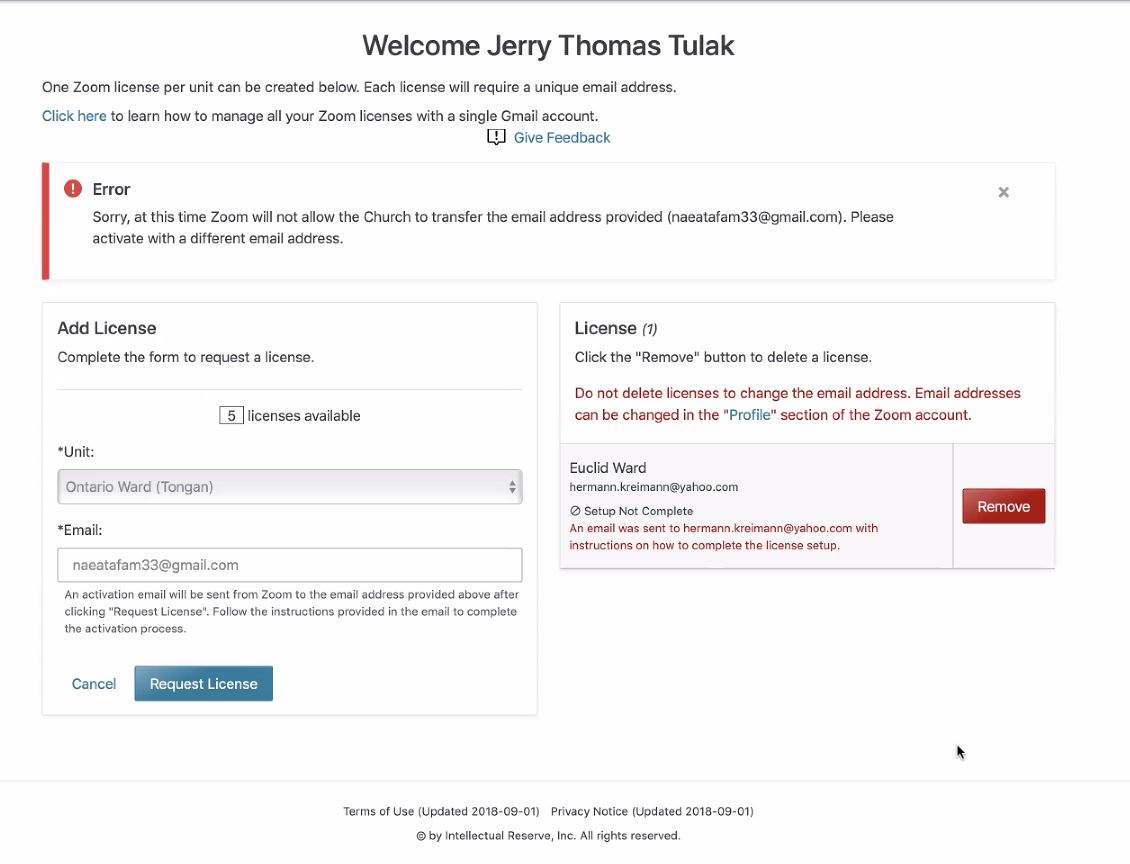
We have a ward that purchased a Zoom account a couple weeks ago. The PDF document (download/file.php?id=4446) posted at the top of this thread instructs to "Enter the email address associated with the locally purchased Zoom account". I did that and got the error others are mentioning:
Image

Some replies specify this happens because the Zoom account already exists, but that is exactly what the PDF instructed to be entered. The whole reason to enter the already existing Zoom account's email is to convert the account and get the refund for the church. If an email is entered that is not associated with a purchased account, then how would the accounts be merged? I am assuming entering an email address not already associated with a Zoom account would not allow the existing account to be merged & refunded.

I should also mention that I hold both the stake tech specialist and ward clerk callings. I have also seen it mentioned that having multiple callings can sometimes cause a problem. Is there a workaround if that is the problem? Anyway, the instructions don't seem to match some of the things I see mentioned in the replies here. So, can anyone bring clarity to the process for the error I am seeing?
New Member
#26
Anyone else having issues with a Zoom account with "Use Google" to sign in?
New Member
#27
blainemoss wrote:Anyone else having issues with a Zoom account with "Use Google" to sign in?
Fixed by enabling a Direct Sign on with email. Followed these steps:
https://support.zoom.us/hc/en-us/articl ... -Facebook-
New Member
#28
I have run into an issue. I went to http://meet.churchofjesuschrist.org/ and created an account for a ward in our stake. At that time, I didn't have directions to use the email address of the account we want to migrate. Today I went and chose to delete the account thinking I could reuse the license and now it won't let me apply a license to that unit. Any suggestions?
New Member
#29
I get the same error: "Error: Cannot create a new Zoom account"

I've tried a couple different emails that already had purchased a Zoom account, always the same error. Any ideas what's wrong?
New Member
#30
randrewlove wrote:We have a ward that purchased a Zoom account a couple weeks ago. The PDF document (download/file.php?id=4446) posted at the top of this thread instructs to "Enter the email address associated with the locally purchased Zoom account". I did that and got the error others are mentioning:
Image
Some replies specify this happens because the Zoom account already exists, but that is exactly what the PDF instructed to be entered. The whole reason to enter the already existing Zoom account's email is to convert the account and get the refund for the church. If an email is entered that is not associated with a purchased account, then how would the accounts be merged? I am assuming entering an email address not already associated with a Zoom account would not allow the existing account to be merged & refunded.
This post addresses your options, it appears to be an issue with Zoom, not the Church's registration page: viewtopic.php?f=146&t=38067&start=70#p217878
New Member
#31
I'm getting an error "Cannot create a new Zoom Account." when trying to transfer the Zoom account for our Edmonds ward. The site says to come to the forum for help, so here I am.
Community Moderators
#32
andrewjorgensen wrote:I'm getting an error "Cannot create a new Zoom Account." when trying to transfer the Zoom account for our Edmonds ward. The site says to come to the forum for help, so here I am.
This post in another related topic explains your options.
New Member
#33
lajackson wrote:
andrewjorgensen wrote:I'm getting an error "Cannot create a new Zoom Account." when trying to transfer the Zoom account for our Edmonds ward. The site says to come to the forum for help, so here I am.
This post in another related topic explains your options.
Thanks, that post alone didn't help, but some others in the thread gave some clues that might. I'll update if anything actually works.
New Member
#34
I was able to create one zoom license for a ward using a new email address. However, when I try to create a zoom license for a ward that already has a paid zoom account, using the email address from the existing zoom account, I get an error stating that it can't create the license. I'm guess it is related to the fact that the zoom account already exists. I'd like to transfer these accounts over to get credit for them for the church but it seems like that is not working. Any ideas?
Community Moderators
#35
sdmahouston wrote:I'd like to transfer these accounts over to get credit for them for the church but it seems like that is not working. Any ideas?
There has not yet been much transfer success. I have just created new accounts as the monthly accounts expire. Fortunately, none of our units paid for a year in advance.
New Member
#36
Hello, The information on transferring a locally purchased prepaid Zoom account is either not accurate or not thorough enough.

Above the section where you ADD AN ACCOUNT it says "Click here for information on transferring a locally purchased prepaid Zoom account....

After doing that the document says the following:
Step 1: Enter the email address associated with the locally purchased Zoom account when creating a Church account on meet.churchofjesuschrist.org.
Step 2: Click "Approve The Request" in the “Zoom account invitation” email sent by Zoom to the address provided during the account creation process.

The issue is, it never sends the email.... It just says "ERROR" when we try to input that original email address. So we never get the invitation email so that we can click on "Approve The Request"

Please advise what to do from here.

We have accounts set up in each ward but want to transfer to these new Zoom accounts.
Community Administrator
#37
pchase2000 wrote:The issue is, it never sends the email.... It just says "ERROR" when we try to input that original email address.
Questions: How were people logging into that account? Via email/zoom password, or via Google/Facebook login?

pchase2000 wrote:We have accounts set up in each ward but want to transfer to these new Zoom accounts.
Since the account has already been created, it would have to be done manually by informing someone. I'm not sure if that's zoom or church support.

Or, you could simply opt to not renew it if it's on monthly billing.
Have you searched the Help Center? Try doing a Google search and adding "site:churchofjesuschrist.org/help" to the search criteria.

So we can better help you, please edit your Profile to include your general location.
Community Moderators
#38
russellhltn wrote:
pchase2000 wrote:The issue is, it never sends the email.... It just says "ERROR" when we try to input that original email address.
Questions: How were people logging into that account? Via email/zoom password, or via Google/Facebook login?
In my case, our SP used his personal email address and I definitely get the same error. No one seems to be able to get past Step 1 of Bret's PDF:
bretbassett wrote:Step 1: Enter the email address associated with the locally purchased Zoom account when creating a Church account on meet.churchofjesuschrist.org.
If an email address is already associated with a Zoom account, an error is produced and there doesn't seem to be any way around it.
russellhltn wrote:Or, you could simply opt to not renew it if it's on monthly billing.
If it's a month-to-month plan, then STS's really don't need Bret's PDF. Just cancel the subscription and when that runs out at the end of the month (or whenever the term ends), switch to the church's General Zoom account. It's those that tried to be frugal by purchasing a 1 year subscription that this applies to. Since the church will be paying either by reimbursement to my SP for his contract, or by our stake having a church General Zoom account, it would be far better for everyone if the former could be transferred to the latter. Unfortunately, the process to do this is either broken, or not spelled out correctly.
So we can better help you, please edit your Profile to include your general location.
New Member
#39
I have an issue with our stake account. All the ward accounts were setup and are working fine. I went through the process to transfer our prepaid stake account to the Church and it did not take. The issue now is the stake account is listed as "setup not Complete" but will not let me remove it to start over. I get the error, Cannot Remove the new Zoom Account. Please try again later. it has now been two days and try again later is not working.

Any suggestions?
Community Moderators
#40
ljgiles wrote:The issue now is the stake account is listed as "setup not Complete" but will not let me remove it to start over.
I have the identical problem and have sent feedback. I have not yet received a response.
#41
Error - Cannot create a new Zoom Account.
I too get this message when trying to use an email address already associated with a locally purchased Zoom account.
Looking for a way around it. Ward clerk doesn't really want to loose all the existing meeting they have set up. Otherwise, it appears the easy solution to this is to have him close the existing account.
David P
Church Employee
#42
We have been working with Zoom to resolve the "Cannot create a new Zoom account" error. We were informed by Zoom that they will block the transfer of licenses associated accounts that have "unresolved issues". An example they provided was a stake that signed up for a Zoom Business account with 10 users. In this scenario the primary "owner email" can't be transferred to the Church until all other "users" are disabled or removed. They didn't provide any other specific examples of unresolved issues unfortunately. I'm sure this example will apply to some getting the error message but not all.

I created a post with the information we've received but it doesn't have a lot more than this in it - viewtopic.php?f=146&t=38125.

The main thing is anyone getting this message will need to contact Zoom to figure out why their account cannot be transferred to the Church.
Church Employee
#43
In reference to my above:

I received a follow up call from Zoom on this just now. They are looking at other options to facilitate these in a different manner. Hold off on the mass calls or emails to Zoom for another 24 hours as they look at other resolutions. I'll update the end of day tomorrow.

If you need to make the switch immediately, the only option is to use a different email address. That means if you have a paid account you'd need to cancel it as noted above.
New Member
#44
I have sent feedback too. I will post if when/if I hear back.
New Member
#45
Would be helpful if assistant stake technology assistants had permission.
Community Administrator
#46
justinp wrote:Would be helpful if assistant stake technology assistants had permission.
How so? The task is nothing more than matching a unit to an email. After that, everything passes to whoever's email was selected.

I suspect the reason for limiting it is that it offers access to the licenses of ALL wards in the stake. Assistants are frequently assigned to assist just one ward.

Also, this page has the power of canceling a ward's license. Things can quickly get out of hand if too many have access and they don't communicate. An example might be a disagreement on who should have control of a ward's account.

If stakes don't have a functioning STS, then they have a problem they need to solve.
Have you searched the Help Center? Try doing a Google search and adding "site:churchofjesuschrist.org/help" to the search criteria.

So we can better help you, please edit your Profile to include your general location.
New Member
#47
I have signed up a Zoom account for my Stake unit, and found that we have been assigned as Member role in the Account Profile with no admin privileges. What that means is that we will not be able to roll into locally purchased licenses. I have talked with a Zoom billing support, and we directed to this link - https://support.zoom.us/hc/en-us/articl ... ed-domains, which is how Zoom does it. So as far as I can tell, the two links provided on the Zoom-Meet Enroll page are misleading and does not apply to us in any way.
Church Employee
#48
All,

We continue to work with Zoom on an automated solution to transfer accounts that have failed to transfer through the meet portal. In the meantime, we have identified an alternative method for getting these transferred. If you still have an account that could not be transferred through the portal that you would like transferred, please visit this Microsoft form survey and provide the requested information.

https://forms.office.com/Pages/Response ... VOUDRKTS4u

It is critical that you provide all the information requested and that it is accurate. We have successfully tested this with a number of accounts that could not transfer and hope this will be a means of resolving most of the outstanding transfer issues.

Thanks!
New Member
#49
So far I've had zero luck using email addresses associated with existing accounts, paid or otherwise. In some cases the wards changed their zoom account email addresses on their paid accounts so I could sign them up for church accounts using their preferred email addresses. So now the paid email address is now different from email address associated with the church zoom account. Will the new mechanism Zoom is working on handle this scenario? Thanks.
Member
#50
All my transfer requests are getting this:

Image
Member
#51
Looks like the manual transfer link given 3 posts prior is doing the trick so far. But we're not out of the woods yet. For one of our wards, it's still acting like a free account.

We got this email:
Hi (name redacted):

Your account has been switched successfully, you are now a member of the Zoom account(Church of Jesus Christ - local units).

Thank you for choosing Zoom.
-The Zoom Team
When logging in through the web portal I see this:

Image

But when trying to schedule a meeting, I get this:

Image

What's hard is that it used to be a paid account with unlimited meeting times, and now our meetings tomorrow may be cut short to 40 minutes because it got downgraded to "free" tier status.
Member
#52
For anyone switching over accounts, I would advise you to not do it over the weekend. One of our ward's zoom accounts was downgraded and their Relief Society meeting link suddenly started requiring a password (which nobody had).

Another of our wards switched over just fine, but it caused us big problems for the ward that didn't.
New Member
#53
bradpeterson@gmail.com wrote:All my transfer requests are getting this:

Image
I'm getting the same error on a couple of mine. Any ideas?
Community Moderators
#54
jstanworth wrote:Any ideas?
This post, back about 11 from yours in this topic, explains one of the reasons a transfer might not work. There are other clues as you read back through this topic that also may help you.
#55
I used the Microsoft forms link sent out by Bart last week for 6 of the wards in my Stake. The first ward account transferred over perfectly. The second one transferred successfully, but now shows up as a basic account WITHOUT webinar capability. As a result, the existing webinar links are lost and that ward is unable to broadcast Sacrament meeting as usual this Sunday. This sounds suspiciously similar to Brad's issue a few posts back.

Is this something Zoom support needs to fix, or is it something that needs to be fixed by the church Enterprise account administrator?
Community Administrator
#56
shanebankhead wrote:The second one transferred successfully, but now shows up as a basic account WITHOUT webinar capability.
By chance, did someone change the email associated with the account from how it was setup?
Have you searched the Help Center? Try doing a Google search and adding "site:churchofjesuschrist.org/help" to the search criteria.

So we can better help you, please edit your Profile to include your general location.
#57
Quick update- Bart responded to my inquiry and was able to resolve the issue quickly. Just a glitch with the transfer process which incorrectly assigned the account as "basic" license. Thanks!

We'll proceed with setting up the other wards now.
Member
#58
shanebankhead wrote:Quick update- Bart responded to my inquiry and was able to resolve the issue quickly. Just a glitch with the transfer process which incorrectly assigned the account as "basic" license. Thanks!

We'll proceed with setting up the other wards now.
How did you contact him? I sent in an email to the church on Saturday and haven't heard back.

Edit: I went into the account and looked, I'm not getting warnings about meetings beyond 45 minutes, hopefully the issue is fixed for me.
New Member
#59
Same general issues as others but with one more level - our paid stake account has 4 (paid) licenses. It was set up this way because we conduct early morning seminary via Zoom right now and to get in class time requirements those classes have to be 60 mins long so the free version wouldn't work.
As the stake executive secretary I've run into the error message in trying to transfer my personal license over to a church license. Figured it was because I am the executive secretary, not the STS so I asked our STS to try and he also runs into the same message.
From everything I've read, a "one-private-paid" to "one-church-paid" license transfer should work but has anyone had luck transferring over an account with multiple paid licenses?
I set it up this way so that the stake could maintain control of seminary classes (have access to their meeting info, be able to help them out if needed, etc.) but I could allow our 3 seminary teachers full meeting control (they start the meetings, they can choose to let others share their screens, etc.). It allows seminary teachers the ability to fully host meetings without me having to start the meeting and assign alternative hosts, etc. (which by the way you can only do beforehand in Zoom with other paid licenses on your account). Breakout rooms were also not a great option as not all the youth are logged on bright and early and I didn't want to have someone birddog the meeting to make sure latecomers made it to the proper breakout rooms). I use the 4th license to conduct our stake level meetings and it's been worth the $15/month to not have to use a seminary teacher's account even though our meetings are typically not at the same times, plus it complies with Zoom pre-church license agreements of having one person per paid license.

Does anyone see a clean way of transferring over one account with 4 paid licenses to maintain one account with 4 full licenses? I'm all for saving some money but the solutions I've seen for my scenario aren't making me want to cancel my existing account yet. All the links not just for my stake meetings but for our early morning seminary classes took a long time to set up ;-).
Community Moderators
#60
jonathan.thom wrote:Same general issues as others but with one more level...
Just curious, were these licenses pre-paid for an annual term or are they on a month-to-month plan?
So we can better help you, please edit your Profile to include your general location.
New Member
#61
Out of our 12 licenses 3 did not convert over with the correct license. It shows I have a Basic license on those three accounts and don't have the Webinar licenses either. The other accounts are OK. How do we get the license corrected so that they can broadcast their meetings on Sunday without hitting the 40 minute limit?
New Member
#62
I'm having the same issue as was described above. Some of the wards are transferring okay but I have at least one that transferred over as "Basic" and therefore cannot create Webinars. I don't see what was done above to resolve it. Do I need to contact Zoom or does someone at the church coordinate the account type change?

Thank you.
New Member
#63
Mikerowaved wrote:
jonathan.thom wrote:Same general issues as others but with one more level...
Just curious, were these licenses pre-paid for an annual term or are they on a month-to-month plan?
It is one account on a month to month basis with 4 paid licenses under the one account.
Community Moderators
#64
jonathan.thom wrote:
Mikerowaved wrote:Just curious, were these licenses pre-paid for an annual term or are they on a month-to-month plan?
It is one account on a month to month basis with 4 paid licenses under the one account.
In that case, I would just request to terminate that account with Zoom and create new ones under the church's license. If they were pre-paid annual licenses I would try to work through the transfer process.
So we can better help you, please edit your Profile to include your general location.
New Member
#65
I'm seeing similar license issues with a ward's account that we transferred yesterday afternoon. We first changed the email address on the account to the new task specific gmail address for the ward then started the account transfer process. It completed but now the license type says Basic while the account profile shows the account type as Enterprise. Webinars can't be created and meetings show a 40 minute time limit. The account was being paid for month to month. I do not see the ward's account under the Zoom enroll page of meet.churchofjesuschrist.org. Does it take some time to update the account license or is the best option to delete the account and recreate it in the meet portal?
New Member
#66
Just wanted to provide an updated here. The license finally updated on the account and it is no longer Basic. The existing meetings that were on the account are still there. The only thing I don't see is the the ward's license in the meet.churchofjesuschrist.org zoom-enroll portal. Perhaps that will show up soon.
New Member
#67
I failed to notice the instructions (Transfer Local Unit Zoom account to General Church account) and created the Zoom account using our Stake's Gmail address that was not associated with Zoom. I had zero issues with setup. The problem I do have is with refunds. Each Ward had their own paid account. How do you apply for refunds on multiple accounts or an account not setup following the prescribed instructions?
Member
#68
bradpeterson@gmail.com wrote: When logging in through the web portal I see this:

Image

But when trying to schedule a meeting, I get this:

Image

What's hard is that it used to be a paid account with unlimited meeting times, and now our meetings tomorrow may be cut short to 40 minutes because it got downgraded to "free" tier status.
I've got a second ward experiencing this problem. Where do we report this to get it fixed?

* I've tried the reseller church email in Zoom but got an email back saying that's the wrong person.
* The account says to contact "MHT-Zoom-noReply@churchofjesuschrist.org", but that no-reply part has me thinking this isn't an account where the church replies, and I've tried this email last time with no response.
* The meet.churchofjesuschrist.org has a "Give feedback", which I filled out, but then it says that they appreciate my survey results...

What is the right approach?
Community Administrator
#69
What does it say if you look under "Profile" and "License type"?
Have you searched the Help Center? Try doing a Google search and adding "site:churchofjesuschrist.org/help" to the search criteria.

So we can better help you, please edit your Profile to include your general location.
Community Moderators
#70
bradpeterson@gmail.com wrote:What is the right approach?
The Meet Portal Give Feedback link is the right way to contact the right folks, even though it thanks you for the "survey". But it may be Monday (at the earliest) before you hear back from them.
Member
#71
russellhltn wrote:What does it say if you look under "Profile" and "License type"?
License Type: Basic

Then under "Account Profile" it says this:

Account Type: Enterprise (Active Host)

Account Name: Church of Jesus Christ - local units
Community Administrator
#72
bradpeterson@gmail.com wrote:License Type: Basic
That's the problem. What I'm seeing is:
- License Type: Licensed
- Meeting: 500 participants
- Webinar: 500 participants

Did someone change the email on the account from what it was originally associated with on the "meet" page?

I think you said this was a change-over from an existing account. At this point, I'd suggest giving Zoom support a call.
Have you searched the Help Center? Try doing a Google search and adding "site:churchofjesuschrist.org/help" to the search criteria.

So we can better help you, please edit your Profile to include your general location.
Member
#73
Right, I know what it's supposed to look like. 4 wards transitioned fine. 2 wards did not and got their paid account downgraded to a basic account under the church enterprise account type.

No email usernames were changed, we didn't do anything fancy. I put in the request. I also approved the process in 1 of the 2 wards that had this downgrade occur. The fault is not on the ward or stake end.
At this point, I'd suggest giving Zoom support a call.
That's the other problem, this entire process is cumbersome without knowing who to contact. From what I gather, I'm supposed to use the survey feedback link at meet.churchofjesuschrist.org.

I can make this ward work for tomorrow. I'm hoping this gets fixed in the next few days.
Community Administrator
#74
I'm not up on all the directives, but I'd try the "Licensed users of Pro accounts" link on this page. Just let them know the conflicting information about how you're "on the account" but only have "basic".
Have you searched the Help Center? Try doing a Google search and adding "site:churchofjesuschrist.org/help" to the search criteria.

So we can better help you, please edit your Profile to include your general location.
New Member
#75
I have another ward account that we transferred earlier this week which ended up with a basic license. The account profile says the account type is Enterprise. I've submitted the survey twice and haven't gotten a response. I tried calling zoom support but their system says the account isn't eligible for phone support. I opened a ticket with zoom a few days ago to which I've yet to receive a response. I'm not sure what else to do. Any ideas?
Member
#76
jay.burgon wrote:I have another ward account that we transferred earlier this week which ended up with a basic license. The account profile says the account type is Enterprise. I've submitted the survey twice and haven't gotten a response. I tried calling zoom support but their system says the account isn't eligible for phone support. I opened a ticket with zoom a few days ago to which I've yet to receive a response. I'm not sure what else to do. Any ideas?
I just got a response by email from someone at the church who fixed this issue. He said "I received the following feedback:" and quoted my survey response in meet.churchofjesuschrist.org. Hopefully your request gets processed soon. If not, PM me and I'll give the email of the church employee who can assist.
New Member
#77
bretbassett wrote:Many local leaders purchased Zoom accounts before General Church Zoom accounts were available. Local units are encouraged to transfer these accounts to a Church Zoom account. Steps to transfer accounts from the local unit to the Church are provided in the attached PDF document.
We followed this but we got the following response. any ideas? I don't think it sent an email to the email we put in the account email field.
unit zoom account problem.JPG
(93.96 KiB) Not downloaded yet
Community Administrator
#78
chukcha2 wrote:We followed this but we got the following response. any ideas?
I'd follow the suggestion given and try another email address. There's probably something about that account that doesn't allow the transfer.

It might be wise to use a email account that can be transferred as callings change rather than using a personal email.
Have you searched the Help Center? Try doing a Google search and adding "site:churchofjesuschrist.org/help" to the search criteria.

So we can better help you, please edit your Profile to include your general location.
Member
#79
bradpeterson@gmail.com wrote:
jay.burgon wrote:I have another ward account that we transferred earlier this week which ended up with a basic license. The account profile says the account type is Enterprise. I've submitted the survey twice and haven't gotten a response. I tried calling zoom support but their system says the account isn't eligible for phone support. I opened a ticket with zoom a few days ago to which I've yet to receive a response. I'm not sure what else to do. Any ideas?
I just got a response by email from someone at the church who fixed this issue. He said "I received the following feedback:" and quoted my survey response in meet.churchofjesuschrist.org. Hopefully your request gets processed soon. If not, PM me and I'll give the email of the church employee who can assist.
Thanks for the update. I'm having the same issue with the 40-minute time limit. I've contacted the Church as you did and I hope to receive a response soon.
New Member
#80
Hey I am from Bindura District and I am the clerk I am failing to create the prepaid zoom account for the Stake. How can I create the prepaid zoom account
Community Moderators
#81
mbadzotatenda wrote:I am the clerk
Normally the District Assistant Clerk--Technology would be the person who is able to create the Zoom account. I do not believe stake or district clerks are able to do it.