Single email address for multiple virtual meeting accounts

111 postsstarted by bartj 67,390 viewsoriginal topic

Church Employee
#1
Many stakes and wards are setting up multiple virtual meeting accounts for use by local leaders. In some cases stake or ward technology specialists are being asked to manage these accounts. One option local leaders can use to simplify the management of multiple accounts is by using the Gmail "task-specific" email feature. Using this feature makes it possible to manage all your virtual meeting accounts from a single Gmail account. Click this link for more information - https://support.google.com/a/users/answer/9308648?hl=en.
New Member
#2
So, is the best practice to use a single email address that's known to the stake tech specialist to setup all of the various ward accounts as opposed to setting up a different email for each ward? Then, the stake tech specialist can just share the email and password with each ward?
Community Administrator
#3
I'm not entirely sure how Zoom works, but if using the task-specific email, then I'd think the STS would be able to reset the password as needed since all of the reset emails would go to his account. Otherwise, the STS might have difficulty helping out a ward that somehow managed to mess things up.
Have you searched the Help Center? Try doing a Google search and adding "site:churchofjesuschrist.org/help" to the search criteria.

So we can better help you, please edit your Profile to include your general location.
New Member
#4
The Meet-Zoom Enroll page does not allow the user to use the same email address for more than one Unit account.
Church Employee
#5
If you're using a Gmail account to manage the unit accounts, you can use the Gmail task-specific email feature. Read the first message in this thread.
New Member
#6
@russellhltn That's what I was thinking. Plus, if the person at the ward level changes/moves and then we don't have access to that email anymore, it's a problem. So, better to just use one email for all of the wards using the gmail feature that allows unlimited emails. Thanks!
New Member
#7
So is the idea to create an email, ie [stake]zoom@gmail.com, and then when registering each ward, use the email [stake]zoom+[ward]@gmail.com?
New Member
#8
I plan on using the task specific aliasing(great tip, I have used gmail since it was beta and did not know this), ie. email+unit1@gmail.com, email+unit2@gmail.com etc, etc etc.

I am interested in any tips and tricks that others are using.
Senior Member
#9
Agreed - finding out about this task specific aliasing is worth the price of admission to this Forum! :D
New Member
#10
This is what we've done for our accounts when we were beta testing this. It's really nice and simple. In our case we have zoom accounts with lvtxstake+sacmtg@.. lvtxstake+fm1@.. lvtxstake+fm2@.. etc. All messages come to the base lvtxstake@gmail account which I control. I set the passwords for the Zoom accounts as well.

While someone with the lvtxstake+xx@.. can log into that one Zoom account and change the password. I can delete the Zoom account from the Church system, I get the confirmation email at the lvtxstake@ account and re-add it so that the stake maintains control of the passwords.
New Member
#11
can this be done with personal google accouts?
Community Moderators
#12
MDLARSEN74 wrote:can this be done with personal google accouts?
Yes, it will work just as well with any gmail address.
So we can better help you, please edit your Profile to include your general location.
New Member
#13
@dbaresrc, I was wondering about this potential issue. If I delete the account in the church system, does that mean all the meetings and webinars that were already scheduled will get deleted? Or if I remove it from the Church system and then readd it, will it still have the already setup meetings?

My alternative which I think works fine is that if someone changes the password to the zoom for a ward, then I just go in and do a password reset on zoom for that ward specific email (ie. stake+ward@gmail.com) and since that's the email I control I get the password reset and I can reset it back to the default I want. I like this approach better since I don't want the ward to lose anything they've already scheduled and possibly sent out.
New Member
#14
bartj wrote:Many stakes and wards are setting up multiple virtual meeting accounts for use by local leaders. In some cases stake or ward technology specialists are being asked to manage these accounts. One option local leaders can use to simplify the management of multiple accounts is by using the Gmail "task-specific" email feature. Using this feature makes it possible to manage all your virtual meeting accounts from a single Gmail account. Click this link for more information - https://support.google.com/a/users/answer/9308648?hl=en.
So is the church wanting us Stake Technology specialist to create/manage the zoom accounts for the wards in the stake? Ether way that is fine but I wish there was more specific to the point directions. This entire you can do this or whatever you want and if you need help go to this forum and spend hours trying to read multiple messages until you find what you think it is right for your stake to do is very time consuming and it has become almost a second full-time job.
New Member
#15
So it looks like if a ward has already set up a zoom account with an email, you can't set it up with task-specific gmail accounts because you have to enter in the email address that the account was created under. Am I understanding this correctly? Is there a way to both transfer the pre-purchased license AND use the task-specific email accounts?
Community Administrator
#16
sdmahouston wrote:Is there a way to both transfer the pre-purchased license AND use the task-specific email accounts?
It can probably be done, either by changing the email associated with the account before or after the conversion.
Have you searched the Help Center? Try doing a Google search and adding "site:churchofjesuschrist.org/help" to the search criteria.

So we can better help you, please edit your Profile to include your general location.
New Member
#17
crashutah1 wrote:@dbaresrc, I was wondering about this potential issue. If I delete the account in the church system, does that mean all the meetings and webinars that were already scheduled will get deleted? Or if I remove it from the Church system and then readd it, will it still have the already setup meetings?

My alternative which I think works fine is that if someone changes the password to the zoom for a ward, then I just go in and do a password reset on zoom for that ward specific email (ie. stake+ward@gmail.com) and since that's the email I control I get the password reset and I can reset it back to the default I want. I like this approach better since I don't want the ward to lose anything they've already scheduled and possibly sent out.
yes, if you delete a Church-sponsored Zoom account through the Meetings website, the account is gone including all its scheduled meetings.

You are correct about the password reset process. That's why it's much better to set up these church accounts with email address controlled at a stake level rather than using personal email addresses.

I wrote in another thread that if you're going to convert existing licenses to the Church system, do it, get the refund (id you pre-paid), then cancel the account with that email address from the Church system and open a new one with a Stake controlled email address.
Community Moderators
#18
I set up a stake account at the meet site. I completed the process at Zoom. All was well.
At Zoom, I changed the password. The stake account at the meet site has reverted to Setup Not Complete (probably because the password does not match).
I cannot delete the account at meet. What do I do now?
New Member
#19
So I assume we are creating seperate passwords for each account?
Community Administrator
#20
4snelson wrote:So I assume we are creating seperate passwords for each account?
That would be prudent. Otherwise, people might start "barrowing" another units account.
Have you searched the Help Center? Try doing a Google search and adding "site:churchofjesuschrist.org/help" to the search criteria.

So we can better help you, please edit your Profile to include your general location.
Community Moderators
#21
4snelson wrote:So I assume we are creating seperate passwords for each account?
If you are creating Zoom accounts for each unit, they must each have a different email address.
New Member
#22
This is the question that I have. I can see how the task-specific email addresses can be used (and it does work, I've tested with my gmail account) but what I'm unsure of is how that impacts the creation of the Zoom account for each ward. Must each ward then use the task-specific email address to log into Zoom and if so, is the password on each Zoom account then the same or can they all be individualized without affecting the others?

I'm concerned about keeping each of the Zoom accounts separated but all working through the same email address.
New Member
#23
So this sounds cool.

I did it using an existing gmail account and added +stake at the end for the stake account. Worked great.

Then I tried doing it with +16 at the end for our 16th ward. It created it in the meet.churchofjesuschrist.org portal, but I never got the emails with the confirmation link. Checked the spam filter, nothing. Tried another one using +4th thinking it couldn't just be numeric. Same thing.

I sent test emails to both addresses and received those fine.

Anyone have any ideas?
Community Moderators
#24
The Meeting setup site stopped sending activation emails late this afternoon. I set up several this afternoon just fine, and numbers work well in the + part of the address. But I am still waiting for the last two activation emails to arrive, so I stopped setting up accounts at that point.

Perhaps the server went home with the staff at the end of the work day today. Or maybe the emails will show up after Family Home Evening. [grin]
Community Moderators
#25
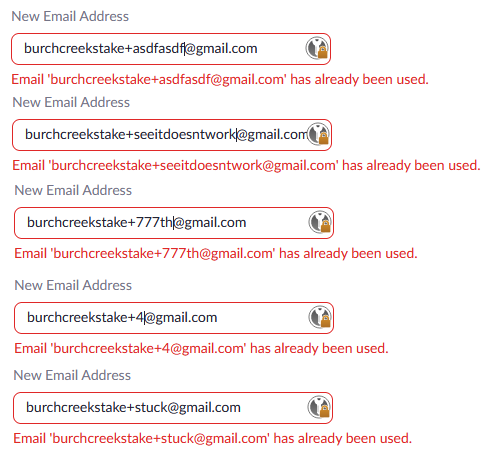
tbingh wrote:I can see how the task-specific email addresses can be used . . . but what I'm unsure of is how that impacts the creation of the Zoom account for each ward. Must each ward then use the task-specific email address to log into Zoom and if so, is the password on each Zoom account then the same or can they all be individualized without affecting the others?
The unit uses the task specific email address to access the account. But when you create the Zoom account you enter a password specific to that Zoom account and they can all be different. So the unit will know the password you assign to their Zoom account, but they will not know the password to the actual email account you are using.
New Member
#26
I did as suggested above and created ward accounts as +ward emails to the stake one, and it worked for the first 3. It now seems to be broken or clogged up or something - when I added the next 3 wards, I didn't get the email to the google account. I've retried a couple of times with no success. Any ideas?
Community Administrator
#27
snlutz wrote:I did as suggested above and created ward accounts as +ward emails to the stake one, and it worked for the first 3. It now seems to be broken or clogged up or something - when I added the next 3 wards, I didn't get the email to the google account. I've retried a couple of times with no success. Any ideas?
Someone reported the system stopped creating new account. Try back later.
Have you searched the Help Center? Try doing a Google search and adding "site:churchofjesuschrist.org/help" to the search criteria.

So we can better help you, please edit your Profile to include your general location.
Community Moderators
#28
snlutz wrote:I didn't get the email to the google account.
Two posts before yours. The system broke late this afternoon.
Community Moderators
#29
Just a few minutes ago I tried to start the setup process for two units at the Meeting website. I got one activation email, but the second one has not arrived.
New Member
#30
Is this still broken for everyone else? Any word on a fix? I'm not getting any activation emails. Would also be nice to see a Resend email button so we don't have to Remove the account and try again.

Anyone know if anyone involved in the project is monitoring these messages?
#31
I'm seeing a similar problem as mentioned by others. I provisioned 7 licenses, but only 3 of them received the activation emails. It was not the first 3 that I provisioned. It was the first 2 and the 5th one. Should I remove the license and re-provision those that didn't receive the email, just wait for xx hours or ??? I don't see a way to re-send the activation email.
#32
swigginton wrote:I'm seeing a similar problem as mentioned by others. I provisioned 7 licenses, but only 3 of them received the activation emails. It was not the first 3 that I provisioned. It was the first 2 and the 5th one. Should I remove the license and re-provision those that didn't receive the email, just wait for xx hours or ??? I don't see a way to re-send the activation email.
I decided to try removing the license and re-provisioning one of the wards that didn't receive the activation email. The email was sent and everything worked fine, so I removed and re-provisioned the others. All worked, so that appears to be a way to resolve the missing activation email issue.
New Member
#33
What is the best practice for managing the emails? I get the email regarding a ward sub-account, then I auto forward it to the Asst Stake Tech Spec. assigned to that ward? I assume that no one can SEND any email with the +ward sub account except for the primary account holder? Any tricks on how you manage that and communication with the wards? for example, reminders of upcoming scheduled meetings, etc. from zoom. I don't think I want to deal with that level of traffic.....
Community Moderators
#34
swigginton wrote:I provisioned 7 licenses, but only 3 of them received the activation emails.

I decided to try removing the license and re-provisioning one of the wards that didn't receive the activation email. The email was sent and everything worked fine, . . .
This worked for me for some of the units. I got every third activation email today. And when I tried to remove and reprovision, is only worked every other time. Some will not remove and I still have several units locked out.

I sent feedback through the site, but have not heard anything back yet. I also had half of my regular email sends to Gmail addresses fail today as I was trying to notify bishops and clerks. I wonder if Google may be part of the problem right now.
Community Administrator
#35
lajackson wrote: I wonder if Google may be part of the problem right now.
Google has certainly had some outages on Tuesday. I'm not sure if they've all been cleared up.
Have you searched the Help Center? Try doing a Google search and adding "site:churchofjesuschrist.org/help" to the search criteria.

So we can better help you, please edit your Profile to include your general location.
New Member
#36
I am new in this calling and have very limited technical knowledge. I already created my google account as per the latest notice dated December 11 but when i login to zoom using the same email account my zoom account is still the free one with 40 minutes limit. I need help to figure out so we can use this new access to our next sacrament meeting.
Please give me your input
New Member
#37
Seems to be working better today for new accounts/units that I haven't tried yet.

I'm still having problems with wards that failed to send emails previously. I delete them and retry and still don't get an email. In some cases it won't let me delete them.

Anyone seeing any tricks to resolve the broken ones?
New Member
#38
Has anyone else had any luck with transferring a local unit Zoom account to a Church account? In order to keep track of all of them using the same Gmail account, I had changed the email for one of our units to one with the task specific email. It keeps telling me that it cannot create the Zoom account. I feel it might be because the email is already being used? If anyone has done this successfully, please do let me know as I would love to find out how.

Thanks!
Community Moderators
#39
bweight wrote:Anyone seeing any tricks to resolve the broken ones?
Not yet I found that you have to wait a short time (10-15 minutes? I did not time it) before you can remove an account for which you did not receive an activation email. Some of them worked the next time when I tried to activate them again. But I still have one that will not generate the email no matter how many times I have tried.
Community Moderators
#40
mbrown87 wrote:Has anyone else had any luck with transferring a local unit Zoom account to a Church account?
Check this post for a possible solution.
New Member
#41
All my licenses were provisioned and all e-mails were sent, and I was able to properly activate 3 of the 8 accounts. The other 5 did not work. When I click on the "Activate your zoom account" button from the e-mail, then click "sign up with a password" on Zoom's website, it takes me to a page that just says "User not exist. (1,001)" with nothing else on the page. Has anyone encountered this?
Community Administrator
#42
joeladam wrote:All my licenses were provisioned and all e-mails were sent, and I was able to properly activate 3 of the 8 accounts. The other 5 did not work.
Anything different about those 5 emails? Perhaps the length?
Have you searched the Help Center? Try doing a Google search and adding "site:churchofjesuschrist.org/help" to the search criteria.

So we can better help you, please edit your Profile to include your general location.
New Member
#43
The Meet-Zoom Enroll as stated by alz1 does not allow the gmail task specific alias to work because the Church Zoom accounts assigned us as Member role, you needed to be either the Owner or Admin for this feature to work. The same applies toward rolling in locally paid accounts into the Church Zoom accounts.
New Member
#44
joeladam wrote:All my licenses were provisioned and all e-mails were sent, and I was able to properly activate 3 of the 8 accounts. The other 5 did not work. When I click on the "Activate your zoom account" button from the e-mail, then click "sign up with a password" on Zoom's website, it takes me to a page that just says "User not exist. (1,001)" with nothing else on the page. Has anyone encountered this?

Joe, did you figure out your issue? I have the same problem "User not exist. (1,001)"
New Member
#45
Yup. Seems to be a thing. I have the problem with 2 of the accounts that I went to set up, but the others worked fine. I see from somebody else' post that they too are having a the same problem. All posts I've seen on it are from 12/20/2020, so hopefully *somebody* can call Zoom's attention to it. I'm getting screened out by the automated chat-bot because I can't provide a meeting number or Host key for an account that hasn't activated yet, and they won't answer the phone for support 'cause the account isn't a high enough tier for phone support!
New Member
#46
Edited 1 time, last by jonesrk on . Reason: Fixed quote
Anything different about those 5 emails? Perhaps the length?
No, the e-mails look the same. I have removed each license (some multiple times) and requested new ones only to see the same result.
New Member
#47
miketorg wrote:
joeladam wrote:All my licenses were provisioned and all e-mails were sent, and I was able to properly activate 3 of the 8 accounts. The other 5 did not work. When I click on the "Activate your zoom account" button from the e-mail, then click "sign up with a password" on Zoom's website, it takes me to a page that just says "User not exist. (1,001)" with nothing else on the page. Has anyone encountered this?

Joe, did you figure out your issue? I have the same problem "User not exist. (1,001)"
Nope. Still working on it.
New Member
#48
I like the idea, but I am having a problem. I created a new gmail account and when I started the process to create a church Zoom account with the +, i.e. lancpasts+unit@gmail.com, it indicated that the account was already in use. This was a new gmail account so I am puzzled by the error message. I created another gmail account just to make sure I had done it right and I get the same error message with the newest gmail account.
New Member
#49
joeladam wrote:
miketorg wrote:
joeladam wrote:All my licenses were provisioned and all e-mails were sent, and I was able to properly activate 3 of the 8 accounts. The other 5 did not work. When I click on the "Activate your zoom account" button from the e-mail, then click "sign up with a password" on Zoom's website, it takes me to a page that just says "User not exist. (1,001)" with nothing else on the page. Has anyone encountered this?

Joe, did you figure out your issue? I have the same problem "User not exist. (1,001)"
Nope. Still working on it.

I have run into the same issue. I was also getting this error when trying to remove the account to try again: "Error: Unable to remove the Zoom Account. Zoom has temporarily suspended changes to this account.Please try making the requested change again in approximately 10 minutes.Contact Zoom or click here you continue to experience issues and need assistance."

I contacted the Church via a survey in the "Click Here" section and have been working with someone throughout the day. They are reaching out to Zoom support for some ideas. Nothing yet though. Will post here if I get anywhere with it.
#50
I am having the same issue. I had no problems for 6 licenses, but for 3 of them, I am getting the "User not exist. (1,001)" message.
New Member
#51
Has anyone found a solution to the issue of when trying to make changes to accounts on the "https://meet.churchofjesuschrist.org/home/zoomenroll" page getting the error "cannot xxx. Zoom has temporarily suspended changes to this account" issue?
And the "User not exist. (1,001)" when trying to activate the zoom accounts from the email invitation link?
I got no response for the " Survey/Feedback" link.
New Member
#52
Many stakes and wards are setting up multiple virtual meeting accounts for use by local leaders. In some cases stake or ward technology specialists are being asked to manage these accounts. One option local leaders can use to simplify the management of multiple accounts is by using the Gmail "task-specific" email feature. Using this feature makes it possible to manage all your virtual meeting accounts from a single Gmail account. Click this link for more information - https://support.google.com/a/users/answer/9308648?hl=en.
I have followed all the instructions for the "task-specific" labels or filters (are these different?) but all my emails for the different wards are filtering into all the filtered folders. Am I doing something wrong?
New Member
#53
I am sure God gave me this calling to humble me. I was trained years ago as a electronic tech. Have not done that for years. I was thinking this was suppose to help me understand this process. I am more confused. On top of that some are using current tech language that I have no clue on what it means. I am back in Kindergarten level training again. Only for this.
New Member
#54
kongjy wrote:The Meet-Zoom Enroll as stated by alz1 does not allow the gmail task specific alias to work because the Church Zoom accounts assigned us as Member role, you needed to be either the Owner or Admin for this feature to work. The same applies toward rolling in locally paid accounts into the Church Zoom accounts.
If this is true, we should give up on this effort to manage ward emails. I wonder if google has a limit on the number of email addresses I can create.....
Community Administrator
#55
trytting wrote:If this is true, we should give up on this effort to manage ward emails. I wonder if google has a limit on the number of email addresses I can create.....
I'm confused. alz1 simply states that you can't use the same email address for multiple units. I expect that to be true, but the point of the "task specific" feature is to make each unit's email LOOK different while still going to the same email account. You wouldn't be using the feature to enroll multiple wards into the same "task".

I'm not sure what trytting is trying to say. I don't understand what the Zoom role has to do with if it accepts the task-specific feature of gmail. It would have to have code to detect and defeat it. But the question is why would they do that?

Some posts here indicates this technique works.
Have you searched the Help Center? Try doing a Google search and adding "site:churchofjesuschrist.org/help" to the search criteria.

So we can better help you, please edit your Profile to include your general location.
New Member
#56
According to the Zoom lic. set up for each unit they require a specific email address for each unit.
I was doing okay linking each units email into the main gmail address account until it requested a new phone number to link the gmail addresses together. I only have one phone number. Maybe I need to give it time so the system does not think I am a hacker or something like it. The other thing I have concern about when setting up each new gmail account is you only can choose between personal or business account. Do we pretend this is for business. Having to input by birth info during set up is not going to work when someone else gets this callingm and can see my birthday ifo. It is always the details that are left out that get me stuck. One top of that I did one letter typo for zoom email address and submitted it. Of course I never got the link info in gmail address.
New Member
#57
This video helped me understand the multiple gmail email addresses being managed by one gmail account. At least the setup part.
I was able to link more addresses the next day. I think you can link 3 or 4 per day without the message of to many attempts.

https://www.youtube.com/watch?v=qQTwSYQX5tw
Member
#58
I'm pretty sure this violates the terms of service for zoom. Could someone post where Zoom allows a generic email address vs. an email address tied to a human that is responsible for meetings?
Community Administrator
#59
bretep wrote:I'm pretty sure this violates the terms of service for zoom. Could someone post where Zoom allows a generic email address vs. an email address tied to a human that is responsible for meetings?
I'm pretty sure having multiple people use the same login violates their TOS as well. But the official communication about accounts indicates that the church has negotiated to allow that as long as the account is used only for church purposes.
Have you searched the Help Center? Try doing a Google search and adding "site:churchofjesuschrist.org/help" to the search criteria.

So we can better help you, please edit your Profile to include your general location.
New Member
#60
We tried this for one of our wards. But the + sign was converted to the code "%2B" . Now zoom has locked the login and we cant activate it because the activation email is not going to the inbox. I can't remove the account because Zoom has "temporarily" locked the account. It gives this error message.
"Error: Unable to remove the Zoom Account. Zoom has temporarily suspended changes to this account. Please try making the requested change again in approximately 10 minutes. Contact Zoom or click here you continue to experience issues and need assistance."
The click here just gives a survey link. I have filled that out but no reply yet. I have not contacted zoom yet. any ideas or who I can contact at zoom?
New Member
#61
What are the guidelines of creating your own Stake or Ward email account? - I'm planning to start creating Zoom accts for each ward in our Stake who doesn't have one. Of course, the approach is to use this idea w/using the task-specific feature email guideline, where all Zoom accts for the Wards in my Stake, are centralized to one email account, managed by me, until we have a STS available.

Because I've searched in the General Handbook and it has one small paragraph that talks about the Communication part of Email.

I also searched in the 'Help Center' and I didn't find any subjects that related to Email guidelines for Leaders.
Community Administrator
#62
Amailei37 wrote:What are the guidelines of creating your own Stake or Ward email account?
Beyond the unwritten "don't embarrass the church", I'm not sure as there is one.
Have you searched the Help Center? Try doing a Google search and adding "site:churchofjesuschrist.org/help" to the search criteria.

So we can better help you, please edit your Profile to include your general location.
New Member
#63
Okay, thank you.
New Member
#64
Are you saying you need go to Zoom and select "sign up for free" and enter the Single e-mail address for multiple virtual meeting accounts.
For example create a free zoom account based on the primary acccount "Clinton?Ward@gmail.com.

ClintonNorthStake+HighCouncil@gmail.com
Clinton?Ward+EldersQuorum@gmail.com
Clinton?Ward+ReliefSociety@gmail.com
Clinton?Ward+DeaconsQuorum@gmail.com
Clinton?Ward+TeachersQuorum@gmail.com
Clinton?Ward+PriestQuorum@gmail.com

? = signifies ones ward
Daniel Combs
Stake Assistant Clerk--Technology Specialist
Clinton Utah North Stake
The Church of Jesus Christ of Latter-Day Saints
801-390-6203
danielcombs1@gmail.com
New Member
#65
sddiamond wrote:We tried this for one of our wards. But the + sign was converted to the code "%2B" . Now zoom has locked the login and we cant activate it because the activation email is not going to the inbox. I can't remove the account because Zoom has "temporarily" locked the account. It gives this error message.
"Error: Unable to remove the Zoom Account. Zoom has temporarily suspended changes to this account. Please try making the requested change again in approximately 10 minutes. Contact Zoom or click here you continue to experience issues and need assistance."
The click here just gives a survey link. I have filled that out but no reply yet. I have not contacted zoom yet. any ideas or who I can contact at zoom?

Go to this Link below for phone support.

https://support.zoom.us/hc/en-us/articles/201362003
Daniel Combs
Stake Assistant Clerk--Technology Specialist
Clinton Utah North Stake
The Church of Jesus Christ of Latter-Day Saints
801-390-6203
danielcombs1@gmail.com
Community Administrator
#66
danielcombs1 wrote:Are you saying you need go to Zoom and select "sign up for free" and enter the Single e-mail address for multiple virtual meeting accounts.
There's only one account per ward/branch/stake/mission. So it would be more like:

ClintonStk+Springfield1Wrd@gmail.com
ClintonStk+Springfield2Wrd@gmail.com
ClintonStk+HighlandWrd1@gmail.com

These addresses would be entered by the STS for each ward's Zoom account to route all the emails for the different accounts to the ClintonStk@gmail.com address.
Have you searched the Help Center? Try doing a Google search and adding "site:churchofjesuschrist.org/help" to the search criteria.

So we can better help you, please edit your Profile to include your general location.
New Member
#67
russellhltn wrote:
danielcombs1 wrote:Are you saying you need go to Zoom and select "sign up for free" and enter the Single e-mail address for multiple virtual meeting accounts.
There's only one account per ward/branch/stake/mission. So it would be more like:

ClintonStk+Springfield1Wrd@gmail.com
ClintonStk+Springfield2Wrd@gmail.com
ClintonStk+HighlandWrd1@gmail.com

These addresses would be entered by the STS for each ward's Zoom account to route all the emails for the different accounts to the ClintonStk@gmail.com address.
What if the wards managed their own Organizations (Elders Quorum, Teachers Quorum...etc) like to make it more granular (specifying Organizations)...?
Then the leadership could Zoom to their Quorum specificallly under one licensed account for that ward. Thus, empowering the wards manage their own accounts locally. Does that work?

For example:
Springfield1Wrd+TeachersQuorum@gmail.com
Springfield1Wrd+PriestsQuorum@gmail.com
Springfield1Wrd+DeaconsQuorum@gmail.com
Daniel Combs
Stake Assistant Clerk--Technology Specialist
Clinton Utah North Stake
The Church of Jesus Christ of Latter-Day Saints
801-390-6203
danielcombs1@gmail.com
Community Administrator
#68
danielcombs1 wrote:What if the wards managed their own Organizations (Elders Quorum, Teachers Quorum...etc) like to make it more granular (specifying Organizations)...?
Then the leadership could Zoom to their Quorum specificallly under one licensed account for that ward. Thus, empowering the wards manage their own accounts locally. Does that work?

For example:
Springfield1Wrd+TeachersQuorum@gmail.com
Springfield1Wrd+PriestsQuorum@gmail.com
Springfield1Wrd+DeaconsQuorum@gmail.com
Additional emails doesn't get you additional zoom accounts. It's only to give zoom "unique" emails when the STS creates the account for the different wards.

There is only one zoom account per ward. That's it. This isn't a workaround for that limitation.
Have you searched the Help Center? Try doing a Google search and adding "site:churchofjesuschrist.org/help" to the search criteria.

So we can better help you, please edit your Profile to include your general location.
New Member
#69
I would like to know more about this feature? So If I have an account say 123@gmail and I want to have it all under this account I would type 123+mwo@gmail, my question is, do I need to create a separate account for mwo@gmail and create a similar yet different account for each unit? (mwo1@, mwo2 etc)
Community Administrator
#70
mwormsby wrote:I would like to know more about this feature? So If I have an account say 123@gmail and I want to have it all under this account I would type 123+mwo@gmail, my question is, do I need to create a separate account for mwo@gmail and create a similar yet different account for each unit? (mwo1@, mwo2 etc)
You'd have a single email account, 123@gmail.com.

As you create Zoom accounts, you'd use the following emails:

Ward Email given to Zoom
------ --------------------------
mwo1 123+mwo1@gmail.com
mwo2 123+mwo2@gmail.com

All the emails for the ward's Zoom accounts will end up in the one "123@gmail.com" mailbox. You're fooling Zoom into thinking they're different emails, when in fact all the emails go to the same place.
Have you searched the Help Center? Try doing a Google search and adding "site:churchofjesuschrist.org/help" to the search criteria.

So we can better help you, please edit your Profile to include your general location.
New Member
#71
Perfect, it worked so easy too. Thanks for the help
New Member
#72
Perfect thank you!! I did it and it was simple.
#73
What about changing the email for the ward in the settings? Can You do it whithout using the task-specific feature? Ir doesn't work any kind of jerarchy?
Community Administrator
#74
brunoaugustomaciasdiaz wrote:What about changing the email for the ward in the settings?
Not advised. It will likely lead to breaking the licensing and other problems.

I'm sure at some point that will be need to be done, but we'll have to wait for a process to be worked out.
Have you searched the Help Center? Try doing a Google search and adding "site:churchofjesuschrist.org/help" to the search criteria.

So we can better help you, please edit your Profile to include your general location.
New Member
#75
No need to delete the Zoom account that has had its password changed. Go to Zoom and enter the account name and then click on forgot password. It will send an email to the parent Gmail account allowing the password to be reset. Make sure the parent Gmail account has a different password than any of the Stake zoom accounts for security reasons. In my Stake only the Stake clerk and the Technology clerk know this password. Last week our Stake Executive secretary accidently changed the Stake Zoom account password and I was able to reset it and retain all the scheduled meetings on the account.
New Member
#76
What do you mean by parent email? I'm not familiar with the email addresses for our stake's units listed in the email received from hq, which look something like:
<stake>+<unit>@gmail.com

And If I try to log into that email inbox, google tells me:
Couldn't find your Google Account

How do I find out the parent email address, and who can access it to help reset the password?
Community Administrator
#77
vicndave wrote:How do I find out the parent email address, and who can access it to help reset the password?
The parent address would be just <stake>@gmail.com. Gmail ignores the + and everything after it.

You'll have to contact who ever set up your Zoom account. Most likely the Stake Technology Specialist.
Have you searched the Help Center? Try doing a Google search and adding "site:churchofjesuschrist.org/help" to the search criteria.

So we can better help you, please edit your Profile to include your general location.
New Member
#78
As I'm creating a Gmail account for my Stake, it asks me to enter the 'First and Last name' of a person, so what person do I enter for that info? - Since, I have my own personal Gmail under my name, and our Stake President already has his personal Gmail account. (keep in mind, I've yet to find a STS in our stake).

- This purpose of creating the central Gmail for our Stake is to dish out the multiple Zoom accts that the Church has given our stake, yet are still in idle, because of this initial process I'm in.
Community Administrator
#79
Amailei37 wrote:As I'm creating a Gmail account for my Stake, it asks me to enter the 'First and Last name' of a person, so what person do I enter for that info?
I don't remember what I put in. Google isn't picky. You could put in "stake tech" and it would be happy.

Amailei37 wrote:(keep in mind, I've yet to find a STS in our stake)
And you'll likely run into another problem. Only the STS has the promise if being able to sign up Zoom accounts, although there have been some reports of the stake clerk being able to get access.
Have you searched the Help Center? Try doing a Google search and adding "site:churchofjesuschrist.org/help" to the search criteria.

So we can better help you, please edit your Profile to include your general location.
New Member
#80
Thanks Russell.
New Member
#81
I dont know where to go for help? I put the wrong email address and need to change it on one account.
New Member
#82
how to created or how to set up specific +email, can be done by a normal gmail email or have to be in Gsuit account
Community Administrator
#83
jorgito2012 wrote:how to created or how to set up specific +email, can be done by a normal gmail email or have to be in Gsuit account
It can be done with any GMail account. Even existing ones.
Have you searched the Help Center? Try doing a Google search and adding "site:churchofjesuschrist.org/help" to the search criteria.

So we can better help you, please edit your Profile to include your general location.
New Member
#84
I was able to successfully setup accounts for the Stake and for all of the wards and branches using the Google task specific email address. Once I understood how to create a task specific email address, it was very straight forward to go through the registration process.

I also kept a spread sheet of each task specific email address I created, with the Zoom passwords that I created. In creating the passwords, I used information that should make sense to the leaders of each unit, but without doing so in such a way that the other units could guess the passwords. The spreadsheet is also easy to keep track of other information about the Zoom accounts.
Community Moderators
#85
bretsorensen wrote:I also kept a spread sheet of each task specific email address I created, with the Zoom passwords that I created.
Glad it worked for you. I also kept all the account info and passwords in a spreadsheet. :)
So we can better help you, please edit your Profile to include your general location.
New Member
#86

Error Message

I am receiving this error message when requesting a zoom license. It doesn’t matter what email address is used.

Sorry, at this time Zoom will not allow the Church to transfer the email address provided (xxxxx@gmail.com). Please activate with a different email address.

How do I bypass this error message? Do I need to have a church email? Ex: xxx@churchofjesuschrist.org
Community Administrator
#87

Re: Error Message

hjohnson96793 wrote:I am receiving this error message when requesting a zoom license. It doesn’t matter what email address is used.
Is there already a Zoom account associated with that email?
Have you searched the Help Center? Try doing a Google search and adding "site:churchofjesuschrist.org/help" to the search criteria.

So we can better help you, please edit your Profile to include your general location.
Church Employee
#88
We see this message regularly with emails being transferred that are associated with existing accounts, especially existing paid accounts. Most of the time we can get around this by manually activating the email address. So, anyone who gets this message can:
 
1. Try activating a different email address.
2. Submit a request for the email to be manually transferred. We setup a Microsoft Form survey where this can be done. Click here to access it: https://nam10.safelinks.protection.outl ... reserved=0
New Member
#89
I've been reading through this thread and it jumps around a lot. Is there anyone, currently working for the Church and who has some authority over the Zoom Licensing, that has built a complete walkthrough for this?

My current issue is that who gets the assigned Zoom license is the Host and that cannot be shared with another unless the other user is also licensed. You can assign Co-Hosts but they don't get all of the privileges of the Host (enabling Breakout Rooms and assigning people to rooms). Is there a solution for this?
Community Administrator
#90
yorgesend wrote:My current issue is that who gets the assigned Zoom license is the Host and that cannot be shared with another unless the other user is also licensed.
While it's normally against Zoom's terms of service to share a login, the church has negotiated to allow that. However having two people logged in using the account can create problems.

What others have done successfully is passing along the Host Key to others. The meeting is set up under the unit's account. The meeting will have to be set up to allow people to join before the host. Then the leader can join and use the Host Key to get host privileges.
Have you searched the Help Center? Try doing a Google search and adding "site:churchofjesuschrist.org/help" to the search criteria.

So we can better help you, please edit your Profile to include your general location.
New Member
#91
Our zoom invitation has expired. Cant remove to set up new invitation. Help.
Community Administrator
#92
tomjh wrote:Our zoom invitation has expired. Cant remove to set up new invitation. Help.
I think your choices are to leave feedback/use the form on the "meet" page, or to send an email to mht at churchofjesuschrist.org with the details.
Have you searched the Help Center? Try doing a Google search and adding "site:churchofjesuschrist.org/help" to the search criteria.

So we can better help you, please edit your Profile to include your general location.
New Member
#93
Hi can someone help me with retrieving a zoom license. In the process of assigning the license to its email, I made a typo with the email and seem to have lost the zoom license???

How do I retrieve a new zoom license for this particular unit.

Much appreciated.
Community Administrator
#94
paea001 wrote:How do I retrieve a new zoom license for this particular unit.
Please see the post just before yours.
Have you searched the Help Center? Try doing a Google search and adding "site:churchofjesuschrist.org/help" to the search criteria.

So we can better help you, please edit your Profile to include your general location.
New Member
#95

Wrong email address in requesting a licence

I have entered a wrong email address in request of a zoom licence for Tai Po Ward. There this ward cannot get the confirmation email to set up their account, licence.

How can I help them to correct this mistake and provide a correct email for Zoom to resend a confirmation email to them to activate the account.

Thanks a lot.
Community Moderators
#96

Re: Wrong email address in requesting a licence

Sohinwah wrote:How can I help them to correct this mistake...
Send an email to mht@churchofjesuschrist.org with the details. They can assist you.
So we can better help you, please edit your Profile to include your general location.
New Member
#97
Como puedo eliminar la licencia de un barrio, para cambiar el correo electronico con el que se dio de alta, hubo relevo de obispo y el actual no tiene el pasword que en su momento el anterior obispado dio de alta su licencia
New Member
#98

requiero cambiar un correo de una Unidad

buenos dias como puedo cambiar un correo de una unidad que no esta utilizando pasa que el correo no es ese por error una letra esta mal y por ese motivo esa cuenta no se esta utilizando que debo hacer para solucionar ese caso por favor ayudenme...
#99
What to do if the unit Leader is not "techie", can a counselor authorized on the leaders behalf like requesting for Zoom License? Thanks
Community Administrator
#100
vincentfrancopelago wrote:What to do if the unit Leader is not "techie", can a counselor authorized on the leaders behalf like requesting for Zoom License? Thanks
Unit leaders can't request the license. Only the Stake Technology Specialist can. Who he gives the login to is between him and the ward.
Have you searched the Help Center? Try doing a Google search and adding "site:churchofjesuschrist.org/help" to the search criteria.

So we can better help you, please edit your Profile to include your general location.
New Member
#101
Hi there I am the technology specialist for my mission, and I cant access the link to set up our mission zoom account. I'm not sure if its because the church doesn't recognize my church accounts as technology specialist, that may be the issue. let me know what I can do to solve this or give my account permission. also I'm not sure my mission has a mission email/ account how can I get that or figure out what it is.

Thanks,
Elder McCurdy
Community Administrator
#102
mattymccurdy wrote:I'm not sure if its because the church doesn't recognize my church accounts as technology specialist, that may be the issue.
That's most likely the problem. I'm able to see Mission Technology Specialist in other missions, but I'm not able to locate your name in CDOL.

Note that you have to have the "calling"/position of "Mission Technology Specialist" in the mission, and not just have it as an assignment.

I'm not sure if missions that only have missionaries (and are not the "parent" of any branches) are set up the same way when it comes to Zoom accounts.
Have you searched the Help Center? Try doing a Google search and adding "site:churchofjesuschrist.org/help" to the search criteria.

So we can better help you, please edit your Profile to include your general location.
Member
#103
dbaresrc wrote: Sat Dec 12, 2020 10:43 am This is what we've done for our accounts when we were beta testing this. It's really nice and simple. In our case we have zoom accounts with lvtxstake+sacmtg@.. lvtxstake+fm1@.. lvtxstake+fm2@.. etc. All messages come to the base lvtxstake@gmail account which I control. I set the passwords for the Zoom accounts as well.

While someone with the lvtxstake+xx@.. can log into that one Zoom account and change the password. I can delete the Zoom account from the Church system, I get the confirmation email at the lvtxstake@ account and re-add it so that the stake maintains control of the passwords.
As a heads up, this approach no longer seems to work. I was able to get one ward moved over to this system, but now it's rejecting all subsequent attempts. See attachment:
stuck.png
stuck.png (45.94 KiB)
Community Moderators
#104
bradpeterson@gmail.com wrote:
dbaresrc wrote: All messages come to the base lvtxstake@gmail account which I control.
As a heads up, this approach no longer seems to work.
You may wish to reconsider the single gmail+ approach after you enjoy this most excellent post.
Member
#105
lajackson wrote: Sun Mar 13, 2022 5:48 pm
bradpeterson@gmail.com wrote:
dbaresrc wrote: All messages come to the base lvtxstake@gmail account which I control.
As a heads up, this approach no longer seems to work.
You may wish to reconsider the single gmail+ approach after you enjoy this most excellent post.
Whoa. Looks like the + trick is being shut down. I'll likely be heading down the road of creating 9 different email addresses (for 7 wards, 1 stake, 1 branch) and then having all of them have the main STS account always retain a password reset priority.
New Member
#106
bradpeterson@gmail.com wrote: Sun Mar 13, 2022 8:22 pm
lajackson wrote: Sun Mar 13, 2022 5:48 pm
bradpeterson@gmail.com wrote:
As a heads up, this approach no longer seems to work.
You may wish to reconsider the single gmail+ approach after you enjoy this most excellent post.
Whoa. Looks like the + trick is being shut down. I'll likely be heading down the road of creating 9 different email addresses (for 7 wards, 1 stake, 1 branch) and then having all of them have the main STS account always retain a password reset priority.
Appreciate the heads up. I am starting to get reports of the same issue. Going to do the same and create different email addresses and retain the password reset priority.
#107
I need to get a hold of our zoom account administrator for the Independence Missouri Stake. Brother David Su'a
Community Moderators
#108
dsua17@yahoo.com wrote: Mon Sep 12, 2022 6:38 pm I need to get a hold of our zoom account administrator for the Independence Missouri Stake. Brother David Su'a
I'd recommend starting with your stake clerk – he will likely know who's managing Zoom accounts in your stake.
Samuel Bradshaw • If you desire to serve God, you are called to the work.
#109
At the STS I setup the email accounts used to create the Zoom accounts. I do not share the email account's password with the unit. I share the email name which is the zoom account username and the Zoom password with the unit. This allows me to reset the Zoom account password if the unit forgets it or changes it to something else. Yes, I setup an individual email account for each unit just for Zoom purposes.
New Member
#110
I no longer am in charge of Stake church zoom accounts. I moved and was released. I hope that the church has created a way to transfer all that I set up to the next person. I have no idea what the next person did to continue with the Stake and ward accounts. I just hope I am not linked to them anymore, and have no idea if I still am. I am also removing myself from this discussion trend.
Community Administrator
#111
nwb1 wrote: Sun Jan 28, 2024 5:14 am I hope that the church has created a way to transfer all that I set up to the next person.
If you've set up any email accounts for managing the Zoom accounts, you need to pass that along to the stake.
Have you searched the Help Center? Try doing a Google search and adding "site:churchofjesuschrist.org/help" to the search criteria.

So we can better help you, please edit your Profile to include your general location.