Today the Send a Message link is absent from the Applications menu of LCR (I was logged in).
Anyone know what happened to it? Moved elsewhere?
Now I'm getting a 500 error as well.bholson wrote:I tried the link, but got an error message. I am a ward clerk. Any other links we could try to access either the old or new beta send a message functionality?
Send a Message Feature Not Showing In Application
Re: Send a Message Feature Not Showing In Application
Your post was merged with an existing topic. You'll find your answer two posts above yours.morriscovey wrote:I went to sent a message to our stake members and could no longer find the "Send a Message" option in the Application button for Leader and Clerk Resources. Did this function get disabled?
Will the bug that prevented leadership from being able to send messages to members who had their privacy settings set to ward/leadership only be fixed? Or will the messages continue to go to only those people whose privacy is set to stake?scgallafent wrote:The "send a message" application has gone through a major rewrite and is in the first stage of LCR beta testing. It will be generally available Real Soon Now.
We don't know the specifics yet, but it wasn't really a bug that the old version didn't do that. The old version was real old and hadn't been updated as other things have evolved. Since the privacy restriction has been discussed (and complained about) a lot over the years, my uninformed guess is that the new version would allow appropriate leaders access to individuals whose privacy settings are restricted. For example, I would expect that a Bishop could contact all ward members, regardless of their privacy setting.kellymab wrote:Will the bug that prevented leadership from being able to send messages to members who had their privacy settings set to ward/leadership only be fixed? Or will the messages continue to go to only those people whose privacy is set to stake?
Your guess would be correct.mevans wrote:my uninformed guess is that the new version would allow appropriate leaders access to individuals whose privacy settings are restricted
You just named the only alternative I'm aware of. And I'm not sure as it would work since 3000 may exceed the limit your ISP allows. You may need to delegate the task to the individual wards.ThomsonMA wrote:Our Stake Conference is coming up next weekend, and our Stake President wants to send an e-mail invitation to all adult stake members. With this function inoperative, what methods can be used to accomplish this objective?
I'm hoping for something better than a manual cut/paste everyone's email from the directory. WIth our 3000 members that's a formidable task.
Excellent. Any improvements we can expect beyond working properly when members have set their profiles to private?scgallafent wrote:The new "Send a Message" feature is now available for users using LCR in English.
russellhltn wrote:Excellent. Any improvements we can expect beyond working properly when members have set their profiles to private?
Is the "send a message" in LCR related in anyway to the email notifications feature in the calendar that's been down?scgallafent wrote:The new "Send a Message" feature is now available for users using LCR in English. We will add additional languages as the translation process is completed for the other languages.
No.kisaac wrote:Is the "send a message" in LCR related in anyway to the email notifications feature in the calendar that's been down?
Nice! That last one makes me cringe a bit. I realize not everyone understands To vs. BCC. I just hope the privacy factor is hinted at somewhere in there.scgallafent wrote:
- Message handling updated to address DMARC issues
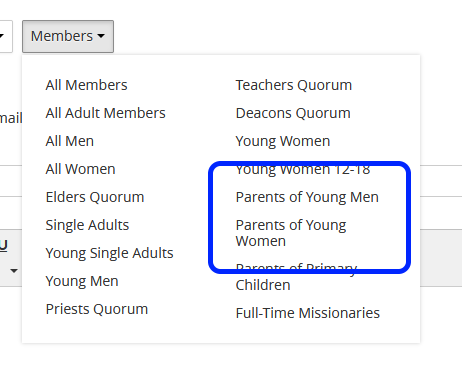
- Updated groups for selecting who should receive a message
- Mailing groups for ward/stake council, PEC, BYC
- Members can be individually selected when selecting a group
- Indication of which members will or will not receive messages
- The TO/BCC interface has been replaced with an "allow recipients to reply to all" option
It has been accounted for. The system won't allow "reply all" if any non-leadership addresses have been added to the group.russellhltn wrote:Nice! That last one makes me cringe a bit. I realize not everyone understands To vs. BCC. I just hope the privacy factor is hinted at somewhere in there.
I like the idea, but I can see the feedback now - someone wants a group discussion of leaders, but wants to include a relevant non-leader. I sure hope the "ward STS" and PFR aren't seen as non-leaders.scgallafent wrote:It has been accounted for. The system won't allow "reply all" if any non-leadership addresses have been added to the group.
It would be nice if the Access Table had that info.mevans wrote:I couldn't find any help. Who has permission to use this in LCR? Can the whole ward council do this (like EQ Pres can send to Elders, etc.)?
Who is considered a "Leader" and has permission to send messages to those with a Private email?
This is technically part of the 3.1 release. Details on who can access the application are in the 3.1 release notes. This feature got patched into LCR 3.0, so it beat the release notes out.mevans wrote:I couldn't find any help. Who has permission to use this in LCR? Can the whole ward council do this (like EQ Pres can send to Elders, etc.)?
Who is considered a "Leader" and has permission to send messages to those with a Private email?
The access table is scheduled to be updated later, but you surely don't want us to hold a feature back until the access table gets updated, do you?russellhltn wrote:It would be nice if the Access Table had that info.
Now that I've figured out how an ES got access and what one is ....kellymab wrote:Our ES reported when he tested the system tonight, he got two copies of the email when he sent a test email to himself. When he sent one to me, he also got a copy. Is it safe to assume that it now auto adds the sender as a reciepient of the message as well?
No, but I hope the update isn't far behind.scgallafent wrote:surely don't want us to hold a feature back until the access table gets updated, do you?
Not wanting to fork this discussion -- I just want to point to the pink elephant in the middle of the room. Many email addresses on the Member List are either incorrect or missing. Most members don't realize they have the ability to update their contact info online. Many members don't realize their email addresses are visible in the ward directory. And yes, many members do not even have email addresses.sbradshaw wrote:You can pull email addresses from the Member List on Leader and Clerk Resources. Go to Membership > Member List. Where it says "Select an organization" choose "All Organizations." Make sure it fully loads (it may take a minute). Then, do a select-all (control-A on Windows or command-A on Mac) and paste into Excel. From Excel, you can easily select all of the email addresses for emailing.
I sent an email to the Bishopric. I'm in the Bishopric email list. I received two copies to the same email address; however, the capitalization of the email is different, so I don't know if it thinks they're different email addresses? (In my LDS Account email address, it's all lower case; In my Membership email address, it's mixed case, but the same address.)scgallafent wrote:The sender gets added as a recipient of the message. If he has two different email addresses defined (one in his LDS Account profile and a different one on his membership record -- both visible at https://ldsaccount.lds.org/contactInformation), he would have gotten one at each address. If he got two messages to the same address, there is an issue we need to address.
The capitalization of the email would make a difference. I'll get it logged so that it can be addressed.mevans wrote:I sent an email to the Bishopric. I'm in the Bishopric email list. I received two copies to the same email address; however, the capitalization of the email is different, so I don't know if it thinks they're different email addresses? (In my LDS Account email address, it's all lower case; In my Membership email address, it's mixed case, but the same address.)
Something to keep in mind: RFC5321scgallafent wrote:The capitalization of the email would make a difference.
Depending on how the filtering works, that could be an issue. If you're just checking that two emails from a one member are the same - that's OK. But if you're checking between users, I'm not sure as a case-insensitive comparison is a good idea.The local-part of a mailbox MUST BE treated as case sensitive. Therefore, SMTP implementations MUST take care to preserve the case of mailbox local-parts. In particular, for some hosts, the user "smith" is different from the user "Smith". However, exploiting the case sensitivity of mailbox local-parts impedes interoperability and is discouraged.
RFC 5321 has several relevant items:russellhltn wrote:Something to keep in mind: RFC5321Depending on how the filtering works, that could be an issue. If you're just checking that two emails from a one member are the same - that's OK. But if you're checking between users, I'm not sure as a case-insensitive comparison is a good idea.The local-part of a mailbox MUST BE treated as case sensitive. Therefore, SMTP implementations MUST take care to preserve the case of mailbox local-parts. In particular, for some hosts, the user "smith" is different from the user "Smith". However, exploiting the case sensitivity of mailbox local-parts impedes interoperability and is discouraged.
The local-part of a mailbox MUST BE treated as case sensitive.
Local-part = Dot-string / Quoted-string
; MAY be case-sensitive
However, exploiting the case sensitivity of mailbox local-parts impedes interoperability and is discouraged.
So the RFC requires (MUST BE) that the local-part be case-sensitive, does not require (MAY) that it be case-sensitive, discourages depending on case-sensitivity, and says that you should avoid implementations where the local-part is case-sensitive -- all in the same document.While the above definition for Local-part is relatively permissive, for maximum interoperability, a host that expects to receive mail SHOULD avoid defining mailboxes where the Local-part requires (or uses) the Quoted-string form or where the Local-part is case-sensitive.
My best guess is it's an old standard (case-sensitive) that turned out to be a bad idea. So it's discouraged, but it remains as part of the standard since there still might be servers out there that use it. You can quickly run into "political" situations trying to resolve it. So at some level, it's best if it's supported. (In this case, we can store the emails in mixed case.)scgallafent wrote:So the RFC requires (MUST BE) that the local-part be case-sensitive, does not require (MAY) that it be case-sensitive, discourages depending on case-sensitivity, and says that you should avoid implementations where the local-part is case-sensitive -- all in the same document.
Off hand, I don't know either. But that's not to say there aren't any. Especially if we're talking world-wide. Thus I thought it worth discussion. It comes down to which is the bigger issue. Maybe not so much in number of people affected, but the seriousness of it. That's kind of a toss up. Which is worse, getting two emails because of what a member entered, or someone not getting them though no fault of their own?scgallafent wrote:In practice, I don't know of any modern email providers that implement case-sensitive email addresses.
Does the new "Send a Message" allow HTML? I haven't tried that yet.zaneclark wrote:I have been using the Directory with the "cut and paste" routine to send messages to the ward but decided to use the application in LCR today.... It is much easier to use, but I miss the ability to tweak the text with bold, colors, etc... Is there any way to do this in LCR other than using HTML?
It doesn't. I tried that in a sample message when I first saw the new version.mevans wrote:Does the new "Send a Message" allow HTML? I haven't tried that yet.zaneclark wrote:I have been using the Directory with the "cut and paste" routine to send messages to the ward but decided to use the application in LCR today.... It is much easier to use, but I miss the ability to tweak the text with bold, colors, etc... Is there any way to do this in LCR other than using HTML?
Yup...tried it just now and no formatting with HTML... Too bad, but I will probably continue to use LCR instead of the Directory as it is much simpler....jonesrk wrote:It doesn't. I tried that in a sample message when I first saw the new version.mevans wrote:Does the new "Send a Message" allow HTML? I haven't tried that yet.zaneclark wrote:I have been using the Directory with the "cut and paste" routine to send messages to the ward but decided to use the application in LCR today.... It is much easier to use, but I miss the ability to tweak the text with bold, colors, etc... Is there any way to do this in LCR other than using HTML?
No. There has been some discussion about that as a possible future enhancement, but no direction to proceed down that path.zaneclark wrote:I have been using the Directory with the "cut and paste" routine to send messages to the ward but decided to use the application in LCR today.... It is much easier to use, but I miss the ability to tweak the text with bold, colors, etc... Is there any way to do this in LCR other than using HTML?
I just ran a test for your stake in our test environment and only one message was sent. Could you look at the headers and see if there are any differences between them? That would give me a starting spot to look at it with the SMTP team. If you want to send the headers for both messages by PM, that would be fine.mtwerner wrote:I sent a message to stake members the other day and received two emails myself, no difference in capitalization of the address. I also heard from other stake members that they received duplicate messages.
mtwerner wrote:Another observation that is interesting but no big deal: previous messages from me showed them coming from "Brother John Doe," but this time it just read "John Doe,"
You're reading way too much into that. The message needed some editing because of the change to LCR, so we rewrote it instead of doing a copy-and-paste from the old code. I vaguely remember thinking that was a wasted word and dropping it when the message was rewritten. We were much more concerned with trying to keep the second paragraph of the footer from turning into a book.kellymab wrote:You're right, it is missing the brother now. Interesting. I think it's fine either way. It does have the source statement still.
It's a bit worse than that for me. I sent a test message to our bishopric and the sender was only from my shortened first name, in both the "from" field and the text at the bottom:scgallafent wrote:mtwerner wrote:Another observation that is interesting but no big deal: previous messages from me showed them coming from "Brother John Doe," but this time it just read "John Doe,"You're reading way too much into that. The message needed some editing because of the change to LCR, so we rewrote it instead of doing a copy-and-paste from the old code. I vaguely remember thinking that was a wasted word and dropping it when the message was rewritten. We were much more concerned with trying to keep the second paragraph of the footer from turning into a book.kellymab wrote:You're right, it is missing the brother now. Interesting. I think it's fine either way. It does have the source statement still.
I just went from "Brother Fullname Lastname" to "Nickname"You have received this email because you have made your email address available to your local Church leaders. It was sent by Matt whose calling is Ward Clerk.
Your LDS Account "display name" controls that. Since we have the LDS Account for the sender in hand (you're logged in, after all), it seemed logical to get the sender's name and email address from the LDS Account rather than making an extra request to get the membership record associated with the account. I have been reconsidering the wisdom of that decision.mfmohlma wrote:It's a bit worse than that for me. I sent a test message to our bishopric and the sender was only from my shortened first name, in both the "from" field and the text at the bottom:I just went from "Brother Fullname Lastname" to "Nickname"You have received this email because you have made your email address available to your local Church leaders. It was sent by Matt whose calling is Ward Clerk.
I'd agree. It's nice to be able to control what the name is that is sent out, but I never would have figured that since the LDS account display name was being used. In my case, it was just my first (shortened) name. I've now fixed it.mtwerner wrote:My first emails were sent using my full name, even though my preferred name was set correctly on my record. After poking around a while, I discovered that the display name on my LDS Account had my full name. After modifying that, everything was hunky-dory. I don't think it's necessarily wrong to pull the name from there, but there's no indication in LDS Account what the display name is for--so some explanation there would help, or even something in "Send a Message" to explain how to modify the sender's name. Even now, I don't know what the purpose of the display name is, other than in this particular situation.
I wonder if the LDS Account team has considered the possibility of synchronizing the Display Name with the Preferred Name on the membership record (when the LDS Account is linked to a membership record).scgallafent wrote:Since we have the LDS Account for the sender in hand (you're logged in, after all), it seemed logical to get the sender's name and email address from the LDS Account rather than making an extra request to get the membership record associated with the account. I have been reconsidering the wisdom of that decision.
https://ldsaccount.lds.org/contactInformation wrote:Primary & Membership Email
These email fields are being merged. When you update one field, the other one will be updated automatically.
You could just check the box at the top of the column to select everyone in the list.psantangelo wrote:Do I really have to check off each box to send out a reminder email to the ward. I could choose send to all in the old version of send a message in LCR. There is no way I will be able to check all the boxes manually to send out an email to my entire ward or even quorums that would take forever.
It's on a list of items for the UI designer to revisit, but I don't think he's worked on a revised design yet.mtwerner wrote:It would be nice if that box were labeled "select all," though. I had the same concern the first time I saw it.
There is a "Select All" checkbox in the header of the list. Just check it and you'll get everyone in the list.psantangelo wrote:Do I really have to check off each box to send out a reminder email to the ward. I could choose send to all in the old version of send a message in LCR. There is no way I will be able to check all the boxes manually to send out an email to my entire ward or even quorums that would take forever.
I'm sending you a private message.Andersjp wrote:I am trying to send a message to my Ward Council. I've filled out everything as far as I can tell, but when I click send message, a red box appears with no text in it. What can I do to send this message out?
That is currently not available.destabrook wrote:On the subject of "Send a message," can I attach a document to an email sent through "send a message?"
No, that's still not possible. But a workaround is mentioned in this post.destabrook wrote:On the subject of "Send a message," can I attach a document to an email sent through "send a message?" If so, how do you attach a document to the message to be sent?
We may not find out why, but my guess would be limited resources and too many projects. We have the needed function, and the other stuff might just be extras. Some church employees occasionally make comments in this forum and they might choose to enlighten us further.1968leocomeeatabite wrote:OK, so no formatting ability no way no how. This is to bad.It would be so helpful. There must be a reason that they do not want formatting apart of it. I wonder why?
Just do an online search for "URL shortener." A variety of services are available.1968leocomeeatabite wrote:It does allow you to include links in the "Send a Message", however I have not been able to figure out how to do a shortened link. like you would in M/S to shorten the link but keep the link embedded into the message. Does any one know how to do this in "Send a Message?
There is no guarantee that you will get a response to feedback. Several different people help to work through the feedback, but there is no way we could individually respond to every item.1968leocomeeatabite wrote:OK, so no formatting ability no way no how. This is to bad.It would be so helpful. There must be a reason that they do not want formatting apart of it. I wonder why? I have left suggestions in the feedback, but no response.
So will this work in "Send a Message" ? I have done the shortened in MS and and then copied and past into "send a message" but the only way it worked was if I had the complete LINK or URL. How do I get it to work in Send a Message?Just do an online search for "URL shortener." A variety of services are available.
The copy and paste didn't work because you were copying text that was hyperlinked. Hyperlinking is not available in Send a Message. So when you pasted you were only pasting the text and not the hyperlinked text with URL.1968leocomeeatabite wrote:So will this work in "Send a Message" ? I have done the shortened in MS and and then copied and past into "send a message" but the only way it worked was if I had the complete LINK or URL. How do I get it to work in Send a Message?Just do an online search for "URL shortener." A variety of services are available.
We have received sporadic reports of this but haven't been able to isolate the issue. Will you send me a PM with the date and time (don't forget the time zone) you tried this so that we can check logs for any indication of what is happening?SamYam wrote:I am a stake exec sec and am having an issue when trying to use the "Send A Message" function to the entire stake. I go through and select all members, wait for it to load all the recipients, type the message and then click to send. I get a pop-up box stating that an error occurred and to try it later. I can send an email to an entire ward without a problem. However when I try to send an email to a second ward distribution then I get the same error.
We saw that feedback. We just haven't been able to reproduce the issue in our test environment.mtwerner wrote:I'm a stake clerk and have been experiencing the same thing. However, it appears that everyone is still receiving the emails. I submitted feedback to the Church on the issue recently, but haven't heard back from anyone.
This is correct. "Send a Message" is primarily intended for broadcast emails. It is not intended as a replacement for regular email. On the rare occasion that a ward or branch clerk needs to send a message to another clerk in the stake, he can look up the information in LDS Tools or in the directory and send a direct email.bluefish wrote:I'm a Stake Clerk trying to help folks in my Stake understand and use this new functionality. I got a question from a Branch Clerk in our Stake along these lines:
When logged into LCR he has access to the Send a Message application, but can only "see" his Branch in the Available Groups dropdown... Is this correct?? Shouldn't he be able to send a message to me, other Stake Leaders, the High Councilman assigned to his Branch, other unit clerks, etc?
He can see the groups that are supported for his calling by going to the application and looking at what is available there. If we created a help page that listed the groups to which he should be able to send messages, it would essentially repeat what is already available in the user interface. If there are groups that someone feels are missing, there is always the option of sending feedback (we have received several suggestions) to be considered.bluefish wrote:This confirms he has has access to the Send a Message application, but does NOT have clues about to whom he should be able to send messages.
Since you asked this twice on the forum yesterday and sent feedback, I'll go ahead and respond with "there are no plans that I know of to implement a training instance of LCR."bluefish wrote:PS: A training instance of LCR would be a GREAT help since so many views are now calling dependent... Would help me a lot if I could see example pages of what they actually see.
My stake executive secretary (Provo Utah YSA 9th Stake) reported receiving the error as well, the other day, though the message was received by everyone we checked with despite the error.mtwerner wrote:I'm a stake clerk and have been experiencing the same thing. However, it appears that everyone is still receiving the emails. I submitted feedback to the Church on the issue recently, but haven't heard back from anyone.
Thanks for the clear feedback regarding these real questions, as well as your patience (and/or sense of humor, or whatever...) with my suggestion for a training instance of LCR. I do feel strongly that many would benefit from one. I'm answering another question to a clerk tonight using screenshots from my training instance of MLS (ver3.7.8, a few versions behind now, but still very useful when his menu choices at the Unit level are different than what I see at the Stake level).scgallafent wrote:This is correct. "Send a Message" is primarily intended for broadcast emails. It is not intended as a replacement for regular email. On the rare occasion that a ward or branch clerk needs to send a message to another clerk in the stake, he can look up the information in LDS Tools or in the directory and send a direct email.bluefish wrote:I'm a Stake Clerk trying to help folks in my Stake understand and use this new functionality. I got a question from a Branch Clerk in our Stake along these lines:
When logged into LCR he has access to the Send a Message application, but can only "see" his Branch in the Available Groups dropdown... Is this correct?? Shouldn't he be able to send a message to me, other Stake Leaders, the High Councilman assigned to his Branch, other unit clerks, etc?
He can see the groups that are supported for his calling by going to the application and looking at what is available there. If we created a help page that listed the groups to which he should be able to send messages, it would essentially repeat what is already available in the user interface. If there are groups that someone feels are missing, there is always the option of sending feedback (we have received several suggestions) to be considered.bluefish wrote:This confirms he has has access to the Send a Message application, but does NOT have clues about to whom he should be able to send messages.
Since you asked this twice on the forum yesterday and sent feedback, I'll go ahead and respond with "there are no plans that I know of to implement a training instance of LCR."bluefish wrote:PS: A training instance of LCR would be a GREAT help since so many views are now calling dependent... Would help me a lot if I could see example pages of what they actually see.
Yes.scgallafent wrote:You may be thinking of the demo that was done in a recent LDSTech broadcast.
I'd suggest we're quickly reaching the point where the biggest "feature" missing from LCR is the ability of members to support each other.scgallafent wrote:That used one of our internal development instances that is not publicly accessible. The data for that demo was generated specifically for that broadcast.
Doing something like that would still require setting up a complete set of publicly-accessible systems (LCR, CMIS, CDOL, etc.) and then populating those systems with some kind of useful dummy data (wards, stakes, members, callings).
I figured it out!! I was getting the error from "Send A Message" because there were invalid email addresses on lds.org / MLS and the distribution list was so big. I broke it down ward by ward, branch by branch. Some ward/branches would send others wouldn't.scgallafent wrote:We saw that feedback. We just haven't been able to reproduce the issue in our test environment.mtwerner wrote:I'm a stake clerk and have been experiencing the same thing. However, it appears that everyone is still receiving the emails. I submitted feedback to the Church on the issue recently, but haven't heard back from anyone.
We have isolated the issue with invalid email addresses and deployed a fix to beta last week. I just checked and verified that the email address that was causing you problems is correctly flagged as invalid and ignored.SamuelHuff wrote:I figured it out!! I was getting the error from "Send A Message" because there were invalid email addresses on lds.org / MLS and the distribution list was so big. I broke it down ward by ward, branch by branch. Some ward/branches would send others wouldn't.
I went through the ward/branch ones that didn't send properly and broke it down into groups of 10ish email addresses. Some of those groups of 10 would send but there was one that didn't. I went through those one-by-one and found an email address that had a typo where the @ symbol was a " symbol. However the group of ten that got the error apparently still sent because I had myself on the distribution list.
So invalid email addresses are causing the error, regardless of the size of the distribution list. The size of the distribution list determines whether the members get the message or not (think it must time-out)?
It looks like something isn't playing nicely with the process that gets your member record to display that information. With this update, messaging gets your information from your membership record instead of your LDS Account. That resolves some of the issues we were seeing due to members having different email addresses on their membership record and LDS Account or an informal name as the display name on the LDS Account.abc46 wrote:"Send a Message" has been working well for me for over a month in sending weekly ward emails. Today I noticed a different layout for the options for selecting who the email goes to. It also shows a "From" field that just lists my email address and not my name. After sending the message, I noticed that the emails that went out did not say they were from me, but rather "noreply". At the bottom of the email, it says that the email "was sent by null, whose calling is....". My correct email address is listed in the reply-to field, but I am wondering how to restore my name to the emails. Any ideas?
scgallafent wrote:It looks like something isn't playing nicely with the process that gets your member record to display that information. With this update, messaging gets your information from your membership record instead of your LDS Account. That resolves some of the issues we were seeing due to members having different email addresses on their membership record and LDS Account or an informal name as the display name on the LDS Account.abc46 wrote:"Send a Message" has been working well for me for over a month in sending weekly ward emails. Today I noticed a different layout for the options for selecting who the email goes to. It also shows a "From" field that just lists my email address and not my name. After sending the message, I noticed that the emails that went out did not say they were from me, but rather "noreply". At the bottom of the email, it says that the email "was sent by null, whose calling is....". My correct email address is listed in the reply-to field, but I am wondering how to restore my name to the emails. Any ideas?
I can reproduce what you're seeing with your account, but didn't see the issue on several other accounts. It looks like it is something special about you. We will see what the logs show and get it fixed in the next update.
The message always comes from noreply@ldschurch.org, but it usually shows your name there. Since there is an error retrieving your name, it just shows the email address.
If you could get me the approximate date and time, that would help isolate it in the logs.
It should be falling back to the member name if there is no preferred name.abc46 wrote:Looking at my member record, there is a "Preferred Name" field that is not populated. Perhaps it is looking in that field, and then not defaulting to the "Member Name" field when that field is empty. It doesn't appear that I can change my own Preferred Name online, but I'll try on Sunday. If this is the issue, then the Member Name field should probably be used as the backup when there is no Preferred Name.
Add a preferred name to your member record or wait for the big fix release of LCR that will be coming shortly.josh.witt wrote:It is showing "null" as the person sending the message in the auto text at the bottom of the email. Anyone know how to resolve this?
You will also notice that the directory only lists those who have the appropriate priesthood office. In our ward, we have several members who hold the office of Elder, yet go to the High Priest Group. We also have several prospective elders that meet with us. These individuals do not show in the directory under the Elders list. Every time I send an email to the EQ, I have to remember to remove people and add others. I have gone round and round with SLC on this, but have never received clear direction when the directory will mirror my EQ class list like LCR does.Jonathan.Monson wrote:I love the send a message feature in LCR. However I just found out that in only applies to bishoprics, clerks, and executive secretaries (on a ward level). For the leaders in quorums or auxiliaries they have to go a backwards way into the directory and copy and paste lists to e-mail their organization. It would be extremely useful if the Church allows the 'Send a Message' feature to be available to the leaders as well. Is there any plans for them to do this?
Jonathan Monson
I think the answer is when the higher priority development tasks are done. When will they be done? They might have some idea, but it's too vague to share. They're done when they're done.dfchamplain wrote:but have never received clear direction when the directory will mirror my EQ class list like LCR does.
We just send an email to the exec sec and ask him to use the "Send a message feature" to send it on to the organization members. While you "could" use the directory to copy the emails and send them yourself, that really only works if your organization is small... your email provider likely will limit your ability to send mass emails (gmail is 100 per dAy, I believe) or worse, flag you as a spammer and lock your account.Jonathan.Monson wrote:I just found out that in only applies to bishoprics, clerks, and executive secretaries (on a ward level). For the leaders in quorums or auxiliaries they have to go a backwards way
The "Email All..." capability of the Directory on LDS.org seems to be working fine now for each organization. It's available for everyone, not just presidencies. Is there a reason that won't work for you?gmark.kasper wrote:Just a thought. I'm the elder's quorum secretary. My president asks me if I can email the quorum on his behalf sometimes. It seems silly that I'm not allowed to send messages via the system but I can copy and paste the email addresses into excel and go from there as suggested above. Why not give the presidencies the capability to email their quorum or group members?
Because we have been instructed to limit it to bishoprics and stake presidencies for now. There has been some discussion about expanding that feature to additional users, but that won't happen unless/until we get instructions from the product manager to do so.gmark.kasper wrote:Just a thought. I'm the elder's quorum secretary. My president asks me if I can email the quorum on his behalf sometimes. It seems silly that I'm not allowed to send messages via the system but I can copy and paste the email addresses into excel and go from there as suggested above. Why not give the presidencies the capability to email their quorum or group members?
That makes sense. Thank you for the reply.scgallafent wrote:Because we have been instructed to limit it to bishoprics and stake presidencies for now. There has been some discussion about expanding that feature to additional users, but that won't happen unless/until we get instructions from the product manager to do so.gmark.kasper wrote:Just a thought. I'm the elder's quorum secretary. My president asks me if I can email the quorum on his behalf sometimes. It seems silly that I'm not allowed to send messages via the system but I can copy and paste the email addresses into excel and go from there as suggested above. Why not give the presidencies the capability to email their quorum or group members?
No, that works fine and I'll continue to use it. I was trying to send it through "official" channels.scgallafent wrote:Because we have been instructed to limit it to bishoprics and stake presidencies for now. There has been some discussion about expanding that feature to additional users, but that won't happen unless/until we get instructions from the product manager to do so.gmark.kasper wrote:Just a thought. I'm the elder's quorum secretary. My president asks me if I can email the quorum on his behalf sometimes. It seems silly that I'm not allowed to send messages via the system but I can copy and paste the email addresses into excel and go from there as suggested above. Why not give the presidencies the capability to email their quorum or group members?
You can make a request via the Feedback link in LCR. That's the best way to make sure it gets to where it needs to go. And even if it happens, it probably won't be any time soon. The development team is very small and they work on things according to a priority list which is quite full.jmarriott wrote:Is there a way that this functionality could be added?
Thanks for the quick reply! But, I don't see a facebook link in LCR. Do you mean LCR on lds.org?russellhltn wrote:You can make a request via the Feedback link in LCR. That's the best way to make sure it gets to where it needs to go. And even if it happens, it probably won't be any time soon. The development team is very small and they work on things according to a priority list which is quite full.jmarriott wrote:Is there a way that this functionality could be added?
It's a Feedback link, not a Facebook link. And yes, it is on LCR (Leader and Clerk Resources) on LDS.org.jmarriott wrote:Thanks for the quick reply! But, I don't see a facebook link in LCR. Do you mean LCR on lds.org?
suprisedEnhanced the Send a Message tool by adding rich text formatting options.
My money is on MS Word. It's notorious for changing punctuation.scgallafent wrote:.... Paste content from where?
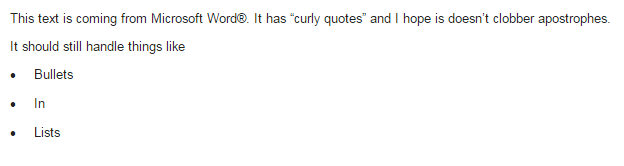
I wonder how much depends on the recipient's email system?scgallafent wrote:Send a Message handles curly quotes and bullet lists coming out of Word. The bullet lists aren't formatted correctly in the edit pane, but they come through in the email along with curly quotes. Non-Latin text also works fine. (I tested with Cyrillic.)
That is also a possibility. At this point, reproducible examples would be a big help in chasing these issues down.russellhltn wrote:I wonder how much depends on the recipient's email system?
Unfortunately, my sent messages do not keep the formats I set. The most recent one I sent to my ward used indentations for quoted texts, but the final result ran all the lines together.1968leocomeeatabite wrote:Sent a message out a couple of days ago! IT IS AWESOME A new update happened September 8. https://www.lds.org/help/support/clerk- ... s?lang=engsuprisedEnhanced the Send a Message tool by adding rich text formatting options.Very Happy
So happy that I am Laughing and just tickled pink
This is so cool
![]()
A BIG THANK YOU! THIS IS SO AWESOME!
I always send a test message, to myself, before I send out to my unit, to see how it will look! That way I can adjust how I want it to look. The quote thing has been discussed earlier in this thread. I am not smart enough to understand the ins and out of that, that is why I 1st send a test message so that I can adjust the message before I send the real one.Unfortunately, my sent messages do not keep the formats I set. The most recent one I sent to my ward used indentations for quoted texts, but the final result ran all the lines together.
Some email clients convert URLs to clickable links on the receiving end – Gmail does this, as well as Apple Mail. I wouldn't be surprised if others did as well.zaneclark wrote:In a different thread, someone said they had been able to include links to URL's without any special formatting.... I just tested this and it worked great with URL's both with without the https format.... I am using Chrome on an Apple computer....
Re: Needing to contact the Bisoph of the Oakland 1st ward of which I am a member
Re: Needing to contact the Bishop of the Oakland 1st Ward of which I am a member
Contacting the bishop is not a part of the "Send a Message" function at LCR. You can locate contact information for your bishop by using the Maps function at LDS.org or by contacting any other member of your ward.flioresninetta@gmail.com wrote:I need to contact the Bishop
No. Access to this function is limited to the bishopric and clerks. This is based on calling and is not a permission that can be granted.jgmathis wrote:Is there anyway to grant the high priest group leader the ability to send a message to the entire high priest group? He used to be able to do this from the bishopric calling that he had, but now he cannot. I am the ward clerk, and can do this, but he would like to be able to do this himself. Can I somehow grant him access?
He already has the ability to do this. But instead of the send a message through the LCR he should use the LDS.org Directory and click the "Email all High Priests..." link on the High Priests organization page.jgmathis wrote:Is there anyway to grant the high priest group leader the ability to send a message to the entire high priest group?
This post, just a couple earlier in the thread,falkk wrote:Hi,
I am a high priest group leader and I do not find the application tap in LCR to send a message to my group members. Is this how it is supposed to be or am I missing rights?
seems to indicate the link in question is in the directory, not LCR. Have you tried here?jdlessley wrote: ...
He already has the ability to do this. But instead of the send a message through the LCR he should use the LDS.org Directory and click the "Email all High Priests..." link on the High Priests organization page.
I think that directory link is there for all ward members, not just leaders.rmrichesjr wrote:If that does not work, make sure your calling is registered as a standard calling rather than a custom calling.
A high priests group leader does not see the Applications menu in LCR, hence he cannot use the LCR Send a Message function. An assistant ward clerk does see Applications, so he has this option.rmrichesjr wrote:here's what one assistant ward (membership) clerk is able to see:
In LCR: Applications -> Send a Message -> Members -> High Priests Group
In Directory: Ward Organizations -> High Priests shows an 'Email all High Priests' button
Does that work for you? If not, check whether your calling is recorded as a standard calling or a custom calling.In Directory: Ward Organizations -> High Priests shows an 'Email all High Priests' button or link that brings up a list of email addresses that can be copy-pasted into an email client.
This.tincupman wrote:or is that function only available for the Stake Presidency, Stake Clerk, and Stake Executive Secretary?
I was helping a new EQ president yesterday and discovered it!jtjacks wrote:Thanks Zaneclark. Was this announced somewhere or did you just discover it?
Yes, I presume such contact preference controls would be made available to an individual and the system would respect those choices. It's the same idea as my dentist office. I can choose email, text, or US mail for notification. However, without a system provided by the church -- then people are more likely to go rogue and use 3rd party tools. (again, ack!)drepouille wrote:I think it is important for members to "opt in" to text message groups. It is not appropriate for leaders to scrape contact information from the ward directory and automatically add members to such groups. The ward directory has visibility settings for a good reason, and we need to respect the privacy of those who have restricted the visibility of their contact information to leadership only.
Members must explicitly consent to contact, especially by intrusive group text messages.
I've already submitted this via the feedback form on the website. I'm sure this isn't a new request. If you all think this would be helpful to your wards, you may want to submit the suggestion via the feedback link on the bottom of the 'send a message' page.scgallafent wrote:If this is something you really need, your stake leaders need to start communicating it to their presiding authorities ... with the understanding that what you ask for, you may not get.
And I frustrate them all by responding that I read and respond to all of my email, and I ignore texts. But I agree that most folks seem to want texts, nowadays.chriswoodut wrote:I will say the discussion in EQ about texting originated because people don't read their email.
Yeah, I'm always a little baffled that people have a smart phone that buzzes when they receive a text but doesn't seem to be setup to buzz them when they receive an email. I thought that was the default behavior....lajackson wrote:And I frustrate them all by responding that I read and respond to all of my email, and I ignore texts. But I agree that most folks seem to want texts, nowadays.chriswoodut wrote:I will say the discussion in EQ about texting originated because people don't read their email.
Ha. My phone doesn't buzz at all when I am at Church. That means when the executive secretary or a member of the bishopric texts me during sacrament meeting to ask if I will give the closing prayer, they just have to sweat it out and see if I notice my name being mentioned by the person conducting when the closing hymn and prayer are announced.chriswoodut wrote:Yeah, I'm always a little baffled that people have a smart phone that buzzes when they receive a text but doesn't seem to be setup to buzz them when they receive an email. I thought that was the default behavior....
How big was the attachment?bballrob wrote:I was trying to send a message tonight with an attachment. IT would not send. When I sent it without the attachment, it sent just find. Something broke?
Re: "Send a Message" Function on LCR (spam/junk folder)
And some emails always go to the spam folder. Each email client is different, and a combination of the the recipient's ISP and email client decide if an incoming email is spam or not. There are a lot of different ways they do that. Some identify problem sending ISPs and others simply notice that an email went to 200 people, so it is probably spam.rootbeericecream wrote:"All meetings are real."
Re: "Send a Message" Function on LCR (spam/junk folder)
Just this week I discovered that Outlook (the program) seems to automatically delete everything sent to the junk folder. Or at least I found that for one person in out company.lajackson wrote:And some emails always go to the spam folder.
Re: "Send a Message" Function on LCR (spam/junk folder)
This +1. Every email provider will be different in how they flag spam. However, there are a few approaches the church can do (and probably does) like SPF to signal that the emails are legitimate. Even given that, some email systems use word analysis to decide if it is spam. I use gmail and frequently see real email in the spam folder that isn't church related.lajackson wrote:And some emails always go to the spam folder. Each email client is different, and a combination of the the recipient's ISP and email client decide if an incoming email is spam or not. There are a lot of different ways they do that. Some identify problem sending ISPs and others simply notice that an email went to 200 people, so it is probably spam.rootbeericecream wrote:"All meetings are real."
Most email clients allow some type of a whitelist.
My ward and stake have promised to keep the various calendars up to date. And I have promised that if a meeting is scheduled at the last minute, and they really need me there, they should confirm with me or I may not be there.
Re: "Send a Message" Function on LCR (spam/junk folder)
I suspect gmail uses the "spam" reporting of other members to determine if it's spam. (As a on-line service, it can classify it anytime after it's been received.) Meaning, if too many members flag their copies as spam, it will end up in your spam folder, even if you didn't rate it as spam.chriswoodut wrote:I use gmail and frequently see real email in the spam folder that isn't church related.
This is one of those messages I hesitate to respond to just in case I'm wrong.jensendo wrote:Have not seen this addressed specifically on this thread.
I want to send a message to a custom group, and I see this text when I look at "Reply All":
"Enabling this option allows message recipients to reply to everyone who received the message. When enabled, everyone who receives the message will see the email addresses of the other recipients."
My question is if there is a way that each recipient receives an individual message, without even being able to know who else received it. The topic is semi-confidential, and I would just rather the whole group not know who the rest of the group is. I understand that they will not see others' e-mail addresses if I do not enable Reply all, but will they still see the names of the other recipients?
Bishop J
If you don't enable the option, it has the same effect as blind-copying everyone on the list. No one will know who it was sent to except themselves. However, once an e-mail is sent, there is really no way to prevent it from being forwarded or printed (or posted online) so I would advise caution in sending anything confidential via e-mail as a matter of good practice.jensendo wrote:Have not seen this addressed specifically on this thread.
I want to send a message to a custom group, and I see this text when I look at "Reply All":
"Enabling this option allows message recipients to reply to everyone who received the message. When enabled, everyone who receives the message will see the email addresses of the other recipients."
My question is if there is a way that each recipient receives an individual message, without even being able to know who else received it. The topic is semi-confidential, and I would just rather the whole group not know who the rest of the group is. I understand that they will not see others' e-mail addresses if I do not enable Reply all, but will they still see the names of the other recipients?
Bishop J
I noticed there are now some basic formatting functions. We may switch our sacrament meeting program to email.chriswoodut wrote:HTML emails are hard to do well as every client interprets and displays them differently. However, I know a company that develops an html formatting tool that companies can buy/pay for and drop it into their own website as an html formatting tool. I'm sure if the church implemented anything, it would be basic functionality as complex functionality like templates is hard.
I haven't had any issues. If you browse the thread, there does seem to be a file size limitation that people sometimes run into. Are all the people complaining gmail users or is it random?drcook345 wrote:I tried the "Send a Message" function for the first time last week (member of stake presidency) sending a message to our high council group; many of them didn't receive the message. We were using goolgegroups (GG) before to communicate with our high council. I tried the LCR message function as many of our HC's weren't receiving emails from the GG. This is random, not always the same recipients each time. Upon doing some web research, some are complaining google is limiting the delivery of email to more than ~ 10 recipients when the message is not sent from the actual author. Wondering if you have heard others having this issue? Any advise?
Yes, by file size I mean attachments. Email takes a lot of detailed information to diagnose delivery issues..... It can be very dependent on the receiver, their email provider, etc. If you were having issues with google groups, it makes me think there's issues in general. If it is reproducible.... like you can send to a test email that you know doesn't get it, that would be a starting point. I wonder if it is possible for it to be sender specific problem too.drcook345 wrote:By file size you mean of attachments or the message body? In either case these were small < 170KB. It's random email addresses. Seems we've had gmail users complain they didn't get the messages same as others.
If it doesn't work, it may not be the church's system that isn't working. If some are delivered and other's aren't delivered, the church's system is likely doing its part and sending it -- the receiving end may just be blocking it.cvhansen wrote:I tried to sent out a mail over this system.
I have sent out INFORMATION on when there is General Conf. Satellite transmissions available to view fin our meetinghouse.
Manny didn't arrive.
Can anybody explain why the Church set forth a system there does not work?
Why do the Church not, as a ORG, provide a mail system for all members, >12 years of age, with their member no as mailbox - addition to that there could be created mailboxes connected to functions like stake presidents branch presidents etc. with forwarding to the personal mail account
This also could help solve some of the issues with members not allowing others to see the personal mail addresses, since these are now property of the Church not personal anymore.
Submitting the information in your post via the Feedback button/link would seem to be a good idea.jgoold wrote:Both my wife and I have problems receiving email from any "@ldschurch.org" email address, in particular messages coming from the "Send a Message" tool. ...
I was wondering this same thing. I checked an email sent through LCR and the SPF records looked right looking at the email headers. I do have a ward member using an @familysearch.org email address (an employee) that doesn't get the emails He was going to talk to the email admin to have them test.russellhltn wrote:I also have Gmail, and I get email from ldschurch.org all the time. However, I don't think my leaders use "send a message" much. There's nothing in my spam folder.
I'm wondering if the issue is the email of the person sending. Their domain may not allow the church to send emails on their behalf.
We're doing our sacrament program via email. The familysearch.org email address is the only one I've heard of not getting it. I use a personal domain on a google g suite account and it works fine for me.zaneclark wrote:I send out a ward newsletter each week using Send a Message and it goes ti AOL, Gmail, MSN, and Hotmail among others and as far as I know, they are all receiving it.
See the Access Table at https://lcr.lds.org/access-tablemoored wrote:Does anyone know which callings have the right to use the "send a message " tool in LCR?
+1. I've had this same thought.sareid wrote:Would love to be able to schedule messages to go out. The ability to "Send Now", or "Send on" with a date and local time filter. Would be super handy.
No one in this user-to-user help forum will probably be able to answer to your question. The best way to get this request heard is to use feedback from within the app. You may not receive an individualized response, but that is the official way to make your request known to those who set the programmer's priorities.pauldjohnston wrote:Some members want to unsubscribe from receiving email (and text messages from withing LDS Tools). As a bishopric we don't want to delete their email address (or phone number) so we can contact them for other needs. We need a way to manage this request. Currently, we have to keep a separate list. Sometimes ward leaders send out messages without checking our separate unsubscribe list and then the recipient gets upset. We suggest adding this capability for leadership and/or members to set their subscribe preferences while also maintaining the ability for church leaders to call, text or email for individual (not bulk messages) or for messages being sent from church headquarters. Has this been discussed and is this on the road map?
There are many variables that could be the cause and without an admin on the recipient end and an admin on the lds.org end testing it together, I don't know that we'll figure out the edge cases. Awhile back I glanced at the SPF headers in the received emails and they do look ok.sebastian.buck wrote:I'd like to second some of the complaints here in the thread about messages send from within LCR not reaching some email recipients. I'm a ward clerk and regularly have to send out emails using the "send message" feature withing LCR.
Most recipients will receive my messages. Some however do not. So far I wasn't able to figure out any reasons for it. All the usual suspects (spam folder, wrong email address ...) have already been ruled out.
So here is definitely some kind of problem going on with the way emails are sent out by LCR. I would appreciate any kind of support or help regarding this issue.
Permissions -- "Send a Message" Function on LCR
Re: Permissions -- "Send a Message" Function on LCR
Some callings for women do have access to send-a-message. https://lcr.lds.org/access-table?lang=engtomj wrote:Our stake is seeing an issue start to come up where sisters are being called by the Bishops as "Ward Communication Specialists" to expressly send out announcements to members ( vision of a Digital Bulletin perhaps), as the church has directed units to reduce over the pulpit announcements with the new schedule. A work around is in place for wards whom call a brother, as the ward can assign them with assistant clerk permissions. From what I understand, The system does not allow this for sisters. I've have a Sister contacting me (Stake Clerk) to help her get permissions to Send to All Members. I think it would be wise to consider creating a "Communications" position in the system which would allow for Adult Brethren and Sisters to be able to have the permissions to utilize "Send A Message". I already know its going to be a bit of an uncomfortable conversation with the sister contacting me, that in order to do her calling she has to send the communication to a Man (assistant clerk) in the Bishopric to then send out the message. The irony is I'm sure the calling was given to reduce that burden on Bishopric members...
I absolutely agree. I remember once getting an error message regarding SPF.chriswoodut wrote:There are many variables that could be the cause and without an admin on the recipient end and an admin on the lds.org end testing it together, I don't know that we'll figure out the edge cases. Awhile back I glanced at the SPF headers in the received emails and they do look ok.
I believe SPF is correct from my looking at it. I use the send-a-message tool every week (ward email blast), sometimes more than once and I've only had one person complain about not getting something.sebastian.buck wrote:I absolutely agree. I remember once getting an error message regarding SPF.chriswoodut wrote:There are many variables that could be the cause and without an admin on the recipient end and an admin on the lds.org end testing it together, I don't know that we'll figure out the edge cases. Awhile back I glanced at the SPF headers in the received emails and they do look ok.
The problem however is that we are supposed to use the church's email system and discouraged to use our private email service to send out messages to members. I agree with it. But in this case the system has to work reliably. Because right now I'm forced to use my personal email service.
Re: "Send a Message" Function on LCR_Attachments
How big is the attachment that you're trying to send? 1MB can be a fairly large (content-wise) attachment if it's all text.taftkyleseth1 wrote:It just lists the name of the attachment and shows the attachment size as 1 MB, which means there is nothing really attached.
Re: "Send a Message" Function on LCR_Attachments
I wonder if the poster meant 1kb instead of 1mb... I have never had a problem adding an attachment as ward clerk. None have been huge, but some have been between 1mb and 2mb.russellhltn wrote:How big is the attachment that you're trying to send? 1MB can be a fairly large (content-wise) attachment if it's all text.taftkyleseth1 wrote:It just lists the name of the attachment and shows the attachment size as 1 MB, which means there is nothing really attached.
https://lcr.lds.org/access-table?lang=engchrispremo wrote:Does the Ward Missionary Leader have permissions to send a message via Leaders and Clerk Resources?
Any chance she has locked her record in the directory? Members can limit visibility of their contact info to only leaders. I wonder if that would also remove it from the send-a-message tool. You being a leader would see the email but the tool may not use it?dhollowell wrote:@scgallafent - I’ll take some screenshots from LDS Tools. It’ll clearly show that her email address is on her record in our ward, but the email icon (the envelope) isn’t displayed when I send an email through LCR. I’ll take care of tomorrow.
Don't post the screen shot here. That will save us the trouble of having to remove the personal information.dhollowell wrote:@scgallafent - I’ll take some screenshots from LDS Tools. It’ll clearly show that her email address is on her record in our ward, but the email icon (the envelope) isn’t displayed when I send an email through LCR. I’ll take care of tomorrow.
The HTML editor in "Send a Message" was never intended to be a full-featured word processor or publishing tool. If you're pasting from Word or some word processing tool, there are no guarantees that the result will match the word processor.egram1949 wrote:I use the "Send A Message" function to send weekly announcements to Ward members. The message NEVER looks the same as how I copy and paste it or even when I enter it "fresh". How can I solve this problem? I'm not that techy advanced so I'd need a step by step answer to solve this very annoying problem. Hope someone can help.
As the other person pointed out, if you are creating the email in Word or other tools, you will lose most of the formatting. HTML email won't recognize fonts or they can get substituted. Text size will get weird, etc.egram1949 wrote:I use the "Send A Message" function to send weekly announcements to Ward members. The message NEVER looks the same as how I copy and paste it or even when I enter it "fresh". How can I solve this problem? I'm not that techy advanced so I'd need a step by step answer to solve this very annoying problem. Hope someone can help.
You cannot assign rights. You can only place members in callings that have rights by virtue of their calling. When they are entered into their callings at LCR, they usually inherit the data rights of their calling within about 24 hours.jacobstimpson wrote:Is there a way to provide "send a Message" rights to a member of the ward?
Make them a second secretary in an organization and they'll get access.russellhltn wrote:I believe "send a message" is limited to members of the ward council. Nothing you could assign to a communication specialist.
I've noticed that extra line looks right when the email is received. Some editors will recognize a shift-key-enter to not add that extra space.dhollowell wrote:@scgallafent and @russellhltn,
I had an opportunity to talk with the ward membership clerk on Sunday and he uncovered the reason why the sister who attends our ward but lives in another ward wasn't able to be sent emails from our ward. I never would have thought of this, so I'm REALLY glad I caught him. The problem was that her email address was in the "household email" field, but not the "personal email" field. As soon as he copied it from household to personal email, I looked on LCR and I was able to send her a test email. She replied back to me Monday morning. So that's solved.
I have a question about the HTML email in LCR. Every time I press the "Enter" key, the cursor advances two lines. When I'm ending a paragraph and starting another, that's fine. But if I want to sign my name and then put my calling at the end of an email, I've got my name, then a blank line, then my calling. I haven't found a way to get rid of the blank line. Is there a way to have the "Enter" key only advance one line? I know that's picky, so I hope it's an easy fix. Thanks all!! I really appreciate all the assistance I receive here in the Forum.
D'oh! Yeah, that's a known issue. Some things use "household", some use "personal". Single people have to have them in both places.dhollowell wrote:The problem was that her email address was in the "household email" field, but not the "personal email" field.
Hoo boy, just a clear sign that I may type the messages but I don't read them after they're received. Once again, thanks for the assistance. This group keeps me on my toes and helps me learn.chriswoodut wrote: I've noticed that extra line looks right when the email is received. Some editors will recognize a shift-key-enter to not add that extra space.
You could put a comma after your name and then your calling. This should keep it all on one line. In my experience, the system will automatically insert your name and calling into the bottom of the email when you send it (something like "this message was sent by 'Leader Name' whose calling is 'Leader Calling' ") - you have no control over that format so if you put your name in the text area, it will appear twice at the bottom of the email.dhollowell wrote:@chriswoodut: I just sent a message to my ward. I signed the letter with my name and calling, and the blank line was between them. Any other thoughts on how I can remove it, or change the line spacing for the enter key to a single line?? Thanks!
Did you try the shift-key + enter key instead of a just an enter? You will need to remove the enter first, so that everything is on one line and then do a shift-enter where you want the line break to be. Do a test and just send an email to just yourself to see what it looks like.dhollowell wrote:@chriswoodut: I just sent a message to my ward. I signed the letter with my name and calling, and the blank line was between them. Any other thoughts on how I can remove it, or change the line spacing for the enter key to a single line?? Thanks!
Well, @chriswoodut, you're considerably more techie than I am, but it reinforces the reason I like the folks on this forum. When I need a problem solved, this group comes through consistently! Thanks again, everyone.chriswoodut wrote: Did you try the shift-key + enter key instead of a just an enter? You will need to remove the enter first, so that everything is on one line and then do a shift-enter where you want the line break to be. Do a test and just send an email to just yourself to see what it looks like.
If you're not responsible for individual relief society members, it makes sense you wouldn't have access to a tool to send messages to them.Why do stake and auxiliary leaders and high councilors have only limited access to LCR?
Stake auxiliary leaders and high councilors are primarily responsible to instruct and support ward auxiliary and Melchizedek Priesthood leaders. They orient newly called ward auxiliary and Melchizedek Priesthood leaders and provide encouragement, support, and instruction. They are not responsible for individual ward members. It is the ward clerk’s responsibility to train ward auxiliary and Melchizedek Priesthood leaders on record-keeping tools and responsibilities. If stake auxiliary leaders and high councilors need a list of members for planning purposes, they should request this information through the ward or stake clerk.
I have seen it before, but it was limited to a bishopric member with a USCellular email. Once he started using Gmail for the church emails, his problem with receiving them was resolved.jsorens6 wrote:Does anyone else have trouble with PDF attachments not opening properly when utilizing the send a message function?
I think it was several months ago that I received a couple of PDF attachments from a bishopric member, and the PDF files were corrupted. I _think_ that problem was caused by an identified bug that was fixed within a matter of a few weeks.jsorens6 wrote:Does anyone else have trouble with PDF attachments not opening properly when utilizing the send a message function?
It would be under the "Applications" menu in LCR. According to the Access Table, the Stake YW Presidency does not have access to the tool. You could compose the email and forward it to a stake clerk to send it using the Send A Message tool.packleslie wrote:Where do I find the "Send a Message" function? Maybe I don't have access since I'm not a Ward Leader? I am the Stake YW Secretary and would like to use the function to send an email to all of the unit presidencies in the stake.
No. In this situation you are limited to copy and paste to create an email list or, enlist the aid of a leader that has Send a Message access.docrg wrote:I have a calling but no access to LCR.
Is it possible to send group email messages through LDS Tools or Church website?
I just tested and my ward's Relief Society Secretary's access is working. Is she looking in the right place for it?jasonpbyu wrote:Why would they have taken access away for secretary position? Our RS secretary was able to send messages last month, but now she cannot. I saw in here some saying that secretary does not have that access, but she sent me an email that she had sent out, and she indeed had that access. "You received this email because you made your email address available to your local Church leaders. It was sent by (member name), whose calling is Relief Society Secretary."
Anyone know why they would have changed that?
That is typically the response for those who want the entire group and not just the leaders. For example, a Stake YM President who want to see the list of all YM in the stake. That doesn't seem to be the case in your situation.ss26 wrote:In reading through the forum, it appears a common answers to a question like this include:
- "In your calling you don't work with individual members so you don't need access" I can appreciate the concept but it doesn't match the reality of callings like stake relief society/primary/young women . . . (who interact with ward presidencies).
You can submit it via "feedback" on the main website, but I don't know how much consideration it will get.ss26 wrote:if there's a group that reviews requests like this to consider adjusting policy, I'd love to know how to contact them?
The method to contact official support/help is to use the 'Feedback' link or button.ss26 wrote:...
So far, the people that have brought it to my attention have GMail. Is there a way for church employees to trace what happened to these missing messages? Is there a department I should contact to ask about this?
Thanks for any info!
I email our elders quorum every other week. And every other week a few of them do not receive the emails. It is a different group that gets missed each time. They have email addresses that are served by every major provider. Mostly it works. Sometimes it does not.ss26 wrote:I've had a number of stake members say they aren't getting the e-mails.
There is one thing to consider. Look at each reported incident's record on LCR to see if their email address is populated in their email field.ss26 wrote:In our stake, the stake president sends weekly e-mails through Send a Message. I've had a number of stake members say they aren't getting the e-mails (I'm the stake clerk). Our stake president says he's including these folks but it doesn't show up in the spam/junk-mail or anywhere else they can see. I have this same problem (of not receiving them on a consistent basis).
So far, the people that have brought it to my attention have GMail. Is there a way for church employees to trace what happened to these missing messages? Is there a department I should contact to ask about this?
Thanks for any info!
As I recall, AOL and Yahoo had particularly harsh SPF records. By any chance, is the sender using one of those services?chriswoodut wrote:If the combination of failed emails is sender and receiver combination specific, reproducing it becomes harder.
Re: Permissions -- "Send a Message" Function on LCR
I am a ward communications specialist and feel it’s silly that the RS assistant secretary can send emails to everyone but I can’t. And I don’t feel like we should have to “falsify” my calling to do so. The Church has asked wards and stakes to reduce time spent with announcements and to help those who are home bound. They should provide a way to do so. My calling is basically worthless without it. And, this is only a recent change as I could before April of last year.chriswoodut wrote:Some callings for women do have access to send-a-message. https://lcr.lds.org/access-table?lang=engtomj wrote:Our stake is seeing an issue start to come up where sisters are being called by the Bishops as "Ward Communication Specialists" to expressly send out announcements to members ( vision of a Digital Bulletin perhaps), as the church has directed units to reduce over the pulpit announcements with the new schedule. A work around is in place for wards whom call a brother, as the ward can assign them with assistant clerk permissions. From what I understand, The system does not allow this for sisters. I've have a Sister contacting me (Stake Clerk) to help her get permissions to Send to All Members. I think it would be wise to consider creating a "Communications" position in the system which would allow for Adult Brethren and Sisters to be able to have the permissions to utilize "Send A Message". I already know its going to be a bit of an uncomfortable conversation with the sister contacting me, that in order to do her calling she has to send the communication to a Man (assistant clerk) in the Bishopric to then send out the message. The irony is I'm sure the calling was given to reduce that burden on Bishopric members...
I will also note that using the ward/branch calendar on lds.org does allow for Events to send out reminder emails in advance. We're starting to use that and the organizations can populate their own events and control the email notification's timing. We have moved to a digital sacrament program and announcements each week. We have an assistant clerk in charge of it (with edits by the ward clerk as needed when sitting in meetings). It's working well.
So far, I think I prefer those needing to communicate to do so themselves rather than trying to funnel all communication through a single person. It ends up being just as much work to communicate that info to the 'communicator' than to just do it yourself (as a clerk, organization, bishopric, etc).
Re: Permissions -- "Send a Message" Function on LCR
The position of RS Assistant Secretary exists in the handbook. I don't think Ward Communications Specialist does. When wards make up callings, it should come as no surprise there's no support for that. The systems the church creates follows the structure outlined in the Handbook.heathermelindarich wrote:I am a ward communications specialist and feel it’s silly that the RS assistant secretary can send emails to everyone but I can’t.
Please see this postJanetteknight wrote:I am Stake Relief Society President and my secretary nor I have access to send a message.
Two things. Sending feedback as you did is the best way to get information to the developers. Though you have not received a response, they do review all of the feedback they receive.dtlindsa wrote:If there is a better way to get this bug information to the developers, I would be happy to use it. Does anyone know a better way?
Most likely your email address is doing spam filtering and is detecting all emails as spam. I personally think similar problems also appears as a sender-recipient pair problem. Your email company/admin is likely throwing away the email without the church email system even knowing.dtlindsa wrote:LCR Messaging messages from local leaders are consistently dropped to specific recipients with no notice to sender or recipient.
No messages from my local leaders (bishop, stake president, elders president, etc.) sent using LCR messaging to the email address in my church profile are received. My wife receives the set of such messages appropriate to her. As a user of LCR, I can produce this result at will. When I send a message from LCR to myself and my wife, she receives it and I do not. I also do not receive the confirmation message Messaging says I will receive.
To report this bug I clicked Do you have feedback on this page from the LCR home page as suggested in this forum. The page I reached is a feedback page asking me to rate my experience with the page. I filled in a report of this bug as Comments and gave my email address. I have received no response in the week since I posted the bug. I had at least hoped for an acknowledgement of the posting.
Some details which I included:
EXAMPLE: My Elders president sent new ministering assignments (using LCR messaging). I did not receive an email. He sent it again. Again I didn’t receive it. He got no error messages.
The last *local* leader communication I received was on 1/27/2018, From: <noreply@ldschurch.org>, [San Jose Stake] Stake Choir Rehearsal. It was sent by <name>, whose calling is Stake Clerk.
This bug does not seem to affect messages from the church general leadership. For example, I received one on 6 Apr 2020.
This may be related to the fact that my wife and I formerly (for many years) had the same email address in our church profiles. She recently changed her email address. Now she gets local leader emails, but I still do not.
As a test, I sent an email to my wife and myself using LCR Messaging on 12 April 2020. Before sending, I floated my cursor over our names and our expected emails were displayed. “From” shows my name and email. I sent it. Messaging responded “Your message is being sent. You will receive a confirmation email when message sending is complete.”
I received neither the confirmation email nor the email message. My wife received the email message promptly. No visible errors were generated by creating and sending this email.
As the sending leader, from this test, I would have assumed that my email was sent to both my wife and myself. However, the email was never sent to me.
It is not acceptable for a messaging system to selectively discard messages to valid addresses without notification to the sender or intended recipient. Here are suggested messages. To the sender: “You tried to send an email to <recipient> through LCR messaging but it was not sent due to an error in … .” To the intended recipient: “<Sender> who is the <unit name> Elders Quorum president attempted to send you an email but it was not sent due to an error in … . Visit <link> to resolve this issue.”
If there is a better way to get this bug information to the developers, I would be happy to use it. Does anyone know a better way? I'm sure I'm not the only person not getting local leader guidance in this current situation due to this bug.
I notice your email is a byu.net address.dtlindsa wrote:No messages from my local leaders (bishop, stake president, elders president, etc.) sent using LCR messaging to the email address in my church profile are received. My wife receives the set of such messages appropriate to her. As a user of LCR, I can produce this result at will. When I send a message from LCR to myself and my wife, she receives it and I do not. I also do not receive the confirmation message Messaging says I will receive.
It may not be that "the church does not intend to address the problem..." It may simply be a resource issue where this problem is not high enough on the priority list to get programming resources.dtlindsa wrote:it seems obvious that the church does not intend to address the problem in such a way that byu.net addresses will be usable.
My personal suggestion is to get a email independent from your ISP. That way you can keep that email even if you move, change ISPs, or if your ISP is bought out/merges/renames.dtlindsa wrote:Or I will need to set up a third email independent of my ISP and have my ISP open that email also.
2 cougars reports exactly the opposite in his posting at https://tech.churchofjesuschrist.org/fo ... ng#p199065 from which I quote (underline is mine):davesudweeks wrote:
"the fact th[at] BYU seems to not forward the church emails... It appears the messages are delivered to the BYU email server "
My conclusion from 2cougars reported discussion with byu.net system administrators is that byu.net servers do NOT receive expected messages from LCR Messaging which are directed to byu.net email addresses. For this reason byu.net IT contacted church support.2cougars said:
I just got off the phone with BYU IT and they are calling the church support. One of the BYU help desk techs set up a new byu.net email and changed his church account to his new byu.net email address. He did not receive the verification email either. They were watching on the byu.net side of things and nothing arrived at their servers from the church domain. Church support said to submit feedback through the main church website.
Bottom line is the church systems were changed a few months ago and they will no longer send any emails to byu.net addresses. They need to fix the issue. It's not user error.
The forum is quite active. The lack of an official response is because the Tech Forum is primarily user-to-user help and support. It never was, and is not now, an official support channel. The official method to send feedback is by way of the feedback link at the bottom of the Send a Message app page. You can also take your chances by contacting support at the Global Service Department (GSD) during the hours found in the Help Center article Contact Information.veehb wrote:No current support??? ... Seems strange that this forum is no longer used or monitored.
This occasionally happens. When this happens to me I do as the message states about trying later, as in another day, and it works. Typically when this happens they are either working on the program or the servers are having a problem. My experience is that the app is unreliable and encounters outages and problems quite regularly.veehb wrote:I've tried for over an hour and keep getting the message "There was an error sending your message. Please try again later."
It's not entirely clear whether that corruption matches this but in case it might:veehb wrote:I was able to send the letter from our stake presidency last night by switching from Safari to Firefox and the message went. However I tried sending the letter as an attachment and everyone received a corrupt file. ...
jacobstimpson wrote:It would appear that an official calling for "communications specialist" exists now and has access to Send a Message.
Curious. "Communications" is part of what used to be called "Public Affairs" which is externally focused, not internally.zaneclark wrote:I have had the calling of Web Administrator for 13 years.....just noticed it had been changed to Communications Specialist also....
I think Communication (singular), as in Stake Communication Specialist, is about to become both internal and external, depending on the specialist assignment. And yes, we have Send a Message privileges.russellhltn wrote:jacobstimpson wrote:It would appear that an official calling for "communications specialist" exists now and has access to Send a Message.Curious. "Communications" is part of what used to be called "Public Affairs" which is externally focused, not internally.zaneclark wrote:I have had the calling of Web Administrator for 13 years.....just noticed it had been changed to Communications Specialist also....
From Handbook 5.1.1.8, that still seems to be the case.
Notice, 4 June 2020: Communication Specialists
Wards and branches are encouraged to (1) keep sacrament meeting announcements to a minimum and (2) during the week, remind members via email, text, social media, or other means, of the meeting schedule for the next Sunday.
To facilitate such communications, the existing calling “Website Administrator” has been renamed “Communication Specialist.” A person holding the communication specialist calling may now email information to ward members by using the “Send a Message” function under “Applications” in Leader and Clerk Resources (LCR).
I previously confirmed that any company using the Yahoo mail service (like US Cellular) is at high risk of being blocked. This is due to the fact that the church spoofs your email address to make it appear to be coming from you when it is actually coming from a church server. While this is a legitimate use of the feature, it can also be used by hackers attempting to gain access to their intended victims. Some mail services have taken the hard line that they block all spoofed emails, period. Short of convincing their mail provider to change their stance, I think there is nothing end users can do short of changing email addresses. When our bishopric member changed the email on his church account from a US Cellular to a Gmail email, his problems receiving them went away.bradyork wrote:I am the 1st Counselor in the Bishopric. We have been sending weekly email messages to all Ward Members during COVID19 shut down. Several members are not getting the emails from within Send a Message function in LCR. Interestingly, most of those not getting the messages are using EMBARQ or Centurylink email addressess. Is this a common problem and what is the fix?
This is what I've been getting:davesudweeks wrote:This is due to the fact that the church spoofs your email address to make it appear to be coming from you when it is actually coming from a church server.
Communications Specialist and "Send a Message"
The Church changed the Ward Website Administrator and Stake Website Administrator callings to Ward Communication Specialist and Stake Communications Specialist, respectively. This change was announced in a Notice dated June 4, 2020, that was sent to Stake Presidents, Bishops, Branch Presidents, and Clerks. Someone here at the Forum has since reported that the ward calling was changed to Ward Email Communication Specialist. As to that, I have not seen anything official.casper684 wrote:Ward Email Communication Specialist renamed from Ward Website Administrator. . (Something I was not aware of nor anyone else in my stake holding this calling).
No, you can't control the CC vs. BCC choice.clarkgw wrote:is there a way to turn on or off the cc or bcc function when sending a message on LCR?
We covered that specific use case.drepouille wrote:Yesterday, the stake presidency asked us to forward a message to all youth in our ward AND their parents. While it is easy to select Young Men and Young Women, I had to manually select their parents from the list of adults. An hour later, the stake presidency sent out a Zoom link for the same group of people. Ugh. I had to manually select them again.
How does that work in the case of guardians?scgallafent wrote:We covered that specific use case.
It has been long enough since I touched that code that I don't remember.russellhltn wrote:How does that work in the case of guardians?scgallafent wrote:We covered that specific use case.
I decided to quit being lazy and go back though a prior conversation. It appears it only goes to those who are both listed as the child's parents and are in the household.scgallafent wrote:It has been long enough since I touched that code that I don't remember.russellhltn wrote:How does that work in the case of guardians?scgallafent wrote:We covered that specific use case.
That is consistent with the approach we are taking with some other tools.russellhltn wrote:It appears it only goes to those who are both listed as the child's parents and are in the household.
That does leave legal guardians out, but the problem is they couldn't be included without making assumptions about the data. So, it would appear that guardians have to be included manually.
Re: "Send a Message" Function on LCR-New Functionality
This functionality has been there for quite a while. There are options for "Parents of Young Men," "Parents of Young Women," and "Parents of Primary Children."gary.griffeth wrote:1. Would it be possible to have a "send to parents of" option for the primary children and youth under the age of 18. I need to ask permission to contact a youth and it is very time consuming when you have a large number.
That is not likely to happen. The whole point of Send a Message was to create a basic tool for sending information by email to members of the ward or stake. It was never intended to provide a full-featured email editor and we never even discussed any kind of options for personalizing the emails.gary.griffeth wrote:2. Would it be possible to have the capability of inserting a piece of information from the members record into the body of the email (i.e. Dear <First Name>, .....). It would make the emails more personable.
Are all gmail users having a problem with a particular message? I have gmail and I've been getting ones from my ward.ajmorris13 wrote:It appears they are being delivered, but GMail may be filtering them as spam or skipping the inbox or something along those lines.
This is correct. You can include or exclude anyone from the message, but you cannot save a custom list in the tool. (Personal opinion: I don't think the Send a Message tool was originally designed to be used the way many are trying to use it.)ayoward wrote:...am I right in thinking there is no way to set up your own list through the Send a Message function?
However, that's likely to effectively cancel any subscriptions the member had, such as from the main church, about their donations, or emails about their calling.davesudweeks wrote:A work-around that preserves the contact information: If members who seek no contact don't have a household email, the clerk can move their personal email to the household email position - the send a message tool only sends to the personal email address.
That is true. And I suppose there are those who want official communications but not unofficial chatting from everyone who reaches out to them. However, in my experience, most who don't want contact, really don't want ANY contact unless they initiate it.russellhltn wrote:However, that's likely to effectively cancel any subscriptions the member had, such as from the main church, about their donations, or emails about their calling.davesudweeks wrote:A work-around that preserves the contact information: If members who seek no contact don't have a household email, the clerk can move their personal email to the household email position - the send a message tool only sends to the personal email address.
I think there's two groups: Those who don't want ANY contact, and those who do want some contact, but feel the local leaders are far too chatty. They want to be left off the routine bulletins that are designed to foster "involvement" or "connectiveness".davesudweeks wrote:That is true. And I suppose there are those who want official communications but not unofficial chatting from everyone who reaches out to them. However, in my experience, most who don't want contact, really don't want ANY contact unless they initiate it.
Re: "Send a Message" Function
We have found using a google doc to do formatting works. Then you can copy and paste into the 'send a message tool' and it retains the formatting most of the time. Keep it basic formatting such as underline, bold, and text color. It cannot do anything tricky like pictures or fancy layouts. We stick to left justified text.Angelafay wrote:I find "Send a Message" so handy in my calling as Relief Society President! However, I am puzzled as to why the format it looks like it's in when I send it, is not the format it looks like when it's received.
For example, I leave a line space between paragraphs. That is what I see when I send it. But when it is received, the entire letter not only is missing the line space between paragraphs, but it is just one long paragraph - the new paragraphs don't even start on a different line!
Is there a reason for this, and is there any way that I can see what it will look like when it is received, before I send it?
Angela
I know we format our sacrament program in google docs (as I mentioned 4 messages above). If we create a link in google doc using ctrl-k, the link survives the cut and paste into 'send a message' and works on the receiving end (android, etc).jbstanford wrote:Sorry for not clarifying - the message comes through entirely blank where it isn't displayed - not formatted incorrectly or not as a link.
That said, it looks like if I use the "Link" tool to embed it as an HTML link it works. Thx for the pointer - a bit annoying (since this is reoccurring and needs to be sent out weekly, so I can't copy/paste) but if I manually use that option to put it in that works.
I don't think the Send a Message tool is linked to custom reports. I would ask whoever told you that to show you how - I think it was wishful thinking on their part...46kevin wrote:I was told I can create a custom list using "Create a Report" in the "Reports" menu, then can somehow access that created custom list in "Send a Message".
In "Send a Message" I can find no way to access any custom reports I have created.
How is that done? Or is there a work around?
Send a Message does not let you enter email addresses. Your only option is to select the member and allow SaM to use the email address on their record.russellhltn wrote:Could a custom report be used to generate a list of emails that could then be cut and pasted into send a message?
Ddavis123 wrote: Thu Aug 19, 2021 6:31 pm I am having an issue with emails getting rejected. It appears that all of the yahoo.com and aol.com email addresses have rejected the ward-wide email I sent. It also appears that other wards are having the same issue, though this is the first time that I have had the issue.
I notice you don't seem to have an email attached to your profile. You might want to check the ward directory and make sure you have an email for you as an individual and not just as a household. This applies even if you are a household of one.clarkgw wrote: Fri Aug 20, 2021 9:08 pm I have been sending a few emails to the Elders Quorum to let them know of service project 2 nights ago & tonight I sent another email to the Quorum about our lesson for this coming Sunday. I haven't received a confirmation email yet.
What's going on? Is the email app not working at all. btw, I used my computer to compose these emails.
Please help.
Is it a Yahoo or AOL account? You might want to look at this threadtdforsyth wrote: Sat Jan 08, 2022 11:20 am I've been made aware that some are not receiving these. I did tests today with one member not receiving. Her email address was correct on Tools and the Church Website Directory. Other emails are reaching her inbox.
We use the tool and also maintain a manual opt out list. We have to manually uncheck every person we know has requested not to receive the emails.davesudweeks wrote: Sun Jan 09, 2022 8:53 am My personal opinion only: this could be part of the problem and would be made worse by senders who don't respect the contact wishes of members. When I use the Send A Message tool as EQP (and I use it very sparingly), I go through the list and uncheck members in our ward who I know have requested no church contact. This is a little more time consuming than just hitting the "select all" button and sending the message, but I believe leaders have an obligation to respect the privacy wishes of individual members. It does little good to frustrate members who just want to be left alone right now.
chriswoodut wrote: Sun Jan 09, 2022 12:21 pmI know is a related but slightly different subject but several leaders in my stake have stated that members can't dictate the condition of their membership. We have followed the counsel not to keep a no-contact list. We contact those that we haven't seen in church for a while (usually via text or email) and invite them to come back. If they respond that they don't want contact we let them know that we can instruct ministering brothers and sisters not to visit in person but that they will still get the occasional email or text. If they respond that they don't want any contact, we let them know that the first step to having their records removed is to contact the Bishop personally.davesudweeks wrote: Sun Jan 09, 2022 8:53 am My personal opinion only: this could be part of the problem and would be made worse by senders who don't respect the contact wishes of members. When I use the Send A Message tool as EQP (and I use it very sparingly), I go through the list and uncheck members in our ward who I know have requested no church contact. This is a little more time consuming than just hitting the "select all" button and sending the message, but I believe leaders have an obligation to respect the privacy wishes of individual members. It does little good to frustrate members who just want to be left alone right now.
There is a reason to keep an opt out list (it is not a do not contact list in our case):wrigjef wrote: Sun Jan 09, 2022 12:53 pm I was told that if the Church wanted us to keep no contact lists, they would include the ability in LCR
There are valid reasons for doing it that way. If the message is truly spam, the return address is likely forged and sending a response does no good. Also, someone could use that feature to harass someone else by spoofing their email address as the sender. Then the target gets a flood of "bounce" messages from valid email systems for a message they never sent.sebastian.buck wrote: Sun Jan 09, 2022 12:47 pm Any email server which just deletes received emails without notifying the sender is male configured. I am aware that some email servers in some instances might do this anyway.
We used to get one. It stopped arriving more than a year or so ago.garystroble wrote: Someone above said we get a bounce list back. That is normally not true and rarely happens, even though I know some church emails do not go through.
Not sure this will help, but in case it might: Are you sure the calling is recorded as a _standard_ calling rather than a custom calling?luke.allen.langford wrote: Sun May 01, 2022 8:10 am Why can't an elders quorum assistant secretary send a message using "send a message" feature?
...
What might we be doing wrong? Anyone else had success getting assistant secretaries in EQ an ability to send messages?
And have you waited at least 24 hours for the rights to work it's way though the system?rmrichesjr wrote: Sun May 01, 2022 11:12 am Not sure this will help, but in case it might: Are you sure the calling is recorded as a _standard_ calling rather than a custom calling?
This is true, but the EQ secretary is not separately listed and he has access under the heading Elders Quorum Presidency. I wonder if they forgot to add the assistant secretary when that calling became official, or if they intended to leave him out. Perhaps a note at the feedback link would be in order.zaneclark wrote: Sun May 01, 2022 1:21 pm I don’t think you will see many assistants with access to Send a Message.
Interesting – I wonder if it's in response to suggestions like this: Official Digital Letterhead for a Unitgarystroble wrote: Fri May 06, 2022 8:56 pm I see today that the Send a Message messages are adding the Church logo at the top and then the name of the ward in semi-bold flush left, with a lot of while space all around at the top. Not sure if this is a feature or a bug, or just someone experimenting at HQ and then left for the weekend, since it was not announced. Will see how long it lasts.
Re: "Send a Message" Function on LCR is appending a logo and unit name
If you are a stake leader, it shows the name of the stake instead of the name of the ward.tmckinlayv wrote: Sat May 07, 2022 2:28 pm It only has the unit name, doesn't mention the stake name,
Please keep in mind that nobody here can comply with that request. This is a user-to-user discussion forum. To get such a problem report and request for a fix to those who can take action, please use the Feedback button or link on the most relevant page or app.carlsonjf wrote: Sun May 29, 2022 12:00 pm Can you please check certs / etc to ensure gmail is not rejecting email from the church?
LCR “Send Message” Not Working
Your wondering is extremely doubtful in my opinion, inasmuch as I mark spam emails as spam and I keep getting the same emails from the same email addresses as spam seemingly forever.davesudweeks wrote: Sun Jul 24, 2022 2:38 pm When I see the report from the church on messages I send, it indicates the message was rejected by the server. I'm no expert on these things, but it sounds to me like a problem with the member's ISP not accepting the message. Other than the rare case where it looks like a member has changed their email address, I don't have any problem with sending or receiving from the Send A Message tool. But then, I don't send messages very often to the members of our Elders Quorum - less than monthly.
I wonder what an ISP would do if a significant percentage of their customers in a specific area marked messages from the Send A Message tool as spam and if this could be a factor?
Well, until someone identifies the cause, anything could be the cause. I'm not seeing any problems with use of the tool either as a sender or a recipient (on my Gmail account) which looks to me like a regional or local problem rather than a global problem. Feedback from the Send A Message web page is the way to provide official bug reports. Posting here in the forum will only help if someone has found a workaround (and it appears no one has).garystroble wrote: Sun Jul 24, 2022 2:45 pmYour wondering is extremely doubtful in my opinion, inasmuch as I mark spam emails as spam and I keep getting the same emails from the same email addresses as spam seemingly forever.davesudweeks wrote: Sun Jul 24, 2022 2:38 pm When I see the report from the church on messages I send, it indicates the message was rejected by the server. I'm no expert on these things, but it sounds to me like a problem with the member's ISP not accepting the message. Other than the rare case where it looks like a member has changed their email address, I don't have any problem with sending or receiving from the Send A Message tool. But then, I don't send messages very often to the members of our Elders Quorum - less than monthly.
I wonder what an ISP would do if a significant percentage of their customers in a specific area marked messages from the Send A Message tool as spam and if this could be a factor?
Currently the only good workaround is not to use the church email system for anything important as it has proven for many months to be unreliable. The fact that one person is not seeing a problem is hardly an indication of anything statistically. Continuing to insist otherwise does not make it so. This week two different leaders in our ward had similar problems with non-delivery of emails sent through the church system. Many others on here report the same. I assume you have read these reports?davesudweeks wrote: Sun Jul 24, 2022 3:27 pmWell, until someone identifies the cause, anything could be the cause. I'm not seeing any problems with use of the tool either as a sender or a recipient (on my Gmail account) which looks to me like a regional or local problem rather than a global problem. Feedback from the Send A Message web page is the way to provide official bug reports. Posting here in the forum will only help if someone has found a workaround (and it appears no one has).garystroble wrote: Sun Jul 24, 2022 2:45 pmYour wondering is extremely doubtful in my opinion, inasmuch as I mark spam emails as spam and I keep getting the same emails from the same email addresses as spam seemingly forever.davesudweeks wrote: Sun Jul 24, 2022 2:38 pm When I see the report from the church on messages I send, it indicates the message was rejected by the server. I'm no expert on these things, but it sounds to me like a problem with the member's ISP not accepting the message. Other than the rare case where it looks like a member has changed their email address, I don't have any problem with sending or receiving from the Send A Message tool. But then, I don't send messages very often to the members of our Elders Quorum - less than monthly.
I wonder what an ISP would do if a significant percentage of their customers in a specific area marked messages from the Send A Message tool as spam and if this could be a factor?
No one is saying there is not a problem. I have read enough here to believe that there is, although I have not personally experienced it.garystroble wrote: Sun Jul 24, 2022 4:30 pm The fact that one person is not seeing a problem is hardly an indication of anything statistically. Continuing to insist otherwise does not make it so.
Actually the people who read the feedback are mostly church service missionaries, many of whom have little or no technical background. I have read their responses to some of my feedback in the past and it was beyond not comprehending. It is partially because of this filtering system in place that things are taking so long to get looked at.lajackson wrote: Sun Jul 24, 2022 6:37 pmNo one is saying there is not a problem. I have read enough here to believe that there is, although I have not personally experienced it.garystroble wrote: Sun Jul 24, 2022 4:30 pm The fact that one person is not seeing a problem is hardly an indication of anything statistically. Continuing to insist otherwise does not make it so.
I think the important thing to remember is that, while those of us here are able to provide data points, none of us can do anything about it. The people who read the feedback are the ones who will do that. So, as always, take every opportunity to provide any details, experiences, and information that you believe might help the developers identify and solve the problem.
In my experience, stating that I'm filing a bug report and want the report escalated to engineering seems to be reasonably effective at cutting through filtering by non-technical service missionaries.garystroble wrote: Sun Jul 24, 2022 6:45 pm Actually the people who read the feedback are mostly church service missionaries, many of whom have little or no technical background. I have read their responses to some of my feedback in the past and it was beyond not comprehending. It is partially because of this filtering system in place that things are taking so long to get looked at.
Where is the guidance shown to escalate a bug report? I have never seen anything on this at all. Even the physical facilities FIR system has a way to escalate things. If that is truly an option with feedback bug reports, it would be nice to have it showing to all. Oh, I forgot we should put in a feedback to suggest this, sigh.rmrichesjr wrote: Sun Jul 24, 2022 7:07 pmIn my experience, stating that I'm filing a bug report and want the report escalated to engineering seems to be reasonably effective at cutting through filtering by non-technical service missionaries.garystroble wrote: Sun Jul 24, 2022 6:45 pm Actually the people who read the feedback are mostly church service missionaries, many of whom have little or no technical background. I have read their responses to some of my feedback in the past and it was beyond not comprehending. It is partially because of this filtering system in place that things are taking so long to get looked at.
I have just included a statement to that effect in my written description of the issue.garystroble wrote: Sun Jul 24, 2022 7:12 pm Where is the guidance shown to escalate a bug report? I have never seen anything on this at all. Even the physical facilities FIR system has a way to escalate things. If that is truly an option with feedback bug reports, it would be nice to have it showing to all. Oh, I forgot we should put in a feedback to suggest this, sigh.
A response to this duplicate post by cgiddley is found here which may be of interest to others who are also posting in this topic.
I wish someone from the LCR dev team would watch theses forums and respond what is happening.cgiddley wrote: Mon Jul 25, 2022 5:57 pm I was able to receive emails via LCR without any trouble until I became ward executive secretary two weeks ago and I gained access to LCR, after never having had access to it before. Since then, I haven't been able to receive any emails from anyone, including myself, and I can't send emails to anyone. My stake clerk doesn't know why. Can someone help me? I have a Yahoo email account. I get the green indicator saying the message is sending, as well, but then I receive no confirmation, and no one, including myself, receives the email. I can't receive emails from any of the other ward leaders, either. I'm missing out on everything and having to ask others to send emails for me.
So there is a different response/send method when sending to individuals vs “everyone”?zaneclark wrote: Wed Jul 27, 2022 9:21 am I found a way to send my newsletter to those with AOL and Yahoo addresses. In Member Tools, I created a list of the 39 members with those addresses, and then after I sent the newsletter using Send a Message, I copied and pasted it an email to them using the Tools list. So far, it seems to be working.
When you initiate sending an email through Member Tools, it sends the email using your own email address, instead of the Church's – which avoids issues with email servers that block the Church's email address.csession wrote: Wed Jul 27, 2022 9:43 amSo there is a different response/send method when sending to individuals vs “everyone”?zaneclark wrote: Wed Jul 27, 2022 9:21 am I found a way to send my newsletter to those with AOL and Yahoo addresses. In Member Tools, I created a list of the 39 members with those addresses, and then after I sent the newsletter using Send a Message, I copied and pasted it an email to them using the Tools list. So far, it seems to be working.
I usually groom the recipient list to remove people I know have moved but whose records haven’t been pulled yet, and exclude serving missionaries. But even when doing that, the Yahoo folks were reporting not receiving the messages.
Wait a second. Member tools vs. LCR. We are talking about two different tools, right?sbradshaw wrote: Wed Jul 27, 2022 11:51 am
When you initiate sending an email through Member Tools, it sends the email using your own email address, instead of the Church's – which avoids issues with email servers that block the Church's email address.
csession wrote: Wed Jul 27, 2022 12:57 pm Wait a second. Member tools vs. LCR. We are talking about two different tools, right?
For clarification, there are no pre-built lists in Member Tools. You must make your own lists and you must manage your own lists. It doesn't have the options that LCR has to let you send a message to, for example, "Ward Council" without first manually setting up a list of ward council members in Member Tools. I think you will probably have to manually adjust the list when changes occur, but cannot verify that - I have never gone to the trouble to set up a manual list on Member tools.lajackson wrote: Wed Jul 27, 2022 2:12 pm Member Tools is the mobile app where you are able to make a list and then use your own personal email to send to them.
If a member moves out of the unit, their name will drop off of a list you have built in Member Tools. Otherwise, everything needs to be manually adjusted for new callings and releases.davesudweeks wrote: Wed Jul 27, 2022 3:59 pm I think you will probably have to manually adjust the list when changes occur, but cannot verify that - I have never gone to the trouble to set up a manual list on Member tools.
While many have reported recent issues with the Send A Message tool, I have not had any issues using it.
I just spoke to the GSC about another matter and also mentioned the email problem. The representative confirmed it is a church system issue (he also used the phrase "it is a pain") and the developers are supposed to be working on it. Hope that clarifies it for all here.davesudweeks wrote: Wed Jul 27, 2022 3:59 pmFor clarification, there are no pre-built lists in Member Tools. You must make your own lists and you must manage your own lists. It doesn't have the options that LCR has to let you send a message to, for example, "Ward Council" without first manually setting up a list of ward council members in Member Tools. I think you will probably have to manually adjust the list when changes occur, but cannot verify that - I have never gone to the trouble to set up a manual list on Member tools.lajackson wrote: Wed Jul 27, 2022 2:12 pm Member Tools is the mobile app where you are able to make a list and then use your own personal email to send to them.
While many have reported recent issues with the Send A Message tool, I have not had any issues using it. I have had a few undelivered but those appear to be valid (member likely changed their email address or their email address was edited by our ward clerk to prevent delivery of the message because they had requested no contact). It may be broken in some specific cases or regions, but I don't believe it is broken for everyone everywhere. I have my own personal opinions about possible reasons (I'm not in an IT field so they are just guesses), but my opinions on this are unpopular with some who claim this is a church problem that they don't care to fix so I'm now just keeping those opinions to myself.
You may want to read Yahoo inbox not receiving church emails.peachy727 wrote: Mon Aug 08, 2022 10:41 pm So I was just wondering if there were any issues that you had heard about? Please let ,me know. Thanks.
Sending from personal emails isn't really practical for anything beyond small groups as far as ensuring that addresses are up to date, and keeping track of groups.sebastian.buck wrote: Sun Aug 14, 2022 9:40 pm In my ward we have almost completely stopped using LCR for sending out messages to members. It is simply not useable in the current state … and never has been.
I might catch flack for suggesting this, but one option that could help keep things updated would be to print the ward directory (with email addresses) to a PDF file, convert the PDF file to plain text, massage the formatting of the text so it's independent of move-ins/move-outs (remove page breaks, etc.) and then compare an earlier version vs. a later version. If the formatting is right, any changes in email address should pop out.sebastian.buck wrote: Sun Aug 14, 2022 11:21 pm I totally agree. But what can you do if the church is unable or unwilling to fix this issue?
This is brilliant! It works and it automatically puts the emails in the BCC field!sbradshaw wrote: Mon Aug 15, 2022 11:03 am If you initiate sending an email from the "Organizations" section of the Member Tools app, it will load the latest email addresses into a new email using your default email app. You shouldn't need to keep a separate list.
Thank you! This is awesome!sbradshaw wrote: Mon Aug 15, 2022 11:44 am Also, if you have Member Tools on your phone but find it easier to compose an email from your computer, you can start the email on your phone, save it as a draft, then pick up the draft on your computer (assuming your email account is set up to sync drafts, which is usually the default).
Good suggestion. However, as the stake executive secretary, I often have a need to email the entire stake and there doesn't seem to be an easy way to accomplish this without using the "send a message" tool.sbradshaw wrote: Mon Aug 15, 2022 11:44 am Also, if you have Member Tools on your phone but find it easier to compose an email from your computer, you can start the email on your phone, save it as a draft, then pick up the draft on your computer (assuming your email account is set up to sync drafts, which is usually the default).
As someone with a stake calling, what do you see when you go to Organizations? Is there a way to select Stake Elders Quorum or Stake Relief Society and then select "All Members"?dkarbuckle wrote: Mon Aug 15, 2022 3:40 pmGood suggestion. However, as the stake executive secretary, I often have a need to email the entire stake and there doesn't seem to be an easy way to accomplish this without using the "send a message" tool.sbradshaw wrote: Mon Aug 15, 2022 11:44 am Also, if you have Member Tools on your phone but find it easier to compose an email from your computer, you can start the email on your phone, save it as a draft, then pick up the draft on your computer (assuming your email account is set up to sync drafts, which is usually the default).
From the stake side of things in "organisations" (for the stake unit), you only see the stake leaders, not the stake members in those organisations. So to send to all elders you'd have to go individually through the wards.fredbloem wrote: Mon Aug 15, 2022 4:29 pm As someone with a stake calling, what do you see when you go to Organizations? Is there a way to select Stake Elders Quorum or Stake Relief Society and then select "All Members"?
caillines Is correct. You don’t have access to any lists of members in a group. You can only email the people who have callings in the various stake level organizations.caillines wrote: Mon Aug 15, 2022 11:13 pmFrom the stake side of things in "organisations" (for the stake unit), you only see the stake leaders, not the stake members in those organisations. So to send to all elders you'd have to go individually through the wards.fredbloem wrote: Mon Aug 15, 2022 4:29 pm As someone with a stake calling, what do you see when you go to Organizations? Is there a way to select Stake Elders Quorum or Stake Relief Society and then select "All Members"?
It also lacks the ability to send to a whole bunch of other predefined groups such as "parents of young women", "all organisation presidencies", etc that the "send a message" function provides.
"Send a Message" on LCR
Thank you for mentioning the known issues with Yahoo email services. I just found this article (https://www.inboxally.com/blog/why-is-y ... verability) and I believe that it is a combination of the nine listed reasons why the Church has email deliverability problems.sebastian.buck wrote: Sun Aug 28, 2022 8:13 am Since this issue has been reoccurring for many years it is highly unlikely that it will be fixed anytime soon. For whatever reason the church seems to be unable to fix the issue.
Yahoo email services have been known for quite some other issues in the past. So it is possible - although I do not for certain of course - that Yahoo will delete or filter some incoming emails after they have been accepted. If this is indeed the case there is no way the sending server of the church can know about it. Nor will the church be able to do anything about it.
There are so many less active members on the Church's membership records and, no doubt, many of them have invalid Yahoo email addresses. However, unless ward clerks around the world will remove all of those invalid Yahoo email addresses, the problem will continue as the emails will continue to bounce every time ward leaders use the LCR Send a Message function.8. Repeatedly Sending to Invalid Email Addresses
If you are repeatedly sending emails to invalid Yahoo addresses or blocked email addresses, it could be another reason why your emails are blocked. So, as much as possible, build your email list using an opt-in with an email validation process and take care of your list hygiene. This is a great way to avoid sending emails or newsletters to invalid email addresses.
Given there's no way of opting out of local leadership emails short of completely removing your email from the system, I'd think "#9. Spamming Complaints" would rank pretty high.fredbloem wrote: Sun Aug 28, 2022 2:04 pm Thank you for mentioning the known issues with Yahoo email services. I just found this article (https://www.inboxally.com/blog/why-is-y ... verability) and I believe that it is a combination of the nine listed reasons why the Church has email deliverability problems.
Reason #8 may well be the biggest problem.
Here's a similar article: https://inboxroad.com/how-to-stop-yahoo ... ur-emails/fredbloem wrote: Sun Aug 28, 2022 2:04 pmThank you for mentioning the known issues with Yahoo email services. I just found this article (https://www.inboxally.com/blog/why-is-y ... verability) and I believe that it is a combination of the nine listed reasons why the Church has email deliverability problems.
Overboard how? This problem is much bigger than a few units causing it. We are trying to use the email system as it has been structured for leaders to use.russellhltn wrote: Sun Aug 28, 2022 4:56 pmGiven there's no way of opting out of local leadership emails short of completely removing your email from the system, I'd think "#9. Spamming Complaints" would rank pretty high.fredbloem wrote: Sun Aug 28, 2022 2:04 pm Thank you for mentioning the known issues with Yahoo email services. I just found this article (https://www.inboxally.com/blog/why-is-y ... verability) and I believe that it is a combination of the nine listed reasons why the Church has email deliverability problems.
Reason #8 may well be the biggest problem.
#8 could certainly be an issue. It would require a bounce message to "delist" the email from future mailings. But that requires adding a feature to the system and as such, would compete will all the other development tasks.
Given that ALL emails come from the same address, we may all be suffering from a few units that go overboard.
Too many messages, too "chatty". Basically anything that would cause the membership to flag the unending stream of messages they can't opt out of as spam. If too many members (including inactive and "no contacts") flag "no-reply-lcr" as spam, then all messages for all units get affected.garystroble wrote: Mon Aug 29, 2022 5:43 pm Overboard how? This problem is much bigger than a few units causing it. We are trying to use the email system as it has been structured for leaders to use.
Until throttles are put on the number of emails allowed, this possible causation will probably continue. Do you have a realistic solution? You have posted multiple times in the past about chatty persons.russellhltn wrote: Mon Aug 29, 2022 6:26 pmToo many messages, too "chatty". Basically anything that would cause the membership to flag the unending stream of messages they can't opt out of as spam. If too many members (including inactive and "no contacts") flag "no-reply-lcr" as spam, then all messages for all units get affected.garystroble wrote: Mon Aug 29, 2022 5:43 pm Overboard how? This problem is much bigger than a few units causing it. We are trying to use the email system as it has been structured for leaders to use.
Your ward may be using it properly. But out there somewhere, I'm sure there's a "Chatty Cathy" that's been put in charge of communication and "magnifying" their calling.
I'm not sure what to suggest. I'm just pointing out that one unit's excess can affect other units.garystroble wrote: Mon Aug 29, 2022 7:23 pm Until throttles are put on the number of emails allowed, this possible causation will probably continue. Do you have a realistic solution? You have posted multiple times in the past about chatty persons.
They also provide this link for sender best practices: https://senders.yahooinc.com/best-practices. So the church system is running afoul of something here.
- Your message failed authentication checks against your sending domain's DMARC or DKIM policy.
- The message contains characteristics that Yahoo won't accept for policy reasons.
- Other suspicious behavior which leads Yahoo to issue a permanent rejection for your SMTP connection.
While a few different domains have been mentioned, it seems that Yahoo/AOL (same mail system) are the consistently blocked ones. That suggests there's something unique about that service that's creating difficulties.
I would assume Yahoo is sending the same error messages I got. The issue is likely that they are being directed to the noreply-lcr@churchofjesuschrist.org address, not to whoever actually sent the message through LCR. I only got one because I had it being redirected through my gmail, which was the one forwarding it to yahoo. So the error messages are being sent, but the people sending the emails aren't actually the ones getting them.sebastian.buck wrote: Mon Aug 29, 2022 11:23 pm If a receiving email server like Yahoo’s is giving correct error messages everything is alright. Because the sender will get notified about delivering problems and can take appropriate actions like sending an email again or from another account.
But this is not the problem since emails sent from an LCR account apparently get lost without any trace or error message. And of course it’s not only Yahoo email addresses.
But thanks for trying and reporting here what you have found out.
That might very well be the case here. And if so then the Church should be able to quickly fix it. They only need to have the right REPLY-TO set.holly96 wrote: Wed Aug 31, 2022 12:37 am So the error messages are being sent, but the people sending the emails aren't actually the ones getting them.
When I look at the header of a email I received at the beginning of the month, I see REPLY-TO is set. But I think that's only of value for errors that crop up after the email has been accepted. There are errors that can arise during the transfer such that the transfer is incomplete.sebastian.buck wrote: Wed Aug 31, 2022 12:51 am That might very well be the case here. And if so then the Church should be able to quickly fix it. They only need to have the right REPLY-TO set.
From what I understand, a change was made such that the transfer went though, but the email was never delivered or kicked back with an error message. Users here remarked they used to get a list of what emails weren't delivered, but then that stopped.sebastian.buck wrote: Wed Aug 31, 2022 1:29 am Incomplete transfers will be detected and an error message is generated. The sender would then get notified.
I'm not sure I would agree that this is a "malfunctioning of the church's email system." I don't think we know for sure and the church isn't saying. The only thing I have read is that the church is aware that some providers are blocking emails from the Send A Message tool at the server level and they are working with them to resolve it. The church has no control over email service providers and how they handle incoming traffic. Either it is much more complicated than we know, or there are other priorities assigned to the few programmers on staff that they have not been able to get to this.sebastian.buck wrote: Tue Oct 11, 2022 11:59 am Basically the whole thread is about this issue. So far some workarounds by other members were described. But there is no known solution to the underlying problem. And since this issue has been around for years and years it is very unlikely that the church is going to resolve it anytime soon.
In essence you have to acknowledge that very likely some or even a lot of sent out messages will not be received by the ones you are sending them to. You can send out newsletters and other messages from your own private email account. This is one of the workarounds. But there’s nothing you can do about the malfunctioning of the church’ email system.
Would that be the more sure word of workaround?davesudweeks wrote: Tue Oct 11, 2022 12:30 pmI'm not sure I would agree that this is a "malfunctioning of the church's email system." I don't think we know for sure and the church isn't saying. The only thing I have read is that the church is aware that some providers are blocking emails from the Send A Message tool at the server level and they are working with them to resolve it. The church has no control over email service providers and how they handle incoming traffic. Either it is much more complicated than we know, or there are other priorities assigned to the few programmers on staff that they have not been able to get to this.sebastian.buck wrote: Tue Oct 11, 2022 11:59 am Basically the whole thread is about this issue. So far some workarounds by other members were described. But there is no known solution to the underlying problem. And since this issue has been around for years and years it is very unlikely that the church is going to resolve it anytime soon.
In essence you have to acknowledge that very likely some or even a lot of sent out messages will not be received by the ones you are sending them to. You can send out newsletters and other messages from your own private email account. This is one of the workarounds. But there’s nothing you can do about the malfunctioning of the church’ email system.
I agree that the most sure workaround at this time is to send your communications from your personal email address. It should be understood, though, that sending lots of emails to people in your ward/branch/stake who don't want them could drive them to report your emails as spam to their email service provider. Discretion is advised to honor those member's wishes who simply don't want as much communication as some leaders want to give.
Most, if not all, of these email addresses are valid. I anonymized them with the x's.russellhltn wrote: Tue Oct 11, 2022 7:24 pm You may want to work with someone and clean up those email addresses. It highly possible that one of the issues with Yahoo/AOL is continuing to send emails to people who are no longer in the system. At some point they quit trying to work with you and just send all emails to the bit bucket.
I understand about the anonymizing. But the server is responding in a way that suggests those accounts/email addresses no longer exist.fredbloem wrote: Tue Oct 11, 2022 7:35 pm Most, if not all, of these email addresses are valid. I anonymized them with the x's.
These are legitimate error messages. They inform you as the sender that the recipients’ email address are simply wrong. The email addresses are no longer existing. At least in this case the system is behaving absolutely normally.
No, most, if not all of these email addresses are correct. I know most of these members and when I email them from my email app they receive my messages and none of the emails bounce.sebastian.buck wrote: Tue Oct 11, 2022 10:18 pmThese are legitimate error messages. They inform you as the sender that the recipients’ email address are simply wrong. The email addresses are no longer existing. At least in this case the system is behaving absolutely normally.
Have the emails themselves been altered, or are you just no longer getting the list of rejected emails? They stopped giving us the failed to deliver list a while ago. If it's the actual email in the ward directory, chances are a ward leader changed it.Hilohi wrote: Tue Oct 18, 2022 10:53 pm Anyway, I just noticed that those email addresses have been deleted from those members' profiles/records. The issue here is that barring the "donotcontact" wording, those email addresses were valid and now they're gone and they're going to be hard if not impossible to get back. Has this happened to anyone else? I wonder if this is related to the Church IT folks trying to fix this Send a Message issue.
The email addresses haven't been altered, per se, but they have been completely deleted from the members' profile. The last failed to deliver list that I got was on 8/27/22 so I would say that's relatively recently. I checked with all members of the bishopric and none of them changed/deleted any of those email addresses and I doubt any of the other ward leaders would change/delete member records without notifying the bishopric first.caillines wrote: Tue Oct 18, 2022 11:08 pmHave the emails themselves been altered, or are you just no longer getting the list of rejected emails? They stopped giving us the failed to deliver list a while ago. If it's the actual email in the ward directory, chances are a ward leader changed it.Hilohi wrote: Tue Oct 18, 2022 10:53 pm Anyway, I just noticed that those email addresses have been deleted from those members' profiles/records. The issue here is that barring the "donotcontact" wording, those email addresses were valid and now they're gone and they're going to be hard if not impossible to get back. Has this happened to anyone else? I wonder if this is related to the Church IT folks trying to fix this Send a Message issue.
Quite possible. We had a member who had requested no contact and the clerk had modified his email so it would fail to deliver when someone sent emails using the Send A Message tool. I just checked and the email is now blank. I don't think our clerk deleted it.russellhltn wrote: Wed Oct 19, 2022 12:08 pm One of the ways that senders to Yahoo/AOL can get labeled a spammer is if they keep sending emails to non-existent addresses.
It's speculation on my part, but it's possible CHQ is deleting all "no not contact" emails to improve the church's standing with the email provider.
I did and they said they didn't delete those email addresses.
In our case, we had put "donotcontact" as part of the domain name so, theoretically, the emails weren't actually being sent to Yahoo, Gmail, AOL, et al.russellhltn wrote: Wed Oct 19, 2022 12:08 pm One of the ways that senders to Yahoo/AOL can get labeled a spammer is if they keep sending emails to non-existent addresses.
It's speculation on my part, but it's possible CHQ is deleting all "no not contact" emails to improve the church's standing with the email provider.
From the sounds of it, when the Church's email provider would try to send a message to that address, DNS lookup would fail. Just a guess on my part, but I would tend to guess that Church headquarters went through and purged email addresses that were provably invalid (invalid domain name) in an effort to try to help solve the problem that is the primary topic of this thread.Hilohi wrote: Wed Oct 19, 2022 9:31 pm In our case, we had put "donotcontact" as part of the domain name so, theoretically, the emails weren't actually being sent to Yahoo, Gmail, AOL, et al.
Maybe. An invalid domain (someone@DoNotContactaol.com) would cause a DNS fail, but I don't know as it would cause problems. If it did, it would strictly be with the church servers. Not with any of the email providers.rmrichesjr wrote: Wed Oct 19, 2022 9:44 pm From the sounds of it, when the Church's email provider would try to send a message to that address, DNS lookup would fail. Just a guess on my part, but I would tend to guess that Church headquarters went through and purged email addresses that were provably invalid (invalid domain name) in an effort to try to help solve the problem that is the primary topic of this thread.
This is similar to the format our clerk used for the member I mentioned a few posts earlier.russellhltn wrote: Thu Oct 20, 2022 12:22 am But a valid domain with a fake name (DoNoContactsomeon@aol.com) would hit that provider.
What? Someone could easily not want to get the latest email about the EQ needing people to help with a move -- that doesn't mean, at all, that they don't want "any contact with the church" nor that they need to talk to the Bishop about having their records removed!wrigjef wrote: Fri Feb 24, 2023 5:20 am It seems fairly straightforward to me. If a person doesn’t want any contact with the church, even a simple email, they should be invited to talk to their Bishop about being removed from the records.
Yeah, no. Sorry, I know several active members with active callings who are regular Temple goers -- who wish they could unsubscribe from the Ward email list. These are not people who are "too far gone" by any stretch.We want to invite and welcome all into the fold. If someone doesn’t want a friendly member showing up on their doorstep, there is a chance that the Lord will soften their hearts and they will come back when the time is right. If they won’t even accept an email that they can simply delete, they might be too far gone.
Code:
☑ Local Leader Email
Email messages delivered using Church systems that were sent by your local leaders.(Just a personal opinion...)
I send out a weekly newsletter to about 300 ward members. The gmail addresses are still getting it, but the 50+ AOL and Yahoo still do not, so I created a separate list of these individuals in Tools and send a copy of the newsletter to this listjkshifflet wrote: Wed Apr 26, 2023 9:30 pm We send a weekly stake email to approximately 2700 recipients. Up until last week the email had not been reaching Yahoo, AOL, etc... but had been reaching those with Gmail accounts. Most of the Stake is using Gmail. We take care to send the email on off-peak hours but, as of last week, it appears that most of our Stake did not receive the email. The concern is that we have now appear to have lost our ability to communicate to our Stake members almost entirely.
Have others noticed this further reduction in functionality?
You might want to have members check their subscription options. The Church added an option to receive emails from local leaders. When I looked at mine, it defaulted to "off". But I may have jumped in before the work was complete.jkshifflet wrote: Wed Apr 26, 2023 9:30 pm but, as of last week, it appears that most of our Stake did not receive the email.
A few members, including me, had all our email subscription options unsolicitedly turned off. It would be a good idea to check with the members in your wards to make sure that that didn't happen to them.russellhltn wrote: Wed Apr 26, 2023 10:12 pmYou might want to have members check their subscription options. The Church added an option to receive emails from local leaders. When I looked at mine, it defaulted to "off". But I may have jumped in before the work was complete.jkshifflet wrote: Wed Apr 26, 2023 9:30 pm but, as of last week, it appears that most of our Stake did not receive the email.
I sent one this afternoon to a group of 30 or so people, and no one received it and I didn't get the notification that the message was sent.Hilohi wrote: Sat Jul 08, 2023 7:43 pm Did anyone send a message via Send a Message today and it not be delivered? I sent a message to the ward today, but it looks like it wasn't actually sent and it's been about 12 hours since I sent it. Not sure if this is a general issues or a personal issue.
I'm having the same issues too. No messages or confirmations received, even for the test email just to myself (gmail).russjones wrote: Sat Jul 08, 2023 9:33 pm I had the same issue with sending a message to a group and I even tried just sending a test email to my account and didn't receive it.
Send a Message in LCR
Re: Send a Message in LCR
I'm having exactly the same problem. I sent an email to a lot of people and some definitely got it because they replied to thank me. But I didn't get it myself nor did I get a confirmation that it had been sent. I use gmail so I set up a gmail filter to tell it that mail received from noreply@mail.churchofjesuschrist.org is to be marked as important and never sent to spam. I then sent a test message to myself, but I still didn't receive it.pyz01 wrote: Sat Jul 15, 2023 5:42 pm I have never had any issues with the LCR "send a message" functionality until last week. Starting last week (7/9/2023), I would send out a message and I would never get a confirmation that the message was sent and I would never get the message, even though I send it to myself included in the distribution.
Fast forward to today (7/15/2023). The same thing has happened. I sent a message to the congregation and most people received it -- but I did not. I believe it has to do with my e-mail service -- I use Outlook.com. G-mail, Hotmail, and iCloud all seem to be working -- but now Outlook.com is not working. I know this issue was propping up before for AOL and Yahoo mail -- but it seems now to have spread to Outlook.com as well.
Anyone else have this issue? Thanks for your replies.
As a quick check, if you are not currently subscribed, it should show the word "Unsubscribed" instead of an envelope in member selection popup in Send a Message.russellhltn wrote: Sat Jul 22, 2023 12:23 pm You might want to check your "Subscriptions" in your Church account to make sure you're set to receive "Local leader e-mail".
Mailchimp has 1500 employees focused primarily on email and communication delivery. The Church does not. I don't want to suggest that more employees makes things easier, but I think it's unfair to compare the Church, whose primary mission isn't email and communication delivery, to a company that's solely focused on that.sebastian.buck wrote: Sun Jul 23, 2023 11:53 am I am sorry, but if email list operators like MailChimp and others are able to deliver millions of newsletters successfully in a consistent manner the church should be able to do it as well.
Sure. But MailChimp also has way more emails to send out …. and it was only an example. There are countless other similar email list operators out there, small and big, that are not experiencing similar issues. And the issues with the email system of the church have been persisting for at least half a decade now. And emails sent over LCR are not sent out to millions of recipients. They reach a few hundred to maybe a thousand recipients at best.sbradshaw wrote: Sun Jul 23, 2023 1:19 pm Mailchimp has 1500 employees focused primarily on email and communication delivery. The Church does not. I don't want to suggest that more employees makes things easier, but I think it's unfair to compare the Church, whose primary mission isn't email and communication delivery, to a company that's solely focused on that.
The church is doing better, but for a long time they wouldn't follow convention for mass emails. For example, it took them a long time to allow members to opt out of emails from LCR and to provide those instructions at the bottom of each email. Some frustrated members would mark them as spam. So far, I've not heard if the church has made those same controls available to leadership for those members who have asked for "no contact".sebastian.buck wrote: Sun Jul 23, 2023 11:53 am I am sorry, but if email list operators like MailChimp and others are able to deliver millions of newsletters successfully in a consistent manner the church should be able to do it as well.
The person/people you are addressing this to will most likely not see your post. The forum is primarily user-to-user discussion and support. Normally I would say to submit your feedback using the feedback link found at the bottom of most Church web pages, but the issues have been being worked for longer that a few years.claytonf wrote: Sun Jul 30, 2023 7:03 pm Could you at least update the notice to read from "has been problematic for the past several weeks" to "has been broken for over a year?" Truth in advertising and all?
Sorry, no! This problem has been persisting for years. Nothing we can do will change anything. The issue has to be fixed by the IT department. And they won’t fix it.
It's not an IT issue. Some of the actions of members and local leadership piled onto policy decisions. When people mark unwanted emails as spam, is the provider supposed to ignore that just because it comes from "the church"? No, they don't.sebastian.buck wrote: Sun Jul 30, 2023 11:34 pm The issue has to be fixed by the IT department. And they won’t fix it.
Well, it is. As mentioned before email list providers like MailChimp and others manage email lists far more exhaustive than the church and they manage to get their emails out to the recipients consistently and reliably. Yes , sure, they also employ far more staff. But it is an IT issue.
sebastian.buck wrote: Mon Jul 31, 2023 2:04 amIt is absolutely an IT issue. Wards can help by cleaning up email addresses, etc., but Church IT has to go work with email providers, big ISPs, (etc.) to have them not view the Church as a spammer.
There was a church IT person participating in this thread (scroll up) who said he was working on the problem, but I don't know if he is still reading this.
Church IT has certainly made some progress (like allowing people to opt out of receiving emails), but there is still a lot to do (like getting wards to validate email addresses, stop using "dummy" email addresses etc), but even if all of those things get fixed, managing a big email sending system will require constant action and monitoring by church IT.
I have manually copied those addreses to a designated group in my own computer Contacts/ Address book. And yea, it is a chore when there are many.claytonf wrote: Sun Jul 30, 2023 7:03 pm
One third of our ward has yahoo or hotmail addresses. Not being able to communicate with such a large proportion of our ward is very limiting. Is there any hope for a fix?
-Clayton Fuller
Thank you for pointing out the too-long-line aspect that could be impacting delivery from send-a-message. That might account for at least some of the symptoms.stevfletchcom wrote: Wed Oct 04, 2023 2:06 pm I'm not sure if this is the right forum or not but I know why sometimes I don't get emails from the church, and possibly why some providers are looking at church emails as spammy.
This message is intended for the church's developers so that they can implement the proper changes in the underlying system to cause smoother delivery in these cases.
...
I hope this helps with other delivery issues. I know it should help with mine.
Steven Fletcher
I would think that a link to your post ought to work very well.stevfletchcom wrote: Wed Oct 04, 2023 7:02 pm Thank you for your reply. I've submitted a link to my post to the feedback form on the bottom of the LCR website. I would be happy to post elsewhere as well if anyone reading this knows where to send it to.
When I read the document, it said the 1-click unsubscribe requirement was for "commercial" messages. Whether Google considers Church messages to be "commercial" may determine whether that's a problem.caillines wrote: Wed Oct 04, 2023 11:06 pm ...
It looks like we'll be falling afoul of the 1-click unsubscribe requirement.
That's a good point that I'd missed during my reading of it. I guess we'll find out come February.rmrichesjr wrote: Thu Oct 05, 2023 5:54 pm
When I read the document, it said the 1-click unsubscribe requirement was for "commercial" messages. Whether Google considers Church messages to be "commercial" may determine whether that's a problem.
Maybe. Their interest is in keeping it simple. Since the church has multiple subscription categories, the stopping by a preference page first would seem to be in everyone's interests. Reset your preferences once instead of "one click" for each kind of email.rmrichesjr wrote: Thu Oct 05, 2023 5:54 pm When I read the document, it said the 1-click unsubscribe requirement was for "commercial" messages. Whether Google considers Church messages to be "commercial" may determine whether that's a problem.
I just got this same message again. I had included five attachments (four flyers in jpeg format and our sacrament meeting program in PDF format) and when I deleted them, I was able to send my message without the aforementioned error occurring. I don't think it's the size of the attachments that are causing this issue as they're not large files. I've also included multiple documents in the past without any issues. Does anyone know how I can fix this issue?Hilohi wrote: Sat Oct 07, 2023 12:52 pm I got this message when I tried to use the Send a Message function in LCR: "There was an error sending your message. Please try again later." I got this message when I first tried to send a message about an hour ago and then when I tried again just a few minutes ago. Has anyone else received this message? Is there a fix/work around for it?
I think I figured out the cause of this issue. I use two separate Apple computers. I save the sacrament meeting programs on one computer and I have LCR open on the other computer. I drag and drop the sacrament meeting program from one computer to the other one. However, when I drop the sacrament meeting program to the other computer (where LCR is open), the sacrament meeting program attaches as a 0 kb file. I noticed that the number that's in the parenthesis next to the file name after I drag and drop it is blank. Conversely, when I use only one computer (the one where the sacrament meeting programs are saved), I don't get that issue (the parenthesis next to the file name actually shows the size of the file - about 35 KB) and I'm able to send my message via LCR without any issues. I've been using this two-computer workflow for a few years now and this issue began only last week. I cleared my cookies, but I still got the same issue. It shouldn't be an issue with the file itself as I use the same document and only update the info on it. Weird.Hilohi wrote: Sat Oct 14, 2023 1:11 amI just got this same message again. I had included five attachments (four flyers in jpeg format and our sacrament meeting program in PDF format) and when I deleted them, I was able to send my message without the aforementioned error occurring. I don't think it's the size of the attachments that are causing this issue as they're not large files. I've also included multiple documents in the past without any issues. Does anyone know how I can fix this issue?Hilohi wrote: Sat Oct 07, 2023 12:52 pm I got this message when I tried to use the Send a Message function in LCR: "There was an error sending your message. Please try again later." I got this message when I first tried to send a message about an hour ago and then when I tried again just a few minutes ago. Has anyone else received this message? Is there a fix/work around for it?
I've noticed that periodically over the past 15 months LCR Send a Message appears to not allow me to send messages with any kind of attachment; however, it doesn't give me an error message when this is the case. Sometimes, about 16 hours later, the emails are delivered to the email addresses whose service providers haven't blocked delivery of Church emails. I became aware of the issue the first time when no one (including me) received the ward bulletin I sent -- until about 16 hours later. This happened several weeks in a row. ... For about three weeks in a row, several months ago, LCR Send a Message would not allow me to send any messages at all -- even with no attachment -- to anyone, with no error message, and the messages were not delivered at all. (All of this occurred after I changed my Church directory email address from Yahoo to Outlook in August 2022 in order to overcome the delivery blocking issue.) ... So now I always test before depending on Send a Message to work. I always send the test email, with an attachment, to only myself. If Send a Message is working, I receive the sent email instantly. If I don't receive the email instantly, then I send another test email, with no attachment. Depending on the results of my tests and how much time I have, I send out an attachment-free email directing people to our ward Facebook page to see the attachment, or to pick up a paper printout when they arrive for sacrament meeting; I post the attachment and a message letting people know that Send a Message is not working today -- to whatever extent is the case -- to our Facebook page; and I send my usual email (and attachment) from my personal email account to those members who never are able to receive any messages sent via Send a Message because of their email addresses. ... I use Yahoo to send from a personal account, in tranches of about 20 emails at a time, and haven't experienced any resistance that way; however, when I tried using Outlook that way, my account was frozen several times because I was flagged as a spammer. I had to work with their customer service to unfreeze my account.Hilohi wrote: Sat Oct 14, 2023 1:43 amI think I figured out the cause of this issue. I use two separate Apple computers. I save the sacrament meeting programs on one computer and I have LCR open on the other computer. I drag and drop the sacrament meeting program from one computer to the other one. However, when I drop the sacrament meeting program to the other computer (where LCR is open), the sacrament meeting program attaches as a 0 kb file. I noticed that the number that's in the parenthesis next to the file name after I drag and drop it is blank. Conversely, when I use only one computer (the one where the sacrament meeting programs are saved), I don't get that issue (the parenthesis next to the file name actually shows the size of the file - about 35 KB) and I'm able to send my message via LCR without any issues. I've been using this two-computer workflow for a few years now and this issue began only last week. I cleared my cookies, but I still got the same issue. It shouldn't be an issue with the file itself as I use the same document and only update the info on it. Weird.Hilohi wrote: Sat Oct 14, 2023 1:11 amI just got this same message again. I had included five attachments (four flyers in jpeg format and our sacrament meeting program in PDF format) and when I deleted them, I was able to send my message without the aforementioned error occurring. I don't think it's the size of the attachments that are causing this issue as they're not large files. I've also included multiple documents in the past without any issues. Does anyone know how I can fix this issue?Hilohi wrote: Sat Oct 07, 2023 12:52 pm I got this message when I tried to use the Send a Message function in LCR: "There was an error sending your message. Please try again later." I got this message when I first tried to send a message about an hour ago and then when I tried again just a few minutes ago. Has anyone else received this message? Is there a fix/work around for it?
What works for me is pressing enter after a paragraph, pressing the space bar and then pressing enter to start a new paragraph. That creates a blank line between paragraphs. I draft my message in Google docs using this method and then I copy-and-paste my message into Send a Message, but I believe this also works if you draft your message in Send a Message (as opposed to copy and pasting from another program)kclemans wrote: Tue Nov 14, 2023 8:24 am I've had problems for months with the formatting of Send a Message. I send a weekly email for our Aaronic Priesthood Quorums. I never know when Send a Message is going to keep the white space I put in my messages. Today I tried putting a period on each blank line and that worked to maintain spacing between paragraphs. I am sharing this in case it helps anyone else. My browser is the latest Windows version of Google Chrome.
sample:
Young Men and your families,
.
.
Temple: Pres. Russell M. Nelson: "Spending more time in the temple builds faith. And your service and worship in the temple will help you 'think celestial.' …There you are drawn closer to the Savior and given greater access to His power. There you are guided in solving the problems in your life, even your most perplexing problems. We are grateful to announce our plans to build a temple in … Colorado Springs, Colorado!"
.
.
“Jesus increased in wisdom and stature, and in favor with God and man” (Luke 2:52).
.
.
Previous unsuccessful attempts:
- pasting from Microsoft Word
- pasting from Google Doc
I hope this is helpful.
- manually deleting the white space once I've copied and pasted the email text, and then manually reinserting returns where I want them (returns still got stripped out in the sent version of the email)
Another option is to use "Shift Enter which seems to create a hard end of line. So if you want a blank line, do this twice. This method has always worked for me, although it's a bit of a pain and you wouldn't think this should be necessary.Hilohi wrote: Wed Nov 15, 2023 9:06 pmWhat works for me is pressing enter after a paragraph, pressing the space bar and then pressing enter to start a new paragraph. That creates a blank line between paragraphs. I draft my message in Google docs using this method and then I copy-and-paste my message into Send a Message, but I believe this also works if you draft your message in Send a Message (as opposed to copy and pasting from another program)kclemans wrote: Tue Nov 14, 2023 8:24 am I've had problems for months with the formatting of Send a Message. I send a weekly email for our Aaronic Priesthood Quorums. I never know when Send a Message is going to keep the white space I put in my messages. Today I tried putting a period on each blank line and that worked to maintain spacing between paragraphs. I am sharing this in case it helps anyone else. My browser is the latest Windows version of Google Chrome.
sample:
Young Men and your families,
.
.
Temple: Pres. Russell M. Nelson: "Spending more time in the temple builds faith. And your service and worship in the temple will help you 'think celestial.' …There you are drawn closer to the Savior and given greater access to His power. There you are guided in solving the problems in your life, even your most perplexing problems. We are grateful to announce our plans to build a temple in … Colorado Springs, Colorado!"
.
.
“Jesus increased in wisdom and stature, and in favor with God and man” (Luke 2:52).
.
.
Previous unsuccessful attempts:
- pasting from Microsoft Word
- pasting from Google Doc
I hope this is helpful.
- manually deleting the white space once I've copied and pasted the email text, and then manually reinserting returns where I want them (returns still got stripped out in the sent version of the email)
Well, since I see us on page 56 of a thread that began in 2015, I wouldn't hold my breath. That said, just this week the Church came out with functionality for teachers to record attendance in the Tools app, which many Forum members (myself included) did not expect anytime soon (if ever). So that's a reminder that we truly don't have a window into Church development priorities or efforts. And all we can do is our best to find workarounds, when functionality doesn't function.
Are you sending your newsletter as an attachment or as a link? If the former, does the attachment show as 0kb (referring to the size of the document)? You can see the size of your attachment after you attach your newsletter to your message - there will be a number in parenthesis next to the attachment. I use two separate Mac computers concurrently when I work on my calling and I used to attach documents from one Mac to the other Mac, the latter of which is where I would draft my messages in Send a Message. Recently, for some unknown reason, using that process would render some attachments as 0kb files, which would cause me to get the same error message you shared. To get around that, I start attaching the same files, but from the computer on which I drafted my messages in Send a Message. Not sure if this is the same case with you, but I just thought I'd share in case it was.MDJackson wrote: Fri Feb 23, 2024 11:14 am Last week, despite numberous tries, I was never able to send out our weekly ward newsletter using "Send a Message." Today, I am again trying to send out the newsletter and continue to get the error message: "There was an error sending your message. Please try again later." As we all know, it's a pain to keep trying to re-send as each time you have to re-format the entire message. What's going on? Is there any way for me to send out the message? I'm located in the U.S. (Virginia) and it is Feb 23, 2024[/b]. The app is so problematic. We have dozens of ward members who never receive any messages sent out from the "Send a Message" function. Will this ever be fixed???
This is precisely the kind of potential side-effect that I mentioned could happen here:Hilohi wrote: Sat Feb 24, 2024 1:08 am I use two separate Mac computers concurrently when I work on my calling and I used to attach documents from one Mac to the other Mac, the latter of which is where I would draft my messages in Send a Message. Recently, for some unknown reason, using that process would render some attachments as 0kb files, which would cause me to get the same error message you shared.
I’m sorry but I still believe that if the church wanted “no contact” lists, that they would make specific tools to house and maintain them. A past Bishop found a quote from a general authority (sorry I don’t recall the reference) this quote said that members can’t dictate the conditions of their own membership. They have the agency to make it known how they wish to be treated, and we have the agency to act as the Spirit directs on a case by case basis. I personally feel that they should encouraged and welcomed to return to the fold but if not they should have some contact with the church (email at minimum) or they should talk to their Bishop and go through the process to have their records removed.russellhltn wrote: Sun Jul 23, 2023 6:40 pmThe church is doing better, but for a long time they wouldn't follow convention for mass emails. For example, it took them a long time to allow members to opt out of emails from LCR and to provide those instructions at the bottom of each email. Some frustrated members would mark them as spam. So far, I've not heard if the church has made those same controls available to leadership for those members who have asked for "no contact".sebastian.buck wrote: Sun Jul 23, 2023 11:53 am I am sorry, but if email list operators like MailChimp and others are able to deliver millions of newsletters successfully in a consistent manner the church should be able to do it as well.
I do not know if there is a limit, but I would not use LCR to send those messages. I would email the individuals separately, or hand them out to the children and families at Church this Sunday.katiesunbeam wrote: Sat Sep 14, 2024 11:42 am Is there a limit to the number of messages allowed to be sent in one day? We are trying to send Primary Program parts to 36 families and seem to be limited at just 6 emails a day?
This sounds a lot like what I've documented as a serious bug in the LCR email system here:caillines wrote: Tue Sep 24, 2024 1:37 am This time it seems to be limited to those messages with attachments, as I send a test message to one of the people that didn't receive, but without an attachment, and they received it.
That is technically correct and might explain the problem. BUT: Billions of emails with attachments are sent daily worldwide. Email providers around the world do this without any problems. Size limits for sending emails are communicated to the sender and exceeding size limits for receiving emails throw an error message that will also be communicated to the sender.ambldsorg wrote: Sun Oct 13, 2024 9:36 am Basically, the crux of it is that when attachments are added to emails, they are MIME encoded and must conform to email RFCs that dictate limits on how messages must be formatted.
You're right, and those billions of emails all follow the RFC. If you don't believe me, you can look at the email messages that have attachments sent from any of the major providers, and from anywhere else. Send yourself an email with a huge attachment, then view the source of the email, you'll see that the MIME attachment conforms by taking long strings of base64 encoded data and splitting it into multiple lines that are terminated with CRLF every 78 characters or so.sebastian.buck wrote: Sun Oct 13, 2024 10:48 am That is technically correct and might explain the problem. BUT: Billions of emails with attachments are sent daily worldwide.
Code:
DOB3iCYLr8W7A3LLr/FxBajM5OhDDJ+nrZkrkcvR0g0gc6nbHl1AvqexKrGz1DcZ
lKT5OH6taft3ZW/0BuU/5v0g5TTKa5a/EL97MkfTaXbCU0H6Iwq/LkvbsFvk3/9o
wmM4F/qFkNyDb6OAIJ2rT6QlzP7unD3UdM/Jji8UXUd6jvUDo3Rj/ryOGa18A4Xd
t0xDGi1AuDpNTmdsff1hyX2s3RlNMTLhj2xMaB+gcjzSrcBCmJTI1FSh3aWrnoce
xQ7YdL8Op/g5JKl5fqfq3jhBkq43XIBgAsQTw8atS7pkAm4GhoXyV2C+o9NAQi4c
VFZ0uqB7n5LL5hEqIM0gqSmnHVRusFwBiizTcNN525RSj/OfybsjFVDymLbiBhrb
765ZcSuYF1/67MOPAx9+mB7bNARfN1ARO0Ze3gt7W19ElAJefnbmJFU4hZkz7F4G
9RAkh/DuIIvSbz6LBmT66KAkgQOtLOsP+sySNhcrf2/dW6kVFFA2sI0BBxTf8fON
E3Td40MmBCQvTCptTCRpzxKhXY3mXSGvsfYLJI5u/qrxOrEEnaOSoD2jIyJo1EVj
0hDN/dsXK/yM5wq+4hmr1xfr7NZ1OYkzRKE5J6seJSJce79hhl4AEl3uVVt558pU
7EeyfAJEudeYh4iVS9f89BlTnaxtK6B06vsRdNiIL/Ue20tZvHOELLi1j4pYC/DO
+Wz2o/i6enDXyRjHFFfgrveTR/tQEeu52h/Bhq3xRn11D16YL7VCk3S4vsuCf9Mg
zhXdNF3LMQnzT5G859ENW0w71NoY4gpwAcC5vVuOW/Q3aleRU7sLinumsbHbU0U6
hCmlWbyCdy/H0Ai5uvgzpqZlc+tHxufseqqJZCVqjwFm5aiC7O+MQFymgWFRN2LG
xgSHCWbxtlh/ct90xR0EwSy6v58oz1ixbEyl/Gvl4oStJcdhdoPvDCTt/+or6yk3
EbKt0hS/XX03YZOjqGXiPG6QF+LvOOZW2KUkfeVloJCD6a6gyuGKzbsuWn19acVq
esR/PJQAqI8OWzQTvSvz99BwxJMNJhZaV+jU4nhFlxfMz5WGEg7RC3Zdvt2duP3I
jl9i0fs/fnS0qznraUnBTT7343AKg8XS41lJE+EtkqgKZjEsC39OVu5bdQoLY0do
CjxC7Rfrah9Yk6J2oDg29LJS06sMAmp2O0eZ6rTqjfdBXhTOVQZnGvjyUlrEbajc
BUWTqQwBEQYwiTu6FB7Sb02BP5IJTe3FrWmojNw0LgYYkfdcRZHqAFP1U3Jd0Ef9
DISi3ys59KYeIfNUGvz4SLpjcNuHI67DwLmpRvmkPGIeQs5+EFrYdsfTb/uNRJNf
TxZxkBoqjHVCf3Jy5Dw02g==
Code:
DOB3iCYLr8W7A3LLr/FxBajM5OhDDJ+nrZkrkcvR0g0gc6nbHl1AvqexKrGz1DcZlKT5OH6taft3ZW/0BuU/5v0g5TTKa5a/EL97MkfTaXbCU0H6Iwq/LkvbsFvk3/9owmM4F/qFkNyDb6OAIJ2rT6QlzP7unD3UdM/Jji8UXUd6jvUDo3Rj/ryOGa18A4Xdt0xDGi1AuDpNTmdsff1hyX2s3RlNMTLhj2xMaB+gcjzSrcBCmJTI1FSh3aWrnocexQ7YdL8Op/g5JKl5fqfq3jhBkq43XIBgAsQTw8atS7pkAm4GhoXyV2C+o9NAQi4cVFZ0uqB7n5LL5hEqIM0gqSmnHVRusFwBiizTcNN525RSj/OfybsjFVDymLbiBhrb765ZcSuYF1/67MOPAx9+mB7bNARfN1ARO0Ze3gt7W19ElAJefnbmJFU4hZkz7F4G9RAkh/DuIIvSbz6LBmT66KAkgQOtLOsP+sySNhcrf2/dW6kVFFA2sI0BBxTf8fONE3Td40MmBCQvTCptTCRpzxKhXY3mXSGvsfYLJI5u/qrxOrEEnaOSoD2jIyJo1EVj0hDN/dsXK/yM5wq+4hmr1xfr7NZ1OYkzRKE5J6seJSJce79hhl4AEl3uVVt558pU7EeyfAJEudeYh4iVS9f89BlTnaxtK6B06vsRdNiIL/Ue20tZvHOELLi1j4pYC/DO+Wz2o/i6enDXyRjHFFfgrveTR/tQEeu52h/Bhq3xRn11D16YL7VCk3S4vsuCf9MgzhXdNF3LMQnzT5G859ENW0w71NoY4gpwAcC5vVuOW/Q3aleRU7sLinumsbHbU0U6hCmlWbyCdy/H0Ai5uvgzpqZlc+tHxufseqqJZCVqjwFm5aiC7O+MQFymgWFRN2LGxgSHCWbxtlh/ct90xR0EwSy6v58oz1ixbEyl/Gvl4oStJcdhdoPvDCTt/+or6yk3EbKt0hS/XX03YZOjqGXiPG6QF+LvOOZW2KUkfeVloJCD6a6gyuGKzbsuWn19acVqesR/PJQAqI8OWzQTvSvz99BwxJMNJhZaV+jU4nhFlxfMz5WGEg7RC3Zdvt2duP3Ijl9i0fs/fnS0qznraUnBTT7343AKg8XS41lJE+EtkqgKZjEsC39OVu5bdQoLY0doCjxC7Rfrah9Yk6J2oDg29LJS06sMAmp2O0eZ6rTqjfdBXhTOVQZnGvjyUlrEbajcBUWTqQwBEQYwiTu6FB7Sb02BP5IJTe3FrWmojNw0LgYYkfdcRZHqAFP1U3Jd0Ef9DISi3ys59KYeIfNUGvz4SLpjcNuHI67DwLmpRvmkPGIeQs5+EFrYdsfTb/uNRJNfTxZxkBoqjHVCf3Jy5Dw02g==Well, let's be honest, LCR is definitely not the only system to have problems with it---email has generally become challenging because everyone is out to block everyone else. I'm not going to fault LCR for having trouble with email, however, it can at least do its best by eliminating egregious and known bugs in the system such as the one I've identified.sebastian.buck wrote: Sun Oct 13, 2024 10:48 am This is no new technology. It has been around for many decades. LCR seems to be one of the only systems to have constant and ongoing problems with it.
And this too is also part of the problem. There is little real communication of problems from LCR email to the sender. As I pointed out elsewhere, all that is sent back to the person who is using LCR to send emails is a very generic:sebastian.buck wrote: Sun Oct 13, 2024 10:48 am Size limits for sending emails are communicated to the sender and exceeding size limits for receiving emails throw an error message that will also be communicated to the sender.
But this lacks the very specifics that would help either the sender or the recipient to be able to properly diagnose and resolve the problem on their own. Which server rejected it? How is one to go about verifying the email address? I know for a fact that in my case, the final destination's email server did not reject it, so who did? What was the reason given for the rejection? Without these kinds of details, using LCR to send email is going to remain a frustrating experience unless everything always works perfectly 100% of the time.The recipients below were rejected by the server. Please verify their email addresses.
Attachments are not working reliably in Send a Message at this time. I have forwarded your report to the developers. They are working on redesigning the messaging feature and will need to make sure this isn't repeated. Thank you.
Yes, this looks very similar to the bug I mentioned in other threads. Whether or not the corruption can be recovered from depends entirely on the recipients email system and what it does with such invalid emails. If the corruption is due to truncation, no workaround exists to recover from it because the data has been lost. If it's some other kind of corruption, then it may be possible. Most people have little control over which SMTP software that their ISP runs and how it behaves with respect to messages that violate the RFCs. That's why I've stated that it's unpredictable and undefined behavior---for some the email might show up just fine, for some it could result in corruption, for some it could result in the email being rejected outright.rmrichesjr wrote: Sun Oct 13, 2024 11:10 am I had also discovered the line length violation around May of 2020 and posted this: viewtopic.php?p=210805&hilit=corrupt#p210805
That's because it's more likely that the Church itself is "blocking" the emails, not Yahoo. I believe that the Church has a blacklist of email addresses that it won't deliver emails to and when a member's email address is on that list, LCR simply refuses and claims that the message was "rejected by the server".cgiddley wrote: Thu Aug 04, 2022 5:07 pm An agent at Yahoo told me that Yahoo was not blocking Church emails from being sent or received, as some in the forum suggested.
1. The member should log on to his/her church accountlajackson wrote: Sun Jun 29, 2025 11:40 am Stake leaders using Send a Message are beginning to receive notice that the members have unsubscribed. I do not believe any of them have done so.
Can this be fixed at a general level?
In the event a member actually did press the unsubscribe link, what is the procedure to undo that selection if they now wish to subscribe?
I've noticed that Gmail has an unsubscribe link to allow users to unsubscribe that way. I wonder if do things like putting the message into the junk folder will trigger that as well.lajackson wrote: Sun Jun 29, 2025 11:40 am Stake leaders using Send a Message are beginning to receive notice that the members have unsubscribed. I do not believe any of them have done so.
Thank you very much.gregneg wrote: Sun Jun 29, 2025 12:38 pm 5. This is the place! "Local Leader Email" is the item being discussed.
You might have to create the newsletter directly in the message field of the Send a Message function. What might also work is deleting any double spaces from your original message before you copy and paste it into the message field. I had been copying and pasting a weekly message and this morning when I sent this week's message, I had random characters appear in my sent message wherever there was a double space (these are the characters that appeared wherever there was a double space: " ").peggyrowell wrote: Sat May 30, 2026 12:27 pm I am trying tio send a Relief Society June Newsletter out. I copied and pasted the newsletter into Send a Message. My sent version of the newsletter has random letters that cause the document to be unreadable in some places. I do not understand how to fix it and what should I do.
It has worked so well in the past.
Agreed. That said, I also had issues sending attachments this morning. I got an error message saying that my message couldn't be sent and I ultimately had to send my message without attachments. Hopefully, these issues will be fixed soon.
I am seeing the same. It looks like it is filtering by all youth instead of all members.zToddW wrote: Thu Jun 04, 2026 11:46 pm Maybe someone here can help -- When I select "All Members", it only lists 30. When I select "All Adults", it has over 200. Is the "All Members" function broken? I'm the communication specialist and the tech specialist for our ward.
Huh. I had the same experience. I thought it was user error.rmrichesjr wrote: Mon Jun 08, 2026 12:09 pm Yesterday, I received two copies of one message sent from a stake officer using LCR.
A couple of weeks ago, I got 10 copies of an email with this subject:rmrichesjr wrote: Mon Jun 08, 2026 12:09 pm Yesterday, I received two copies of one message sent from a stake officer using LCR. The only differences between the copies were in the header and the part boundary separator.
Code:
Subject: Elder Patrick Kearon Shares Christ-Centered Principles in Temple
Actually, looking through my email from Sunday, I also got two copies of a message that our clerk sent out. It had an attachment. There are significant differences in the headers, but everything else is the same. For example, the Date headers differ by about a minute:russellhltn wrote: Mon Jun 08, 2026 1:16 pm Huh. I had the same experience. I thought it was user error.
Code:
-Date: Mon, 8 Jun 2026 04:06:20 +0000
+Date: Mon, 8 Jun 2026 04:07:55 +0000
As far as I can tell, only the UI and the way that the messages are formatted has changed. The email messages are still delivered using the same technology as before, so if you were having email delivery problems in your ward before, it isn't likely to change with this update. If you have members that are having trouble receiving emails that are sent from LCR, then they may need to work it out with GSD if they want to receive the messages.rgilgen wrote: Mon Jun 08, 2026 11:40 am Actually, there being a new version is good news. We've been having problems with the old one not getting to some of the members it's being sent to.
Well that's interesting. Perhaps as part of the update they decided to purge the Amazon SES account-level Suppression List which I believe has been the source of a lot of email delivery failures over the years. If you were one of those for which the "Message confirmation" that LCR would send back included a report for your email address stating:rgilgen wrote: Mon Jun 08, 2026 4:01 pm Darn. I had been one that wasn't receiving messages until a couple of week ago, but now I do. So I thought maybe the problem was fixed.
Code:
The recipients below were rejected by the server. Please verify
their email addresses.
This new update is worse than the prior version. I am finding inconsistent formatting (output loses some of the formatting options selected on the LCR website), random insertion of characters on the sent message ( ), with a VERY laggy interface (sometimes 5 seconds for a typed letter to show up). I've tried to paste plain text and still have formatting issues compounded by the decreased number of formatting options (You can no longer, center, right, or left justify). (For reference, I am typing on a desktop computer using Chrome as a browser to send the message. I had similar problems on an iPad).Hilohi wrote: Sat May 30, 2026 8:21 am It looks like the Send a Message function has been updated and you can now "properly" format your message in the Message field. I know for a long time there were issues with formatting your message in this function (i.e. line spacing, etc.).
For those of you who copy and paste from another word processor, doing so might cause errors in your message once it's sent. For example, I used to copy and paste a message from Google Docs to get around the aforementioned formatting issues. However, I just did that and now the sent version of that message includes random characters everywhere I had double spacing. So just a heads up.
I don't think it's as simple as that. Every organization is unique and has unique communication demands and requirements.sebastian.buck wrote: Mon Jun 08, 2026 9:44 pm Such email services are in no way unique to the Church. All cooperations and other institutions of all kinds are using this or at least similar systems.
I agree. But these and similar problems have been plaguing this service for many years, well, even a decade. Look at the length of this thread and similar other threads. There is no light at the end of the tunnel - so to speak. The problems are not going away. And after a decade I feel it is not uncalled for to call it what it is.
I still have this issue. Do you or does anyone else have this issue still? Should I report it? I use Chrome on Windows 10 Pro- what do others with or without this issue use?splayer7 wrote: Fri Jun 05, 2026 11:19 amI am seeing the same. It looks like it is filtering by all youth instead of all members.zToddW wrote: Thu Jun 04, 2026 11:46 pm Maybe someone here can help -- When I select "All Members", it only lists 30. When I select "All Adults", it has over 200. Is the "All Members" function broken? I'm the communication specialist and the tech specialist for our ward.
Oh, hah, I updated my Chrome and now it's fixed. Guess I should've done that first.zToddW wrote: Sat Jun 27, 2026 1:23 pmI still have this issue. Do you or does anyone else have this issue still? Should I report it? I use Chrome on Windows 10 Pro- what do others with or without this issue use?splayer7 wrote: Fri Jun 05, 2026 11:19 amI am seeing the same. It looks like it is filtering by all youth instead of all members.zToddW wrote: Thu Jun 04, 2026 11:46 pm Maybe someone here can help -- When I select "All Members", it only lists 30. When I select "All Adults", it has over 200. Is the "All Members" function broken? I'm the communication specialist and the tech specialist for our ward.