StickyGetting Audio right with Virtual Sacrament Meeetings

112 postsstarted by bretbassett 138,832 viewsoriginal topic

Church Employee
#1
The attached document describes how to use church system audio to enhance the quality of your broadcasts.
📎 Audio Input - update 4.pdf (694.46 KiB)
Senior Member
#2
I tried the Comtek ALS receiver last week, and the Lavalier system this week. No joy. I just can't get the signal strength correct for my laptop.
Next week, I will just run a 16-foot mini-mic cable from the podium mic boom directly into my laptop with no electronics or amplifiers between them.
Dana Repouille, Plattsmouth, Nebraska
Community Administrator
#3
bretbassett wrote:The attached document describes how to use church system audio to enhance the quality of your broadcasts.
A couple of comments:
- The phone needs to see a DC resistance of about 1000 ohms or higher. If it doesn't, it will ignore the microphone and will likely remain with the built-in mic. Presumably, the purchased adapters will take care of this. But it's important if you try to build your own.

- The output jack is transformer isolated and not referenced to ground. Consequently, ground loops with the output are unlikely. If you are using any of the chapel mic inputs (interactive) that's a different story. The loop will likely be between the mic input and the power for the device(s).
Have you searched the Help Center? Try doing a Google search and adding "site:churchofjesuschrist.org/help" to the search criteria.

So we can better help you, please edit your Profile to include your general location.
Church Employee
#4
Excellent addition russellhltn. I'll share that with our team.
Member
#5
As mentioned by Russellhltn - A resistance of 1-2Kohm is required across the external microphone input of a MACBook/iOS device (with a TRRS jack) before it will switch from the internal mic to the external mic jack. In addition, the aux/line level from the chapel's record output jack needs to be attenuated to microphone level to avoid overloading the mic input and causing distortion.

There is one product that performs both functions , "Headset Buddy Line-Level Audio Adapter" https://www.amazon.com/dp/B00OAW85ZG or https://www.amazon.com/dp/B078HGFS3Z.

A long (6-100ft) TRS cable https://www.amazon.com/dp/B00A6VYR5W will be needed from the record output jack to the HeadsetBuddy adapter & MacBook.

If you prefer a wireless connection, this product https://www.amazon.com/dp/B082BG2F7Q can replace the cable (you still need the HeadSetBuddy adapter). There are many other wireless solutions that will connect directly to a MAC/iOS device without the need for any adapter but most of them use bluetooth/2.4GHz and have limited range(30ft) and will not reach to the back of a chapel reliably.

Once you have the connections made, you will need to adjust the MACBook external mic input gain as described here https://www.switchingtomac.com/tutorial ... -on-a-mac/
Community Administrator
#6
CalS201 wrote:If you prefer a wireless connection,
I looked into the idea of a Bluetooth transmitter, but the inexpensive ones I looked at had reviews that indicated a delay long enough to cause lip sync issues. The more expensive ones might work, but it was above my price point for testing. Too bad. Assuming your computer/phone would take a Bluetooth connection, it looked like a possible plug and play solution.
Have you searched the Help Center? Try doing a Google search and adding "site:churchofjesuschrist.org/help" to the search criteria.

So we can better help you, please edit your Profile to include your general location.
Community Administrator
#7
Moderator note: The original file has been updated.

Also, additional discussion on interfacing with the meetinghouse can be found in Meetinghouse Audio as this is a topic that crosses areas.
Have you searched the Help Center? Try doing a Google search and adding "site:churchofjesuschrist.org/help" to the search criteria.

So we can better help you, please edit your Profile to include your general location.
Community Administrator
#8
Moderator note: The file has been updated to verson 3.
Have you searched the Help Center? Try doing a Google search and adding "site:churchofjesuschrist.org/help" to the search criteria.

So we can better help you, please edit your Profile to include your general location.
New Member
#9
Thanks for the PDF document! I was wondering if the connection is similar if you are using a laptop? Would the in from the pulpit sound system go into the headphone jack or would it go through a USB?

Thanks,
Senior Member
#10
The "Record Out" jack under the Sacrament table is a "Line Level" signal, and uses a 3.5 mm connector. You would need to verify that your laptop's audio jack can handle that. If not, then you would need to purchase the correct adapter.
Dana Repouille, Plattsmouth, Nebraska
Community Administrator
#11
sunshinesdad wrote:I was wondering if the connection is similar if you are using a laptop?
It depends on the laptop. If it has line-in (rare) you could get by with just a 3.5mm to 3.5mm cable.
If it has a "headset" jack, then it would be just like a cell phone.
If it only has a "mic" jack, then you need an attenuator, but must conform to the "mic" pin-outs which is different from a "headset" pin out, even if the plugs look and fit the same.

I wouldn't overlook external sound cards that plug into the USB. Such devices may have been sold for converting cassette to MP3. Those devices may have a line-in and might be easier then trying to work out the cable.
Have you searched the Help Center? Try doing a Google search and adding "site:churchofjesuschrist.org/help" to the search criteria.

So we can better help you, please edit your Profile to include your general location.
Member
#12
Here is another way of reducing the line-level signal from record output jack to mic-level that is required by most laptops and iphones. It also presents the proper impedance to the computer for it to recognize the external mic signal. It uses the EJ8 (crab box) that many bldgs already have. It perfroms the same functions as the "Headset Buddy Line-Level Adapter" https://www.amazon.com/Headset-Buddy-Li ... B00OAW85ZG

See attached PDF.
Member
#13
The biggest complaint I am hearing from members (not in my stake) who are watching virtual sacrament meetings is the audio. I am a believer that audio is key to a successful event for those viewing. I just noticed the recommendatione
New Member
#14
I used OBS on my laptop (Dell Latitude e6530) with webcam (Logitech C270) and used this for the audio:
https://www.amazon.com/Movo-Microphone- ... 212&sr=8-5

There is echo present, not horrible but it's there.

Two questions,

1) There a configuration or a setup change I could make to reduce the echo? (perhaps lowering volume of the chapel's system)

I tried to get record out audio in building to work but my laptop didn't pick it up. Would still like to get that working if possible,

2)
Question on Use EJ8 to get mic-level for laptop and iphone.pdf instructions, can someone detail the cables/connectors used in the document? I know we've got the crabbox, I also think we have a 3.5mm audio cable... other pieces, I'm not too certain what they are... a detailed list of the items would be great. (amazon links/product links also good)
Member
#15
For the audio into the laptop, you may want to get a USB sound card device. They are usually mic level input so you will reduce from line out to mic level out.
Senior Member
#16
After nearly three months, I think I have perfected our Sacrament Meeting broadcast.

Using a wired Lavalier mic with a 16-foot cable gave us perfect audio this morning. I have also learned how to monitor live audio input on my laptop using the Windows Sounds app. I no longer have to wonder if the sound capture is any good.
Dana Repouille, Plattsmouth, Nebraska
Senior Member
#17
CalS201 wrote:Here is another way of reducing the line-level signal from record output jack to mic-level that is required by most laptops and iphones. It also presents the proper impedance to the computer for it to recognize the external mic signal. It uses the EJ8 (crab box) that many bldgs already have.

See attached PDF.
Thanks very much, I didn't realize you could use it for that purpose, the schematic helps. But I'm confused how the volume control would have any impact on the levels between two input jacks.
Craig
Saint George, UT
Member
#18
strj500 wrote: Question on Use EJ8 to get mic-level for laptop and iphone.pdf instructions, can someone detail the cables/connectors used in the document? I know we've got the crabbox, I also think we have a 3.5mm audio cable... other pieces, I'm not too certain what they are... a detailed list of the items would be great. (amazon links/product links also good)
Attachment #1 contains parts references for the EJ8 configuration. However, you should also consider the simplified interface in attachment #2 if you have a laptop with one TRRS audio jack, or attachment #3 for iphone interface.
Member
#19
craiggsmith wrote: I didn't realize you could use it for that purpose, the schematic helps. But I'm confused how the volume control would have any impact on the levels between two input jacks.
Referring to the schematic. The TOTAL resistance of the EJ8's 1K pot is affected by the transformer & resistor connected to the arm of the pot - which changes the input divider ratio.
Member
#20
I have a building that has the ethernet port and red and white RCA jacks on it. I am not clear on what those are exactly from the document. I believe the comment about it not being connected refers to the ethernet port.

Are the red and white RCA audio system line out or in? I would like to use them as INPUT to my mobile phone if they are line out from the audio.
Community Administrator
#21
arpitman wrote:Are the red and white RCA audio system line out or in? I would like to use them as INPUT to my mobile phone if they are line out from the audio.
It's line out. Line in has a volume control knob.

Same setup as the 3.5mm plugs, just different connector.
Have you searched the Help Center? Try doing a Google search and adding "site:churchofjesuschrist.org/help" to the search criteria.

So we can better help you, please edit your Profile to include your general location.
Member
#22
Thank you for taking the time to reply.

That is goods news. Most of the cables I have seen are to go from the output of a laptop or phone INTO RCA left and right stereo. Can you recommend a cable that will take the red / white RCA and input into a standard laptop or phone 4 section connector (I think that is the TRRS)?
Community Administrator
#23
arpitman wrote:Can you recommend a cable that will take the red / white RCA and input into a standard laptop or phone 4 section connector (I think that is the TRRS)?
Please check the first post in this thread.
Have you searched the Help Center? Try doing a Google search and adding "site:churchofjesuschrist.org/help" to the search criteria.

So we can better help you, please edit your Profile to include your general location.
Member
#24
I am not sure where you are referring to. I read the PDF a couple times and see lots of information about the plug type cables with links, but I don't see anything about an RCA to TRRS.

I also did a search while on the post itself and don't find anything when searching for RCA. Sorry to be a pain, but could you point it right out to me or better yet provide a copy of a link going to the product like the other links?
Member
#25
arpitman wrote:I am not sure where you are referring to. I read the PDF a couple times and see lots of information about the plug type cables with links, but I don't see anything about an RCA to TRRS.

I also did a search while on the post itself and don't find anything when searching for RCA. Sorry to be a pain, but could you point it right out to me or better yet provide a copy of a link going to the product like the other links?

You cannot use a RCA to TRRS cable for this purpose. You have to purchase a long Stereo RCA to 3.5mm male TRS cable, which will connect the chapel audio output to a HeadsetBuddy Line-Level to Mic-Level Attentuator. The attentuator's TRRS connector then plugs into the laptop. The PDF has several hookup diagrams depicting setups similar to yours. You just have to replace the TRS to TRS cable that plugs into the record out jack with your RCA to TRS cable.
https://www.amazon.com/Monoprice-105596 ... B002K7ULJQ
https://www.amazon.com/Headset-Buddy-Li ... B078HGFS3Z
Community Administrator
#26
Or, you could use an adapter like this and then use the cable others are describing.

While it may not be the smoothest route, you'd have a setup that would work in either kind of chapel.
Have you searched the Help Center? Try doing a Google search and adding "site:churchofjesuschrist.org/help" to the search criteria.

So we can better help you, please edit your Profile to include your general location.
New Member
#27
We use an 18’ wired lapel mic that clamps to the pulpit mic and travels to the second pew where we sit with a laptop and USB webcam. The lapel mic cost $11 (well 2/$22) https://www.amazon.com/dp/B085TK4N92?re ... b_ap_share
A3048933-3AAB-4647-A660-331EF5900D40.jpeg
(3.57 MiB) Not downloaded yet
The wired lapel mic is omnidirectional so there is a bit of audience (kid) noise, but this was remedied by turning the laptop’s input mic down to 5%, still heard the speaker perfectly.
New Member
#28
How about using comtek or listen hearing impaired device and cable it to laptop?
Community Administrator
#29
craneps wrote:Why not try using a comtek or listen hearing device. Connected by 3.5 mm , male at both ends between it and your laptop?
There's a number of posts describing the failure or success with attempts at this.

If the computer input is a "headset" (TRRS plug), it won't work. Some receivers require a load to turn on that the computer will not provide. Some of those who have had success report the audio isn't as high quality as the direct connection. Others have been happy with the results.
Have you searched the Help Center? Try doing a Google search and adding "site:churchofjesuschrist.org/help" to the search criteria.

So we can better help you, please edit your Profile to include your general location.
Community Administrator
#30
The original post now has Update #4.
Have you searched the Help Center? Try doing a Google search and adding "site:churchofjesuschrist.org/help" to the search criteria.

So we can better help you, please edit your Profile to include your general location.
New Member
#31
I was able to use the Comtek hearing devices in my library with a crab box and two cables. A 3.5 mono cable on each end that goes from the Comtek to the crab box and then a 3.5 stereo cable on each end that goes from the crab box to the 3.5 mic input on a laptop. The sound is great if the Comtek is turned to position 3 of 12 on the adjustment.

Here are the parts from Newegg if you're interested:


StarTech.com MU3MMSRA Slim 3.5mm to Right Angle Stereo Audio Cable Male to Male

StarTech.com MU3MMSRA Slim 3.5mm to Right Angle Stereo Audio Cable
Item #:N82E16882203140
Return Policy: 45/1 Return Policy

$4.95

Add StarTech.com MU3MMSRA Slim 3.5mm to Right Angle Stereo Audio Cable to cart
1
SYBA SD-CM-UAUD USB 2.0 External Stereo Audio Adapter

SYBA SD-CM-UAUD USB 2.0 External Stereo Audio Adapter
Item #:N82E16812186035
Return Policy: 45/1 Return Policy

$9.29

Add SYBA SD-CM-UAUD USB 2.0 External Stereo Audio Adapter to cart
1
Steren ST-255-155 2 ft. 3.5 Mono Plug to 3.5 Mono Plug Cable

Steren ST-255-155 2 ft. 3.5 Mono Plug to 3.5 Mono Plug Cable
Item #:9SIA00Y8965463
Sold by UnbeatableSale
New Member
#32
FYI after some research I built a "simple" DC isolating pi attenuating pad to let an assisted listening device see a 32 ohm load and a phone see a 2k microphone (to trigger the phone to see a microphone) with a 40db attenuation to turn line to mic. Using one of the newer "listen" devices at 100% feeding into iphone hits good levels (with some headroom). In theory it should work with the comtek devices that look for a headphone load to turn on/stay on. Haven't tried with android. Used some components I had around except the jack cables, which I got pre-cut & stripped ones from amazon. I heatshrinked it together to make a solid cable. Components: TRRS cable, TRS cable, 32 ohm resistance (used 22+10 in series), 10k resistor, 10uF capacitor (to block iphone mic power or any dc on the listening device output), then 2k resistor. 32 ohm across TRS tip and sleeve, tip signal series through 10k, then positive of capacitor to 10k, negative of cap to last ring of trrs, 2k load across last two rings, 2nd to last ring of trrs and sleeve of first (ground signal) tied together. Going to still make a few more cables but I've got 50' headphone extension cables to connect to the recorder out line level, but I'll use this adapter. Assisted listening devices were just too noisy (might try to find a better tuner, wireless is nice, it's just 72.1MHz)
Community Administrator
#33
BrandonBates wrote:FYI after some research I built a "simple" DC isolating pi attenuating pad to let an assisted listening device see a 32 ohm load and a phone see a 2k microphone (to trigger the phone to see a microphone) with a 40db attenuation to turn line to mic. ... Going to still make a few more cables but I've got 50' headphone extension cables to connect to the recorder out line level, but I'll use this adapter. Assisted listening devices were just too noisy (might try to find a better tuner, wireless is nice, it's just 72.1MHz)
32 ohms is fine for the receivers, but may be a bit low for the record out. I'm not sure of the exact specss, but it's being driven by a 600 ohm line level system though a transformer. I think the transformer is more isolation then step up or down. And it's fewer parts. I just used a 120K and 1.2K resistors in a L pad arrangement.
Have you searched the Help Center? Try doing a Google search and adding "site:churchofjesuschrist.org/help" to the search criteria.

So we can better help you, please edit your Profile to include your general location.
Member
#34
When building your own attentuator that connects the chapel "Record Out" jack to the iPhone, IPad, or most laptops using a TRRS connector, the following info should prove helpful.

It should be noted that you can buy a similar attentuator, https://www.amazon.com/Headset-Buddy-Li ... B078HGFS3Z, on Amazon.

Code:

          RECORD                   DIY                     IPHONE/IPAD
          OUT JACK             ATTENTUATOR                   (V+)
                                                               | 
                                                             (?? K)
[V1]                  [V2]   [C1]      [R2]  [V3]              |
300mv-)|(---< [T]RS <------(-10uf+)---(22K)------> TRR[S] >---[V4]
      )|(              |                      |   
  600 )|(            (22K) [R1]         [R3](2.2K)
  ohm )|(              |                      |
 -----)|(---< TR[S] <----------------------------> TR[R]S >---

V4 = 30mv rms. It is the maximum allowed audio input to the iphone/ipad. Distortion will occur above 35mv. A DC bias is also present. If you plug in anything with 1-3K resistance the DC bias drops to 1-2V, which will activate the microphone input circuit.

V3 is the output level of the attentutor and should be at least 15mv, but less than V4(30mv)

V1 is about 300mv rms at the record out jack when someone speaks loudly into pulpit mic.

V2 is the same as V1 when attached attentuator load impedance is greater than 10 X 600ohms (best practice). The load impedance should always be the same or greater than the 600 ohms source impedance of the record out transformer.

R1 & C1 are optional. C1 is good practice to isolate a transformer from any DC bias in the circuit. It can often be eliminated when the DC bias is small (like from the iPhone).

For the circuit values shown, the iphone will receive about 26mv, which is ideal.

FORMULAS
If V1 = 300mv then
V2 = V1 * R1/(600+R1) = 292mv
V3 = V2 * R3/(R2+R3) = 26.5mv

The impedance seen by RecordOut transformer is about 11K.
The impedance seen by the iPhone is about 2K
Senior Member
#35
I ordered a 50-foot 3.5 mm stereo cable to see if I can use the Record Out jack under the Sacrament table. I've discovered that most modern desktop and laptop computers can accept either mic-level input or line-level input without using an attenuator.
So I have several audio options:
  • Record Out jack with 50-foot cord
  • Webcam mic
  • Wired Lavalier mic with 16-foot cord, taped to the mic boom on the podium
  • Wireless Lavalier mic, taped to the mic boom on the podium
  • Comtek ALS receiver
With three wireless options and one really long cord, I can probably move the camera and computer off to the side of the room, where it is out of the way, and not so obvious.
Dana Repouille, Plattsmouth, Nebraska
Community Administrator
#36
CalS201 wrote:

Code:

          RECORD                   DIY                     IPHONE/IPAD
          OUT JACK             ATTENTUATOR                   (V+)
                                                               | 
                                                             (?? K)
[V1]                  [V2]   [C1]      [R2]  [V3]              |
300mv-)|(---< [T]RS <------(-10uf+)---(22K)------> TRR[S] >---[V4]
      )|(              |                      |   
  600 )|(            (22K) [R1]         [R3](2.2K)
  ohm )|(              |                      |
 -----)|(---< TR[S] <----------------------------> TR[R]S >---

Nice ASCII art. I'm stealing that to illustrate my DIY cable as soon as I check some things. ;)

Some comments: R1 isn't needed except to give a lower load to the source. But most sources don't care if they see a higher impedance.

I left out C1 as the amount of DC current is too small to be a concern, especially knowing that the output is a transformer. I might leave both in if the source were an amplifier output. But 2V though a 22K resistor is 0.091 mA, or 91 micro-amp. It doesn't seem like much of a concern.

One thing I'm puzzling over is everyone seems to be using a 20dB attenuation while I found I had to use 50dB to avoid distortion or clicking on my Android.
Have you searched the Help Center? Try doing a Google search and adding "site:churchofjesuschrist.org/help" to the search criteria.

So we can better help you, please edit your Profile to include your general location.
Senior Member
#37
I bought a 50-foot 3.5 mm audio cable, and used it to connect the Record Out jack under the Sacrament table to the "line level" input jack on a Dell Optiplex desktop. The signal was not strong enough. So I moved the cable from the "line level" input jack to the microphone input jack on the desktop. It worked perfectly!

I checked the Microphone Properties Levels settings. The microphone was set to 100%, and the microphone boost was set to +20.0 dB.

I wanted to try this way back in July when I began broadcasting Sacrament meeting, but I was scared that the "line level" signal would blow out my microphone jack. It didn't.
Dana Repouille, Plattsmouth, Nebraska
Community Administrator
#38
drepouille wrote:The signal was not strong enough. So I moved the cable from the "line level" input jack to the microphone input jack on the desktop. It worked perfectly!
Does the front of the "record out" jack say "Microphone level"? There is a version that can be ordered from EMTech, but I've not seen it installed in a church building before.
drepouille wrote:I wanted to try this way back in July when I began broadcasting Sacrament meeting, but I was scared that the "line level" signal would blow out my microphone jack. It didn't.
Line level into consumer "mic in" will not physically damage anything. But it will "blow out" the sound.
Have you searched the Help Center? Try doing a Google search and adding "site:churchofjesuschrist.org/help" to the search criteria.

So we can better help you, please edit your Profile to include your general location.
Member
#39
russellhltn wrote:
One thing I'm puzzling over is everyone seems to be using a 20dB attenuation while I found I had to use 50dB to avoid distortion or clicking on my Android.
The iPhone/iPad devices have a maximum microphone level of about 30mv so a 20db pad (divide by 10) correctly reduces the 300mv signal from the record out jack.

I believe Android phones have a maximum microphone level of 12mv for some models.
http://www.technical-direct.com/en/smar ... -audio-ii/
This requires a 26-30db pad to avoid distortion. Your 40-50db pad would drop the 300mv RecordOut signal down to 1-3mv which is extrememly low. Maybe your chapel's RecordOut jack is outputting a level higher than 300mv.
http://www.technical-direct.com/en/smar ... -audio-ii/
Community Administrator
#40
CalS201 wrote:The iPhone/iPad devices have a maximum microphone level of about 30mv so a 20db pad (divide by 10) correctly reduces the 300mv signal from the record out jack.
Nit-pick, 0VU for consumer line-out is −10 dBV, or 0.316Vrms, 0.447Vpeak. Not 0.300V.

But if the iPhone distorts at 35, that's not leaving you any overhead for peaks. (difference between VU and peak reading meters/peak light) I'd think you'd want at least an additional 10dB so to have some headroom. Especially since we don't know if there's any compressors or limiters in the chain.

While we want a good solid signal, what we really need is something our apps can work with comfortably without having to turn up the gain to the point we start noticing the noise floor.

I'd be curious to hear how your cable works with a known consumer line-out signal, such as from a home stereo.
Have you searched the Help Center? Try doing a Google search and adding "site:churchofjesuschrist.org/help" to the search criteria.

So we can better help you, please edit your Profile to include your general location.
Community Administrator
#41
At the risk of flogging a horse, here's an article, VU AND PPM AUDIO METERS – AN ELEMENTARY EXPLANATION.

The line out, being an analog with old standards, the 316mV is more of a perceived loudness "target" (VU). Some overhead is allowed for peaks.

The phone on the other hand, with it's A/D hard limit, 0dbFS is more of a "never exceed" value.

The article suggests mapping 0 VU to -20dbFS. Which means you'd need a 40dB attenuator.
Have you searched the Help Center? Try doing a Google search and adding "site:churchofjesuschrist.org/help" to the search criteria.

So we can better help you, please edit your Profile to include your general location.
Member
#42
russellhltn wrote:Nice ASCII art. I'm stealing that to illustrate my DIY cable

That's plagiarism !
russellhltn wrote:
CalS201 wrote:The iPhone/iPad devices have a maximum microphone level of about 30mv so a 20db pad (divide by 10) correctly reduces the 300mv signal from the record out jack.
Nit-pick, 0VU for consumer line-out is −10 dBV, or 0.316Vrms, 0.447Vpeak. Not 0.300V.
I never equated 0.300V to 0VU or -10dbV
russellhltn wrote:But if the iPhone distorts at 35, that's not leaving you any overhead for peaks. (difference between VU and peak reading meters/peak light) I'd think you'd want at least an additional 10dB so to have some headroom. Especially since we don't know if there's any compressors or limiters in the chain.

While we want a good solid signal, what we really need is something our apps can work with comfortably without having to turn up the gain to the point we start noticing the noise floor.
russellhltn wrote:At the risk of flogging a horse, here's an article, VU AND PPM AUDIO METERS – AN ELEMENTARY EXPLANATION...............The article suggests mapping 0 VU to -20dbFS. Which means you'd need a 40dB attenuator.
I will try to explain why a 20db (divide by 10) pad works better than a 40db pad (divide by 100) .

I first measured the peak and rms amplitude at the record out jack using an oscope on a 10 second sweep. See attachment. I measured the iphone mic input amplitude by using the recording app to record as I stepped a 1khz sine wave from 15mv to 20,25,30,35,40, and 45mv rms. I found the maximum level (before clipping) by playing back the recording and observing the results on an oscope. Clipping occurs between 35-40 mvrms, which is 50-57mv pk. The ascii art diagram shows the results.

Code:

RecordOut                                      iPhone  Android Android
  Jack                                          iPad      1       2
                                                mvFS     mvFS    mvFS 
    
325/650mv------  peak--------------* *---------- 50       35      18
 |   |                          *       *
 |   |                                           35rms    25      13
 |   |                        *           *
 |   |
 57  113rms*                *              *
 |   |   -----------------------------------------
 |   |      *              *                *
 |   |
 |   |       *            *                  *
 |   |
 |   |        *          *
 |   |         *        *
 |   |            *  *
 |   |
 |   --Speaking overly loud 2" from pulpit mic, 
 |     saying "test, test, one, two, three"
 |
 --Estimated normal loud speaking at normal distance
Arriving at the attentuator division ratio that will cut the RecordOut Jack level down to mic level for the phone is pretty simple when you know the maximum peak level "expected" at the RecordOut jack and the peak level "allowed" (before clipping) into the phone.


FOR IPHONE
For loud speech at normal distance from pulpit mic its 325mv pk / 50mv pk = 6.5 (about 16db)
For overly loud speech 2" from pulpit mic its 650mv pk / 50mv pk = 13 (about 22db)

A purchased 20db pad (divide by 10) or the DIY pad I suggested earlier (22db,divide by 11.5) should work OK,

FOR ANDROID #2
For loud speech at normal distance from pulpit mic its 325mv pk / 18mv pk = 18 (about 25db)
For overly loud speech 2" from pulpit mic its 650mv pk / 18mv pk = 36 (about 31db)

A purchased or DIY 30 pad should work OK.


Using a 40db pad (divide by 100) with either phone results in a signal level less than a tenth of the phone's fullscale input, which forces you to somehow raise the gain (and noise) by 10X.


First plagiarism :o , then nitpicking :roll: , now flogging horses :cry: . What has happened to these forums? Maybe I need to contact the forum administrator. ;)
Community Administrator
#43
I've figured out the discrepancy. It turns out the phone I was using for development (Pixel 1) is very, very sensitive. 40dB attenuation is a good start, but still pretty strong. The Pixel 3a is not quite as sensitive, but still works well with -40. The Droid Maxx seems to do OK with it, but could use a little more volume. But -40dB is way too much attenuation for my laptop. (Adjusting for the right plug).

Clearly, one attenuator that works for everyone isn't possible.

Also, I was mis-remembering the value I was using. It's -40dB, not -50.
Have you searched the Help Center? Try doing a Google search and adding "site:churchofjesuschrist.org/help" to the search criteria.

So we can better help you, please edit your Profile to include your general location.
#44
99% of the time, the RCA jacks are an input outlet on Church PA systems.

Mark Clark
STS Gresham Stake Oregon
New Member
#45
CalS201 wrote:Here is another way of reducing the line-level signal from record output jack to mic-level that is required by most laptops and iphones. It also presents the proper impedance to the computer for it to recognize the external mic signal. It uses the EJ8 (crab box) that many bldgs already have. It perfroms the same functions as the "Headset Buddy Line-Level Adapter" https://www.amazon.com/Headset-Buddy-Li ... B00OAW85ZG

See attached PDF.

Thinking of trying this out, so to clarify those 1/4" plugs can be used as an output of they are both used and combined?

I have 2 buildings with the same setup using the record out to a usb audio adapter for the computer, streaming using OBS. One building which is actually older the sound is clear and no issues. The other building there is some distortion and seems to be too loud. I tried using OBS audio filters which help some but if speakers get too close to the microphone or talk loud then the distortion can be heard. I want to use the EJ8 box to project music as some wards don't have a pianist and play music instead which I have it setup to do. But trying to see if I could use it as well to control the record out for the one building with audio issues.
Member
#46
Referring to the EJ8 "quick-but-dirty lashup" I mentioned in earlier post.
snihipali99 wrote:Thinking of trying this out, so to clarify those 1/4" plugs can be used as an output if they are both used and combined?
Yes, any and all of the 1/4" and 1/8" jacks on the EJ8 can be used as inputs or as outputs, but combining 2 outputs is only needed when you have to connect to a phone or laptop with TRRS jack that needs to see a particular impedance(about 1-2K ohm).
snihipali99 wrote:I have 2 buildings with the same setup using the record out to a usb audio adapter for the computer, streaming using OBS. One building which is actually older the sound is clear and no issues. The other building there is some distortion and seems to be too loud. I tried using OBS audio filters which help some but if speakers get too close to the microphone or talk loud then the distortion can be heard.
Have you checked and lowered the USB Audio Adapter MIC "gain" in the laptop's ControlPanel/Sound settings? Doing so may solve your distortion issue. Having said that, the EJ8 lashup will lower the RecordOut jack signal level. Just connect the RecordOut Jack to one of the 1/8" EJ8 jacks (with a TS or TRS cable) and connect the USB Audio Adapter MIC jack to one of the 1/4" (you don't need to combine 2 jacks) EJ8 jacks(with a TRS cable). The signal at the USB adapter should then be less than 1/6 of the RecordOut level.

An alternative to the EJ8 lashup is the https://www.amazon.com/Movo-MV-RC300-Mi ... B073HR6SY4.

snihipali99 wrote: I want to use the EJ8 box to project music as some wards don't have a pianist and play music instead which I have it setup to do. But trying to see if I could use it as well to control the record out for the one building with audio issues.
You can use the EJ8 to input music to the PA system "OR" use it to output the PA system to your laptop. You cannot do both at the same time with one EJ8.
Community Moderators
#47
snihipali99 wrote:The other building there is some distortion and seems to be too loud.
Is it possible that the building sound system itself is overdriving the record out line?
New Member
#48
CalS201 wrote:An alternative to the EJ8 lashup is the https://www.amazon.com/Movo-MV-RC300-Mi ... B073HR6SY4.
Thanks, I ordered this to try out. I was able to test with the EJ-8 and the sound was great, hopefully this attenuator will perform the same.

On another note the building where the audio is good, it is running a laptop on Windows 10 while the building where it is not is a desktop running Windows 7. I tried going through the sound settings in the control panel for the computer running Windows 7 and the levels don't seem to have an affect on the sound. It made me think that maybe Windows 10 or the laptop is better at controlling the sound.
Member
#49
snihipali99 wrote:On another note the building where the audio is good, it is running a laptop on Windows 10 while the building where it is not is a desktop running Windows 7. I tried going through the sound settings in the control panel for the computer running Windows 7 and the levels don't seem to have an affect on the sound. It made me think that maybe Windows 10 or the laptop is better at controlling the sound.
Drilling down to the correct sound setting can be confusing on a Windows computer. You are looking for the "INPUT" settings of the "USB Audio Device". If your computer has a built-in audio device then the "USB Audio Device" is a 2nd device, so make sure you select/confirm which device you are adjusting. For example, my laptop has 3 audio input devices and 2 audio output devices:

INPUTS
Microphone (USB Audio Device)
Microphone (Logitech Pro for Notebooks)
Microphone (Realtek High Definition Audio)

OUTPUTS
Speakers(Realtek High Definition Audio)
Speakers(USB Audio Device)

Selecting the wrong one might explain why your adjustments have no effect.
Member
#50
CalS201 wrote:
snihipali99 wrote:On another note the building where the audio is good, it is running a laptop on Windows 10 while the building where it is not is a desktop running Windows 7. I tried going through the sound settings in the control panel for the computer running Windows 7 and the levels don't seem to have an affect on the sound. It made me think that maybe Windows 10 or the laptop is better at controlling the sound.
Drilling down to the correct sound setting can be confusing on a Windows computer. .............................................
Selecting the wrong one might explain why your adjustments have no effect.
This forum post about the USB adapter and settings on the ControlPanel may be helpful to you.
viewtopic.php?f=27&t=37779#p216128
New Member
#51
CalS201 wrote: There is one product that performs both functions , "Headset Buddy Line-Level Audio Adapter" https://www.amazon.com/dp/B00OAW85ZG or https://www.amazon.com/dp/B078HGFS3Z.
Other suggestions since the splitter version is out of stock?
Community Administrator
#52
gknutti wrote:Other suggestions since the splitter version is out of stock?
If you don't need the headphone out: https://www.amazon.com/Headset-Buddy-Li ... B00OAW85ZG

If you're using a laptop or other large device, I'd suggest the $8 USB adapter mentioned here.
Have you searched the Help Center? Try doing a Google search and adding "site:churchofjesuschrist.org/help" to the search criteria.

So we can better help you, please edit your Profile to include your general location.
New Member
#53
CalS201 wrote:This forum post about the USB adapter and settings on the ControlPanel may be helpful to you.
viewtopic.php?f=27&t=37779#p216128
Thanks for everyone's input. The computer is a Dell and there is a Dell audio setting that was set to increase any microphone input by 10db, so I was able to disable that and use the computer control panel sound setting.
New Member
#54
Hello,
We are using the record out from the building system, and that is working great. The only issue we have is the organ does not sound good. I know they are tied into the building's sound system, but I am not sure if they are routed to the record out. What has worked for you?
Thanks!
Community Moderators
#55
sbpope wrote:The only issue we have is the organ does not sound good. I know they are tied into the building's sound system, but I am not sure if they are routed to the record out.
The organ in older buildings is not tied into the building sound system at all. You are probably hearing the organ speakers through the pulpit microphone.

In newer buildings, the organ output is sent into the sound system only when the overflow curtains are open. If you are entirely in the chapel and the overflow is closed, the organ normally is not feeding the sound system.

Everything going through the building sound system should be going to the record out jack, including the organ when it is feeding the system, i.e., the overflow is open.
New Member
#56
sbpope wrote:Hello,
We are using the record out from the building system, and that is working great. The only issue we have is the organ does not sound good. I know they are tied into the building's sound system, but I am not sure if they are routed to the record out. What has worked for you?
Thanks!
To get sound for the organ to sound better in our chapel (where we are using zoom) we found and did the following and had great success. https://support.zoom.us/hc/en-us/articl ... inal-sound
New Member
#57
lajackson wrote:
sbpope wrote:The only issue we have is the organ does not sound good. I know they are tied into the building's sound system, but I am not sure if they are routed to the record out.
The organ in older buildings is not tied into the building sound system at all. You are probably hearing the organ speakers through the pulpit microphone.

In newer buildings, the organ output is sent into the sound system only when the overflow curtains are open. If you are entirely in the chapel and the overflow is closed, the organ normally is not feeding the sound system.

Everything going through the building sound system should be going to the record out jack, including the organ when it is feeding the system, i.e., the overflow is open.

So in some building it is tied into the sound system? How would one go about determining if it is or is not? I attempted to look around behind doors that allowed me to see the Organ etc... and was hoping to see a really big label on a wire somewhere that said "ORGAN DIGITAL CONNECTION" and then something near the audio rack that said "ORGAN" but it doesn't appear to be that easy.. LOL....
Community Administrator
#58
jacobstimpson wrote:How would one go about determining if it is or is not?
I'd think the easiest way is to open the overflow into the cultural hall, turn on the sound system and have someone play the organ. See if you can hear it over the speakers in the cultural hall. (Assuming there's no organ speakers in the cultural hall.)
Have you searched the Help Center? Try doing a Google search and adding "site:churchofjesuschrist.org/help" to the search criteria.

So we can better help you, please edit your Profile to include your general location.
New Member
#59
russellhltn wrote:
jacobstimpson wrote:How would one go about determining if it is or is not?
I'd think the easiest way is to open the overflow into the cultural hall, turn on the sound system and have someone play the organ. See if you can hear it over the speakers in the cultural hall. (Assuming there's no organ speakers in the cultural hall.)

So I "sort of" tested that... Meaning I did it and I heard the organ... but I assumed the sound was coming via the microphone in the chapel not a direct integration into the sound system.

Thoughts????
Community Administrator
#60
jacobstimpson wrote:So I "sort of" tested that... Meaning I did it and I heard the organ... but I assumed the sound was coming via the microphone in the chapel not a direct integration into the sound system.
In my buildings, I'm able to open the podium and get access to the plug for the podium mic. I'd disconnect it (with the sound system off) and run the organ test again.

Although, if you can hear the organ clearly, that does suggest there's a direct connection. It would be pretty soft if it was just the podium mic picking it up.
Have you searched the Help Center? Try doing a Google search and adding "site:churchofjesuschrist.org/help" to the search criteria.

So we can better help you, please edit your Profile to include your general location.
New Member
#61
We are having audio troubles with the sound volume going up and down with not other changes. We are using the Larix app and proper adapter connections to the building sound system and I phone. Any thoughts on what the problem could be?
Community Administrator
#62
rademakerg wrote:We are having audio troubles with the sound volume going up and down with not other changes. We are using the Larix app and proper adapter connections to the building sound system and I phone. Any thoughts on what the problem could be?
I'd look at the 3.5mm connector(s). Phone jacks of all sizes are rather notorious for poor connections. You could try rapidly inserting/removing as well as rotating it to try and get a clean metal-on-metal connection. You could also try wiping the plug with course paper, such as a paper bag or paper towel

Just this past Sunday, my ward had a problem with music playback because of a 3.5mm connection on the MP3 player. It went from normal to soft to nothing in the space of a few seconds.
Have you searched the Help Center? Try doing a Google search and adding "site:churchofjesuschrist.org/help" to the search criteria.

So we can better help you, please edit your Profile to include your general location.
Member
#63
russellhltn wrote:
craneps wrote:Why not try using a comtek or listen hearing device. Connected by 3.5 mm , male at both ends between it and your laptop?
There's a number of posts describing the failure or success with attempts at this.

If the computer input is a "headset" (TRRS plug), it won't work. Some receivers require a load to turn on that the computer will not provide. Some of those who have had success report the audio isn't as high quality as the direct connection. Others have been happy with the results.

For what it's worth, Comtek will sell you a cable that is similar (in looks) to the Headset Buddy cable that will allow you to use the wireless option. I've used that before. Audio isn't as good as a direct connection, as the highs and lows are clipped. But it works.
New Member
#64
russellhltn wrote:
jacobstimpson wrote:So I "sort of" tested that... Meaning I did it and I heard the organ... but I assumed the sound was coming via the microphone in the chapel not a direct integration into the sound system.
In my buildings, I'm able to open the podium and get access to the plug for the podium mic. I'd disconnect it (with the sound system off) and run the organ test again.

Although, if you can hear the organ clearly, that does suggest there's a direct connection. It would be pretty soft if it was just the podium mic picking it up.

I tested it and when the mic is unplugged I get nothing in the priesthood/relief society rooms which have direct integration and I also had nothing in the zoom meeting I had running. However we do have the IR sensors that would "suggest" the system is capable of supporting integration... Does anyone know "what device/technology" is used to integrate? If I look closely around the organ should I expect to see something mounted? A cable leading to or from? Something in the audio rack that says "Organ Stuff don't touch" (because of course I would touch it) but I would only touch it to see if it had power and if there was a cable connected that looked like it went "somewhere" hopefully useful...
Community Administrator
#65
jacobstimpson wrote:I tested it and when the mic is unplugged I get nothing in the priesthood/relief society rooms which have direct integration and I also had nothing in the zoom meeting I had running.
Then it appears the organ is not integrated. I think only the most recent chapel in my stake has the organ connected to the sound system. Most of them probably don't have an extra output to feed the sound system. When our new stake organ arrived last year, it lacked that option.

I'd drop trying to do any modifications and settle for adding an auxiliary mic near the organ speaker.
Have you searched the Help Center? Try doing a Google search and adding "site:churchofjesuschrist.org/help" to the search criteria.

So we can better help you, please edit your Profile to include your general location.
Member
#66
I read in these forums that is you turn “Original Audio” on in your Zoom meeting, it will turn the Zoom audio processing off a d might help pick up the organ and congregation singing.

We tried it yesterday, as we had a lot of musical numbers due to Christmas time. I didn’t get to hear it, but Zoom observers said that it sounded much better.

It’s possible that much better means that they can hear *something* rather than nothing or very little. So, that’s cool.

BTW we are using the record out jack for our audio, so whatever processing happens by the buildings system, that’s what we get.
Member
#67
Update: Today I was running the Zoom meeting remotely, so I was able to hear the audio better. I didn't notice a huge difference between Original Audio On or Off. I did switch the audio to the laptop microphone, and it sounded much better. Except you could hear my helper singing off-key :). If I control for that, it might be a good option.
New Member
#68
lajackson wrote:
sbpope wrote:The only issue we have is the organ does not sound good. I know they are tied into the building's sound system, but I am not sure if they are routed to the record out.
The organ in older buildings is not tied into the building sound system at all. You are probably hearing the organ speakers through the pulpit microphone.

In newer buildings, the organ output is sent into the sound system only when the overflow curtains are open. If you are entirely in the chapel and the overflow is closed, the organ normally is not feeding the sound system.

Everything going through the building sound system should be going to the record out jack, including the organ when it is feeding the system, i.e., the overflow is open.
This last sentence is not true.

The organ feed (if the organ is attached to the sound system at all) is never fed to the audio output jack near the sacrament table/clerk's desk, regardless of any overflow doors that might be open in the building.

Unfortunately there is no simple way to get organ audio in most of our buildings.
Community Moderators
#69
daveg123 wrote:
lajackson wrote:Everything going through the building sound system should be going to the record out jack, including the organ when it is feeding the system, i.e., the overflow is open.
This last sentence is not true.

The organ feed (if the organ is attached to the sound system at all) is never fed to the audio output jack near the sacrament table/clerk's desk, regardless of any overflow doors that might be open in the building.

Unfortunately there is no simple way to get organ audio in most of our buildings.
Well, I did say "should". This is interesting though, because would it not be technically difficult to put the organ sound into the system to get to the speakers and then take it out again on the way to the audio output jacks? That would require some clever wiring. I wonder why they would do that.

Still, I agree that it is difficult to get good organ audio out. Except at our stake center where it comes out fine.
Community Administrator
#70
lajackson wrote:Well, I did say "should". This is interesting though, because would it not be technically difficult to put the organ sound into the system to get to the speakers and then take it out again on the way to the audio output jacks? That would require some clever wiring. I wonder why they would do that.
Not clever wiring - a different output on a programmable mixer.
Have you searched the Help Center? Try doing a Google search and adding "site:churchofjesuschrist.org/help" to the search criteria.

So we can better help you, please edit your Profile to include your general location.
Community Moderators
#71
russellhltn wrote:Not clever wiring - a different output on a programmable mixer.
Ah, clever computing. I should have known.
Member
#72
One of our organs (stake center) has AUX-in, AUX-out, and MIDI ports under the organ keyboard. For Stake conference I ran 1/4" TS cables from the AUX-out to our mixer, along with mics for musical numbers and an additional mic at the pulpit, and then fed the mixer directly into my laptop which gave me complete control over which mics and sounds were going into the Zoom meeting. This gave me great sound from the organ and was an excellent find. I'm glad an organist pointed out the ports to me.

For weekly sacrament meetings I successfully connected from the AUX-out to the EJ-8 and fed it back into the chapel sound system. I can control the volume enough with the crab box to make it sound just right and it's way better than anything I'd been picking up with a microphone to this point. I didn't want to confuse any of the ATS' that are doing the weekly Sacrament webcasts with a mixer, keeping it simple is usually better.

Of course this is the one organ I don't have the model number on, I didn't need it to look it up since I already have it working. My other two buildings have the Allen AP-22 and the Allen LD-34B model organs, which don't have the aux-out ports. I've been searching for a solution to add some kind of audio out from them, but turned up nothing of use so far. I've learned quite a bit about organs that I didn't know before and even discovered that both of these models should be able to play a selection of pre-loaded hymns if you didn't have an organist available. Not that it's usually a problem finding an organist, but did have me wondering how many wards and stakes even knew it was possible.
Community Administrator
#73
As you've found, each organ is a different situation. We had a high-end organ installed in our stake center a couple of years ago. I asked the installer about a line out and was told it was an option that the church didn't purchase.

Given that the organ in is warranty, we'd probably have to fly in the installer to add the option if I could somehow convince the powers that be to do that.
Have you searched the Help Center? Try doing a Google search and adding "site:churchofjesuschrist.org/help" to the search criteria.

So we can better help you, please edit your Profile to include your general location.
Community Moderators
#74
Our stake center is currently getting the whole audio/video upgrade package and included with that is adding an audio isolation transformer to the organ and feeding a portion into the sound system. Our organ did not have that capability before.
So we can better help you, please edit your Profile to include your general location.
Community Administrator
#75
Mikerowaved wrote:Our stake center is currently getting the whole audio/video upgrade package and included with that is adding an audio isolation transformer to the organ and feeding a portion into the sound system. Our organ did not have that capability before.
Lucky you.

For me, the sound system side was already set up. There was a wire and plug under the organ all ready to go. But the new organ didn't have that option.
Have you searched the Help Center? Try doing a Google search and adding "site:churchofjesuschrist.org/help" to the search criteria.

So we can better help you, please edit your Profile to include your general location.
New Member
#76
So I have a comtek pr-75a. I am trying to have it so that for video I just have a webcam via USB. Then for audio I am guessing I need to have the setup shown in the document to plug into my laptop?
Community Administrator
#77
cole.chatterton wrote: Sun Sep 12, 2021 4:21 pm comtek pr-75a
I'd suggest reading the Using a Comtek for sound when broadcasting Sacrament thread.
Have you searched the Help Center? Try doing a Google search and adding "site:churchofjesuschrist.org/help" to the search criteria.

So we can better help you, please edit your Profile to include your general location.
Member
#78
Revisiting this topic as we needed to improve the sound from the organ into the broadcast.

Currently feeding audio out of chapel sound system to Mevo by 3.5mm TRS.
When hymns were being played, the 3.5mm was removed from the mevo so that the camera's internal mics would pick up the ambient sound in the chapel. Not great and if there's a loud singer close to the camera it drowns out the organ almost entirely.

After much messing around, we located a dynamic mic on a stand approx 8-10 inches from the organ's loudspeaker. There is an XLR mic input just a few feet from here, so easy to run the cable. Adjusted the volume and the sound quality through the broadcast is brilliant. I was sceptical but the performance of this solution far exceeds my expectation.

Food for thought if anyone else is still having organ challenges.
New Member
#79
We switched from YouTube Live to Zoom months ago using my Iphone 12 and the headset buddy adaptor connect by an audio cable that I'd strung from the line-out at the pulpit to the first front row pew (when I was using YouTube Live and my laptop). I connect the headset buddy (purchased on Amazon) into the iphone using the lightning adaptor. Also, we use the same zoom meeting link each week, which makes it a snap to setup each week,. The bishop and clerk love the report that is generated showing who was virtually attending. It's also nice not to have to worry about deleted the broadcast as with YouTube Live. (headset buddy: https://www.amazon.com/dp/B00OAW85ZG/re ... asin_0_img)
New Member
#80
Wattsuk wrote: Mon Oct 11, 2021 10:39 am Revisiting this topic as we needed to improve the sound from the organ into the broadcast.

Currently feeding audio out of chapel sound system to Mevo by 3.5mm TRS.
When hymns were being played, the 3.5mm was removed from the mevo so that the camera's internal mics would pick up the ambient sound in the chapel. Not great and if there's a loud singer close to the camera it drowns out the organ almost entirely.

After much messing around, we located a dynamic mic on a stand approx 8-10 inches from the organ's loudspeaker. There is an XLR mic input just a few feet from here, so easy to run the cable. Adjusted the volume and the sound quality through the broadcast is brilliant. I was sceptical but the performance of this solution far exceeds my expectation.

Food for thought if anyone else is still having organ challenges.
Can you tell me a little more about how you adjusted the volume? Is that through zoom?

I'm wondering if you have to adjust volume on the fly, every time you transition from a speaker/testimony to music? Or if there is a specific combination of settings and you can just leave during the duration of the meeting to get the best effect? I've been trying to solve this exact problem for the last few weeks (found your post today), I'm going to try your solution after conference.
Member
#81
If you are using zoom then just check the box to use original audio when it comes to the hymns.
Uncheck the box when someone is speaking.

If you need to amplify the organ in someway then there are lots of options.
We found using a dynamic mic gives the correct amount of control. Just adjust the distance/mic level accordingly for the broadcast feed and it's a set it and forget it sort of thing.

This way doesn't affect anything for the in person service and doesn't need monitoring by an operator too.
Member
#82
failproof wrote: Mon Apr 12, 2021 4:59 pm My other two buildings have the Allen AP-22 and the Allen LD-34B model organs, which don't have the aux-out ports.
The Allen LD-34B we have does have a connection for audio out (XLR). It is inside the cabinet. Use something thin and flat and slide it under the top on the left toward the back to release the latch. Then the top swings up. With the top up you can release the back panel easily. Our organ came with short XLR microphone cable in the jack and all ready to connect to the sound system. I think this is a standard setup for the Allen LD-34B that FM orders.

This brief 19 minute video from a BYU professor on the Allen LD-34B is an excellent introduction (for organists, not about connecting to the sound system):
https://youtu.be/PKTaovqiGX4
#83
Just a FYI, that record out jack is not being included in new sound system upgrades so don't expect it to be around when and if your system ever gets upgraded. Many buildings were never equipped with it in the first place. You'll likely have other options when a new system is installed.
Ryan Gardner
Community Administrator
#84
RyanGard1977 wrote: Thu Sep 29, 2022 1:13 pm Just a FYI, that record out jack is not being included in new sound system upgrades so don't expect it to be around when and if your system ever gets upgraded. Many buildings were never equipped with it in the first place. You'll likely have other options when a new system is installed.
What other options might be provided? Given that webcasting for shut-ins has become a permanent feature, I'd think some kind of accommodation would be part of the standard. FM doesn't always ask (or at least ask the right people) before going ahead with changes.
Have you searched the Help Center? Try doing a Google search and adding "site:churchofjesuschrist.org/help" to the search criteria.

So we can better help you, please edit your Profile to include your general location.
#85
I'll find out what the option is on these new QSC systems and post a reply. On some of the recent IVIE system upgrades they did, they left the record out or audio out jacks connected, but in other situations they removed the record out/tape in jacks. I'll find out.
Ryan Gardner
Community Moderators
#86
We receive audio just fine from the A/V rack which feeds a tiny "NUC" clone PC running OBS. If you mean up at the clerk table, I have no idea, since we never use that anymore with the new system.
So we can better help you, please edit your Profile to include your general location.
Member
#87
russellhltn wrote: Thu Sep 29, 2022 1:28 pm What other options might be provided? Given that webcasting for shut-ins has become a permanent feature, I'd think some kind of accommodation would be part of the standard. FM doesn't always ask (or at least ask the right people) before going ahead with changes.
When they did one of our buildings about a year before the covid pandemic hit, they put in RCA audio out and RCA audio in w/volume knob, ethernet, and an XLR input on the side of the pulpit. That building never had the 1/8" record out jack anywhere that I was aware of, unless it was completely hidden under the sacrament table. When they did our Stake Center during covid, right about the same time we started webcasting sacrament meetings, they just rerouted the 1/8" TS jack from the sacrament table to the side of the pulpit and did not add RCA audio out. But they also put multiple audio in/out options in the rack in our library, including HDMI out for webcasting, etc. Unfortunately we find we rarely use the stuff in the rack because all the wards prefer to do their webcasting from the chapel. It appears though, that they don't really have a single standard, and it probably depends on who they contract to do the work. They were, however, willing to work with us when we asked for a few things not planned for, so it seemed like they could pretty much do anything we needed within reason.
New Member
#88
Edited 1 time, last by bkharmon1 on
I come here seeking some help. I have experimented since Covid on various streaming setups. We initially used the listener devices, and some wards are still using this. But as a Stake Clerk, I am getting complaints each conference that the audio isn't great. I keep going back to the drawing board trying to figure out what is wrong and how to correct it.But I am not an audiophile.

Our Stake Center is setup with a cieling mounted camera that runs a cable to the other end of the building where our Library AV closet is. (Needless to say, I got my steps in doing all of these tests) The audio is also accessed in this closet and has an RCA connection. (See video at :06) We run our streams from this location and use OBSstudio to cast to YouTube.

To try and show what is happening, I created this video: https://youtu.be/iC9164BM7ek of the different tests I have run. In my tests, it seems that using the RCA cable to the Ground Loop Noise Isolator to the laptop using Line In as the input works the best. However, you can see in the last chapter at 6:25, the mic cuts out if I'm not talking. This wouldn't be good if there was a piano solo. I also saw this happen at the very first test with the organ.

Right now, it seems to get good voice quality without the humming, I need to use the Ground Loop Noise Isolator. But musical performances will be a problem. I suppose I can split the audio and setup 2 different audio sources in OBS to switch between using the noise reducer and not using it, but the music will also suffer from the hum/buzzing that comes through without the Ground Loop Noise Isolator.

Do I have a ground issue? If you go to 1:48, you can hear th buzzing/humming that is being broadcast.

Thanks for any expertise you can provide.

0:00 - Setup
0:08 - First Test: RCA to Noise Reducer to Computer using Line In. Audio goes in and out if not speaking on mic. Buzzing at the end.
1:32 Test 2: Using the EJ-8 Crab box - Terrible
1:48 Test 3: Split Y RCA to Blue Headset Buddy. Computer set to receive audio as a headset
2:05 Test 4: Split Y RCA to Laptop selecting Line In
2:18 Test 5: Single RCA to Laptop selectin Line In
2:33 Test 6: Single RCA to Ground Loop Noise Isolator selecting Line in on Laptop
2:57 Test 7: Single RCA to Blue Headset Buddy to Laptop selecting Headset on the laptop
3:10 Test 8: Single RCA to Ground Loop Noise Isolator to Blue Headset Buddy to Laptop selecting Headset on Laptop
3:30 Test 9: Single RCA to Ground Loop Noise Isolator to Blue Headset Buddy to USB Sound Card Headset Port
3:52 Test 10: Single RCA to Ground Loop Noise Isolator to Laptop with Line In Selected
4:12 Same as Test 10. Showing that the audio is cutting out if not speaking in the mic. Ground Loop Noise Isolator is behaving like a noise cancellation device.
5:16 Test 11: RCA to Blue Headset Buddy to HDMI USB adapter
5:52 Test 12: Single RCA to HDMI USB Adapter
5:50 Test 13: Single RCA to Ground Loop Noise Isolator to HDMI USB Adapter
6:04 Test 14: Single RCA to Ground Loop Noise Isolator to HDMI USB Adapter with mic sensitivity dropped to 30%
6:25 Test 15: Single RCA to Ground Loop Noise Isolator to Laptop selecting Line-In. Audio seems to cut out playing piano if I don't talk.
Community Administrator
#89
bkharmon1 wrote: Wed Mar 01, 2023 1:38 pm Right now, it seems to get good voice quality without the humming, Ineed to use the noise reducer.
I'm guessing the hum is coming from a ground loop. I'd suggest looking for an isolation transformer so you can couple the audio to your laptop without the noise reducer.
Have you searched the Help Center? Try doing a Google search and adding "site:churchofjesuschrist.org/help" to the search criteria.

So we can better help you, please edit your Profile to include your general location.
New Member
#90
Thats exaclty what I am using when I refer to the noise reducer. I should have said I am using a Ground Loop Noise Isolator. The problem with using this is that audio, like the organ or piano drop off completely.
Community Administrator
#91
Is this an active device or passive? What you're describing sounds like it has a noise gate.
Have you searched the Help Center? Try doing a Google search and adding "site:churchofjesuschrist.org/help" to the search criteria.

So we can better help you, please edit your Profile to include your general location.
New Member
#92
Member
#93
We use a bluetooth transmitter to avoid the hum. There are many models available on Amazon. This is the on we use (from China so some shipping time but it used to be on Amazon):
https://www.tinysineaudio.com/index.php ... uct_id=190

It requires a USB power supply (not included).

Bluetooth has the advantage of being totally isolated.
Community Administrator
#94
That looks fine. But it seems like you have a noise gate in the system somewhere. Perhaps the hum is keeping it open.

I'd look at how audio is being processed on the laptop.
Have you searched the Help Center? Try doing a Google search and adding "site:churchofjesuschrist.org/help" to the search criteria.

So we can better help you, please edit your Profile to include your general location.
Member
#95
The Ground Loop Noise Isolator you purchased from Amazon is composed of two cheap audio isolation transformers (one for left channel and one for right channel). It is designed to remove "60hz hum" typically caused by a ground loop - it will be only moderately effective. It does NOT cause your audio to cut in and out. The fact that you have a hum issue is all the reason you need to turn in a FIR work request to have a professional grade audio isolator installed. In the past, the FM group would install a RDL TX-1A https://www.amazon.com/Radio-Design-Lab ... B01D8QDFI6 to mitigate hum issues. They are also available used on ebay for a lot less.

There are several audio settings on your Windows laptop that WILL cause voice and music to cut in and out - all in an attempt to emphasize/clarify speech and minimize background noises. These setting are ON by default. You should TURN THEM ALL OFF. On the computer's SETTINGS / SYSTEM / SOUND / Input / Device Properties / AdditionalDeviceProperties / MicrophoneEnhancements screen you should make sure NoAudioEnhancements is ON, EchoCancellation is OFF, and NoiseReduction is OFF. These settings may be buried on a different menu on your laptop - just keep looking until you find them.

OBS has similar noise reduction settings - TURN THEM ALL OFF.

If you use ZOOM, make sure UseOriginalAudio is set to ON.
New Member
#96
Thanks so much! This is really helpful information and I will go back to the church tomorrow to test this out with these windows settings. I will also put in an FIR request. I was sondering if this hum was normal/common in all buildings or at leaset if the church had a plan to mitigate the issue if I did report it. This is so helpful and I really appreciate your detailed response!!!
CalS201 wrote: Wed Mar 01, 2023 8:21 pm The Ground Loop Noise Isolator you purchased from Amazon is composed of two cheap audio isolation transformers (one for left channel and one for right channel). It is designed to remove "60hz hum" typically caused by a ground loop - it will be only moderately effective. It does NOT cause your audio to cut in and out. The fact that you have a hum issue is all the reason you need to turn in a FIR work request to have a professional grade audio isolator installed. In the past, the FM group would install a RDL TX-1A https://www.amazon.com/Radio-Design-Lab ... B01D8QDFI6 to mitigate hum issues. They are also available used on ebay for a lot less.

There are several audio settings on your Windows laptop that WILL cause voice and music to cut in and out - all in an attempt to emphasize/clarify speech and minimize background noises. These setting are ON by default. You should TURN THEM ALL OFF. On the computer's SETTINGS / SYSTEM / SOUND / Input / Device Properties / AdditionalDeviceProperties / MicrophoneEnhancements screen you should make sure NoAudioEnhancements is ON, EchoCancellation is OFF, and NoiseReduction is OFF. These settings may be buried on a different menu on your laptop - just keep looking until you find them.

OBS has similar noise reduction settings - TURN THEM ALL OFF.

If you use ZOOM, make sure UseOriginalAudio is set to ON.
Member
#97
To try and show what is happening, I created this video: https://youtu.be/iC9164BM7ek of the different tests I have run.
It would be helpful to watch and listen to your audio but the youtube link doesn't seem to work.
New Member
#98
Geeze. I'm sorry. The correct link is here: https://youtu.be/PKTaovqiGX4
I tried to edit the original post to correct it for any future readers, but am no longer able to, probably because that post has been quoted on other postings.
As far as the vocals cutting out, I did find that my Dell laptop has software installed called "Dell Optimizer". I made sure this software was installed because this software will detect when a 3.5 mm cable is plugged in and allows me to select headset, headphone, Line In etc. This software also has an Auto Mute feature that was on by default. So tonight I will test this again with this setting disabled as well as the windows settings you mentioned.
Community Moderators
#99
bkharmon1 wrote: Thu Mar 02, 2023 8:23 am Geeze. I'm sorry. The correct link is here: https://youtu.be/PKTaovqiGX4
I tried to edit the original post to correct it for any future readers, but am no longer able to...
[Moderator note] You only have a fixed time to edit posts. I went ahead and updated your other post with the correct YT link.
So we can better help you, please edit your Profile to include your general location.
Member
#100
I may have missed something but have you tried the testing with and without the AC power adapter connected to your laptop?

That's usually the quick temporary fix for these issues. Ground loop issues when AC adapter connected and then eliminated when the laptop is purely on battery power.
New Member
#101
I should have mentioned that this test was done with the laptop running on battery power to avoid any additional interference.
Wattsuk wrote: Thu Mar 02, 2023 9:42 am I may have missed something but have you tried the testing with and without the AC power adapter connected to your laptop?

That's usually the quick temporary fix for these issues. Ground loop issues when AC adapter connected and then eliminated when the laptop is purely on battery power.
New Member
#102
Wattsuk wrote: Mon Oct 11, 2021 10:39 am Revisiting this topic as we needed to improve the sound from the organ into the broadcast.

Currently feeding audio out of chapel sound system to Mevo by 3.5mm TRS.
When hymns were being played, the 3.5mm was removed from the mevo so that the camera's internal mics would pick up the ambient sound in the chapel. Not great and if there's a loud singer close to the camera it drowns out the organ almost entirely.

After much messing around, we located a dynamic mic on a stand approx 8-10 inches from the organ's loudspeaker. There is an XLR mic input just a few feet from here, so easy to run the cable. Adjusted the volume and the sound quality through the broadcast is brilliant. I was sceptical but the performance of this solution far exceeds my expectation.

Food for thought if anyone else is still having organ challenges.
I have been tasked with getting our organ music to be broadcast on zoom. I currently use a wireless mic with transmitter at the podium and it work fabulous for our speakers. But with Easter Sunday coming up, we have lots of music happening and my bishop wants to hear the organ and congregation during hymns. HELP!! We are in an older building.
Member
#103
Newer organs (like the Allen LD-34b Organ) have an XLR output that can feed the sound system. If your building is like many of ours, you won't have that option. A microphone plugged in on the stand can be used to pickup the organ sound, and can also give some pickup from congregational singing. Standard issue corded mics in our buildings are selected to avoid feedback and are rather directional.

This document ( https://p.shure.com/houses-of-worship-a ... tems-guide ) has a lot of good background information. I'm not advocating that brand, or that you go all out and change the audio system - even our older sound systems are well designed and tuned. I would first try a standard corded mic and experiment with placement to pickup the organ and congregational singing (keep it away from any one singer). You should turn this mic on only during hymns to avoid feedback and echo problems.

If standard mics don't work, consider purchasing a choir microphone. You should be able to find one for not much over $200 new. And on something like eBay you can probably get one used for less than half of that. It may require "phantom power" from the mixer (all of our our podium and sacrament table mics use phantom power). I would not go for wireless as you will pay much more for one good enough for music.

The best advice is test, test, test and try different approaches to find what works best.

Also, in Zoom be sure to select "Use Original Sound" - this is critical. "Original sound for musicians setting allows for the preservation of audio received from your microphone without using Zoom's echo cancellation and audio filters." I turn it back on for speakers.
Community Administrator
#104
Odds are the existing podium mic will work as long as there's no noise gate to cut the signal. However, you may have to turn up the volume when no one is speaking.

You can improve the sound by adding mics and a mixer.
Have you searched the Help Center? Try doing a Google search and adding "site:churchofjesuschrist.org/help" to the search criteria.

So we can better help you, please edit your Profile to include your general location.
New Member
#105
I might add that when I turned off zoom noise cancelling so the organ could be heard, the noise going out of the audio system was so loud the organ could still not be heard well. Too much hum and harmonics. I added a noise isolation device to the audio coming out of the rack for the zoom and run that through a small amp (for additional control) before going to the computer. That made the sound coming out of zoom much better. I set the noise cancellation in zoom to "low" for organ and choir, and turn the zoom noise cancellation back to "auto" when we have speakers. I know this is a local grounding problem, but thought I would suggest this in case you have a similar problem.
#106
We need a simple, turnkey solution for handling organ music. I see some people have found work arounds using various mics or other pass through methods but we need something simple that just works regardless of who is running zoom.
Community Moderators
#107
derrickfulkerson wrote: Sat Apr 29, 2023 5:21 pm We need a simple, turnkey solution for handling organ music.
I see three options.

1. Let the pulpit microphone pick up the organ.
2. Find an output on the organ, if there is one, and feed it directly into the sound system or the device originating the webcast.
3. Place a microphone on the stand in the choir seats where it will pick up the organ sound from the organ speakers.

Which one works best will depend on your meetinghouse sound system or whether the organ has an output option. I use option 1 in the meetinghouses where it works acceptably.
Community Administrator
#108
#1 works, but probably needs a volume boost. But that's the simplest to run. Everything else requires a mixer and probably someone to run it.
Have you searched the Help Center? Try doing a Google search and adding "site:churchofjesuschrist.org/help" to the search criteria.

So we can better help you, please edit your Profile to include your general location.
Member
#109
It is not ideal to feed the organ into the chapel speakers. It can be done as a workaround to get organ sound into the zoom feed. Separate organ speakers are designed for the volume and frequency range for organ music. Newer church sound systems feed an organ direct output (via an internal XLR connector output) to overflow (aka cultural hall) in a typical stake center, but do not mix the organ into the amplifier that drives the speakers in the chapel itself. Ideally, the organ would be mixed into the zoom feed without a mic that feeds into the amplifier for the chapel speakers. The digital mixers installed in sound systems for the past couple of decades have the hardware capacity to provide a special "zoom" output feed, but they are not programmed to do that. Stake centers which were designed for the discontinued church webcast system with the Teradek Vidiu box had an audio feed intended for webcasting, but even then it seems the programming did not mix organ into the webcasting feed.

I do want to emphasize selecting "Use Original Sound" in Zoom - this is critical. "Original sound for musicians setting allows for the preservation of audio received from your microphone without using Zoom's echo cancellation and audio filters." Without this setting, music is very choppy and cuts in and out even when you have a good mix feeding it.
#110
For Stake Conference I use a basic 4 channel mixer to USB and can feed the main audio and organ audio into the mixer however it still does not work great. Zoom still can’t quite handle it even on Original Sound for Musician settings. It is better than letting the pulpit mic pick it up though.

But this set up really isn’t an option for Sacrament Meetings.

I’ve thought about going back to the Teradek and streaming to YouTube but I like the simplicity of Zoom. It just doesn’t so Audio we’ll, IMO.
Community Moderators
#111
derrickfulkerson wrote: Sun Apr 30, 2023 8:00 am I’ve thought about going back to the Teradek and streaming to YouTube . . .
This is what we do for units in our stake center. Turn on the encoder. Hold the meeting. Turn off the encoder. No need for laptops or other devices. I reset the YouTube event each week to reuse the same settings, so they do not even need to reprogram the encoder during the week.

Our pulpit microphone does a fairly decent job of picking up the organ sound.
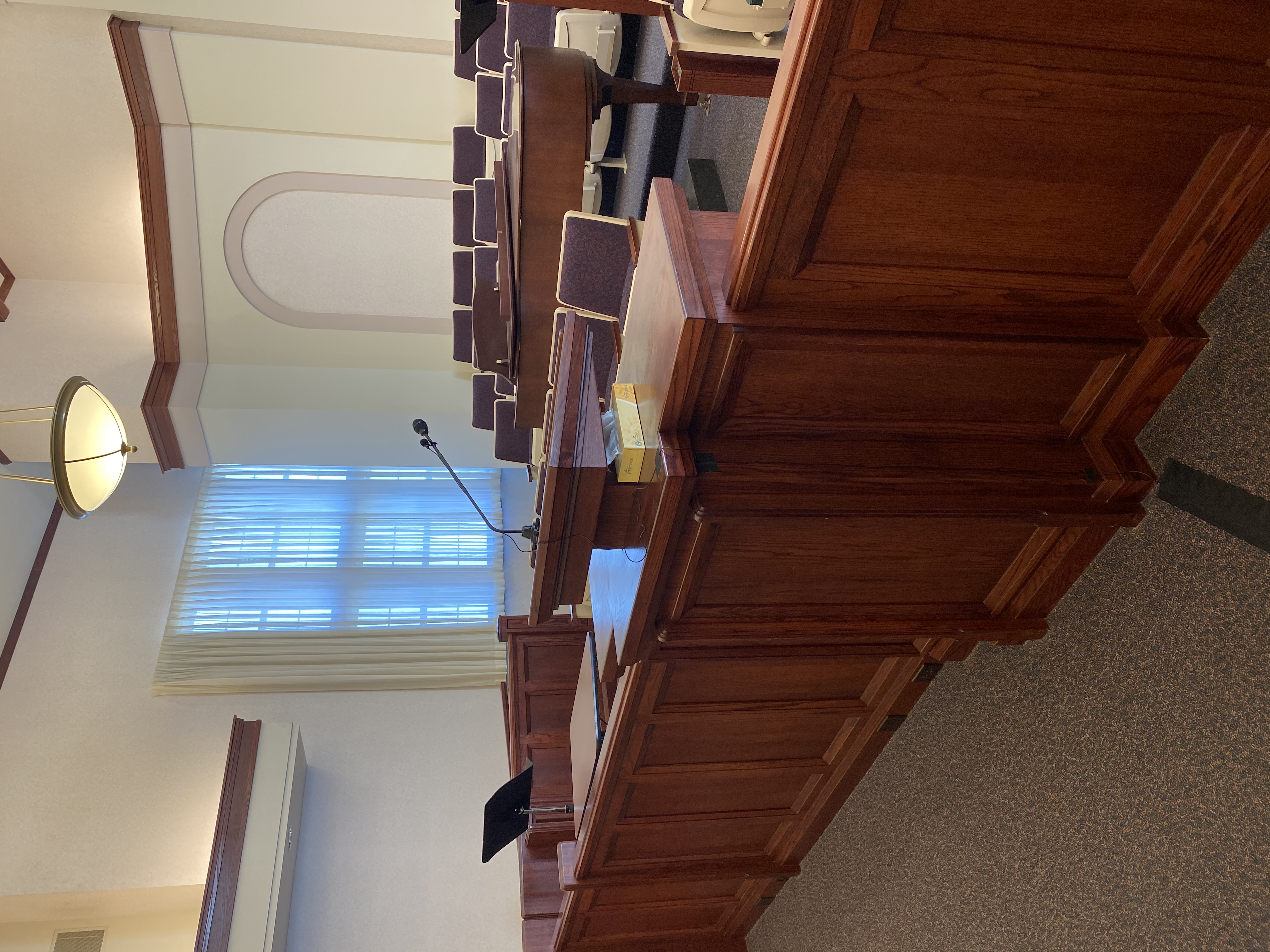
#112
lajackson wrote: Sun Apr 30, 2023 8:49 am
derrickfulkerson wrote: Sun Apr 30, 2023 8:00 am I’ve thought about going back to the Teradek and streaming to YouTube . . .
This is what we do for units in our stake center. Turn on the encoder. Hold the meeting. Turn off the encoder. No need for laptops or other devices. I reset the YouTube event each week to reuse the same settings, so they do not even need to reprogram the encoder during the week.

Our pulpit microphone does a fairly decent job of picking up the organ sound.
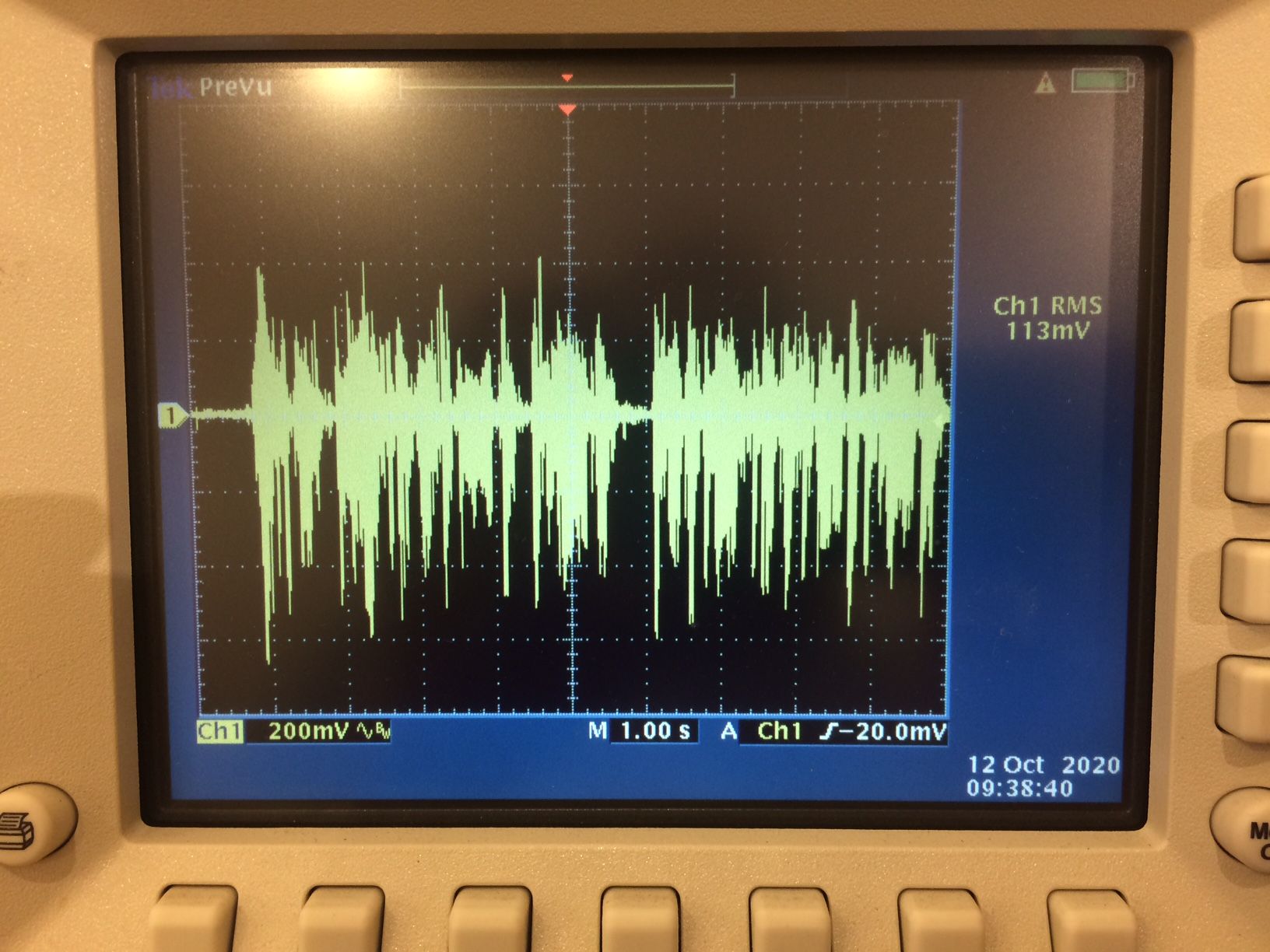
I’d like to be able to do this but the output from our mounted camera is in the first overflow and there are no audio inputs or outputs there. For stake Conference we run a snake cable back to the overflow to get audio (and send audio), but that is not feasible for weekly meetings.

We would also need some kind of built in cabinet to house the teradek and hide cables.