StickyChurch Webcasts using YouTube Live Streams

123 postsstarted by bretbassett 146,731 viewsoriginal topic

Church Employee
#1
Please find attached a document describing how to use YouTube's Live Streaming service for Sacrament Meeting broadcasts.
📎 YouTube Streaming.pdf (217.24 KiB)
New Member
#2
I tried this and the YouTube app says you need to have 1000 YouTube subscribers to your channel as one of the pre-requisites to do live streaming. Did I miss something? This seems like a high bar for being generally useful for the Sacrament Meeting broadcasts.
Church Employee
#3
Read closer. The 1,000 person limit is if you want to run a Youtube Live from your cellphone. If you're coming from a laptop or computer, there is no required audience number.
Community Administrator
#4
bretbassett wrote:The 1,000 person limit is if you want to run a Youtube Live from your cellphone.
More specifically, I think it's if you want to use the YouTube mobile app. But if you use an app like Larix Broadcaster, I think you can do it from a cell phone.
Have you searched the Help Center? Try doing a Google search and adding "site:churchofjesuschrist.org/help" to the search criteria.

So we can better help you, please edit your Profile to include your general location.
New Member
#5
I've done several Ward Devotional Live Streams to YouTube from my home PC and OBS, since I have fiber internet. I usually select a higher bitrate and It has worked great. Has anyone tried live streaming to youtube from the Church? What bitrate should be used when streaming from the church? Is it feasible to broadcast in HD? I tried a speedtest there and was only getting .02 upload speed.
Community Administrator
#6
josephchild wrote:Has anyone tried live streaming to youtube from the Church? What bitrate should be used when streaming from the church? Is it feasible to broadcast in HD? I tried a speedtest there and was only getting .02 upload speed.
Not all buildings are the same.

While written for the church webcast, I'd suggest Webcast Network Health and Encoder Settings to assess your situation.

My ward has done it in a building with 10 Mbps upload. I'm not sure what settings they used.
Have you searched the Help Center? Try doing a Google search and adding "site:churchofjesuschrist.org/help" to the search criteria.

So we can better help you, please edit your Profile to include your general location.
New Member
#7
Thanks. I was using the speedtest app to check speeds, as well as the built in speedtest on google.com. Both were showing abysmal speeds. I figured something is configured in the router to block these type of connections. Perhaps someone has been by to re-configure. I'll go down to the church this evening and try it again, and follow some of the advice in the network health document.
Community Administrator
#8
josephchild wrote: I'll go down to the church this evening and try it again, and follow some of the advice in the network health document.
You might try power cycling things. Modems and routers are computers too and can suffer the same issues.
Have you searched the Help Center? Try doing a Google search and adding "site:churchofjesuschrist.org/help" to the search criteria.

So we can better help you, please edit your Profile to include your general location.
New Member
#9
I was able to successfully stream to youtube this evening from the chapel. We have an ethernet port at the podium, so I connect to the network from there. Not sure what changed when I did it tonight.. when I've checked speedtest before, it would time out or show really slow results (even when I first tried tonight it did this). When I attempted to stream from OBS , it actually streamed and was mostly stable. When I checked the speed test again after that, I was getting 30+ down and about 5 up. Not ideal for streaming.. but it worked. I changed my output in OBS to 720p from 1080p and changed my OBS network settings to auto adjust the bitrate instead of dropping frames just to compensate. It was holding the bitrate for the most part around 4000-5000. At times it would dip to 1000 or 1500 .. YouTube did not like that.. it doesnt like anything under 3000. I do worry that on Sunday there will be a lot more congestion on the network and make it much harder to hold a stable stream. I wouldnt mind powercycling everything beforehand, but we dont have keys to the network closet. I think only the FM group or the stake might have those.
Community Administrator
#10
josephchild wrote:I wouldnt mind powercycling everything beforehand, but we dont have keys to the network closet. I think only the FM group or the stake might have those.
Do you have access to the circuit breakers? <grin> I've got one building where everything is in a locked cabinet. That's how I have them reset things.

Just note that it may take 5 minutes or so before things are up and running again.
Have you searched the Help Center? Try doing a Google search and adding "site:churchofjesuschrist.org/help" to the search criteria.

So we can better help you, please edit your Profile to include your general location.
Community Moderators
#11
josephchild wrote:I do worry that on Sunday there will be a lot more congestion on the network and make it much harder to hold a stable stream.
It's a valid concern for buildings with marginal Internet speeds. One solution is to ask the Stake Technology Specialist if he would shut off the WiFi to your building for the duration of your sacrament meeting. He has the tools to do that.
So we can better help you, please edit your Profile to include your general location.
New Member
#12
So the bottom line as I understand it is that you need at least 5+ MB upload speed to successfully broadcast from the building? I am assuming you disable all AP's prior to streaming? We are working to come up with a good solution as we have been given clearance to meet physically in two weeks (following general conference). We will be testing a MEVO to see if that solution will work in our buildings. Looking for assistance from any who have been down this road... Thank you.
Community Administrator
#13
rickdez wrote:So the bottom line as I understand it is that you need at least 5+ MB upload speed to successfully broadcast from the building?
You can go with less, although at some point the quality suffers.

I'd suggest looking at the document Webcast Network Health and Encoder Settings.

rickdez wrote:I am assuming you disable all AP's prior to streaming? ... We will be testing a MEVO to see if that solution will work in our buildings.
That would be nice, but some solutions require the use of WiFi to stream. Note that Mevo requires an adapter to use a wired connection.
Have you searched the Help Center? Try doing a Google search and adding "site:churchofjesuschrist.org/help" to the search criteria.

So we can better help you, please edit your Profile to include your general location.
New Member
#14
Typically, if you use an encoder like the Teradek, your bitrate runs around 5Mbps in 1080p. in 720p your bitrate will be closer to 2Mbps upload - OBS requires more, with more latency. However, be careful messing around if you aren't the STS in your stake. You have a great stream in 720p where you aren't taxing the upload, that is if you have enough bandwidth. If you have a more limited internet at your building, have your STS turn off the WiFi for broadcasts and use the network at the podium. You will not be fighting with all of the members whose phone picks up the Liahona network - which will drop your available access to upload your stream.

A great tool is just using a Webcam and stream via the Webcam connection, like using a Logitech webcam with the mic built in. It will pick up a great cast for members who cannot attend church. the STS should be aware of the letter submitted by the church on Sept 25 about ward broadcasts. If you aren't an STS, seek their help, if you are an STS - use the tools the church has provided to help in all of these situations.
New Member
#15
Thank you for the input. I am the STS and have been reading the streams and documents on these topics throughout most of the day. We will be trying out the MEVO streaming to YouTube solution on our existing bandwidth at our three buildings this week. I plan to disable the AP and wire the device directly via ethernet to the switch so we can hopefully squeeze out every oz. of available bandwidth.
New Member
#16
We did have a successful stream of Sacrament today to Youtube. Like I said in a previous post, I downgraded my video output to 720p in OBS and set the OBS network settings to adjust the bitrate as needed. It seemed to handle everything on the 5mb Upload connection. I was worried about network congestion, but we purposely did not ask members to turn off their devices. I wanted to see how it handled with everyone still connecting. Besides, since we don't have hymnals out for people to use, they need to be able to pull up the hymns on their phones! lol. I am not the STS (I just do streaming as a hobby so I get pulled in to help out), but am in our bishopric, so I was able to sit on the stand and monitor the stream from my laptop. It was nice to be able to see the face of our speaker (via the video camera) for the first time in a long time! haha.
New Member
#17
rickdez wrote:We will be trying out the MEVO streaming to YouTube solution on our existing bandwidth at our three buildings this week. I plan to disable the AP and wire the device directly via ethernet to the switch so we can hopefully squeeze out every oz. of available bandwidth.
May I ask how the stream went? We have been looking at the MEVO vs just a webcam and computer setup. Can you connect a receiver in the MEVO's 3.5mm jack as a mic?
New Member
#18
I would like to stream to YouTube from my Stake Center via the VidiU device. When I attempt to connect to YouTube for VidiU to pull my stream I continually get a network response of "Broadcast-Error: "Connection:Cannot resolve address []" - The previous STS here was able to stream from this device a while back, so he believes it should still work. There is a direct ethernet connection to the VidiU device. I'm guessing the firewall might be blocking the device from reaching YouTube? Any ideas how I can debug this or get this to work? Any help would be greatly appreciated.
Community Administrator
#19
Jvb182 wrote:"Broadcast-Error: "Connection:Cannot resolve address []"
The [] makes me think the server address hasn't been set up.

You might check what the filter level on the firewall has been set to. If it's any higher than the minimum, it might be filtering it.
Have you searched the Help Center? Try doing a Google search and adding "site:churchofjesuschrist.org/help" to the search criteria.

So we can better help you, please edit your Profile to include your general location.
New Member
#20
cunhaka wrote:
rickdez wrote:We will be trying out the MEVO streaming to YouTube solution on our existing bandwidth at our three buildings this week. I plan to disable the AP and wire the device directly via ethernet to the switch so we can hopefully squeeze out every oz. of available bandwidth.
May I ask how the stream went? We have been looking at the MEVO vs just a webcam and computer setup. Can you connect a receiver in the MEVO's 3.5mm jack as a mic?
I'm using the MEVO Start in 2 buildings. Direct ethernet connection via the PoE adapter, that way WiFi & battery power isn't a variable. I am running an aux cable from the pulpit record out straight to the MEVO device for direct audio from the church system, and it sounds great. For songs and whatnot I just switch the audio device from the AUX input to the MEVO device to pick up more of the room.
New Member
#21
russellhltn wrote:
Jvb182 wrote:"Broadcast-Error: "Connection:Cannot resolve address []"
The [] makes me think the server address hasn't been set up.

You might check what the filter level on the firewall has been set to. If it's any higher than the minimum, it might be filtering it.
The firewall is on the lowest setting. What do you mean the server address hasn't been set up? Ahh...like it's not configured or setup to YouTube correctly?
Community Administrator
#22
Jvb182 wrote:What do you mean the server address hasn't been set up? Ahh...like it's not configured or setup to YouTube correctly?
I'm expecting to see the server's name in the "[]". And the fact there is no name indicates the problem. The name hasn't been entered into the VidiU. At least not in the place where it needs it to be.
Have you searched the Help Center? Try doing a Google search and adding "site:churchofjesuschrist.org/help" to the search criteria.

So we can better help you, please edit your Profile to include your general location.
Community Moderators
#23
Jvb182 wrote:...like it's not configured or setup to YouTube correctly?
Possibly. Did you enter your YouTube login credentials into the VidiU, or did you just get the RTMP info from your scheduled YouTube Live event? In either case, here are some instructions from Teradek that may be helpful:

https://support.teradek.com/hc/en-us/articles/217446427-VidiU-YouTube-Live-Setup
So we can better help you, please edit your Profile to include your general location.
New Member
#24
There has been a lot of confusion on this topic, at least in our area. I've been asked to help our ward out.

The week before our first Sunday's broadcast, I had setup a youtube channel to take care of the broadcast and all was working well in my tests. We were then told NOT to use a live streaming service like Youtube or Facebook Live so I switched to Zoom and it worked great for our first broadcast, except I had to diligently monitor the screen the whole time on my laptop prepared to shut off anyone's video if they joined with it on. You can then disable it for the rest of the meeting if they do turn it on, but you can't disable it until they turn it on (so weird for zoom to do it that way). So I much prefer the option to use youtube now that we are told it IS approved to use. You can auto-disable audio in Zoom once you start the broadcast, but you have to remember to do that after you start your video event, then chose the checkbox to auto-mute all for that event, but hopefully that's a mute point now that we can use youtube live.

Youtube works well, except in my case, I believe the church firewall is doing something to the stream as it will crash after about 10 minutes and then I have to start a whole new session with a new URL. Has anyone come up with a solution for that issue (or maybe I'm doing something wrong)? Are you sharing the link to the event or to your channel. I feel that sending viewers to the channel is better in case anything goes wrong with the direct link, they can still find any updated meeting broadcasts in the channel?? Thoughts??

Our STS is checking the filtering level that our building, but I still suspect it may be doing some filtering with youtube.com, otherwise the only other issue could be upstream bandwidth.

I can't recommend highly enough to use the building sound instead of a webcam or omni mic, audio is the most important aspect of a meeting, it doesn't matter how well your video is if you can't understand the speaker it will only frustrate the viewers. So make sure you have a sound feed going into your stream from the building sound system. In our case, we had to tap into the pulpit mike with an xlr splitter cable and run it into a mini mixer with USB to plug into the streaming laptop. I recommend you do a full walk-through and test it out with someone viewing your test streams for good audio and video, there's nothing worse than running into issues during the meeting!!

Good luck, and hopefully we can all learn a thing or two on here and share our experiences.

John
Community Moderators
#25
johnv wrote:You can auto-disable audio in Zoom ... but hopefully that's a mute point now that we can use youtube live.
Nice pun. :)
johnv wrote:I feel that sending viewers to the channel is better in case anything goes wrong with the direct link, they can still find any updated meeting broadcasts in the channel?? Thoughts??
I think if you send someone to the channel, the video has to be public for people to be able to find it – it can't be "unlisted." That may or may not be a concern.
Samuel Bradshaw • If you desire to serve God, you are called to the work.
Community Moderators
#26
johnv wrote:Youtube works well, except in my case, I believe the church firewall is doing something to the stream as it will crash after about 10 minutes and then I have to start a whole new session with a new URL.
If you're getting through at all, then it's not a firewall issue. Are you streaming to YouTube using a Teradek VidiU, or some other means? Can you let us know your streaming settings, mostly video bitrate, and what your building's upload rate is? I'm hoping you're using a wired connection and not wireless for the uplink. Finally, is the WiFi still active in the building during your webcast?
So we can better help you, please edit your Profile to include your general location.
New Member
#27
Also having this problem. Was able to successfully link the teradek (from the teradek) to our youtube account. I can, from the teradek, see and create events, but as soon as I try to broadcast, I get the error.

In terms of [] being blank, I don't see any place within the app (on iphone, connected via wifi to vidiu directly) to set anything, as the setup process simply asks me to go to google.com/device, enter the code the vidiu gives me, and then it's synced...

I also checked the filter and it says "managed" (not "moderate" or "strict").

Anyone that has it successfully working - please let us know what you did.
Community Administrator
#28
Have you searched the Help Center? Try doing a Google search and adding "site:churchofjesuschrist.org/help" to the search criteria.

So we can better help you, please edit your Profile to include your general location.
New Member
#29
No. Tried that first before coming here.
Member
#30
Can you use an iPad for YouTube live streaming or do you have to use a laptop?
Community Administrator
#31
mmkids6 wrote:Can you use an iPad for YouTube live streaming or do you have to use a laptop?
The app described in the first post of this thread will work on Android and iOS, including iPads.

If you have a laptop, you can just use the web page, but my understanding is that you have to have 1,000 subscribers to use YouTube's own app on any mobile devices.
Have you searched the Help Center? Try doing a Google search and adding "site:churchofjesuschrist.org/help" to the search criteria.

So we can better help you, please edit your Profile to include your general location.
New Member
#32
Anyone else had the experience that when you stop the stream for the Sacrament that YouTube redirects your viewers to other religious videos on YouTube (not from our church)? We did during our first video test streams a few weeks ago, and while it might be somewhat amusing for a test, it's not ideal to have your viewers redirected against your will. I believe it can be avoided by configuring a "repeating" event and using it, instead of a one-time scheduled event, but...

I used to use only YouTube for our Stake events because of all the problems we used to have with the Church Webcast site, but have kept trying to see how it has improved. Last year we simulcasted Stake Conference on both the church webcast site and YouTube, and both worked very well for us, so with the "redirection" issue, we've been using the church Webcast system now with great results, and even written automation scripts to automatically configure and start OBS Studio (I've posted about it elsewhere on the forum if you are interested). While still not quite as good as YouTube, the Church Webcast system is looking quite good these days. Kudos to the development team - while I wouldn't have built it on Azure, it's better than it used to be, and appears to be set up to scale as much as needed.

OBS Studio has far more flexibility on configuring bitrates, so for our building with only 768k upload speed, a 500 kbps video stream plus 32-48 kbps audio works, as long as you've disabled WiFi in the building. While I use a pretty sophisticated setup for Stake Conference (with equipment I own), OBS Studio on an inexpensive older computer works very well for weekly meetings. We're using 2009-era iMac computers purchased surplus, at a cost of $50 each, including adding a second Gig of memory. Running Ubuntu brings new life to old computers and saves a lot of machines from the landfill, while saving cost. Even a Raspberry Pi (with a camera, SD card, case, cables, and so on) costs more.
New Member
#33
mmkids6 wrote:Can you use an iPad for YouTube live streaming or do you have to use a laptop?
https://support.google.com/youtube/answer/2853834?hl=en

To broadcast from a mobile device you need to have at least 1,000 YouTube subscribers. I'm not sure if an iPad is considered a "mobile device."
Laptops have no such restriction.
Community Administrator
#34
BubbaBollinger wrote:To broadcast from a mobile device you need to have at least 1,000 YouTube subscribers.
That's true if using the YouTube app. If you use another app like Larix Broadcaster, you can circumvent that restriction.
Have you searched the Help Center? Try doing a Google search and adding "site:churchofjesuschrist.org/help" to the search criteria.

So we can better help you, please edit your Profile to include your general location.
New Member
#35
Broadcast-Error: "Connection:Cannot resolve address []
I'm replying largely to get notifications on this topic, because we're still stopped on that error from the Teradek/Vidiu. Everything's set up--we have for a long time broadcasted Stake conference to remote buildings, I can see my feed on the vidiu app and YouTube Live's preview, but the moment I push Go Live on Youtube, I get Broadcast-Error: "Connection:Cannot resolve address []. Now that I type it that way it makes me wonder whether some ytimg-type subdomain of youtube maybe specific to broadcasting, is being blocked. Because it's working internally, and can't resolve that null address with no option to set a custom address. Anyway, these last two weeks we set up a laptop with a webcam in the front row and had to broadcast by tethering to my cell phone. That's going to cost me as much as a vidiu within a few months! (not really, but still...) Thoughts?
New Member
#36
My stake has been using Youtube live for a few weeks now with great success.

We are using laptops with 2 USB ports and one Ethernet port -- one for a webcam mounted right in front of the podium and one for a USB audio adapter, pulling the audio from the line-out jack under the Sacrament table. We are using the Ethernet jack by the podium and turning off wi-fi to save bandwidth for the broadcast. [For Apple laptops USB-C adapters to provide USB and Ethernet have worked].

We've used Chrome with YouTube Live webcam broadcasts. This eliminates the need for having software installed (only the Chrome browser is required) as well as the need to learn OBS or other broadcasting tools.
New Member
#37
Last week 10/18 was our first live stream for Sacrament meeting. We have 4 wards in our building which is about 10 years old. We ran a continuous youtube live stream from before the first meeting till after the 4th meeting. The laptop runs OBS and we selected a scene that had no camera or sound during the sacrament. Our stream worked fine the whole 5+ hours.
New Member
#38
Our ward has been using youtube live (webcam) for a couple of weeks. Everything has gone smoothly with one exception. Our setup is a laptop (internal camera) and line-in audio from the pulpit microphone (RCA jacks). When someone is at the pulpit, the audio is perfect. However, when the organ is playing prelude and/or we're singing a song, the audio (as it is received by a viewer at home) fluctuates up and down. To isolate the problem (see it was the sound system or something else), I recorded my wife playing the organ. I first recreated the problem with youtube live and webcam option. Then, I used "audicity" and I recorded her playing. The play back was perfect, no fluctuation. Conclusion, youtube live is not handling the audio very well. I've sent a comment to youtube about the issue and have not yet gotten any feed back. Has anyone else experienced this? Any comments or suggestions? Would using OBS improve this? Or is this a problem we have to wait for youtube to address?
Community Administrator
#39
evancpugh wrote:I first recreated the problem with youtube live and webcam option. Then, I used "audicity" and I recorded her playing. The play back was perfect, no fluctuation. Conclusion, youtube live is not handling the audio very well.
I think you're on the right track. You might want to explore YouTube live's settings for something like a noise gate. If you find it, disable it.

You could also try an external mixer to adjust the sound going into the laptop to keep it happy. But that's extra setup.

OBS would be one of the tools, but I understand it's got a bit of a learning curve. It would be nice to keep everything simple so someone else can take over if conditions require it.
Have you searched the Help Center? Try doing a Google search and adding "site:churchofjesuschrist.org/help" to the search criteria.

So we can better help you, please edit your Profile to include your general location.
New Member
#40
Because the test using audacity resulted in near perfect reproduction of the sound (organ), a mixer wouldn't help. I see no settings at all especially for audio. I'm pretty sure it is a youtube live issue, but when they might address this.. COV-19 will be a thing we'll be talking to our grandkids about.
Community Administrator
#41
evancpugh wrote:Because the test using audacity resulted in near perfect reproduction of the sound (organ), a mixer wouldn't help.
I suspect the issue is that during the musical portion, the audio is much weaker and YouTube live is reacting to that. You can test that in audacity by comparing the volume while speaking at the mic with the music.

I think you'll find that you'll want to bring the volume up during the musical portions of the program so the music isn't too soft. Fix that and YouTube live will likely fix itself.

A mixer would give you more control over the signal level that goes into the laptop.
Have you searched the Help Center? Try doing a Google search and adding "site:churchofjesuschrist.org/help" to the search criteria.

So we can better help you, please edit your Profile to include your general location.
New Member
#42
Read my text a little closer. Because of the poor results from our last two sacrament meetings, I've gone over to the church with my wife, who plays the organ, and run several tests. I first recorded with audacity and it was perfect, no fluxtuations at all. Then I would do a youtube live using Chrome, the results were fluctuations continually - very poor. Today, I went over and checked the internet speed (CenturyLink - wow an amazing down load speed of 10-12 Mb and upload speed of about 5 mb) I'm running at home 120 Mb and upload of 5.7 Mb - comcast. Maybe the church ought to switch to comcast or pay a little more and get a faster speed. But aside from the gripes, I ran a test with Edge, Firefox and another test with Chrome. Consistantly, Edge and Chrome were pretty much horrible but Firefox was actually fair - better than the other two. I found this interesting. My conclusion so far is it may be internet speed related and not an issue with youtube live. As mentioned, when someone is at the pulpit speaking, the sound is flawless. But of the sacrament experience, to enjoy the prelude music and singing, it would be nice to fix this out.
Community Administrator
#43
Unless your chapel is one of those that run the organ though the sound system, any music is just ambient pickup by the podium mic which is intended for close speaking. There's going to be a significant difference in audio levels. That could mess with any YouTube logic trying to determine if this is a weak sound that needs to be boosted, or just background noise that should be suppressed.

The upload speed (which is what counts here) is a little on the low side. The low bandwidth of the download leaves me concerned that members' phones are taking up some bandwidth and interfering with the webcast. If you can wire the laptop and turn off the WiFi, that would be something to consider. However, I'd think bandwidth issues would sound like "music on hold as experienced by a cell phone user" (a burble sound), not the in/out that I think you're describing.

What control do you have over YouTube's settings? You may want to reduce the resolution of the video so there's more bandwidth for the audio or see what audio settings you have.

You may need to switch to something like OBS to get better control over the situation.
Have you searched the Help Center? Try doing a Google search and adding "site:churchofjesuschrist.org/help" to the search criteria.

So we can better help you, please edit your Profile to include your general location.
Member
#44
evancpugh wrote:Our ward has been using youtube live (webcam) for a couple of weeks. Everything has gone smoothly with one exception. Our setup is a laptop (internal camera) and line-in audio from the pulpit microphone (RCA jacks). When someone is at the pulpit, the audio is perfect. However, when the organ is playing prelude and/or we're singing a song, the audio (as it is received by a viewer at home) fluctuates up and down. To isolate the problem (see it was the sound system or something else), I recorded my wife playing the organ. I first recreated the problem with youtube live and webcam option. Then, I used "audicity" and I recorded her playing. The play back was perfect, no fluctuation. Conclusion, youtube live is not handling the audio very well. I've sent a comment to youtube about the issue and have not yet gotten any feed back. ..........
It may seem like youtube is the culprit because you get a clean signal in audacity, but it's also possible audacity is controlling/changing some audio setting of your laptop.

It's worth verifying the ControlPanel/Sound settings (PC), or SystemPreferences (Apple), to make sure the audio signal level is approaching 75-100% when someone is speaking at the pulpit. If you have low signal level, and the input have AGC=On, you might get some strange results.

Also, it is possible your laptop is still using it's built-in mic (while you webcast to youtube) even though you connect to the external mic jack? You could check this by doing a short youtube webcast, tap the pulpit mic and then tap the laptop mic.

It would also be helpful if you could tell us the make and model of laptop, and if you have a single TRRS audio connector or if you have 2 audio connectors (mic & headphone), as well as the cable type and any attentuator in use.
Community Administrator
#45
A question for those using YouTube live. I have a ward that is having problems with it.

From what I'm told:
  • The equipment being used is barrowed, owned by someone other than the operator. Each week it arrives in a unknown state.
  • There is no preview with YouTube live so you can be sure the external webcam is selected. (as opposed to the webcam built-into the laptop).
  • You can't switch webcams once the stream starts.
  • Stopping the stream cancels it, forcing a last-second email to the membership about the new link
I personally haven't tried YouTube live. Is there something my operator is overlooking to make sure the webcast uses the right camera from the get-go?
Have you searched the Help Center? Try doing a Google search and adding "site:churchofjesuschrist.org/help" to the search criteria.

So we can better help you, please edit your Profile to include your general location.
New Member
#46
russellhltn wrote:
I personally haven't tried YouTube live. Is there something my operator is overlooking to make sure the webcast uses the right camera from the get-go?
we had this same problem in our stake this last Sunday. We were going to test it this week to make sure... but it appears that you should schedule the live stream from the computer with the camera attached that you plan to use for the broadcast. When you set up the livestream it locates the external camera on the machine and expects to find that when the broadcast starts. At least from what I can tell that was the issue.
Community Administrator
#47
engjake wrote:but it appears that you should schedule the live stream from the computer with the camera attached that you plan to use for the broadcast.
Ouch. Since the equipment is borrowed, I don't know as the machine is available when the event is scheduled. Trying to do the scheduling and sending of the link 10-15 minutes before hand could be a problem.
Have you searched the Help Center? Try doing a Google search and adding "site:churchofjesuschrist.org/help" to the search criteria.

So we can better help you, please edit your Profile to include your general location.
New Member
#48
Just a quick note on sound quality with Youtube streaming. If the left and right channels are out of phase (polarity swapped on one of them maybe?), the Youtube audio algorithms will have issues as it does some kind of linked encoding between the left and right channels. With one of our wards we didn't yet have an audio feed out of the amp rack, so I patched into the monitor from the hearing impaired system. That worked fine with the church webcaster, and I could easily record the sound on a laptop as was mentioned above, but in youtube it sounded awful, completely corrupted. I finally took the Teradek up by the pulpit where there's a line-out feed and that worked just fine. I can't find the document online where I first read about this problem. Hope this kind of helps.
Member
#49
russellhltn wrote:A question for those using YouTube live. I have a ward that is having problems with it.

From what I'm told:
  • The equipment being used is barrowed, owned by someone other than the operator. Each week it arrives in a unknown state.
  • There is no preview with YouTube live so you can be sure the external webcam is selected. (as opposed to the webcam built-into the laptop).
  • You can't switch webcams once the stream starts.
  • Stopping the stream cancels it, forcing a last-second email to the membership about the new link
I personally haven't tried YouTube live. Is there something my operator is overlooking to make sure the webcast uses the right camera from the get-go?
You can use VLC https://www.videolan.org/index.html to preview the webcam video before you "GoLive" with youtube. This would be useful to get the exposure and framing of the pulpit area.

You can use the free program "Orban Loudness Meter" https://www.orban.com/freeorbanloudnessmeter to check and adjust your audio levels (use the peak meter and adjust audio level to be close to-yet stay out of the red overload area)

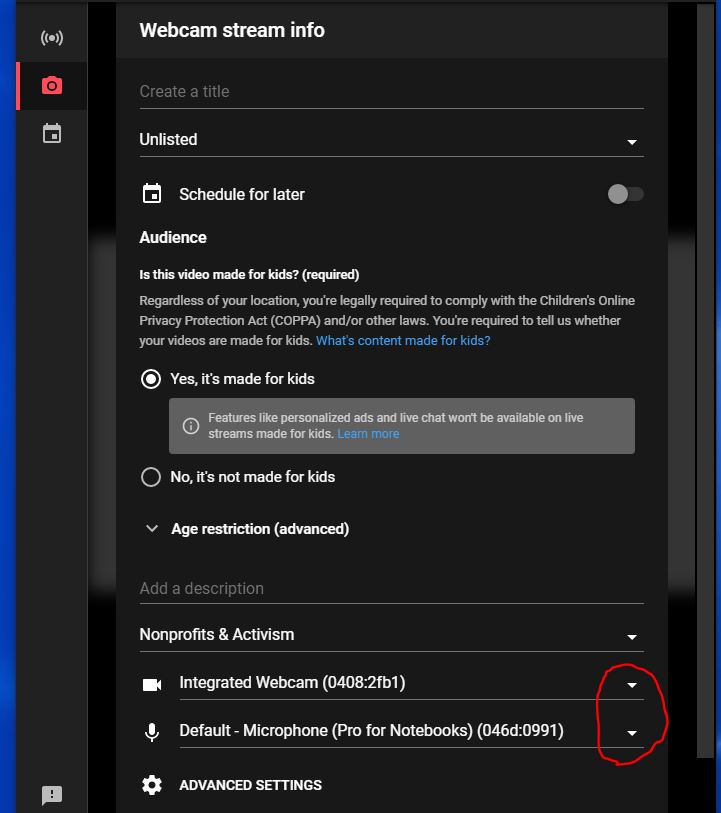
Once your video looks good and the audio level is good you can "Go Live". When you Go Live look for the "More Options" button. Press the button and select which webcam and microphone you want to use. See attachments for Go Live screen captures showing the webcam and mic selection.
New Member
#50
If you are using the Chrome browser for the live stream, when you start it the selection for both camera and audio are now on the same screen. You can see the video in the background behind the dialog box to verify you have the right camera.
New Member
#51
mashcraft wrote:My stake has been using Youtube live for a few weeks now with great success.

We are using laptops with 2 USB ports and one Ethernet port -- one for a webcam mounted right in front of the podium and one for a USB audio adapter, pulling the audio from the line-out jack under the Sacrament table. We are using the Ethernet jack by the podium and turning off wi-fi to save bandwidth for the broadcast. [For Apple laptops USB-C adapters to provide USB and Ethernet have worked].

We've used Chrome with YouTube Live webcam broadcasts. This eliminates the need for having software installed (only the Chrome browser is required) as well as the need to learn OBS or other broadcasting tools.
I've updated the document to match some changes to the Youtube UI.
Senior Member
#52
russellhltn wrote:A question for those using YouTube live. I have a ward that is having problems with it.

From what I'm told:
  • The equipment being used is borrowed, owned by someone other than the operator. Each week it arrives in a unknown state.
  • There is no preview with YouTube live so you can be sure the external webcam is selected. (as opposed to the webcam built-into the laptop).
  • You can't switch webcams once the stream starts.
  • Stopping the stream cancels it, forcing a last-second email to the membership about the new link
I personally haven't tried YouTube live. Is there something my operator is overlooking to make sure the webcast uses the right camera from the get-go?
We use OBS with YouTube, which has a preview and you can of course switch audio and video after scheduling.
If the broadcasts are public, people don't need a link, they can just search for it and/or subscribe to the channel.
Craig
Saint George, UT
Senior Member
#53
CalS201 wrote:
evancpugh wrote:Our ward has been using youtube live (webcam) for a couple of weeks. Everything has gone smoothly with one exception. Our setup is a laptop (internal camera) and line-in audio from the pulpit microphone (RCA jacks). When someone is at the pulpit, the audio is perfect. However, when the organ is playing prelude and/or we're singing a song, the audio (as it is received by a viewer at home) fluctuates up and down. To isolate the problem (see it was the sound system or something else), I recorded my wife playing the organ. I first recreated the problem with youtube live and webcam option. Then, I used "audicity" and I recorded her playing. The play back was perfect, no fluctuation. Conclusion, youtube live is not handling the audio very well. I've sent a comment to youtube about the issue and have not yet gotten any feed back. ..........
It may seem like youtube is the culprit because you get a clean signal in audacity, but it's also possible audacity is controlling/changing some audio setting of your laptop.

It's worth verifying the ControlPanel/Sound settings (PC), or SystemPreferences (Apple), to make sure the audio signal level is approaching 75-100% when someone is speaking at the pulpit. If you have low signal level, and the input have AGC=On, you might get some strange results.
We are using YouTube with OBS and haven't had this problem when using the building audio. But we had a similar problem with a previous audio source; turns out it had built-in noise reduction, and the music was apparently at its threshold of what it thought was noise. Perhaps YouTube native encoding has this; otherwise it seems like AGC as Cal mentioned.
Craig
Saint George, UT
New Member
#54
What we found works well is an old Pixel 3a purchased on ebay (~$60) that had defects we didn't mind (screen streaking). The phone is factory default except for adding the Larix Broadcaster app. We then have a TRRS -> TRS audio cable with the needed resistors to allow the phone to detect the audio as Mic input. The audio output from the PA is mini jack right at podium (Our building A/V was updated last year).

We the purchased a gooseneck phone holder that clips to the podium. The setup is very plug and play pretty much click through wifi, launch app tap record. Watch for video to go live on YouTube Studio. Links are pre-scheduled and in the ward calendar. We use the same stream key so no messing with the phone is needed. Then just start/stop the stream via YouTube Studio. Phone goes back into the clerk's office on the charger during the week.

This has the benefit of the device always being at the church. It's not tied to a person who may not be there is they get sick or have other issues.

When streaming started we moved our sacrament to the end of the meeting per the guidance given. This way there is no messing with cutting audio/video in the middle. Those at home don't have to wait for an unknown amount of time for the meeting. For those at home the meeting ends up being about 30-40min. Those in person stay the extra 15 min for the sacrament.
New Member
#55
I got around it by dropping to port 80. so try http://... vs https://...
New Member
#56
jkarras wrote:What we found works well is an old Pixel 3a purchased on ebay (~$60) that had defects we didn't mind (screen streaking). The phone is factory default except for adding the Larix Broadcaster app. We then have a TRRS -> TRS audio cable with the needed resistors to allow the phone to detect the audio as Mic input. The audio output from the PA is mini jack right at podium (Our building A/V was updated last year).

We the purchased a gooseneck phone holder that clips to the podium. The setup is very plug and play pretty much click through wifi, launch app tap record. Watch for video to go live on YouTube Studio. Links are pre-scheduled and in the ward calendar. We use the same stream key so no messing with the phone is needed. Then just start/stop the stream via YouTube Studio. Phone goes back into the clerk's office on the charger during the week.

This has the benefit of the device always being at the church. It's not tied to a person who may not be there is they get sick or have other issues.

When streaming started we moved our sacrament to the end of the meeting per the guidance given. This way there is no messing with cutting audio/video in the middle. Those at home don't have to wait for an unknown amount of time for the meeting. For those at home the meeting ends up being about 30-40min. Those in person stay the extra 15 min for the sacrament.
I am using an old phone that does not have mobile network service. But after connecting to wifi, it still requires me use the internet to answer an authorization question before I can use the internet. How to I get past this problem trying to connect to the Liahona wifi at church?
Community Administrator
#57
marobert wrote:I am using an old phone that does not have mobile network service. But after connecting to wifi, it still requires me use the internet to answer an authorization question before I can use the internet. How to I get past this problem trying to connect to the Liahona wifi at church?
I'm not understanding what your saying. The WiFi will offer up the web page needed to answer the question. No other access to the internet is needed.

You may need to open the browser and attempt to access the internet to get the page.
Have you searched the Help Center? Try doing a Google search and adding "site:churchofjesuschrist.org/help" to the search criteria.

So we can better help you, please edit your Profile to include your general location.
New Member
#58
My current smartphone that I use daily, connects fine to the church wifi. Neither of my two old phones will connect. I thought it could be because they have no mobile network phone service. If I correctly understand your answer, phone service is not required to connect to wifi with a smartphone or ipad.
Next Sunday, I will try to open the browser and attempt to access the internet to get the page.
Thanks for your advice.
Community Administrator
#59
marobert wrote:Next Sunday, I will try to open the browser and attempt to access the internet to get the page.
Thanks for your advice.
Please note that the device will need to use the DNS that the church's network provides. Using your own DNS setting (perhaps done by some filtering software) may cause problems with getting to the splash screen necessary for normal access.
Have you searched the Help Center? Try doing a Google search and adding "site:churchofjesuschrist.org/help" to the search criteria.

So we can better help you, please edit your Profile to include your general location.
New Member
#60
I am using an old phone that does not have mobile network service. But after connecting to wifi, it still requires me use the internet to answer an authorization question before I can use the internet. How to I get past this problem trying to connect to the Liahona wifi at church?
If you are referring to the "accept terms of service" click-through, you can add the MAC address of the phone to the "Firewall IP Assignments" page for the building in the Technology Manager (tm.churchofjesuschrist.org, select Devices->Firewalls, then over on the right-hand side you'll see a button with three dots, which is a hidden menu, and look for "IP Assignments"). Add the device to the "nosplash" group to bypass the terms of service for that device.
Community Administrator
#61
jeremywillden wrote:If you are referring to the "accept terms of service" click-through, you can add the MAC address of the phone to the "Firewall IP Assignments" page for the building in the Technology Manager (tm.churchofjesuschrist.org
That option is only available to a few people such as the Stake Technology Specialist or Assistant Technology Specialists. It's not avilable to the general membership.
Have you searched the Help Center? Try doing a Google search and adding "site:churchofjesuschrist.org/help" to the search criteria.

So we can better help you, please edit your Profile to include your general location.
Community Moderators
#62
marobert wrote:I am using an old phone that does not have mobile network service. But after connecting to wifi, it still requires me use the internet to answer an authorization question before I can use the internet. How to I get past this problem trying to connect to the Liahona wifi at church?
A phone without mobile service or even a SIM card can connect to the Liahona WiFi just like any other device. Scroll to the bottom of the splash screen and accept the terms of use. Done.
So we can better help you, please edit your Profile to include your general location.
Member
#63
We've been successfully webcasting in our stake using the church's webcast portal for years now, and it was a fairly easy transition to using it when we started webcasting Sacrament Meetings. This year we have begun the process of moving to Zoom after the recent update from MHT. One of our challenges with Zoom is that it doesn't have an app for most (or any that I know of) smart TVs and smart TV devices (roku, firestick, etc.) One solution to that would be to utilize Zooms feature to also stream it to YouTube. Many of the smart TV/devices have a YouTube app.

What I'm wondering is whether anyone has a good solution for a pema-link for the YouTube stream? I've considered the "youtube.com/channel/YOUR_CHANNEL_ID/live", but in order for this to work your stream has to be public rather than unlisted or private. The guidelines we received from the church, however stated "YouTube Live events should be unpublished and deleted after the meeting," so setting it to public doesn't seem like the right way to go.
Member
#64
failproof wrote:.......What I'm wondering is whether anyone has a good solution for a pema-link for the YouTube stream? I've considered the "youtube.com/channel/YOUR_CHANNEL_ID/live", but in order for this to work your stream has to be public rather than unlisted or private. The guidelines we received from the church, however stated "YouTube Live events should be unpublished and deleted after the meeting," so setting it to public doesn't seem like the right way to go.
Our stake uses the free Google Sites to host a permanent webpage with links to all Sacrament Meetings on youtube and all Second Hour Classes on Zoom. The link everyone uses for Google sites is pretty short, for example "https://sites.google.com/view/YourStakeName/home". Links for the unpublished/unlisted Sacrament Meetings are updated each week by the Stake Clerk and links for the Zoom classes never change. See attachment.
Community Administrator
#65
CalS201 wrote:Our stake uses the free Google Sites to host a permanent webpage with links to all Sacrament Meetings on youtube and all Second Hour Classes on Zoom.
Nice solution, but it does raise the question of "unpublished". Is it findable by any kind of websearch?
Have you searched the Help Center? Try doing a Google search and adding "site:churchofjesuschrist.org/help" to the search criteria.

So we can better help you, please edit your Profile to include your general location.
Member
#66
russellhltn wrote: Nice solution, but it does raise the question of "unpublished". Is it findable by any kind of websearch?
If you know what search terms to use you can find MANY stake and ward webcast home pages that contain their broadcast links. In addition, any member with the home page link can share it with anyone else. Any member can also share the link to the unlisted youtube videos.
Member
#67
russellhltn wrote: Nice solution, but it does raise the question of "unpublished". Is it findable by any kind of websearch?
Doing a quick web search indicates there are setting you can invoke that will disable web searching. Also, there are settings for "Published" or "Unlisted". If it's unlisted then only people that have the link can access the webpage.
Community Administrator
#68
CalS201 wrote:If you know what search terms to use you can find MANY stake and ward webcast home pages that contain their broadcast links.
Somehow, I don't think that "All the other kids are doing it!" works. ;)

CalS201 wrote:Doing a quick web search indicates there are setting you can invoke that will disable web searching. Also, there are settings for "Published" or "Unlisted". If it's unlisted then only people that have the link can access the webpage.
Nice! That sounds like a good solution that can be set according to needs.
Have you searched the Help Center? Try doing a Google search and adding "site:churchofjesuschrist.org/help" to the search criteria.

So we can better help you, please edit your Profile to include your general location.
New Member
#69
failproof wrote:What I'm wondering is whether anyone has a good solution for a pema-link for the YouTube stream?
Each YouTube event/video is a different URL -- so to enable members to use the same link every week I use the URL shortening service rebrandly.com. I can update our short URL each week to point to the next week's video. That way the URL the members visit each week can be the same.
Member
#70
Some other ideas that we've toyed with. Have not used either yet but maybe they have some mileage for you.

Free google site:
https://sites.google.com/view/southampton/home

Google sheet:
https://docs.google.com/forms/d/e/1FAIp ... g/viewform

Can also use bitly (or other service) to shorten URL:
https://bit.ly/2Qdxmzw

We may revisit these ideas if the option of youtube streaming is put back on the table for our local unit.
Community Moderators
#71
After review of the council given us regarding live-streaming, our stake's choice was to create a Stake YouTube Channel and freely publish it to the stake membership. There, they can find their own ward's meeting(s). All meetings have comments and live-chat turned off to avoid any unwanted disruptions. 60 seconds after a stream stops uploading, that video automatically changes to "Unlisted". After reviewing each video for quality, they are deleted - but not before making a "clone" of that meeting's settings for the following week. This keeps the RTMP URL the same from week to week making it easier for the ATS's assigned to each ward. (YouTube has a nice feature allowing you to create, name, and manage reusable stream keys. You even get a friendly warning if you happen to use the same key for different upcoming live events.)

The biggest advantage is a single URL where all the meetings in the stake can be found. Some bishops have chosen to include second-hour meetings, while others have not. The actual meeting links change each week, but the static pictures don't, making it simple for a member to find a particular meeting. When a meeting goes live, it's automatically moved from the "Upcoming" list to the "Live now" list, again, making it easy to find.

The stake president has indicated that in the near future he would like the YT Live links created as "Unlisted" from the start, then email the individual links to the ward bishop (or ATS) each week so they can send them to those who have a real need to stay home. Nothing from the above YT Live procedure will change, except one switch. Everything else will be exactly as before. The difference (of course), is the links to the videos will not be visible.
So we can better help you, please edit your Profile to include your general location.
Community Moderators
#72
Mikerowaved wrote:60 seconds after a stream stops uploading, that video automatically changes to "Unlisted".
That's one way to encourage people to be on time for Church! :)
Samuel Bradshaw • If you desire to serve God, you are called to the work.
New Member
#73

Re: Webcasts da Igreja usando transmissões ao vivo do YouTube

gente quem for fazer transmissão para youtube so e preciso ativar a função de transmissão eles aprovam em ate 24h
Community Moderators
#74
I gather from this post that a Teradek VidiU encoder could be set once to stream to the proper RTMP URL and will not need to be reset if the subsequent meetings are "cloned" as they are created each week. Otherwise, the encoding device would need to be reconfigured each week. Is this correct?

I gather from the Stake YouTube Channel page that a YouTube account is able to stream two or more events simultaneously? I presume this happens because each meeting has a different RTMP URL and receives the appropriate feed from the device in that particular ward. Is this correct?

In the post you mention that the meeting link changes each week, but that the static pictures do not. Did you set up the pictures, or does YouTube do that for you?

If you switch to "unlisted" meetings, will you have to send out the meeting link to the invited members, and will it be a different link each week?

At stake conference time, do you just throw up a new event that gets added to the list?
Community Moderators
#75
lajackson wrote: Sat Oct 09, 2021 1:17 pm I gather from this post that a Teradek VidiU encoder could be set once to stream to the proper RTMP URL and will not need to be reset if the subsequent meetings are "cloned" as they are created each week. Otherwise, the encoding device would need to be reconfigured each week. Is this correct?
Correct. Subsequent webcasts can use the same RTMP key. In our stake center, 3 wards use the Teradek, so each has a "profile" saved on the Teradek that can be easily recalled by the next ward to use it.
lajackson wrote: Sat Oct 09, 2021 1:17 pmI gather from the Stake YouTube Channel page that a YouTube account is able to stream two or more events simultaneously? I presume this happens because each meeting has a different RTMP URL and receives the appropriate feed from the device in that particular ward. Is this correct?
Correct. There's no limit to the number of concurring webcasts, as long as each is using a different stream key.
lajackson wrote: Sat Oct 09, 2021 1:17 pmIn the post you mention that the meeting link changes each week, but that the static pictures do not. Did you set up the pictures, or does YouTube do that for you?
I setup the static pics, but they're not required. I just did it to help members find their ward's webcast a bit easier. One thing to remember is If they're not in a 16:9 format, then YouTube will pad either the top/bottom or sides with black bars.
lajackson wrote: Sat Oct 09, 2021 1:17 pmIf you switch to "unlisted" meetings, will you have to send out the meeting link to the invited members, and will it be a different link each week?
Yes and yes.
lajackson wrote: Sat Oct 09, 2021 1:17 pmAt stake conference time, do you just throw up a new event that gets added to the list?
Yes. I have two events prepared already for the Saturday and Sunday sessions of our stake conference next week. Our SP wishes to keep the Saturday session Unlisted and give the URL to those who need it. The Sunday session will be made Public.
So we can better help you, please edit your Profile to include your general location.
Community Moderators
#76
Mikerowaved wrote:In our stake center, 3 wards use the Teradek, so each has a "profile" saved on the Teradek that can be easily recalled by the next ward to use it.
So the ward specialist needs to access the Teradek and select the profile before each meeting? Sounds simple enough.
Community Moderators
#77
lajackson wrote: Sat Oct 09, 2021 9:30 pm
Mikerowaved wrote:In our stake center, 3 wards use the Teradek, so each has a "profile" saved on the Teradek that can be easily recalled by the next ward to use it.
So the ward specialist needs to access the Teradek and select the profile before each meeting? Sounds simple enough.
Yes, it actually is pretty simple. The ward technology specialists all know the Teradek's fixed IP address and the password to access its web interface from anywhere in the building. There's an Android app available for it also that works pretty well. (Not sure about iOS.)
So we can better help you, please edit your Profile to include your general location.
Senior Member
#78
Vidiu app also available on iOS!
Community Moderators
#79
Biggles wrote: Sun Oct 10, 2021 6:54 am Vidiu app also available on iOS!
I think there has been an iOS app since the beginning. I was just wondering if they had built an Android app. It turns out they have, but my phone is not powerful enough to run it. [sigh]
Community Moderators
#80
Mikerowaved wrote:Yes, it actually is pretty simple. The ward technology specialists all know the Teradek's fixed IP address and the password to access its web interface from anywhere in the building.
Duh. I forgot I could use the browser on my phone to get there from here.
Community Moderators
#81
How do I get YouTube to recognize that I have an encoder? I went into the VidiU and linked it to the YouTube account. But YouTube still only gives me the webcam or the streaming software option.
Community Moderators
#82
lajackson wrote: Mon Oct 25, 2021 1:15 pm How do I get YouTube to recognize that I have an encoder? I went into the VidiU and linked it to the YouTube account. But YouTube still only gives me the webcam or the streaming software option.
Rather than use the YouTube option in the VidiU, my preference is to just use Manual RTMP.

Create a new live event in YT.
In the Manual RTMP settings in the VidiU...
For the URL, enter: rtmp://a.rtmp.youtube.com/live2/ (Or whatever URL YT gives you. This usually doesn't change.)
For the Stream, enter the Stream Key from YT, in the form: xxxx-xxxx-xxxx-xxxx-xxxx
Done.
So we can better help you, please edit your Profile to include your general location.
Community Moderators
#83
Mikerowaved wrote: Create a new live event in YT.
YT will not finish creating the event until it sees my streaming software. How do I get YT to see my VidiU? I have followed the other steps for the manual setup.
New Member
#84
YT will not finish creating the event until it sees my streaming software. How do I get YT to see my VidiU? I have followed the other steps for the manual setup.
This is how I do it for youtube from a Mevo camera (essentially the same as a vidiU but with a built-in camera). I distribute our ward's youtube channel to everyone, so it doesn't matter what the video URL is each week, it changes, but the member just goes to the Channel URL and see's whatever the current broadcast is and clicks on it.

By doing this, there is no need to 'schedule' a broadcast in your Youtube Studio, just use the 'live streaming' option. Copy those settings into your vidiU RTMP settings and as soon as you 'go live' on your vidiU and start your broadcast, your Youtube Studio should reflect that and start your broadcast. I use a surface to do this each week. You could use a mobile device, laptop or other.

I thought about using the schedule option, but if something goes wrong and I need to change the URL I don't have to worry about it since we sent out the 'channel' URL instead.
Community Moderators
#85
johnv wrote: By doing this, there is no need to 'schedule' a broadcast in your Youtube Studio, just use the 'live streaming' option.
I have also tried that unsuccessfully. Either way I do it I get the "Broadcast-Error: "Connection:Cannot resolve address []" error when I try to go live from the VidiU. I linked the VidiU with YT using the code (and Google confirmed that the VidiU had signed into the account). But something else is still amiss.
Community Moderators
#86
Hopefully, this series I've started will help.

viewtopic.php?p=227877#p227877
So we can better help you, please edit your Profile to include your general location.
Community Moderators
#87
Mikerowaved wrote: Hopefully, this series I've started will help.
Thank you so very much for doing this.
Community Administrator
#88
Mikerowaved wrote: Fri Oct 29, 2021 8:53 pm Hopefully, this series I've started will help.
Looks good. I know where I'll be looking if this drops into my lap.
Have you searched the Help Center? Try doing a Google search and adding "site:churchofjesuschrist.org/help" to the search criteria.

So we can better help you, please edit your Profile to include your general location.
New Member
#89
BubbaBollinger wrote: Wed Oct 07, 2020 9:35 pm Also having this problem. Was able to successfully link the teradek (from the teradek) to our youtube account. I can, from the teradek, see and create events, but as soon as I try to broadcast, I get the error.

In terms of [] being blank, I don't see any place within the app (on iphone, connected via wifi to vidiu directly) to set anything, as the setup process simply asks me to go to google.com/device, enter the code the vidiu gives me, and then it's synced...

I also checked the filter and it says "managed" (not "moderate" or "strict").

Anyone that has it successfully working - please let us know what you did.
11/2-2021
Figured it out...YouTube changed their API, so you have to use RTMP and then use the YouTube stream API:
rtmp://a.rtmp.youtube.com/live2 and then the Stream Key they give you for the event, then under the AGENT settings (on the VidiU under Platform>RTMP) I had to change it from FMLE to Teradek, input our gmail account credentials and then I was able to stream via YouTube.
Community Moderators
#90
BubbaBollinger wrote: Tue Nov 02, 2021 9:46 am . . . then under the AGENT settings (on the VidiU under Platform>RTMP) I had to change it from FMLE to Teradek, input our gmail account credentials and then I was able to stream via YouTube.
I thought that entering the gmail account credentials would solve my problem, but it did not and I continued to get the same [] error.

However, never underestimate the power of a timely reboot. I was about to give up. I rebooted. The Teradek VidiU came up live and streaming to YouTube.

Our last Church webcast system meeting will take place this Sunday and then we will leave the system. The bishop wanted to be able to announce the new link over a Sunday for the benefit of the not too technically savvy. And I plan to use YouTube Live for our upcoming stake conference, as well.

This will have the added benefit of ending those pesky little reminder emails from mht that tried to be so helpful but were only aggravating the pain because my audiovisual rack was not wired they way they wanted it to be when it was installed in our new building several years ago. And I will be able to ignore the popup at the Webcast Portal that does not work for my installation either.

We will still part friends.
Community Moderators
#91
Our stake webcast a funeral recently. The pianist played prelude and postlude music out of the hymnbook. The funeral webcast now has three copyright claims against it. What is that all about?

The webcast will be taken down in a few days anyway after family who were not able to attend the funeral have a chance to view it. But it is a bit disconcerting.
Member
#92
Generally not a problem with Youtube. Even when a copyright claim is detected, it usually just prevents the video from being monetised. Occasionally depending on the copyright holder, youtube may remove part of the audio track or remove the whole audio track from the video entirely.

Luckily, none of this happens in real time as it does with Facebook. If you are streaming live on facebook and their systems detect music with copyright, they will just disconnect your stream without warning.
Community Administrator
#93
lajackson wrote: Mon Mar 14, 2022 10:21 am Our stake webcast a funeral recently. The pianist played prelude and postlude music out of the hymnbook. The funeral webcast now has three copyright claims against it. What is that all about?
Which hymns? And what does it say at the bottom of the page? Many of the hymns are too old and out of copyright. However, the church has licensed some.

If you go to Hymns, you'll notice some are missing from the download due to copyright. This includes some popular ones like All Creatures of Our God and King, How Great Thou Art, Because I Have Been Given Much
Have you searched the Help Center? Try doing a Google search and adding "site:churchofjesuschrist.org/help" to the search criteria.

So we can better help you, please edit your Profile to include your general location.
Community Moderators
#94
Every week I get YouTube copyright notifications from some hymn or musical number performed. As was mentioned, these are the important parts of the YT message:
YouTube wrote:The Content ID claim on your video doesn't affect your channel. This is not a copyright strike.
...
Video cannot be monetized.
Just last Sunday, I got hits for the following songs:

Be Still, My Soul
Vicino a te Signore
I Believe in Christ
Climb Every Mountain
Come, Thou Fount of Every Blessing
Battle Hymn of the Republic

I have one ward that likes to play various musical numbers during the sacrament and they get hit with claims every week, but like it says above, it's ok, as long as we're not trying to make money off of these productions.
So we can better help you, please edit your Profile to include your general location.
Community Administrator
#95
Mikerowaved wrote: Mon Mar 14, 2022 1:07 pm Just last Sunday, I got hits for the following songs:
Be Still, My Soul - Copyright by the Presbyterian Board of Christian Education
Vicino a te Signore - Not in hymn book
I Believe in Christ - Copyright 1985 IRS
Climb Every Mountain - Not in hymn book
Come, Thou Fount of Every Blessing - Not in hymn book
Battle Hymn of the Republic- appears to be out of copyright. At least none is listed in the hymnal. This one is curious. Arrangements can by copyrighted and performances can be copyrighted, but a performances out of the hymnal shouldn't be an issue.
Have you searched the Help Center? Try doing a Google search and adding "site:churchofjesuschrist.org/help" to the search criteria.

So we can better help you, please edit your Profile to include your general location.
New Member
#96
When you look at the copyright notice you'll find it's often due to the content matching some performance someone uploaded to the ContentID database. So even though the music and words are public domain it's matching some other performances. You can submit a dispute and say as much and the company with the match has 30 days to respond. All of those I've done this to expire after the 30 days. I often do it just out of spite that the way the system works is there will always be a match to someone's copyrighted performance.
Senior Member
#97
Mikerowaved wrote: Mon Mar 14, 2022 1:07 pm Every week I get YouTube copyright notifications from some hymn or musical number performed. As was mentioned, these are the important parts of the YT message:
YouTube wrote:The Content ID claim on your video doesn't affect your channel. This is not a copyright strike.
...
Video cannot be monetized.
Just last Sunday, I got hits for the following songs:

Be Still, My Soul
Vicino a te Signore
I Believe in Christ
Climb Every Mountain
Come, Thou Fount of Every Blessing
Battle Hymn of the Republic

I have one ward that likes to play various musical numbers during the sacrament and they get hit with claims every week, but like it says above, it's ok, as long as we're not trying to make money off of these productions.
No music should be played during the passing of the sacrament or immediately after. See General Handbook 18.9.3, paragraph 5, last sentence. Or did you mean they play music during the Zoom or YouTube broadcast? Even then, it may not be in the spirit of the handbook as members could be administering the sacrament at home during that time as well.
Senior Member
#98
No music should be played during the passing of the sacrament or immediately after. See General Handbook 18.9.3, paragraph 5, last sentence.
I assumed he meant that in addition to blacking out the virtual broadcast of sacrament meeting during the passing of the sacrament, they also played music for the virtual attendees during the blackout, to help preserve the spirit for those at home. My reading of the Handbook guidance is that it's specific to those receiving the sacrament (as it's the ordinance itself which is sacred), and not a paused or blacked-out transmission. And if somebody was also administering the sacrament at home during that time, they could (should) turn off the broadcast volume. Assumptions are awesome... ;)
Community Moderators
#99
garystroble wrote: Mon Mar 14, 2022 5:31 pm Or did you mean they play music during the Zoom or YouTube broadcast?
Of course. That's what we're discussing here.
garystroble wrote: Mon Mar 14, 2022 5:31 pmEven then, it may not be in the spirit of the handbook as members could be administering the sacrament at home during that time as well.
Our stake has withdrawn the invitation to administer the sacrament in our homes, except in cases that existed before Covid.
We're getting off track here.
So we can better help you, please edit your Profile to include your general location.
Community Moderators
#100
jkarras wrote: Mon Mar 14, 2022 2:23 pm When you look at the copyright notice you'll find it's often due to the content matching some performance someone uploaded to the ContentID database. So even though the music and words are public domain it's matching some other performances. You can submit a dispute and say as much and the company with the match has 30 days to respond. All of those I've done this to expire after the 30 days. I often do it just out of spite that the way the system works is there will always be a match to someone's copyrighted performance.
I don't understand the point of disputing it, since, A) it has no bearing on the status of your YT channel, and B) these videos are (or should) be deleted not long after being recorded anyway.
So we can better help you, please edit your Profile to include your general location.
Community Administrator
#101
Mikerowaved wrote: Tue Mar 15, 2022 11:55 am I don't understand the point of disputing it,
Nothing practical, but it's the principle of guilty by bot until proven otherwise. Left uncontested, it may expand until it does interrupt broadcasts.
Have you searched the Help Center? Try doing a Google search and adding "site:churchofjesuschrist.org/help" to the search criteria.

So we can better help you, please edit your Profile to include your general location.
New Member
#102
Yea mostly on principle. Due to the 3d nature of copyright and the 2d nature of the bot, there isn't anything that may not be marked as copyright.
Senior Member
#103
Mikerowaved wrote: Tue Mar 15, 2022 11:48 am
garystroble wrote: Mon Mar 14, 2022 5:31 pm Or did you mean they play music during the Zoom or YouTube broadcast?
Of course. That's what we're discussing here.
garystroble wrote: Mon Mar 14, 2022 5:31 pmEven then, it may not be in the spirit of the handbook as members could be administering the sacrament at home during that time as well.
Our stake has withdrawn the invitation to administer the sacrament in our homes, except in cases that existed before Covid.
We're getting off track here.
My apologies, but there was no way for me or anyone reading what was posted to know the status of your individual stake. As far as what we are discussing here, it does have some merit, at least on a railroad siding, as there were absolutely no instructions when remote sacrament meetings were allowed during COVID that music could or should be played during the blacked out and silenced portion of the meeting when the sacrament was blessed and passed in person. Of course, I have no knowledge outside of my stake and area. :)
Community Moderators
#104
Thank you for your comments. Mikerowaved's post answered my question. Thanks.

I am new to YouTube, but liking it very much. I have never seen these copyright claims before, probably because I remove the sacrament meeting broadcasts each Sunday afternoon. These claims appeared because I left a funeral up for a few days for delayed viewing.

In spite of the examples given, these are not Church claims. In my case they came from SACEM, FILSCAP, APRA_CS, ECAD_CS, Polaris Hub AB, AMRA, LatinAutor, LatinAutorPerf, Anthem Entertainment (Publishing), and ICE_CS, and were probably automated. These are all companies that license music, many of them foreign. They claimed copyright based on the melody of the hymns played. One of them listed the hymn tune in Spanish.

I will just choose to ignore them as Mikerowaved suggested.
Community Moderators
#105
If I set up a YouTube Live broadcast to auto start and to auto stop, if the encoder goes down during the meeting and the stream auto stops, will it start again if the encoder goes back online, or am I forced to set up a new stream?
New Member
#106
lajackson wrote: Tue Mar 29, 2022 7:53 pm If I set up a YouTube Live broadcast to auto start and to auto stop, if the encoder goes down during the meeting and the stream auto stops, will it start again if the encoder goes back online, or am I forced to set up a new stream?
If you are using an encoder and you have a broadcast set up, I also prefer to choose the 1080 teradek pre settings when you get the stream ID and key, when I have had issues with the stream, I press "go live" on the teradek and it picks right up and nobody has to change or look for a new link. It works well.

I have found, as well, the key to a solid stream is to...
1) reboot your internet router / modem no closer than 2 hrs before you start your stream, and
2) make sure your Liahona SSID is shut down. Keep that bandwidth all for you.

Another frustration we had for years is using the teradek non-pro version. I got the pro version and all of that garbage we were fighting just went away. But the connection to YouTube connects and if you drop it is most likely the teradek dropping, YouTube picks it back up clean.

Last thing, auto start doesn't mean it starts the broadcast to everyone, you see it streaming so you can test stream strength and can make changes as you monitor it on YouTube, but you still have to press "GO live" (upper right of window) on your YouTube page in order for the congregation to see the stream.
New Member
#107
lajackson wrote: Tue Mar 29, 2022 7:53 pm If I set up a YouTube Live broadcast to auto start and to auto stop, if the encoder goes down during the meeting and the stream auto stops, will it start again if the encoder goes back online, or am I forced to set up a new stream?
Auto start/stop will allow the stream to start automatically when the source starts sending data. It will also stop the stream automatically if the encoder stops sending data. The trouble is once a stream is stopped on YouTube it can't be restarted. When auto-stop is on if the stream drops for just a few seconds you should be fine. If it stops for a few minutes the stream will be stopped and a new link will have to be sent. Use with caution or only switch on once the meeting is towards the end.

I had one time when the encoder locked up middle of the meeting and ultimately killed the stream because I had auto-stop on. So now I leave auto stop off or don't turn it on until the last few minutes of the stream.

From a bandwidth perspective if your upload is decent (ours is ~15mbps) and your sending a 3-5mbps stream you should be fine. Especially if you leave the buffering setting on normal. If your video stream is not leaving headroom on the upload then yea doing what you can to cut back on other users makes sense. With overlapping schedules this isn't always possible.
Community Moderators
#108
lajackson wrote: Tue Mar 29, 2022 7:53 pm If I set up a YouTube Live broadcast to auto start and to auto stop, if the encoder goes down during the meeting and the stream auto stops, will it start again if the encoder goes back online, or am I forced to set up a new stream?
With auto-stop enabled, you have exactly 60 seconds to restart the stream. After that, a new stream will need to be created.

If it concerns you, there are ways to have a cellphone running Larix Broadcaster be on "standby" and if the main stream fails, you could enable Larix to take over with a static image telling viewers the webcast will resume shortly (or other such verbiage). This will extend the time indefinitely to get your main stream back online. I can give you more info on how to set this up.

The other way is to simply not use auto-stop and manually change the videos to "Unlisted" following the meeting until they've been reviewed for quality purposes (if desired) then deleted.
So we can better help you, please edit your Profile to include your general location.
Community Administrator
#109
Mikerowaved wrote: Tue Mar 29, 2022 11:43 pm With auto-stop enabled, you have exactly 60 seconds to restart the stream. After that, a new stream will need to be created.
The question is how long will it take you to find out something has happened?

I think the suggestion of leaving auto-stop off and switching to unlisted when it's over is a safer plan.
Have you searched the Help Center? Try doing a Google search and adding "site:churchofjesuschrist.org/help" to the search criteria.

So we can better help you, please edit your Profile to include your general location.
Community Moderators
#110
russellhltn wrote: Wed Mar 30, 2022 3:33 am The question is how long will it take you to find out something has happened?
If you're quietly monitoring on a phone, the delay is 5-10 seconds, depending on the YouTube buffer setting.
russellhltn wrote: Wed Mar 30, 2022 3:33 amI think the suggestion of leaving auto-stop off and switching to unlisted when it's over is a safer plan.
That certainly is an option. It depends a lot on your ISP's uplink speed and reliability if you need to go that route. We've had zero problems with failed uploads going on 2 years using both OBS (hardwired) and Larix Broadcaster (WiFi), but that's with fiber connections to our buildings, so YMMV.
So we can better help you, please edit your Profile to include your general location.
Community Moderators
#111
Mikerowaved wrote: With auto-stop enabled, you have exactly 60 seconds to restart the stream. After that, a new stream will need to be created.
Thank you, Mikerowaved. That is exactly what I needed to know.

Since I am not at the building during the webcast, and the person who is does not have access to set up a new YouTube stream, I will continue to use auto-start but leave auto-stop off in case they shut down the encoder instead of just turning off the video and sound (during the sacrament).
Member
#112
I've got another link where I shared what we've been doing for broadcasts, but given the topic of the thread I'll share it here again, as we've made a few changes since the handbook update talking about continuing broadcasts.

Given the language of "Both the device and the person using it should be inconspicuous." we were able to talk the FM group into running ethernet to the back of each chapel in our stake (4 buildings). We mounted a SMTAV camera in the back of each chapel https://www.amazon.com/dp/B09D7D5T9S these cameras are using the same optics/electronics/firmware as the PTZ Optics cameras, at half the price. We continued using the Raspberry Pi's that we had started with, and moved those into the audio cabinets so they're locked away and can't be disturbed. I created a board for tapping into the same audio feed that goes out to the "Record Out" output in the chapel.

Broadcasts themselves are automated, they start 5 min. before the meeting is scheduled to start, and go till 5 min. after. There is a simple web-page where the ward technology specialist can run the camera between presets, pause the broadcast for sacrament, and extend or stop the meeting as needed if the automated end-time isn't sufficient. This keeps the technology barrier very low for using the system, is inconspicuous as the only visible device is the small camera in the back corner of the chapel.

As an added bonus since the cameras use the NDI protocol, it's possible to use them from Zoom or other conferencing applications from a laptop if needed for other meetings.

If you'd like to see more details, this is the document I put together for the Bishoprics and Ward Technology specialists https://docs.google.com/document/d/1QIp ... rQrdEHn_M/ and the broadcast automation scripts are all available on GitHub https://github.com/TechnoSwiss/broadcast_pi
New Member
#113
Is anyone using any YouTube / broadcast automation?
New Member
#114
We have something very similar. I made a Wi-Fi module for manual switching via a tiny key fob. No computer needed. Once the key fob is activated, it selects inputs on video switch to random official church media like Bible videos as no Book of Mormon videos. We use VLC web interface for media content that runs on a tiny mini pc.

The automation is all done with Powershell. The video switcher has 4 inputs but currently only use two: camera and media. I use an audio combiner for the camera video and podium audio in to an hdmi input on the video switcher. It works great. We have three wards that are automated. All that is required is the key fob. The media OSD is customized for each ward. I’m in the process of testing automated sacrament switching via the microphone drop down reed switch, the switch back to live camera by ultrasonic distance sensor mounted underneath the podium. I’m also testing podium height sensor for auto positioning the camera.

Our camera is an older one that only has a serial controller. But the mini pc was less expensive than the serial to IP controller. Now PTZ is controlled by simple web running on mini pc.
Member
#115
nasgool wrote: Thu Feb 23, 2023 8:16 pm Is anyone using any YouTube / broadcast automation?
@nasgool see my post just above yours, we've been doing automated broadcasts with YouTube since Sacrement broadcasts were first allowed, it works pretty well. It's unfortunate that a similar system isn't available on Zoom since you don't get to see WHO's joining the YouTube broadcasts like what you get with Zoom.
New Member
#116
I did not see what I was looking for in your post. I have partially automated broadcast. I say particularly because each Sunday I manually create the scheduled broadcasts for all the wards for the following Sunday. On Sunday, a PowerShell script starts, stops, and monitors the remote sacrament switch, and controls the video switch.

What I would like to do is to fully automate it. I want to automate the creation of the YouTube schedule broadcasts and stream keys. It looks like it can be done via YouTube Apis. The last time I checked, there was little to no documentation on it. Manually creating the scheduled broadcast only takes a fe west minutes. But it would be nice if it could be automated.
Member
#117
nasgool wrote: Tue Sep 26, 2023 8:48 pm I did not see what I was looking for in your post. I have partially automated broadcast. I say particularly because each Sunday I manually create the scheduled broadcasts for all the wards for the following Sunday. On Sunday, a PowerShell script starts, stops, and monitors the remote sacrament switch, and controls the video switch.

What I would like to do is to fully automate it. I want to automate the creation of the YouTube schedule broadcasts and stream keys. It looks like it can be done via YouTube Apis. The last time I checked, there was little to no documentation on it. Manually creating the scheduled broadcast only takes a fe west minutes. But it would be nice if it could be automated.
I'm sorry I didn't see your response earlier, I guess I forgot to set notify me on to replies. I have a github repo that contains all the python scripts I've created for automating the YouTube broadcasts for our stake https://github.com/TechnoSwiss/broadcast_pi these run on a Raspberry Pi setup in each building, and there's a little web page that the ward technology specialist can use to control the camera, and pause the broadcast for the Sacrament. The scripts in concert with systemd timers will start the broadcast, keep a log of the number of people watching, and then stop the broadcast at the end of the meeting, send the viewer log out to the Bishopric and membership clerk, and then setup the new broadcast for the next week.
New Member
#118
I have been using YouTube studio for years to stream church meetings. This Sunday, both YouTube.com and studio.youtube.com seem to be unreachable. Other websites function fine.

I was wondering if this is a firewall policy change, possibly unified to the UK with our governments upcoming social media ban for under 16s. Does anyone have any insider knowledge about it?
New Member
#119
@grahammrose we have started discussion of this over here. viewtopic.php?t=46969
New Member
#120
As of today it appears that the CNM content filter is DNS-redirecting YouTube frontend domains (www.youtube.com, m.youtube.com, youtu.be, ytimg.com, i.ytimg.com, ggpht.com) to a sinkhole, so they fail to connect, while Google API domains resolve normally. RTMP ingest on 1935 is also blocked. All available documentation for this both here and across other church forums say YouTube is not blocked, nor should it be as an approved streaming host. We broadcast our meetings via YouTube Live and need these domains exempted from the YouTube DNS-restriction policy for our broadcast network, plus TCP 1935 opened to a.rtmp.youtube.com/b.rtmp.youtube.com.

Both wards in our building had difficulty, with one ward failing to broadcast at all, and the other was only able to via a last-minute hotspot bypassing the church systems altogether.

Code:

HOST                             DNS              HTTPS      NOTES
-------------------------------- ---------------- ---------- -----
www.youtube.com                  23.213.186.156   BLOCKED    resolves but no connect = filtered
m.youtube.com                    23.213.186.156   BLOCKED    resolves but no connect = filtered
youtu.be                         104.109.250.252  BLOCKED    resolves but no connect = filtered
googlevideo.com                  142.250.9.106    BLOCKED    resolves but no connect = filtered
i.ytimg.com                      104.77.161.197   BLOCKED    resolves but no connect = filtered
ytimg.com                        2.18.188.210     BLOCKED    resolves but no connect = filtered
youtubei.googleapis.com          216.239.38.223   405        
googleapis.com                   108.177.122.147  404        
accounts.google.com              74.125.138.84    302        
gstatic.com                      142.250.9.94     301        
ggpht.com                        FAIL             BLOCKED    dns filtered/sinkholed
a.rtmp.youtube.com               2.18.188.210     BLOCKED    resolves but no connect = filtered
a.rtmp.youtube.com:1935          -                BLOCKED    rtmp ingest
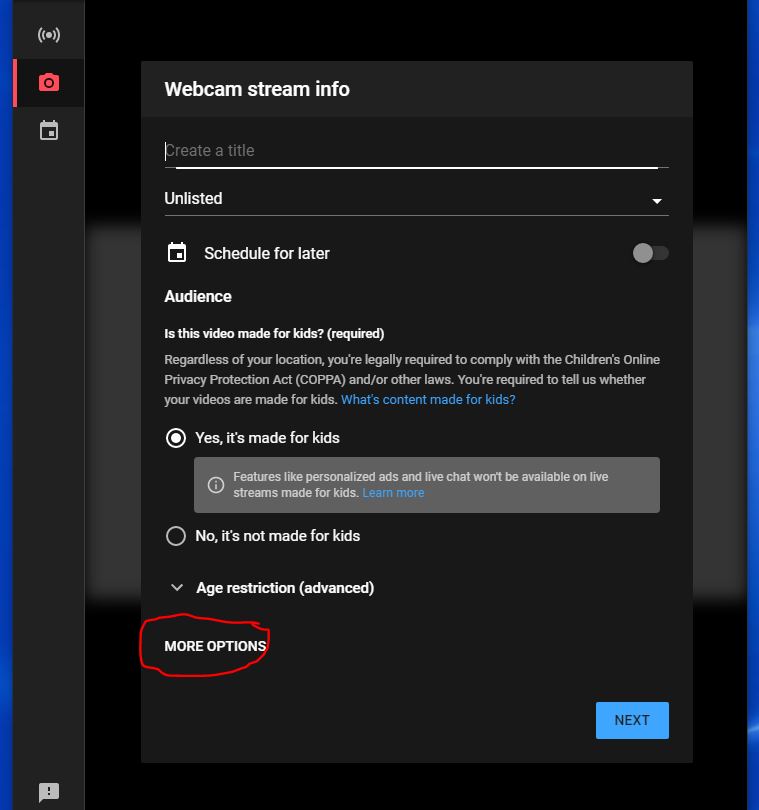
New Member
#121
I noticed the same today, YouTube studio was blocked; had to use a hotspot.
New Member
#122
We had that problem too on that day, but since then it's been working fine.
New Member
#123
We Zoom our Sacrament meeting and livestream from Zoom to YouTube Live