Building a cable from sound system to "mic in"

40 postsstarted by russellhltn 17,187 viewsoriginal topic

Community Administrator
#1
Rather than tack onto an already lengthy thread, I thought I'd start a new one. This past week I built my own cable and was able to successfully use it this past Sunday for a webcast using a cell phone. There might be a pre-made cable out there that can do that, but it's not easy to find and I'd have to order it.

I apologize in advance for no pictures, but it would have delayed this post.

A number of design criteria needed to be met:
1. It has to connect to the sound system which uses a 2-conductor 3.5mm jack (tip and sleeve).
2. In my case, it has to connect to a cell phone which uses a 4-conductor TRRS 3.5mm connector.
3. It has to attenuate the line-out of the sound system down to mic-in level.
4. It has to present a DC resistance to the cell phone of 1K "or higher", otherwise the phone will not recognize the microphone as "present".

Item #1 is easy enough.

Item #3 and #4 was done by building an L-pad, using the values of R1(series resistance)=120K, R2(shunt)=1.2K. That gives an attenuation of 40dB, which experimentally proved to be the minimum attenuation that didn't cause problems. Why 1.2K instead of 1K? The sound system output is transformer-coupled (yea, no ground loops!) As a result, the DC resistance seen by the phone will be R1 in parallel with R2. Plus, I didn't want to get too close to the 1K threshold specified in the Android specs. (From what I can find, iOS seems to be closer to 800 ohm.)

Item #2 is a bit tricky. I wasn't able to find a TRRS connector in my area. I ended up using a pre-made TRRS to three RCA adapter cable used to connect video and stereo audio to a camcorder. (White, Red, Yellow). They can be found in stores and even thrift stores. Connecting the output of the attenuatior to the Red lead accomplishes that.

That fixed my situation, but what about yours? There's no less than 3 different pin-outs for 3.5mm that can be called "microphone":
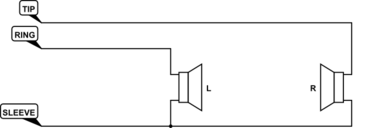
1. Cell phone/computer single-jack "headset" input using a TRRS connector. (2ed ring = ground, sleeve=mic-in)
2. A computer input that has a "mic in" jack using a TRS connector. (sleeve=ground, tip=mic-in)
3. A camera stereo mic input using a TRS connector. (sleeve=ground, tip=left mic, ring=right mic)

I've already outlined what I did for #1. The other two can probably be found at a local electronics store, but you can also used pre-made cables. So, if you build an attenuating 3.5mm to female RCA, you can use pre-made cables to adapt to the device in question making the attenuator "universal".

I'll give more details on that later, but that should be enough to get you started acquiring the necessary materials. Just remember that 25ft cable that gets you from the sound system out to the location of your device should be shielded cable.
Have you searched the Help Center? Try doing a Google search and adding "site:churchofjesuschrist.org/help" to the search criteria.

So we can better help you, please edit your Profile to include your general location.
Member
#2
Edited 1 time, last by mrbitsch on
I would point out the one piece of direction that we have received from the First Presidency regarding the broadcasted meetings: https://newsroom.churchofjesuschrist.or ... 091020_CTA

"Since a sacrament broadcast does not include the administration of the sacrament, consider initiating the broadcast following the sacrament,or alternatively, holding the sacrament portion of the meeting last,so those viewing the sacrament meeting virtually see the program without interruption."

Not a requirement, but a suggestion, however that doesn't leave people at home wondering what's going on for 12 minutes. (although that time would provide them the opportunity to do the sacrament at home)

-- and now I realize that I posted this on the wrong thread... --
Community Administrator
#3
Yes, I think the leaders learned their lesson on that one.

What I'm interested in is how many "makers" do we have that can make this cable? I wish I could point people to something commercial off-the-shelf, but I'm not sure where to find them. I might try dropping into a local supply store for professional installers to see what they have.
Have you searched the Help Center? Try doing a Google search and adding "site:churchofjesuschrist.org/help" to the search criteria.

So we can better help you, please edit your Profile to include your general location.
Member
#4
russellhltn wrote:What I'm interested in is how many "makers" do we have that can make this cable? I wish I could point people to something commercial off-the-shelf, but I'm not sure where to find them. I might try dropping into a local supply store for professional installers to see what they have.
Good question. I've got a couple here, but they're all hand-made, I haven't seen anything off the shelf.
Member
#5
mrbitsch wrote:Good question. I've got a couple here, but they're all hand-made, I haven't seen anything off the shelf.
Well scratch that, this MIGHT work https://www.amazon.com/Alilong-Micropho ... 088LNFXDN/
Community Administrator
#6
mrbitsch wrote:Well scratch that, this MIGHT work https://www.amazon.com/Alilong-Micropho ... 088LNFXDN/
It might be a "step", but it appears to adapt the old "computer mic" to the TRRS. No attenuator.

But this looks promising. Just need to add a 3.5mm to 3.5mm 25' cable and you should be good to go.
Have you searched the Help Center? Try doing a Google search and adding "site:churchofjesuschrist.org/help" to the search criteria.

So we can better help you, please edit your Profile to include your general location.
Member
#7
russellhltn wrote:
mrbitsch wrote:It might be a "step", but it appears to adapt the old "computer mic" to the TRRS. No attenuator.
Yes, I've been looking through Amazon at attenuators, but I your find looks like a perfect fit.
#8
Gentlemen,

Have you considered using an ALS (Assisted Listening System) receiver to get sound? The receiver has a volume control so you can turn it down. You may be able to do that and get by without an attenuator.

I did find a commercially built cable that does exactly what you are trying to do. I believe I picked it up from Performance Audio (https://www.performanceaudio.com) in Salt Lake City, but I'm not certain of that. I've had it for quite some time. I used it to feed an "Audio Only" backup for stake conference. I input sound directly from the chapel sound system into a cell phone. If you haven't found a solution, I can try to track down what the cable is called and where I acquired it.
David P
Community Administrator
#9
davidanderspatten wrote:Have you considered using an ALS (Assisted Listening System) receiver to get sound? The receiver has a volume control so you can turn it down. You may be able to do that and get by without an attenuator.
It's possible, but it also raises technical issues. I know of at least 3 different models of receivers made by two different companies.

As I recall, past efforts showed that it takes some effort to get it right.
- The device may use the electrical properties rather then the physical presence to switch on/stay on.
- The device was designed to drive a earphone at high volume, so I think an attenuator is still advisable.
- I've noticed a fair amount of hiss in the receiver, especially the older ones.
- Transmitters sometimes fail in a way that makes them intermittent. Unless you have active users of the system, it may be failing and you don't know it.

By all means, try, but just don't count on it until you've tested it and confirmed it works. I've learned the hard way what happens when you make assumptions about how easy an approach will be.
Have you searched the Help Center? Try doing a Google search and adding "site:churchofjesuschrist.org/help" to the search criteria.

So we can better help you, please edit your Profile to include your general location.
New Member
#10
russellhltn wrote:
mrbitsch wrote:Well scratch that, this MIGHT work https://www.amazon.com/Alilong-Micropho ... 088LNFXDN/
It might be a "step", but it appears to adapt the old "computer mic" to the TRRS. No attenuator.

But this looks promising. Just need to add a 3.5mm to 3.5mm 25' cable and you should be good to go.

Just bought 4 of these-- should be here early next week. Will let you know if they work.

Great find!
Member
#11
davidanderspatten wrote:Have you considered using an ALS (Assisted Listening System) receiver to get sound? The receiver has a volume control so you can turn it down. You may be able to do that and get by without an attenuator.
I've used the ALS receiver in the past to get sound for various things (the sacrament broadcast for one of our buildings because the Record Out jack was broken, so we were using the ALS receiver while the FM group fixed that).

Some factors to keep in mind with the ALS system:
1) The receivers are battery operated, and typically only get 40 hours of battery life. (which means you'll have to remember to turn it off each week, or you'll have a dead battery the next week)
2) The ALS system is typically a narrow-band FM broadcast system, you lose a bit of sound quality because of the lower-bandwidth.
3) It's an RF system so it's susceptible to interference. (I've yet to listen to an ALS system that didn't have some kind of extraneous noise on it, and as russellhltn mentioned the missmatch between the headphone out on the ALS and the input on your broadcast device will likely mean needing to amplify the signal, which likely amplifies the noise. In our case when we were temporarily using the ALS system we had this noticeable background hum on the audio.)
Community Administrator
#12
Some things to keep in mind with the ALS:

The older COMTEK units needs to see 100 ohms or less to turn on/stay on. Odds are, a common cable setup isn't going to do that.

The newer Listen TECH. units are shipped with the "Jack Sense" turned off, so that should work. But if "Jack Sense" has been turned on, it will need to see 32 ohms or it will turn off in 60 seconds.

I see one suggestion is to use a "Y" cable to connect a an earphone. That will work, but I'd be concerned the earphone will also act as a microphone and add noise and/or color the sound. At least that was my experience in the old days trying to record while tapping off of a speaker.

Bottom line, test and verify your plan. Don't assume it will work.
Have you searched the Help Center? Try doing a Google search and adding "site:churchofjesuschrist.org/help" to the search criteria.

So we can better help you, please edit your Profile to include your general location.
Senior Member
#13
That makes perfect sense. I tested the Comtek receiver twice with dismal results at both high and low volume. I am going to try to tape a Lavalier mic to the podium mic boom this Sunday to see how the quality of that sound comes through.
Dana Repouille, Plattsmouth, Nebraska
Community Moderators
#14
russellhltn wrote:But this looks promising. Just need to add a 3.5mm to 3.5mm 25' cable and you should be good to go.
Just ordered a pair of the above adapters, along with a pair of 25' shielded cables. Didn't see any other adapter/attenuators that would work. These are the full URL's for my order:
https://www.amazon.com/gp/product/B00OAW85ZG 3.5mm TRRS to TRS adapter with line-level to mic-level attenuator.
https://www.amazon.com/gp/product/B07G56Z531 3.5mm TRS male-male 25' shielded cable.

I also ordered this car cellphone mount to attach near one of the pulpit corners furthest from the speaker. I plan on setting the flexible tubing to near vertical to start, with further adjustments to be made once it arrives. The goal is to position the phone at, or slightly above eye level; similar to the view you'd get from a wall-mounted camera in the back of the chapel. Might even be close enough for direct audio, but I'm not counting on that. It will ride up and down with the pulpit for different speaker heights. My ultimate goal is to set-and-forget, until it's time to shut down the webcast.
https://www.amazon.com/gp/product/B07W5GYK5G

With shipping (on the 1st item) and UT tax, the total came to $50.45 per building. If this is our only tech expenses, I'd be very happy with that.
So we can better help you, please edit your Profile to include your general location.
Senior Member
#15
I bought a 25 inch Flexible Arm 360 Desk or Bed Gooseneck Mount Stand for Cell Phone 11 Pro XS Max XR X 8 7 6 Plus and Logitech C925e, C922x, C930e,C922,C930,C920,C615,Brio
https://www.amazon.com/gp/product/B088RC8N6B
Dana Repouille, Plattsmouth, Nebraska
Member
#16
This product does what you want. It attenuates line level to mic level, presents the proper impedance to the laptop/iOS device, and outputs to a TRRS. https://www.amazon.com/dp/B078HGFS3Z
#17
Since the REC OUT jack is mono, would a mono to stereo adapter be needed for either of the above solutions?
Community Administrator
#18
EarloftheWest wrote:Since the REC OUT jack is mono, would a mono to stereo adapter be needed for either of the above solutions?
It depends on what it's feeding. In most cases, it would be an attenuator and it would depend on how it's wired.
Have you searched the Help Center? Try doing a Google search and adding "site:churchofjesuschrist.org/help" to the search criteria.

So we can better help you, please edit your Profile to include your general location.
Member
#19
russellhltn wrote:Rather than tack onto an already lengthy thread, I thought I'd start a new one. This past week I built my own cable and was able to successfully use it this past Sunday for a webcast using a cell phone. There might be a pre-made cable out there that can do that, but it's not easy to find and I'd have to order it.
I am far from a technology guy, but this sounds close to what I need. In my case, I need to go from the "Record Out" to the "Mic In" on my laptop. My understanding is that I'm going from a line level TS connector to a mic level TRS connector. Does that sound correct?

So, my questions are:

Is the L-pad using the resistors you described still appropriate?

Are 1/4 watt resistors appropriate, not enough, or overkill?

My understanding is that the connections are tip to tip and sleeve to sleeve, with the ring unconnected. Is that correct?

Anything else I need to be considering?

I apologize for the basic nature of my questions. I'm kind of learning as I go.

Many thanks
Community Administrator
#20
idjeeper2 wrote:My understanding is that I'm going from a line level TS connector to a mic level TRS connector. Does that sound correct?
That depends on the laptop. Is the icon by the plug of a microphone, or a headset(headphone with boom mic)?

TRS is correct for "mic", TRRS is needed for "headset".
idjeeper2 wrote:Is the L-pad using the resistors you described still appropriate?
I need to do a little more research to make sure it's not overkill, but they do work.
idjeeper2 wrote:Are 1/4 watt resistors appropriate, not enough, or overkill?
They're what's handy. I'd even consider 1/8th watt if I'm trying to build this into the plug. However, my local electronics store only goes down to 1/4 watt.
idjeeper2 wrote:My understanding is that the connections are tip to tip and sleeve to sleeve, with the ring unconnected. Is that correct?
That's correct - assuming you're using a "mic in" and not "headset". Of course, the tips pass though a resistor.
idjeeper2 wrote:Anything else I need to be considering?
Just your skill as a maker. Since you're considering building this, I assume you feel confident about the construction part. The absence of that skill seems to be driving most to ordering from Amazon.
Have you searched the Help Center? Try doing a Google search and adding "site:churchofjesuschrist.org/help" to the search criteria.

So we can better help you, please edit your Profile to include your general location.
Member
#21
russellhltn wrote:
idjeeper2 wrote:My understanding is that I'm going from a line level TS connector to a mic level TRS connector. Does that sound correct?
That depends on the laptop. Is the icon by the plug of a microphone, or a headset(headphone with boom mic)?

TRS is correct for "mic", TRRS is needed for "headset".
This laptop actually has a mic-in along with two headphone-out plugs.

Thanks for your reply. I'll post my results when I have them.
Member
#22
This project met a quick end. I went to the meetinghouse last evening and discovered we don’t have a record out plug. So I need to find a lapel mic to hang on the pulpit.
Community Administrator
#23
idjeeper2 wrote:This project met a quick end. I went to the meetinghouse last evening and discovered we don’t have a record out plug.
Yeah, that doesn't go well.

The plug can be hidden. I've found them inside the podium, as well as inside a cabinet near the "clerk's desk" on the stand.
Have you searched the Help Center? Try doing a Google search and adding "site:churchofjesuschrist.org/help" to the search criteria.

So we can better help you, please edit your Profile to include your general location.
New Member
#24
Would this work to send audio wirelessly from the 3.5mm record-out jack under the sacrament table to your cell phone via bluetooth?

https://www.amazon.com/gp/product/B01EH ... UTF8&psc=1

I ordered one of the above which will be here on Tuesday after 'hours' of reading/researching about how many different adapters and reasons that a simple 25' 3.5mm mono cable won't work getting plugged into a cell phone that needs TRRS mic input and what will work and what won't work. I'm a tech guy, but not necessarily an audio guy. I know something better is coming, but we are already into this 4 weeks now and I have heard some horror stories about broadcasts failing for many different reasons.
Member
#25
johnv wrote:Would this work to send audio wirelessly from the 3.5mm record-out jack under the sacrament table to your cell phone via bluetooth?
https://www.amazon.com/gp/product/B01EH ... UTF8&psc=1.
Yes, it will probably work as long as you stay within the distance limitation of Bluetooth technology. Most BT devices are limited to 10m/33ft. I have used several BT devices where you get intermittent dropouts when less than 20ft away and objects (people) get between the transmitter and receiver. Given the choice of "wired" or "wireless" in this application, "wired" may be more robust and reliable.
johnv wrote:....after 'hours' of reading/researching about how many different adapters and reasons that a simple 25' 3.5mm mono cable won't work getting plugged into a cell phone that needs TRRS mic input and what will work and what won't work.
There are a lot of forum posts discussing many audio issues and it can be difficult to extract the information you need. There are a few posts with concise information. See the attachments to these forum posts-
viewtopic.php?f=140&t=37590
viewtopic.php?f=140&t=37670
viewtopic.php?f=27&t=37528
Community Administrator
#26
johnv wrote:Would this work to send audio wirelessly from the 3.5mm record-out jack under the sacrament table to your cell phone via bluetooth?

https://www.amazon.com/gp/product/B01EH ... UTF8&psc=1
If plugged in directly, you'd only get audio in the left channel. You'd need a mono to stereo adapter to fix that. I like the idea, but I'm concerned about the reviews on this device that report latency (about 1/4 second) as well as reports that it cuts off at low audio.
Have you searched the Help Center? Try doing a Google search and adding "site:churchofjesuschrist.org/help" to the search criteria.

So we can better help you, please edit your Profile to include your general location.
New Member
#27
CalS201 wrote:
johnv wrote:Would this work to send audio wirelessly from the 3.5mm record-out jack under the sacrament table to your cell phone via bluetooth?
https://www.amazon.com/gp/product/B01EH ... UTF8&psc=1.
Yes, it will probably work as long as you stay within the distance limitation of Bluetooth technology. Most BT devices are limited to 10m/33ft. I have used several BT devices where you get intermittent dropouts when less than 20ft away and objects (people) get between the transmitter and receiver. Given the choice of "wired" or "wireless" in this application, "wired" may be more robust and reliable.
johnv wrote:....after 'hours' of reading/researching about how many different adapters and reasons that a simple 25' 3.5mm mono cable won't work getting plugged into a cell phone that needs TRRS mic input and what will work and what won't work.
There are a lot of forum posts discussing many audio issues and it can be difficult to extract the information you need. There are a few posts with concise information. See the attachments to these forum posts-
viewtopic.php?f=140&t=37590
viewtopic.php?f=140&t=37670
viewtopic.php?f=27&t=37528
I did actually see these posts today, thank you, and I did also order a 50' audio cable and mic-in adapter as well. I'll try them both out and see which one works the best (obviously the wired solution will be worry free, the wireless solution would be great if it works, much easier on the eyes). Would be nice to 'pin' those links up top to help everyone get at the information they need.

Thanks again. Today was my 3rd broadcast using OBS and Sony HDMI camera and mixer. I have it down pat and it's 100% reliable, now I just want to reduce the setup and complexity of it for the next guy.
Community Administrator
#28
Coming back to this, I'm finding that building the cable is not so simple. I had thought that if I just drop line-level down to the same voltage as standard electret microphone, everyone would be happy. Boy, was I wrong!

It turns out my collection of Android cell phones wanted 40dB attenuation. But apparently, all indications are that iOS wants only 20dB.

Things got even stranger when I tested my laptop and found it wanted -10dB on it's TRS input. And digging into the microphone settings, that was with 10dB boost! Turn off all boost, and it's happy with full line level input.

So, using CalS201 excellent ASCII art as a starting point, here is my suggestions with the values for different levels of attenuation.

Code:

          RECORD            DIY             3.5mm to Device       
          OUT JACK      ATTENTUATOR                  
                                             TRRS       TRS          
                                          
316mv-)|(---< [T]RS <-----[R1]-------------> TRR[S]  or [T]RS
      )|(                          |   
  600 )|(                         [R2]
  ohm )|(                          |
 -----)|(---< TR[S] <----------------------> TR[R]S  or TR[S]


For TRRS (headset) Connection:

          R1       R2
-20dB     12K     1.2K
-30dB     39K     1.2K
-40dB    120K     1.2K


For TRS (mic in) Connection:

          R1       R2
-10dB     10K     4.7K
-20dB     47K     4.7K
I'm in the middle of designing a cable that will work with either TRS or TRRS and will have 3 levels of attention to choose from. That way, I should be able to deal with most anything.
Have you searched the Help Center? Try doing a Google search and adding "site:churchofjesuschrist.org/help" to the search criteria.

So we can better help you, please edit your Profile to include your general location.
Member
#29
russellhltn wrote:Coming back to this, I'm finding that building the cable is not so simple. I had thought that if I just drop line-level down to the same voltage as standard electret microphone, everyone would be happy. Boy, was I wrong!

It turns out my collection of Android cell phones wanted 40dB attenuation. But apparently, all indications are that iOS wants only 20dB.

Things got even stranger when I tested my laptop and found it wanted -10dB on it's TRS input. And digging into the microphone settings, that was with 10dB boost! Turn off all boost, and it's happy with full line level input.
Things get even stranger on the iPhone/iPad because the Apple lightning audio adapter presents a low impedance (~2K) to your external attenuator. An Android phone "may" also be the same way. For example, if you use a 20db HeadSetBuddy attenuator (which has a 2.2K output impedance), you end up with 26db of attenuation when you plug it into the Lightning audio adapter. You expected 1/10 (20db) of the signal level, but ended up with 1/20 !!

Also, something to consider in your choice of 1.2K for your R2 in the TRRS configuration. We know the R2 value determines the DC bias level on the Mic activation circuit. If the bias level is too low or too high the mic circuit is not turned on. All the commercial adapters seem to be using ~2K. If 1K, 2K, or 3K resistors all activate the mic circuit, it might be better to pick the middle value (for best reliable activation) so you don't get close to the de-activation points.
Community Administrator
#30
CalS201 wrote:Also, something to consider in your choice of 1.2K for your R2 in the TRRS configuration. We know the R2 value determines the DC bias level on the Mic activation circuit. If the bias level is too low or too high the mic circuit is not turned on. All the commercial adapters seem to be using ~2K. If 1K, 2K, or 3K resistors all activate the mic circuit, it might be better to pick the middle value (for best reliable activation) so you don't get close to the de-activation points.
I was going by the Android specification of "1000 ohms or higher". My brief search for iOS specs suggested the lower switching point was "at least 800 ohms". Even that still seems to be well above the value of the resistors used to issue commands via the mic jack.

At no point was I able to find a upper threshold for either system. That really messes with trying to find a "safe zone".

My choice of 1.2K was driven by making sure I stayed above 1K even considering the "record out" jack to be a DC short due to being a transformer.

I'll note that by making R2 as low as possible, I minimize the effect of the input impedance on the attenuation.

Edit: If I was designing for a mixing board input, I'd probably make R2 about 150 ohms, since that's the impedance most mic preamps expect to see.
Have you searched the Help Center? Try doing a Google search and adding "site:churchofjesuschrist.org/help" to the search criteria.

So we can better help you, please edit your Profile to include your general location.
New Member
#31
Any updates on this headset buddy line level to mic level adapter shared earlier in the thread?
https://www.amazon.com/Headset-Buddy-Li ... 00OAW85ZG/

On a whim, I tried plugging line level directly in to the mic input on my lappy. Much less complicated than plugging into the TRRS jack on a phone. Without attenuation, the distortion is... lovely.

This also looks like a possibility:
https://www.amazon.com/Movo-MV-RC300-Mi ... 073HR6SY4/
Community Administrator
#32
If you're using a laptop, I'd recommend the Sabrent USB External Stereo Sound Adapter for Windows and Mac.. That and a plain old 3.5mm stereo cable will work fine. It avoids a whole bunch of ifs, ands, buts, and maybes.

But before placing the order, dig into the hardware settings in the control panel. You find find a "mic boost" setting. If so, set it to 0dB and try again.

At $8, it's also one of the cheapest options.
Have you searched the Help Center? Try doing a Google search and adding "site:churchofjesuschrist.org/help" to the search criteria.

So we can better help you, please edit your Profile to include your general location.
Community Moderators
#33
I tried the Headset Buddy cable, but found it had too much attenuation for the phones we were using. I'm working on a custom L-pad that will bring the level approximately up to that of the Tabernacle Choir when they come on, but still have a reasonable source impedance for the phone. I'll let you know what I come up.
So we can better help you, please edit your Profile to include your general location.
#34
russellhltn wrote: Thu Oct 01, 2020 5:11 pm
idjeeper2 wrote:This project met a quick end. I went to the meetinghouse last evening and discovered we don’t have a record out plug.
Yeah, that doesn't go well.

The plug can be hidden. I've found them inside the podium, as well as inside a cabinet near the "clerk's desk" on the stand.
I still haven't found one in our building. We don't even seem to have an ALS system that I can tap into.
Cease to be idle; cease to be unclean; cease to find fault one with another; cease to sleep longer than is needful; retire to thy bed early, that ye may not be weary; arise early, that your bodies and your minds may be invigorated
Doctrine & Covenants 88:124
Member
#35
What model amplifier and preamp/mixer do you have fitted?
New Member
#36
russellhltn wrote: Sat Dec 05, 2020 8:02 pm If you're using a laptop, I'd recommend the Sabrent USB External Stereo Sound Adapter for Windows and Mac.. That and a plain old 3.5mm stereo cable will work fine. It avoids a whole bunch of ifs, ands, buts, and maybes.
This didn't work in my meetinghouse. The bishopric manages Zoom Meetings from a laptop on a stool/box at the side of the pulpit, in front of them so they can see the speakers face on screen, via a camera just in front of the podium (on a stick attached to hymn books so it doesn't move when persons at the pulpit shake the tabletop of the podium). The audio signal going from the side of the pulpit into the Sabrent AU-MMSA would intermittently come through and fade out and come back. It was even doing it at the A/V rack at the back of the building (out of an RDL D-series PSP1 speaker, hooked up to the same RDL distribution amplifier as the signal coming to the Sabrent AU-MMSA USB Sound Adapter [audio interface]), but only when I plugged into that Sabrent device.

Sabrent tech support mentioned that their device expects, in the pink mic port, an unbalanced signal, mic level, with the positive signal on the tip at 2kohm [or presumably less] impedance, and the sleeve as ground, and the ring isn't hooked up or maybe shorts to ground, but is used in other devices for stereo signals. The Sabrent device puts 2-5V DC bias voltage on the tip, for electret microphones, and they recommended using a DC blocking capacitor for my situation. It's important to note that DC bias voltage can saturate a transformer, causing it to malfunction, which can even cause issues at the source device feeding the transformer.

EmTech tech support wouldn't comment on whether the MSC-U device (that outputs our audio from the side of the pulpit) uses professional line level, or consumer line level, and they wouldn't comment on whether the ground is just passing through, or whether it goes through its transformer at all. They mentioned that EACH signal wire is 600 ohm (a curious statement that made sense later).

RDL tech support mentioned that our audio distribution amplifier ( RU-ADA4D ) uses differential balanced output (phase inverted signal on negative wire, and positive and negative wires are impedance matched), not just balanced (impedance matched but negative wire doesn't have phase inverted signal). Their literature also mentioned that the device output is isolated (thus presumably it is transformer based output rather than active output). It also mentioned that it can output balanced (really differential balanced; 150 ohm; pro line level) or unbalanced (75 ohm; consumer line level), and its input is to be line level (roughly pro or consumer line level, and a bit beyond those, with an input gain knob on the front, where you dial it in to be green with some flickering red when peaking/limiting).

I couldn't get the input gain to indicate the green and red appropriately, so I eventually had to get the sound engineer who does audio blueprints for buildings to adjust the QSC 110F DSP output to be line level to that RDL D.A. Ideally you email the FM Group about such things rather than file an FIR support ticket that gets routed to Emcor, or similar, who will close out the ticket as completed, because it doesn't apply to them, and they'll charge for it anyway (this has literally happened in my experience).

Once our DSP signal was allegedly at line level, I wanted to find out if the MSC-U transformer had its windings kicking down the levels some amount, so I could know how much to attenuate to get that output to mic level before going into the Sabrent device. This proved problematic because you need sound going from the pulpit mic, or it's wire, to measure the MSC-U output, and how loud should that sound be?

I tried sending a -40dbu level signal (loudest mic level signal; -60 dbu is the quietest that you can have the peak of a waveform in the A/C audio signal; I was using a multimeter, so using RMS rather than peak electrical measurements), but the multimeter was bouncing all over. That's because it was a composite audio signal with many wavelengths overlapping, so then I tried sending a lower frequency sine wave (40-125hz or so, so it hurts my ears less) and that got the multimeter to stop bouncing values. I was sending it from my cell phone headphone trs jack into the crab box (EmTech EJ-8) which has 100 ohm XLR output, using this website ( https://onlinetonegenerator.com/ ), with my phone and that website having their volumes maxed, and turning the crab box volume to dial in the -40dbu, based on ohms and voltage, because I needed the software volume dials to be easily repeatable since websites refresh and lose their volume and ohm values, etc. I used this website for the dbu calculations into voltage, relative to ohms impedance of each device: ( https://www.analog.com/en/resources/int ... nvert.html ). Once the crab box had -40dbu output, from XLR, between pins 2 (positive) and 3 (negative), I plugged the crab box XLR into the pulpit mic's XLR input wallplate (with the pulpit mic XLR removed therefrom), and I turned on the QSC touchscreen at the Bishop's pedestal, and turned up its pulpit mic volume slider all the way (so it's easily repeatable), and checked the levels coming onto the harness that goes into the RDL D.A. input, from the QSC 110F DSP, using the multimeter probes on the harness screws for positive and negative, to see what levels the QSC 110F DSP was outputting, and using the aforementioned website to convert the voltage to dbu relative to the QSC 110F DSP impedance (220 ohms for two wire balanced). I then plugged that harness back into the RDL D.A. input. I then repeated my measuring steps on an empty harness (Euro block/Phoenix connector) that I moved into place where the RDL D.A. output goes to the MSC-U, checking the voltage with probes on its positive and negative screws, and turning the RDL input gain knob until it came out at pro line level voltage (at 150 ohms), with the RDL output dial set to the pro line level (+4dbu) marking on the front of that device. I then plugged the actual wired harness back into the appropriate RDL output (moving the empty harness Euro block/Phoenix connector back to where it had been). Then I plugged in a TRS cable into the MSC-U output to see what levels were coming out of it, to see if its transformer windings kicked down the level, etc. I couldn't get a signal between the tip (positive) and ring (negative) but I could get a signal between tip and sleeve, and also between ring and sleeve. Therefore, it seems that the MSC-U is a balanced line level transformer only on its input: it seems to convert a balanced signal (of whatever impedance and whatever line level) to two unbalanced signals, each of which is 600 ohms. So the ground presumably isn't just passing through from the back to the front of the MSC-U wallplate, but seemingly goes through the transformer. You might regard that as a floating ground in a sense, but not a dead end, as it's part of the output circuit. Because the RDL is presumably transformer based output (it's isolated), you wouldn't hurt anything at the RDL D.A. by shorting the MSC-U output ring to ground, if you presumed it was balanced output and wanted to try to convert it to unbalanced, but since the MSC-U isn't balanced output, and that would be shorting to a sort of floating ground which is part of the circuit, after two transformers rather than one, that gets weird real fast. But since the MSC-U is essentially a balun-un (balanced to two unbalanced signals) and since the RDL D.A. can output unbalanced, whether you use or ignore the MSC-U ring output won't hurt anything at the RDL D.A. I'm not sure if the MSC-U does any real common mode noise rejection (their tech support would reply sometimes, but wouldn't answer that either).

With levels dialed in, I still seemed to notice a disparity when the actual pulpit mic was hooked up. I'm not sure what levels it actually outputs because it depends on the pressure that hits it, and I can't access the DSP settings to see what they expect as input. Thus I tried to send in a talk from President Nelson, from my phone's speaker, into the mic (with the pulpit mic volume on the QSC touchscreen at the Bishop's pedestal set to max), and I tried sending some Bach through the same way, and my multimeter levels were again bouncing (fancy multimeters can record the highest value found thus far), but when sending a sine wave through that way, the ear perceives volume differently based on frequency (and high frequency at high volume is especially painful). So in the end I just played those things loud into the pulpit mic (with its volume maxed), and set the RDL D.A. input gain according to the green and red leds (very minimal red flickering on sometimes), with its output set to the +4dbu marking. Then I measured the bouncing signal coming off of the TRS cable exiting the MSC-U output, from tip to sleeve (not ring) and determined that the highest I could see, that it ever bounced around to, was 0.45V at 600 ohms, which is -4.7dbu RMS. When differential balanced output from the RDL D.A. was +4dbu, output from MSC-U was -4.7dbu; the balanced phase inverted ring from the D.A. adds 6db headroom as compared to an unbalanced signal, so the unbalanced signal should have been -2dbu, thus the MSC-U drops 2.7db doing its impedance changing from 150 ohms differential balanced to 600 ohms for each unbalanced signal. Because some attenuators have 5% margin of error (many resistors do), 38dB attenuation is probably a good option, since it can take the -4.7dbu down to -42.7dbu, but could be off in either direction perhaps by 5%, so 1.9db error, thus it might be -40.8 to -44.6 dbu, and the highest mic level signal should be below -40dbu. If I needed a little bump beyond that, I could turn the RDL D.A. output dial a little lower.

So consider using the following (or equivalent):

(Select quantity of two; select 3ft. each [or up to about 20 ft. collectively for both depending on your needs]; the first plugs 3.5mm TRS male into the MSC-U output) ( https://www.showmecables.com/3-5mm-ster ... l-rca-plug )

(One; RCA female attaches to white RCA male on one of the cables; the red RCA on that cable is a dead end) ( https://www.showmecables.com/f-type-mal ... le-adapter )

(One; it's important that the frequency goes to DC or Zero Volts on each attenuator; it's also important that at least one attenuator is DC blocking; attaches to f-type male of preceding adapter) https://www.showmecables.com/f-type-mal ... eSIfxGlwHf

(One; attaches to preceding attenuator) https://www.showmecables.com/f-type-mal ... -mhz-12-db

(One; attaches to preceding attenuator) https://www.showmecables.com/f-type-mal ... 0-mhz-6-db

(One; attaches to preceding attenuator) https://www.showmecables.com/f-type-fem ... eSIfxGlwHf

(Then attach the second cable's white RCA male to the RCA female of the preceding adapter; the male red RCA is a dead end; the cable's 3.5mm male TRS goes into the Sabrent AU-MMSA pink mic port.)

(One; pick a color light enough to label/write on, like white; tape up all the connections and label it to indicate its purpose) https://www.showmecables.com/pvc-colore ... -ft-length

(One; our laptop had no mic boost setting in the OS with which to fiddle) https://www.amazon.com/Sabrent-External ... 00IRVQ0F8/

This setup should work for nearly every meetinghouse or Stake Center, and for most any Windows or Apple computer, with parts that can be put together easily by any Tech Specialist.

It worked for my meetinghouse, and Zoom Meetings' audio now sounds better than being live in the chapel, for persons speaking at the pulpit, and sounds good for organ music, and decent for congregation singing, relative to sound entering the pulpit mic, based on its pointed direction, distance, etc. Background noise isn't much of an issue. I use the 'Original Sound For Musicians' setting in Zoom, with 'Echo Cancellation.' Also our meetings get started from the 'Recurring Meetings' section at the bottom right in Zoom (click the camera icon), rather than starting a 'New Meeting,' or 'Joining.' We've had issues with our host computer ending up in a different meeting from the participants when we don't go through our recurring meeting section.

Best wishes!
New Member
#37
My tests mentioned in my earlier post actually seem valid despite the mic pressure being variable: it needs a mic level signal, so sending a sine wave from a tone generator website on your cellphone into the crab box, with the volume dial in the tone generator, and for your phone, and at the bishop's pedestal, set to max, and dialing in the crab box volume dial to have its XLR output at -40dBu to -60dBu mic level (using a multimeter that can handle the frequency of the sine wave) appears valid, then you can send that signal into the pulpit mic XLR port (with the pulpit mic removed), and measure the output of the dsp that goes to the audio distribution amplifier that feeds your rec. out ports, etc., if you ever need to. My calculations were wrongly in dbm which is only the same as dbu at 600 ohms, so I had to recalculate my dB values.

My 400hz test and the 100hz test show a difference of ~40db in what I send into the dsp (-54dbu and -48dbu respectively) and what I get out (-13dbu & -8dbu respectively) of the dsp.
My 40hz test shows I was actually sending in -46dbu into the dsp and getting out of the dsp -30dbu (-31dbV), which is only a 16db difference (thus presumably they have a high pass filter limiting low frequency signals, in their qsys design file for our dsp).

I did other tests with white noise where I could turn up the volume really quickly and it would let the signal through, and after about 4 seconds it would cut it off unless it was very loud. This seemed to confirm that our dsp is using an automatic gating mic mixer, that changes the noise floor dynamically, and would learn the white noise signal, treat it as slow changing rms, and filter it out, and raise the level it regards as noise floor, and thus the threshold over noise floor would require even greater volume to be satisfied. Long story shorter, when people speak into our pulpit mic, the signal is strong enough to overcome the threshold over noise floor setting, and when the pulpit mic needs to pick up music and congregational singing, it would only intermittently do so, because the threshold over noise floor setting was set too high to allow our pulpit mic to pick up organ music and congregational singing reliably. Our stake building representative, FM Group, contact at church HQ, audio blueprint guy, audio installers, and meetinghouse technology coordination team, each decided not to bother helping that setting get changed, or helping with a workaround. I suppose none of them sustained the lowly tech specialist in their calling, in a meeting, and thus they didn't when their help was requested. To the new techs, be prepared to battle all heck by yourself. That is as good of advice as you'll find on this forum.

In the end I was able to send our organ to the EJ-8 crab box, and into an XLR port into the dsp, to get the organ music. For congregational singing, I recommended using a Shure B.G. 2.0 older hand mic on the flat tabletop of the podium, pointed at the audience, and because it is cardoid, not hypercardoid, it avoids comb filtering issues with the pulpit mic because it doesn't also pick up a signal from its rear which is in parallel with the pulpit mic. This hand mic goes into a mini mic stand, connecting to an XLR cable which goes into an old Shure M68FC mic mixer (from ~1984), and out its line level RCA output (because mic level signals couldn't get over our noise gate in the dsp [threshold over noise floor], except for the organ feed, because we are reducing it to mic level from line level, so I can send it in at a very hot mic level). The mixer RCA output is high impedance, so I couldn't send it into the Emtech MSC-W which doesn't list specs, and their tech support is dodgy on listing specs, answering questions, or product support beyond a year that isn't slated for a new sale; nevertheless, their EJ-10 uses 4.7kohm impedance on aux ports, so if it was anything like that, that was way too low. The Extron DTP T HWP 4K 331 D aux input could handle greater than 10kohm impedance but it wasn't hooked up. The audio blueprint installer refused to hook it up when I asked him to in a message, and in the building, stating church HQ didn't intend for its use (and thus it would remain a dead port which people will plug into for the next 20 years). So I recommended the Ward move the blue clip from the Extron HAE 100 4k plus (HDMI audio de-embedder) to the Extron DTP HDMI 330 Rx (both in the back of the A/V rack) for sacrament meeting (disabling HDMI input on the same device as the Extron aux in, but enabling the aux in), and that blue clip can be put back for other meetings that need HDMI IN (projector stuff) which don't need audio in the foyer, mother's lounge, overflows, Zoom Meetings, etc., or someone can be moving that clip during a meeting. The mixer volume dial for the hand mic gets set at '10' and the master volume dial gets set to the lowest volume that lets congregational singing be appropriately heard in the foyer (any louder can introduce background noise into the meeting), and if that is too quiet, the program audio button on the bishop's pedestal QSC lcd screen can be toggled on for music, off otherwise. It must be on to hear that hand mic either way, and its volume slider is relevant in mixing it against the pulpit mic.

So, the coax attenuator and dc block cable I mentioned earlier in this thread: it didn't fix my intermittent audio but still provides the signal the Sabrent AU-MMSA wants, at least prolonging its life. We did crash the computer one time presumably from sending a line level signal into that device and unplugging the Sabrent device (as it had no eject USB option), so the higher voltage is a gamble if not building that cable. But, from what I understand about the Emtech MSC-U being a bal-un-un, when sending that signal into the Sabrent without the coax attenuators and dc block, with a plain old trs cable, I'd suspect that the Sabrent tip (left) channel sees the close side at line level, but its tip (left) channel far side at something higher than ground (higher than zero volts) because the stereo port ring (right) channel is probably actually hooked up (Sabrent wasn't sure if it is because it is used as stereo in other Sabrent devices, but not intended to be used as stereo in this device), so then you have multiple resistors, inverted signal, etc, running into the ground side (the far side of the tip
channel), and thus perhaps that does some attenuation of a sort, when those two sides for the left channel are compared. So, it might work without the coax attenuators and dc block, and apparently does, but it is at least specification-wise, sketchy.

Notes_251222_135528_e80.png
Notes_251222_135528_e80.png (6.47 KiB) Viewed 1226 times
(https://electronics.stackexchange.com/a/253550)

"There isn't really a problem. As long as the return conductor resistance is low relative to the resistance / impedance of the speakers then the speakers lower terminals will be held at GND." -Transistor

In this instance, I'm not sure the return conductor resistance is held at ground (zero volts) or the Sabrent would see line level and it would be crazy distorted and way too hot. The PC we used didn't even have a 'Mic Boost' setting.

But all in all, this device worked for us. Thanks! Sorry for the tangent.
#38
I've tried a number of the items listed (Headset Buddy and others) with similar results. What worked best for me was the "Behringer U-PHORIA UM2 Audiophile 2x2 USB Audio Interface" at about $45 on Amazon (https://www.amazon.com/dp/B00EK1OTZC).
David P
New Member
#39
Our meeting house is equipped with the “listen” brand assisted listening devices. we just plugged one of those into our laptop via a USB to mic/headphone adapter and a 3.5mm male/male cable. Only hiccup we’ve had with this is we have to keep an ear piece plugged into the listen unit as well because it requires a load to stay powered up.

It’s a bit of a twisty solution, but it allows us to have the streaming laptop at the rear of the chapel near our bootleg camera without digging into the building wiring.
Community Administrator
#40
flarg2 wrote: Sun Dec 28, 2025 12:22 pm Only hiccup we’ve had with this is we have to keep an ear piece plugged into the listen unit as well because it requires a load to stay powered up.
I know that was true of the Comtek brand, but I didn't think the Listen came that way by default. It can be changed via programming.

The problem with having an ear piece plugged in is that it will act as a microphone and color the sound. It would be better to have a resistor of the same resistance.
Have you searched the Help Center? Try doing a Google search and adding "site:churchofjesuschrist.org/help" to the search criteria.

So we can better help you, please edit your Profile to include your general location.