Household photo not being shown on ward directory print out

89 postsstarted by cmr3rd 19,584 viewsoriginal topic

New Member
#1
Although the check box has been marked to include the household photo on a ward directory print out, the photo is not being shown on the pdf to be printed. Getting just text. This previously worked fine. Has this function been disabled?
Community Moderators
#2
I just did a check only using Firefox and encountered the same issue. If we get a few others to help confirm this we can elevate this to the developers.
JD Lessley
Have you tried finding your answer on the ChurchofJesusChrist.org Help Center or Tech Wiki?
Community Administrator
#3
We've had complaints before about some photos not showing up in certain products. I don't know as that was ever solved. But it wasn't a case of all photos in the ward.
Have you searched the Help Center? Try doing a Google search and adding "site:churchofjesuschrist.org/help" to the search criteria.

So we can better help you, please edit your Profile to include your general location.
Church Employee
#4
I was able to duplicate this and we're looking at it now. Thanks for the heads up.
QA Engineer
New Member
#5
Tried different browsers, different computers and windows versions. No pictures coming up in PDF when marking boxes to include household photo. The problem exists when requesting a ward directory or even an organizational directory. Just text. No photo. This is not "some photos not showing". This is NOT ANY, like the box for photos was left un-marked. This worked fine in September versions of LDS.org. Thanks for your attention.
New Member
#6

Photos not printing

We have been unable to get the photos to print even though the box is checked. The website was down for quite awhile last Saturday and Sunday. We have tried to print multiple times this week thinking it would be fixed. All other info comes through with the exception of the photo.
Community Administrator
#7
LisaAn is part of the team that develops the calendar. Since she reported that she can duplicate the problem, no further reports of this problem are necessary.
Questions that can benefit the larger community should be asked in a public forum, not a private message.
New Member
#8

Can't see photos on our directory

Tried different browsers, different computers and windows and Mac versions. No pictures coming up in PDF when marking boxes to include household photo. The problem exists when requesting a ward directory or even an organizational directory. Just text. No photo.

I printed a Draft of our directory 2 weeks ago and the photos were coming up just dandy, but now they just won't show up.

Could someone just login to our ward and save the pdf with the photos and just email it to me? If not, with whom can I work for assistance? So frustrating... but I'm sure there's an easy fix, right?
Community Administrator
#9
I removed your attachment. It contained live data from your ward. This is a public forum and live data should not be posted to it.
Have you searched the Help Center? Try doing a Google search and adding "site:churchofjesuschrist.org/help" to the search criteria.

So we can better help you, please edit your Profile to include your general location.
Community Moderators
#10
Please people, we do not need any further reports about the issue. As aebrown stated in post #7 the issue has been duplicated by those who need to fix it. They will be working on it. There is no work-around. It will continue to be this way until it is fixed.
JD Lessley
Have you tried finding your answer on the ChurchofJesusChrist.org Help Center or Tech Wiki?
New Member
#11

no photos in ward directory

RussellHltn wrote:We've had complaints before about some photos not showing up in certain products. I don't know as that was ever solved. But it wasn't a case of all photos in the ward.
This is a new problem-- has the development team recently performed maintenance? That is when problems like this occur.
Church Employee
#12
Can we get more specifics? Does this happen for just one household or all the households in the ward/branch? Is it limited to one ward? Or every ward in a stake. Does this happen only when you print the PDF or does the PDF not show the photo also? Thanks.
QA Engineer
Community Administrator
#13
When this thread first started, I wasn't able to duplicate the problem. But now I can't make it work. Not in my ward, not in my stake. The entire ward/stake is affected. It doesn't work for the ward directory nor for an organization when I can see that there are photos there.

I'm not sure if my request to include photos is being ignored, or if the photos just are not making it to the "open PDF", or if it's a server load issue. But as of this posting, I can't get photos into the PDF file - at all.
Have you searched the Help Center? Try doing a Google search and adding "site:churchofjesuschrist.org/help" to the search criteria.

So we can better help you, please edit your Profile to include your general location.
Community Moderators
#14
My experience is like RussellHltn. No Directory print output in which a photo option is checked actually includes any photos. This is for my ward or any unit within my stake.
JD Lessley
Have you tried finding your answer on the ChurchofJesusChrist.org Help Center or Tech Wiki?
Church Employee
#15
We've duplicated this issue and we're working on it (reference 1571). Thanks for the heads up.
QA Engineer
New Member
#16
Having the same problem here...
New Member
#17

So... how will we know?

JD- How will we know when they've fixed the bug? will you update us?
Community Administrator
#18
Richardsed wrote:How will we know when they've fixed the bug? will you update us?

At the top of each thread on the forum is a dropdown labeled "Thread Tools"; one of the choices there is "Subscribe to this Thread." Choosing that will make sure you get notified when anyone posts to this thread. When the bug is fixed and deployed, I'm sure someone will post that to this thread.
Questions that can benefit the larger community should be asked in a public forum, not a private message.
Church Employee
#19
When I write up the bug, I include the URL to the thread that the bug was reported on. When I test the bug and close it out, I try to remember to come back to the thread and let you know that we fixed it and that it's going to be available soon. Not a perfect process but it works.
QA Engineer
New Member
#20
Another great method to determine if bug is fixed is... to try it..... In this case, do the photos appear in the PDF prior to printing?! BTW Thanks to those for tweaking LDS Tools to work great. Anxiously awaiting the return of photos in the directory to print out. Members love it.
New Member
#21

photos still not printing in pdf of ward directory Nov 13 2012

Richardsed wrote:JD- How will we know when they've fixed the bug? will you update us?


Still a problem ... photos not printing ... would be helpful to have working!

Looks like this has been a problem for over a year ...
Community Administrator
#22
dro3 wrote:Looks like this has been a problem for over a year ...

No, it hasn't been a problem anywhere near that long. Maybe a month or two, but definitely not a year.
Questions that can benefit the larger community should be asked in a public forum, not a private message.
New Member
#23

Photo Directory

As many have stated I can not get photos to print on the directory.

Strangely I was able to do so earlier this month (Nov) but can not any more.

Please help.
Community Administrator
#24
hyderc wrote:Please help.

There is nothing else to be done but to be patient.
Have you searched the Help Center? Try doing a Google search and adding "site:churchofjesuschrist.org/help" to the search criteria.

So we can better help you, please edit your Profile to include your general location.
New Member
#25

pictures not showing up on directory

I am having the same problem today. 11-14. I have tried many times
cmr3rd wrote:Although the check box has been marked to include the household photo on a ward directory print out, the photo is not being shown on the pdf to be printed. Getting just text. This previously worked fine. Has this function been disabled?
Church Employee
#26
This has been fixed and will be available in the 3.0 release of Directory. Thanks for your patience.
QA Engineer
Member
#27
LisaAn wrote:This has been fixed and will be available in the 3.0 release of Directory. Thanks for your patience.

Which brings us to the next question of: when can we expect the 3.0 release of Directory?
New Member
#28
kylehart wrote:Which brings us to the next question of: when can we expect the 3.0 release of Directory?

I agree with Kyle...

Sorry to be impatient but my Bishop has been all over my case about this. I keep trying to explain that the techs are working on a fix for the directory.
Could you please release Directory 3.0? I get asked for the new directory with photos every Sunday for the past 2 - 3 months...
Community Moderators
#29
sphan wrote:Sorry to be impatient but my Bishop has been all over my case about this. I keep trying to explain that the techs are working on a fix for the directory.
Could you please release Directory 3.0? I get asked for the new directory with photos every Sunday for the past 2 - 3 months...

I would suggest that you stop trying to explain anything. Your bishop will still be frustrated and may choose to vent. I would politely say that he is welcome to take his frustrations out on me if it makes him feel better, but that I have nothing to do with the release of Directory 3.0 and that it will come when it comes.

Or if you really want to be funny, when you see him Sunday, tell him, "Not this week, and they have stopped taking my calls, so I will not find out before you do."

Smile when you say it. He's probably a good bishop. Just a bit frustrated.

It is really easy to get wrapped up in things when you are trying to be helpful but have no real influence in a matter.
New Member
#30
I am having the same problem in that I cannot print the pictures of my ward members even though the picture box is checked. Never had any problem with the old web site.
Community Moderators
#31
rlbendorf, please see post # 26. The fix for this in Directory version 3.0 has not been released yet.
JD Lessley
Have you tried finding your answer on the ChurchofJesusChrist.org Help Center or Tech Wiki?
New Member
#32
HELP!!!! Not able to print a directory with pictures. I have called into Church Headquarters and talked to the Web people. They do not give an answer just say to submit comment. I have submitted comment and get no reply. Could someone PLEASE just tell us if this problem is being worked on and when it is expected to be fixed?
New Member
#33
Estimated date of release? PLEASE
New Member
#34
It was working in September. I printed in directories for a number of people in our family and in the Ward
New Member
#35
Bad answer. It was working, now it is not. I can be patient if information is provided to let us know a possible fix date. In todays world things just dont go from working to not working and then stay that way for a long time. If we are no longer going to be able to get pictures just say so.
Senior Member
#36
sja47 wrote:Bad answer. It was working, now it is not. I can be patient if information is provided to let us know a possible fix date.
As you can see in post #26 it has been fix and will be available on the release of the next version of the directory. Currently the Tech folks at Church Head Quarters are working hard to get the newest release of MLS out to the wards. In doing so there has been a few kinks, that has required them to shift some of their resources to in order to make sure the MLS stays up and working. When the MLS release is pushed to all the units in the world and working the way it needs to me they will be able to put the resources back to the directory and get it released as well. In the mean time everyone just needs to be patient.
sja47 wrote:In todays world things just dont go from working to not working and then stay that way for a long time.
This is not the corporate world where business is trying to make money. This is "The Church of Jesus Christ of Latter-day Saints" where a group of dedicated people are working hard trying to provide a good product on a limited budget. Things get done when they get done.
sja47 wrote:If we are no longer going to be able to get pictures just say so.
As stated the fix is done but will be in the next release which I would guess has more than the ability to print pictures. Be patient there are more important things needed than the ability to print pictures.
New Member
#37

Directory Photos

Just wondering if we have a date yet when we will be able to start printing the photo's again with the ward directory?
Community Administrator
#38
The church typically does not give dates ahead of time. I'd assume that it won't be soon enough for what you need and go from there.
Have you searched the Help Center? Try doing a Google search and adding "site:churchofjesuschrist.org/help" to the search criteria.

So we can better help you, please edit your Profile to include your general location.
New Member
#39

gb

We have a large turn over in the YSA wards and it it helpful to have the picture print so we can help our leaders put names with faces. Do you have any idea how long it will take before it is up amd running again?
Community Administrator
#40
georgebills wrote:We have a large turn over in the YSA wards and it it helpful to have the picture print so we can help our leaders put names with faces. Do you have any idea how long it will take before it is up and running again?
[Moderator note: I moved this post into the main thread for this topic.]

The best answer we have at this point is in post #26. I know that doesn't specifically answer your question, but that's the best we have at this point. I would recommend that you subscribe to this thread so that you will be notified of updates to this thread. When the problem is fixed, there will certainly be a post to this thread announcing that fact.
Questions that can benefit the larger community should be asked in a public forum, not a private message.
Member
#41
For anyone that wants to save a directory with pictures, do this in Chrome (probably works in IE or firefox too). The catch is it only saves what you see on the screen and not all the nice details the print button normally does.

1) Open the directory you want to print, with the pictures showing.
2) Press CTRL+S to save the COMPLETE WEBPAGE. Choose a location and press "OK". This will save an html file and the images to a folder of your choosing on your PC.
3) Open the HTML file saved (Default name is "Local Unit Directory")
4) Place your cursor at the top of the list of members and drag to the bottom of the list so that all the names, photos, and contact information are highlighted. For example, from "Relief Society" (or from the left of the first person's name) all the way to the right of the photo of the last person's name.
5) CTRL+C to Copy (or right click on the highlighted portion and choose "copy"
6) Open a new Microsoft Word document and paste by pressing "CTRL+V". All the contact info from the screen INCLUDING PICTURES should be in the word document now.
7) You now have a directory that will do for now until 3.0 comes out.

NOTE: Do not skip step #2 or else when you go to paste the pictures, they will not be there.

I hope this helps someone.
New Member
#42

can't print photos with Ward Directory

What do I need to do to print the photo's with the directory.
send answer to emerycpa@juno.com. It is urgent that I get
this done this week by December 7th, today!!
Community Administrator
#43
emerycpa wrote:What do I need to do to print the photo's with the directory.
send answer to emerycpa@juno.com. It is urgent that I get
this done this week by December 7th, today!!
There's a possible workaround listed in this post, but there's no way the actual PDF generating and printing feature of the directory will be fixed today. No date for the fix has been announced. You can subscribe to this thread so that you will be notified when the problem is fixed, but otherwise you'll just have to exercise patience.
Questions that can benefit the larger community should be asked in a public forum, not a private message.
New Member
#44
Every member can access to lds.org and see the directory (they cannot edit) but they can see people in their ward. So, they can use the digital directory to get to know the faces of the members while we wait the 3.0 release.
New Member
#45
Is there a time line on this being fixed?
Community Moderators
#46
dlpyro1957 wrote:Is there a time line on this being fixed?
Yes there is. It is when Directory 3.0 is released. When the release will happen has not been announced.
JD Lessley
Have you tried finding your answer on the ChurchofJesusChrist.org Help Center or Tech Wiki?
New Member
#47
I don’t think we need an exact date when “version 3” will be available. It would be very helpful to have something that we can use. I worked in the software industry for 20 years. I understand not giving out dates. However, even something as general as “2-4 weeks”, “2 months” or even “Q2 of 2013” would be helpful.

I’m in a YSA ward in a residential area where we have close to 200 YSA’s and we get from 2-8 new members every week and 2-8 members moving out every week. Not having a photo directory is slowing down the work regarding helping members and filling assignments.

I understand fixes or updates breaking a feature and not enough time to regression test. My opinion is that this bug should be a “hotfix”.
Senior Member
#48
boydivey wrote: Not having a photo directory is slowing down the work regarding helping members and filling assignments.
That's interesting for over 175 years we have been able to help without a photo directory and now its slowing down because its not working properly!!!!!!!!
New Member
#49
Yes! And maybe we should go back to typewriters and horses! ;-)
Community Administrator
#50
boydivey wrote:I don’t think we need an exact date when “version 3” will be available. It would be very helpful to have something that we can use. I worked in the software industry for 20 years. I understand not giving out dates. However, even something as general as “2-4 weeks”, “2 months” or even “Q2 of 2013” would be helpful.
And in all the time I've been a clerk, the church rarely gives any such timelines. And when they have, (except in the case of "next week") they've regretting it as they missed it and got everyone asking "when".

Bottom line: Unlike private enterprise, we're not the customer. The Priesthood Dept is the customer. We get what we get, when we get it.
Have you searched the Help Center? Try doing a Google search and adding "site:churchofjesuschrist.org/help" to the search criteria.

So we can better help you, please edit your Profile to include your general location.
Senior Member
#51
boydivey wrote:Yes! And maybe we should go back to typewriters and horses! ;-)
Not a bad idea for us that know how to use a typewriter and who make our living Shoeing Horses, I could be a rich man.:)
#52
The delay doesn't bother me one bit--I understand that as the Church expands its online presence that it will run into glitches like this. Whenever "Directory 3.0" comes out, I'm sure it'll be great. What does bother me, and what could be fixed IMMEDIATELY, is that the feature still appears on the directory web site as if it worked! How many collective hours have members of this forum alone wasted trying different browsers, operating systems, etc. to get the directories to print? Now add in the time of members who are NOT reading forum threads!

If the "print" button can't be removed from the directory photo view, how about a popup notification saying "Please note that photo directories cannot be printed at this time"? We're talking like one line of code here, folks. We should respect that the Church is not a business looking to be profitable and has limited resources to devote to issues like this. But whoever is in charge of this bug needs to respect that hundreds (maybe thousands?) of hours have gone to waste.
New Member
#53
LisaAn wrote:This has been fixed and will be available in the 3.0 release of Directory. Thanks for your patience.

Lisa -- Great to hear there's a fix. Release date?
Community Administrator
#54
martin1 wrote:Lisa -- Great to hear there's a fix. Release date?

We rarely get even a time frame.
Have you searched the Help Center? Try doing a Google search and adding "site:churchofjesuschrist.org/help" to the search criteria.

So we can better help you, please edit your Profile to include your general location.
New Member
#55

Re: Household photo not being shown on ward directory print

Geez guys, chill out. . . Even the typewriters and horses had to go offline now and then to put new ribbon in and new shoes on. Back off the demands for a timeline. Yes, all I want for Christmas is 3.0 too, but reading this thread is embarrassing. It's been disabled for a reason, and it's certainly not lifethreatening without it for a while. The feature will return in all it's glory and more.
New Member
#56

Re: Household photo not being shown on ward directory print

We are also having this issue, no photos on directory pdf when photos are a selected option.
Tried different browsers, different computers and windows versions. No pictures coming up in pdf when marking boxes to include household photo. The problem exists when requesting a ward directory or even an organizational directory.

We are trying to publish or 2013 directory and have put considerable effort into posting member photos for the update.
New Member
#57

Re: Household photo not being shown on ward directory print

Our directory updates printed on 28 Oct and again 18 Nov both had photos.
Community Moderators
#58

Re: Household photo not being shown on ward directory print

lloyd.gloekler wrote:Our directory updates printed on 28 Oct and again 18 Nov both had photos.
And then there was an update that introduced a bug.

Have you read the rest of the thread? Check the post just three before yours where a church employee was quoted:
LisaAn wrote:This has been fixed and will be available in the 3.0 release of Directory. Thanks for your patience.
In that post the poster asked " Release date?". The response in the next post was:
russellhltn wrote:We rarely get even a time frame.
We all will continue to not be able to print any directory with photos until Directory 3.0 is released. A post will be made when Directory 3.0 is released.
JD Lessley
Have you tried finding your answer on the ChurchofJesusChrist.org Help Center or Tech Wiki?
Community Administrator
#59

Re: Household photo not being shown on ward directory print

And now that the 2013 lessons are in the Lesson Scheduler, and the Calendar has been updated to fix bugs - hopefully these are all signs that that Directory 3.0 is that much closer to reaching the top of the priority stack.
Have you searched the Help Center? Try doing a Google search and adding "site:churchofjesuschrist.org/help" to the search criteria.

So we can better help you, please edit your Profile to include your general location.
New Member
#60

Re: Household photo not being shown on ward directory print

Unbelieveable. . . And again, why is it they call this a thread?
Member
#61

Re: Household photo not being shown on ward directory print

cmr3rd wrote:Unbelieveable. . . And again, why is it they call this a thread?
Because it is frayed?
New Member
#62

Re: Household photo not being shown on ward directory print

Or because common sense hangs by one when reading it.
New Member
#63

Re: Household photo not being shown on ward directory print

All wards and stakes are affected... where I come from this is called a Priority 1 incident. ;)
New Member
#64

Re: Household photo not being shown on ward directory print

I suspect that one would have to see everything on their plate to come the conclusion that re-enabling the print photo feature is a top priority. Just have members log on until it returns, or go to church to see what people look like.
New Member
#65

Re: Household photo not being shown on ward directory print

i've called several times and suggested removing the photo option with some kind of note about when (if ever) the photo feature will be turned back on.
New Member
#66

Re: Household photo not being shown on ward directory print

I have tried printing picture directory on IE, Chrome, and ios. None of our pictures will show up. There is not even a spot for them on the printout.
New Member
#67

Re: Household photo not being shown on ward directory print

Apparently there is no one Downtown who can answer the question. Why it has to be such a mystery. . . . . many wards publish a new directory at the beginning of the year. Sure would be nice to have the photos in the new directory. The photo directory is great for new members in a ward,the many members who simply can't make it to church because of work, ill health, agoraphobia, etc. Maybe Downtown could hire a temp to tell us when (if ever) the photo option will work again.
New Member
#68

Re: Household photo not being shown on ward directory print

cmr3rd wrote:I suspect that one would have to see everything on their plate to come the conclusion that re-enabling the print photo feature is a top priority. Just have members log on until it returns, or go to church to see what people look like.
That's a real over-simplification. The ones who need the directory don't know people's names and a good share of members don't have any idea how to log on to the directory.
Community Administrator
#69

Re: Household photo not being shown on ward directory print

linettesmith wrote:Apparently there is no one Downtown who can answer the question.
Perhaps not; development is done in Riverton, which is not "Downtown." :)
linettesmith wrote:Why it has to be such a mystery. . .
There's no mystery about the problem; it has already been fixed. It will be deployed as part of Directory 3.0. The only thing we don't know is the release date.
linettesmith wrote:Maybe Downtown could hire a temp to tell us when (if ever) the photo option will work again.
Since we know that the bug has been fixed in the development code, there's no reason for your "if ever" comment. We just need to wait for Directory 3.0 to be deployed. Regarding the timing of that, I would refer you to Romans 8:25.
Questions that can benefit the larger community should be asked in a public forum, not a private message.
New Member
#70

Re: Household photo not being shown on ward directory print

the point you are missing is that every week or every day you have probably hundreds of ward clerks trying the use the print photo feature on the directory home page. on the directory page you could put a disclaimer that the photos won't print until further notice. (how much time has to be wasted trying to print a photo directory?)

And no one has any idea when directory 3.0 will be deployed. Sounds like the government.
Community Moderators
#71

Re: Household photo not being shown on ward directory print

linettesmith wrote:on the directory page you could put a disclaimer that the photos won't print until further notice.
That would require a revision update. And since they have already fixed the issue in the next release, the disclaimer is not necessary.
linettesmith wrote:And no one has any idea when directory 3.0 will be deployed.
Not anyone on these forums who is not a church employee. They seldom announce dates for releases. Past experience has shown that when they have announced release dates and the date slips there is just as much, if not more, grumbling and complaining.
JD Lessley
Have you tried finding your answer on the ChurchofJesusChrist.org Help Center or Tech Wiki?
Community Administrator
#72

Re: Household photo not being shown on ward directory print

The forum is primary user-to-user assistance. While a few developers do visit here to get input, no one here has control over the priorities. That's controled by the church leadership.
Have you searched the Help Center? Try doing a Google search and adding "site:churchofjesuschrist.org/help" to the search criteria.

So we can better help you, please edit your Profile to include your general location.
New Member
#73

Re: Online directory photos not showing up

Does anyone know how long it will be before photos are available to print? Also, there are photos in my ward's directory that do not print at all, plus there are a couple that come up in the wrong place. I have no problem uploading the photos and the photos reflect online in the directory, but I can no longer bring photos into the pdf in order to print them. We were hoping to have all photos completed in order to print by the end of February. ... Kathie Johnson, Canyon View 7th Ward.

kathie@kathrynjohnson.net
Community Moderators
#74

Moderator Note

[Moderator note: The previous post was moved to this thread from the Online directory photos not showing up because the topic of this thread and the moved post are the same.]
kathrynajohnson wrote:Does anyone know how long it will be before photos are available to print?
See the earlier posts of this thread. In short, the problem has been fixed and will be included in the next Directory release. When that release will happen is unknown.
JD Lessley
Have you tried finding your answer on the ChurchofJesusChrist.org Help Center or Tech Wiki?
Community Administrator
#75

Re: Online directory photos not showing up

kathrynajohnson wrote:Does anyone know how long it will be before ...
With very few exceptions, the answer to this type of question is "No. Nobody knows."
Have you searched the Help Center? Try doing a Google search and adding "site:churchofjesuschrist.org/help" to the search criteria.

So we can better help you, please edit your Profile to include your general location.
Member
#76

Re: Household photo not being shown on ward directory print

That was quite entertaining. I read the entire thread after trying to generate a photo directory for our ward photographer. I found a few common themes:

1. There are a lot of people that don't read the entire thread before posting. I'll have to go with the benefit of the doubt on this and assume these are people that are not used to using technical forums. Hopefully they read some of the follow-ups to their postings so that now they know.

2. YSA wards change a lot, and understandably so. It sounds like weekly photo directories are generated. Hopefully those aren't printed since they're out of date by the following week. Perhaps the PDF file is emailed to the entire ward. Hopefully the directories are not posted online somewhere (eg, facebook, google docs, etc) as I'm not sure that goes with church policy. If an individual can login to FB, Google, etc to view a directory, then they should be capable of logging in to lds.org and viewing the directory directly.

3. Photo directories are apparently very desirable as people seem to be quite passionate about them. Each family photo can indeed be worth a thousand words, or in the case of our one YSA ward, 160,000 words. That's twice the words in 'Chamber of Secrets' and about the same as 'Half-Blood Prince'. Or for you alternate readers, 'Twilight' is in between with 130K words :-)

4. I wanted to commend our community moderators/admins, jdlessley, russellhltn, and aebrown, for keeping things civil, and especially thank LisaAn (church employee) for posting about the fix.

Have said all that, I still have one question. Other than seeing photos appear again in generated directories, or seeing LisaAn's posting that 3.0 has been released, how do we know which version of the directory we're using? With desktop apps, you can usually go to Help > About and see a version number. I don't see a way to get a version number with the directory. Do I have to go to the wiki to see it?

https://ue.ldschurch.org/ldsapphelp/dir ... _notes.htm

Church Employee
#77

Re: Household photo not being shown on ward directory print

sasgrw wrote:Have said all that, I still have one question. Other than seeing photos appear again in generated directories, or seeing LisaAn's posting that 3.0 has been released, how do we know which version of the directory we're using? With desktop apps, you can usually go to Help > About and see a version number. I don't see a way to get a version number with the directory. Do I have to go to the wiki to see it?

https://ue.ldschurch.org/ldsapphelp/dir ... _notes.htm
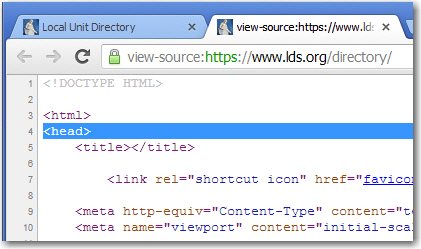
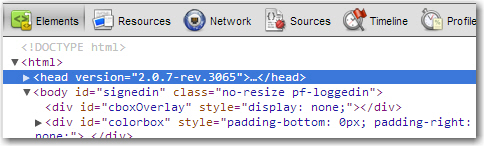
If you look at the page source you can see the version in the head tag.

Currently it looks like <head version="2.0.7-rev.3065">
Member
#78

Re: Household photo not being shown on ward directory print

JonesRK wrote:If you look at the page source you can see the version in the head tag.

Currently it looks like <head version="2.0.7-rev.3065">
I don't see that in my source code. I used 'view source' in FF, IE, and Chrome. From FF, the file name is "www.lds.org_directory.html" (I use an external text editor to view source). From IE and Chrome, it's "https://www.lds.org/directory". My <head> tag is plain and simple.
head tag via view source (plain).JPG
head tag via view source (plain).JPG (78.21 KiB) Viewed 2309 times
However, if I use firebug, I can see it.
head tag via firebug (version).JPG
head tag via firebug (version).JPG (74.86 KiB)
Church Employee
#79

Re: Household photo not being shown on ward directory print

I was using firebug. I didn't even think to look at the original source. It must be being added to the head tag somewhere in the javascript.
Member
#80

Re: Household photo not being shown on ward directory print

I just wanted to add a small note here to say that the 3.0 release is almost here. We plan to enter a beta testing period shortly. I believe much of the hold-up has been due to a new imaging service that has had issues.

However, as a positive note on this thread, the issue with printing a photo directory in the existing release will be fixed prior to the 3.0 release. Hopefully that PDF print fix will go out this week.
New Member
#81

Re: Household photo not being shown on ward directory print

I also cannot get photos to print even though I have checked the photo box and the preview shows me that the entries will include pictures. I also have printed photo directories many times but haven't been able to lately.
Community Administrator
#82

Re: Household photo not being shown on ward directory print

louisegdurham wrote:I also cannot get photos to print even though I have checked the photo box and the preview shows me that the entries will include pictures. I also have printed photo directories many times but haven't been able to lately.
What you are reporting has been reported many times throughout this topic. Somehow you found the right topic to post to, but didn't notice that everyone who has posted to this topic (everyone in the world, actually) is having that exact same experience.

But the good news is that in the post just before yours, we learn that the fix will be deployed soon.
Questions that can benefit the larger community should be asked in a public forum, not a private message.
Church Employee
#83

Re: Household photo not being shown on ward directory print

Hi all, the photo option on PDF printing has been fixed. Thank you for your patience.
LDS.org Local Unit Apps Team Lead
New Member
#84

Re: Household photo not being shown on ward directory print

Sadly I didn't see much patience demonstrated. Thanks for all you guys and gals do and put up with.
Member
#85

Re: Household photo not being shown on ward directory print

JonesRK wrote:If you look at the page source you can see the version in the head tag.

Currently it looks like <head version="2.0.7-rev.3065">
I'm still using that version but photos are now showing up in the PDF file. I thought I wasn't supposed to see photos until version 3 was released?

Ironically, if I try the V3 beta, it does *not* show photos.
Community Administrator
#86

Re: Household photo not being shown on ward directory print

sasgrw wrote:
JonesRK wrote:If you look at the page source you can see the version in the head tag.

Currently it looks like <head version="2.0.7-rev.3065">
I'm still using that version but photos are now showing up in the PDF file. I thought I wasn't supposed to see photos until version 3 was released?
I guess you missed the recent posts in this topic that said that it would be fixed prior to v3, and that the fix has been deployed for v2.
sasgrw wrote:Ironically, if I try the V3 beta, it does *not* show photos.
That's a separate topic, probably unrelated to whether this bug has been fixed. See the Beta Directory topic Photos not showing in beta.
Questions that can benefit the larger community should be asked in a public forum, not a private message.
Member
#87

Re: Household photo not being shown on ward directory print

aebrown wrote:I guess you missed the recent posts in this topic that said that it would be fixed prior to v3
I missed the mental processing of that post. I had read the post when it was first published but for some reason the neurons didn't process "prior to V3".

I still had a legitimate point, I think, because the revision number is still the same.

<head version="2.0.7-rev.3065">

That is, revision 3065 is the one that couldn't handle the photos in the pdf but now 3065 *can* handle it. So new code was put out there but the revision wasn't updated. Not a big deal, though. I'm just happy pictures are back.
Community Administrator
#88

Re: Household photo not being shown on ward directory print

sasgrw wrote:I still had a legitimate point, I think, because the revision number is still the same.
I can't find the post, but I have a dim recollection from the past that some Church employee said that the problems were related to some different service -- not the actual deployed Directory web application. If that memory is correct, then it would make sense that the Directory web app version number might not change even though the other service was fixed.

But in any case, all's well that ends well (I give Shakespeare permission to steal that phrase from me if he'd like).
Questions that can benefit the larger community should be asked in a public forum, not a private message.
Member
#89

Re: Household photo not being shown on ward directory print

aebrown, yes, your memory is correct. The bug was due to a network service restriction, not the actual web application. However, from a user's perspective, it's still pretty much just a bug.