Webcasting Video Capture Cards that Work

65 postsstarted by Paulbb1 30,388 viewsoriginal topic

Member
#1
Can we start a list of video capture cards that are working with the Meeting House Webcasting software? What are the pros and cons.

I have one that doesn't encode the sound (Osprey 210). It maybe my setup but it works with Windows Media Encoder.

What are you using that works?


Arlan Beebe
Ann Arbor Stake, MI
abeebe@tc3net.com
Arlan Beebe
Ann Arbor Stake
New Member
#2

Hauppauge WinTV-HVR-1600

I'm using a Hauppauge WinTV-HVR-1600 model 1199 that "works" but only in an odd way. This card is listed on the Church site as one of the available options so I assumed it work work correctly.

First, I can't get it to work directly in windows media encoder (WME). And, if you try to get it working in WME, it seems to cause problems with the meeting house webcasting (MHW) software.

To get it working the first time, I had to install the hardware, drivers, and software from Hauppauge; and install WME & MHW. Then I had to UNinstall and then reinstall WME & MHW. After the reinstall, using the card in MHW worked. However, when I tried to get the card working in WME again, it broke MHW (everthing was in black and white). I rebooted with no improvement. I had to launch the Hauppauge WinTV application (and then exit) to get MHW to again see the video in color.

Another issue is that you can't get audio into MHW via the HVR card. There is no option to use that as an audio input for MHW. I have to use the computer's built in audio input (line in) instead. I was concerned because of the possible sync problems between the video and audio. However, it appears to work correctly (be in sync).
Member
#3

Website listing supported video capture cards

Can you post the link to the church site listing supported video cards. I missed it in my browsing.
Arlan Beebe
Ann Arbor Stake
Community Administrator
#4
PaulBB1 wrote:Can you post the link to the church site listing supported video cards. I missed it in my browsing.
Here is the list of Webcast video hardware.
Questions that can benefit the larger community should be asked in a public forum, not a private message.
Member
#5

List of Hardware

Thank you for the connection. I will have to apologize to Troy about there not being a list of cards. Wish it was around when I bought my Osprey 210 a year ago.

The link should be spread around in some of these forum questions.
Arlan Beebe
Ann Arbor Stake
Member
#6

Hauppauge WinTV-HVR-1600 model 1199

Doesn't sound like a easy install. Scary as related to stability long term.
Arlan Beebe
Ann Arbor Stake
Member
#7

Video Capture - USB

The list has a lot of USB devices. Are they working well? I am interested in the ones with s-video input.
Arlan Beebe
Ann Arbor Stake
Member
#8

Osprey 210

I have finally gotten Meeting House Webcasting (MHW) software to work with this card. There is no reason to buy this card for webcasting because the software will only work with the MIC in port of the computer and not the sound of the card. It must be that MHW only looks for sound from the computer MIC. Buy the cheaper Osprey 100 which has no sound input on it.
Arlan Beebe
Ann Arbor Stake
Community Moderators
#9
I'm glad you were able to get that card working with MHWS (Meetinghouse Webcast Software)!
Troy
New Member
#10

Haupage 1600

I thought I would save some money so purchased an ATI capture card off Woot for $19. Couldn't get it to work after teleconferencing one of the church broadcast engineers so then I purchased the Haupauge 1600 for about $80. Tonight, conferenced the same engineer who had me go into Windows Encoder and change some settings. Got to the screen where the camera should be showing a picture. No picture! Then he said, that card won't work. I said what about it being on the list of cards to purchase. He said they discovered since I talked to them last that it won't work. Okay, then why did he have me try it tonight if he already knew it wouldn't, just to see if it would work? I said what do I do now. Was told to get a USB device. I said it was previously mentioned that USB devices don't always work well. Was then told to try the Diamond V600. Not sure how much more the Stake will let me spend on hardware that the church is listing on the Internet giving the impression it has been tested and then find out it doesn't work. Has anyone else had success with the Diamond V600? It almost seems like those in SLC looked through some magazines, listed some possibilities and then leave it up to the tech specialists to spend all their money and time to beta test this stuff. By the way, why is the Webcast software off beta test for about 4 months now if it doesn't work with some of the listed cards? I just got through setting up 12 new clerk computers for our Stake. No instructions on setting them up came with them. Found out by calling tech support where to download them. Then found out after doing the first computers that the instructions were not in the correct order of how the computer wants to set up, then we found out later that tech support had to be called on every computer to have them reset the security so the MLS transmit would work and that the clerk login had to be set to administrator privilages so MLS would work properly.
Member
#11

Diamond VC600

Anyone have success with a Diamond VC600 and the Meetinghouse Webcast Software?
We are preparing to try webcasting as a beta for our next Stake Conference and I would prefer to avoid getting a USB video adapter that is problematic.

Thanks

Aaron Z
Community Moderators
#12
I personally have not had any issues using the VC600 USB adapter. Although I know there are people who have. What camera are you planing on using? Sometimes that combination can be the issue as well.
Troy
Member
#13
tsheffield wrote:I personally have not had any issues using the VC600 USB adapter. Although I know there are people who have. What camera are you planing on using? Sometimes that combination can be the issue as well.
Troy
We are still looking at cameras, currently, the plan is to get a Sony EVI-D70, but that is still up for debate.
Ideally, we would like to get a network one (rather than one that needs a coax cable) so that it could be more portable, but it would need to be able to interface with the Webcast Software.

Aaron Z
Church Employee
#14
Greetings Northbear,

I am sorry to hear about the negative experience you had while setting up your video capture. From what I could learn, the Haupauge was listed since it was a working device but later removed due to the high complexity in configuration. We are looking into a restructuring of the wiki documentation to make the capture device selection easier for users. We are also working on an updated version of the software, built upon the Microsoft Expression engine, which may offer a greater level of flexibility in the capture cards that can be used.

Thank you for your feedback and please feel free to contact me with any additional questions and/or comments.

Cheers,
Jacob
New Member
#15

Slingbox

I use Slingbox it is point to point and has a remote control fuction.
I instaled an old VCR in the SAT cab and can access the three chanels in our stake center.:)

Bob Graf cedar UT.
Church Employee
#16

Roxio VHS-to-DVD

Anyone here tried the Roxio VHS to DVD? We heard from a stake that they had great success with the device. We have been testing it and also having strong success. What about you? Any feedback either positive or negative?
Member
#17

VHS to DVD

I don't understand the purpose of the VHS to DVD converter hardware. This thread is about capture cards.
Arlan Beebe
Ann Arbor Stake
Community Administrator
#18
It's actually a package solution for using your computer to convert VHS to DVD.

In other words, it's a inexpensive ($59 list) consumer video capture solution. I think this is what they are talking about.
Have you searched the Help Center? Try doing a Google search and adding "site:churchofjesuschrist.org/help" to the search criteria.

So we can better help you, please edit your Profile to include your general location.
Member
#19
It appears to be similar in design to the Diamond VLC-600. We have been testing with that one and find that it works well for video. How does this one handle sound?

Aaron Z
Church Employee
#20
I also just heard of someone trying the EasyCap USB Capture device and finding it worked exceedingly well. It should be noted though that the USB solutions are always a bit more fickle to get working the first time than the installed cards.
#21

Roxio Easy VHS to DVD-Windows

We used the Roxio Easy VHS to DVD-Windows and it worked great (they also have a Mac version)

Thanks to
headquarters staff for recommending the Roxio Easy VHS to DVD-Windows

The Roxio USB video capture device was recognized (audio and video inputs) by the Meetinghouse Webcast Software running on a Toshiba Netbook with Windows 7 Home Premium

Note: No video capture card required


:cool: Your Fellow Servant,
Porter (Pete) Lee Arnett Jr.
USA
New Member
#22

Diamond VC500 Video Capture

About 2 weeks ago I installed this device on my computer and was able to create a web cast with no problems. (I am using the Beta webcast software.) I tried it again yesterday as part of the dry run for Stake Conference but now the video (same camera and cables) flickers randomly and is only in black & white. Rebooted the computer and removed/reinstalled the software numerous times with the same results.

Anyone have any ideas how I might get this working again?

Seems like a great product if I can get it working again.

Thanks.
Community Administrator
#23
jwabraham wrote:flickers randomly and is only in black & white.
That tends to sound like a analog problem caused by a poor connection, bad cable or at least a weak signal.

From experience, I would focus on the cables first. They're flexed, walked on, run over, etc and do fail.
Have you searched the Help Center? Try doing a Google search and adding "site:churchofjesuschrist.org/help" to the search criteria.

So we can better help you, please edit your Profile to include your general location.
Member
#24

Video Capture cards that work

We finally hooked up the Osprey 210 card correctly and now the sound does encode like it should.

Add it to the list of those that work.

===============
"Can we start a list of video capture cards that are working with the Meeting House Webcasting software? What are the pros and cons.

I have one that doesn't encode the sound (Osprey 210). It maybe my setup but it works with Windows Media Encoder.

What are you using that works?"


=========================
Arlan Beebe
Ann Arbor Stake
Member
#25
Has anyone compared these solutions to see if they give better results than the dedicated box? We have the broadcast box and while sound is good the video is what I get complaints about. It's not the camera feeds as they look fine. It may just be the window encoder to blame but I would still like to hear if anyone has found one of these solutions to give better video.

Also, I don't suppose any of these other solutions would allow dual channel audio, would they? I need to read more on the forums to see if anyone has solved that as the Spanish translation at the local buildings is a pain compared to if we could just send up a second channel of audio.
Member
#26
russp wrote:Also, I don't suppose any of these other solutions would allow dual channel audio, would they? I need to read more on the forums to see if anyone has solved that as the Spanish translation at the local buildings is a pain compared to if we could just send up a second channel of audio.
See http://tech.lds.org/forum/showthread.php?t=5232
I am told that it can be done, but we haven't had a chance to try it yet.

Aaron Z
Senior Member
#27
I haven't officially done a broadcast, but I have an ATI TV Wonder 550 PCI and it works like a champ. I tested it with COAX connection from a VCR and the sound was terrible, but when I use the component input, it worked like a champ.
Member
#28
Has the Hauppauge 1193 WinTV HVR-1500 card been tested? We have seen some oddness with the Diamond VC600 and are thinking about going to a different card when we buy a computer to webcast with.
It would more convenient to use the HVR-1500 with a laptop rather than a desktop/monitor with an Osprey inside, but I would prefer not to waste time/money on something that will not work.

Thanks

Aaron Z
New Member
#29

osprey 210 setup

Anything special on setting this card up to work with Meetinghouse Webcast? I keep trying to select it but it says it is in use by another program.
Paulbb1 wrote:We finally hooked up the Osprey 210 card correctly and now the sound does encode like it should.

Add it to the list of those that work.

===============
"Can we start a list of video capture cards that are working with the Meeting House Webcasting software? What are the pros and cons.

I have one that doesn't encode the sound (Osprey 210). It maybe my setup but it works with Windows Media Encoder.

What are you using that works?"


=========================
Member
#30
I had no issues with connecting to it for video but did have the sound input in the wrong input.
I wonder if some application that is running in the background that has a capture function. I am not an expert in this area. Maybe someone else has a suggestion.
mikefackrell wrote:Anything special on setting this card up to work with Meetinghouse Webcast? I keep trying to select it but it says it is in use by another program.
Arlan Beebe
Ann Arbor Stake
New Member
#31
WARNING

According to the church's recommended list of video capture cards the Osprey 230 is "... the top recommended choice for capturing video and audio for Meetinghouse Webcast Software." Based on this recommendation I ordered one. However, what the church's site doesn't warn you about is that it requires a PCI-X connection. This is NOT PCIe (PCI Express). And it's not backwards compatible with standard PCI. Most desktop PCs don't come with PCI-X slots. It's more commonly found in servers, etc. So if you're considering the Osprey 230 check to make sure you have PCI-X slots available.

Fortunately for me CDW is awesome and is refunding the entire purchase price including what i paid for shipping. I called the card manufacturer and they made some recommendations. I ordered the Osprey 240e which uses a PCIe slot. It's still a little pricey but it's supposed to essentially be the same thing as the Osprey 230 only with a PCIe interface. The Osprey 260e is also the same thing as the 240e but uses a different chipset. The manufacturer said they can no longer acquire the chipset they used on the 240e. But the functionality between the 240e and the 260e is identical. The only reason I went with the 240e instead of the 260e is because the 260e was on back order and a couple of weeks from being filled and I'm in a bit of a time crunch. The only problem this may cause is if my local stake decided to move it to a new computer after the new Windows OS comes out. ViewCast won't be updating the drivers for the 240e. I don't see this being an issue because I'll be installing it on a system and that system won't change for many years to come. If we do change the hardware we'll just have to make sure we us Win7 or WinXP. Plus we got a better price on the 240e because CDW is trying to get rid of them. :)

I'll give a full review once I get it up and running.
Member
#32
bwuehler wrote:WARNING
According to the church's recommended list of video capture cards the Osprey 230 is "... the top recommended choice for capturing video and audio for Meetinghouse Webcast Software." Based on this recommendation I ordered one. However, what the church's site doesn't warn you about is that it requires a PCI-X connection. This is NOT PCIe (PCI Express). And it's not backwards compatible with standard PCI. Most desktop PCs don't come with PCI-X slots. It's more commonly found in servers, etc. So if you're considering the Osprey 230 check to make sure you have PCI-X slots available.

That has now been noted on the Wiki page.

Aaron Z
New Member
#33
Sorry for the delayed update... The Osprey 240e worked beautifully! The Meetinghouse software recognized the input device immediately. It was almost seamless. The only problem we had was with the video display drivers for the video card (not the capture card). It was causing some flickering on the video stream. After updating the drivers everything was fine.

For this setup I was using a desktop computer with WinXP Pro. and 4Gb of RAM. The processor wasn't as good as it should have been but it did the job. Also, I recommend getting a decent video card to work in conjunction with the capture card. If you are using onboard video it might be ok, but when you start adding multiple video sources it'll really put a strain on your system.

For testing I also installed the Osprey 240e card into a Windows 7 workstation and the setup was just as easy and seamless.

Last note, we looked into the best way to manage multiple video streams. While the software has it's own source switching feature, we've decided that the best way is going to be to get a video source switch control board. Something specifically designed to accept multiple inputs then feed one output into the Osprey capture card. Thus reducing the processing strain on the workstation. That might take us some time, but I'll try to get more info up about that when we get to it.
#34

Multi-input capture cards

I was actually moving the opposite direction than the previous poster (bwuehler) - am looking for solutions that will allow me to use (more cost effectively) the multi-channel/video switching capabilities of the webcasting software. Buying 3 Osprey 230s sure gets pricey, though. Osprey has a 4 channel capture card, Osprey 460e:

http://www.viewcast.com/products/osprey ... sprey-460e

But at $900, it's no cheapie!

I also found this Hauppauge ImpactVCB card (model 188) with 4 channels of video (no audio). Seems like the perfect thing for webcaseting - can use the single system audio for the audio capture - and only $50 on Amazon.

http://www.amazon.com/gp/product/B001EY ... PDKIKX0DER

http://www.hauppauge.com/site/products/ ... ctvcb.html

I can't seem to find anything which claims compatibility with the MS Expression Encoder though, but for $50 I may just buy it and try it out!

Anyone had further experience with Hauppauge or this particular line of cards (posting in this thread because it was begun with a discussion of Hauppauge)

Thanks
Member
#35
With their PCI-Express cards, they say that:
The HVR 1850 or the HVR 1250 will work but you can only use the composite or
Svideo input and it will be video only, no audio.
If you contact them from their website (http://hauppauge.com/site/contact/contact_us.html) they should respond with an answer fairly quickly.

Aaron Z
New Member
#36
well i dont see the 240e on the osprey website. Anyone work with the 260e at $495?
http://www.viewcast.com/products/osprey ... sprey-260e
Senior Member
#37
abcampa wrote:well i dont see the 240e on the osprey website. Anyone work with the 260e at $495?
http://www.viewcast.com/products/osprey ... sprey-260e

I have purchased that card and for the initial test it worked fine. I won't be really trying until the end of February, but it is recognized by the software and also by PVC.
Member
#38
We have the 260e and will be using it for our 1st Stake Conference Broadcast in May. We have done initial testing and it seems to be a great choice. We do our multi camera mixing in a video mixer before going into the PC through the 260e.
New Member
#39
With the encouragement of Kolsen, I picked up a Blackmagic DesignIntensity Pro editing card and installed it in two machines. ThisPCIe card is readily available at $185. The PC’s were:

1. Dual core AMD 64 3200+at 2Ghz with 2 GB RAM with the XP Sp 3 O/S 32 bit

2. i7-920 2.67Ghz with 6 GBRAM Windows 7 Ultimate 64 bit (CPU Rating 7.4)

Version 2.0 and 3.0 of the Webcast software were used with a Sony EVI-D70 camera in S-video mode.
All four combinations of Webcast software and computers were tested and were functional. It was somewhat surprising that the Intensity Pro (IP) software worked with the XP machine, both the latest IP version and the oldest version both played. The degree of CPU utilization was judged using Task Manager and noting the CPU usage percentage. It was found that the CPU load was little changed by doing an actual Webcast. The following comparisons used a steady video image not the still JPEG file.
Here are a few highlights of the measured values:

On the AMD PC at640x480x30fps version 2.0 used 80% of the CPU.

On the AMD PC at640x480x30fps version 3.0 used 97% of the CPU.

On the i7-920 PCat640x480x30fps version 2.0 used 9% of the CPU.

On the i7-920 PCat640x480x30fps version 3.0 used 18% of the CPU.

Using the i7-920 PC at different resolutions/data rates these were the CPU utilization rates:

Version 2.0 350Kbps 7%

Version 2.0 450Kbps 9%

Version 2.0 601Kbps 8%

Version 2.0 1,214Kbps 16%

Version 2.0 1,855Kbps 22%

Version 3.0 High 4:3 18%

Version 3.0 HD 3.6Mbps Up52%

Version 3.0 HD 1.7Mbps Up15%

This is not quite an apples to apples comparison since the profiles used in version 2.0 and 3.0 are somewhat different.

Just for fun, a webcast was run under versions 2.0 and 3.0 at the highest data rates from the i7-920 PC thru the Headquarters server and back to the AMD PC media player successfully. There were no drops as reported on version 2.0.

As a proxy for machine capability the website www.cpubenchmark.net provides CPU ratings. The Athlon chip is 530 and the i7-920 chip is 5,567.

Conclusions:

The Blackmagic card works with about the same CPU load as a PCI card we have used. The AMD PC is on the edge of performance failure. Version 3.0 needs more resources to run.


#40
Great test data, quintonrhq. Last weekend my Blackmagic Design Intensity Pro arrived, so I did some initial tests as well, hoping to recommend this card. On paper it looks better than the Osprey 260e. It is cheaper, and has HDMI/HD capture capability. Seems like a no brainer to me - a cheaper, future proof solution!

My tests mostly focused on installation, configuration, then running long webcasts to ensure audio sync. I'm using an AMD x64 Dual Core with 4GB memory running the Webcast 3.0 software software in "high" 4:3 mode (640x480).

I was able to get the card to work with both Vista and Win 7, though Win 7 is highly recommended because it is less resource intensive than Vista (I needed all the CPU clock I could get). I did a 4.5 hour webcast and had NO audio sync issues or video drop issues. The CPU ran at about 95% - a little hot for comfort, but I think it will work.

One nice thing about this card is it also has output ports. So you can easily hook up a monitor (with composite, component, or HDMI) as a 'program' monitor.

I would definitely recommend this card for use, especially due to the HDMI interface, and if we get a few more users with good reviews, I'd propose we add it to the wiki as a recommended solution.

All the appropriate caveats: this is a PCIe x1 card. It is full-height, no half-height options... so if you have a thin PC, you will need a riser card interface or a new case.
Member
#41
Add the Hauppauge 1128 WinTV-HVR-1850 Internal Hybrid TV Tuner/Video Recorder to the list of cards that work out of the box.
We had a ~2 hour meeting yesterday and ran that with the S-Video input on the "Low 4x3" setting with Meetinghouse Webcast 3.0.1.101. No problems (that I am aware of) with audio sync.
I would have used a higher quality, but some of the receiving units were on Time Warner cable (one had a 10x1 connection as tested when having issues) and for some reason, couldn't watch the Medium 4x3 stream without constant buffering.
I had the HVR-1850 and a Diamond VC-600 connected (one to each camera) with the same audio source and used the "switch source" feature to go from one to the other.

Aaron Z
Community Moderators
#42
I will add 2 thumbs up for the Blackmagic Design Intensity Pro PCIe card. With HDMI, Component, S-Video, and Composite video inputs AND outputs, and audio over HDMI or RCA jacks, it's flexibility is amazing. It maxes out at 1080p/24, but for what we do, 1080i/60 or 720p/60 should be more than enough.

A couple of negatives... It seems you can't just install the drivers, but instead you have to install their 90MB "installation package", that includes the drivers along with some apps and utilities. Another thing it did was install a Blackmagic Design shortcut in the system Control Panel. Only there can you reconfigure the A/V inputs and outputs from HDMI to the various RCA jacks. In other words, it does not auto-sense where the source is connected to. (Took a call to their tech support to figure that out.) Oh, and their tech support was fast, friendly, and very knowledgeable.
So we can better help you, please edit your Profile to include your general location.
#43
I have been hesitant to purchase the Blackmagic Intensity Intensity Pro PCIe because their website states only a handful of PCs and motherboards (link) are recommended.

How can I find out if the card will work in a PC without installing one?
#44
I think you can understand that to mean that those are they systems they have tested and qualified, especially for encoding HD video using their bundled software. I think, hardware-wise, you have a good chance of success as long as you have a true PCI-e slot and a computer less than 3 years old.
New Member
#45

Notes relating to Intensity Pro audio setup with Webcast version 3.0

The Intensity Pro (IP) installation has no mixer software options. It must be fed and managed externally. This is a virtue to me.
The ouput impedence is 600 ohms and with a load of 3.1K the input and output levels are the same. WYSIWYG.
When the IP and version 3.0 are used together, the following maximum input voltage and Output Audio Gain Level combinations are at saturation:
0 - Off
1 - 2.640 V (peak to peak)
2 - 1.410
3 - 0.950
4 - 0.720
5 - 0.580
6 - 0.480
7 - 0.411
8 - 0.370
9 - 0.330
10 - 0.290
This was done with a 1Khz sine wave. The Output Audio Gain Level is basically a 20 dB gain control.

The strategy is to measure the absolute peak that will be expierenced during a broadcast and pick an Output Audio Gain level that is close to it.
Then using an external mixer, adjust the mixer gain to match the saturation point.
Finally adjust the limiter to squash any excursions over the saturation point.
This should give the greatest dynamic range and avoid overload.

Version 3.0 has a little graphic VU bar on the right side of the video image. Here is a rough calibration. Using the full green bar at the top as 0 db:
75% - 2 dB
50% - 5.6dB
33% - 9 dB
25% - 12 dB
17% - 15dB


Version 3.0 transports a stereo signal. The graphic bar shows the strongest channel.
If the speaker and music were constant the grapic bar could just be set to the top but the difference between the peak and average is about 9 dB.
That means that the graphic bar will normally hover around 1/3 to 1/2 of full scale.
Be careful when working in dB's to make sure that the proper reference values are used.
This test data was gathered with a Behringer DEQ2496, signal generator and oscilloscope.
Member
#46
Question am I allowed to install the video capture card into the MLS PC to use this for the webcats.

Otherwise the stake are going to need to buy a dedicated machine just for webcasts.
#47
If you are the Stake Technology Specialist, then yes you are allowed to add hardware to the Clerk computer.

Just make sure you remember to remove it before the computer is replaced/upgraded by your facilities group.
Community Moderators
#48
sphester wrote:Question am I allowed to install the video capture card into the MLS PC to use this for the webcats.
sammythesm wrote:If you are the Stake Technology Specialist, then yes you are allowed to add hardware to the Clerk computer.
The STS would normally be the individual to actually perform the task. Any configuration changes to the administrative computers must be approved by the stake president. Of course the STS would council with him to provide the necessary information for him to make an informed decision.
JD Lessley
Have you tried finding your answer on the ChurchofJesusChrist.org Help Center or Tech Wiki?
Member
#49
I've assumed here it is going to be better to use the MLS admin machine than a laptop with a usb video capture card. Also would a 5 year old windows xp do the job with 2 gig of ram. Its due for replacement this year i hope.

What are people views on this?
Community Moderators
#50
sphester wrote:I've assumed here it is going to be better to use the MLS admin machine than a laptop with a usb video capture card. Also would a 5 year old windows xp do the job with 2 gig of ram. Its due for replacement this year i hope.

What are people views on this?
The load on the PC really depends on the video quality selected (which is usually determined by the available bandwidth). At the Medium quality setting, an older PC might do fine, but each step up in quality puts a higher demand on the system. For example, just for fun I tried uploading a test stream at the highest possible HD setting and my Intel i5 quad-core system was barely up for the task.

[For those reading this thread, we are discussing the CPU load on the PC doing the uploading. Downloading is not as intensive and can be done by most modern PC's.]
So we can better help you, please edit your Profile to include your general location.
New Member
#51
We just purchased Roxio Easy VHS to DVD 3 Plus and we can't get the s-video to work on the video capture but the composite works fine. If we hook up the s-video on the camera to a TV it works just fine. Has anyone had any problems (or solutions) with this?
Member
#52
roundsah wrote:We just purchased Roxio Easy VHS to DVD 3 Plus and we can't get the s-video to work on the video capture but the composite works fine. If we hook up the s-video on the camera to a TV it works just fine. Has anyone had any problems (or solutions) with this?
Have you switched the Webcast Communicator software to use the S-Video input? In the place where you change the input card, there is a button to configure the card settings. One of the three submenus will let you choose the input on the card. If it is set to Composite Video, you will not see anything from S-Video.

Aaron Z
Member
#53
As an FYI, I recently used the Blackmagic Design Intensity Pro, and it worked great! It's a lot cheaper than the Osprey, and it does both analog and digital.
#54
[INDENT]
As an FYI, I recently used the Blackmagic Design Intensity Pro, and it worked great! It's a lot cheaper than the Osprey, and it does both analog and digital.
What is the brand, model and specifications of the computer you installed this in?

Also, how much did you pay for it?

I read that those cards are not compatible with Dell PCs.
[/INDENT]
Member
#55
Does anybody have experience with the USB 3.0 option from Blackmagic (Intensity Shuttle)?
If I upgraded from Roxio, I think I would prefer an option that wasn't tied to a single, desktop computer.
Community Moderators
#56
michaelfish wrote:I read that those cards are not compatible with Dell PCs.
They are full-height cards and the Dell 740 is built for the shorter style cards, often seen in servers. The solution is to purchase an optional "riser" card that Dell made for these that allowed for 2 full-height cards to be installed. If I recall, they made two versions for the 740, one model was for installing 2 full-height PCI cards, and one model for installing 1 PCI-E card (up to x16) and 1 PCI card. Of course, for the Design Intensity Pro, you would need the latter.
So we can better help you, please edit your Profile to include your general location.
#57

The solution is to purchase an optional "riser" card
Has anyone actually had success with the Blackmagic Intensity Pro in a Dell PC (with or without the riser)? If so, what was the model and configuration?

The reason I'm asking is because of this statement on Blackmagic's Website (link)
"Please note: Dell workstations are not supported for use with Blackmagic Design capture cards."

Also, I'm concerned because of a statement from the Director of Support at Blackmagic Design Inc (post):
"Dells have been a problem with us in the past because there is no way to get to any engineering resources in case of a conflict. They will also many times change hardware components in the same model of machine. So as an outdated example a two dimension 4400's 6 months a part will very likely have completely different components.

And this statement is more heavily targeted at the server lines which are missing a setting we need to work properly....

Sincerely,

Joshua
Director of Support
Blackmagic Design Inc."

Finally, according the Blackmagic website, only certain motherboards are recommended (link).
#58
I have a Intensity Pro working in a Dell Optiplex 740 with the riser card. I took out all other PCI cards and boosted the RAM to 4GB and can webcast without problem. (though the RAM was overkill, the CPU is now my bottleneck in terms of webcasting - for a 640x480 webcast, my processor runs ~90% the whole time)
New Member
#59
I have been looking at the Intensity Shuttle. Have you found it anything about compatibility yet? We're looking at it instead of installing a PCIe card in a desktop computer. I would appreciate any information you have learned about this solution.
Member
#60
michaelfish wrote:What is the brand, model and specifications of the computer you installed this in?

It was in a Lenovo desktop running Windows 7.
New Member
#61

A Super Simple Solution!

Add the following card to those that work: Hauppauge WinTV-HVR 950Q $90

@ BestBuy $90 it's called Hauppauge - PCTV HD Stick USB 2.0 TV Tuner with PVR.

I found this card sufficient and very easy to use. I wanted to go with a dedicated desktop with an Osprey Card solution but decided to keep it simple for now.

This WinTV-HVR 950Q is a small USB stick that accepts TV/RCA/S-Video as inputs.

I chose to use the TV Tuner as it was the simplest.
Install:
1. Install Software that came with device
2. Plug In > Tune to Channel 3 > Looks Good
3. Open up Church Webcast Software > Select WinTV-HVR 950Q > Tune to Channel 3
4. Start Webcast

Setup:
Laptop
Windows 7 (XP also Worked [Backup Laptop])
WinTV-HVR 950Q
Church provide Webcast Software
Slow Internet Connection 1.4 / 1.4Mbps

Connection:
Laptop > WinTV-HVR 950Q > Coax Cable > Front of Satellite Cabinet TV connection

Conclusion:
Using the TV Tuner Option was Super Easy. Audio/Video already synched from same source. Everyone is seeing the same thing. Whether they are at the stake center watching channel 3, or at remote locations. Any video switching is done away from the laptop setup.

+This setup can be placed anywhere you have a TV connection @church, you don't necessarily have to be next to the Satellite Cabinet.

Ran multiple tests with no issues. Stake Conference 2+ hours with no problems.
New Member
#62

Just got the Blackmagic Design Intensity Pro

bfromm wrote:As an FYI, I recently used the Blackmagic Design Intensity Pro, and it worked great! It's a lot cheaper than the Osprey, and it does both analog and digital.

Just installed the new card and used the blackmagic console in the control panel to change the video source. The video comes through fine, but the audio doesn't come through. Any thoughts?

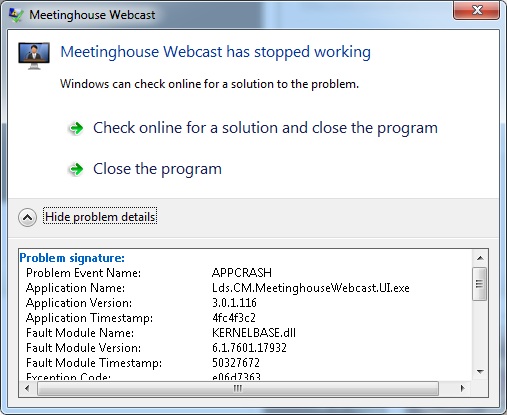
The larger issue that I am facing is that when I use the Blackmagic card as the source, webcast communicator crashes with the attached error
webcast error.jpg
webcast error.jpg (68.86 KiB) Viewed 2346 times
Did you do any special configuration for the Blackmagic Design Intensity Pro card?

I'm using a new computer with an i5 processor and 4GB memory.
#63
bshepher wrote:Did you do any special configuration for the Blackmagic Design Intensity Pro card?

I'm using a new computer with an i5 processor and 4GB memory.

No special configuration here. I just installed the card, loaded the drivers, and away I went. I can't speak for the HDMI input, though. I've only been using the composite in/out and audio in/out ports.
New Member
#64

Capture setup that works for us

We have taken a rather simplistic approach to webcasting. We just finished our 5th webcast. We have tweaked our configuration a little over time and it is working well for us. Here is our configuration.
1- Computer - HP G42 laptop running Windows 7. At medium resolution the CPU is at 50%. I have set it for high resolution which exceeds our bandwidth but the CPU is at 60%. We are getting an internet upgrade next week so maybe we can go to the high resolution.
2- Video Capture - We use a USB Dazzle DVC100 (50 or 60 bucks) with composite video input. Our video feed comes right out of our satellite cabinet. We get a very descent picture. We haven't been able to get the audio through the card. The web is over run with this known problem
3- Audio Capture - So we do something here that is not recommended anywhere but we have found a way for it to work. We plug in the audio straight from our satellite cabinet (Chapel audio) to Mic In on the computer. The attached document describes how we have adjusted the computer settings. We don't use a mixer but could, we just haven't found a need for one. Depending on the computer, this may or may not be a good solution for everyone. But it works very well for us. We have not experienced any synching problems between audio and video. They are always right on.
4- Camera - We have used a couple of different cameras and both work fine. One is an older Sony CCD-TRV212. It is plugged into our Chapel video system at the back of the Chapel.

So that is our setup. We haven't had problems on the transmitting end. We have seen some problems on the receiving end but that has nothing to do with our setup. Receiving problems have been bandwidth related when we don't kill the wireless at the receiving location. In our last conference the speaker asked everyone to open their scriptures. At the receiving site, this overloaded our internet. We have always killed the wireless at the transmitting site and will now kill it at the receiving sites also. Lesson learned.

This seems to be a very good and robust setup and pretty simple. We have just used our personal equipment rather than buy any equipement with the exception of the Dazzle capture device. I had to be pretty insistent with our FM group to get the outputs we needed from the satellite cabinet. In our case, and I think in most cases, the needed signal sources are readily available in the cabinet, it is just a matter of getting access to them. Fortunately, we have internet available at our satellite cabinets. We actually have two buildings in our Stake setup to originate webcasting.
📎 Adjusting Mic In.docx (1.27 MiB)
New Member
#65
Edited 1 time, last by jdlessley on . Reason: Add link to thread topic.
We just finished our stake conference with the BlackMagic Design Intensity Pro card. the card is nice because it is a card (and this is the only type of video capture device currently recommended by the webcast tech group here, and it is cheaper than the Osprey cards. It also have both digital inputs (HDMI and Component) plus analog inputs including composite (and s-video if I recall correctly).
But with the current version of MeetingHouse Webcast, you will need to be careful not to choose the wrong video and audio drivers during installation or at any time thereafter. If you do, you will have errors.
But I have posted a fix for this mistake on March 25, 2013 by kpeek, entitled: Meetinghouse Webcast Encoder & BlackMagic Design Intensity Pro
Good luck to you and enjoy your broadcast!