Zoom not picking up the Organ or Musical Number for Choir

18 postsstarted by brandonm35 6,191 viewsoriginal topic

New Member
#1
We've recently discovered while using zoom that when we have the audio feed coming from the pulpit directly into my laptop, that there is an issue with folks at home streaming not being able to hear the organ during the Hymns or when a musical number perhaps from a choir in the seats at the back of the rostrum are singing. when folks are speaking directly into the pulpit micorophone it's crystal clear but when singing the hymns or a choir is performing behind the organ or to the side of the pulpit they aren't able to hear them.

I know there was an option to select regarding "Original sound for musicians" but even with that selected it seems the issue still occurs, not sure what workarounds there are or what can be done to alleviate the issue.
Community Moderators
#2
Do you have Zoom hooked up directly to the chapel sound system (which relies on the podium microphone), or are you using a microphone that will pick up all of the sound in the room?
Samuel Bradshaw • If you desire to serve God, you are called to the work.
Church Employee
#3
brandonm35 wrote: Mon Feb 03, 2025 11:42 am I know there was an option to select regarding "Original sound for musicians" but even with that selected it seems the issue still occurs, not sure what workarounds there are or what can be done to alleviate the issue.
When you use the "Original Sound for Musicians" option, are you also toggling it on or off? Enabling the setting alone is not enough - you also need to toggle it on/off to hear the organ and background music, as mentioned here: https://tech.churchofjesuschrist.org/wiki/Zoom_Audio
New Member
#4
"Original Sound for Musicians" is an option but you have to remember to turn it on and off throughout the meeting as needed. I tried it for awhile but kept forgetting to either turn it on or off. For a 'set it and forget it' solution set the Zoom Audio Profile background noise removal to Low and the podium microphone will pick up the organ and the choir. Zoom Settings -> Audio -> Audio Profile -> Zoom background noise removal -> Low.
Community Administrator
#5
WillClaridge wrote: Wed Feb 05, 2025 9:00 pm "Original Sound for Musicians" is an option but you have to remember to turn it on and off throughout the meeting as needed. I tried it for awhile but kept forgetting to either turn it on or off.
What kind of problems were you experiencing if you left it on?
Have you searched the Help Center? Try doing a Google search and adding "site:churchofjesuschrist.org/help" to the search criteria.

So we can better help you, please edit your Profile to include your general location.
Member
#6
brandonm35 wrote: Mon Feb 03, 2025 11:42 am We've recently discovered while using zoom that when we have the audio feed coming from the pulpit directly into my laptop, that there is an issue with folks at home streaming not being able to hear the organ during the Hymns or when a musical number perhaps from a choir in the seats at the back of the rostrum are singing. when folks are speaking directly into the pulpit micorophone it's crystal clear but when singing the hymns or a choir is performing behind the organ or to the side of the pulpit they aren't able to hear them.

I know there was an option to select regarding "Original sound for musicians" but even with that selected it seems the issue still occurs, not sure what workarounds there are or what can be done to alleviate the issue.
Do you have noise cancellation enabled? It might be purposefully blocking it out as background noise so you can hear people talking into the microphone. Try turning noise cancellation off (if Zoom gives you that option) and see if it helps, if you haven't yet.
New Member
#7
russellhltn wrote: Wed Feb 05, 2025 10:42 pm
WillClaridge wrote: Wed Feb 05, 2025 9:00 pm "Original Sound for Musicians" is an option but you have to remember to turn it on and off throughout the meeting as needed. I tried it for awhile but kept forgetting to either turn it on or off.
What kind of problems were you experiencing if you left it on?
Zoom participants complained about the audio levels, and quality, of the different Sacrament Meeting Speakers at the podium if "Original Sound for Musicians" was left on. Zoom does a good job of smoothing out audio variations when you let it. Setting the Zoom Audio Profile background noise removal to 'Low' eliminated complaints and permitted choir and organ to be picked up by the podium mic.
Senior Member
#8
Since we do not have multiple microphones, choir microphones, or an audio mixer, my solution for congregational hymns during Sacrament meeting is to mute audio from the mic, and simply share the hymn audio and sheet music from the church website to the Zoom participants. They love it.

Since the shared hymn and the local hymn are never in sync, I monitor the shared hymn using earbuds from the laptop running Zoom. That allows me to scroll the sheet music as needed.
Dana Repouille, Plattsmouth, Nebraska
Senior Member
#9
I believe the church audio setup is that organs in stake centers have a direct line input to the audio system, but in non-stake centers, they do not. I believe it's designed this way to facilitate audio/video distribution in the building for meetings like stake conference. I don't know if they're still engineering systems for a webcast system or not. I'd have to go look, but I think in our stake center system there's a separate organ out at the rack for the webcast outputs.

If you're in a stake center, check to see if your organ is connected to the sound system. The system may not be programmed to have the organ go to the audio out you're using. If that's the case, you might be able to get the FM group to reprogram the system to get organ in your audio out. If it's a newer system, it might be connected to the internet and they might be able to reprogram it remotely. This doesn't solve the choir problem, but it would help with organ.
Member
#10
For picking up choir / piano / instruments, we use boundary condenser mics.

This one for XLR into existing sound system.
https://amzn.to/3KbYZFl

This one for USB input into a laptop
https://amzn.to/49JUgoL

5 years use since Covid and very good results across multiple buildings.
New Member
#11
Wattsuk wrote: Fri Nov 28, 2025 8:45 am For picking up choir / piano / instruments, we use boundary condenser mics.

This one for XLR into existing sound system.
https://amzn.to/3KbYZFl

This one for USB input into a laptop
https://amzn.to/49JUgoL

5 years use since Covid and very good results across multiple buildings.
Are you just manually switching between mics then on your device in zoom?
Member
#12
Yes, that's correct for the USB mics.
New Member
#13
Thank you. I'm thinking of getting a small USB mixer and a small omni directional mic to place on the organ and or place near the choir when there is one. I get weekly feedback of how bad the audio is, right fully so because all were able to use is the podium mic.
New Member
#14
sbradshaw wrote: Mon Feb 03, 2025 12:20 pm Do you have Zoom hooked up directly to the chapel sound system (which relies on the podium microphone), or are you using a microphone that will pick up all of the sound in the room?
Yes it's connected straight into the podium mic output. I'm just not sure how audio is routed from the organ into the system or is it simply it's not, do these things have some type of internal speaker that blasts it? To my ears it's going through the system.
Senior Member
#15
davemoore99 wrote: Sun Jan 18, 2026 10:39 am Yes it's connected straight into the podium mic output. I'm just not sure how audio is routed from the organ into the system or is it simply it's not, do these things have some type of internal speaker that blasts it? To my ears it's going through the system.
By saying it's connected into the podium mic output, I'm guessing there are some jacks there for record out and that it's not connected directly to the podium mic itself. Can you post some pictures so we can verify?

If you're not in a stake center, there's a good chance that the organ is not connected directly to your sound system. If you're in a stake center, it might be. Look at the wires coming out of your organ. Do any wires come out of it and connect to an interface the plugs into a mic jack near the organ? If. you're unsure, you can post some pictures of wires coming out of the organ and where they go and maybe we can help figure it out.

If you don't have an output from the organ connected to a mic jack, then I doubt the signal is anywhere in your system. On the other hand, if you do, it's a matter of programming the mix going into the audio output jack that you're connecting to your broadcast. If the sound system in your building is newer, it may be connected directly to the Internet and an audio engineer can configure it remotely. Otherwise, they'll probably have to send a tech to your building to program it with a laptop.

If your organ is connected to the sound system and its not mixed into the audio out, you can likely ask your FM group to have it reprogrammed. If your organ isn't connected to the sound system and the building isn't a stake center, it's probably not going to happen. Your stake president can always request it from the FM group and see if they'll go for it. But it feels like the current trend is the church isn't too responsive to local requests for adjustments based on how a building is used by the local congregations.

If your organ isn't connected, you can use some of the microphones mentioned in this post. If that solution doesn't give you good enough audio for the person speaking at the pulpit, you can get a simple mixer and connect the boundary mic and pulpit mic to it. Send the pulpit mic into the mic jack at the pulpit and send a mix of the boundary mic and pulpit mic to your broadcast feed. But I'd start with a mic suggested in the post first and if that isn't acceptable, then consider the setup I'm describing with a mixer. We occasionally use an external mixer for such purposes, like for stake conference, training meetings, or firesides where we set up wireless mics, choir mics, and possible instrument mics for accompanying instruments. If you feel you need to go the external mixer route and aren't sure what to do, post here and there are people who can help you figure it out.
New Member
#16
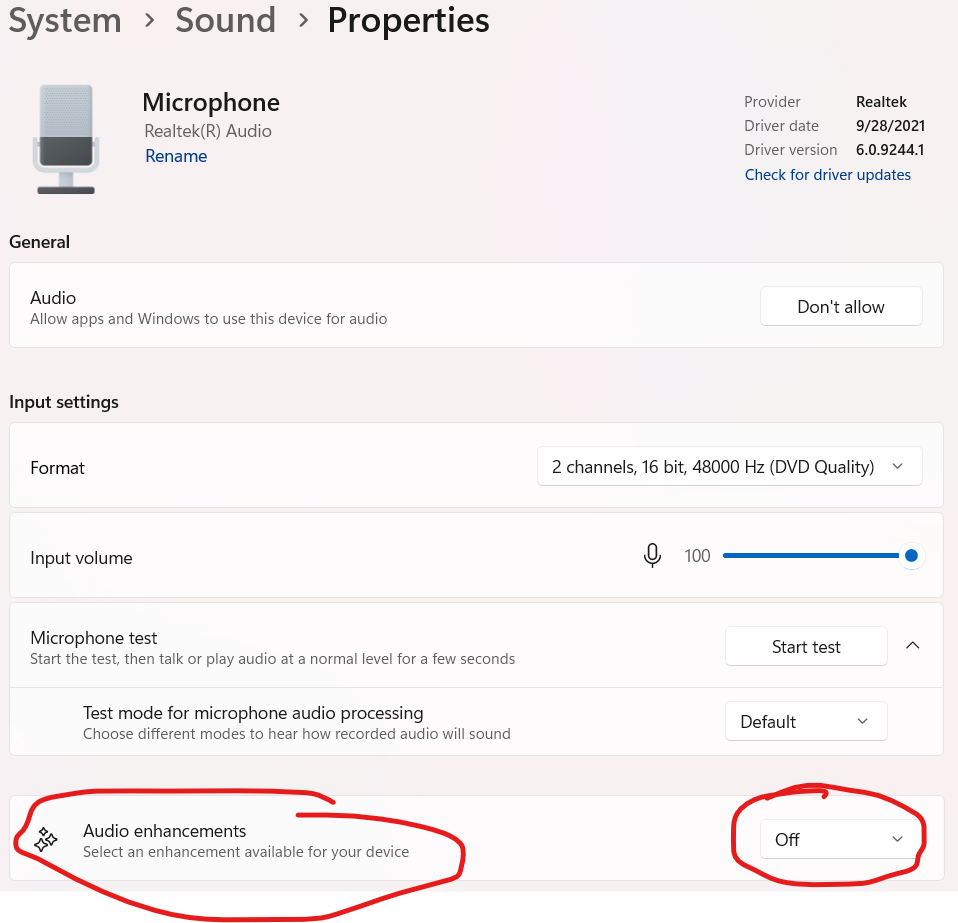
In addition to using "Original Sound for Musicians" in Zoom, you need to watch out for the OS (I've especially noticed on newer Windows 11 devices) doing it's own noise cancelation, which will also interfere with music numbers being heard on the Zoom call.
Audio Noise Processing.png

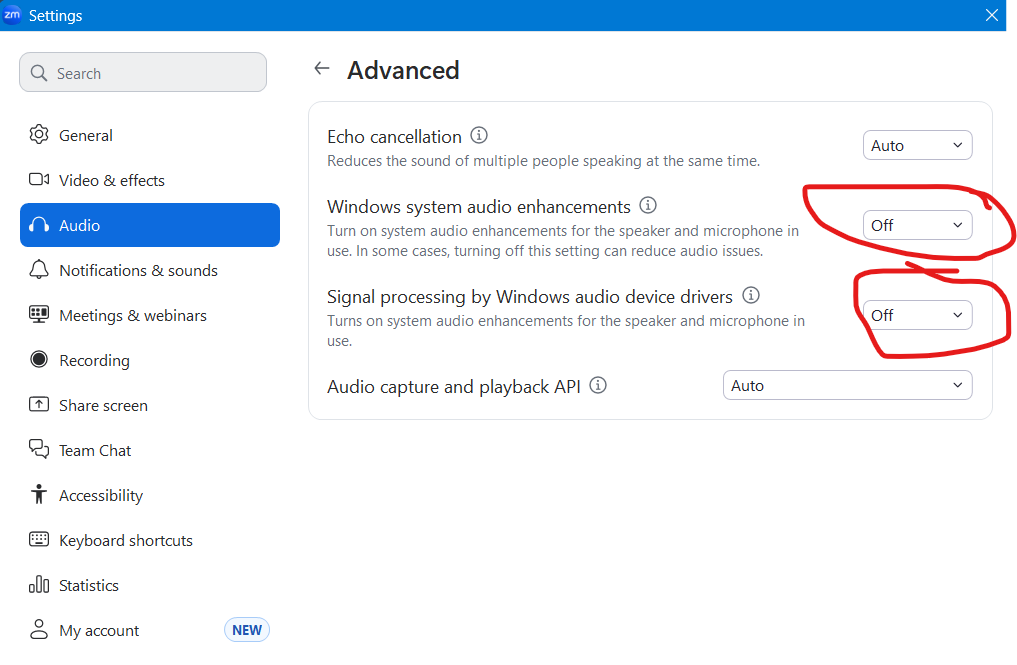
You can also try having zoom ignore windows processing in the Settings > Audio > Advanced menu
Audio Noise setting in Zoom.png
New Member
#17
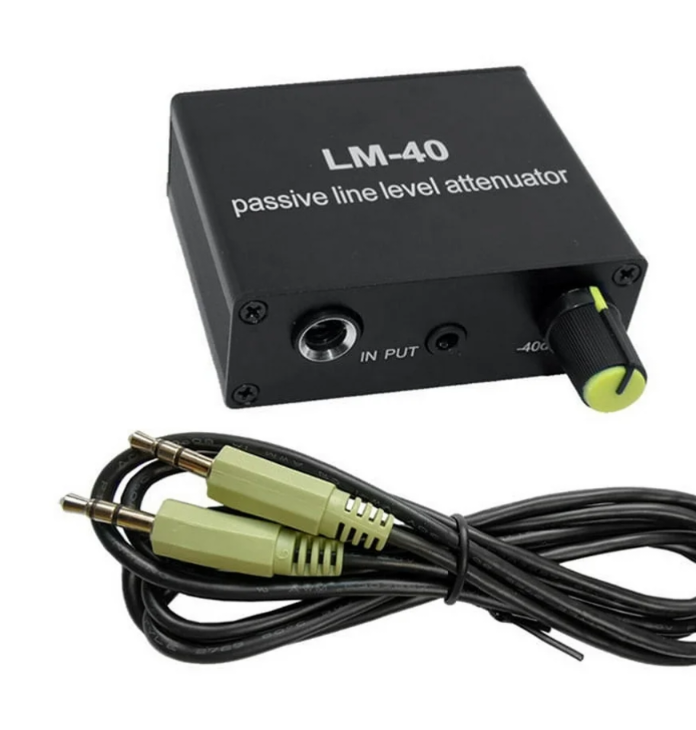
We discovered that the computer was getting too much sound, the sound card was being overloaded during music. We added a "Audio Passive Line Level Attenuator" found online for less than $20. All audio is now heard from all of our broadcasts, we were able to broadcast a music and the spoken word type meeting at Easter.
Screenshot_20260503-102128.png
Community Moderators
#18
sbbdemo wrote: Sun May 03, 2026 8:34 am We discovered that the computer was getting too much sound, the sound card was being overloaded during music. We added a "Audio Passive Line Level Attenuator" found online for less than $20. All audio is now heard from all of our broadcasts, we were able to broadcast a music and the spoken word type meeting at Easter.
There are many different types of attenuators on the market. Some that have a knob for variable attenuation get "scratchy" over time or can become noisy, even when the knob is not being touched. Running the knob smoothly through its full range a dozen or so times can often get rid of the scratchy/noise short-term. A fixed attenuator avoids that problem.