Ward Directory and Map Page Flickers in a loop

10 postsstarted by joshbingham 2,428 viewsoriginal topic

New Member
#1
Help.

My new Bishop (and myself) have a major issue when we signs into our church account and then choosing "Ward Directory & Map", the page just flickers and keeps resetting, not allowing access. What's going on? We both use Chrome for web browser.

Screen shot attached.

-Josh (Ward Clerk)
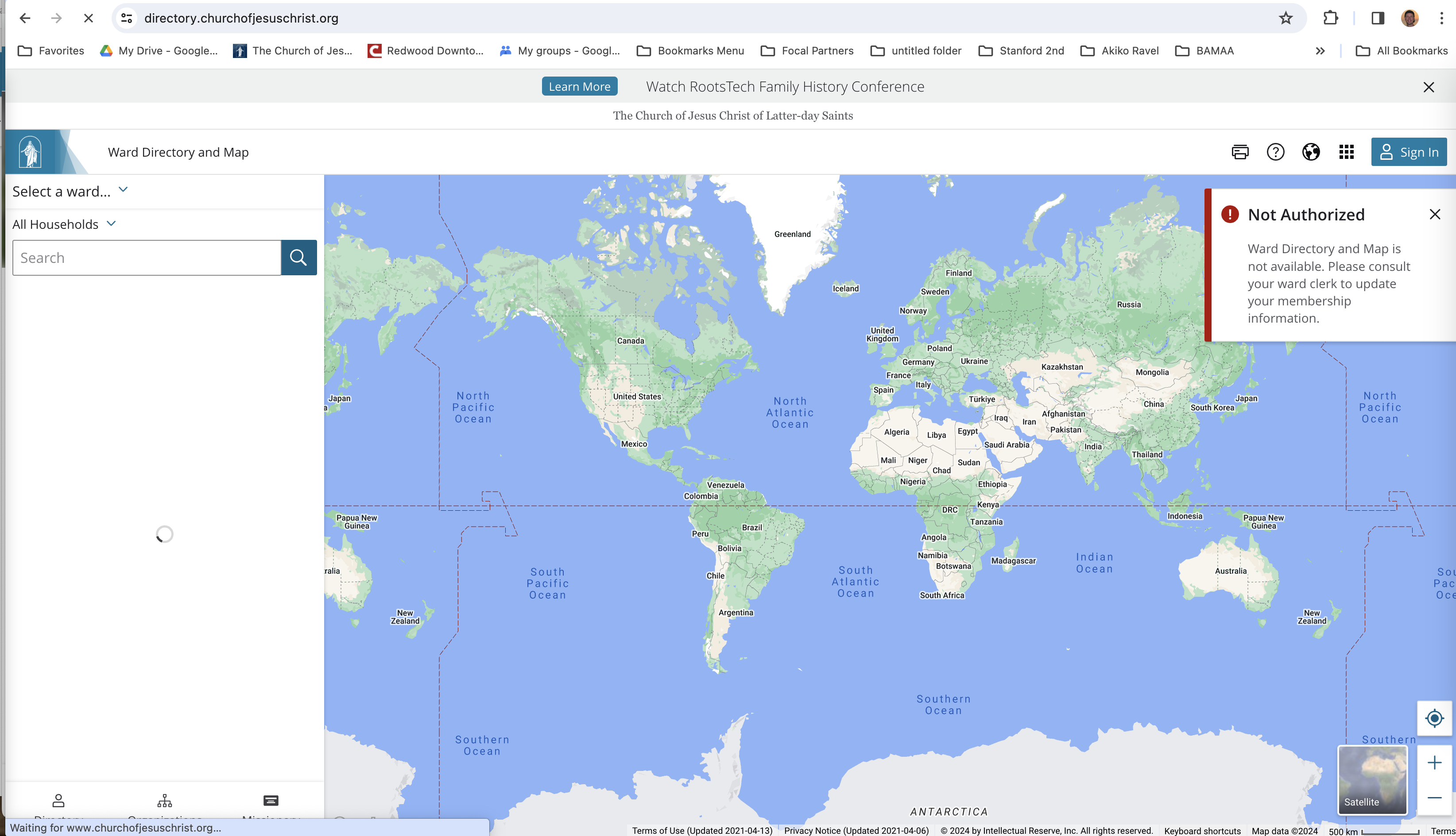
Ward Directory and Map flickers.png
Ward Directory and Map flickers.png (1.12 MiB)
Josh Bingham
Ward Clerk - Palo Alto Foothills Ward (California)
Senior Member
#2
joshbingham wrote: Wed Feb 28, 2024 2:31 am Help.

My new Bishop (and myself) have a major issue when we signs into our church account and then choosing "Ward Directory & Map", the page just flickers and keeps resetting, not allowing access. What's going on? We both use Chrome for web browser.

Screen shot attached.

-Josh (Ward Clerk)
It's working currently for me. Your description sounds like a server issue which I have seen occasionally. For how long have you been having this problem?
Senior Member
#3
I've seen this occasionally. Almost always it was cookie buildup. Try running in private/incognito mode, and if that is successful, then try clearing the cookies from your browser.

If that works, please come back and share your results (and if it doesn't, please also share!). Very often people post a problem, get suggestions that work, and then never come back. Providing an update helps others who will eventually find this thread.
Member
#4
BrianEdwards wrote: Wed Feb 28, 2024 9:20 am I've seen this occasionally. Almost always it was cookie buildup. Try running in private/incognito mode, and if that is successful, then try clearing the cookies from your browser.

If that works, please come back and share your results (and if it doesn't, please also share!). Very often people post a problem, get suggestions that work, and then never come back. Providing an update helps others who will eventually find this thread.

I had the flashing issue the other day. Clearing cookies fixed it.
New Member
#5
BrianEdwards wrote: Wed Feb 28, 2024 9:20 am I've seen this occasionally. Almost always it was cookie buildup. Try running in private/incognito mode, and if that is successful, then try clearing the cookies from your browser.

If that works, please come back and share your results (and if it doesn't, please also share!). Very often people post a problem, get suggestions that work, and then never come back. Providing an update helps others who will eventually find this thread.


Using the Incognito worked like a charm. I didn't want to try clearing cookies since I've read that also deletes all the saved passwords. Thanks all for your help.
Josh Bingham
Ward Clerk - Palo Alto Foothills Ward (California)
Community Administrator
#6
joshbingham wrote: Thu Feb 29, 2024 8:57 pm I didn't want to try clearing cookies since I've read that also deletes all the saved passwords.
To limit impact, you can removed just the church cookie.
Have you searched the Help Center? Try doing a Google search and adding "site:churchofjesuschrist.org/help" to the search criteria.

So we can better help you, please edit your Profile to include your general location.
New Member
#7
russellhltn wrote: Fri Mar 01, 2024 12:08 am
joshbingham wrote: Thu Feb 29, 2024 8:57 pm I didn't want to try clearing cookies since I've read that also deletes all the saved passwords.
To limit impact, you can removed just the church cookie.
On my gosh, that was a WONDERFUl suggestions. I just did that and it worked like a charm. Thanks you brother for sharing that. I didn't know we could delete specific cookies. Have a great sabbath evening.

-Josh
Josh Bingham
Ward Clerk - Palo Alto Foothills Ward (California)
New Member
#8
I am experiencing this on my main machine at home. Win11 22H2, Edge 123.0.2420.53. I tried clearing cache/cookies/everything and it still doesn't happens. It works in Google Chrome but not in Edge.
Community Administrator
#9
rmsnwbrdr wrote: Sat Mar 23, 2024 1:53 pm It works in Google Chrome but not in Edge.
Do you have any plugins in Chrome and not Edge?
Have you searched the Help Center? Try doing a Google search and adding "site:churchofjesuschrist.org/help" to the search criteria.

So we can better help you, please edit your Profile to include your general location.
New Member
#10
I tried this several different ways and it still fails in Edge but works in Chrome. I tried it...

1. With all extensions turned off
2. With my extensions turned on one at a time (ublock origin, lastpass, and amazon assistant)
3. with Edge ad blocking turned off

I did not try changing the tracking prevention modes in Edge (Basic, balanced, or strict, currently set to balanced).