Cannot add new payees

20 postsstarted by AdamRules 7,002 viewsoriginal topic

New Member
#1
When I try to add new payees, it leads to a page that says

Code:

Uh oh! We're Sorry ...
It looks like something went wrong which prevented the page you requested from displaying. Sorry for any inconvenience that this may have caused!
Browsers I have tried:

* Google Chrome (on Windows and Android)
* Mozilla Firefox (on Windows)
* Microsoft Edge (on Windows)

I have tried two different Windows PCs, and my bishop has tried on his laptop. For MS Edge, it was also that browser's first visit to the site. I even set the site permissions to allow absolutely everything and it still fails.

My bishop was able to add the payee via some other means, but I really want this resolved. What can I do about this?

-Adam
Community Administrator
#2
Just to be sure, you're a clerk and not clerk - membership, correct?
Have you searched the Help Center? Try doing a Google search and adding "site:churchofjesuschrist.org/help" to the search criteria.

So we can better help you, please edit your Profile to include your general location.
Senior Member
#3
If you are a clerk or clerk-finance as russellhltn mentions, then more details would be helpful.

At what point is this error page displayed? In LCRF, when you select the "Participants" tab? Or can you successfully do this, but when you click the "Add Participant" button it then shows the error? Or do you get further along in the process before it fails?
New Member
#4
Edited 1 time, last by AdamRules on
I am the Ward financial clerk, and I have added payees in the past. This has been a problem for me for the past few months. I impacts both myself and my bishop. I do not know if it impacts everyone, or just the two of us. My bishop was able to add the payee using the participants page. He said that he would show me how to use that page this weekend.

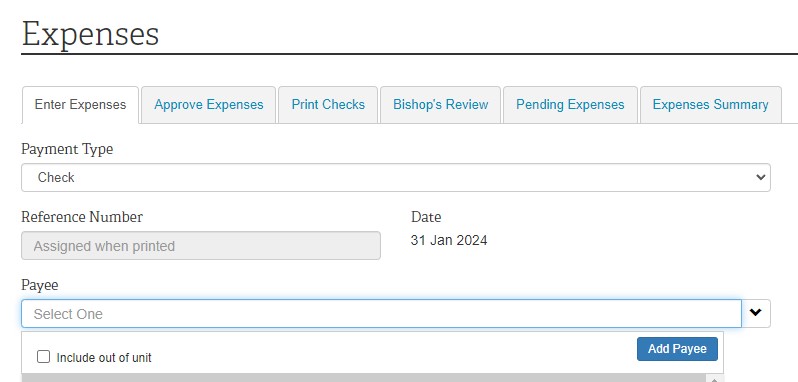
This happens when I try to add a new payee when entering a new expense. In the payee drop-down, there is a blue button to add a new payee.
Screenshot 2024-01-31 085324.jpg
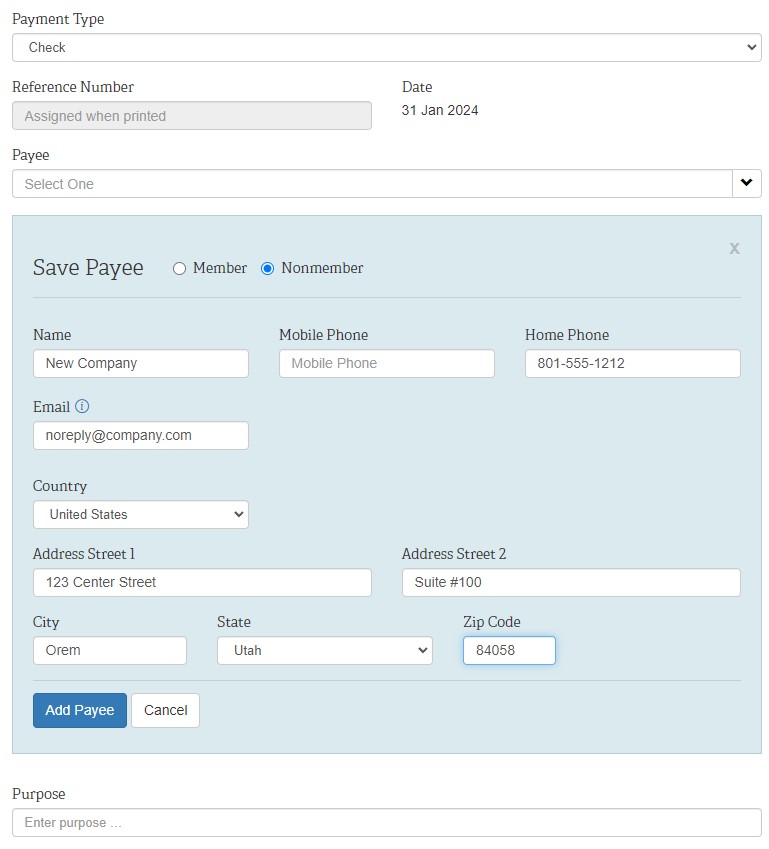
When I select that, a few text fields open up below the payee line. Above those fields is a radio button that lets me select member or nonmember. When I switch to nonmember, it lets me add in information for that payee. In this case, it is a landlord. I enter the name, phone number, email, address, and hit Add Payee.
Screenshot 2024-01-31 085503.jpg
That takes me to the "Uh oh" page.
Screenshot 2024-01-31 085744.jpg
Am I doing something wrong? Is there any way to use this method of adding a payee?
Community Moderators
#5
That sounds like a common issue that happens on Sundays during peak load times. There is nothing going wrong on your end. It is what many of us experience during the high server loads on Sunday. Our finance clerk has resorted to using the system, when possible, during youth mutual night on Wednesdays for fast offering assistance payments.

If you are experiencing that on weekdays then there may be other issues at work. Internet connectivity or network issues may need to be investigated.
JD Lessley
Have you tried finding your answer on the ChurchofJesusChrist.org Help Center or Tech Wiki?
New Member
#6
I am seeing the same issue. I saw this on Feb 4th 2024 and again today on Feb 6th. I get the same page. I also thought it was due to the Sunday load but not the case since it is now Tuesday evening an still I am getting the same results. Please help us resolve this issue.
Community Moderators
#7
Without any additional information to help it looks like you will have to call the GSD.
JD Lessley
Have you tried finding your answer on the ChurchofJesusChrist.org Help Center or Tech Wiki?
New Member
#8
We are getting the same thing - I am at BYU-Idaho and the only clerk for a singles ward so I have same rights as Ward Clerk, Finance Clerk, and Membership Clerk. Same Error Message.

Have recruited the Stake Finance Clerk and he gets that error message at his level today when he tries to add a Payee.

Sounds like a fix is in order as this is not something we are all doing wrong.
New Member
#9
Same thing happened to me yesterday (Sunday the 18th) and today. I was able to add the payee through the participants screen (great tip, thanks!). Then I could enter on the expenses screen as normal.
New Member
#10
This is happening in our ward as well. It happened about a month ago, and again today. Has anyone tried calling GSC to see what they recommend / advise?
New Member
#11
We got it figured out!

I talked to GSC and they said there can be issues with trying to add a new payee while processing the expense directly. Here is the fix:

Before trying to enter the expense, add the payee separately. When you are in the finance webpage, there is a tab at the top called "Participants". Click on that tab, and then click on the link that says
"+ Add Participant"

From there, add the Payee as you normally would, and then click on "Add Participant" at the bottom of the form.

Once the participant has been added, then go back to your expense tab, enter your expense, and the new Payee will show up as a possible Payee.

:D
New Member
#12
I have also tried on multiple days and different p.c's and it's the same message also. I have lodged a ticket with church support but haven't heard anything for almost a week now. I am in Melbourne, Australia.

Those that have added the payee via the "participant's" page can you please provide a brief guide on where this page is?

Thank You
Community Moderators
#13
mission12 wrote: Fri Mar 01, 2024 3:06 pm Those that have added the payee via the "participant's" page can you please provide a brief guide on where this page is?
In the LCRF menu bar 'Participants' is found between 'Budget' and 'Tithing Declaration'.
JD Lessley
Have you tried finding your answer on the ChurchofJesusChrist.org Help Center or Tech Wiki?
New Member
#14
Thank you, this saved me.

It's frustrating that this is a known issue for several months and hasn't been resolved or at least have a descriptive error pointing people to add via participants.
Senior Member
#15
adamrcarmack wrote: Sun Jun 30, 2024 7:58 pm Thank you, this saved me.

It's frustrating that this is a known issue for several months and hasn't been resolved or at least have a descriptive error pointing people to add via participants.
It might be helpful if you also reported this via the Feedback functionality (available at the bottom of most Church webpages). As the Tech Forum is not connected to Church IT resources, we don't necessarily have any idea what (if any) plans the Church has for things like this. There's always a hopeful possibility that your feedback could help push this to the top of their action pile. They never make promises, but I have seen a few Forum members state that after they submitted feedback, a change was implemented relatively quickly. And of course many other items remain unchanged for quite long periods of time, given the limited Church resources in their departments and the large amount of other tasks they are prioritized with.
New Member
#16
I talked to GSD. Go to Participants / Add Participant and create the new payee there,, then go back to Expenses and the newly added participant will show. There is a broken link in LCR/ Finance / Expenses when trying to create a new Payee (again).
New Member
#17
Happy Conference weekend! This is still an issue for me (can’t add a Payee inline from Enter Expenses).

The Participants tab workaround works for me, thanks all for the tip!
Senior Member
#18
This is still a problem. For reference, here's another thread with the same problem and the same workaround:
viewtopic.php?p=259097
New Member
#19
If you get this error message, click participants and add the payee there by clicking "add payee".
New Member
#20

Add new participant worked

Thanks