capture organ music on zoom

13 postsstarted by yhowardyang 13,898 viewsoriginal topic

New Member
#1
Hi, any helpful ideas on how to best capture organ music/sound onto zoom meeting? do you use a mic close to the organ pipe openings? does organ have a some sound output port?

thanks!
Howard
Community Administrator
#2
yhowardyang wrote: Tue Jan 23, 2024 8:56 pm does organ have a some sound output port?
Some do, some don't. Either way, you'll need to add a audio mixer.
Note that I think most organs are "stereo". That is, some stops may be only on one side. Depending on what stops are selected, you may find you're missing part of the song if you only mic one side.
Have you searched the Help Center? Try doing a Google search and adding "site:churchofjesuschrist.org/help" to the search criteria.

So we can better help you, please edit your Profile to include your general location.
Church Employee
#3
In Zoom Audio Settings, turning on the option "Original sound for musicians" will allow whichever microphone is being used, typically the pulpit mic, to pick up the background music/organ, otherwise the default option suppresses background sound/noise. This is what we needed to do in my ward for Zoom to pick up the organ as background sound over the pulpit mic.

https://support.zoom.com/hc/en/article? ... =KB0064198
New Member
#4
Which is better for chapel sound via zoom broadcast; Original Sound for Musicians, with High Fidelity and Echo Cancelation selected or Live Performance Audio?
Church Employee
#5
It depends on the audio equipment being used and the speed of your network and internet connection. According to the page linked in the previous post:
  • Enabling the Live performance audio profile reduces audio latency even further, but requires better audio equipment and network connection.
  • Live performance audio mode is not yet supported in Zoom Webinars - only supported for Zoom Meetings.
New Member
#6
Thanks to nmecantwin73 for the response. We are doing webinars so will use Original Sound.
New Member
#7
In our Stake I learned the hard way about the ZOOM settings, to capture audio from the Choir, Piano, and organ I use a few condenser mics,. Our Stake purchased these condenser mics and they have worked great. I place them on a boom microphone stands, https://www.bhphotovideo.com/c/product/ ... Stand.html with the https://www.bhphotovideo.com/c/product/ ... th_34.html. I was able to ask FM to provide. I am using a couple combiners, https://www.bhphotovideo.com/c/product/ ... n_The.html, and this Yamaha MG10 mixer https://www.sweetwater.com/store/detail ... usb-and-fx. This way I can use the highs/mids/lows eq and gain to set good levels to feed into OBS Studio then into Zoom.
New Member
#8
Turning off "Windows Audio Enhancement" was also helpful for us. I think it had some built-in noise cancellatiom that was causing trouble.
New Member
#9
All good ideas - we have used a Mic'ed speaker from organ via mixer in some buildings
New Member
#10
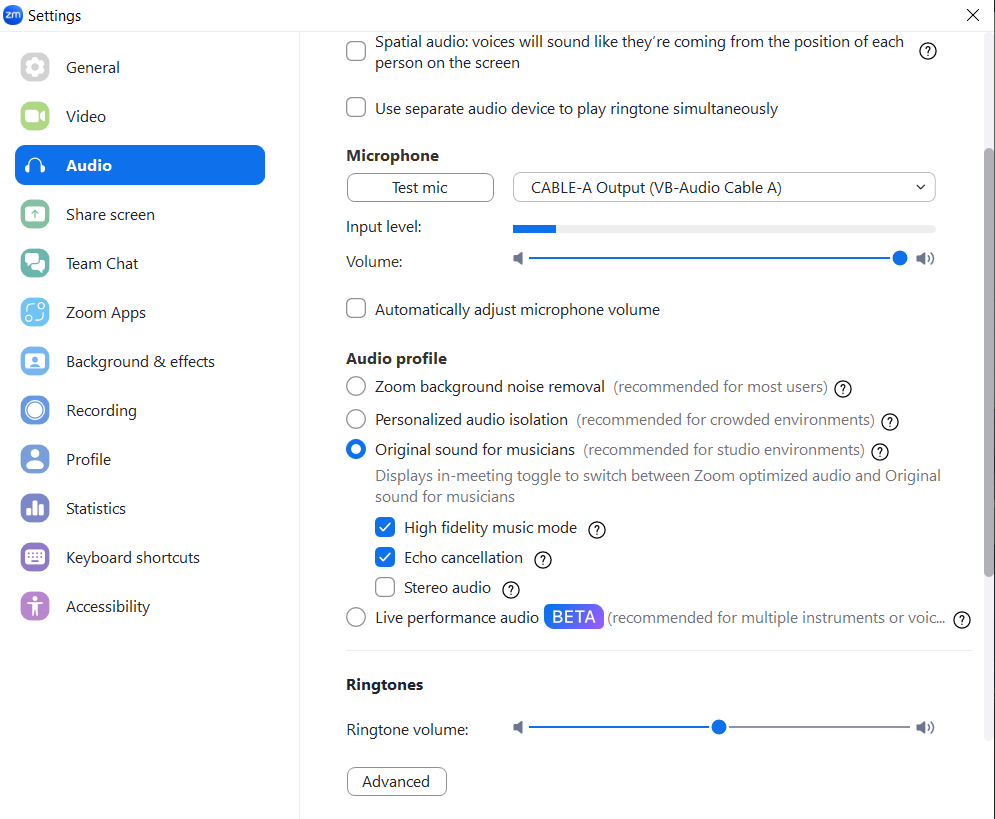
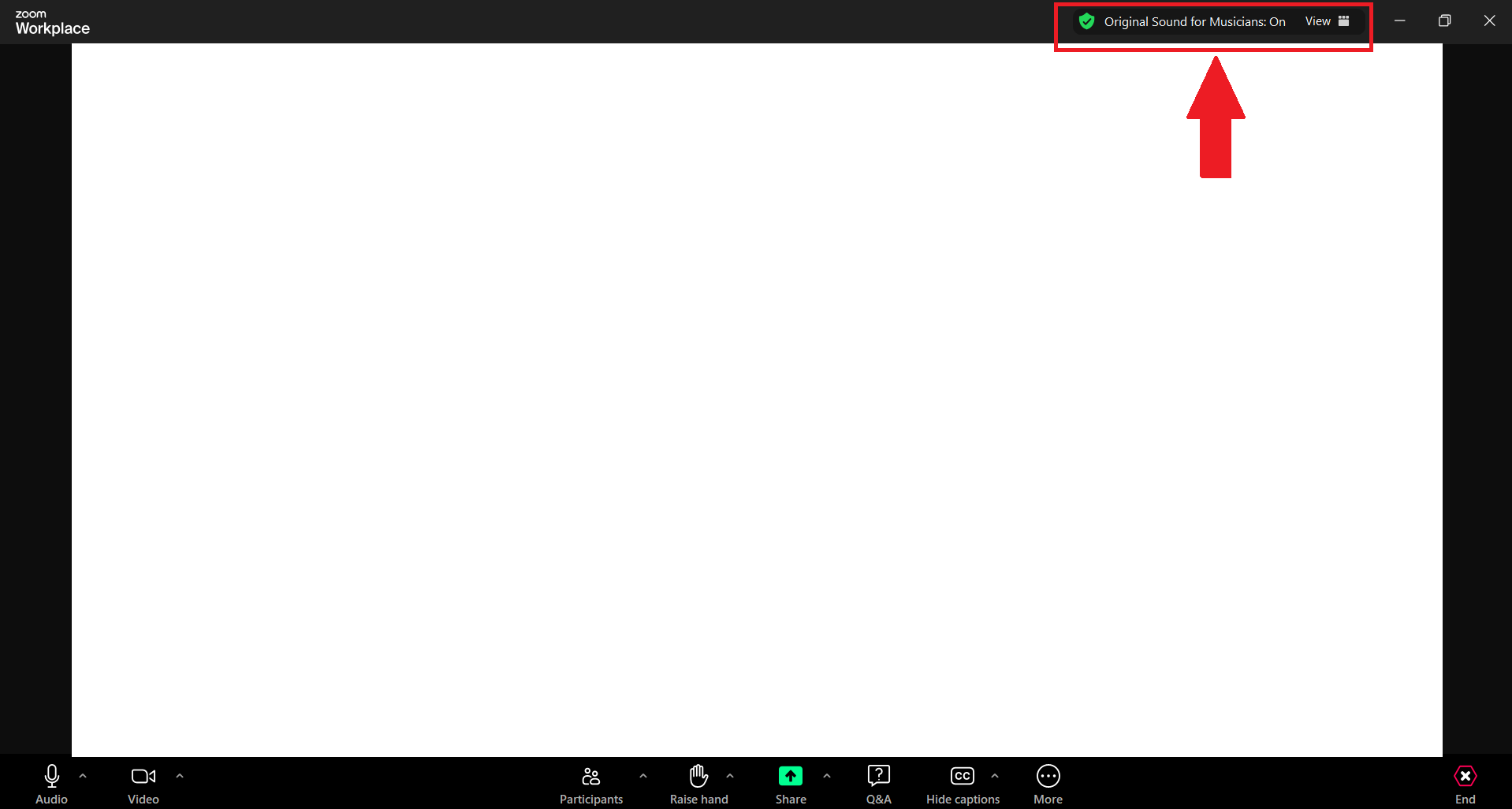
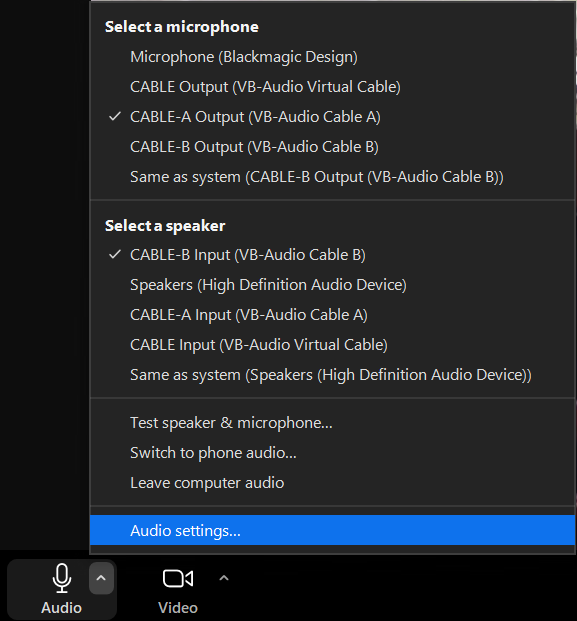
You can you just have to use "Original Sound" ***YOU WILL NEED TO TURN IT ON EVERYTIME YOU START ZOOM*** (Should be a button that appears once you enable it) it's on the top right of the zoom window once you enable it. Also be sure you are in the correct mode. Copy these audio settings. You can find them by clicking on the "Audio Settings" Note you should only have to set up original sound the first time, but you have to enable it every time!
Zoom Audio Settings Find.png
Zoom Audio Settings.png
Button looks like this once you enable it. MUST SAY **ON** YOU NEED TO CLICK IT EVERYTIME (EVERYTIME!!!!!) If not activated click it once.
Zoom Audio Settings On.png
Senior Member
#11
Tindog wrote: Sun Jul 07, 2024 12:52 pm You can you just have to use "Original Sound" ***YOU WILL NEED TO TURN IT ON EVERYTIME YOU START ZOOM*** (Should be a button that appears once you enable it) it's on the top right of the zoom window once you enable it. Also be sure you are in the correct mode. Copy these audio settings. You can find them by clicking on the "Audio Settings" Note you should only have to set up original sound the first time, but you have to enable it every time!

Button looks like this once you enable it. MUST SAY **ON** YOU NEED TO CLICK IT EVERYTIME (EVERYTIME!!!!!) If not activated click it once.
There is an alternative installation method, using Zoom's MSI installer, which lets you install Zoom such that Original Sound for Musicians stays enabled and toggled on across logins. After installing with this method and the correct command line options, you no longer have to remember to turn it on every time! See this thread for more info.
#12
For any type of music, vocal or instruments on zoom the built-in, default audio suppression cancels it. It does a great job of cancelling out crying babies and background noise however it treats all non speaking audio as something you don’t want. I switch this feature on and off during the meeting so we can hear the speaker and the singing. This is overkill to some you may just “enable original sound” at the beginning of each meeting at just leave it.
New Member
#13
I have found you have to first set Background Noise Removal to Low before trying Original Sound for Musicians or Live Performance Audio will work. The Background Noise Reduction seems to remain active (at least in some Zoom versions)