Zoom Webinar- Practice Mode by default

6 postsstarted by dlporter56 3,090 viewsoriginal topic

New Member
#1
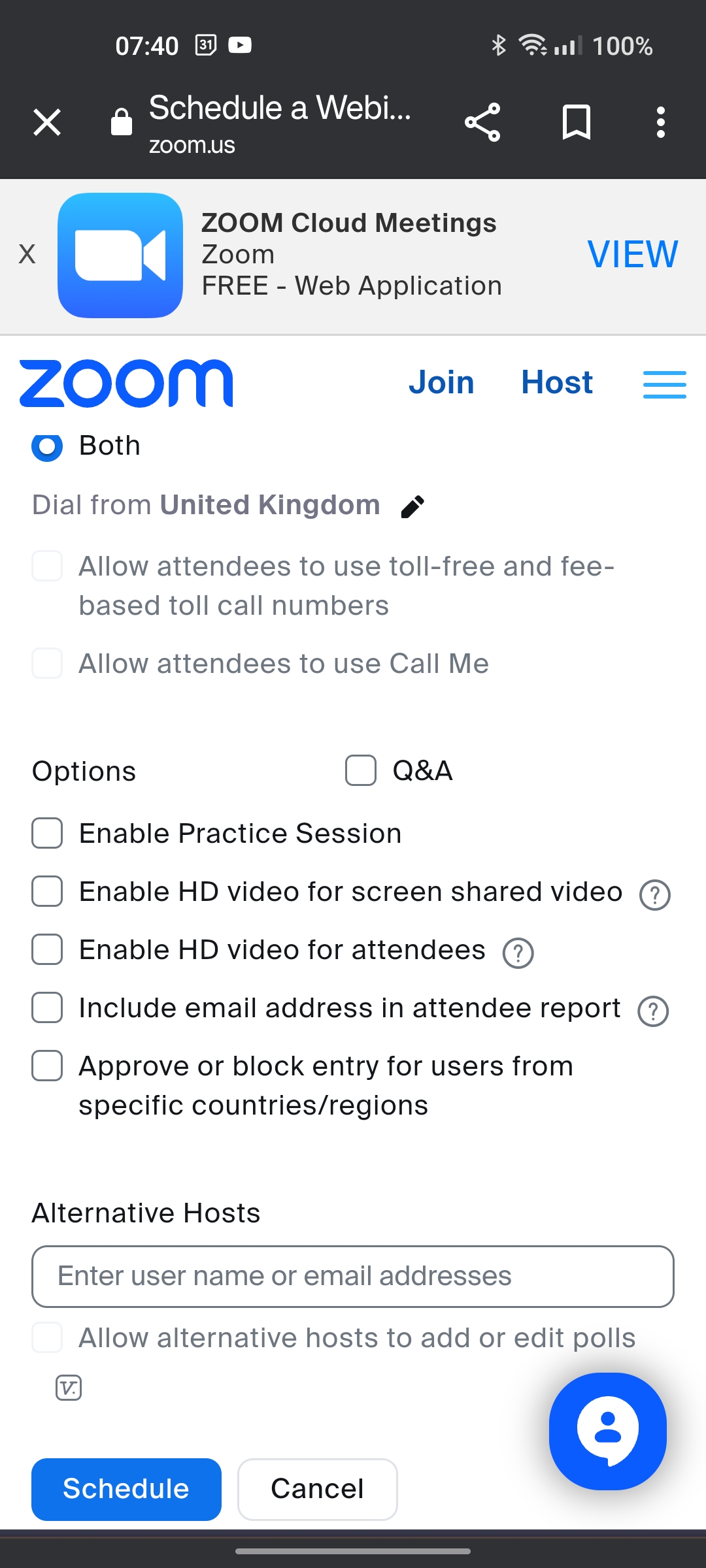
Our ward has decided to use Zoom Webinar as our means of streaming Sacrament Meetings. It always opens up in practice mode as the default. Is there a way to turn that off so it opens to the meeting? I'm the ward tech and struggle with that. Our Stake Tech doesn't answer my texts. PLEASE help.
Community Administrator
#2
From Using Webinar practice session:
To enter the practice session, the host, alternative host, and panelist need to simply join the webinar before the host begins broadcasting the webinar live to attendees, as the webinar will begin in the practice session when started. The host or co-host can start broadcasting when everyone is ready.
Have you searched the Help Center? Try doing a Google search and adding "site:churchofjesuschrist.org/help" to the search criteria.

So we can better help you, please edit your Profile to include your general location.
#3
dlporter56 wrote: Fri Dec 01, 2023 10:42 am Our ward has decided to use Zoom Webinar as our means of streaming Sacrament Meetings. It always opens up in practice mode as the default. Is there a way to turn that off so it opens to the meeting?
Edit the webinar and uncheck, "Enable Practice Session". It will then immediately start in live broadcast mode.
New Member
#4
swigginton wrote: Fri Dec 01, 2023 7:21 pm
dlporter56 wrote: Fri Dec 01, 2023 10:42 am Our ward has decided to use Zoom Webinar as our means of streaming Sacrament Meetings. It always opens up in practice mode as the default. Is there a way to turn that off so it opens to the meeting?
Edit the webinar and uncheck, "Enable Practice Session". It will then immediately start in live broadcast mode.
I'm not finding that setting anywhere. Thanks though.
Member
#5
Screenshot_2023-12-02-07-40-30-51_40deb401b9ffe8e1df2f1cc5ba480b12.jpg
New Member
#6
Wattsuk wrote: Sat Dec 02, 2023 12:41 am Screenshot_2023-12-02-07-40-30-51_40deb401b9ffe8e1df2f1cc5ba480b12.jpg
Thanks!