New Member
Who is ultimately responsible for talking to the local ISP about issues? A few weeks ago we had an internet outage in one of our meeting houses. As the STS I tried to contact the ISP directly to get their help in resolving the issue. I was asked for an account number, which I did not have and it is not in the CNM record. I was asked my name and told it wasn't a contact they had in the record. I communicated with our local FM group and was told they don't do anything with the internet. I called STS/Global Services support and was told after a long hold that I needed to talk to our local FM group.
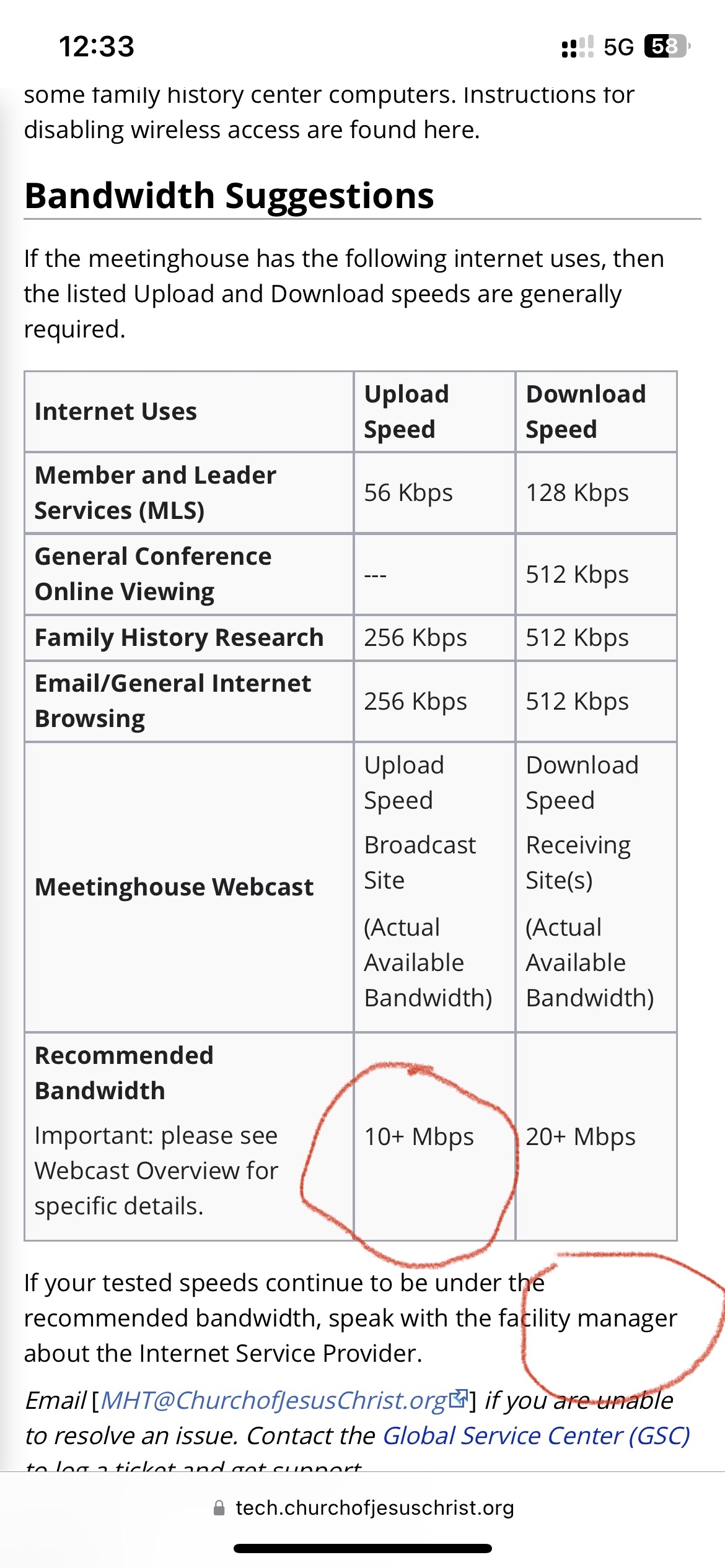
On another more pressing issue we are consistently getting (much) less than the recommended upload bandwidth in our stake building (as per CNM documentation; see attachment below). During the last stack conference our video stream froze for the remote ends multiple times and dropped completely during our stake president's talk. The remote chapels just said a closing prayer and sent the members home. Recently, our stake building was upgraded to the new HD AV standard equipment. We were using the older SD equipment provided to us by the church before. We were promised to get trained on this new equipment but it hasn't happened and now we have stake conference coming up in less than two weeks. Again, in trying to get our building's bandwidth upgraded I have run into the same "finger pointing" issue. The local FM group says that I need to talk to Global Services support. Global Services says I need to talk to the FM group. I don't know if this is part of a larger problem that we have with our FM group (e.g., the building I meet in is almost to the point it needs to be condemn: e.g., the 40+ year old roof is leaking everywhere, there is mold growing in the ceiling tiles, there was a gas leak in the building but now we haven't had hot water in the building all summer long, etc.).
Also, who is responsible for training us on the new AV equipment that was installed in our stake building about a month ago? I have been essentially "reverse engineering" what has been installed, pulling down manuals, following cables under the building, etc. In the process I have found that anyone on the building wifi (Liahona) can take control of this new system: change the volume settings, move the pulpit up and down, shut the system off, etc. Should we just shut off the building wifi to address this security problem?
On another more pressing issue we are consistently getting (much) less than the recommended upload bandwidth in our stake building (as per CNM documentation; see attachment below). During the last stack conference our video stream froze for the remote ends multiple times and dropped completely during our stake president's talk. The remote chapels just said a closing prayer and sent the members home. Recently, our stake building was upgraded to the new HD AV standard equipment. We were using the older SD equipment provided to us by the church before. We were promised to get trained on this new equipment but it hasn't happened and now we have stake conference coming up in less than two weeks. Again, in trying to get our building's bandwidth upgraded I have run into the same "finger pointing" issue. The local FM group says that I need to talk to Global Services support. Global Services says I need to talk to the FM group. I don't know if this is part of a larger problem that we have with our FM group (e.g., the building I meet in is almost to the point it needs to be condemn: e.g., the 40+ year old roof is leaking everywhere, there is mold growing in the ceiling tiles, there was a gas leak in the building but now we haven't had hot water in the building all summer long, etc.).
Also, who is responsible for training us on the new AV equipment that was installed in our stake building about a month ago? I have been essentially "reverse engineering" what has been installed, pulling down manuals, following cables under the building, etc. In the process I have found that anyone on the building wifi (Liahona) can take control of this new system: change the volume settings, move the pulpit up and down, shut the system off, etc. Should we just shut off the building wifi to address this security problem?