Unit history tool

75 postsstarted by adamhaymond 37,449 viewsoriginal topic

New Member
#1
I have recently been called to serve as Stake Clerk and today I was perusing the Handbook and stumbled across section 33.7.1 Ward and Stake Histories.

In the 4th paragraph it states that "Stake and ward priesthood and organization leaders contribute stories using the Unit History Tool at https://unithistory.churchofjesuschrist.org, yet when you go there you only get a message that says
Not Yet Available
We're sorry, your unit has not been authorized to access the Unit History tool at this time.
Eventually, most units will be given access. When your unit is authorized, please refer to communication from your unit leaders on how to access and contribute to your unit history.
I am wondering why this information is already released in the handbook but the tool itself is not readily available. Also why will "most units" be given access and not all units?

Does anyone have further information on what the crew at the Riverton Office Building is up to with this?
Senior Member
#2
adamhaymond wrote: Thu Nov 09, 2023 5:41 pm I have recently been called to serve as Stake Clerk and today I was perusing the Handbook and stumbled across section 33.7.1 Ward and Stake Histories.

In the 4th paragraph it states that "Stake and ward priesthood and organization leaders contribute stories using the Unit History Tool at https://unithistory.churchofjesuschrist.org, yet when you go there you only get a message that says
Not Yet Available
We're sorry, your unit has not been authorized to access the Unit History tool at this time.
Eventually, most units will be given access. When your unit is authorized, please refer to communication from your unit leaders on how to access and contribute to your unit history.
I am wondering why this information is already released in the handbook but the tool itself is not readily available. Also why will "most units" be given access and not all units?

Does anyone have further information on what the crew at the Riverton Office Building is up to with this?
My understanding is it is being rolled out to stakes in phases. No idea what that methodology is.
New Member
#3
Your stake should receive a notice when it goes live for you. As we all know, more often than not, such notifications are the ideal situation but not the reality. :roll: I receive the same message when attempting to access but added it on my to-do list to spot check every month or so.
New Member
#4
Winchester, Virginia is anxiously awaiting this tool for Unit Histories. . .fyi.
New Member
#5
I noticed our stake now has access to the tool even though we didn't get notified. Does anybody know if we should compile our 2023 report and send that in as we have done in the past or just start using the new tool?
New Member
#6
We also just got access to the tool this week and are putting stories on there, but the Area Church History Adviser told us a couple of weeks ago to just submit the history like we have always done, since they weren't sure when this tool was actually going to be up and running. Hopefully your Stake History Specialist will know how to submit for 2023.
New Member
#7
Unit tools went live mid Dec here, I have served as a stake history specialist for over 16years so going digital was a pleasure but unfortunately I hold a branch clerk and stake history specialist calling but I find when inputting as branch clerk all is Fine the system has two windows at the top of the page showing drop down window as the system recognises both my calling the branch input is fine and works well but when I try to input stake history the system alway defaults to my unit calling plus when in the branch window the top bar shows
Create Story
My Stories
Manage
Help
But when in as stake calling it only shows home and not Create Story, My Stories, Manage, Help the quick guide is essential reading but my main problem just now is the system always default to the branch plus I was put on the system as a custom calling and the system doesn’t recognise custom calling.

Can anyone tell me should the branch and the stake show the same information window? And why dose the system default to branch?
Community Moderators
#8
scottg10 wrote: Tue Jan 09, 2024 3:44 am Can anyone tell me should the branch and the stake show the same information window? And why dose the system default to branch?
When I had two callings, the system defaulted to the ward/branch calling. But I was always able to use the drop down menu by my name and select the stake calling when I needed it.

You are right that a custom calling gives no privileges, but a standard calling should. Your clerk should be able to change any custom calling you have to a standard calling.

And I would think that a similar menu for history would show in both places, since the stake is responsible for writing a history, too.
New Member
#9
Thanks I have looked again when in my branch the information at top shows Home, Create Story, My Stories, Manage, Help but when in the stake calling it only shows Home and help, I expected both to show the same but the don’t
New Member
#10
Would someone with access to the tool mind taking a screenshot of the "Roles and Callings" section of the Quick Start Guide showing who the authorized "authors" are and posting it here?
We are not yet allowed access, but I would like to begin training the appropriate "authors" so that we can hit the ground running when our Stake is allowed access.
Thanks.
Senior Member
#11
Would someone with access to the tool mind taking a screenshot of the "Roles and Callings" section of the Quick Start Guide showing who the authorized "authors" are and posting it here?
I'm not certain I can/should do that since it's behind a login screen, but I can summarize that it's members of the ward council, adult presidency members (including secretaries), history specialist, mission leader, temple & family history leader, Aaronic Priesthood advisers, and assistant ward clerk/secretary.
Does anybody know if we should compile our 2023 report and send that in as we have done in the past...
I'd note that the old way of exclusively focusing on year-end summaries, has been replaced in the new tool with it being a living document. So for 2023 perhaps summaries are all that your ward orgs will provide. But the help guides definitely point out that as meaningful or interesting events occur, authors should write up a story right then-and-there throughout the year, as often as they like, before lots of the details get lost to time. At the end of this year (2024), an organization may well want to write a summary in December to cover what happened in their org this coming year, but that should be in addition to the other stories they've been sharing throughout 2024.
New Member
#12
I am the stake primary secretary, and I posted my first entry yesterday. It all went fine except I could not post a picture. There are photos in my folder, I was going to choose one, but it showed my folder was empty. Today I was going to post another entry for the stake. I typed up my story, went to Preview, did not Save and Close like I did yesterday, went back to make a correction and the entry was gone. Since it Saves every 30 seconds, I thought my entry would be in a draft folder; cannot find one. I am also the ward historian. When I went back to retype my second entry it defaulted to my ward. I click on my stake name but when I hit Create a Story it defaults to my ward. I was not going to prepare an annual history the old way, but I may have to.
Community Administrator
#13
brothersc65 wrote: Sat Jan 13, 2024 11:46 am It all went fine except I could not post a picture. There are photos in my folder, I was going to choose one, but it showed my folder was empty.
According to the FAQs, it must be a JPEG. I'd think it would accept a .jpg as well, but maybe not.
Have you searched the Help Center? Try doing a Google search and adding "site:churchofjesuschrist.org/help" to the search criteria.

So we can better help you, please edit your Profile to include your general location.
New Member
#14
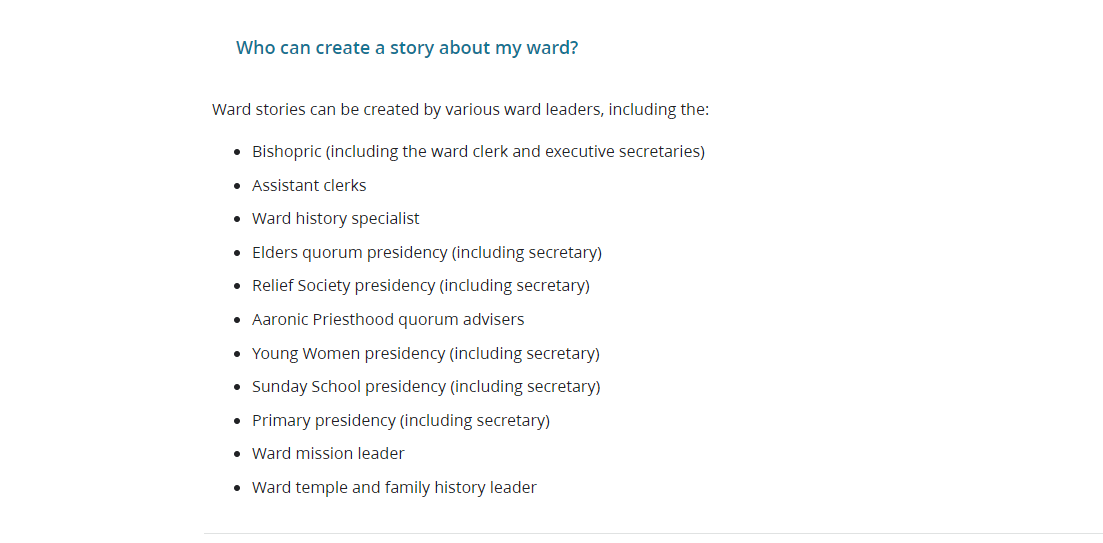
Who can write ward stories.png
New Member
#15
brothersc65 wrote: Sat Jan 13, 2024 11:46 am I am the stake primary secretary, and I posted my first entry yesterday. It all went fine except I could not post a picture. There are photos in my folder, I was going to choose one, but it showed my folder was empty. Today I was going to post another entry for the stake. I typed up my story, went to Preview, did not Save and Close like I did yesterday, went back to make a correction and the entry was gone. Since it Saves every 30 seconds, I thought my entry would be in a draft folder; cannot find one. I am also the ward historian. When I went back to retype my second entry it defaulted to my ward. I click on my stake name but when I hit Create a Story it defaults to my ward. I was not going to prepare an annual history the old way, but I may have to.
I am a product manager for the Church. We are aware of the issue when one has a stake calling and ward calling (both with at least author permissions). We are working on a solution and it should be available shortly.
New Member
#16
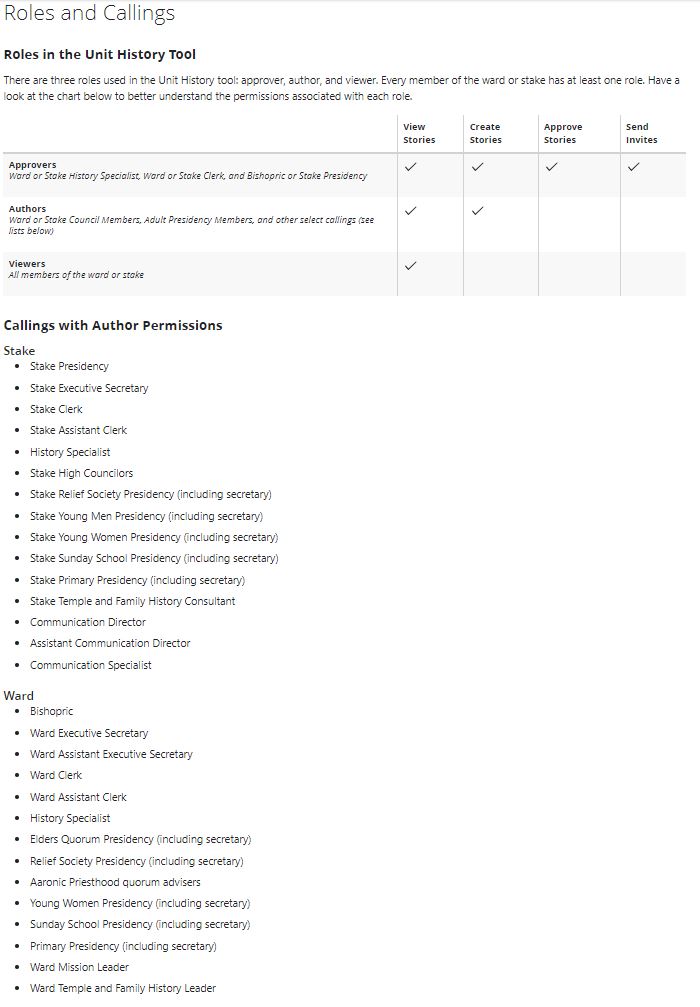
This is the list of Roles and Callings with associated permissions (from the Quick Start Guide)
Unit History Tool - Roles & Callings.JPG
New Member
#17
I have the ward calling as "History Specialist". According to the information sent out by the church, I should be able to submit stories to the tool and to approve stories submitted by others. When I try to log onto the tool, I am not able to see any of the menus nor have access to the tool. I also have two other callings in the ward listed on tools. Is the fact that I have three callings on tools causing a problem? . I visited my ward clerk who has full access to the tool, so I know what I should see. Why do I not have access to thus Unit history Tool?
Senior Member
#18
fdlee15 wrote: Sat Jan 20, 2024 8:00 am I have the ward calling as "History Specialist". According to the information sent out by the church, I should be able to submit stories to the tool and to approve stories submitted by others. When I try to log onto the tool, I am not able to see any of the menus nor have access to the tool. I also have two other callings in the ward listed on tools. Is the fact that I have three callings on tools causing a problem? . I visited my ward clerk who has full access to the tool, so I know what I should see. Why do I not have access to thus Unit history Tool?
According to a post 2 posts before yours, having multiple callings could be the problem (and they are aware of it and apparently working on it). Also, ask the clerk to make sure you are in a "Standard Calling" in LCR. A custom calling (even one named the same as a standard calling) grants no access to anything other than what a regular member sees.
New Member
#19
On the Create Story and Send Invites pages last night and this morning, the Add Authors box is saying "Not assigned" for all callings in my ward. They had all shown and we used them a few days ago.
I know I can wait a few days and it will probably be ok, but just wanted to be sure it was on someone's radar.
Senior Member
#20
... but just wanted to be sure it was on someone's radar
For awareness, all the Forum participants are regular church members like yourself. And the few participants who are church employees, don't use the Forum as any kind of 'bug-reporting' mechanism. So it's unlikely that anyone in Church IT who could potentially do something about this, would actually see your post.

But it's always good to share something like this, since other Forum members may find the same behavior. I just checked and see the exact same thing, and it's always reassuring to know "it's not just me" ;)
Senior Member
#21
And the best way to "be sure it was on someone's radar" is to report via the formal feedback mechanisms (use the feedback link on any church web page, from within the app for app issues, or escalate it through your Stake President to the coordinating council he is a member of).
New Member
#22
I'm having the same problem, i.e. all authorized callings show as "not assigned".
New Member
#23
Thanks for the advice! I didn't think about the Feedback reporting, and will do that now. I spent a lot of time on this forum a dozen years ago as a clerk, but hardly any recently. Have a great Sabbath!
New Member
#24
Two Questions: 1. I am trying out the system to see how it works. My first issue is that there is not enough space and I have had to cut out important parts of an article I wrote. Why only 8 to 900 words??? If there needs to be a restriction perhaps around 1,500 words would be more realistic and useful? 2. As History Specialist, can I enter an article written by someone else with their approval and attributed to them? Again I have come up against the word limit as the first article I want to use is 1,200 words, not excessive, and all very relevant. Also there is an article by a new member I want to appear about her conversion, and additionally an article written by a child about her baptism in the sea. They cannot be "invited" according to callings, but their stories are vital.
Community Moderators
#25
For your first question a unit history FAQ states:
What should I do if the story I want to create exceeds the 5,000 character limit?
You have a few options. You can write the story and attach it as a PDF, or you could write the story in parts (for example, Part I, Part II, etc.).
For your second question a unit history FAQ answers a related question that gives your answer in the last sentence:
What should I do if I have content previously created for this year's history?
Please input any existing content into the Unit History tool. Simply copy and paste the previously created content into the story template or enter a title and attach the previously created content as a PDF or JPEG image. Make sure to credit the original authors.
The last concern about an story written by a new member and their conversion can be handled using the same method described above for your second question. There is also an additional unit history FAQ that addresses this:
How can others outside of traditional leadership roles contribute to the history?
Only certain unit leaders can author a story. However, additional content generated by other unit members may be included in a story if an authorized leader so chooses. Keep in mind, authors should never share their Church Account information for the purposes of letting someone else author a story in their name.
JD Lessley
Have you tried finding your answer on the ChurchofJesusChrist.org Help Center or Tech Wiki?
#26
Ours is live here in Charleston SC.
I serve as the Stake History Specialist.
I am thinking notices went out to unit clerks and stake leaders.
As I am receiving questions for ward clerks.
Senior Member
#27
Also there is an article by a new member I want to appear about her conversion, and additionally an article written by a child about her baptism in the sea. They cannot be "invited" according to callings, but their stories are vital.
To add to @jdlessley's good input, our plan locally for these types of situations, is to send an invite to the organization leader, asking them to create stories for specific events in their organizations. So for a new member's conversion story, the invite would go to the Mission Leader. And for a child baptism, the invite goes to the Primary President. Obviously these leaders could take the initiative without an invite, and create the story on their own, but that's our current plan. We'll see how it works out in practice...
New Member
#28
I'm a Ward History Specialist and I was absolutely giddy about this new tool. I love the idea of history in real time, and also the way it will nudge the emmphasis towards stories that have meaning for the faith of our wards.

The Primary secretary and I are good friends and we've spent about an hour testing things. I've sent her invitations and she's written stories; I've been able to edit those stories. I believe I've also been able to add to stories when I sent the invitations to both her and myself and she started the story. But when I include myself on the invitation and start the story, while she was able to edit it, she wasn't able to save her edits so I was never able to see them--they just vanished when she clicked "SAVE AND CLOSE" even though the "SAVED AS DRAFT" popup appeared.

I'm interested if anyone else has tried to have a story with multiple authors and how it worked. We recently had three children in one family baptized on the same day--a Primary child, a young woman, and a young man. It's a complex story involving a part-member, mine/yours family, and it was a perfect story with which to inaugurate this program in our ward. My initial efforts to have a story with multiple authors weren't working and I didn't know whether it was that I wasn't doing it correctly or that the people to whom I sent the invitation weren't responding, which is why I ended up sitting down with my friend and trying a few things. (I'll also be talking to all the invitees tomorrow...)

Has anyone managed to invite several people to participate in authoring a single story? How did you manage it?
Member
#29
I haven't tried the multiple authors thing, but I have authored several things for histories sent to me for our stake, and found a few other bugs that were pretty frustrating. For now, I'd probably recommend treating this as beta software (it's brand new after all) since I have also lost data doing simple things that seem like they should not behave that way.

One of the features of the Unit History tool is the ability to tag people mentioned in the entry. This doesn't actually limit you to people as you can type in complete nonsense, but it's a nice idea that, if people can avoid typos, could have some interesting potential going forward. The problem with this is that, in multiple computers, and various browsers, if you have multiple people tagged, and you erase any one of them, it erases all of them. I almost gave up on this tool the first time I used it, entered the Primary history, including names of people baptized throughout the year, tried to delete the second-to-last one because I realized it was a duplicate, and lost the whole list. I know this isn't official, and I do not expect the product manager to come back and see this, but beware: it's beta software.

Also, as a note, the site is open to at least one stake in Provo. When it was made available an e-mail was sent to people like me (I have access). In general I think this idea is great to better capture histories, including miracles that happen today for many people but may be forgotten/lost by the end of the year or if only able to be recorded by organization presidents.

Hopefully the implementation can be improved quickly, but my one attempt to submit other feedback via the site resulted in, "You used the wrong feedback link... try the other less-obvious one." and a closed ticket, so I didn't, as I don't have time to send detailed feedback twice when it isn't appreciated the first time (I may have a bad attitude about this, but I don't like to be fooled twice).
New Member
#30
Does anyone know the photos-with-people-in-them policy? We usually have to get signed consent for photos with people in them, and submit it with the physical/paper ward history. With this new online way, do we get the form signed, then upload it as a document with the story?
#31
I have about three drafts going with multiple authors. I did consider it in Beta form and gave the authors until the end of April before posting a final draft. Last year I went the comprehensive route for the history of our local unit. I have also distinguished the difference between history specialist and historian. History Specialist is more home centered and church Supported system administration of the local History( beginning with the family) then the previous until historian. Most history should be under memories or life sketches in family Search.
Senior Member
#32
With this new online way, do we get the form signed, then upload it as a document with the story?
As you may already know, the "Permission to Use Photographs" form states that the form is completed by the owner of the photographs, and given to the person compiling the history. There is no additional instruction on the form, of how the form should be retained after it is provided to the person compiling the history.

I'd also note that the "Annual History Consent Form" which is also available via the Unit History page, is specific to non-members. I'm not aware of any specific consent form for members that somebody else took pictures of, but I'm also not a expert on these things. This consent form likewise doesn't have instructions about how/where to retain said form.

The only formal documentation about uploading photos seems to be in the FAQ: Are there conditions to uploading a photograph", which then points to the Local Unit History Content Submission Agreement (Updated 2023-09-25)
New Member
#33
I have just been called as Branch History Specialist and am reviewing all the info. What I do not find is how the Branch members can access the stories once they are written. Can someone please help? Thanks
Senior Member
#34
All members should be able to access their unit history via the same general link that leaders use to create and manage stories:
Unit History
General members will of course only see the published stories, and not any of the leader tools. Members can always find this link via the "9 dots icon" (at upper right of home page), and searching for Unit History.
New Member
#35
How can we add the Branch Presidency and Branch Mission Leader names to the author and approver lists? Currently the list shows those positions as "Unassigned"
Senior Member
#36
cmanley51 wrote: Tue Feb 27, 2024 8:28 pmHow can we add the Branch Presidency and Branch Mission Leader names to the author and approver lists? Currently the list shows those positions as "Unassigned"
Could you share this same question on the following post? Since there's already a separate thread for this, that's probably better than having it get "lost" in the middle of all the other things discussed in this thread.
Unit History invitations for Branch-specific callings
I'm glad to know we're not the only ones experiencing this. My original thought was that this would be a general issue that many/most/all Branches would see, but until now nobody else had posted about seeing this.

I've shared this with our Stake History Specialist, asking if she could send this up her pipeline -- since she is getting a lot of push to have local leaders use the new tool, I'm hoping they might be responsive to getting this resolved.

I'll post an additional response on that other thread.
Senior Member
#37
This is a list of those who are supposed to be able to create stories.... I am an assistant clerk, and all I see are Home and Help.


Bishopric (including the ward clerk and executive secretaries)
Assistant clerks
Ward history specialist
Elders quorum presidency (including secretary)
Relief Society presidency (including secretary)
Aaronic Priesthood quorum advisers
Young Women presidency (including secretary)
Sunday School presidency (including secretary)
Primary presidency (including secretary)
Ward mission leader
Ward temple and family history leader
Senior Member
#38
I wasn't sure if the "Assistant clerks" that the Help FAQ describes, also included the "Assistant Clerk - Finance" and "Assistant Clerk -Membership". Are you one of those, or are you the "Assistant Clerk"? (I've always loved the messiness around these calling names ;))

The wording to me does indicate that all assistant clerks are included, otherwise it would seem logical to just say "Assistant Clerk" (I believe there can only be one assistant clerk). But then again, I'm not sure why a financial or membership clerk would be authoring a story. And if you're an "Assistant Clerk", then there does seem to be something else going on.
#39
I am having a similar issue. I am a Branch clerk and when i try to invite someone to share a story and go to recipient it has a list for Ward Bishoprics instead of Branch presidency. I can send an invite to other Branch officers, but not to the Branch Presidency. I have noted this in the feedback part of the tool, but have received no response. Any ideas or suggestions?
Senior Member
#40
ctcoombs@hotmail.com wrote: Thu Feb 29, 2024 1:02 pm I am having a similar issue. I am a Branch clerk and when i try to invite someone to share a story and go to recipient it has a list for Ward Bishoprics instead of Branch presidency. I can send an invite to other Branch officers, but not to the Branch Presidency. I have noted this in the feedback part of the tool, but have received no response. Any ideas or suggestions?
I see you also posted this in the other thread. I'll answer there, to try and avoid duplicating discussion on this specific aspect, in both places.
New Member
#41
So I am an assistant stake clerk, I have had responsibility for the Ward and Stake Annual Histories since being called, I have been trying to get up to speed on this new Unit History Tool, one of the Wards in the stake called a History Specialist and asked her to get familiar with the Unit History Tool and then present it to the Ward Council, I talked with her about it to try and get informed about it because according to the Handbook the Stake Clerk (s) are responsible to see that the History programs are implemented in the stake, I have several questions, so is there a Unit History Tool for the Stake or is it just at the ward level, can stake clerks be "authors" or " administrators" ? Second question how can I post "new" topics on this forum and not just reply ? At the ward level who is automatically an "administrator" for the Unit History and can assign "authors" or another administrator ?
Community Administrator
#42
dinsdct wrote: Thu Mar 14, 2024 6:06 pm Second question how can I post "new" topics on this forum and not just reply ?
You can't start a topic while reading a thread. You have to go to the directory/folder level.

If you click on "General Clerk Discussions" above, you'll see a "New Topic" button.
Have you searched the Help Center? Try doing a Google search and adding "site:churchofjesuschrist.org/help" to the search criteria.

So we can better help you, please edit your Profile to include your general location.
Community Moderators
#43
dinsdct wrote: Thu Mar 14, 2024 6:06 pm So I am an assistant stake clerk, I have had responsibility for the Ward and Stake Annual Histories since being called, I have been trying to get up to speed on this new Unit History Tool ...
You can do that by going to the Unit History page and reviewing the Quick Start Guide and the FAQs available in the Help menu item.
dinsdct wrote: Thu Mar 14, 2024 6:06 pm... is there a Unit History Tool for the Stake or is it just at the ward level, can stake clerks be "authors" or " administrators" ? At the ward level who is automatically an "administrator" for the Unit History and can assign "authors" or another administrator ?
Those questions are answered in the Quick Start Guide and the FAQs.
JD Lessley
Have you tried finding your answer on the ChurchofJesusChrist.org Help Center or Tech Wiki?
New Member
#44
This is what I want to know too! I'm the Ward Primary Secretary. What about permission from parents to use images of the Primary Children in the unit history story? I read somewhere there's a form to use to get permission of photos taken by someone else, but that's not what I'm after. The Stake Primary President mentioned that I can take pics of the children from a distance, side profile or head down working on their activity, without permission - not sure if that's true. Any information would be very helpful. Thankyou.
Senior Member
#45
paulinek wrote: Fri Apr 19, 2024 4:38 am This is what I want to know too! I'm the Ward Primary Secretary. What about permission from parents to use images of the Primary Children in the unit history story? I read somewhere there's a form to use to get permission of photos taken by someone else, but that's not what I'm after. The Stake Primary President mentioned that I can take pics of the children from a distance, side profile or head down working on their activity, without permission - not sure if that's true. Any information would be very helpful. Thankyou.
I'll point back to my previous response in this thread, because I haven't seen anyone post any further clarification:
The only formal documentation about uploading photos seems to be.....
As stated in that post, I am not aware of the Church providing any type of specific restrictions or guidelines like what your Stake RS President describes. I expect that this is very location-dependent, and different countries (and then states/provinces inside those countries), may have additional laws that should be followed.

If anyone is aware of additional Church policy beyond what I've described (or correcting what I've described), that would be good.
Member
#46
Taken from the FAQ for https://unithistory.churchofjesuschrist.org/ itself:

https://www.churchofjesuschrist.org/leg ... -agreement
Publicity. You consent to the unlimited use of your name, image, story, and likeness as included in your Content in perpetuity and throughout the world, by IRI, its sublicensees, and users of this Site in accordance with this Agreement. You may not submit Content pertaining to other living individuals (e.g., whose name, image, story, or likeness appears in the Content) unless such individuals have given you their consent to submit it to this Site, or if an individual is a minor, the minor’s parent or legal guardian has granted such consent.
I suspect the "if far away" bit is not correct, but tops of heads may be fine since it's probably not possible to accurately identify a random human by the top of their head. Disclaimer: I am not a lawyer.

Also from the FAQ:
Photographs are welcome and typically make a story better! But remember they need to be in JPEG format. Please keep the number of photos to a reasonable amount per story, and be sure to identify everyone in the images.
Based on the "be sure to identify everyone in the images" I suspect that means you should be able to seek permission from them to be in the unit history, and if you cannot then hiding them is probably prudent. Maybe ask ahead of time, or have the Bishop find out during a new member meeting about sensitivity to being in images that are publicly shared in any way (e.g. a person who wants to not have contact with a former partner/spouse). Helping people understand about the availability and purpose of the Unit History site may make this a lot easier, since if everybody knows that a history is being built, they can opt in (or out) early on and the number who opt out will probably be small, at least in many cultures.
Senior Member
#47
Yeah, I referenced that agreement page as well in my previous post. Thanks for pointing out the "NIL" specific language regarding others, including children.

To me, it's the "consent" part that's tricky. Is consent a one-time thing, per specific events, or do individual pictures need to be cleared? And is it verbally given, or written? And how is consent documented, or for that matter, does the consent need to be documented? All that doesn't seem to be specified beyond the "consent is required" language, and we're left to our own interpretations about what is and isn't appropriate regarding consent.

I'd also point out that even mentioning the names of other people in a Unit History Story falls into this category of requiring consent, per that agreement language.
New Member
#48
I would like more insight into what you're trying to accomplish. I'm our Ward History Specialist and have added stories to the Unit History. My problem is actually getting anyone else to engage with it. I'm wondering how you will motivate authors.
Anyway as requested-
Roles and Callings
Roles in the Unit History Tool
There are three roles used in the Unit History tool: approver, author, and viewer. Every member of the ward or stake has at least one role. Have a look at the chart below to better understand the permissions associated with each role.

View Stories Create Stories Approve Stories Send Invites
Approvers
Ward or Stake History Specialist, Ward or Stake Clerk, and Bishopric or Stake Presidency

Authors
Ward or Stake Council Members, Adult Presidency Members, and other select callings (see lists below)

Viewers
All members of the ward or stake

Callings with Author Permissions
Stake
Stake Presidency
Stake Executive Secretary
Stake Clerk
Stake Assistant Clerk
History Specialist
Stake High Councilors
Stake Relief Society Presidency (including secretary)
Stake Young Men Presidency (including secretary)
Stake Young Women Presidency (including secretary)
Stake Sunday School Presidency (including secretary)
Stake Primary Presidency (including secretary)
Stake Temple and Family History Consultant
Communication Director
Assistant Communication Director
Communication Specialist

Ward
Bishopric
Ward Executive Secretary
Ward Assistant Executive Secretary
Ward Clerk
Ward Assistant Clerk
History Specialist
Elders Quorum Presidency (including secretary)
Relief Society Presidency (including secretary)
Aaronic Priesthood quorum advisers
Young Women Presidency (including secretary)
Sunday School Presidency (including secretary)
Primary Presidency (including secretary)
Ward Mission Leader
Ward Temple and Family History Leader
Custom Callings
The Unit History tool uses your Church calling for permissions to create and approve stories. Standard callings in the Leader and Clerk Resources (LCR) system must be used.

For example, if your calling is recorded as "Ward Historian," which is a custom calling, you won't have approver and author permissions in the tool. To fix the problem, your unit leaders would need to change your calling in LCR to "History Specialist."
New Member
#49
About a month ago members of our ward council reported that Unit History stories they submitted and drafts they saved disappeared. Tried logging in/out, clearing cache, trying from different computers ... with no resolution. Tried to wait a little to see if the work they submitted would reappear.

Some are now reporting they get the following error message when trying to access Unit History
"Not Yet Available
We're sorry, your unit has not been authorized to access the Unit History tool at this time.
Eventually, most units will be given access. When your unit is authorized, please refer to communication from your unit leaders on how to access and contribute to your unit history.
Senior Member
#50
jchau wrote: Wed May 22, 2024 6:37 am About a month ago members of our ward council reported that Unit History stories they submitted and drafts they saved disappeared. Tried logging in/out, clearing cache, trying from different computers ... with no resolution. Tried to wait a little to see if the work they submitted would reappear.

Some are now reporting they get the following error message when trying to access Unit History
"Not Yet Available
We're sorry, your unit has not been authorized to access the Unit History tool at this time.
Eventually, most units will be given access. When your unit is authorized, please refer to communication from your unit leaders on how to access and contribute to your unit history.
We see the same access error message, and we've used it a ton before now. My guess is that there's a system glitch that hopefully resolves itself.

In the meantime, submitting Feedback is always a good idea, this will ensure it makes its way to the Church's development team. Use the Feedback link at the bottom of this (or most any) Church webpage.
New Member
#51
BrianEdwards wrote: Wed May 22, 2024 8:05 am In the meantime, submitting Feedback is always a good idea, this will ensure it makes its way to the Church's development team. Use the Feedback link at the bottom of this (or most any) Church webpage.
It's still down for me. I just submitted a service ticket. Admittedly, I'm concerned about losing everything we've posted so far :shock:
New Member
#52
Hello, is there a way to edit published stories in unit history?
Community Moderators
#53
natsumi08 wrote: Wed Oct 02, 2024 11:35 pm Hello, is there a way to edit published stories in unit history?
Yes. Published stories can be edited by Approvers. Those callings with approver permissions are the ward history specialist, ward clerk, and bishopric. I am not certain whether or not any of the Authors for the story can also edit their story.

To edit a published story click Story Manager in the Manage menu. Select the Published tab and click the View Story button for the story to edit. Scroll to the bottom of the story page and click the Edit Story button.
JD Lessley
Have you tried finding your answer on the ChurchofJesusChrist.org Help Center or Tech Wiki?
New Member
#54
Story submissions I've made in the Unit History tool don't save the text of the story. I am a Relief Society secretary, and when I have tried saving or submitting a story, the text disappears and is replace with just an *. Here are the steps I took on 4 different occasions:

1) I log into the Church website using Google Chrome or Microsoft Edge as my browser
2) I navigate to the Unit History tool here https://unithistory.churchofjesuschrist.org/
3) I click "Create Story"
4) I type in the Title and Dates then hit the Continue button
5) I go to the Summary section (there's just an * there which I delete) then I enter/paste my text
6) I hit the Save and Close button (and receive a message that says it's Saved as Draft)
7) I click the Preview button - all it shows is the title, dates, and the story section only shows an * but none of the text I had just saved
8) I close the Preview window, which returns me back to the My Story form - the text of the story is showing in the Summary field, so I hit Save and Close again
9) I click the Submit button which launches another window that says Submit for Publication, so I click the Submit button on that window
10) I navigate back to the Unit History tool, to My Stories, and click on the Submitted tab - the message there says I have no stories submitted

I have tried the above sequence of steps 4 times now, on 3 different days with the same results. Has anyone else experienced this problem? If so, how do I overcome it?
Senior Member
#55
kat123kat wrote: Thu Mar 13, 2025 10:25 pm Story submissions I've made in the Unit History tool don't save the text of the story. I am a Relief Society secretary, and when I have tried saving or submitting a story, the text disappears and is replace with just an *. Here are the steps I took on 4 different occasions:
.....
I have tried the above sequence of steps 4 times now, on 3 different days with the same results. Has anyone else experienced this problem? If so, how do I overcome it?
I haven't used the Unit History Tool for over a year now, so no helpful info. But given that Church webpages often suffer from cookie buildup which can cause various user-interface issues, it's always a good idea to try and repeat that process in a private/incognito browser session. If that works, then clearing the browser cache should fix things for regular browsing sessions.
#56
I have been using "Feed Back" in relation to the Unit History Tool but no response yet. I think that all feed back goes into a suggestions box or something that someone might get around to looking at them eventually, They must be very busy. :oops: Is anyone there?
New Member
#57

Sending invite

I'm unable to find the invite form to send an invitation to members of the Ward to author a story?
Community Administrator
#58

Re: Sending invite

allredjerry wrote: Sun Sep 07, 2025 3:17 pm I'm unable to find the invite form to send an invitation to members of the Ward to author a story?
I believe it's done from the unit history webpage. However, you need to hold an appropriate calling to do that.
Have you searched the Help Center? Try doing a Google search and adding "site:churchofjesuschrist.org/help" to the search criteria.

So we can better help you, please edit your Profile to include your general location.
New Member
#59
Thank you!
New Member
#60

Ward History stories vs Stake History stories

I have access to both the Stake History and my own Ward's History and regularly contribute stories to both. Recently, whenever I try to Manage the Ward History stories, the system tries converting them to Stake History stories. It won't let me choose. Has anyone else encountered this. Is there a solution?
New Member
#61
JohnCalvinSheppard wrote: Sun Mar 16, 2025 6:39 am I have been using "Feed Back" in relation to the Unit History Tool but no response yet. I think that all feed back goes into a suggestions box or something that someone might get around to looking at them eventually, They must be very busy. :oops: Is anyone there?
After eight months it sadly appears that nobody was here, either. Sorry, brother. I'm curious if you ever got a response after all this time?
Senior Member
#62
jstamps wrote: Mon Sep 15, 2025 4:56 am
JohnCalvinSheppard wrote: Sun Mar 16, 2025 6:39 am I have been using "Feed Back" in relation to the Unit History Tool but no response yet. I think that all feed back goes into a suggestions box or something that someone might get around to looking at them eventually, They must be very busy. :oops: Is anyone there?
After eight months it sadly appears that nobody was here, either. Sorry, brother. I'm curious if you ever got a response after all this time?
For everyone's awareness, the Tech Forum primarily serves as voluntary user-to-user self-help and discussion, and we're all just regular church members with normal callings. One of the results of this format, is that responses to posts heavily depend on various factors, such as whether any active Forum member is aware of something worth contributing. Also, many Forum members are not consistently active in the Forum, so it's quite easy to miss a post that they might actually have responded to if they saw it. There's nothing wrong with making a follow-up post here in the Forum, to try a second time to see if there's any Forum members who might have insight or ideas.

Regarding Feedback, yes it can be frustrating when your feedback goes into a black box and there's no response, but it's the only way the Church has provided to connect with their Support teams. The Tech Forum is quite distinct and has no connections to anything the Church's Feedback team might (or might not) be doing.
New Member
#63
Can you recover a story that was inadvertently deleted?
Community Moderators
#64
lynnebb wrote: Sun Jan 18, 2026 8:58 pm Can you recover a story that was inadvertently deleted?
There currently is no recovery of deleted stories.
JD Lessley
Have you tried finding your answer on the ChurchofJesusChrist.org Help Center or Tech Wiki?
New Member
#65
I have uploaded some PDFs of scanned physical documents for the Unit History tool but upon opening any of them I am greeted with the attached message
Screenshot_1.jpg
Have I uploaded them wrong somehow?
Community Moderators
#66
Spyran wrote: Fri Apr 03, 2026 3:52 pm I have uploaded some PDFs of scanned physical documents for the Unit History tool but upon opening any of them I am greeted with the attached message

Screenshot_1.jpg

Have I uploaded them wrong somehow?
The image states the file is an XML file rather than a PDF file. If you are sure you uploaded a PDF file and if you try again do you still get the message? If so, then submit feedback using the feedback link found at the bottom of the web page.

I just did a test and uploaded a PDF file to the Unit History app and it worked just fine.
JD Lessley
Have you tried finding your answer on the ChurchofJesusChrist.org Help Center or Tech Wiki?
Community Administrator
#67
Looks like some kind of permissions issue. What is your calling?
Have you searched the Help Center? Try doing a Google search and adding "site:churchofjesuschrist.org/help" to the search criteria.

So we can better help you, please edit your Profile to include your general location.
New Member
#68
Re: Unit history tool
#48Post by dbosse » Sat May 04, 2024 3:35 am

The responder to my post has misunderstood my query.

I understand how posting works, and who can post and who can edit and publish posts.
I understand that all members in a Stake have access to view the content posted on Unity History Tool.

My query relates to the way the Church website is designed in relation to promotion of the U. H. T.
The Church hasn't made it very clear what the objective of the U.H.T is....the reason I know it's not clear is that Clerks, Ward Councils, Bishoprics, High Councils, Stake Presidencies and orgnization presidencies are ignoring it and also because
the tool is buried deep in Resources=> All resources tab. Most membes only engage with the Church webiste for paying donations. They will use tabs found in TOOLS on their phone and LIBRARY on their
phone............U.H.T is neither found in TOOLS or LIBRARY.
It would help if it was more like Familysearch in the following ways-
1. U.H.T could be added to TOOLS
2. A notification icon appear when there's a new story to read on the TOOLs U.H.T Tile.
3. An automated email sent like with other local news items with link to the story which could be enabled in a menu/settings.
Senior Member
#69
dbosse wrote: Fri Apr 03, 2026 10:13 pm Re: Unit history tool
#48Post by dbosse » Sat May 04, 2024 3:35 am

The responder to my post has misunderstood my query.

I understand how posting works, and who can post and who can edit and publish posts.
I understand that all members in a Stake have access to view the content posted on Unity History Tool.

My query relates to the way the Church website is designed in relation to promotion of the U. H. T.
The Church hasn't made it very clear what the objective of the U.H.T is....the reason I know it's not clear is that Clerks, Ward Councils, Bishoprics, High Councils, Stake Presidencies and orgnization presidencies are ignoring it and also because
the tool is buried deep in Resources=> All resources tab. Most membes only engage with the Church webiste for paying donations. They will use tabs found in TOOLS on their phone and LIBRARY on their
phone............U.H.T is neither found in TOOLS or LIBRARY.
It would help if it was more like Familysearch in the following ways-
1. U.H.T could be added to TOOLS
2. A notification icon appear when there's a new story to read on the TOOLs U.H.T Tile.
3. An automated email sent like with other local news items with link to the story which could be enabled in a menu/settings.
There's a lot of different sub-topics going in different directions in this Thread, for sure. In this last post, it seems like you are requesting enhancements to the UHT functionality?

If that's the case, then this Forum is not the correct place for those types of requests. The Tech Forum primarily serves as user-to-user discussion and self-help. We can share thoughts about different Church Tech topics, but even if there's agreement with a suggestion, there's no process for getting issues discussed here, into the Church's support system. And since almost all Forum participants are regular Church members like yourself, we generally don't have any insight into whether the Church has enhancements on their timetable, or what any priority might be for implementation. The Feedback tool is the correct way to submit your ideas for consideration, and it can be accessed via the link at the bottom of most Church webpages, as well as inside Church apps.

PS: those are good suggestions, I completely agree about the under-utilization of unit histories
New Member
#70
I have uploaded some PDFs of scanned physical documents for the Unit History tool but upon opening any of them I am greeted with the attached message
Screenshot_1.jpg
Screenshot_1.jpg (5.96 KiB)
New Member
#71
I have people sign a permission form re submission of stories and photos and just keep it on file with their story in my personal calling folder, I haven't uploaded it but did wonder whether I should, so good question.
New Member
#72
As a ward mission leader (Bernina Ward) I submitted a page to my ward history. It was short but covering our name changes over the last 50 years.
But I've never seen my page show up after posting it.
And it said my page would disappear within 2 years anyway.

But now I see my stake (Bennion Utah West Stake) has several entries in there. The oldest is now 3 years old.
New Member
#73
jwthomasbennion wrote: Sun Apr 19, 2026 3:07 pm As a ward mission leader (Bernina Ward) I submitted a page to my ward history. It was short but covering our name changes over the last 50 years.
But I've never seen my page show up after posting it.
And it said my page would disappear within 2 years anyway.

But now I see my stake (Bennion Utah West Stake) has several entries in there. The oldest is now 3 years old.
Thank you for submitting a story and for using the Unit History tool. Your story was successfully submitted, but an approver in your ward still needs to approve the story before it is made visible on your Unit History page. You may need to reach out to an approver in your ward to let them know there is a story waiting for approval. Approvers are people in these callings: Bishop, bishopric counselors, ward clerk, and history specialist. I suggest you first contact your history specialist, as they should hopefully keep an eye on submitted stories awaiting approval. Once approved, your story will be visible for two years from the original publication date, at which time it will be archived in the Church's archives. The stories you see on your stake page were published within the last two years but may have an event date that is older than two years.
New Member
#74
Crescentridge3rdward


How to locate my ward to ok some pictures BM on
New Member
#75
The ability to author ward stories is limited to:

Bishopric (including the ward clerk and executive secretaries)
Assistant clerks
Ward history specialist
Elders quorum presidency (including secretary)
Relief Society presidency (including secretary)
Aaronic Priesthood quorum advisers
Young Women presidency (including secretary)
Sunday School presidency (including secretary)
Primary presidency (including secretary)
Ward mission leader
Ward temple and family history leader

Reach out to one of them if you have a story you’d like to share. Ward stories are designed to be about relatively recent events.