New Member
The scriptures home page hasn't been loading the images for the past couple of weeks on Firefox (see attachment).
Firefox: 119.0 (64-bit)
Windows Edition Windows 11 Pro
Version 22H2
Installed on 12/8/2022
OS build 22621.2428
Experience Windows Feature Experience Pack 1000.22674.1000.0
Things I've tried:
- Disabled all extensions does not affect it
- Deleting all cookies from the church does not affect it
- Running in Private Mode does resolve the issue
- Logging in or not logging in doesn't affect it
The Syntax Error ("missing ) after argument list") in the console export is present on both firefox and chrome (and it works fine in chrome)
Firefox: 119.0 (64-bit)
Windows Edition Windows 11 Pro
Version 22H2
Installed on 12/8/2022
OS build 22621.2428
Experience Windows Feature Experience Pack 1000.22674.1000.0
Things I've tried:
- Disabled all extensions does not affect it
- Deleting all cookies from the church does not affect it
- Running in Private Mode does resolve the issue
- Logging in or not logging in doesn't affect it
The Syntax Error ("missing ) after argument list") in the console export is present on both firefox and chrome (and it works fine in chrome)
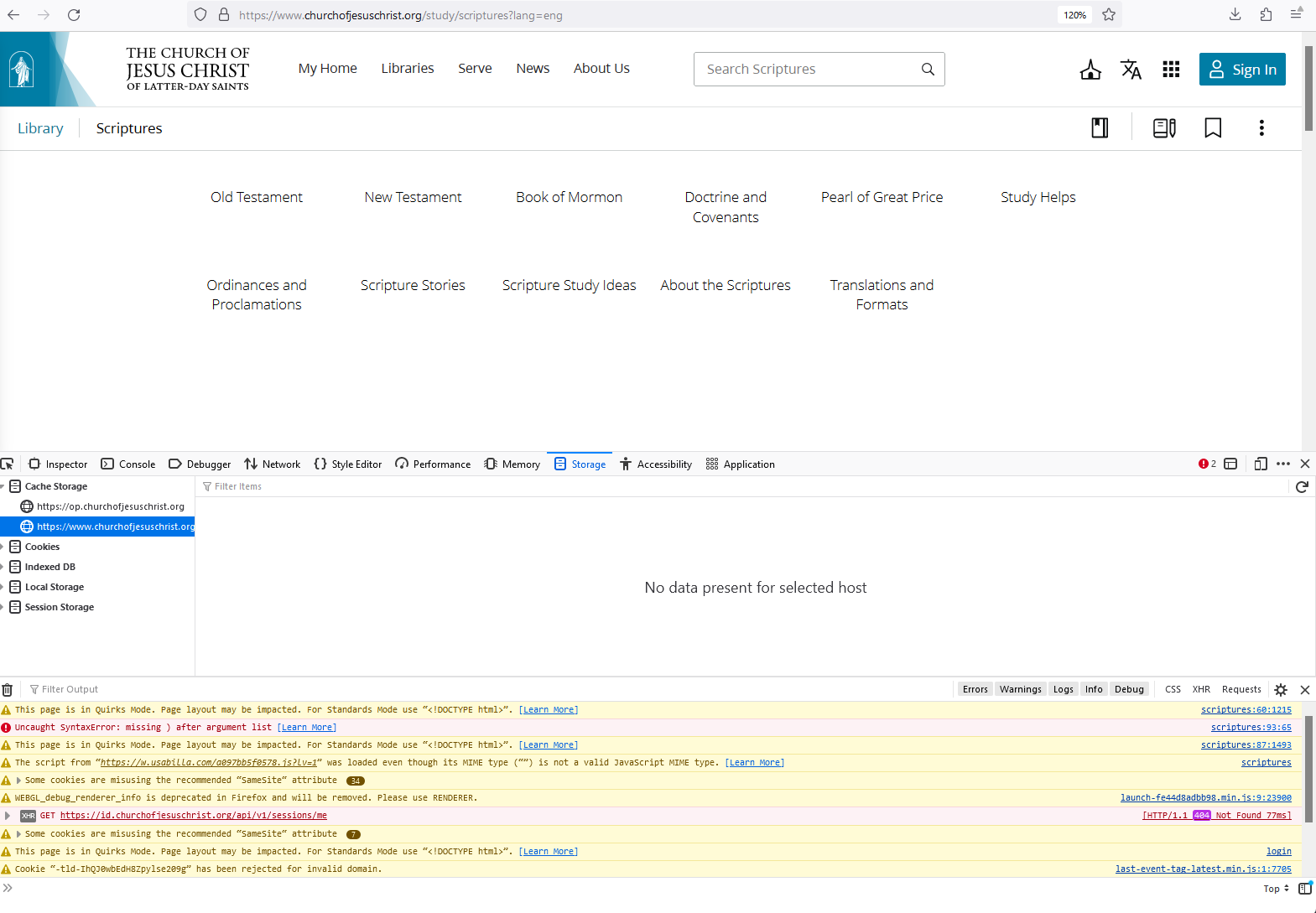
📎 console-export-2023-11-7_8-10-30.txt (3.76 KiB)