Issues with new Zoom -> meet.churchofjesuschrist.org

44 postsstarted by brad_p 35,934 viewsoriginal topic

Member
#1
Edited 3 times, last by brad_p on
I received the email about changes to broadcasting. Two sentences quoted below raised a few questions. After that are my initial issues, inserted with edits with what I've found so far answering those issues:
The Church created a portal for managing Zoom licenses called “Church Meet”, which can be found at meet.ChurchofJesusChrist.org.... To more easily inform Church members about local Zoom broadcasts, events created using a Church Zoom license are now automatically imported into the Church Meet “Events” section.
Issue #1: I cannot access meet.churchofjesuschrist.org. I get 403 forbidden, despite being logged in. Is there a workaround or a fix for this?

Partial answer: If I go into my browser's Private/Incognito mode, then re-log in, then I get it to work. Seems this is a bug on the church's end.

Issue #2: I went into my ward's church enterprise Zoom and created both a Meeting and a Webinar for tomorrow. I was not given an event code, and nothing shows up at broadcasts.churchofjesuschrist.org. About 10 minutes later I did a refresh just to check. It still says "Local Broadcasts - No upcoming broadcasts." How do you get something to show up at broadcasts.churchofjesuschrist.org? Is it just currently broken?

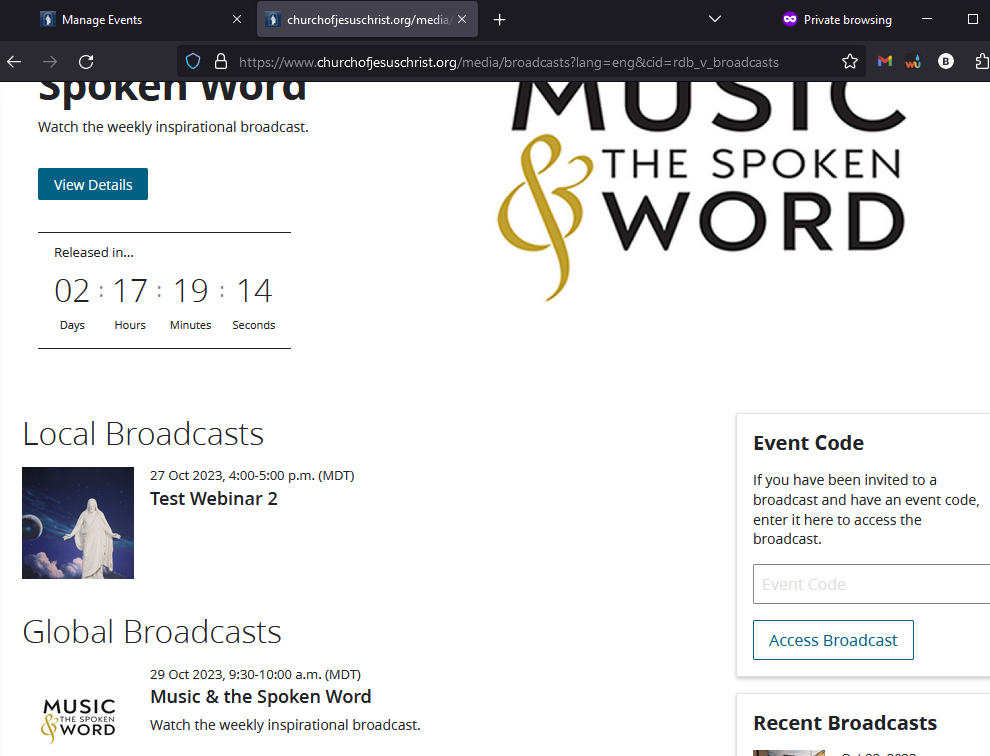
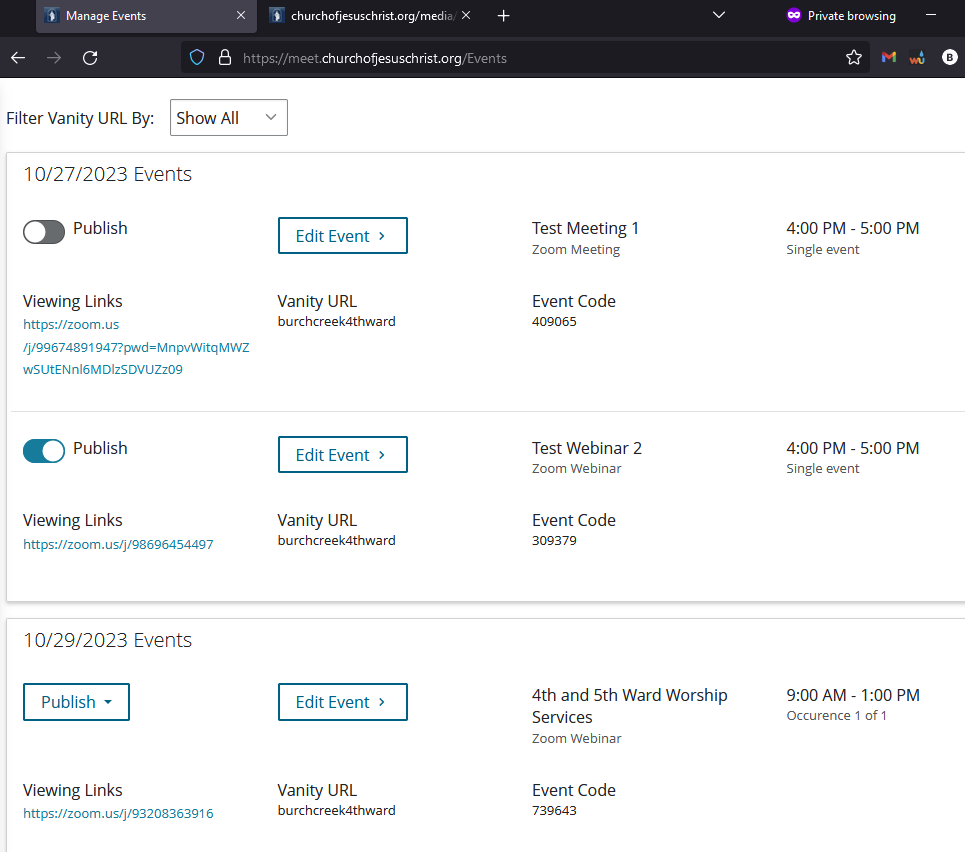
Partial answer: You have to manually approve them first. They come default to unpublished. However, when I published one, then went to broadcasts.churchofjesuschrist.org, I got a message saying I had to log into my account, despite being logged in (seems this is another bug on the church's end). Two minutes later, the page itself refreshed and then I got the link. See broadcast_page.png screenshot.

Issue #3: The letter says "broadcasts", but Zoom calls it "Meetings" or "Webinars". Which is that referring to? If meeting are automatically published, we're in trouble because our stake routinely has unit leaders setting up Zoom meetings for things that shouldn't be publicly listed. If it's Webinars, that should be ok.

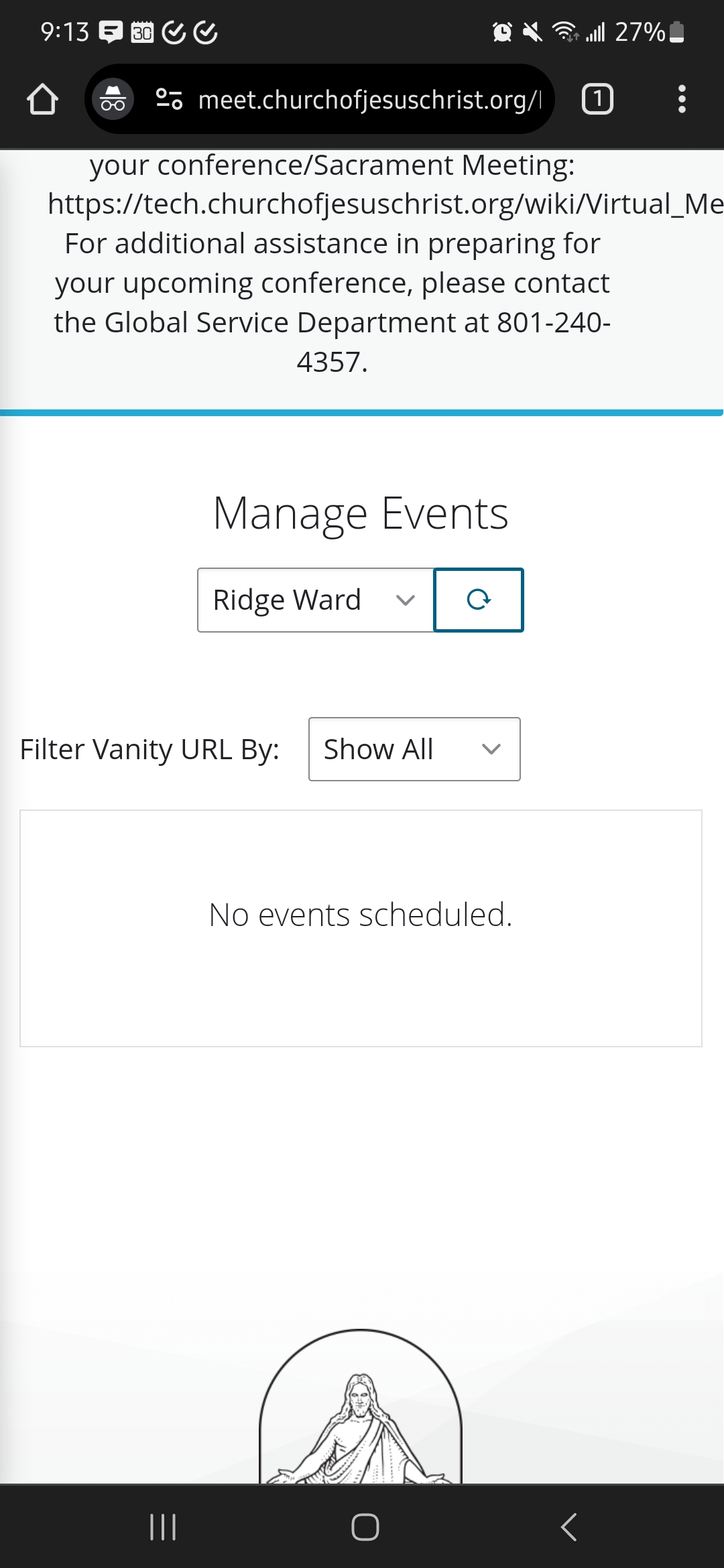
Answer: You choose to publish Meetings and/or Webinars. So "broadcast" is a good term because it can be either one. Confidential meetings stay confidential unless someone goofs and manually publishes it. See meet_page.png screenshot.

Issue #4: Can we disable this? This proposal creates more problems for us from a ministering standpoint than it helps. The current church setup frankly has poor attendance gathering capabilities. We have a front end where we ask the individual(s) for names and number of people watching that broadcast. That helps us tremendously as we generate weekly reports that we disseminate to ward leaders which they then act on. If we can't disable the broadcast.churchofjesuschrist.org local zoom meeting link, then we will have users slip through our tracking systems.

Answer: Yes, they come defaulted to not published.

Issue #5: This is probably a stretch, but is there a way to somehow target one broadcast for *three* wards? For example, we have one building with three wards attending. To make the broadcast flow smoother, we simply create one broadcast that starts around 8:30 AM and ends around 1:30 PM. All three wards get the same broadcast link, and all we do is simply put an overlay in between meetings. That way we don't have to set up three meetings per day, and we don't have to manually stop and start webinars three times per Sunday. We just start it at 8:30, stop it at 1:30 PM, and we're golden. I'd prefer to not have to go back to the old days of managing one broadcast per ward.

Answer: Doesn't look to be possible based on what I see so far.
meet_page.png
meet_page.png (77.72 KiB)
broadcast_page.png
broadcast_page.png (197.18 KiB)
Community Administrator
#2
brad_p wrote: Thu Oct 26, 2023 3:57 pmIssue #1: I cannot access meet.churchofjesuschrist.org. I get 403 forbidden, despite being logged in. Is there a workaround or a fix for this?
Try Incognito mode.

brad_p wrote: Thu Oct 26, 2023 3:57 pmIssue #2: I went into my ward's church enterprise Zoom and created both a Meeting and a Webinar for tomorrow. I was not given an event code, and nothing shows up at broadcasts.churchofjesuschrist.org. About 10 minutes later I did a refresh just to check. It still says "Local Broadcasts - No upcoming broadcasts."
Because you didn't set them to "publish" in "meet" due to Issue #1.

brad_p wrote: Thu Oct 26, 2023 3:57 pm our stake routinely has unit leaders setting up Zoom meetings for things that shouldn't be publicly listed.
There's a slider in "meet" that says "publish". Don't publish and you're fine.
Have you searched the Help Center? Try doing a Google search and adding "site:churchofjesuschrist.org/help" to the search criteria.

So we can better help you, please edit your Profile to include your general location.
Community Moderators
#3
brad_p wrote: Thu Oct 26, 2023 3:57 pm Issue #5: This is probably a stretch, but is there a way to somehow target one broadcast for *three* wards? For example, we have one building with three wards attending. To make the broadcast flow smoother, we simply create one broadcast that starts around 8:30 AM and ends around 1:30 PM. All three wards get the same broadcast link, and all we do is simply put an overlay in between meetings. That way we don't have to set up three meetings per day, and we don't have to manually stop and start webinars three times per Sunday. We just start it at 8:30, stop it at 1:30 PM, and we're golden. I'd prefer to not have to go back to the old days of managing one broadcast per ward.
It sounds like you're a stake leader or technology specialist setting up broadcasts for all of the wards yourself. I don't have access to the system, but are wards able to set up their own broadcasts? It seems like a lot of work for someone in the stake to manage all of the ward meetings every week – and it's possible that some wards don't have members who need a broadcast at all.
Samuel Bradshaw • If you desire to serve God, you are called to the work.
Member
#4
I don't see our meetings on the Meet-Events page. In an image brad_p posted, the events were listed with an option to publish, but I don't see that for our ward.
Screenshot_20231028_091304_Chrome.jpg
Anyone know how I can get that view?
Community Administrator
#5
From the FAQ: "If meeting data from a recurring series is not returned to the “Events” section of the Church Meet portal, event managers will need to create a new recurring series."

I'm guessing the importing of events had limited "reach", requiring some to be re-created.

But it also raises the possibility that some wards are somehow not using the zoom license/login assigned to them by the STS. No one would realize it until this tool came along.
Have you searched the Help Center? Try doing a Google search and adding "site:churchofjesuschrist.org/help" to the search criteria.

So we can better help you, please edit your Profile to include your general location.
New Member
#6
I'm the STS for our stake and I'm having problems with meet.

We have several units in our building that broadcast with Zoom. And My ward and another of the wards nothing was populated over, based on what I have seen in here I will have to recreate the zoom meetings. I will probably wait until next year when we change our meeting schedule.

It looks like in Broadcasts.ChurchOfJesusChrists.org that it only shows events out for two weeks. I tried publishing a new Stake Conference meeting the middle of next month, but it isn't showing up yet.

It will take some time to get used to the new setup.
New Member
#7
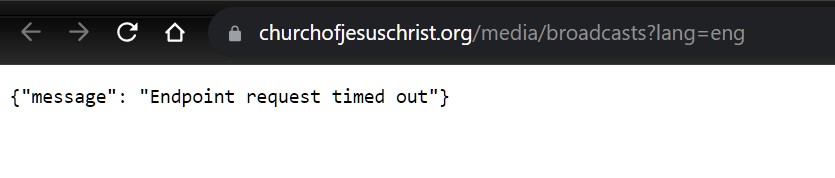
Attempt to connect on a Sunday and you get "Endpoint request timed out"
Screenshot 2023-10-29 112914.jpg
Screenshot 2023-10-29 112914.jpg (20.93 KiB)
New Member
#8
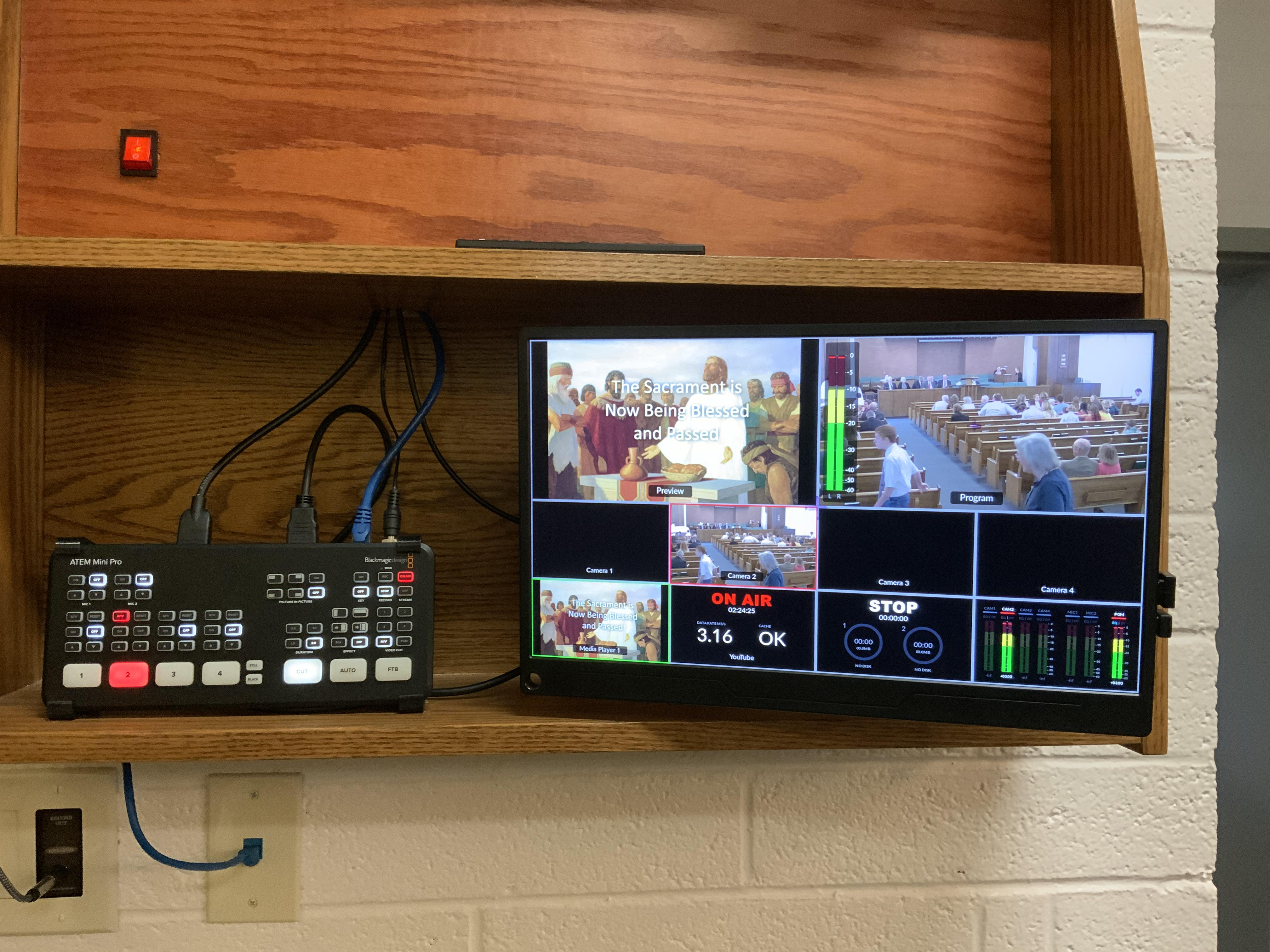
We also just do one broadcast for the entire Sunday and use the same streaming key to YouTube Live. All we need to do each Sunday is just push "ON AIR" and we are live. I could not imagine going back to using a laptop. This would be plagued with many more technical issues and currently anyone can put the "ON AIR" button.

I'm not quite sure why we would want to restrict who can watch or make it more difficult for some. The broadcasts have been great for inactive and non-members. It seems that everything is moving to access only for those who are active or at least gatekeeping only for active members.
unnamed.jpg
unnamed.jpg (1.59 MiB)
Community Administrator
#9
joeneuman wrote: Sun Oct 29, 2023 11:53 am I'm not quite sure why we would want to restrict who can watch or make it more difficult for some. The broadcasts have been great for inactive and non-members. It seems that everything is moving to access only for those who are active or at least gatekeeping only for active members.
I'd suggest reading General Handbook 29.7
"Streams and virtual meetings are not meant for the convenience of those who could reasonably attend in person."

We're no longer in "pandemic" mode. The streams can continue for the shut-ins, but it's not intended for the inactive or non-members. Maybe that will change, but that's the current status.
Have you searched the Help Center? Try doing a Google search and adding "site:churchofjesuschrist.org/help" to the search criteria.

So we can better help you, please edit your Profile to include your general location.
New Member
#10
russellhltn wrote: Sun Oct 29, 2023 4:36 pm I'd suggest reading General Handbook 29.7
"Streams and virtual meetings are not meant for the convenience of those who could reasonably attend in person."
Very helpful. Today I was talking with a member and they mentioned that a leader shared their disdain for something that was said in a sacrament meeting and then removed the post when he realized the problems that it might cause. It made me realize how quickly things in our modern world can become distorted and people start pulling out pitchforks and torches. For this very reason, we need to keep our meetings sacred and secure.
Member
#11
joeneuman wrote: Sun Oct 29, 2023 11:53 am We also just do one broadcast for the entire Sunday and use the same streaming key to YouTube Live. All we need to do each Sunday is just push "ON AIR" and we are live. I could not imagine going back to using a laptop. This would be plagued with many more technical issues and currently anyone can put the "ON AIR" button.

I'm not quite sure why we would want to restrict who can watch or make it more difficult for some. The broadcasts have been great for inactive and non-members. It seems that everything is moving to access only for those who are active or at least gatekeeping only for active members.
That's a pretty cool setup you have with the Atem. Did you hit up Facilities Management for that, or did it come from the unit budget?
New Member
#12
It came from our budget. $300 for ATEM, $80 for monitor, $320 for Camera, and another $200 for hardware. I think we are going to add a Raspberry Pie with the Zoom web app.
New Member
#13
Edited 1 time, last by jameswwassmer on
None of our meetings are appearing in the new church meet webpage. I have a church Zoom account through which meetings are scheduled in Zoom, but they are not populating on the meet website either published or unpublished. I even edited the meeting parameters to see if that would help, but no joy. I have converted the meetings to a webinar but still, no joy.
Community Administrator
#14
jameswwassmer wrote: Mon Oct 30, 2023 10:51 am None of our meetings are appearing in the new church meet webpage. I have a church Zoom account through which meetings are scheduled in Zoom, but they are not populating on the meet website either published or unpublished. I even edited the meeting parameters to see if that would help, but no joy. I have converted the meetings to a webinar but still, no joy.
Have you tried creating a new meeting as a test?
Have you searched the Help Center? Try doing a Google search and adding "site:churchofjesuschrist.org/help" to the search criteria.

So we can better help you, please edit your Profile to include your general location.
New Member
#15
I haven't tried that yet. However, even if that is successful, my Zoom sacrament meeting attendees are mostly elderly and are technologically challenged. Just changing to the Church licensed Zoom account and new meeting ID's and Passcodes was a major undertaking. I may postpone creating a new meeting schedule when we change meeting times in January. I think I'll go ahead and try a new meeting but with Relief Society in mind. Thanks
Community Administrator
#16
jameswwassmer wrote: Mon Oct 30, 2023 12:54 pm I think I'll go ahead and try a new meeting but with Relief Society in mind.
Unless there's something I'm missing, you can create a meeting for any reason just as a test. I don't think anyone else would be aware of it.
Have you searched the Help Center? Try doing a Google search and adding "site:churchofjesuschrist.org/help" to the search criteria.

So we can better help you, please edit your Profile to include your general location.
New Member
#17
After some trial and error, I was able to get our Relief Society and next years sacrament meetings to be visible. The current years sacrament meetings are still not populating but since our Zoom audience is made up of elderly with limited tech experience, I'll leave it as is until January. Thanks for all the tips.
Member
#18
sbradshaw wrote: Fri Oct 27, 2023 2:42 pm It sounds like you're a stake leader or technology specialist setting up broadcasts for all of the wards yourself. I don't have access to the system, but are wards able to set up their own broadcasts? It seems like a lot of work for someone in the stake to manage all of the ward meetings every week – and it's possible that some wards don't have members who need a broadcast at all.
Yes, I'm a stake STS. That is a good question, I don't believe the church has a mechanism to let ward members manage this.

Just a side note, I do believe it's most efficient and cleanest to have the STS set up and manage all broadcasts for the wards. It's far more reliable that way, and it's not that much work. I require about 90 minutes of setup the week prior (this includes creating broadcasts, updating links, and setting up hardware in three buildings). Then about 30 minutes the day of to manage attendance reports and the occasional weird thing that goes wrong. Each ward has a camera assistant to control the broadcast. As far as time commitment for callings, that's pretty light compared to others.

I've seen stakes try to offload all the broadcast work onto wards, and I've personally never seen it work well. One or maybe two wards may figure it out, but the rest of the wards in the stake won't.
Community Administrator
#19
brad_p wrote: Wed Nov 01, 2023 11:37 am I've seen stakes try to offload all the broadcast work onto wards, and I've personally never seen it work well.
Curious. In our stake the wards are doing their own. The STS (me) wasn't involved except to get them to work out some bugs getting them connected.

But then, I'm not sure what they're using. My ward is using YouTube.
Have you searched the Help Center? Try doing a Google search and adding "site:churchofjesuschrist.org/help" to the search criteria.

So we can better help you, please edit your Profile to include your general location.
New Member
#20
As I studied 29.7 it became less clear what is meant in the letter when it says:

"Zoom has been approved as the tool for conducting local broadcasts and has
built-in settings to ensure users are following principles outlined in the General
Handbook
"

What principles are they referring to? If anything I can see how using Zoom will make following the principles more difficult.

1) Are essential workers or otherwise required to work on the Sabbath.
Stream recordings of ward and stake meetings should be deleted within one day after the meeting.

How will we accommodate these members if the broadcast is not recorded?

2) Streams and virtual meetings should not distract from the Spirit. Generally, only one device should be used to capture the meeting. Both the device and the person using it should be inconspicuous.

Right now we don't use a computer to do our broadcasts. We use a video encoder and stream directly without drawing any attention to the person holding a handheld remote. Someone pushes "ON AIR" in the morning and the stream just goes through all 3 sacrament meetings. Using Zoom we would need to use a computer and monitor the meeting to make sure it's working and hope the computer doesn't crash. Each ward would need to individually come in early connect a computer, log in, and start the Zoom meeting and then break it down after each ward.
Member
#21
joeneuman wrote: Sat Nov 04, 2023 2:12 am Each ward would need to individually come in early connect a computer, log in, and start the Zoom meeting and then break it down after each ward.
This is how it happens in our ward.
Community Moderators
#22
joeneuman wrote: Sat Nov 04, 2023 2:12 am How will we accommodate these members if the broadcast is not recorded?
We have never been authorized to record the webcasts. They may have gotten recorded due to the process used to webcast, but that it likely the reason we were instructed to remove them within a day.
Community Administrator
#23
caillines wrote: Sat Nov 04, 2023 3:37 am
joeneuman wrote: Sat Nov 04, 2023 2:12 am Each ward would need to individually come in early connect a computer, log in, and start the Zoom meeting and then break it down after each ward.
This is how it happens in our ward.
Same.
Have you searched the Help Center? Try doing a Google search and adding "site:churchofjesuschrist.org/help" to the search criteria.

So we can better help you, please edit your Profile to include your general location.
Community Administrator
#24
lajackson wrote: Sat Nov 04, 2023 12:18 pm
joeneuman wrote: Sat Nov 04, 2023 2:12 am How will we accommodate these members if the broadcast is not recorded?
We have never been authorized to record the webcasts. They may have gotten recorded due to the process used to webcast, but that it likely the reason we were instructed to remove them within a day.
That prohibition seems to have gone away. At least I'm not seeing it as part of the Handbook. However, if we interpret "within a day" as "within 24 hours", it would be quite the shift that someone couldn't find time to view it within those 24 hours.
Have you searched the Help Center? Try doing a Google search and adding "site:churchofjesuschrist.org/help" to the search criteria.

So we can better help you, please edit your Profile to include your general location.
Senior Member
#25
GHB 29.7 seems pretty clear that only livestreams can be authorized for sacrament meetings. The specific use of the term "livestream" indicates sacrament meeting is intended to be viewed live, and not on-demand later on.

The last part of 29.7, which talks about deleting recordings, refers to all meetings. So for sacrament meetings, this would address situations where the livestream process used, also generates a recording.
Community Administrator
#26
BrianEdwards wrote: Sat Nov 04, 2023 2:37 pm GHB 29.7 seems pretty clear that only livestreams can be authorized for sacrament meetings. The specific use of the term "livestream" indicates sacrament meeting is intended to be viewed live, and not on-demand later on.
That's certainly one possible interpretation. I was trying to address joeneuman/young man's claim that having to delete recordings "within a day" wasn't helpful to people who had to work. But if no recording is allowed at all, that's even worse.
Have you searched the Help Center? Try doing a Google search and adding "site:churchofjesuschrist.org/help" to the search criteria.

So we can better help you, please edit your Profile to include your general location.
New Member
#27
I am just looking on the Meet Portal and noticed that my the recurring webinar that my STS created for my ward ( he also created one for each ward/branch in the stake) is not on the manage event page. What would be the recommended thing to do in this case? I have read that some people are letting their STS manage the creation of the webinar on Zoom instead of having the ward doing it themselves. I do have the login info that the previous STS created for the ward but I am wondering if it is not showing since I was only recorded as a ward tech specalist during a training meeting yesterday and if that had something to do with the Meet Portal not showing the recurring webinar.
Johnny T.
Ward Technology Specialist & EQ Secratary
Gooding, Idaho
----------------------
Former Ward Clerk & Stake Technology Specialist
Community Administrator
#28
Not everything transferred. The advice was to re-schedule. A number of forum members have indicated they'll do that when they reschedule for the new year.
Have you searched the Help Center? Try doing a Google search and adding "site:churchofjesuschrist.org/help" to the search criteria.

So we can better help you, please edit your Profile to include your general location.
Member
#29
Hi,

Let us not forget:

1. ONLY the STS can get access to meet.churchofjesuschrist.org and it can take up to 2 business days for you to be manually added into the system.

2. The Bishop may allow streaming of services for those who cannot attend in person if they fall into one of the said categories like being in a nursing home, sick, etc. I built a website to prevent anyone else from seeing the stream and where the Bishop could choose yes or no, and where the person would request to see the broadcast or not, and other many features, but it seems the church has no desire to implement such a system at all, pity.

3. All recordings must be deleted within 24 hours and that includes both Zoom and YouTube

4. The STS will setup the credentials for each ward.

5. For normal Zoom meetings the Ward should never give out the Zoom credentials... only the Host Code which is a 6 digit code found in the account area of www.zoom.us it will not show up in the app, only the website. Then after the meeting the Host Code should be replaced with a different one by the administrator of the ward's Zoom account.

I have many other items but limited myself to just 5... lol... so if you have any questions please reply with them to me. :)

Simon Phillips
Member
#30
I'm not sure about that first point. As a STS, i've discussed the meet portal with Bishoprics and Stake Presidency who clearly have access.

On the last point about sharing the host key. We make it a practise not to share this host key and i'm not sure under what circumstances this would be necessary in a church context?
Member
#31
Example of why a Host Code is better:

The administrator (person who only has the zoom credentials) (limiting access to credentials is essential)

1. Sets up the meetings, rooms etc.

2. The host will be given the host code

Day of the meeting

1. The host who has no credentials clicks on the link to the broadcast meeting and signs into the zoom app or on desktop

2. The host signs in as a free account

3. The host clicks on the participants and then his or her name

4. The host clicks on "take host" and types in the host code

5. The host is now moderator and has full access to all settings as if they had the credentials

6. The host cannot sign into zoom.us

7. The host cannot change the account settings and mess things up for other meetings and other hosts

After the meeting

1. The administrator changes the code

2. The host cannot now become the host to any future meetings or change settings in zoom

What if the host messes around in the meeting?

1. The administrator will sign in as the host with the credentials

2. The host is instantly a normal user and kicked from being a host instantly

3. The administrator gives someone else the host then leaves the meeting

I hope this helps

Simon
Member
#32
Ah, I can see why you would operate it that way.

In our stake we have an admin who logs into every meeting and can then assign hosts/co-hosts as needed for that meeting. No need for the host key but an admin has to make sure they're in the meeting, even if it's just for 2 minutes at the start to get the appropriate hosts assigned.
Member
#33
That again is why the host code is useful.

You give the code to the host, and the meeting is setup months in advance...

The assigned host with the host code would then gain access to the zoom meeting as host with that code.

Cool huh?

Simon
Member
#34
If then you have co-hosts, that host would then give out appropriate access to those pre-chosen to be co-hosts.

It saves hassle, time and effort, especially if the admin is sick, lost his or her internet, on holiday, etc...

Simon
Member
#35
It's all well and good as long as your prospective hosts are well trained and understand the process of using the host key.

My memory is foggy about why we stopped trying to use host keys but I believe it was the local leaders who were failing to get to grips with it and then panicking that they couldn't access/start the meeting , then requiring an admin to attend at the last minute to get them sorted out.

Technology is great until it's not.
Community Administrator
#36
simph1 wrote: Wed Nov 22, 2023 8:24 am ONLY the STS can get access to meet.churchofjesuschrist.org and it can take up to 2 business days for you to be manually added into the system.
This is true for the section for Zoom licensees. Others can log into meet.churchofjesuschrist.org, but can't see the "Local Units" option, just the "Manage Events" option.
Have you searched the Help Center? Try doing a Google search and adding "site:churchofjesuschrist.org/help" to the search criteria.

So we can better help you, please edit your Profile to include your general location.
Member
#37
That is why you have training, and also create a PDF or FAQ on a site to answer all their questions.

Then you email the host code to them or text message it, etc.. how hard is it honestly to click participants -> your name -> take host?

Hope this helps... and I agree that technology is great until it's not! lol

Simon
Member
#38
russellhltn wrote: Wed Nov 22, 2023 10:37 am
simph1 wrote: Wed Nov 22, 2023 8:24 am ONLY the STS can get access to meet.churchofjesuschrist.org and it can take up to 2 business days for you to be manually added into the system.
This is true for the section for Zoom licensees. Others can log into meet.churchofjesuschrist.org, but can't see the "Local Units" option, just the "Manage Events" option.
Correct. Also as a side note... if your calling is like mine "Stake Technology Specialist - Website Developer" you won't get access to the website either, that is why they recently renamed my calling to the normal Stake Technology Specialist so that I could advise them and help them wherever necessary.

:)

Simon
Community Administrator
#39
simph1 wrote: Wed Nov 22, 2023 10:40 am Also as a side note... if your calling is like mine "Stake Technology Specialist - Website Developer" you won't get access to the website either, that is why they recently renamed my calling to the normal Stake Technology Specialist so that I could advise them and help them wherever necessary.
I don't think there is any such standard calling as "Stake Technology Specialist - Website Developer". Custom callings never get access. Only Standard positions.
Have you searched the Help Center? Try doing a Google search and adding "site:churchofjesuschrist.org/help" to the search criteria.

So we can better help you, please edit your Profile to include your general location.
Member
#40
russellhltn wrote: Wed Nov 22, 2023 11:03 am
simph1 wrote: Wed Nov 22, 2023 10:40 am Also as a side note... if your calling is like mine "Stake Technology Specialist - Website Developer" you won't get access to the website either, that is why they recently renamed my calling to the normal Stake Technology Specialist so that I could advise them and help them wherever necessary.
I don't think there is any such standard calling as "Stake Technology Specialist - Website Developer". Custom callings never get access. Only Standard positions.
Which is why I stated "why they recently renamed my calling to the normal Stake Technology Specialist"... ;)

Simon
New Member
#41
joeneuman wrote: Mon Oct 30, 2023 10:07 am It came from our budget. $300 for ATEM, $80 for monitor, $320 for Camera, and another $200 for hardware. I think we are going to add a Raspberry Pie with the Zoom web app.
Is there any way to get a more detailed description of your set up?
New Member
#42
I’m a STS. We have 3 wards meet at the stake centre that use the stake zoom account. Start @9am done @1pm. Many shut ins watch all 3 meetings. We use OBS to pause for sacrament message and use the mute on zoom to stop audio from going out.
Ward members can only see their ward events and any stake events that get published. This is why we use the stake zoom account.

When creating a zoom webinar…the event is not published at https://www.churchofjesuschrist.org/med ... s?lang=eng until it is published at meet.churchofjesuschrist.org

If after creating the zoom webinar and one edits the event e.g. change the time or extend the number of events…any changes you make WILL NOT BE PUBLISHED. In other words only the original zoom webinar will publish for the original time and the number of weeks it was originally scheduled for. Hope this helps in understanding why some events can be published and why some can’t be.
Member
#43
R0BT wrote: Sun Dec 24, 2023 1:46 pm I’m a STS. We have 3 wards meet at the stake centre that use the stake zoom account. Start @9am done @1pm. Many shut ins watch all 3 meetings. We use OBS to pause for sacrament message and use the mute on zoom to stop audio from going out.
Ward members can only see their ward events and any stake events that get published. This is why we use the stake zoom account.

When creating a zoom webinar…the event is not published at https://www.churchofjesuschrist.org/med ... s?lang=eng until it is published at meet.churchofjesuschrist.org

If after creating the zoom webinar and one edits the event e.g. change the time or extend the number of events…any changes you make WILL NOT BE PUBLISHED. In other words only the original zoom webinar will publish for the original time and the number of weeks it was originally scheduled for. Hope this helps in understanding why some events can be published and why some can’t be.
Additionally:

1. If you give the hosts the host code instead of the credentials:

a) They cannot make any changes to the account or settings of the zoom.
b) It gives your stake far better security and protection from known issues that have been reported.
c) If you see a host messing around, you can sign in with the credentials and they automatically lose host instantly, and you are host.

Hope this helps. :)

Simon
New Member
#44
Having used the new broadcast feature since in was introduced I have to say that I like it from most standpoints although I have to agree with the comments regarding the lack of capability to gather accurate statistics through Zoom alone.
The reason for this post is that I would like to suggest if possible for the broadcast to start between 3 to 5 minutes before the scheduled time so that viewers can see that that they are viewing correctly prior to the meeting. As it is you have to wait till the meeting starts before you sign in and enter your credentials.