Setting conference talk for Elders Quorum lesson

21 postsstarted by nantoda 12,855 viewsoriginal topic

New Member
#1
I have a question. I am trying to set the conference talk for the Elders Quorum lesson for the month. I said it over and over, edit stays for a few minutes. Then I get the error that says that the conference talk has not been set. It’s as if it doesn’t seem to remember the things I put in.

Any recommendations or help?

Dan
Community Administrator
#2
What is your calling? Is there any oddity, like holding two callings or being an out of unit member? Is your GL the most current version?
Have you searched the Help Center? Try doing a Google search and adding "site:churchofjesuschrist.org/help" to the search criteria.

So we can better help you, please edit your Profile to include your general location.
Church Employee
#3
Does it work for others in your presidency?
Community Moderators
#4
Are you on Android or iOS? Gospel Library 6.6.0 is currently in beta – I'm curious if it fixes the issue for you.
Samuel Bradshaw • If you desire to serve God, you are called to the work.
New Member
#5
Where do I go to set the EQ lesson so that members can see them in Gospel Library? I am the EQ 2nd Counselor. I assume I have the ability to set the lessons, but I can't figure out where to go to do this.
New Member
#6
I cannot see any place to post Elders Quorum Discussions on the Gospel library app. I have Elders Quorum Lessons selected at the home screen edit page. The add Elders Quorum screen showed up for a week or less then disappeared. I am on an Android 11 phone. Is this still available??
Community Moderators
#7
rdunkel wrote: Sun Nov 19, 2023 10:52 pm I cannot see any place to post Elders Quorum Discussions on the Gospel library app. I have Elders Quorum Lessons selected at the home screen edit page. The add Elders Quorum screen showed up for a week or less then disappeared. I am on an Android 11 phone. Is this still available??
What's your calling? (Adding lessons is available for the elders quorum presidency and secretary, but not for teachers.)

Do you see a "Callings" card in Home?
Samuel Bradshaw • If you desire to serve God, you are called to the work.
New Member
#8
Does anybody know the answer to this? I have the same problem. I am EQ president and can't find which link I need to use on library, tools, or LDS.org?
Community Administrator
#9
kenkstout wrote: Sun Nov 26, 2023 11:49 am I am EQ president and can't find which link I need to use on library, tools, or LDS.org?
It's part of Gospel Library - Android and iOS. I don't know as the Windows version has that capability yet.

On the Home screen, there should be a tile says "Elders Quorum Lesson". Either clicking that or the three-dot menu option on the tile should get you in the mode for setting lessons.
Have you searched the Help Center? Try doing a Google search and adding "site:churchofjesuschrist.org/help" to the search criteria.

So we can better help you, please edit your Profile to include your general location.
New Member
#10

Re: Priesthood/RS Lessons

i am elder Quorum President and i am trying to put out lessons plan in the system but i can not find where or how to do it. can you help me
Community Moderators
#11
@bigmac25, Your post was moved to a more appropriate topic thread.
bigmac25 wrote: Sat Nov 02, 2024 5:12 pm i am elder Quorum President and i am trying to put out lessons plan in the system but i can not find where or how to do it. can you help me
The RS/EQ lessons now are part of the Gospel Library app. There is an Elders Quorum Lesson tile on the Gospel Library Home page. Use the edit icon, pencil icon, to add general conference talks for the selected dates. If the Elders Quorum Lesson tile does not appear on the Home page, then tap the overflow menu icon, 3 vertical dots icon, and tap Edit Home. Scroll down to the More Items section and tap on the on/off button to turn on the Elders Quorum Lesson tile.
JD Lessley
Have you tried finding your answer on the ChurchofJesusChrist.org Help Center or Tech Wiki?
New Member
#12
Please, please allow us to set lessons from the https://lcr.churchofjesuschrist.org/ web page. A keyboard on my desktop is so much easier to use than a mobile interface.
Community Moderators
#13
KJBinSTL wrote: Sun Dec 08, 2024 8:57 am Please, please allow us to set lessons from the https://lcr.churchofjesuschrist.org/ web page.
The Tech Forum is user-to-user discussion and collaborative self help. No one here has the ability to make that happen. If you want to get your input to the decision makers then either use the Gospel Library in app Send Feedback feature found in the Help menu or any feedback link found at the bottom of most Church website web pages.

Since there is a development effort on-going to align the capabilities for leaders found in LCR and Member Tools so that they are the same by some time in the middle of 2026, then I would expect that feature to be included in the programming.
JD Lessley
Have you tried finding your answer on the ChurchofJesusChrist.org Help Center or Tech Wiki?
New Member
#14
We were able to solve the issue. However, there are no options to add other teaching sources apart the most recent conference talks.
Can options be provided to allow for access to other teaching sources in the Church?
Community Administrator
#15
General Handbook 8.2.1.2 - Gospel Learning in Quorum Meetings
The focus should be on topics in one or more talks from the most recent general conference. The elders quorum presidency prayerfully selects conference messages for quorum members to discuss.
The powers that be would need to authorize other material and then instruct the developers.
Have you searched the Help Center? Try doing a Google search and adding "site:churchofjesuschrist.org/help" to the search criteria.

So we can better help you, please edit your Profile to include your general location.
New Member
#16
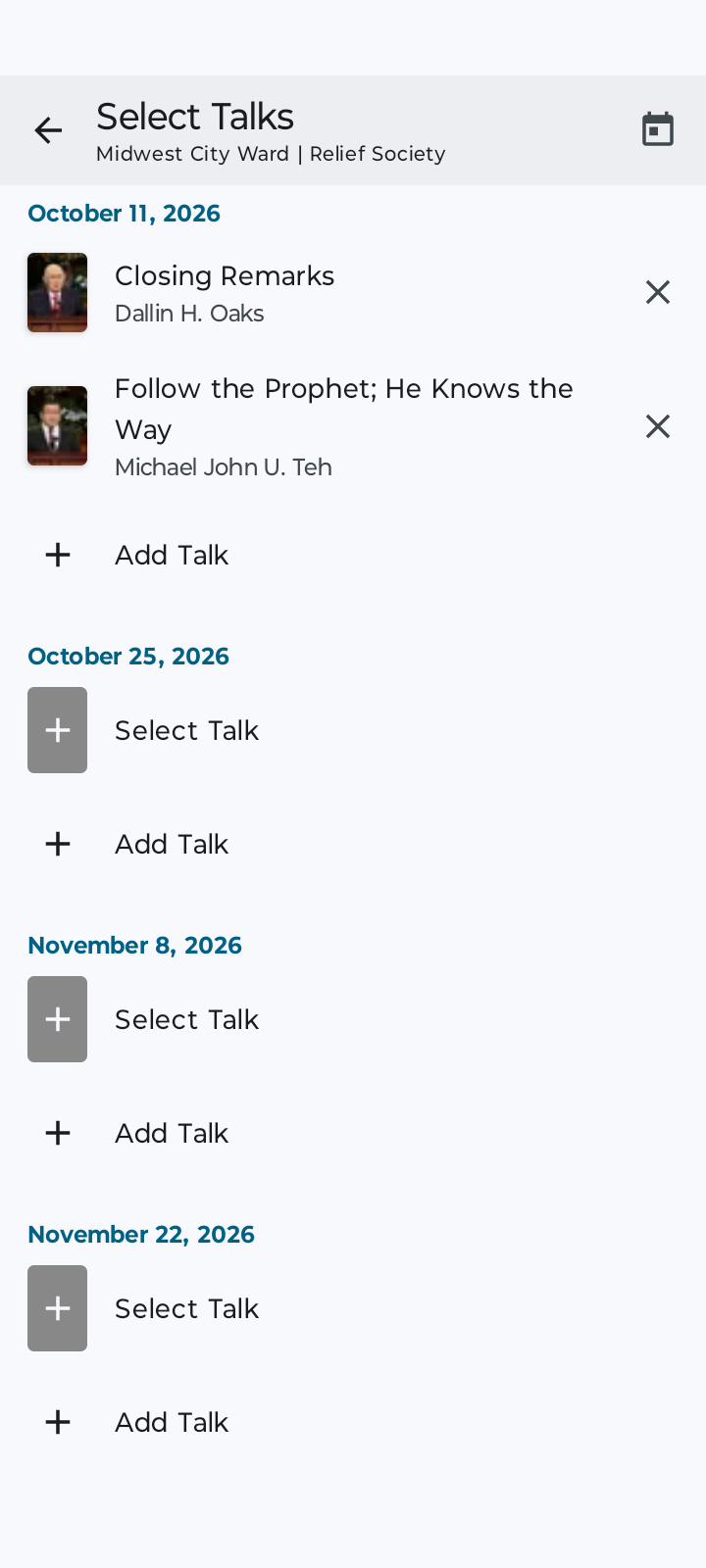
I'm the first counselor in RS and I can see where to add conference talks on the gospel app but the only dates it gives me are the 2nd and 4th weeks instead of every week. How can I fix that?
Screenshot_20261011-074110.png
Screenshot_20261011-074110.png (100.65 KiB)
Community Moderators
#17
jsantiago63 wrote: Sun Oct 11, 2026 9:46 am I'm the first counselor in RS and I can see where to add conference talks on the gospel app but the only dates it gives me are the 2nd and 4th weeks instead of every week. How can I fix that?
Just a guess until someone who really knows something responds: Have you tried updating the app? The every-other-week logic might have been programmed into the app before the September change.
New Member
#18
russellhltn wrote: Tue Feb 24, 2026 10:51 am General Handbook 8.2.1.2 - Gospel Learning in Quorum Meetings
The focus should be on topics in one or more talks from the most recent general conference. The elders quorum presidency prayerfully selects conference messages for quorum members to discuss.
The powers that be would need to authorize other material and then instruct the developers.
Including the previous 2 conferences would suffice for my needs. We're still covering talks from April.
Community Administrator
#19
The Handbook is saying "most recent". The "prior 2" isn't in keeping with the guidance. I'm not seeing any possible alternative interpretation.

Keep in mind this isn't a choice made by the developers, but the "business rules" handed down from the same group that wrote the Handbook.
Have you searched the Help Center? Try doing a Google search and adding "site:churchofjesuschrist.org/help" to the search criteria.

So we can better help you, please edit your Profile to include your general location.
New Member
#20
I’m also wondering about adding other sources specifically for 5th Sundays. Seems like this should be an option even if only the Bishopric can do this.
Community Administrator
#21
You can put that in as a suggestion via the Feedback link on the church main page. It does get looked at, but you might not receive any response.
Have you searched the Help Center? Try doing a Google search and adding "site:churchofjesuschrist.org/help" to the search criteria.

So we can better help you, please edit your Profile to include your general location.