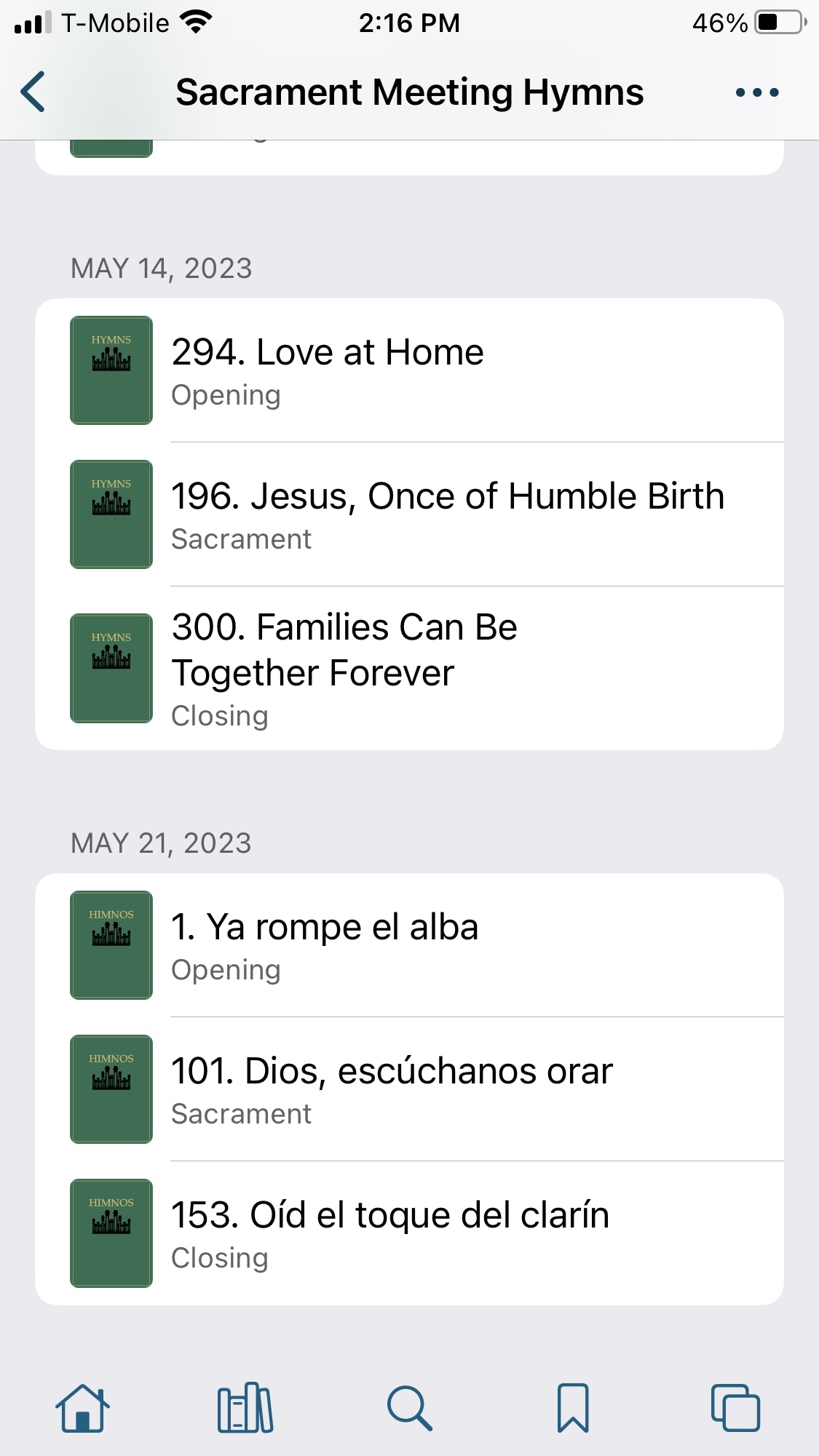
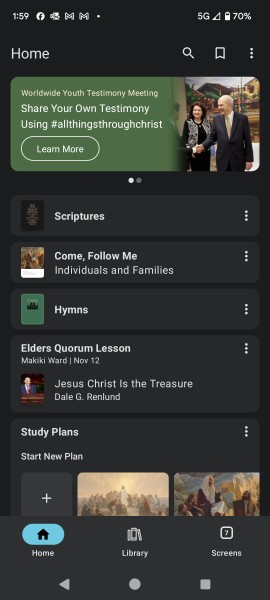
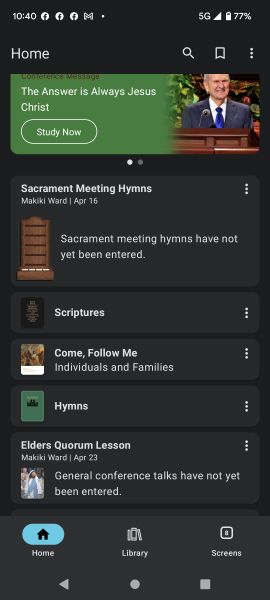
New Ward-Based Experiences on the Gospel Library App

89 postsstarted by locke99 37,583 viewsoriginal topic

New Member
#1
Does the new Ward-Based Experience of 6.5 only work for iOS. I have the gospel library app 6.5 installed on the Pixel 6. I am in the EQ and my president who has an iphone it works for him, but I don't have access.
I am signed in, I am using version 6.5, My calling is current in Leader and Clerk Resources, and our ward sacrament meeting start time is current.
So, is this an iOS only experience for the time being?
Community Administrator
#2
From the Apple Play store:
Ward and Branch Features
• Added a “Sacrament Meeting Hymns” card to Home (visible during sacrament meeting) that music coordinators can use to communicate hymns each week.
• Added “Relief Society Lessons” and “Elders Quorum Lessons” cards to Home that presidencies can use to communicate selected general conference talks for 2nd- and 4th-Sunday lessons.
• Added a “Callings” card for selecting hymns and lessons (only visible for members with callings that can edit).
• Added notification options in Settings for some of the above features.
• (Ward and branch features require signing in with a Church Account that’s connected to a membership record number.)
From the Google Play store:
Ward and Branch Features
• Added a “Sacrament Meeting Hymns” card to Home (visible on Sundays) that music coordinators can use to communicate hymns each week.
• Added “Relief Society Lessons” and “Elders Quorum Lessons” cards to Home that presidencies can use to communicate 2nd- and 4th-Sunday lesson topics.
• Added a “Callings” card for editing hymns and lessons (only visible for members with callings that can edit).
• Added Display Options to the reading view
However, in the "what's new" section of the Android app, there's no mention of the lessons.

Perhaps the first question is if the EQP has entered any lessons. Only then are EQ members going to see anything.

You didn't say what your calling is and it's not clear just how many members of the EQP have "write" access.
Have you searched the Help Center? Try doing a Google search and adding "site:churchofjesuschrist.org/help" to the search criteria.

So we can better help you, please edit your Profile to include your general location.
New Member
#3
I am a counselor in the presidency.
My president has added a lesson for the 23rd (I don't see the added lesson).
In the video, it says you will see callings, I don't see that.
Community Administrator
#4
What video are you referring to? You can see callings in Member Tools.

I have no idea what the delay/sync time is for added lessons.
Have you searched the Help Center? Try doing a Google search and adding "site:churchofjesuschrist.org/help" to the search criteria.

So we can better help you, please edit your Profile to include your general location.
New Member
#5
I can verify that the Elders Quorum lesson tile and Hymns tile show even if no hymns or lesson have been selected. For the lesson it states "General Conference talks have not been entered.'
William Woodford
New Member
#6
Training video for general conference talks.
Everything shown on the screen of this training video, I do not have. https://media2.ldscdn.org/assets/inform ... 0p-eng.mp4

Video of what I'm seeing
https://drive.google.com/file/d/1O_ej2s ... p=drivesdk
Senior Member
#7
locke99 wrote: Sat Apr 15, 2023 7:36 pm Training video for general conference talks.
Everything shown on the screen of this training video, I do not have. https://media2.ldscdn.org/assets/inform ... 0p-eng.mp4
Are you sure you are signed in to the app with your church account? I didn't have it on my android device and when I investigated I found I was signed-out of the app. I have not signed out manually so that may have happened as the result of an update. When I signed in with my church account, the lesson tile was available to turn on (but our Elder's Quorum presidency has not loaded any lessons yet).
New Member
#8
Signed in, signed out, re signed in, uninstalled, re installed, re signed in.
Community Moderators
#9
locke99 wrote: Sat Apr 15, 2023 8:17 am So, is this an iOS only experience for the time being?
It works in the Android beta. I expect it will work in the regular release as soon as it gets pushed.
Community Administrator
#10
I didn't see it yesterday, but today I decided to logout and back in and then I could see it. I didn't check today before the login/logout, so I'm not sure if that made a difference or not.

This is GL 6.5.0 on a Pixel 6 just after sacrament meeting.
Screenshot_20230416-104015.jpg
Have you searched the Help Center? Try doing a Google search and adding "site:churchofjesuschrist.org/help" to the search criteria.

So we can better help you, please edit your Profile to include your general location.
Community Moderators
#11
A few things to check:
– Are you on Gospel Library 6.5.0 or later? (Gospel Library Settings > App Details)
– Are you signed into Gospel Library with your Church Account? (Gospel Library Settings)
– Is your membership record number attached to the account you’re signed in with? (Account.ChurchofJesusChrist.org)
– Are you a member of the elders quorum presidency (including secretary)? (These callings should have edit access for elders quorum lessons.)
– Is the calling recorded correctly in Leader and Clerk Resources? (A custom calling in the system won’t have access rights – a clerk can verify that the standard calling is being used.)
– Has Gospel Library synced recently? (This should happen automatically, but to force a sync, make sure you’re connected to the internet, then go to Home and pull downward to refresh.)
– Is the Callings card enabled in Home? (Home > overflow menu > Edit Home)
Samuel Bradshaw • If you desire to serve God, you are called to the work.
Community Moderators
#12
sbradshaw wrote: Sun Apr 16, 2023 5:15 pm A few things to check:
And, if you are looking for the sacrament meeting hymns, does LCR have the correct meeting start time? If the music folks have loaded them, the hymns will show up an hour before the meeting and go away about 15 minutes after it ends, if you are connected to the Internet.

The loaded conference talks for EQ and RS should always be there.
New Member
#13
Does anyone know what music calling I need to have to edit the Sacrament Meeting music? They have me in incorrectly as a Choir Director, but I am actually the Ward Music Director, which doesn't seem to be one of the listed callings for music - the choices are Music Advisor and Music Coordinator. Which should I be and will that give me access to add the music??
Community Moderators
#14
cpkofford wrote: Sun Apr 16, 2023 8:34 pm Does anyone know what music calling I need to have to edit the Sacrament Meeting music? . . . - the choices are Music Advisor and Music Coordinator.
The official Notice says that ward music coordinators and bishopric members will be able to do it.
Community Moderators
#15
cpkofford wrote: Sun Apr 16, 2023 8:34 pm Does anyone know what music calling I need to have to edit the Sacrament Meeting music? They have me in incorrectly as a Choir Director, but I am actually the Ward Music Director, which doesn't seem to be one of the listed callings for music - the choices are Music Advisor and Music Coordinator. Which should I be and will that give me access to add the music??
These ward or branch callings can edit sacrament meeting hymns:
  • Music Coordinator
  • Music Leader
  • Accompanist
  • Bishop / Branch President
  • Bishopric First Counselor / Branch Presidency First Counselor
  • Bishopric Second Counselor / Branch Presidency Second Counselor
  • Ward Executive Secretary / Branch Executive Secretary
  • Ward Clerk / Branch Clerk
  • Ward Assistant Clerk / Branch Assistant Clerk
See General Handbook 19.4, “Music Leadership in the Ward.” If your calling is recorded as one of these, you won't have edit access: Music Adviser (no longer in handbook), Music Chairman (now “Music Coordinator”), Music Director (now “Music Leader”), Chorister (now "Music Leader"), Organist or Pianist (now “Accompanist”).

These are the callings that can edit elders quorum lessons:
  • Elders Quorum President
  • Elders Quorum First Counselor
  • Elders Quorum Second Counselor
  • Elders Quorum Secretary
  • Elders Quorum Assistant Secretary
See General Handbook 8.2.1.2, “Gospel Learning in Quorum Meetings.” To encourage presidencies to have an active role in selecting lesson topics, teachers do not currently have edit access.
These are the callings that can edit Relief Society lessons:
  • Relief Society President
  • Relief Society First Counselor
  • Relief Society Second Counselor
  • Relief Society Secretary
  • Relief Society Assistant Secretary
See General Handbook 9.2.1.2, “Gospel Learning in Relief Society Meetings.” To encourage presidencies to have an active role in selecting lesson topics, teachers do not currently have edit access.
Samuel Bradshaw • If you desire to serve God, you are called to the work.
Community Administrator
#16
What's interesting is there's nothing for Sunday School. I'll take a wild guess that has to do with the curriculum not lending itself to be easily selected like hymns and conference talks.
Have you searched the Help Center? Try doing a Google search and adding "site:churchofjesuschrist.org/help" to the search criteria.

So we can better help you, please edit your Profile to include your general location.
New Member
#17
Yesterday, (Sunday) I used the "Come, Follow Me" (Sunday School) tile to access the lesson for Sunday School. I was taken to the correct lesson in the manual directly. So it appears that Sunday School does work as well
William Woodford
New Member
#18
I checked my phone at 2:00am on Monday. The day after the release and I can now access the update.
All systems nominal.
Community Moderators
#19
russellhltn wrote: Mon Apr 17, 2023 12:11 am What's interesting is there's nothing for Sunday School. I'll take a wild guess that has to do with the curriculum not lending itself to be easily selected like hymns and conference talks.
The only approved curriculum for Sunday School currently is Come, Follow Me, which follows the same schedule throughout the Church (so there's nothing for teachers to choose). There's a Come, Follow Me quick link on Home that takes you to the current lesson.
Samuel Bradshaw • If you desire to serve God, you are called to the work.
Senior Member
#20
wwoodford wrote: Mon Apr 17, 2023 5:20 am Yesterday, (Sunday) I used the "Come, Follow Me" (Sunday School) tile to access the lesson for Sunday School. I was taken to the correct lesson in the manual directly. So it appears that Sunday School does work as well
This tool for RS/EQ brings it to the place where Sunday School already was. Selecting the home page, CFM, SS takes you right to the manual of the date you're on. It's a good way to make sure that wards and branches are doing the right lesson as well.
“A long habit of not thinking a thing wrong, gives it a superficial appearance of being right, and raises at first a formidable outcry in defense of custom.”
― Thomas Paine, Common Sense
New Member
#21
I am a Ward Elders Quorum President. I am being prompted to enter the lessons from GC iny GL Android app. I have entered all the lessons accept for April 23rd because our Stake had us change that to a SS lesson due to Ward Conference being the week before. This seems to be holding the whole six months of lessons from being published as I keep getting prompted to enter April 23rd lesson.
Thoughts?
Community Administrator
#22
rdunkel wrote: Thu Apr 20, 2023 10:38 am I am a Ward Elders Quorum President. I am being prompted to enter the lessons from GC iny GL Android app. I have entered all the lessons accept for April 23rd because our Stake had us change that to a SS lesson due to Ward Conference being the week before. This seems to be holding the whole six months of lessons from being published as I keep getting prompted to enter April 23rd lesson.
Report your findings to the stake. Let them know the system doesn't allow them to make this change.

But either way, this would appear to be solved in a little over a week.
Have you searched the Help Center? Try doing a Google search and adding "site:churchofjesuschrist.org/help" to the search criteria.

So we can better help you, please edit your Profile to include your general location.
Senior Member
#23
As a workaround, you could just enter any random conference talk to the lesson as a place holder. You may need to communicate to your Quorum to ignore that lesson.
New Member
#24
I serve in a Spanish ward bishopric. I can see the tool to select hymns, but it only lets me choose English hymns.

Is that a current limitation, or is it because my Gospel Library app is in English? (Side note, I couldn't figure out how to switch the app into Spanish to test that, so I'm open to that idea if it's doable.)
Senior Member
#25
The GL app inherits the cellphone's system language settings. So if you change the system language to Spanish, then GL will allow you to choose the hymns in Spanish.

As an aside, please consider adding this as Feedback into the Church's system, I have the feeling that this is a very common type of scenario. I've submitted feedback myself, so that regardless of the langauge that a hymn or EQ/RS lesson was entered, it would display in the user's language of choice. And the more voices that request this enhancement, the better chance (hopefully) this will get added soon.
Community Moderators
#26
BrianEdwards wrote: Sun Apr 23, 2023 1:21 pm The GL app inherits the cellphone's system language settings. So if you change the system language to Spanish, then GL will allow you to choose the hymns in Spanish.
Once the basic selection process for a primary language is resolved, there will be additional challenges in a bilingual ward.

The EQ/RS lesson (conference talk) should be easy. The talks are already available in different languages on a one-for-one basis.

The hymn part will be problematic because foreign language hymns are not translated directly. The hymn number will be different if it even exists in the foreign language. The title rarely translates directly, The text is usually different.

Hymn selection in different languages would probably require the creation of a data lookup table to make the jump from English to other languages. It is not the same as a conference talk that has the same identification in any language with the language designation being the only difference.

That said, I am still in favor of developing that capability. We have a chart tacked to the bulletin board in our clerks office with the English to Spanish hymn list a former stake clerk developed many years ago.
Church Employee
#27
lajackson wrote: Sun Apr 23, 2023 6:36 pm
BrianEdwards wrote: Sun Apr 23, 2023 1:21 pm The GL app inherits the cellphone's system language settings. So if you change the system language to Spanish, then GL will allow you to choose the hymns in Spanish.
Within the app you can also change your language. It's an option under the 3 dot menu.
lajackson wrote: Sun Apr 23, 2023 6:36 pm Once the basic selection process for a primary language is resolved, there will be additional challenges in a bilingual ward.

The EQ/RS lesson (conference talk) should be easy. The talks are already available in different languages on a one-for-one basis.

The hymn part will be problematic because foreign language hymns are not translated directly. The hymn number will be different if it even exists in the foreign language. The title rarely translates directly, The text is usually different.

Hymn selection in different languages would probably require the creation of a data lookup table to make the jump from English to other languages. It is not the same as a conference talk that has the same identification in any language with the language designation being the only difference.

That said, I am still in favor of developing that capability. We have a chart tacked to the bulletin board in our clerks office with the English to Spanish hymn list a former stake clerk developed many years ago.
Even though the hymns don't have the same numbers they've got them mapped between languages (at least English and Spanish). Last week my Spanish speaking in-laws were with us in church and I found the hymn in English and then switched my language to Spanish (I had already downloaded the Spanish hymns) and it went to the correct hymn even though the number was different. I don't know how that will work in the new section of the app, but I hope they do the same thing there.
Community Moderators
#28
jonesrk wrote: Sun Apr 23, 2023 9:20 pm Even though the hymns don't have the same numbers they've got them mapped between languages (at least English and Spanish).
This is absolutely wonderful.
Church Employee
#29
lajackson wrote: Mon Apr 24, 2023 10:21 am
jonesrk wrote: Sun Apr 23, 2023 9:20 pm Even though the hymns don't have the same numbers they've got them mapped between languages (at least English and Spanish).
This is absolutely wonderful.
Yes I was happily surprised. The old ways of finding them were much harder.
Senior Member
#30
If you go to the main hymns webpage https://www.churchofjesuschrist.org/mus ... s?lang=eng, and select any hymn, on the page that appears there's a menu in the upper-right that defaults to English. Clicking there, you can choose from the different languages and it automatically displays the corresponding hymn. In the url, it's the standard suffix change from ".....lang=eng" to "lang=ita" or whatever is selected. The languages that appear in the drop-down menu are specific to whether the particular hymn is available in the corresponding language hymnal (I've found a few errors, but it seems pretty solid). So some hymns have a lot of choices for languages, others just a few. It's been this way for some time.

That said, given the mismatches between what hymns are in all the various language hymnals, I wouldn't be surprised if the Church waits until the long-awaited new hymnal comes out, and all the hymns in every hymnal are identically available. But if they want to do it sooner, it seems the mapping exists so I'll keep my hopes up 8-)
Senior Member
#31
BrianEdwards wrote: Sun Apr 23, 2023 1:21 pm The GL app inherits the cellphone's system language settings. So if you change the system language to Spanish, then GL will allow you to choose the hymns in Spanish.
I just tested this on my phone. When I set the iPhone to use Spanish as the default language, the Gospel Library app switched its app name to Biblioteca, all the prompts within the app were then in Spanish, and it then presented me with a list of Spanish hymns to select from instead of the English ones for this newly released feature.

I suspect this will be the same for selecting the General Conference talks for EQ/RS lessons.
Senior Member
#32
And my hope continues to be that regardless of the language used to select hymns, what is displayed will be shown in each member's cellphone's language setting.

So for your test case, if you select the hymns in Spanish, what does a member then see if they have English set on their cellphone? If they see the English hymns displayed even though they were selected in Spanish, then that is a great support for dual-language congregations. Otherwise, as previously noted the member has to click the hymn and then manually change the language for each hymn they select; not the worst by any means, but extra steps that hopefully a future update can resolve.
Senior Member
#33
BrianEdwards wrote: Sun Apr 30, 2023 2:44 pm So for your test case, if you select the hymns in Spanish, what does a member then see if they have English set on their cellphone?
If the hymns are selected in Spanish, the Spanish hymn is presented regardless of the language setting. Once you have that hymn up, the member can manually select to see it in a language other than the one it was presented by clicking the 3 dots in the upper right.

To clarify, in one week we selected English hymns, then switched the iPhone language setting to Spanish, and selected Spanish hymns for the following week. The member is presented with the hymns in English as selected by the music coordinator for the first week, and the following week the member is presented with the hymns in Spanish just as the music coordinator selected them.
IMG_1001.jpg
Community Moderators
#34
BrianEdwards wrote: Sun Apr 30, 2023 2:44 pm And my hope continues to be that regardless of the language used to select hymns, what is displayed will be shown in each member's cellphone's language setting.

So for your test case, if you select the hymns in Spanish, what does a member then see if they have English set on their cellphone? If they see the English hymns displayed even though they were selected in Spanish, then that is a great support for dual-language congregations. Otherwise, as previously noted the member has to click the hymn and then manually change the language for each hymn they select; not the worst by any means, but extra steps that hopefully a future update can resolve.
There are tradeoffs both ways. For a fully bilingual ward where it's expected that members will sing in both languages, this might be preferred, but in a regular ward where there's one primary language, a returned missionary, immigrant, or visitor with their phone set to a different language may feel more comfortable singing in English with everyone else. If they have to manually switch the hymn to English every time, they may feel frustrated or singled out.
Samuel Bradshaw • If you desire to serve God, you are called to the work.
Community Administrator
#35
sbradshaw wrote: Mon May 01, 2023 1:45 pm There are tradeoffs both ways. ... If they have to manually switch the hymn ... every time, they may feel frustrated or singled out.
(Selective editing to make a comment)

I agree that can be a problem either way. Maybe make it a setting in GL?
Have you searched the Help Center? Try doing a Google search and adding "site:churchofjesuschrist.org/help" to the search criteria.

So we can better help you, please edit your Profile to include your general location.
New Member
#36
Which callings are able to input hymns into the gospel library app?
Community Administrator
#37
jaredpaulg wrote: Fri May 05, 2023 8:16 am Which callings are able to input hymns into the gospel library app?
See this post.
Have you searched the Help Center? Try doing a Google search and adding "site:churchofjesuschrist.org/help" to the search criteria.

So we can better help you, please edit your Profile to include your general location.
Community Moderators
#38
A new section on "Ward and Branch Features" was added to the Gospel Library FAQ that may be helpful:
https://www.churchofjesuschrist.org/learn/mobile-applications/gospel-library-faq?lang=eng
Samuel Bradshaw • If you desire to serve God, you are called to the work.
Senior Member
#39
A new section on "Ward and Branch Features" was added to the Gospel Library FAQ
That's a great reference link, thanks for posting.
Senior Member
#40
BrianEdwards wrote: Fri May 05, 2023 11:45 am
A new section on "Ward and Branch Features" was added to the Gospel Library FAQ
That's a great reference link, thanks for posting.
That really is a great link! Is there something Lke this for MemberTools?
Community Moderators
#41
zaneclark wrote: Sat May 06, 2023 8:28 am
BrianEdwards wrote: Fri May 05, 2023 11:45 am
A new section on "Ward and Branch Features" was added to the Gospel Library FAQ
That's a great reference link, thanks for posting.
That really is a great link! Is there something Lke this for MemberTools?
https://www.churchofjesuschrist.org/tools/help/member-tools-frequently-asked-questions?lang=eng
JD Lessley
Have you tried finding your answer on the ChurchofJesusChrist.org Help Center or Tech Wiki?
New Member
#42
I am in the US and our unit is a Portuguese speakers unit. There's no option to change the language in the main app, except in the library. With that being said, there's no way to select a hymn in Portuguese for the sacrament meeting and the english/portuguese numbering is not the same.

You could give us the option to change the main app language settings and not individual libraries. and NO, I can't download the Portuguese library version because my Google account is located in the US.

So, this feature does not help at all our unit.
Community Administrator
#43
andredjlima wrote: Mon May 22, 2023 2:24 pm There's no option to change the language in the main app, except in the library.
From what's been told here, the app takes it's primary language from the phone's OS.
Have you searched the Help Center? Try doing a Google search and adding "site:churchofjesuschrist.org/help" to the search criteria.

So we can better help you, please edit your Profile to include your general location.
New Member
#44
Hi,

I am Elder’s Quorum Secretary. I see the option to Select Talks for Elderes Quorum Lessons. About 2 weeks ago I went in and chose all the lessons that the Quorum Presidency decided to use. For the next couple of days I was able to see and edit them (if I had wanted to). Notifications went out to all members who opted for it for the lesson on May 14th. Then, all of a sudden last Sunday all of the lessons I had selected were gone. All I saw in the Select Talks for Elders Quorum Lessons was a big red !Not selected for May 28.

I then went in and selected the lesson for May 28th and it then clicked done and it showed up as having been selected…..but if I leave that screen and go to any other screen and then come back it reverts to the !Not selected for May 28.

Am I doing something wrong when it did work the first time?

Thanks
New Member
#45
Wonder how we make a suggestion that those who do the Ward Communications/Bulletin have access to the hymns that are going to be used.
Community Moderators
#46
Wouldn't that be the Feedback mechanism in the app? I don't use the app myself, so I'm not able to give directions to find it, but I understand it's there.
Community Administrator
#47
jenniekuoha wrote: Sat Jun 17, 2023 9:12 pm Wonder how we make a suggestion that those who do the Ward Communications/Bulletin have access to the hymns that are going to be used.
I can see all the Hymns entered. I just go into GL, and press the three dots on the "Hymn" tile, and select "View sacrament meeting hymns".

Same with lessons.
Have you searched the Help Center? Try doing a Google search and adding "site:churchofjesuschrist.org/help" to the search criteria.

So we can better help you, please edit your Profile to include your general location.
#48
Is there a way to Deep Link to these Ward-Based Experiences in Gospel Library? For example a GospelLibrary://content/EQLesson or GospelLibrary://content/SacramentMeetingHymn1
Thanks,

Michael H. Cox
Community Moderators
#49
michaelcox wrote: Fri Jun 30, 2023 8:04 pm Is there a way to Deep Link to these Ward-Based Experiences in Gospel Library? For example a GospelLibrary://content/EQLesson or GospelLibrary://content/SacramentMeetingHymn1
No, unfortunately – but that would be a helpful feature! You can send it as a feature request in Gospel Library under Help > Send Feedback.
Samuel Bradshaw • If you desire to serve God, you are called to the work.
Community Moderators
#50
My hymns and elders quorum conference talks have stopped appearing on my home page. Is it possible that I accidentally turned them off? Everything seems to be set to display them.
Community Moderators
#51
lajackson wrote: Fri Jul 07, 2023 8:13 am My hymns and elders quorum conference talks have stopped appearing on my home page. Is it possible that I accidentally turned them off? Everything seems to be set to display them.
There are some troubleshooting ideas in the Gospel Library FAQ under "How can I see my ward’s sacrament meeting hymns, elders quorum lessons, or Relief Society lessons?" you could try. (https://www.churchofjesuschrist.org/learn/mobile-applications/gospel-library-faq?lang=eng)
Samuel Bradshaw • If you desire to serve God, you are called to the work.
New Member
#52
Make sure you are logged in. If you aren't logged in with your church account you don't see the hymns and next lesson.
Community Moderators
#53
lhillman wrote: Sun Jul 16, 2023 8:58 pm Make sure you are logged in. If you aren't logged in with your church account you don't see the hymns and next lesson.
Thanks. I am logged in. For some reason, probably my fumble fingers, I have completely lost everything to do with the new ward-based experience in Gospel Library. I saw it for two or three weeks, and then it went away.

It happened at the time I was released as the elders quorum secretary. At that point I lost everything in the Gospel Library app that had anything to do with the new features. I never had a music calling that would have allowed me to update the hymns, but those displays went away at the same time.

There are other members of our ward who have never seen the ward-based experience features either and we are working to help them. They were very nice and helpful for the week or two I was able to access them.
Community Administrator
#54
If you see the sections but they're blank, it's possible they're not filled in. You might try the three dot menu and "display all".

Since your calling changed, I'd suggest logging out and back in. If that doesn't work, log out, delete all the data, and then log back in.
Have you searched the Help Center? Try doing a Google search and adding "site:churchofjesuschrist.org/help" to the search criteria.

So we can better help you, please edit your Profile to include your general location.
Community Moderators
#55
russellhltn wrote: Sun Jul 16, 2023 10:51 pm Since your calling changed, I'd suggest logging out and back in.
Aha! I do not know if it had anything to do with my calling change, but the app had already signed me out. Perhaps it happened during one of the recent upgrades. All I had to do was sign in.

Funny how that works. I do not remember the Gospel Library app ever signing me out before.
Community Moderators
#56
bkunz wrote: Sat May 27, 2023 8:21 pm Hi,

I am Elder’s Quorum Secretary. I see the option to Select Talks for Elderes Quorum Lessons. About 2 weeks ago I went in and chose all the lessons that the Quorum Presidency decided to use. For the next couple of days I was able to see and edit them (if I had wanted to). Notifications went out to all members who opted for it for the lesson on May 14th. Then, all of a sudden last Sunday all of the lessons I had selected were gone. All I saw in the Select Talks for Elders Quorum Lessons was a big red !Not selected for May 28.

I then went in and selected the lesson for May 28th and it then clicked done and it showed up as having been selected…..but if I leave that screen and go to any other screen and then come back it reverts to the !Not selected for May 28.

Am I doing something wrong when it did work the first time?

Thanks
Is this still happening for you? There's a beta version of Gospel Library 6.6.0 available, and I'm curious if it fixes the issue – if you're still seeing the issue and interested in joining the beta, let me know (you can send me a private message with your email address).
Samuel Bradshaw • If you desire to serve God, you are called to the work.
New Member
#57
Our ward music leader regularly uploads the weekly hymns using her iphone, but they never show in the Gospel Library for anyone else. Has anyone else had this issue, or have ideas as to why this might be happening? She also mentions that past hymns that she has selected will often disappear and revert back to 'not selected'.
Community Administrator
#58
grega wrote: Wed Sep 13, 2023 8:57 am but they never show in the Gospel Library for anyone else.
They only seem to appear in a fairly tight window of when sacrament meeting is scheduled. You might want to verify that CDOL has the correct meeting times for your ward.

Even then, the window is so tight that GL doesn't always update on it's own to show it. You may have to do a manual refresh.

What I'm referring to above is the display that looks like the chapel display of hymn numbers. You should be able to look in GL and see "hymns". From there you should see the list of hymns (displayed as a hymn book).
Have you searched the Help Center? Try doing a Google search and adding "site:churchofjesuschrist.org/help" to the search criteria.

So we can better help you, please edit your Profile to include your general location.
Senior Member
#59
I believe the hymns can be uploaded for some weeks/months in advance of the meetings. Then they show on member's devices at some point just prior to the meeting or the day (I have not tested to see how soon). If the ward music leader is uploading them just before the meeting, you are relying on their device syncing the information to the server and then everyone in the ward syncing their information from the server (and as russellhltn pointed out, the standard sync window may not capture the hymns if members don't sync manually just before the meeting starts). Given the struggles with network access on Sundays, that might not be the best method - I have seen it affect syncing both Member Tools and Gospel Library on Sundays so I try to sync on Saturday evening from home each week.

Uploading just before the meeting starts could be the reason no one sees them on their own personal devices.
Community Administrator
#60
I assumed that the upload was done far in advance, but if it's being done the same day, I wouldn't have much hope the users would see it. I wouldn't even bet on uploading the night before.
Have you searched the Help Center? Try doing a Google search and adding "site:churchofjesuschrist.org/help" to the search criteria.

So we can better help you, please edit your Profile to include your general location.
New Member
#61
It's being done several weeks in advance, sometimes a month's worth. The tight window thing makes sense if that's how the feature is intended to work. What doesn't make as much sense is that both the music leader and I both have 'admin rights' to this, and even I don't see that she has selected anything, yet she sends screen shots showing she clearly has. Not the end of the world, was just curious.
Senior Member
#62
Our ward music leader regularly uploads the weekly hymns using her iphone, but they never show in the Gospel Library for anyone else. Has anyone else had this issue, or have ideas as to why this might be happening? She also mentions that past hymns that she has selected will often disappear and revert back to 'not selected'.
I assume this means that once she chooses the hymns, the tile under "Callings" in the Home screen changes to say "Selected" (instead of the default "Not selected for <date>"). I would have her select the hymns for upcoming dates, then ask another leader in the Bishopric to check a day or so later on their own app, to see if they also see the same thing under the Hymns tile. I expect if it's all working, those other Bishopric members should also see that it says "Selected". Doing something like this would remove the issue with the tight timeframe when regular members can actually see what hymns are selected for the imminent sacrament meeting.

Another option would be to have a Bishopric member select the hymns, and then see if the Music Leader or other Bishopric members can see the selected hymns. That might isolate whether it's a general problem for your ward, or just something specific to the Music Leader.
Community Administrator
#63
grega wrote: Wed Sep 13, 2023 1:37 pm What doesn't make as much sense is that both the music leader and I both have 'admin rights' to this, and even I don't see that she has selected anything, yet she sends screen shots showing she clearly has. Not the end of the world, was just curious.
Any chance there's an out-of-unit membership involved or some other situation where "her" unit might not be "your" unit? I do wonder how well this all works in a YSA ward where much of the bishopric is out-of-unit. At least that's the "fun ones" that can give developers interesting test cases.

The other thing to look at is to see if her device is syncing. I'd also check the version just in case it's old.
Have you searched the Help Center? Try doing a Google search and adding "site:churchofjesuschrist.org/help" to the search criteria.

So we can better help you, please edit your Profile to include your general location.
Church Employee
#64
You might also try having one of the other leaders update them and see if the other leaders or the music leader see them
New Member
#65
Is this feature still working? It worked perfectly in August. But now I can't see the My Calling feature.
I also don't like the hidden Sign In link. I can't tell whether or not I am signed in and it's not very obvious where to go to sign in.
Community Moderators
#66
jo.leach wrote: Mon Sep 18, 2023 10:17 am Is this feature still working?
It is on my Android phone.
Make sure the Home screen has not been edited with the "Callings" section turned off in the "Edit Home" menu item.
jo.leach wrote: Mon Sep 18, 2023 10:17 am It worked perfectly in August. But now I can't see the My Calling feature.
I see what you are calling the My Calling feature only it is identified as "Callings". Make sure "Callings" is turned on as previously mentioned.
jo.leach wrote: Mon Sep 18, 2023 10:17 amI also don't like the hidden Sign In link. I can't tell whether or not I am signed in and it's not very obvious where to go to sign in.
It is located in the Settings menu item. When signed in it displays your name and username (in parenthesis) in the Account section. To sign out just tap your name and select "Sign Out". If signed out you will see the link "Sign In". Just tap the "Sign In" link to sign in.
JD Lessley
Have you tried finding your answer on the ChurchofJesusChrist.org Help Center or Tech Wiki?
Community Moderators
#67
jo.leach wrote: Mon Sep 18, 2023 10:17 am I also don't like the hidden Sign In link. I can't tell whether or not I am signed in and it's not very obvious where to go to sign in.
The Account card shows on Home by default if you're not signed in. However, you can set it to always show on Home, so you never have to worry if you're signed in or not. To do that, go to "Edit Home" (either in the overflow menu at the top right, or using the Edit Home button at the bottom of Home), then toggle the switch next to "Account." You can also drag it up or down in the list to control where on Home it appears.
Samuel Bradshaw • If you desire to serve God, you are called to the work.
Senior Member
#68
sbradshaw wrote: Mon Sep 18, 2023 3:59 pm The Account card shows on Home by default if you're not signed in. However, you can set it to always show on Home, so you never have to worry if you're signed in or not. To do that, go to "Edit Home" (either in the overflow menu at the top right, or using the Edit Home button at the bottom of Home), then toggle the switch next to "Account." You can also drag it up or down in the list to control where on Home it appears.
Thanks for that tip!
New Member
#69
I the Ward Chorister and able to input Sacrament Meeting Hymns on my android app but not on my microsoft surface - is this normal?
Community Moderators
#70
kar3nj wrote: Wed Oct 04, 2023 12:13 pm I the Ward Chorister and able to input Sacrament Meeting Hymns on my android app but not on my microsoft surface - is this normal?
The Windows Gospel Library app doesn't yet have all of the ward-based features that Android and iOS Gospel Library have. Hopefully it will be added soon.
Samuel Bradshaw • If you desire to serve God, you are called to the work.
New Member
#71
I am a relief society president and was previously able to assign talks to various weeks. However, ever since the Oct 2023 conference ended, the dates available for assigning talks are wrong. The only dates available are Oct 9, 2022 to April 2023. I've tried logging out and reinstalling. How can I get this fixed.
Community Moderators
#72
There was a bug in Android Gospel Library this week that prevented choosing talks for the right dates. This is now fixed in Android Gospel Library 6.6.2!
Samuel Bradshaw • If you desire to serve God, you are called to the work.
New Member
#73
Is anyone else dealing with issues with the hymns? I noticed in the most recent update on iOS that the Sacrament Meeting Hymns has disappeared. I am the ward executive secretary and have selected the hymns but they do not show up on the homepage. I have uninstalled, logged out, reinstalled, all the things, but nothing shows up.
Community Administrator
#74
jbradshaw6 wrote: Sun Oct 29, 2023 8:32 am Is anyone else dealing with issues with the hymns? I noticed in the most recent update on iOS that the Sacrament Meeting Hymns has disappeared. I am the ward executive secretary and have selected the hymns but they do not show up on the homepage. I have uninstalled, logged out, reinstalled, all the things, but nothing shows up.
Scroll to the bottom of the home page. You should see an "Edit Home" link. Make sure Hymns didn't accidently get turned off.
Have you searched the Help Center? Try doing a Google search and adding "site:churchofjesuschrist.org/help" to the search criteria.

So we can better help you, please edit your Profile to include your general location.
New Member
#75
I actually figured out that the hymns show up on the home page only 30 mins before sacrament meeting starts.
Community Administrator
#76
jbradshaw6 wrote: Mon Oct 30, 2023 8:14 am I actually figured out that the hymns show up on the home page only 30 mins before sacrament meeting starts.
True, but the section should always be there. A tap on the three dots in that section should offer the ability to see the hymns. At least that's what I see in Android.
Have you searched the Help Center? Try doing a Google search and adding "site:churchofjesuschrist.org/help" to the search criteria.

So we can better help you, please edit your Profile to include your general location.
Community Moderators
#77
jbradshaw6 wrote: Mon Oct 30, 2023 8:14 am I actually figured out that the hymns show up on the home page only 30 mins before sacrament meeting starts.
russellhltn wrote: Mon Oct 30, 2023 11:27 am True, but the section should always be there.
The priesthood and Relief Society section is always there, because you can study the talks during the week.

But the Hymn section only shows up on Sunday, about an hour before sacrament meeting, and stays during the meeting until about 45 minutes after the meeting.

Those times may not be exact, but I know I have seen it more than 45 minutes before and at least 45 minutes after. I was checking afterward a few weeks ago. They were there at 44 after and not there at 55 after.

But actually, I have been concentrating more on how much effort is required to get credit for the Daily Study streak. I was surprised by the answer, but at least I now know the target. Personally, I use a (slightly) higher standard.
Community Administrator
#78
lajackson wrote: Mon Oct 30, 2023 5:26 pm But the Hymn section only shows up on Sunday, about an hour before sacrament meeting, and stays during the meeting until about 45 minutes after the meeting.
Not in my experience. Here's a screen shot from just now.
Screenshot_20231030-135947.jpg
Have you searched the Help Center? Try doing a Google search and adding "site:churchofjesuschrist.org/help" to the search criteria.

So we can better help you, please edit your Profile to include your general location.
Senior Member
#79
I see 2 options when editing the home page (Android 9, GL 6.6.2):
1. "Sacrament Meeting Hymns" (which has been selected for many months but doesn't currently show on the home screen) - it says it "displays for meetings only" and I cannot recall if it appears on its own because my wife and I normally sing from a physical book we share.
2. "Hymns for Home and Sunday Worship" (which wasn't selected but when I select it I can see the selected hymns for the next month if I tap the 3-dot menu - tapping the tile brings up the hymnal)

I don't know when #2 above appeared and it is initially non-intuitive (in my opinion), but I've come to expect non-intuitive in many apps (both church apps and non-church apps). I will probably deselect #1 above because I prefer a stable list where the tiles don't change position randomly on their own. #2 above stays on the home screen even if you are not close to a meeting time.
Community Moderators
#80
lajackson wrote: Mon Oct 30, 2023 5:26 pm But the Hymn section only shows up on Sunday, about an hour before sacrament meeting, and stays during the meeting until about 45 minutes after the meeting.
russellhltn wrote: Mon Oct 30, 2023 6:06 pm Not in my experience. Here's a screen shot from just now.
The Hymns tile showing in your screenshot is the Hymns (For home and Sunday worship) that is always available and takes you to the fairly new Hymns section of Gospel Library, which is very similar to what the Sacred Music app used to be, but not nearly as capable as the Sacred Music app has become. If you do not have that Hymns tile selected you can still get to the Hymns section through the Library page.

The Hymn section I am describing that only shows up on Sunday is the Sacrament Meeting Hymns (Displays for meetings only) section that appears before, during, and after the meeting and displays a hymn board just like the one at the front of the chapel with the hymns that were programmed in by someone with a music calling in your ward. Even though you may have that item selected to display on your Home page, it only appears during that meeting window. And if the clerk has the wrong sacrament meeting time set at LCR, you will see it then, and not during your real meeting time. If you do not have that item selected, you will never see it, even during the two hours around your Sunday meeting as loaded in LCR.

I was not aware of the feature that davesudweeks noted where, when the Hymns (For home and Sunday worship) tile is selected to appear on the Home page, it has a three-dot menu that takes you to the complete list of hymns that have been selected by the music calling folks that will be sung in sacrament meeting. Thank you, davesudweeks, for that discovery. It will help me when I am called upon occasionally to lead the music in sacrament meeting. The absent music director will not need to send me the list of hymns for the meeting.
Senior Member
#81
You are most welcome. In playing with it further, I see hymns going back to April this year so it might be useful for someone who wants to see "some" history of hymns previously sung. That's a cool feature (I don't know how far back it is designed to show, but my records were in a different ward until mid-June this year and our prior ward may have not been using it before April).
Community Administrator
#82
Huh. I always thought it was one tile, but looking at a old screen shot, you're right - they are two separate tiles. I stand corrected.

In my screen shot from April, there's "Sacrament Meeting Hymns" and just "Hymns". Looking at the app now, I see "Hymns".
Have you searched the Help Center? Try doing a Google search and adding "site:churchofjesuschrist.org/help" to the search criteria.

So we can better help you, please edit your Profile to include your general location.
Senior Member
#83
russellhltn wrote: Tue Oct 31, 2023 2:04 am Looking at the app now, I see "Hymns".
I see "Sacrament Meeting Hymns" still available to select in the Home Setup view, but it doesn't show on the home page (which would be expected if is isn't supposed to show until just before Sacrament meeting starts).
New Member
#84
davesudweeks wrote: Sat Apr 15, 2023 8:05 pm
locke99 wrote: Sat Apr 15, 2023 7:36 pm Training video for general conference talks.
Everything shown on the screen of this training video, I do not have. https://media2.ldscdn.org/assets/inform ... 0p-eng.mp4
Are you sure you are signed in to the app with your church account? I didn't have it on my android device and when I investigated I found I was signed-out of the app. I have not signed out manually so that may have happened as the result of an update. When I signed in with my church account, the lesson tile was available to turn on (but our Elder's Quorum presidency has not loaded any lessons yet).
Recently I was called as an Elders Quorum President. On a laptop, I verified that I have the EQP privileges. I have an Android Phone and have Gospel Library revision 6.6.2. Between 53 and 59 seconds in the training video, Sister Camille Johnson shows a screen with a group called "Callings". I don't see it. She says that if you don't see it, you need to sign-in. No further instruction is given as to how to tell if you are already signed-in or how to sign-in. I presume that I am signed-in because when I mark a scripture on my Android phone, I see the marking on my iPad.
Community Administrator
#85
KellyHawkes wrote: Fri Dec 08, 2023 10:35 am Recently I was called as an Elders Quorum President. On a laptop, I verified that I have the EQP privileges. I have an Android Phone and have Gospel Library revision 6.6.2. Between 53 and 59 seconds in the training video, Sister Camille Johnson shows a screen with a group called "Callings". I don't see it.
I'm not seeing ANY sections on my home screen. Everything is individual tiles.

I thought that when I showed the feature to my EQP, it was a part of "Elders Quorum Lessons" and selection was accessed by going into the three-dot menu on the right side of that tile.
Have you searched the Help Center? Try doing a Google search and adding "site:churchofjesuschrist.org/help" to the search criteria.

So we can better help you, please edit your Profile to include your general location.
Senior Member
#86
...a screen with a group called "Callings". I don't see it.
Two thoughts:

1) Have you tried the "Edit Home" option at the bottom of the Home screen? There's always the possibility the "Callings" tile simply isn't enabled.
2) Have you logged out and then back in after your EQ President calling was registered? A few have found that their Gospel Library user account doesn't always sync when changes like this occur. A forced sync sometimes works, others log out then back in and see what they expect, and a few unlucky ones have said they needed to delete and reinstall the app.
Community Moderators
#87
KellyHawkes wrote: Fri Dec 08, 2023 10:35 am Between 53 and 59 seconds in the training video, Sister Camille Johnson shows a screen with a group called "Callings". I don't see it.
Make sure you have "Callings" turned on in the "Edit Home" list of options. For android tap the overflow menu in the top right of the Home screen and tap "Edit Home". You can change the position of the Callings tile on the Home page by tap-hold-drag the two horizontal lines to the left of the tile name in the Edit Home page.
JD Lessley
Have you tried finding your answer on the ChurchofJesusChrist.org Help Center or Tech Wiki?
New Member
#88
I posted a lesson for Relief Society and now a change has been made. How do I delete the lesson I put in and replace it with another.?
New Member
#89
Not sure if you're still having this problem like I was. I uninstalled the app and cleared my app caches and then reinstalled and now it is showing for me. Hope this helps!