Adding a new video setup for a chapel

21 postsstarted by cyberrick1 24,250 viewsoriginal topic

New Member
#1
Hi,

Our stake center has a permanent Lumens camera setup witch runs great. Now we are looking at putting a permanent camera in our other two buildings. I'd like to see
what you all would recommend on the camera we should use. The Lumens is a great camera but too pricey.

Thanks.
Community Moderators
#2
cyberrick1 wrote: Tue Mar 07, 2023 11:58 am Now we are looking at putting a permanent camera in our other two buildings.
I would check with your FM group first. Unless it's changed, they have pretty strict instructions about not having any permanent cameras mounted in ward buildings.
So we can better help you, please edit your Profile to include your general location.
Member
#3
I have setup and used the PTZ Optics 20X SDI/HDMI cameras in 7 bldgs https://www.amazon.com//dp/B01BI7BQBU. They are expensive ($1600), but I have also purchased them on ebay for much less. An identical twin camera by Prisual https://www.amazon.com/dp/B097CF8482can be purchased on Amazon for $600. A close cousin camera by FoMako https://www.amazon.com/dp/B08L5GW5Q1is also on Amazon. The nice thing about these cameras is the ability to stream directly from the camera to youtube. Free camera control software from PtzOptics works on all of them.

In some bldgs the cameras are wall mounted, while other bldgs bring the camera out each Sunday and setup on a tripod. In both cases the audio is routed (in attic or taped along side wall of chapel) to the camera with a 100ft stereo headphone extension cable that is permanently plugged into the chapel record output jack. If running audio cable isn't possible then you can use a wireless audio conection like thishttps://www.amazon.com/dp/B09MCGQ8S2. The audio receiver can get it's power from the USB port of the camera.

In two bldgs we completely automated the sacrament meeting broadcasts by using a 24/7 timer relayhttps://www.amazon.com/gp/product/B073DGGHD7 to turn on/off the camera's POE power for each sacrament meeting. As soon as the camera is turned on it starts streaming to youtube. The audio is automatically switched off during the sacrament ordinance when the camera is panned 90degrees to the side via a magnetic switch that is attached to the side of the camera (see attached picture for better explanation). The bishopric uses the IR remote control to select one of several preset positions (pulpit, piano, choir, sacrament ordinance with audio-off, etc). Recently we ran a second audio cable from the organ to the camera, bypassing the magnetic audio off switch at camera, so the organ prelude, sacrament hymn, and postlude can be heard at all times, even when the sound system is off.
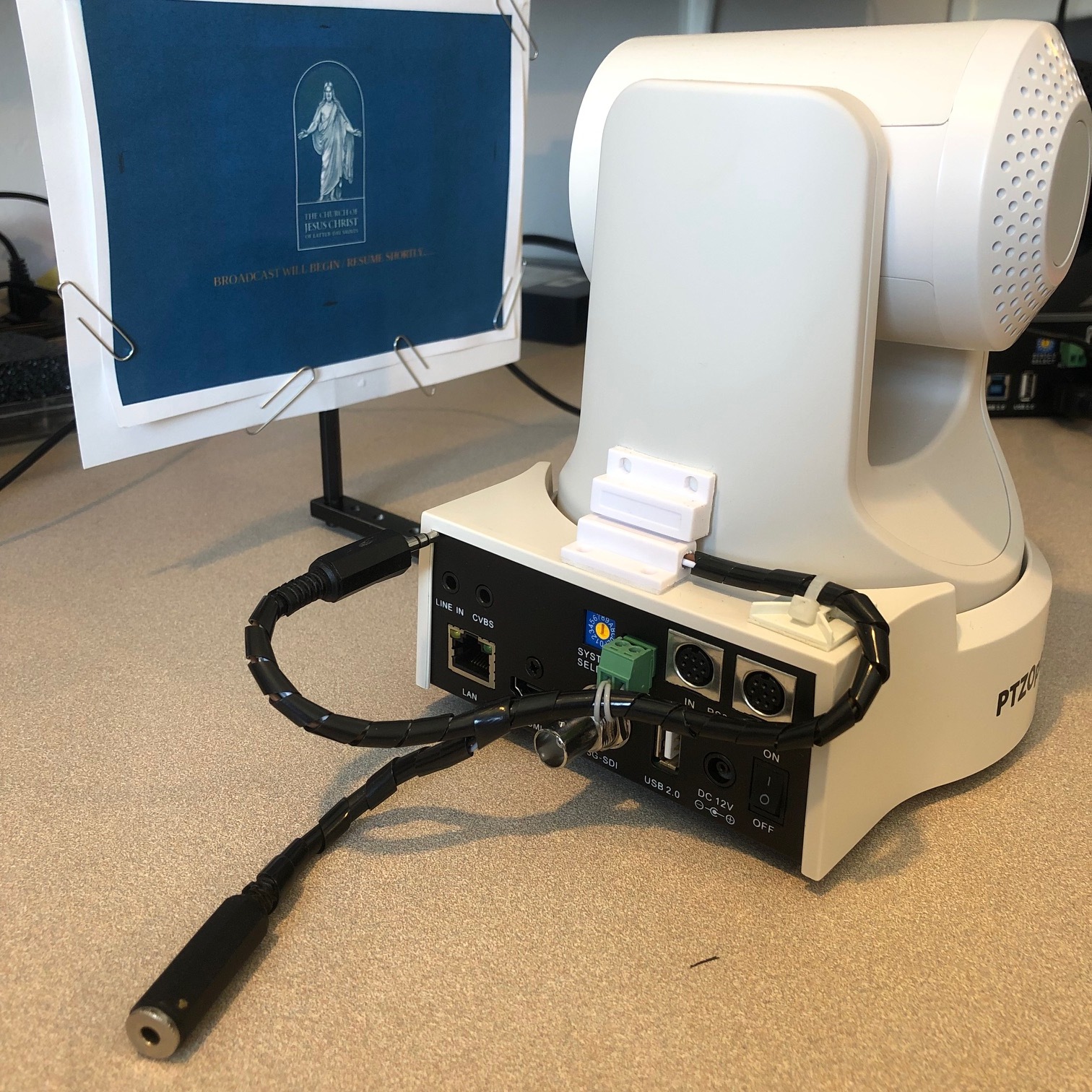
Camera_AudioSw_and_Sign.jpg
For the last 2 years we have allowed anyone to watch the streams just by going to our stake website hosted on a free google "site" and clicking on a youtube link. Starting this month we were asked to limit access to the streams, so now when the member clicks on the button to watch the stream, a Google Form will popup. The member must enter their name and a pincode unique to their ward that they received from their Bishop, afterwhich the streams can be watched. Google Forms automatically logs the time, member name, & pincode to a Google spreadsheet each time the stream is accessed.
Member
#4
SMTAV https://www.amazon.com/dp/B08PFQSGVH also makes an identical twin to the PtzOptics 20X camera and is in the $600 dollar range.
Member
#5
Just one observation,
GH 38.8.8
Local units may use the written name of the Church (not the wordmark or symbol)

Wordmark and symbol. The Church’s wordmark and symbol (see the illustration above) are to be used only as approved by the First Presidency and Quorum of the Twelve Apostles.
There are 11 types of people. Those who understand Gray Code and those that don't.
New Member
#6
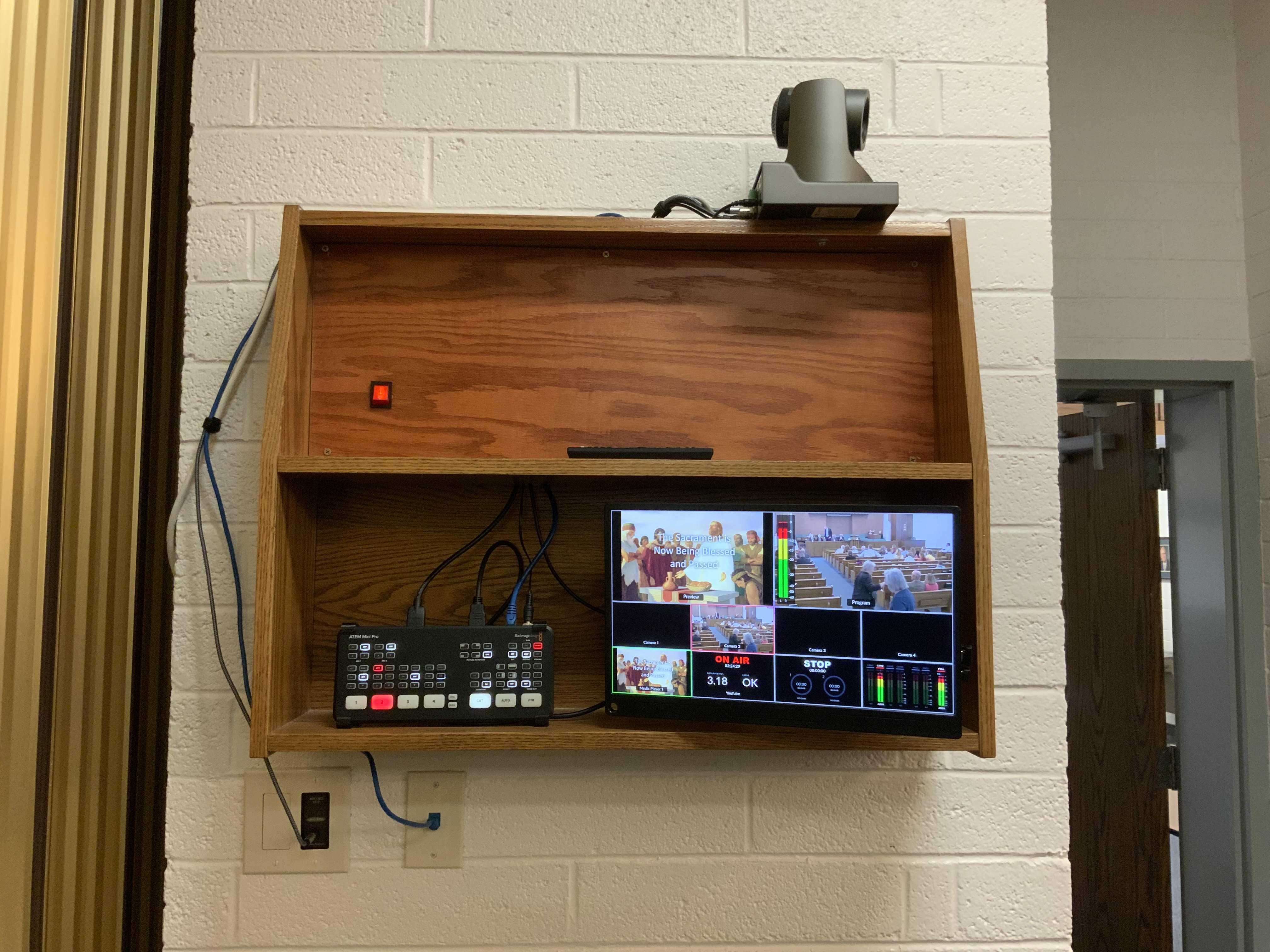
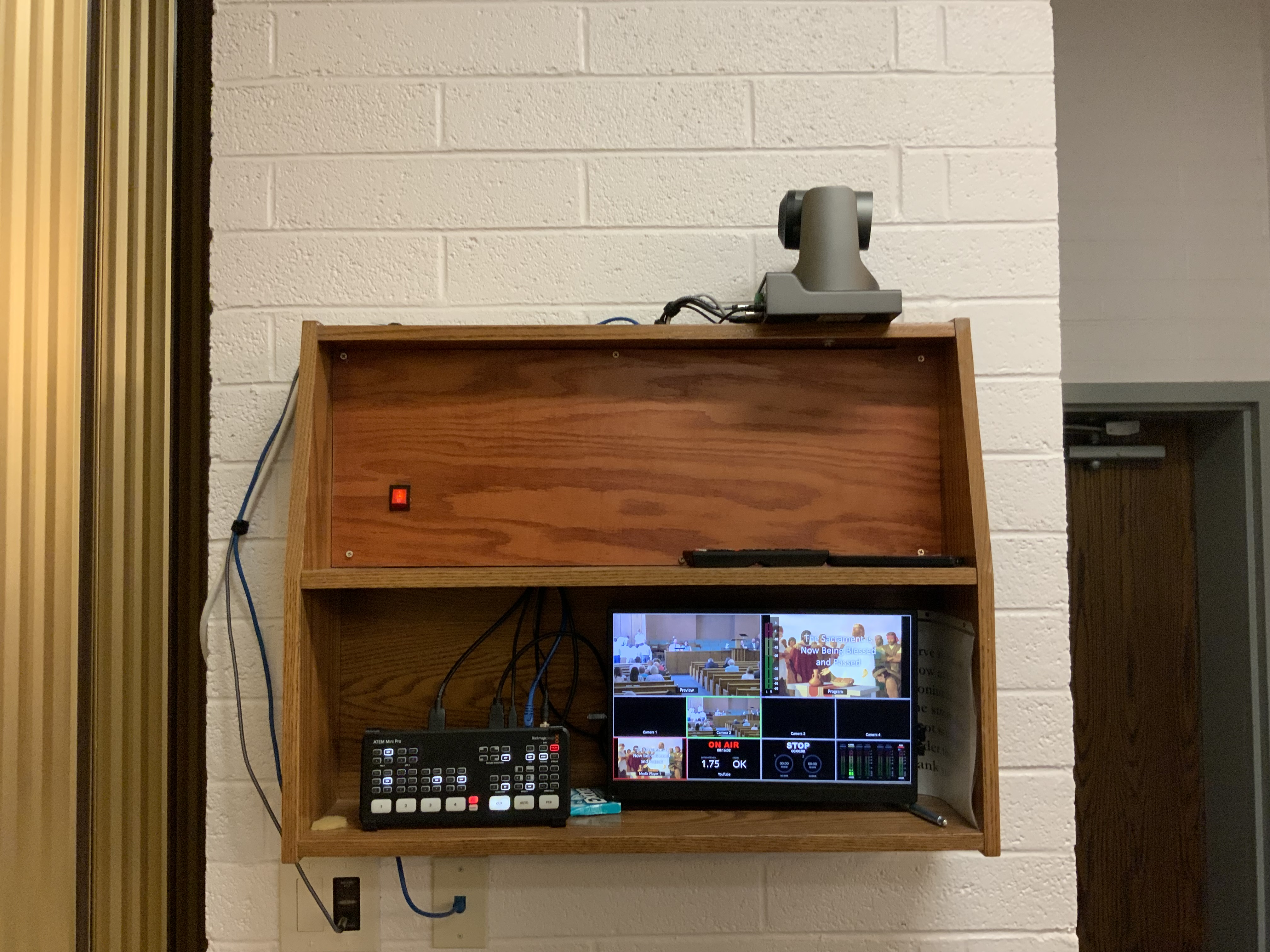
While it is true that permanently affixing video equipment to non-steak centers is not allowed by FM it is possible to install a temporary solution that we built inside this existing bookshelf. This setup is great because there's no computer required and anyone can just push the ON AIR button to go live on YouTube. We decided it was easier to just start the broadcast in the morning and leave it going to for 3 wards. The FM group had no problem adding a house audio out and a network jack.
unnamed (1).jpg
unnamed (1).jpg (1.38 MiB)
Community Administrator
#7
Nice. I'd suggest waiting to see what the church settles on for webcasting. Right now, Zoom is the only approved method. We'll have to see what they say about other services in the long run.
Have you searched the Help Center? Try doing a Google search and adding "site:churchofjesuschrist.org/help" to the search criteria.

So we can better help you, please edit your Profile to include your general location.
Community Moderators
#8
joeneuman wrote: Sun Oct 29, 2023 7:50 pm ...that we built inside this existing bookshelf.
Nice setup. Just curious, does it get locked up during the week?
So we can better help you, please edit your Profile to include your general location.
New Member
#9
It does not. We are working on adding a door that locks that will fold down.
New Member
#10
Mikerowaved wrote: Wed Mar 08, 2023 1:22 am
I would check with your FM group first. Unless it's changed, they have pretty strict instructions about not having any permanent cameras mounted in ward buildings.
I thought I had understood this to be the case, however the response I got from our FM Group Leader was that the stake could install one but the FM Group could not do the installation or maintain it once it was installed.

The group leader even gave me contact information to a contractor they use to install them.
New Member
#11
CalS201 wrote: Wed Mar 08, 2023 8:14 pm SMTAV https://www.amazon.com/dp/B08PFQSGVH also makes an identical twin to the PtzOptics 20X camera and is in the $600 dollar range.
I second this. We have been using these in our buildings now for a few years without any issue.
New Member
#12
We have the PTZOptics camera in our stake center and this Fomako clone in another building. The PTZOptics is much better documented and support for software, etc, but both look and operate great!
https://www.amazon.com/FoMaKo-Simultane ... r=1-4&th=1
New Member
#13
I use the ZowieTek PTZ 30x camera with NDI. $849.00 on Amazon. I have one in each building.
Installation and usage isn't complicated. For the camera installation, you need network connectivity (use POE to power the camera) and audio from the chapel. I usually split the audio from the assisted listening system. To access the camera, you need a laptop connected to the buildings WIFI and NDI tools installed. https://ndi.video/tools/
In Zoom, the camera shows up as a webcam (audio and video). The user managing the broadcast can be located anywhere where there is building wireless connectivity. They can control the camera and the zoom meeting with a windows laptop. It allows those called to manage the broadcast to sit with their families.

I highly recommend the setup. I have been running it for 2+ years.
New Member
#14
exxodus wrote: Sun Aug 11, 2024 11:15 am I use the ZowieTek PTZ 30x camera with NDI. $849.00 on Amazon. I have one in each building.
Installation and usage isn't complicated. For the camera installation, you need network connectivity (use POE to power the camera) and audio from the chapel. I usually split the audio from the assisted listening system. To access the camera, you need a laptop connected to the buildings WIFI and NDI tools installed. https://ndi.video/tools/
In Zoom, the camera shows up as a webcam (audio and video). The user managing the broadcast can be located anywhere where there is building wireless connectivity. They can control the camera and the zoom meeting with a windows laptop. It allows those called to manage the broadcast to sit with their families.

I highly recommend the setup. I have been running it for 2+ years.
Do the NDI tools give you full PTZ control over the camera?
Have you had any audio sync issues in this setup?
New Member
#15
The NDI will give you a live feed over IP.

With any PTZ camera you get full control over the PTZ with other hardware and software solutions it just makes it easy to use your mobile device as you can see the video live over the network.

For audio you want to get "house audio out" like what comes out at the pulpit wired at the back of the chapel.

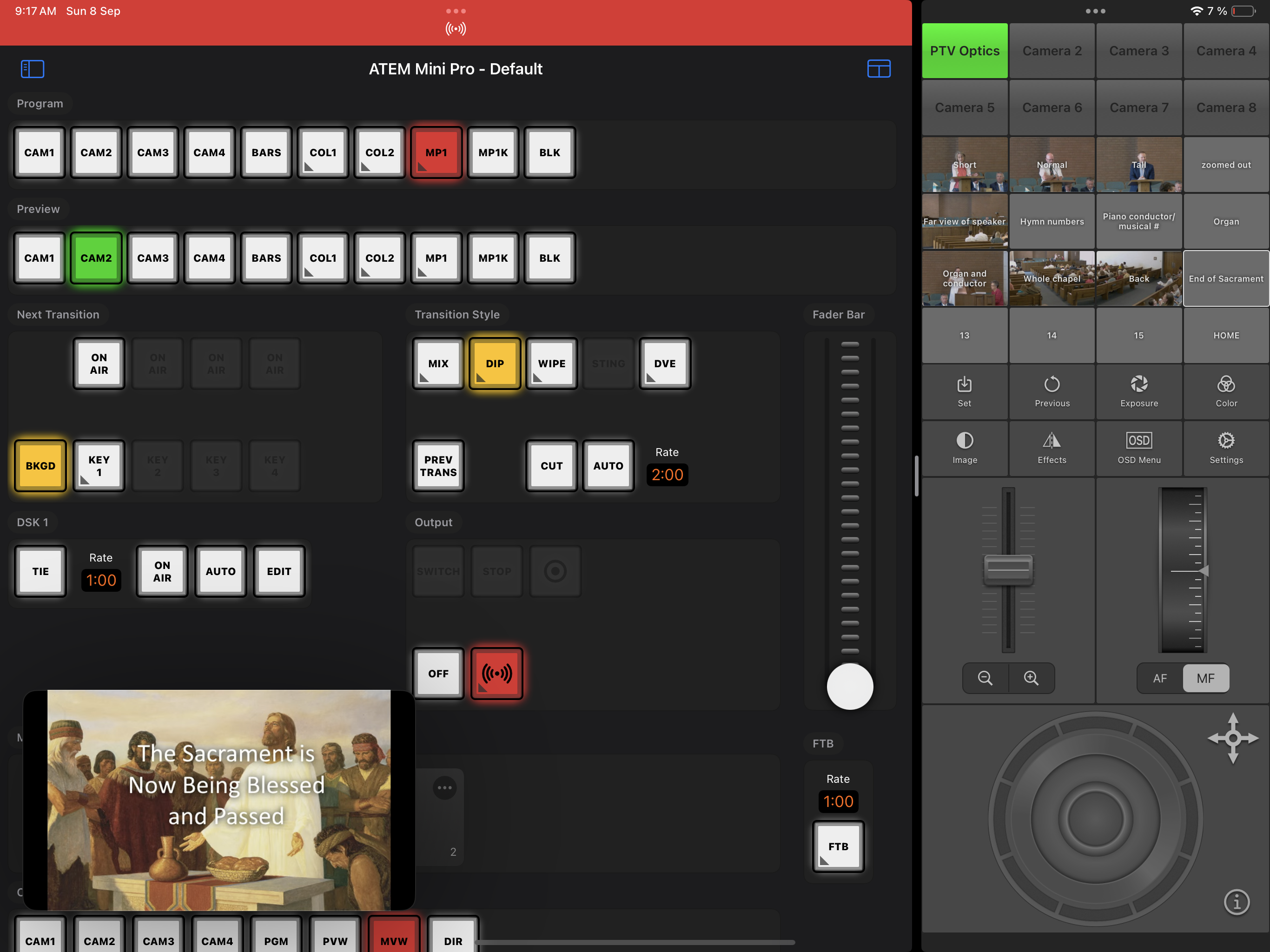
Connecting this all into the ATEM mini Pro is the perfect solution.
New Member
#16
exxodus wrote: Sun Aug 11, 2024 11:15 am To access the camera, you need a laptop connected to the buildings WIFI and NDI tools installed.

I highly recommend the setup. I have been running it for 2+ years.
Two questions:
1. How good is the audio quality over NDI? I find noise artifacts in the NDI feed that aren’t there when I connect with HDMI connected directly to the camera.

2. What do you do to secure the camera over IP? Presumably, you are connected to the Liahona/Lehi subnet, this is available for anyone with the NDI tools apps.

Thx
New Member
#17
You don't run the audio though the camera.

You will want to set up the camera on a static IP and you can access it though the IP address on any device.
New Member
#18
Look up the camera's manual to see if it provides an HTTP or RTSP stream. If available, you can access it by entering the IP address in a browser
New Member
#19
IMG_0824.jpeg
IMG_0823.png
New Member
#20
WOW! This setup looks amazing! I love that anyone can run it. Often times our regular zoom operator is out and we have to find a sub, usually me. I'm looking at your setup image, is this a web based software as well? Looks like it's just plugged into power and network? Would love to hear more about your setup and steps to implement someting like this. Currently we are using a web cam hooked up to a laptop in the front row. While it works the professionaly side of me thinks it's ugly and I would love to do something like this! Thanks for sharing,
New Member
#21
Actually wondering if anyone has photos to share for access "doors" to get under the choir seats area to run cables to the podium? Currently our cables are run on top of the carpet with a velcro sleeve. We want to eliminate the possible tripping hazard and the unprofessional look as well.