Can you undo “close other screens”?

9 postsstarted by sasgrw 4,326 viewsoriginal topic

Member
#1
I was trying to rearrange a newly opened screen to put it near other scriptures and talks related to it. I’ve done this often. However, when trying to move it I accidentally hit “close other screens”.

I am crushed by this. I’ve spent years building up talks and scriptures in my screen list. I have no way to remember all the talks I had open.

It was too easy to accidentally hit “close other screens” that I hope there’s an undo option.
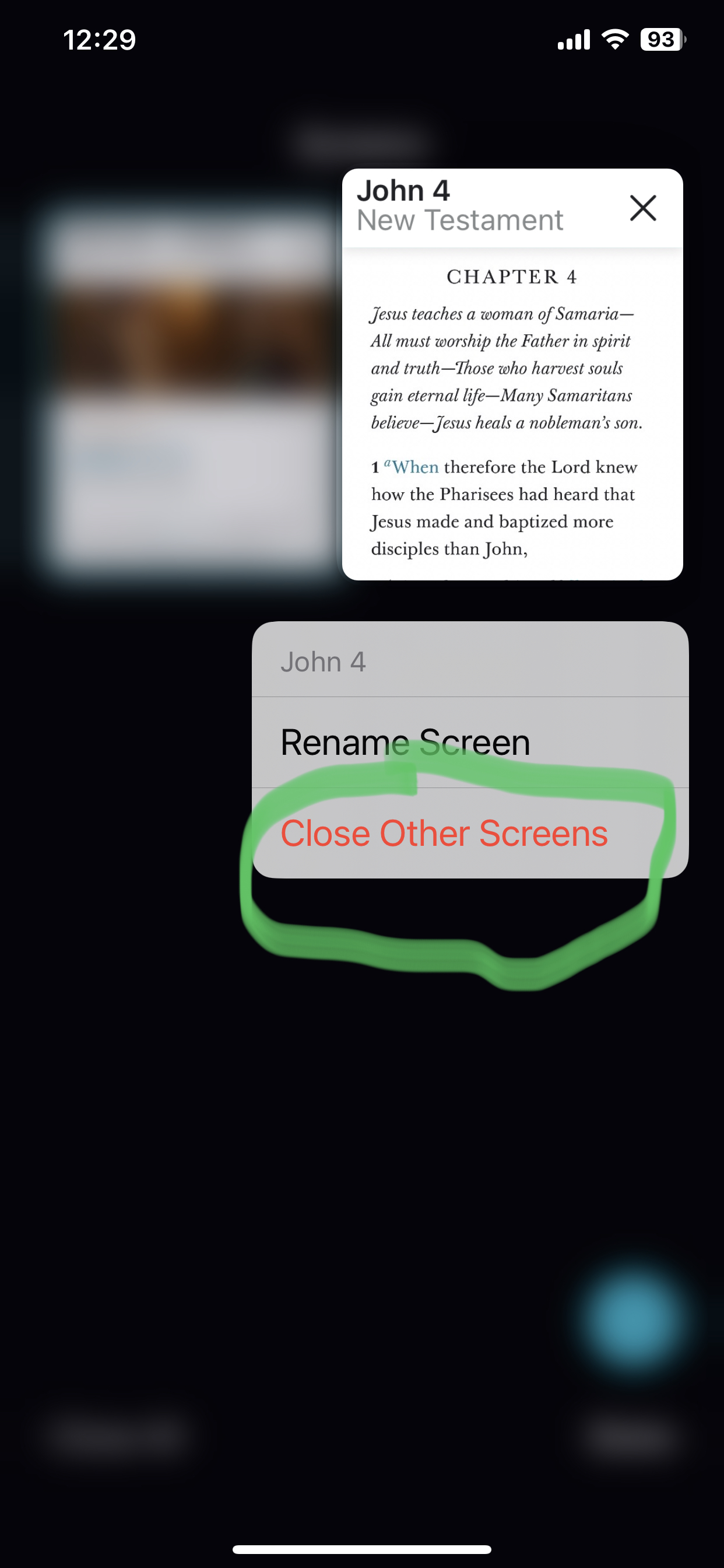
D838F410-C9E1-448B-AA03-326C1A346606.jpeg
D838F410-C9E1-448B-AA03-326C1A346606.jpeg (829.59 KiB)
Community Moderators
#2
There isn't a way to undo closing screens, unfortunately. Screens are like tabs in a browser, and while the app should remember them between restarts, they are intended to be temporary. Screens are not backed up to your Church Account or synced to other devices. In the future, I'd recommend using bookmarks instead of screens for keeping track of things on a long-term basis. Bookmarks are synced with your Church Account.
Samuel Bradshaw • If you desire to serve God, you are called to the work.
Member
#3
Not to nit-pick but browsers do let you undo when you close a tab or close all tabs. The default behavior when opening a talk or a scripture is to open a new screen. If bookmarks are saved, then perhaps opening talks should open a bookmark instead of a screen. Nowhere in the app does it say that screens are temporary.
#4
There is also a section that contains your history [don't know if it is locally saved]. So that would be a way to refind all those talks, scripture, videos, ect. To access do the following:
Kebab Menu
Kebab Menu
History
History
All History
All History
If that doesn't work for you or if you wanted something else, send feedback by doing the following:
Kebab Menu
Kebab Menu
Help
Help
Send Feedback
Send Feedback
I teach them correct principles and they govern themselves. - Joseph Smith
Member
#5
Thanks, James. I forgot to mention that I was already looking through the history to try to recover talks. I have a ton of things in the history so wading through the ones I actually saved vs ones I just read is a challenge, but it's a possible way to recover some things.

I was waiting to send feedback for a few days to see if anyone posted a magical option to recover my closed screens.

While it won't help me now, destructive menu options such as "close all" or "close others" should always have a confirmation dialog. "Are you sure you want to close 65 screens?"
#6
That is a lot of tabs. How do you find everything? The best suggestion, imo, would be to send feeback and wait for the issue to be resolved.
I teach them correct principles and they govern themselves. - Joseph Smith
Member
#7
Yes, it is a lot of screens, which is why I'm really disappointed it was so easy to close them all without confirming the closing or a way to undo it. When you view all the screens, depending on your font size, you can see about 3 words in the title of the talk or scripture reference so that's how I find things.
New Member
#8
Please, PLEASE fix this issue!!! I just experienced the same thing... Accidentally touching “Close All Other Screens” WITHOUT any warning or confirmation is totally unacceptable!
Community Moderators
#9
dleemanning wrote: Fri Nov 29, 2024 3:30 pm Please, PLEASE fix this issue!!! I just experienced the same thing... Accidentally touching “Close All Other Screens” WITHOUT any warning or confirmation is totally unacceptable!
The Tech Forum is user-to-user discussion and collaborative self help. There is nothing anyone here can do; and those who are the decision makers most likely will never see any postings here. The official communication with the development teams is through the in-app Send Feedback feature found in the Help menu.
JD Lessley
Have you tried finding your answer on the ChurchofJesusChrist.org Help Center or Tech Wiki?