russellhltn wrote: Sat Mar 09, 2024 10:11 pm
Have you tried using the camera's manual white balance? With the change in lighting to different technologies, I'm not sure as I'd trust the presets to do a good job.
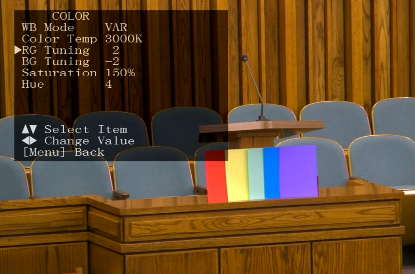
The camera has several different color modes. Each seems to give you access to some things but not others. I tried them all, many times, and this is the one I found worked best. This setting turns some blues into purples, and some purples into deep purples. But most everything else is good. All other settings would make heads angelic beaming white, or lose two colors (red, orange, yellow, and/or green were frequently lost), or just look badly muted, or auto adjust the wrong way too often.
I also made a typo, I said RG tuning is -2 to -3, I meant RG tuning is 2 to 3.
TKofford wrote: Sat Mar 09, 2024 10:22 pm
Great info! What VISCA client did you try that worked? I’m looking at a couple on GitHub based on python - was it one of those?
OBS-PTZ plugin with OBS. That plugin has a bug on certain machines on com ports, and hopefully it's fixed now. It relied on QT6 which was the source of the bug but is now fixed I believe? If you have a direct IP connection, use that first, it's much better, and it avoids the bug. If you only have a com port, it will work, but it takes a several seconds before it accepts its first command, and subsequent commands are a bit sluggish. See the prior attached document for a screenshot how I do it.
I haven't found any plugin that's satisfactory in moving the camera with ease. The pros seem to use a physical joystick for easy steering control. With that plugin you just have to get good at very quick flicks to move the camera slightly. I also recommend 8-12 presets, it really makes a difference.