mailing labels: apparent bugs

19 postsstarted by rmrichesjr 4,457 viewsoriginal topic

Community Moderators
#1
My Bishop informed me of some odd things in the way mailing labels are printing, and I'm seeing a similar but different set of odd things. Some of them look like bugs. My calling is assistant ward clerk, membership.
  • - For one couple, my Bishop gets one label showing both first names and the last/family name. In the list to select whose labels to print, I see two separate names and get two separate labels, one with each first/given name. I double-checked that LCR shows them in the same household and family.

    - For one part-member family, the label shows only the name of the member sister, not the non-member husband. That might make sense if the labels are based on household rather than family information. However, it sounds like a poor way to help the non-member husband feel welcomed by the Church.

    - For each of two of the widows whose respective husbands' deaths have long since been recorded and are showing up in LCR as deceased spouses, my Bishop gets a label that shows the relevant deceased husband's name along with the living widow's name. For me, each label has only the widow's name. The labels for other widows show only the relevant widow's name.

    - For two couples with different last/family names, I'm told the different last/family names aren't being printed.
Are other wards seeing similar odd behavior from the label printing feature?

Does anyone have insight into workarounds?
Community Administrator
#2
rmrichesjr wrote: Mon Dec 12, 2022 6:34 pm For one part-member family, the label shows only the name of the member sister, not the non-member husband.
What about for other part-member households? Does it track the ward directory if the spouse shows or not?
Have you searched the Help Center? Try doing a Google search and adding "site:churchofjesuschrist.org/help" to the search criteria.

So we can better help you, please edit your Profile to include your general location.
Community Moderators
#3
I don't have a list of part-member families and am not acquainted with any others off the top of my head. In the case of the family where the mailing label prints only the member wife's name, the directory shows the whole family, including the non-member husband.
Community Moderators
#4
After being informed my Bishop was using some non-default options, the inconsistent results issue is gone. He was selecting the 'Households' tab rather than the default 'Individuals' tab. Then, in the second round of the dialog, he was clicking on 'Household Name' -> 'First Last'. When I use those options, I get the same results as my Bishop did. Two puzzles remain:

1) For the part-member household, the non-member husband's name shows up in the selection list (next to the check-boxes). However, his name does not show up on the labels.

2) For the two widows in question, each widow's name appears by itself in the select list, but the deceased husband's name shows up on the labels.
New Member
#5
I was just informed of this bug by our bishop. We printed off labels for households to send out Christmas cards. There was a brother that had his deceased wife listed, while there was a sister with a deceased husband that did not have her late husband listed. This is a problem that shouldn't be happening.
Community Moderators
#6
MHall09 wrote: Wed Dec 14, 2022 8:22 pm This is a problem that shouldn't be happening.
Since 1990 we have been going through printed labels to remove the ones that we feel should not be used. Since there have never been more than five or six we needed to replace in our large ward, we usually just address those envelopes by hand.
Community Moderators
#7
lajackson wrote: Wed Dec 14, 2022 8:57 pm Since 1990 we have been going through printed labels to remove the ones that we feel should not be used. Since there have never been more than five or six we needed to replace in our large ward, we usually just address those envelopes by hand.
Of course, there's the option for some cases to select the 'Individuals' tab and manually select the relevant individuals. It could leave a lot of a page of labels blank, though.
New Member
#8
Yes, I saw the deceased members names in the list of printed records. I found that this was due to the preferred name for the household. Changing that fixed the issue.

I didn't like many of the choices for the mailing labels.
* centered rather than left aligned
* using full name if no preferred name is provided, which includes middle names.
* using full state name, rather than state abbreviation.

So I wrote my own code to do this. You can find it here: https://github.com/adamulrich/lds-mailing-labels with instructions. If you have run a python script before, this is pretty straight forward. I use an HTML table scraper to pull the data out of the preview and get it into CSV format.

Note that you will get asserts when your data isn't clean, such as:
* missing zip codes
* you have ", apt 1" in the first line rather than using the address 2 field.
* missing city or state values.

It took about 30 edits to get our records cleaned up, but I'm glad that it found all the errors in our addresses.

The output is designed for standard Avery 5160 labels.

I drop all given names after the first given name.
I left align.
I translate long state to state abbreviation.

the output translates this:

Adam Matthew Ulrich
1 Main St
Auburn, Washington 98092-0001

to

Adam Ulrich
1 MAIN ST
AUBURN, WA 98092-0001
Community Administrator
#9
adamu wrote: Mon Dec 19, 2022 1:29 pm Note that you will get asserts when your data isn't clean, such as:
* you have ", apt 1" in the first line rather than using the address 2 field.
It's been a long time, but I thought that some printouts wouldn't print the second line, creating problems.

Since much of the work has moved on-line/in-app from the old paper forms, that may no longer be a concern. But I would check to see if there's any unintended consequence to moving things to the second line.

adamu wrote: Mon Dec 19, 2022 1:29 pm I drop all given names after the first given name.
Realize that if you were to send mail to M. Russell Ballard, it would be printed as "Melvin Ballard".
Have you searched the Help Center? Try doing a Google search and adding "site:churchofjesuschrist.org/help" to the search criteria.

So we can better help you, please edit your Profile to include your general location.
New Member
#10
The python is there for anyone to modify or fork if they want to contribute further.

No, M. Russell Ballard would become M. Ballard.
No, the second line is used 80% of the time with apartment addresses. We simply had old addresses that hadn't been touched in a long time that had not been standardized. Address 2 is not going anywhere.
Community Administrator
#11
adamu wrote: Mon Dec 19, 2022 3:25 pm No, M. Russell Ballard would become M. Ballard.
I used a familiar name. If his preferred name wasn't recorded, the full name would be Melvin Russell Ballard, which would be changed to just Melvin Ballard.

My point was that while using the full name can less than desirable, using just the first name has issues as well. One needs to choose the lesser of two issues.
Have you searched the Help Center? Try doing a Google search and adding "site:churchofjesuschrist.org/help" to the search criteria.

So we can better help you, please edit your Profile to include your general location.
Community Moderators
#12
russellhltn wrote: Mon Dec 19, 2022 2:39 pm It's been a long time, but I thought that some printouts wouldn't print the second line, creating problems.
True, but the data is still there to access using his process.
Community Moderators
#13
adamu wrote: Mon Dec 19, 2022 1:29 pm Yes, I saw the deceased members names in the list of printed records. I found that this was due to the preferred name for the household. Changing that fixed the issue.

...
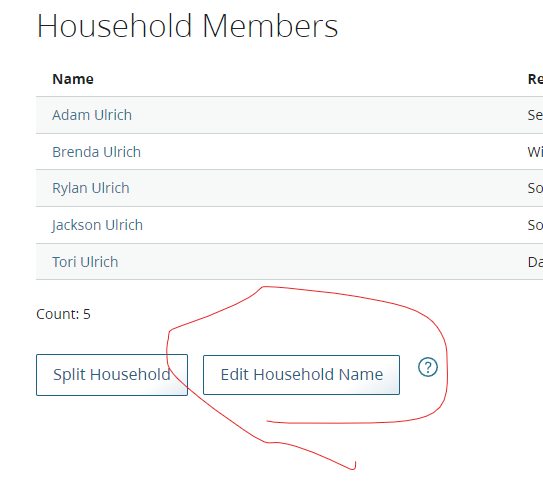
By "preferred name for the household", do you mean the field that is set by the 'Edit Household Name' button when looking at a member profile and selecting the Household tab? Or, do you mean something different? If something different, please inform where you found a field to edit that solves the problem.

For the two widows in my ward whose deceased husbands show up on the labels, the household name is set to simply the shared surname of both spouses, only one word per profile. LCR will not allow me to make that field empty.

I did discover that if I leave the default "Head of Household Name -> First Last" selected rather than manually clicking on "Household Name -> First Last", I don't get the deceased husband's name.
Community Administrator
#14
lajackson wrote: Mon Dec 19, 2022 5:25 pm True, but the data is still there to access using his process.
Yes, but if you standardize ward addresses by putting the apartment number on the second line, what report/print-outs are now missing the apartment number?

A quick glance at Pub 28 from the USPS seems to indicate that they're fine with the apartment number on the same line as the street address as long as there's space for it.
Have you searched the Help Center? Try doing a Google search and adding "site:churchofjesuschrist.org/help" to the search criteria.

So we can better help you, please edit your Profile to include your general location.
Community Moderators
#15
russellhltn wrote: Mon Dec 19, 2022 5:44 pm Yes, but if you standardize ward addresses by putting the apartment number on the second line, what report/print-outs are now missing the apartment number?
I am not familiar enough with LCR to know which reports/print-outs do not include address 2. But you are correct. There are a number of them.

Since I am not using adamu's system, I would leave the apartment number in address 1 so it would not be lost. As you indicate, the USPS is perfectly happy with that format. For him, it is better if the apartment number is in address 2.
New Member
#16
Actually, the address validator that the church uses moves the apartment number to the second line. When you make a new record or make an address update the validator will provide a recommendation, and it has always had the apartment number on the second line.
New Member
#17
russellhltn wrote: Mon Dec 19, 2022 4:26 pm My point was that while using the full name can less than desirable, using just the first name has issues as well. One needs to choose the lesser of two issues.
Actually, you can add a very specific household name and use it as well.

Image
Screenshot 2022-12-21 112619.png
Screenshot 2022-12-21 112619.png (27.76 KiB)
New Member
#18
rmrichesjr wrote: Mon Dec 19, 2022 5:41 pm By "preferred name for the household", do you mean the field that is set by the 'Edit Household Name' button when looking at a member profile and selecting the Household tab? Or, do you mean something different? If something different, please inform where you found a field to edit that solves the problem.
Yes, in my reverse engineering the labels, I believe that they use the Household Name first, then fall back to Preferred Name if not set, then finally fall back to Given Name + Family Name when Preferred Name is not set.
New Member
#19
lajackson wrote: Mon Dec 19, 2022 7:56 pm I am not familiar enough with LCR to know which reports/print-outs do not include address 2. But you are correct. There are a number of them.
There are addresses listed in the following standard reports, and they all show address 2 in them if it is not blank.
* Ministering reports
* members moved in and moved out
* member list (household view)

If you have custom reports that do not include address 2, then yes, those would have to be updated.

The reason that address 2 is necessary is that in many areas, the street names can be quite long. If you live in Utah, you have the grid system which keeps your address 1 line to less than 20 chars, plenty of room to add a comma and an apartment number. Most addresses in the Seattle area have a 5 digit number plus a numeric based street, like my address: 11821 SE 282nd St. If you understand our grid, you know that I live 118 blocks East and 282 blocks south of 1st avenue and main street in downtown Seattle.

But we also have many roads that are not on a grid that connect various towns, such as Bellevue Redmond Rd, or Graham Kapowsin Hwy, Pacific Highway S. In my specific area, we have Kent - Kangley Road and Auburn Black Diamond Road. Adding an apartment number at the end of the line can cause it to be truncated.

The default mailing labels as provided aren't well designed.
* They don't use state abbreviations.
* They are center aligned rather than left aligned.
* There is no field that allows you to specify the addressee name to be used.
* Even worse, they pull data incorrectly based on marriage and do not take into account people who are widowed, which could be traumatic if not caught.

With a few tweaks, what they provide would be great.