Church store on-line

62 postsstarted by garystroble 28,694 viewsoriginal topic

Senior Member
#1
The church store on-line has a new look. Unfortunately the new look is mostly broken software; it is quite hosed. GSC is aware and hopeful it will be fixed soon.
Senior Member
#2
Update: 72 hours later, the church store web page is still royally messed up.
Community Administrator
#3
What's messed up?
Have you searched the Help Center? Try doing a Google search and adding "site:churchofjesuschrist.org/help" to the search criteria.

So we can better help you, please edit your Profile to include your general location.
Senior Member
#4
russellhltn wrote: Fri Sep 16, 2022 9:48 pm What's messed up?
A lot of things. As an example, look at sacrament cups, it requires a language for the cups (?) and a type of material, but using the defaults, English and 00004 or paper all you get are errors. You cannot even get a price on sacrament cups nor if they are in stock.

Items which are discontinued and sold out for months continue to show in stock and available.

Unit history is buried so far it takes an excavator to find it.

There is more, it's a downgrade thus far.
#5
is church store site down? i haven't been able to login for a few days
New Member
#6
I can login fine and add items to the cart but as soon as I try to calculate shipping cost the website keeps appearing like it is loading. I've emailed the help center. We'll see what they say.
Senior Member
#7
It's up, but for a lot of items it might as well be down, still highly messed up.
New Member
#8
garystroble wrote: Tue Sep 13, 2022 9:41 pm The church store on-line has a new look. Unfortunately the new look is mostly broken software; it is quite hosed. GSC is aware and hopeful it will be fixed soon.
Is this why sometimes I can login to the store and see garments in the store and in my cart, but other times I cannot, as though they do not exist?
I was able to a week ago, and was able to just fine before the update, but now the website acts like garments do not even exist, and won't show me the ones I already had in the cart even though I am logged in.
Senior Member
#9
estubbsb wrote: Sat Oct 08, 2022 10:20 pm
garystroble wrote: Tue Sep 13, 2022 9:41 pm The church store on-line has a new look. Unfortunately the new look is mostly broken software; it is quite hosed. GSC is aware and hopeful it will be fixed soon.
Is this why sometimes I can login to the store and see garments in the store and in my cart, but other times I cannot, as though they do not exist?
I was able to a week ago, and was able to just fine before the update, but now the website acts like garments do not even exist, and won't show me the ones I already had in the cart even though I am logged in.
That would be a good guess yes. If you need to order I would just call them.
New Member
#10
I have logged in to the church store site, but I cannot add anything at all to my cart. All I get is the button: Sign In to Add to Cart. I am obviously signed in, my name is on the top right. How can I fix this? Refreshing page presents same issue. Can't order anything at all.
Community Moderators
#11
ProfessrCox wrote: Sun Oct 09, 2022 5:33 pm All I get is the button: Sign In to Add to Cart.
Try to sign in again at the Store. There is a quirk where it shows you have signed in, but you really are not yet in their system. The Church login does not carry over to their system most of the time.
New Member
#12
Nope not that, I'm signed in and when I click Sign in to Add to Cart it just continually refreshes the page. I can also choose a language for vials for consecrated oil, only English.
New Member
#13
ProfessrCox wrote: Sun Oct 09, 2022 9:57 pm Nope not that, I'm signed in and when I click Sign in to Add to Cart it just continually refreshes the page. I can also choose a language for vials for consecrated oil, only English.
Fixed now, can order things once more.
Member
#14
Store is still having issues. On the Checkout screen, after I choose my address and click on continue, a grey spinning circle appears and I'm unable to advance to the next part of the checkout process (choosing my shipping option). This has happened to me on a few other occasions.
New Member
#15
ProfessrCox wrote: Sun Oct 09, 2022 5:33 pm I have logged in to the church store site, but I cannot add anything at all to my cart. All I get is the button: Sign In to Add to Cart. I am obviously signed in, my name is on the top right. How can I fix this? Refreshing page presents same issue. Can't order anything at all.
I've been having this same issue for several weeks. Do you know how you fixed your issue?

I've tried signing in through the store and through the main site, deleting cookies, multiple browsers, clean browser install. I've yet to try a different computer.
New Member
#16
Same problem here. I cannot add anything to cart. I purchased here last year with no problem
Senior Member
#17
Just mentioning for completeness, the "Contact Us" link at the bottom of the Store webpages does have email and phone contact info, so at least orders can be made and processed even when the website is wonky. I've recently made two successful orders online without any issues, which doesn't help those struggling with the site since I didn't have to do anything to make it work, I added a number of different items for our unit and did the checkout without problems. And yeah, I know, a "it works for me!" response isn't really any help ;)

Perhaps if somebody contacts the Store support personnel with their situation, Support might be aware of the issue and have useful suggestions they could share with the Forum (@srichardsen posted earlier that they had emailed support, but never posted a follow-up on the thread with any results).
New Member
#18
I am unable to make orders and bill to unit despite being a member of the bishopric. Is this a related issue?
New Member
#19

Can't Add Anything To Basket In Store

Good afternoon,

I am trying to do something simple (or at least it should be!) I just want to purchase a plastic oil bottle and a keychain vial from the Church online store.

I log into my Church account using the Okta push 2FA and use the tools menu from the home page to navigate to the store.

On attempting to add any item from the website to my basket the button shows "Sign in to Add to Cart"

However, I am already signed in....

I have tried this on Edge, Chrome, & Firefox, on a Windows laptop, android tablet, & phone using my home Wi-Fi, cellular, and work guest Wi-Fi.

So at this point I'm fairly confident it's nothing I'm doing and it something on the back end of the website, or my credentials that are at fault. I raised a ticket a few days ago but haven't heard anything back yet.

Anyone have any ideas, or can do anything to help?

Thanks,

Thomas Irvine
Community Moderators
#20
@ThomasLDS01,
Your post has been merged with an existing topic/thread discussing your issue.
JD Lessley
Have you tried finding your answer on the ChurchofJesusChrist.org Help Center or Tech Wiki?
Senior Member
#21
However, I am already signed in....
@ThomasLDS01, specifically see this post in the thread:
The Church login does not carry over to their [Store] system...
I also see this at times in the Tech Forum, when I'm logged into my church account, but when accessing the Tech Forum is doesn't show me as signed in (however, it does show my user profile pic, weirdly). In this case if I simply click the "sign in" hotlink at the upper-right hand of the Tech Forum page, it immediately registers me as logged in, without even requiring additional credentials. Possibly it's not as random as it seems, I perhaps just haven't noticed a simple pattern.
New Member
#22
@BrianEdwards I have tried to sign in via the top right person icon on the store. It shows my name and the sign in button below it but doesn't resolve the issue unfortunately.
New Member
#23
I'm getting same issues as a lot of you. Sign in issues being unable to add anything to cart.

Also the oil vial initially told me I didn't hold a valid calling to purchase it! And it asks for a language option for an empty plastic container.

Do we have a time line for a fix? I'd imagine there's a few issues here sign on and the actual ecommerce listings.

I may call up to order my stuff in the meantime.
New Member
#24
Just to say the sign on issues for me seem to be resolved for now.

When I logged in on the store website it reverted to text 2FA whereas the main lds.org site still asks for the okta push.

Maybe they've made some changes to the store authentication process for now to make sure it works reliabily.

In any case I was able to add stock to my cart which is promising 😊
New Member
#25
ThomasLDS01 wrote: Mon Nov 07, 2022 7:39 am Just to say the sign on issues for me seem to be resolved for now.

When I logged in on the store website it reverted to text 2FA whereas the main lds.org site still asks for the okta push.

Maybe they've made some changes to the store authentication process for now to make sure it works reliabily.

In any case I was able to add stock to my cart which is promising 😊

Thanks for this notice! Everything seems to be working for me as well. As a note, I use the Authenticator App as my 2FA.
New Member
#26
timiperer wrote: Wed Nov 02, 2022 5:42 am I am unable to make orders and bill to unit despite being a member of the bishopric. Is this a related issue?
We're having the same issue here. Neither Bishop, or myself (ward clerk) can charge the ward for items from store. Email to GSC has been ignored.

Anyone know if this is a problem with the site or have they actually deliberately removed this option? Obviously not ideal at all.
Community Moderators
#27
billson wrote: Sun Nov 13, 2022 5:57 am We're having the same issue here. Neither Bishop, or myself (ward clerk) can charge the ward for items from store. Email to GSC has been ignored.

Anyone know if this is a problem with the site or have they actually deliberately removed this option? Obviously not ideal at all.
If the GSD has not replied to email (or maybe has replied but the message got lost), calling the GSD on the phone would be the most reliable way to get an answer/solution.
New Member
#28
rmrichesjr wrote: Sun Nov 13, 2022 10:18 am
billson wrote: Sun Nov 13, 2022 5:57 am We're having the same issue here. Neither Bishop, or myself (ward clerk) can charge the ward for items from store. Email to GSC has been ignored.

Anyone know if this is a problem with the site or have they actually deliberately removed this option? Obviously not ideal at all.
If the GSD has not replied to email (or maybe has replied but the message got lost), calling the GSD on the phone would be the most reliable way to get an answer/solution.
Yes, that was unfair of me, you are probably right. It's probably just got lost or missed somewhere.

Email is just much more convenient from the UK. Will try again.
Community Moderators
#29
billson wrote: Sun Nov 13, 2022 5:52 pm ...

Email is just much more convenient from the UK. Will try again.
If I understand correctly, they should have someone available during daytime hours of most timezones. There's a phone number listed for the UK and for many countries in Europe.

(Forum moderators have been instructed to not give out the phone number, but it's very easy to find.)
New Member
#30
Hilohi wrote: Wed Oct 26, 2022 10:18 pm Store is still having issues. On the Checkout screen, after I choose my address and click on continue, a grey spinning circle appears and I'm unable to advance to the next part of the checkout process (choosing my shipping option). This has happened to me on a few other occasions.
Exact same thing. Have tried multiple devices and OS. I’ve changed addresses, thinking it was a usps verification issue. Ive tried 5 and 9 digit zip etc etc I’ve logged in and out, I’ve removed items that were out of stock, happening for over a month I cannot get my cart to go through
Member
#31
zaos wrote: Sun Nov 27, 2022 10:49 am
Hilohi wrote: Wed Oct 26, 2022 10:18 pm Store is still having issues. On the Checkout screen, after I choose my address and click on continue, a grey spinning circle appears and I'm unable to advance to the next part of the checkout process (choosing my shipping option). This has happened to me on a few other occasions.
Exact same thing. Have tried multiple devices and OS. I’ve changed addresses, thinking it was a usps verification issue. Ive tried 5 and 9 digit zip etc etc I’ve logged in and out, I’ve removed items that were out of stock, happening for over a month I cannot get my cart to go through
Clearing my cookies helped. Ordering during the day also helped. I don't know why, but I had the most issues with the store when I tried to order in the evening.
New Member
#32
I have had the grey spinning circle issue too. Upon further inspection I found,
{
"TypeName": "CartValidationException",
"Exception": "{\r\n \"ValidationResults\": [],\r\n \"ErrorResourceId\": \"Microsoft_Dynamics_Commerce_Runtime_InvalidCartVersion\",\r\n \"LocalizedMessage\": \"The cart was updated by another session. Please refresh and retry.\"\r\n}",
"CorrelationId": "68088d10-ad37-41d6-b92c-a60975d9f7f6"
}

This was found in the Network inspector when running the process on the page, this request returned a 400 error and that message. nothing has seemed to help.
New Member
#33
I have been having this same issue. It has been happening to me all day. It has also happened to me sometime last week when I tried. It doesn't matter if I try it on my phone, my home computer, Chrome, or Microsoft Edge.
Community Moderators
#34
Using the 'Feedback' button or link to report the problem is the best way to possibly get a solution. If you have cleared browser cache and deleted cookies, I suggest saying you already tried that--else you will likely be asked to do that in the first reply.
Member
#35
Any updates on when the issues with the online store will be fixed? I'm trying to place an order right now, but I get the spinning grey circle when I try to checkout.
New Member
#36
I cannot successfully order necklaces from the Youth emblems of belonging section. I can select a metal color, but then the website will not allow me to actually place the items in the cart and check out. Not sure what to do.
Community Moderators
#37
debschmeil wrote: Sun Jan 01, 2023 7:51 pm I cannot successfully order necklaces from the Youth emblems of belonging section. I can select a metal color, but then the website will not allow me to actually place the items in the cart and check out. Not sure what to do.
Wondering whether it's a calling issue:

Are the necklaces restricted so that only people with certain callings can order them?

If so, do you have one of those callings and is your calling recorded as a standard calling?

If your calling has LCR access, can you access LCR features that your calling should give you access to?
Community Administrator
#38
debschmeil wrote: Sun Jan 01, 2023 7:51 pm I cannot successfully order necklaces from the Youth emblems of belonging section. I can select a metal color, but then the website will not allow me to actually place the items in the cart and check out. Not sure what to do.
Standard thing to try when church web pages don't work right is to try incognito mode. You may also need to enable pop-ups. It's possible it's trying to tell you it's out of stock.
Have you searched the Help Center? Try doing a Google search and adding "site:churchofjesuschrist.org/help" to the search criteria.

So we can better help you, please edit your Profile to include your general location.
Community Moderators
#39
If the suggestions provided do not work then call in your order to the global services department (GSD). I have done this twice because the website was the issue and not a local computer, browser, or Internet connection issue. Make sure to let the support person know what the problem was, when in the ordering process it happened and what corrective actions, such as those recommended previously in this topic thread, you took and what happened after taking those actions.

I just tried a test to make an order similar to debschmeil's. Using the URL http://store.lds.org/ I ran into a 500 internal server error with the "IBM_HTTP_Server at store.churchofjesuschrist.org Port 443" comment message. So it looks like they are still working on the reported website ordering issues.
JD Lessley
Have you tried finding your answer on the ChurchofJesusChrist.org Help Center or Tech Wiki?
Senior Member
#40
Whilst I was trying to make a unit purchase last week, I encountered the following problems
1. No Unit purchase history.
2. No Personal purchase history.
3. No Payment option for the Unit, only Debit/Credit card.

I’m the Ward Clerk and have made Unit purchases in the past without issue.
In the end I made the purchases via the GSD. I also raised the problem with the person taking the order who raised a ticket about the problem. The missing account histories has been a problem for over a month now.
Senior Member
#41
Websites should be tested and refined before they are made live and not put into production for an arbitrary deadline or a failure to maintain the previous platform, but I repeat myself.
New Member
#42
Experiencing the same thing today. Did this start working for you? Anyone else know a reason? Thanks!
Community Moderators
#43
The past two online store orders I made from 8 January and today worked just fine.
JD Lessley
Have you tried finding your answer on the ChurchofJesusChrist.org Help Center or Tech Wiki?
New Member
#44
Online store still doesn't work. Seriously need my books!! Online reading is not doing it for me. There's no legit stores like this one that sells the Mormon book in a hundred different languages. Pleaseeee the waiting is torture. :(
Community Moderators
#45
xiongisabella wrote: Fri Jul 21, 2023 8:26 pm Online store still doesn't work. Seriously need my books!! Online reading is not doing it for me. There's no legit stores like this one that sells the Mormon book in a hundred different languages. Pleaseeee the waiting is torture. :(
Did you try clearing your browser's cache and relevant cookies? That might help. Alternatively, incognito or private browsing mode might help. If those ideas don't help, please describe exactly what is happening in your browser.

There are legitimate brick/mortar and online stores with at least a fair selection. If the Book of Mormon is what you're looking for, Deseret Book online has a soft cover in Japanese, but it's currently out of stock. They also have physical stores near a lot of the temples in the US. There's a store finder on Deseret Book's website.
New Member
#46
This started happening to me today - enter my address, then get a spinning shipping wheel (that eventually fails and asks me to re-enter my address).

Tried removing some items from cart and using an incognito tab.
Community Administrator
#47
emag42 wrote: Fri Sep 29, 2023 11:18 pm Tried removing some items from cart and using an incognito tab.
Did you check what country/language you had set in the upper right?
Have you searched the Help Center? Try doing a Google search and adding "site:churchofjesuschrist.org/help" to the search criteria.

So we can better help you, please edit your Profile to include your general location.
New Member
#48
Trying to buy something on the church online store and the checkout option is 'greyed out' when I go to my basket. I found if I hover over the basket icon in the corner I can click checkout there but then when I get to the payment stage this message comes up "You are not authorized to view this page. The transaction has not been processed." Tried on 2 different computers, multiple browsers and on my phone but no luck.

As I am ward clerk I have the option to buy something and charge the ward and that seems to work, I just can't purchase something for myself.

Any ideas?
Community Moderators
#49
billson wrote: Wed Nov 22, 2023 4:13 am ...

As I am ward clerk I have the option to buy something and charge the ward and that seems to work, I just can't purchase something for myself.

Any ideas?
There's a (perhaps slim) chance that clearing your browser cache and deleting relevant cookies might solve that. Trying the same operations in incognito mode (aka private browsing) would do the same thing but only temporarily for that session.
Community Administrator
#50
Some have reported problems with "wrong country". You may want to click on the language icon and select the proper country.
Have you searched the Help Center? Try doing a Google search and adding "site:churchofjesuschrist.org/help" to the search criteria.

So we can better help you, please edit your Profile to include your general location.
Senior Member
#51
I have found that Firefox does not work on the Church store. Chrome works fine.
New Member
#52
russellhltn wrote: Wed Nov 22, 2023 11:00 am Some have reported problems with "wrong country". You may want to click on the language icon and select the proper country.
Thanks for the suggestions. I have tried clearing the cache and visiting the store in incognito mode, with no joy there. I've checked the country and that it correct as the UK store and all prices are shown in £.

I've tried on Safari, Chrome and Edge but get the same results each time. Haven't tried Firefox but the comment above suggests I'll have no luck there either. Really strange.

This is the full message I get:

You are not authorized to view this page. The transaction has not been processed.
If the problem persists please report your problem and quote the following Error Reference Number:

E-F337C3D6E5D7437AAD97B836E8AB053D
Community Administrator
#53
I'd use feedback to report the issue. This forum is other users like yourself. But it seems you've already tried the workarounds we're aware of.

Just as a thought - are you using a VPN that make you appear to be in a different country?
Have you searched the Help Center? Try doing a Google search and adding "site:churchofjesuschrist.org/help" to the search criteria.

So we can better help you, please edit your Profile to include your general location.
Community Moderators
#54
garystroble wrote: Wed Nov 22, 2023 12:44 pm I have found that Firefox does not work on the Church store. Chrome works fine.
I successfully placed a personal order using Firefox ESR ( approx. version 115.4.0esr) on Nov. 14 or 15, 2023.
Community Moderators
#55
I am running Firefox 120.0 (64-bit) and have not had but minor issues, that all could be overcome, and just completed an order with no difficulties.
JD Lessley
Have you tried finding your answer on the ChurchofJesusChrist.org Help Center or Tech Wiki?
Senior Member
#56
Firebox has not allowed me to order sacrament cups for some time now. It keeps saying choose a size as an error. Chrome works fine for ordering them. I am the ward clerk and logged in to the Church store when Firefox fails me on this task.
Community Moderators
#57
I always delete ChurchofJesusChrist.org cookies before opening the store. And the order I made yesterday was for a box of 8,000 sacrament cups.
JD Lessley
Have you tried finding your answer on the ChurchofJesusChrist.org Help Center or Tech Wiki?
Senior Member
#58
jdlessley wrote: Sat Nov 25, 2023 1:29 am I always delete ChurchofJesusChrist.org cookies before opening the store. And the order I made yesterday was for a box of 8,000 sacrament cups.
So do I. Perhaps it is a strange fudge ripple in the force.
Community Moderators
#59
garystroble wrote: Sat Nov 25, 2023 7:30 am So do I. Perhaps it is a strange fudge ripple in the force.
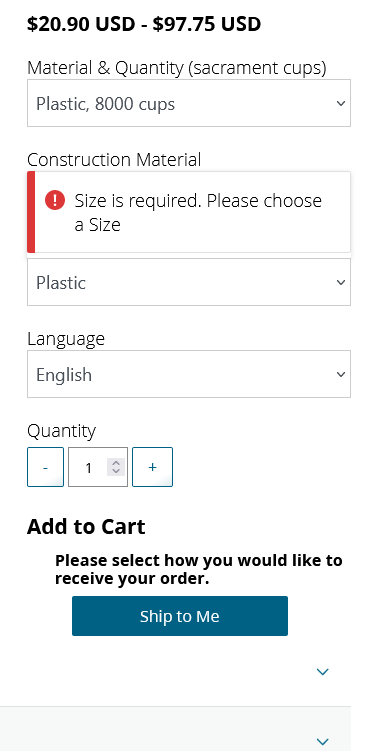
Would it be possible to get a screenshot that shows the error messages but without any sensitive information? The exact message might ring a bell with someone and could potentially lead to a solution. Otherwise, it sounds like it ought to be reported to official channels as a bug. On the other hand, the first response you'll most likely get is to use Chrome.
Senior Member
#60
rmrichesjr wrote: Sat Nov 25, 2023 5:18 pm
garystroble wrote: Sat Nov 25, 2023 7:30 am So do I. Perhaps it is a strange fudge ripple in the force.
Would it be possible to get a screenshot that shows the error messages but without any sensitive information? The exact message might ring a bell with someone and could potentially lead to a solution. Otherwise, it sounds like it ought to be reported to official channels as a bug. On the other hand, the first response you'll most likely get is to use Chrome.
Screenshot 2023-11-25 at 18-39-47 Sacrament Cups.png
Community Moderators
#61
Being as their does not appear to be a field on the form for size, that looks to me to be a bug. Also, I find it interesting that the form asks for a language for sacrament cups. Maybe that's for the label on the small box.

What do the form elements below the "Ship to Me" button do? If one of them gives options for size, that might at least allow an order to be placed.

The web console (in web developer tools) might shed more light on the bug. Just my personal opinion, but if I was getting that, I'd report it as a bug.
Senior Member
#62
rmrichesjr wrote: Sat Nov 25, 2023 5:52 pm Being as their does not appear to be a field on the form for size, that looks to me to be a bug. Also, I find it interesting that the form asks for a language for sacrament cups. Maybe that's for the label on the small box.

What do the form elements below the "Ship to Me" button do? If one of them gives options for size, that might at least allow an order to be placed.

The web console (in web developer tools) might shed more light on the bug. Just my personal opinion, but if I was getting that, I'd report it as a bug.
There are no options below Ship to Me and the size error appears when I click on Ship to Me, which is the only option by the way. I will just continue to order on Chrome, am sure the developers have bigger fish to fry, such as the sign out process from the store, which has not worked correctly for months. You have to click on refresh to completely sign out.