"Member Tools Services are unavailable" when signing into Member Tools App

48 postsstarted by smithfam548 26,584 viewsoriginal topic

New Member
#1
I have been trying for some time to log in to my iphone Member Tools app. I repeatedly get the message "Member Tools Services are unavailable. Please try again later". This has gone on for over a week now. I have tried re-setting my member username and password, but no luck. Any ideas how to fix this?
Senior Member
#2
Try uninstalling then reinstalling the app!
Let us know if this fixes the issue, as this might help someone else with the same issue!
New Member
#3
Uninstalling/re-installing did work, thank you!
New Member
#4
I get this error all the time. I'm getting it right now. I've tried uninstalling and reinstalling the app. No luck. I still get the error. And I'm attached to a wifi network.
Community Moderators
#5
hdavidfrey wrote: Tue Feb 28, 2023 10:12 am I get this error all the time. I'm getting it right now. I've tried uninstalling and reinstalling the app. No luck. I still get the error. And I'm attached to a wifi network.
Is your phone an iPhone? If so, others experiencing similar issues found a solution that involved going in to your phone Settings > General > Background App Refresh and from the list of apps shown, use the toggle to turn Background App Refresh on for Member Tools.
JD Lessley
Have you tried finding your answer on the ChurchofJesusChrist.org Help Center or Tech Wiki?
#6
I have been having this problem when I try to sign in. I will put in my password and a prompt will appear telling me that “services are unavailable.” I tried all the tricks multiple times. Uninstalling my app, turning my phone off, refreshing it... I’m the secretary in the Relief Society and it makes it tricky to do my calling without the app.
New Member
#7
Having the same problem with both of our accounts. iPhone users and have un-Installed, re-installed and made sure the toggle on the background refresh is on. Any other tricks?
#8
Dealt with this issue for months. Tonight Global Services rep had me turn on Two Step Authentication. I first tried Biometric, but that did not play nicely with the app. But I tried SMS and now I am finally back in. Hopefully that will help someone out. I tried ALL other tips and tricks, this was the only thing that got my devices past the "Member Tools Services are unavailable" error and back into administrative bliss :)
New Member
#9
Same issue with service unavailable. I went to settings and turned off "Download directory photos" and "Download other photos". Then attempted logging in and the sync worked.
New Member
#10
I’m having this issue as well. I’ve tried almost everything on here, and nothing works. The only thing I haven’t tried is turning off “Download directory photos” and “Download other photos”, because I don’t see those options anywhere. Does anyone know where I can find those to turn them off? I’m on iPhone, BTW.
Community Moderators
#11
abfinz wrote: Tue Nov 21, 2023 2:28 pm I’m having this issue as well. I’ve tried almost everything on here, and nothing works. The only thing I haven’t tried is turning off “Download directory photos” and “Download other photos”, because I don’t see those options anywhere. Does anyone know where I can find those to turn them off? I’m on iPhone, BTW.
I can see those settings on my iPhone if I tap the "More" button in the bottom right, then Settings. The two settings are called "Member Photos" and "Other Photos". I'm running iOS Member Tools version 4.10.1 (which you can see under "About" in More > Help).
Samuel Bradshaw • If you desire to serve God, you are called to the work.
Community Moderators
#12
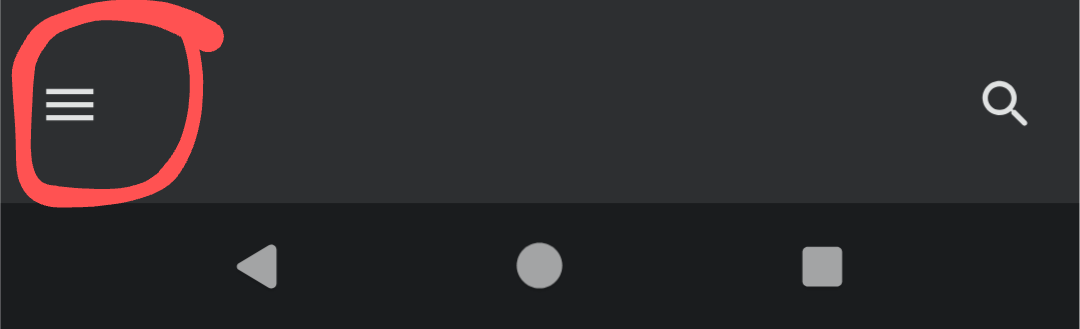
In Android those settings are found by tapping the hidden menu icon or hamburger icon (3 stacked horizontal lines) in the upper left of the screen. Then scroll down to and tap Settings.
JD Lessley
Have you tried finding your answer on the ChurchofJesusChrist.org Help Center or Tech Wiki?
New Member
#13
I'm experiencing this as well, on Android. Tried clearing all data, then reinstalling the app. Also tried turning off the photo download. Nothing has worked.

I don't see any option for the two step authentication mentioned earlier, so I haven't tried that yet.
Community Moderators
#14
Anyone trying today will run into a connection problem that has been going on since 8:24 AM MST.
JD Lessley
Have you tried finding your answer on the ChurchofJesusChrist.org Help Center or Tech Wiki?
Member
#15
jdlessley wrote: Sun Nov 26, 2023 2:31 pm Anyone trying today will run into a connection problem that has been going on since 8:24 AM MST.
Would that also be the reason the bug report feature of the beta apps is failing to submit?
New Member
#16
jdlessley wrote: Sun Nov 26, 2023 2:31 pm Anyone trying today will run into a connection problem that has been going on since 8:24 AM MST.
Me!!
New Member
#17
Thanks, everyone. I wasn’t able to turn off those settings, because the app wouldn’t even let me log in, but I tried it again yesterday, and it just worked. I assume they fixed something on their end.
New Member
#18
I have tried Uninstalling and reinstalling my LDS tools app to no avail. I get to the point of logging in, it asks me to sinc data, then tells me membership tools is not available right now. Could you please assist me.
Community Moderators
#19
pschiewek wrote: Sun Apr 28, 2024 1:54 pm I have tried Uninstalling and reinstalling my LDS tools app to no avail. I get to the point of logging in, it asks me to sinc data, then tells me membership tools is not available right now. Could you please assist me.
What operating system version (Android, iPhone/iPad) is your Member Tools installed on? Has this been an issue only on Sundays or has this been a problem for a while?
JD Lessley
Have you tried finding your answer on the ChurchofJesusChrist.org Help Center or Tech Wiki?
New Member
#20
Hi,
I am also having the same issue. I log in but after trying to sync the app says tools isnt available. I tried uninstalling, doing the background refresh setting, using another device and I still have the issue
New Member
#21
Me too!! I don't have "Settings" anywhere, it just asks me to log in and then it's not available
New Member
#22
On Android, look for the menu button lower left corner for latest version of app. Older versions it could be in a different corner.
Screenshot_20240818-112515.png
New Member
#23
Not sure if this is the same issue...

Sunday night the Member Tools app on my Android phone stopped working. Whenever I opened it, it would give a screen "Updating..." with four large dots at the bottom, and crash when the second or third one lit up.

Today I tried uninstalling and reinstalling it. Now when I open it, and enter my username and password, it just gives the error
Unable to sign in. Please try again.
Community Administrator
#24
What version of the app? Versions prior to 5 may no longer be supported.
Have you searched the Help Center? Try doing a Google search and adding "site:churchofjesuschrist.org/help" to the search criteria.

So we can better help you, please edit your Profile to include your general location.
New Member
#25
I have tried all the suggestions and I am not being successful with any of these. I have checked my settings and even did a hard reboot of my phone. I have an Iphone 7 does this have anything to do with the situation. I have not been able to use Member tools now going on three weeks.
Community Administrator
#26
Lorieprasmussen wrote: Wed Sep 11, 2024 2:18 pm I have an Iphone 7 does this have anything to do with the situation.
The supported version of Member Tools is 5.0.3 and requires iOS 16. iPhone 7 did not receive iOS 16. You'll have to forgo the app and use the web browser.
Have you searched the Help Center? Try doing a Google search and adding "site:churchofjesuschrist.org/help" to the search criteria.

So we can better help you, please edit your Profile to include your general location.
New Member
#27
I have been having issues with my apple Iphone 7, it will only accept IOS 15 updates . The member tools app for the Church of Jesus Christ of Latter day Saints is available on IOS devices that run IOS 16.0 or later.
Community Moderators
#28
Lorieprasmussen wrote: Thu Sep 12, 2024 5:03 pm I have been having issues with my apple Iphone 7, it will only accept IOS 15 updates . The member tools app for the Church of Jesus Christ of Latter day Saints is available on IOS devices that run IOS 16.0 or later.
The official word for iPhone 7 is: "Mainstream software support for the iPhone 7 was dropped when iOS 16 was released. But, it still receives iOS 15 security updates (as of January 22, 2024). The current version of iOS to support iPhone 7 is iOS 15.8.3." So you will not be able to update to iOS 16. The only hardware solution is to upgrade your phone to a newer phone that operates on iOS 16. iOS 16 supports all iPhones starting at iPhone 8 and later and iPadOS 16 supports iPad Pro (all models), iPad Air (3rd generation and later), iPad (5th generation and later) iPad mini (5th generation and later).
JD Lessley
Have you tried finding your answer on the ChurchofJesusChrist.org Help Center or Tech Wiki?
Community Administrator
#29
You should still be able to access the information via the browser.
Have you searched the Help Center? Try doing a Google search and adding "site:churchofjesuschrist.org/help" to the search criteria.

So we can better help you, please edit your Profile to include your general location.
New Member
#30
I had this problem. I had to update my IOS to the most recent version. Then I deleted the app and reinstalled it. That did the trick
New Member
#31
Update to iOS 17.1, uninstall then reinstall did it. Mother and law was off tools for a month because of this.
New Member
#32
I have an Android, so it's not just an IOS issue. I found that I cannot sync over wifi - ANY wifi. I had to turn off Wi-Fi and sync over data instead. Worked fine after that.
Community Moderators
#33
Attila wrote: Thu Oct 24, 2024 8:52 pm I found that I cannot sync over wifi - ANY wifi.
Are you by chance using VPN?
JD Lessley
Have you tried finding your answer on the ChurchofJesusChrist.org Help Center or Tech Wiki?
Member
#34
Brother in church showed me his iphone. The LDS Tools loads in. The screen says sign in. Clicked the button, takes to a website looking page with the church header and footer, but there is just a white area and no where to see the login form. Cannot scroll up or down. I checked his privacy and settings. Checked his browser. Cleared cache and cookies. Checked the app settings. Nothing seems to work. Rebooted phone, reinstalled, nothing at all. He has the 18.1 version of Iphone os. Any ideas?
Community Administrator
#35
simph1 wrote: Sun Nov 17, 2024 11:34 am The screen says sign in. Clicked the button, takes to a website looking page with the church header and footer, but there is just a white area and no where to see the login form. Cannot scroll up or down. I checked his privacy and settings. Checked his browser. Cleared cache and cookies. Checked the app settings. Nothing seems to work.
What does he have set as default browser? Is it different than what's the normal default?
Have you searched the Help Center? Try doing a Google search and adding "site:churchofjesuschrist.org/help" to the search criteria.

So we can better help you, please edit your Profile to include your general location.
New Member
#36
I have tried account recovery, I have gotten a new username and password but Member Tools still doesn’t allow me or give me the option to sign in?????
Community Administrator
#37
Healyka wrote: Mon Nov 18, 2024 12:05 pm I have tried account recovery, I have gotten a new username and password but Member Tools still doesn’t allow me or give me the option to sign in?????
I see you have a membership record attached to this login. Please check with your clerk to make sure your records are in the ward. You can't sign in if your records are floating around in "address unknown".
Have you searched the Help Center? Try doing a Google search and adding "site:churchofjesuschrist.org/help" to the search criteria.

So we can better help you, please edit your Profile to include your general location.
New Member
#38
I am having the same issue. Has any solution been found?
Community Moderators
#39
ahemphill wrote: Sun Dec 08, 2024 7:57 pm I am having the same issue. Has any solution been found?
Could you provide some details? This topic thread has addressed several situations that have caused, or may cause, issues with the "Member Tools Services are unavailable" message when signing into Member Tools. Has this been an ongoing issue for you over a period of days?
JD Lessley
Have you tried finding your answer on the ChurchofJesusChrist.org Help Center or Tech Wiki?
Community Administrator
#40
ahemphill wrote: Sun Dec 08, 2024 7:57 pm I am having the same issue. Has any solution been found?
I've made a new post with a list of things to check.
Have you searched the Help Center? Try doing a Google search and adding "site:churchofjesuschrist.org/help" to the search criteria.

So we can better help you, please edit your Profile to include your general location.
New Member
#41
Edited 1 time, last by musicnerd on
So, I've been experiencing this message every time I try to get in. I've everything that has been suggested here. I've cleared cache, uninstall and reinstall, etc. I can't seem to get this to work. Any help maybe? I have android.
New Member
#42
Same issue here. I have an android. I've attempted to login 3 times over the past week, varying days and times. I've made sure my phone OS is up to date. I've uninstalled and re-installed the app. I've logged in on the web to add two factor identification. I've unchecked all the "download photos" buttons. I've tried using it with wifi on and wifi off (using just data). It keeps asking me to sync every time I open the app, then gives me this same error message. Still keeps error ing out.
New Member
#43
Had a member show me her phone and it "Member Tools Services are unavailable. Please try again later." She said that she delated and re-intsalled the app. She changed her password a few times and she can't login. Anyone else figure out how to fix it?
Community Moderators
#44
harmond wrote: Sun Aug 02, 2026 12:53 pm Had a member show me her phone and it "Member Tools Services are unavailable. Please try again later." She said that she delated and re-intsalled the app. She changed her password a few times and she can't login. Anyone else figure out how to fix it?
To the 'can't login' problem, wait an hour or three. If there are too many failed login attempts (or apparently password changes), the account is automatically locked until there is some period of time without any activity. I don't know the exact time limits. If that doesn't help, have the ward or branch clerk provide the phone number for the Global Services Department.
Community Administrator
#45
Check the version of Member Tools. She may have and old device that can't run the current version. She's reinstalling the highest version she can install, but it may be too old and is no longer getting service.
Have you searched the Help Center? Try doing a Google search and adding "site:churchofjesuschrist.org/help" to the search criteria.

So we can better help you, please edit your Profile to include your general location.
New Member
#46
I also cannot get into tools. I had my son logged in for a minute to schedule his first temple visit. Then I logged him out. After that it no longer would allow me to see anything but living ordinances to schedule and said I wasn't endowed. So I tried uninstalling tools. Now it won't let me get past the sync screen at start up after logging in with my username and password. I have an Android.
Senior Member
#47
LCR on the Church web site is also not available. This is very frustrating to users to be doing live software updates, testing or whatever is going on during what should be normal user hours. There were issues last evening as well.

UPDATE: Some things are working now but not all functions. Obviously a major problem.
Senior Member
#48
Things might all be working now.