Connecting Laptop to Direct Audio Feed from Pulpit

10 postsstarted by brandonm35 5,780 viewsoriginal topic

New Member
#1
I'm currently looking at ways to get the direct feed from the Chapel Sound System fed directly into my HP Laptop via the Headphone Jack.

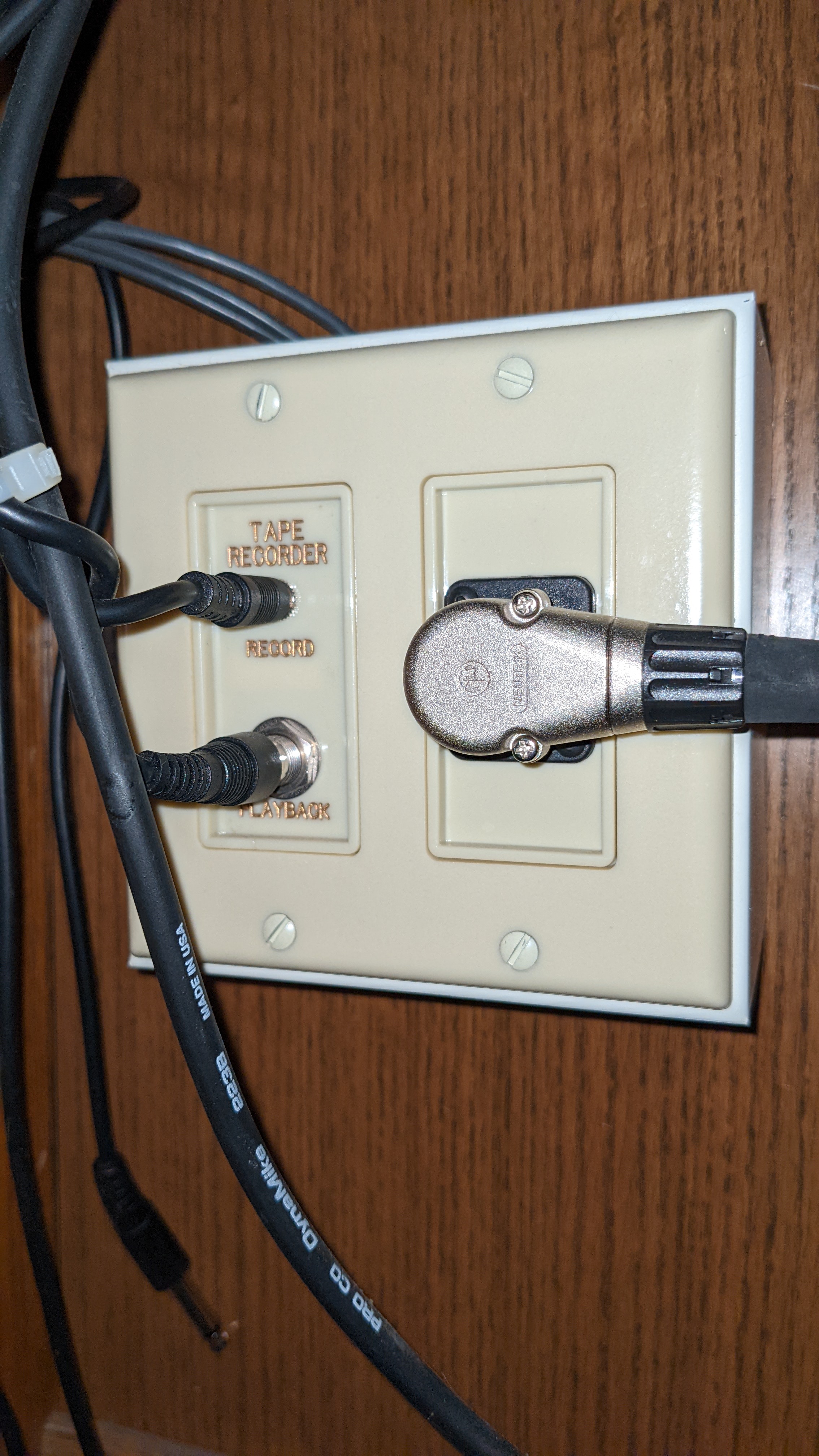
I did some research and found that my Older buiding does have a sort of "Audio Out" jack underneath the Sacrament Table (shown in the included picture) that they used to use when tape recording meetings.

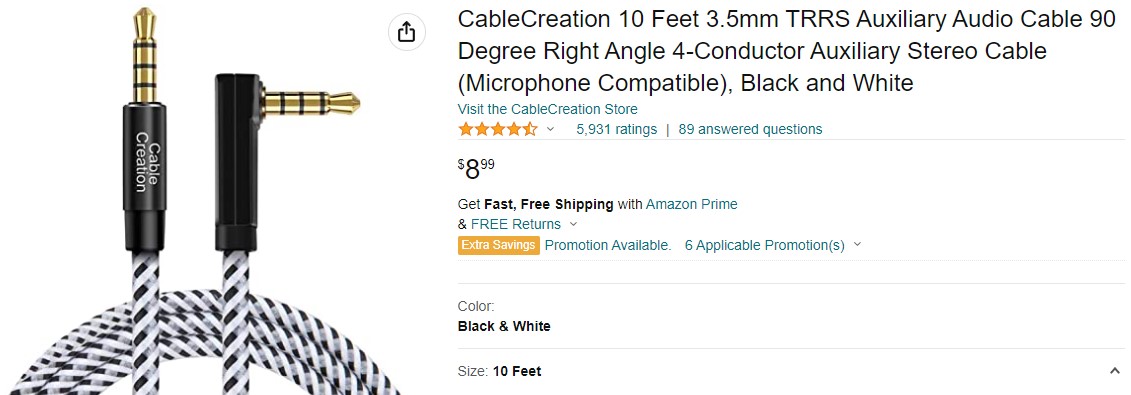
I read on the Tech Page that a TRRS cable is what would be needed to plug into that "Audio Out" Jack and connect the other end into the Headphone Jack on my HP Laptop (it is the type that supports the headsets with microphones built in.

I saw this product on Amazon (Picture of Item listing on Amazon's site included as well as link to the item) but was unsure if this would be suitable for this purpose

https://www.amazon.com/CableCreation-Au ... WYCZS?th=1
Sacrament Table Audio Out Jack.jpg
Sacrament Table Audio Out Jack.jpg (2.16 MiB)
TRRS Cable Amazon.jpg
TRRS Cable Amazon.jpg (85.97 KiB)
Community Administrator
#2
No, that won't work. There's two issues that need to be addressed:
  • The pulpit jack is a TS connection, not TRS, nor a TRRS. You have to adapt the TS signal to the right places of the TRRS connector.
  • The pulpit output is line level. Odds are it will badly overload a mic input and cause horrible distortion.
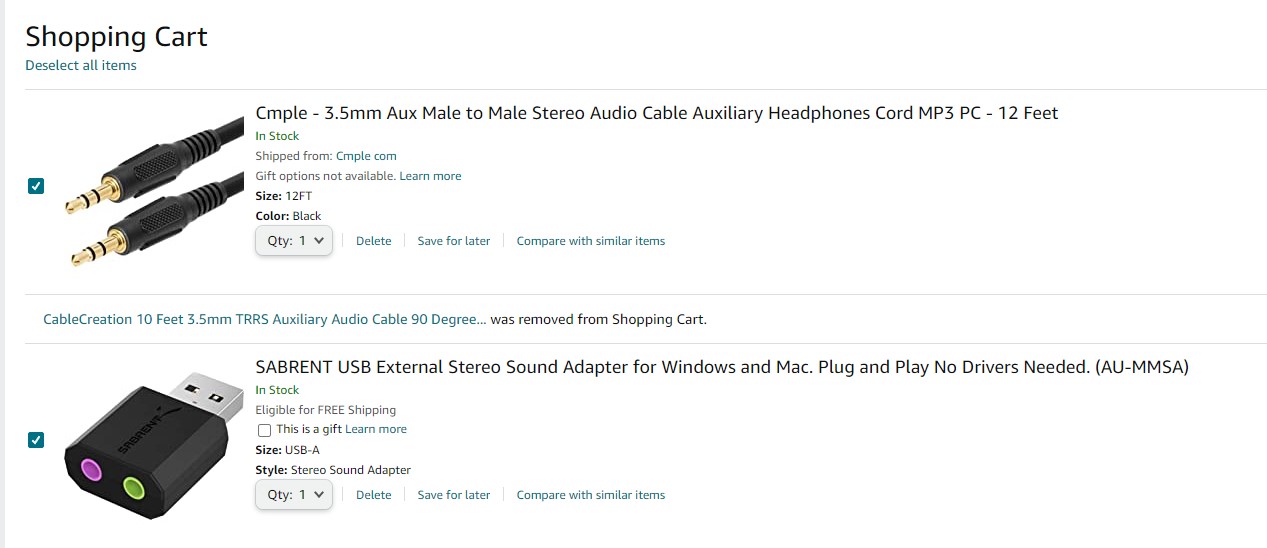
I would suggest you use this: SABRENT USB External Stereo Sound Adapter for Windows and Mac. There are versions for USB-C and some come with a short USB pigtail. While it says "Mic in" it works fine with the podium line out. You can use the cable you have, or any TS or TRS cable. All together, they'll be cheaper than an adapter to work with your laptop. This setup also works with any laptop - Mac or PC. Any adapter setup you get working with your laptop may not work with another.
Have you searched the Help Center? Try doing a Google search and adding "site:churchofjesuschrist.org/help" to the search criteria.

So we can better help you, please edit your Profile to include your general location.
New Member
#3
Could I use that cord from Amazon with that Adapter from Sabrent?
Community Administrator
#4
brandonm35 wrote: Thu Jun 02, 2022 4:35 pm Could I use that cord from Amazon with that Adapter from Sabrent?
You could, but I think a TRS or TR cord would be better. If you're using the Sabrent, nothing is TRRS.

Here's a TRS cable.

It might be wise to add an adapter to make sure you get audio in both channels. The adapter would go on the podium end of the cable.
Have you searched the Help Center? Try doing a Google search and adding "site:churchofjesuschrist.org/help" to the search criteria.

So we can better help you, please edit your Profile to include your general location.
New Member
#5
Image

So Based of what has been mentioned would this 3.5 Cord (In attached Picture) work to plug into the spot under the Sacrament Table and then feed the other end of the cord into this adapter (also in picture) and then plug the adapter into the usb slot on my laptop?
Adapter and Cord.jpg
Adapter and Cord.jpg (88.77 KiB)
Senior Member
#6
That is exactly what I use to connect our Lenovo ThinkPad P50 laptop to the audio output from under the Sacrament table. My TRS cable is about 25 feet long, and I set up the laptop in the pew behind "Deacon Row". Since the cable runs across a doorway, I had to cover the cable with a rubber conduit.

When I used my Dell Inspiron laptop, I did not need the USB audio adapter, because the Dell auto-adjusted to the TRS plug and the signal. However, when I switched to the Lenovo P50 laptop that our stake provided, I found that I needed a USB adapter to capture the audio signal.
Dana Repouille, Plattsmouth, Nebraska
New Member
#7
I have the cable I purchased it today, the adapter i'm getting delivered tomorrow, the only question is Once I've plugged one end of the cord into the port under the sacrament Table what port do I plug the other end of the cord into on the adapter do I put it in the Purple One or the Green one
Community Administrator
#8
I believe green is usually "out" (as in output to speakers). But no harm in getting it wrong.
Have you searched the Help Center? Try doing a Google search and adding "site:churchofjesuschrist.org/help" to the search criteria.

So we can better help you, please edit your Profile to include your general location.
Senior Member
#9
Green is a standard color for speaker output, so the purple is for mic input. One of the photos for the Sabrent audio adapter on Amazon specifically shows that.
61AL6hdNnML._AC_SL1500_.jpg
Dana Repouille, Plattsmouth, Nebraska
New Member
#10
Thanks again for your input, I tested out the new setup this morning in the chapel with success.
the Audio Stream was crystal clear on my end no issues, I used my tablet to view the stream so I could see for myself and it sounds perfect.