How to respond to The Change in FHAR

18 postsstarted by brenmar 16,853 viewsoriginal topic

New Member
#1
Edited 1 time, last by russellhltn on . Reason: Removed personal information - this is a public forum
There is another topic here entitled "Change in Family Activity Report?", which includes some good detail and commentary on the change.

What I'm searching for is enough information so that I can be useful in my calling as Temple and Family History Leader.

Here is the official word on the change:
A change was recently made to the Family History Activity Report (FHAR).

A brief note approved by Elder Kevin S. Hamilton of the Seventy describes this change:

“The “Family History Activity Report” found in Leader and Clerk Resources (LCR) has been adjusted to represent only the Family Trees of members who have a FamilySearch account. This change will result in a lower number of “First Four Generation Trees” reported. This adjustment should give leaders more accurate information about member family history activity in their unit.”

The change has already been implemented from an experience perspective. The workaround that has been used to maintain consistent reporting will be retired. The change will provide more accurate reporting and better data governance.

If you have questions about this change or need additional information, please contact your local Priesthood leaders.
My understanding was that the original metric was "the current percentage of first four generation ancestors in FamilySearch Family Tree for members of the unit" and that now the metric "has been adjusted to represent only the Family Trees of members who have a FamilySearch account." Since "this change will result in a lower number of “First Four Generation Trees” reported" (my unit dropped nearly 50%), I conclude that there are indeed members with four generation trees but without a FamilySearch account.

So these questions come to mind, and I would like to understand how to answer them as a local Priesthood leader.

Can we identify those members whose trees have now been excluded from the metric?

If such a member simply signs up for a FamilySearch account, will that member then be included in the new metric?
If not, what must they do to be included?

How does this all fit with the ability to sign into FamilySearch using one's Church Account? Is a Church Account and a FamilySearch account the same as far as this metric is concerned, or do they specifically need a FamilySearch account? And if it is the latter, then do they need to ignore the "Sign in with Church Account" option and sign in directly to FamilySearch?

Again, I'm interested not only in the details of the change, but in clear instruction regarding how to respond to the change as we seek to engage in this great work.

Many thanks,
[Personal contact information removed - this is a public forum]

Senior Member
#2
Here is my understanding (but I have no special knowledge so welcome correction from someone who knows for sure). I am also the Temple and Family History Leader in my ward (as well as the EQP).
brenmar wrote: Wed Feb 16, 2022 3:15 pmCan we identify those members whose trees have now been excluded from the metric?
No. We are not given that information at the ward level. The only way to find out is for members to self-report.
brenmar wrote: Wed Feb 16, 2022 3:15 pmIf such a member simply signs up for a FamilySearch account, will that member then be included in the new metric?
If not, what must they do to be included?
They need more than a FamilySearch account. They must have 4 generations in their tree after they get their FamilySearch account. The Temple and Family History Leader or Consultants can help the member add living ancestors and then search for (or add) deceased ancestors in FamilySearch to complete the metric.
brenmar wrote: Wed Feb 16, 2022 3:15 pmHow does this all fit with the ability to sign into FamilySearch using one's Church Account? Is a Church Account and a FamilySearch account the same as far as this metric is concerned, or do they specifically need a FamilySearch account? And if it is the latter, then do they need to ignore the "Sign in with Church Account" option and sign in directly to FamilySearch?
A member can have their church account credentials be the same as their FamilySearch account credentials, but unless they have 4 or more generations in their family tree they will not be counted as complete in the metric. The change stops counting 4 generations from their church membership information. The metric is a "FamilySearch Activity" metric, not a church membership metric so they don't get credit for just being a member of the church.
Community Administrator
#3
brenmar wrote: Wed Feb 16, 2022 3:15 pmHow does this all fit with the ability to sign into FamilySearch using one's Church Account? Is a Church Account and a FamilySearch account the same as far as this metric is concerned, or do they specifically need a FamilySearch account? And if it is the latter, then do they need to ignore the "Sign in with Church Account" option and sign in directly to FamilySearch?
Once a member signs in to FamilySearch, they have a FamilySearch account. The important thing for FHAR statistics is that they sign in with their FamilySearch account that is connected to their Church membership record. If they use their Church Account credentials to sign in, then you can be certain that the FamilySearch account they are signed in with is the one linked to their Church membership record. If they use their FamilySearch account credentials, then make sure that they have the correct account. Some people have inadvertently created more than one FamilySearch account, but only one can be connected to their Church membership record.

Once they have signed in to a membership-linked FamilySearch account, they will contribute to the numerator of the 4-gen ancestor statistic (prior to that, they will be part of the numerator, as is every youth and adult in the ward, but they will contribute 0). They will then count for at least 1/15 (about 7%) because they count as one of the 15 4-generation ancestors. To count for more than that, they have to be connected to parents, grandparents, and great-grandparents. Some of that may be filled in automatically from their membership record and the records of their ancestors, or they may need to fill it in manually.
Questions that can benefit the larger community should be asked in a public forum, not a private message.
Community Administrator
#4
aebrown wrote: Mon Feb 21, 2022 7:59 amIf they use their FamilySearch account credentials, then make sure that they have the correct account. Some people have inadvertently created more than one FamilySearch account, but only one can be connected to their Church membership record.
To verify that your FamilySearch account is connected to your Church membership record:
  1. Sign in to FamilySearch
  2. Click on your name in the upper right corner
  3. Choose Settings
  4. Click on the Account tab within Settings
  5. Scroll to the bottom to the subheading "Account"
  6. You will either see text that says "Member of The Church of Jesus Christ of Latter-day Saints" or a button that says "Add Church Record Number"
If your account is not connected to your Church record number, you might be tempted to add your Church record number. That might work, but if you have accidentally created another FamilySearch account that is already connected to your Church record number, you might get confused. It might work better to sign out, then use the password recovery option on the sign in page, using the Membership Record Number recovery method. That will reveal if you have another account already linked to your membership.
Questions that can benefit the larger community should be asked in a public forum, not a private message.
Community Administrator
#5
davesudweeks wrote: Wed Feb 16, 2022 4:38 pm
brenmar wrote: Wed Feb 16, 2022 3:15 pmIf such a member simply signs up for a FamilySearch account, will that member then be included in the new metric? If not, what must they do to be included?
They need more than a FamilySearch account. They must have 4 generations in their tree after they get their FamilySearch account. The Temple and Family History Leader or Consultants can help the member add living ancestors and then search for (or add) deceased ancestors in FamilySearch to complete the metric.
They need only to have a FamilySearch account connected to their membership record number, and sign in. Then they will be counted in the numerator of the 4-gen ancestors metric. As I explained elsewhere, they will always count for 1 out of 15, but to count the full 15, they need to also have 2 parents, 4 grandparents, and 8 great-grandparents.
davesudweeks wrote: Wed Feb 16, 2022 4:38 pm
brenmar wrote: Wed Feb 16, 2022 3:15 pmHow does this all fit with the ability to sign into FamilySearch using one's Church Account? Is a Church Account and a FamilySearch account the same as far as this metric is concerned, or do they specifically need a FamilySearch account? And if it is the latter, then do they need to ignore the "Sign in with Church Account" option and sign in directly to FamilySearch?
A member can have their church account credentials be the same as their FamilySearch account credentials, but unless they have 4 or more generations in their family tree they will not be counted as complete in the metric. The change stops counting 4 generations from their church membership information. The metric is a "FamilySearch Activity" metric, not a church membership metric so they don't get credit for just being a member of the church.
The key is to have a FamilySearch account that is connected to their Church membership, and sign in to FamilySearch. What password they use is irrelevant. But as I explained above, you can get partial credit for anywhere from 1 to 15 out of the 15 possible 4-gen ancestors.

But you are correct that the change is that no one gets credit anymore just for being a member, with more credit for their ancestors being members. They only get credit if they sign in to FamilySearch.
Questions that can benefit the larger community should be asked in a public forum, not a private message.
Senior Member
#6
Thank you for the clarification. In addition to the Temple and Family History leader in our ward, I am also the EQP. We have stake training tomorrow evening and I have been asked to discuss our ward's Temple and Family History plan (I think we are the first ward in the stake to submit ours this year).
New Member
#7
And my thanks, too. Excellent information.
New Member
#8
aebrown wrote: Mon Feb 21, 2022 8:02 am
aebrown wrote: Mon Feb 21, 2022 7:59 amIf they use their FamilySearch account credentials, then make sure that they have the correct account. Some people have inadvertently created more than one FamilySearch account, but only one can be connected to their Church membership record.
To verify that your FamilySearch account is connected to your Church membership record:
  1. Sign in to FamilySearch
  2. Click on your name in the upper right corner
  3. Choose Settings
  4. Click on the Account tab within Settings
  5. Scroll to the bottom to the subheading "Account"
  6. You will either see text that says "Member of The Church of Jesus Christ of Latter-day Saints" or a button that says "Add Church Record Number"
If your account is not connected to your Church record number, you might be tempted to add your Church record number. That might work, but if you have accidentally created another FamilySearch account that is already connected to your Church record number, you might get confused. It might work better to sign out, then use the password recovery option on the sign in page, using the Membership Record Number recovery method. That will reveal if you have another account already linked to your membership.
I have tried to verify that my FamilySearch account is connected to my Church membership record using the steps outlined above but do not see the "Account" subheading under the "Account" tab, nor do I see any indication that I am a member of the church. Is there another way to confirm that the account is connected to a Church membership record?
Community Administrator
#9
rmallen wrote: Sun Dec 11, 2022 12:32 pmI have tried to verify that my FamilySearch account is connected to my Church membership record using the steps outlined above but do not see the "Account" subheading under the "Account" tab, nor do I see any indication that I am a member of the church. Is there another way to confirm that the account is connected to a Church membership record?
These screens have changed a bit since I wrote that post. Here are the updated steps:
  1. Sign in to FamilySearch
  2. Click on your name in the upper right corner
  3. Choose Settings
  4. Click on the Account tab within Settings
  5. Scroll to the bottom to the subheading "General"
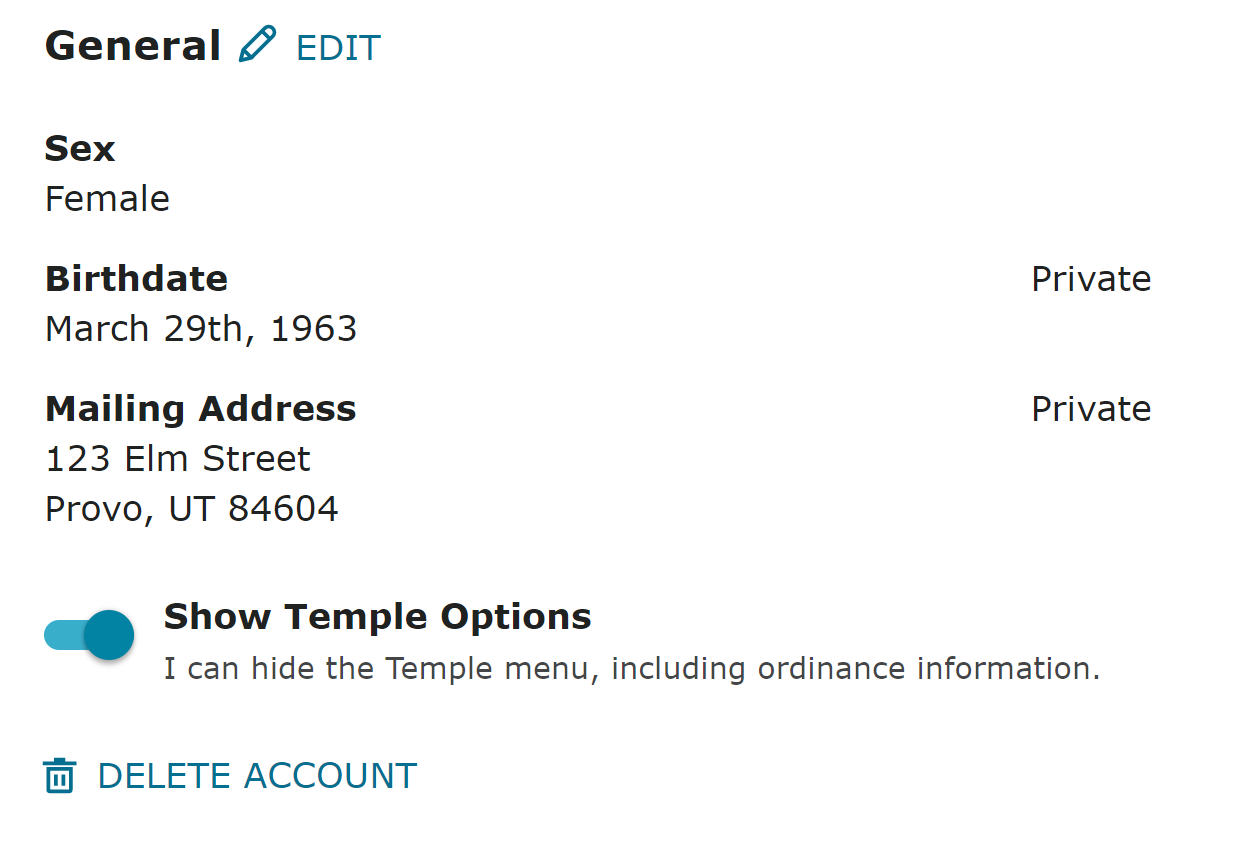
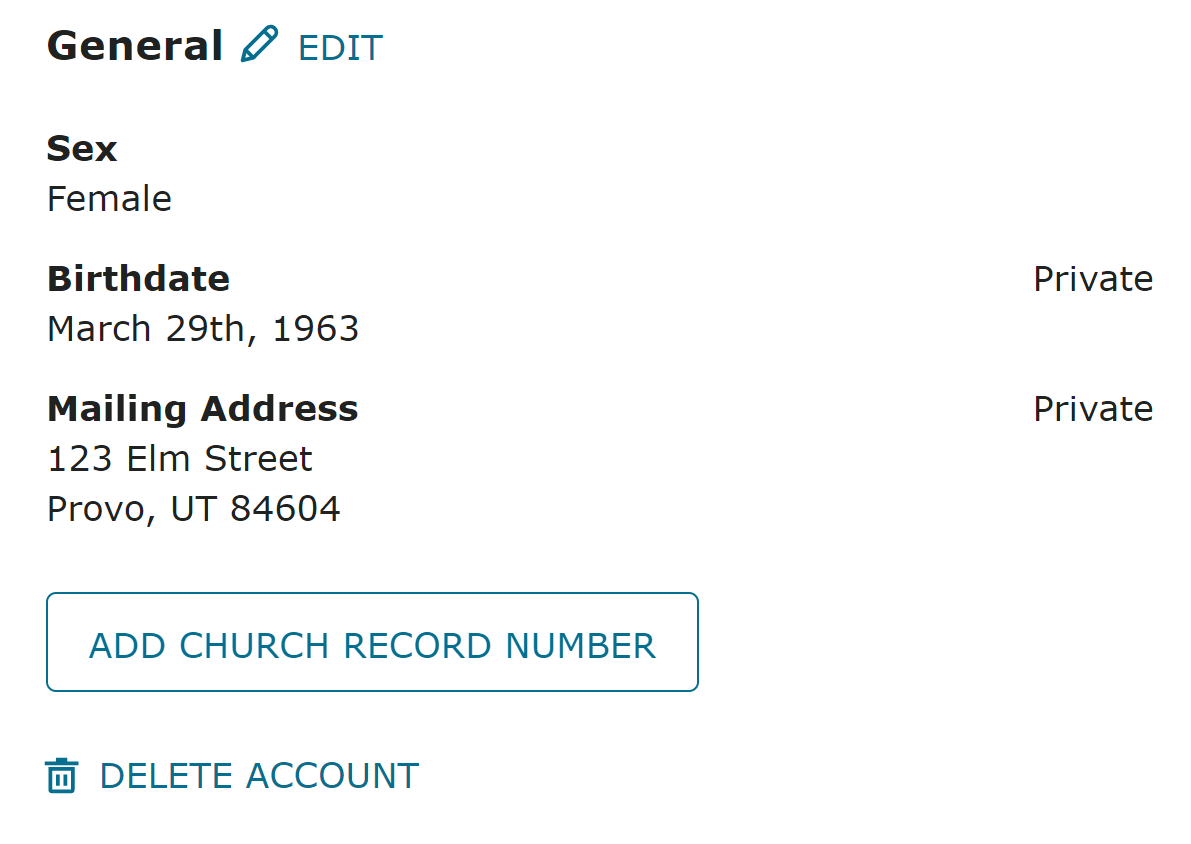
  6. You will either see a switch labeled "Show Temple Options" or a button that says "Add Church Record Number"
Here are a couple of screen shots to show the different cases:

Your account is a member account if you see something like this:
Account-Mem.png
Your account is NOT a member account if you see something like this:
Account-Non.png
Questions that can benefit the larger community should be asked in a public forum, not a private message.
Member
#10
Correct me if I'm wrong, but a quick and easy way to see if a member's Family Search account is linked to his/her church account is the member's account will have the "Temple" link in the row of links in the top left corner on the Family Search webpage. We recently helped a member who didn't have the Temple link on her Family Search webpage. I went into her account settings and linked her Family Search account with her church account and the Temple link appeared.
Community Moderators
#11
Hilohi wrote: Tue Sep 05, 2023 12:12 am Correct me if I'm wrong, but a quick and easy way to see if a member's Family Search account is linked to his/her church account is the member's account will have the "Temple" link in the row of links in the top left corner on the Family Search webpage.
Just to be clear, a Church member's Church Account and their Family Search account are separate accounts and are not linked directly. In fact, a member or nonmember can have multiple Church Accounts and multiple Family Search accounts. Changes in the profiles of any of those accounts will not affect any of the other accounts. The key that connects one Church Account to one Family Search account is the membership record number (MRN). It is the ability to have multiple Church Accounts and multiple Family Search accounts that causes confusion and difficulties for some Church members.

You are correct that if the menu item "Temple" is displayed on the Family Search menu bar then that Family Search account has a MRN registered in that user's profile. Only work done with that Family Search account will include temple information for that account holder.

Even the display of the "Temple" menu item is not a good indicator the account has been properly set up for that account holder. Always check the account profile for the correct MRN. Sometimes, and because of long ago traditions, member couples will use their spouses MRN when creating accounts.
JD Lessley
Have you tried finding your answer on the ChurchofJesusChrist.org Help Center or Tech Wiki?
Community Administrator
#12
Hilohi wrote: Tue Sep 05, 2023 12:12 am Correct me if I'm wrong, but a quick and easy way to see if a member's Family Search account is linked to his/her church account is the member's account will have the "Temple" link in the row of links in the top left corner on the Family Search webpage.
That technique is generally okay for determining if a person's account is linked to their Church membership. However, there is one case where that technique is not reliable. As I noted in my previous post, there is a setting for "Show Temple Options"; if that is turned off, you won't see the Temple menu, even if your account is linked to your Church membership. Rarely do Church members turn off that setting, but it does happen (sometimes on purpose and sometimes unintentionally). So the most reliable technique to answer this question is to go to Account Settings.
Questions that can benefit the larger community should be asked in a public forum, not a private message.
New Member
#13
I'm still confused as to the interpretation of "YTD Submitters Unit Detail". For example, our Ward November 2025 Report shows Totals: 100/438. Does that mean there have been 100 submittals by 438 members that specifically have FamilySearch accounts?

I am trying to help our ward members increase the First Four Generations of Ancestors in the Tree in the coming year (2026). Our results have been relatively flat for the last 3 years. Any help is appreciated.

Dennis Byram
Senior Member
#14
dbyram wrote: Sat Dec 27, 2025 12:11 pm I'm still confused as to the interpretation of "YTD Submitters Unit Detail". For example, our Ward November 2025 Report shows Totals: 100/438. Does that mean there have been 100 submittals by 438 members that specifically have FamilySearch accounts?

I am trying to help our ward members increase the First Four Generations of Ancestors in the Tree in the coming year (2026). Our results have been relatively flat for the last 3 years. Any help is appreciated.

Dennis Byram
This post describes how the metric works. @aebrown works for FamilySearch.

viewtopic.php?p=252297&hilit=4+generations#p252297
Community Administrator
#15
dbyram wrote: Sat Dec 27, 2025 12:11 pm I'm still confused as to the interpretation of "YTD Submitters Unit Detail". For example, our Ward November 2025 Report shows Totals: 100/438. Does that mean there have been 100 submittals by 438 members that specifically have FamilySearch accounts?

I am trying to help our ward members increase the First Four Generations of Ancestors in the Tree in the coming year (2026). Our results have been relatively flat for the last 3 years. Any help is appreciated.
I think you're confusing two different stats. From past posts, I don't think you can see the number of submissions, but the number of submitters. That is, the number of ward members who have submitted at least one name during the time period.

For the second, I think it would be a percentage (unless that stat has changed.)

Either way, you won't know who you need to work with, just where your ward stands as a whole.
Have you searched the Help Center? Try doing a Google search and adding "site:churchofjesuschrist.org/help" to the search criteria.

So we can better help you, please edit your Profile to include your general location.
New Member
#16
Our December 2025 report shows 103/441 YTD Submitters Unit Detail.
Numerator: 103 - That means we had 103 ward members who submitted a Temple name.
Denominator: 441- Does that mean 441 members with FamilySearch accounts or 441 members of our Ward?
Thanks for your help.
Community Administrator
#17
dbyram wrote: Thu Jan 15, 2026 1:22 pm Our December 2025 report shows 103/441 YTD Submitters Unit Detail.
Numerator: 103 - That means we had 103 ward members who submitted a Temple name.
Denominator: 441- Does that mean 441 members with FamilySearch accounts or 441 members of our Ward?
For all the statistics in the FHAR, the members counted are youth and adults. That includes every ward member who turns 12 in the year. So for your December 2025 FHAR, that means every member who turned 12 or older in 2025. When the January 2026 FHAR comes out (in early February), that number will also include the new batch of youth who turn 12 during 2026.

So with that understanding, the 103 means you had 103 youth and adults who submitted a name in 2025, out of a total of 441 youth and adult members of your ward (it makes no difference whether they have a FamilySearch account -- the denominator includes all youth and adults). For the exact definition of "submitter" see the Family History Activity Report (FHAR) Guide (must be signed in to FamilySearch to view).
Questions that can benefit the larger community should be asked in a public forum, not a private message.
New Member
#18
Thank you for responding, clarifying the YTD Submitters Unit Detail, and the link to FHAR instructions.

Dennis