Calendar outage?

38 postsstarted by scl1982 12,011 viewsoriginal topic

New Member
#1
I'm currently having a "Sorry, the requested file does not exist." error message when trying to access the calendar. Is there a general outage?
Community Moderators
#2
scl1982 wrote: Sat Jan 29, 2022 4:25 pm I'm currently having a "Sorry, the requested file does not exist." error message when trying to access the calendar. Is there a general outage?
I am getting the Calendar page but also the "Give us a moment..." error and the page is not loading. I guess the Calendar may be out until someone notices and reboots the server, or whatever it takes. And since it is Saturday . . . [sigh]
Community Administrator
#3
Seems to be working for me, but I did use incognito mode to avoid the dreaded cookie issue.
Have you searched the Help Center? Try doing a Google search and adding "site:churchofjesuschrist.org/help" to the search criteria.

So we can better help you, please edit your Profile to include your general location.
Community Moderators
#4
lajackson wrote: I am getting the Calendar page but also the "Give us a moment..." error and the page is not loading.
It seems to be working normally again. Temporary outage, not general, I suppose. Here at the Forum we are users who discuss things and have no control at all over the servers and other parts of the website. All we can do is send Feedback through official channels, just the same as anyone else.
New Member
#5
It still seems out for me (I've tried in incognito mode).
Community Moderators
#6
A "New Private Window" (Firefox) works for me. But deleting cookies and cache does nothing to correct the error.
JD Lessley
Have you tried finding your answer on the ChurchofJesusChrist.org Help Center or Tech Wiki?
Community Moderators
#7
The Calendar still seems to be working for me. I am using Firefox 96.0.2 (about to upgrade to 96.0.3). I am not using a private window or anything similar.
Community Moderators
#8
Just tried it again following lajackson's post. Deleted cookies and cleared cache. I get a 404 - Error when clicking the Calendar link using the 'normal' method. Tried it also using a "New private window" and it works.
JD Lessley
Have you tried finding your answer on the ChurchofJesusChrist.org Help Center or Tech Wiki?
Senior Member
#9
Also getting the "Sorry, the requested file does not exist." message, this morning in the UK. Same message using Incognito mode in Chrome as well. At the moment it looks like the Calendar doesn't like Chrome at all. :?

However, no issues with Firefox!
Community Administrator
#10
Working fine for me using incognito mode in Chrome. (I didn't try regular mode.)
Have you searched the Help Center? Try doing a Google search and adding "site:churchofjesuschrist.org/help" to the search criteria.

So we can better help you, please edit your Profile to include your general location.
Senior Member
#11
I have just discovered that the issue arises when I access the Calendar, whilst logged into LCR, using the Tools menu the Calendar displays the "Sorry, the requested file does not exist." error message.

However accessing it from the Tools menu on the main Church homepage normal service is resumed! :!:
Community Administrator
#12
Hmmm. There's an issue accessing the calendar or meetinghouse locator via the header when in the forum. It tries to take you to tech.churchofjesuschrist.org/calendar/ or tech.churchofjesuschrist.org/maps/meetinghouses/.
Have you searched the Help Center? Try doing a Google search and adding "site:churchofjesuschrist.org/help" to the search criteria.

So we can better help you, please edit your Profile to include your general location.
Community Moderators
#13
russellhltn wrote: Tue Feb 01, 2022 10:42 am Hmmm. There's an issue accessing the calendar or meetinghouse locator via the header when in the forum. It tries to take you to tech.churchofjesuschrist.org/calendar/ or tech.churchofjesuschrist.org/maps/meetinghouses/.
I'm seeing that as well – good catch! I'm guessing it has to do with either the slim Church header or the subdomain, both of which apply to Tech and Leader and Clerk Resources.
Samuel Bradshaw • If you desire to serve God, you are called to the work.
Church Employee
#14
I reported it to the header/footer team. They have an open ticket on it. They do not expect to see if fixed until sometime next week.

I could add some redirects on the server itself to work around the issue, but I think I'll wait for a proper fix. The work around is easy, go to the main Church site first, and then pick from the 9 dot menu.
Church Employee
#15
The header/footer links for Calendar and Meetinghouse Locator have been updated now. They should be working again on Tech.
Community Moderators
#16
TimRiker wrote: Mon Feb 07, 2022 11:26 am The header/footer links for Calendar and Meetinghouse Locator have been updated now. They should be working again on Tech.
Verified – hooray!
Samuel Bradshaw • If you desire to serve God, you are called to the work.
New Member
#17
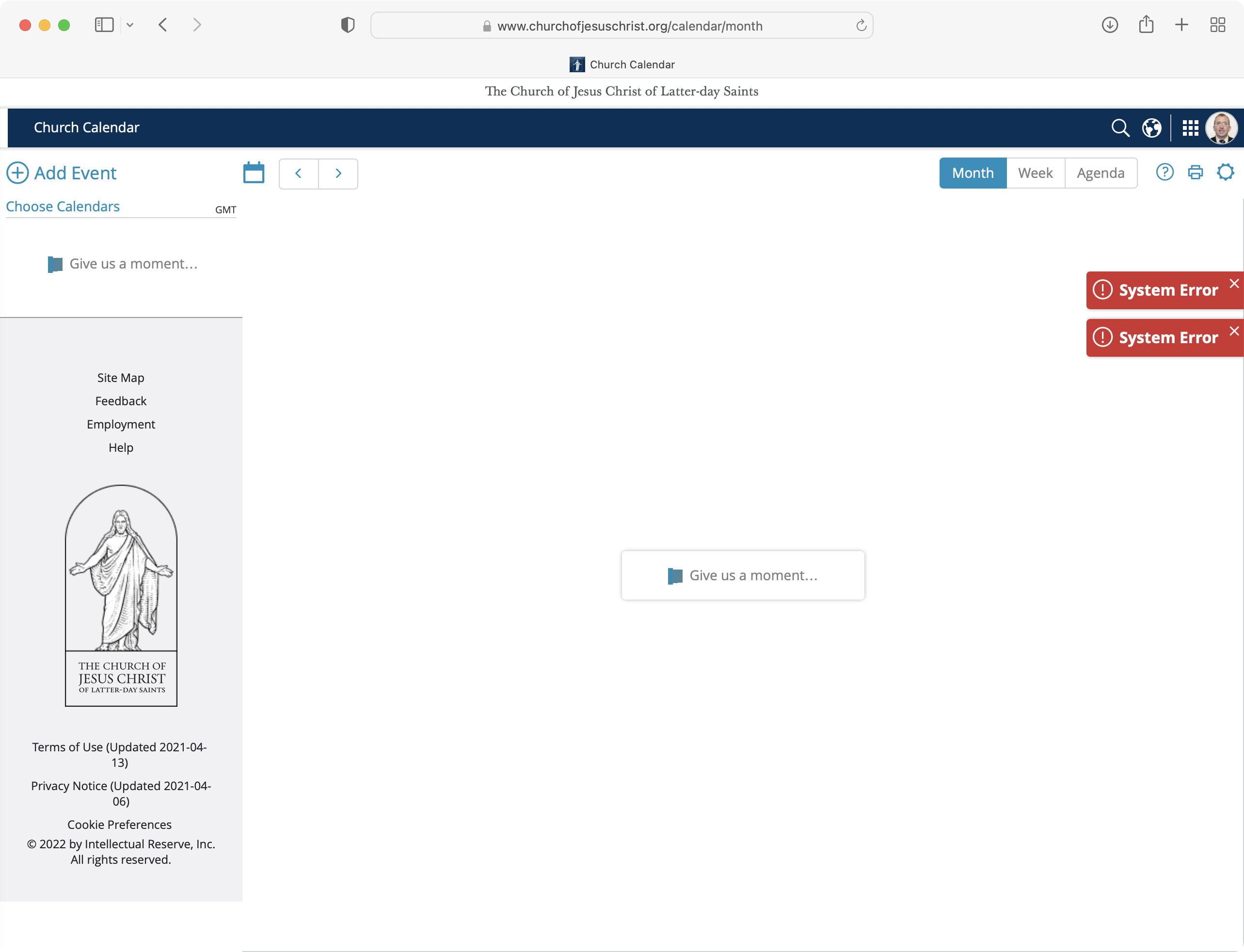
Is everyone else having issues with the calendar this morning? We get a red "system error" message and the stake executive secretary got hundreds of email notifications that events had been cancelled.
Senior Member
#18
I'm getting the same error message, but don't know if anything else has happened as a consequence.
Community Moderators
#19
mkoyle wrote: Fri May 13, 2022 5:15 am Is everyone else having issues with the calendar this morning? We get a red "system error" message and the stake executive secretary got hundreds of email notifications that events had been cancelled.
I'm also getting a calendar error today.
Screen Shot 2022-05-13 at 9.12.25 AM.png
Screen Shot 2022-05-13 at 9.12.25 AM.png (381.13 KiB)
Samuel Bradshaw • If you desire to serve God, you are called to the work.
New Member
#20
I had the same problem last night and this morning "system error."
New Member
#21
It's been unavailable for me as well - since last night.
Community Administrator
#22
Appears functional to me. And I'm not behind the church firewall.
Have you searched the Help Center? Try doing a Google search and adding "site:churchofjesuschrist.org/help" to the search criteria.

So we can better help you, please edit your Profile to include your general location.
Senior Member
#23
russellhltn wrote: Fri May 13, 2022 3:00 pm Appears functional to me. And I'm not behind the church firewall.
It’s now functioning for me! Whatever the problem it appears to have been resolved since earlier today.
Member
#24
Is there a calendar problem with "system error" again? Trying to help a High Councilman make his entries for 2023 and he keeps getting "system error" as his message. He has cleared his cache and deleted cookies and restarted and problem continues. Your advice? I see this was a problem in May 2022 but don't see a resolution. I will continue looking on the forum page to see what help I can offer.
Community Administrator
#25
The webpage is working fine for me.

The Member Tools apps can be more fickle.
Have you searched the Help Center? Try doing a Google search and adding "site:churchofjesuschrist.org/help" to the search criteria.

So we can better help you, please edit your Profile to include your general location.
Member
#26
Odd I didn't have trouble either but HC did and I can't figure out why. I tried to report to feed back but keep getting error message.
Feedback Response: "There was an error transmitting your request. Please try again later."
Community Administrator
#27
You might have him try incognito mode. Perhaps the clearing of cookies didn't work right.
Have you searched the Help Center? Try doing a Google search and adding "site:churchofjesuschrist.org/help" to the search criteria.

So we can better help you, please edit your Profile to include your general location.
Member
#28
I had already had him try going incognito to no avail. Odd not everyone having same trouble? My work around was to go
in and just enter the least amount of info I could to publish and then they are able to go in and edit my entries.

I am still unable to send feedback (tried incognito) and afraid to clear my cache etc as I am not having any problems with
these calendar issues.
New Member
#29
Looks like the calendar is down again. I haven't been able to reach it via web browser for a few hours.
New Member
#30
Rumor has it there was an update being pushed today to solve the DST and all-day event issues. Will see if it comes up tomorrow.
New Member
#31
Haven't been able to access the calendar since yesterday.
Senior Member
#32
marcello wrote: Wed Nov 16, 2022 7:46 am Haven't been able to access the calendar since yesterday.
The church rolled out new calendar software yesterday. I was able to access it yesterday evening but there have been reports of spotty access by some. Have you tried today?
New Member
#33
I have also been trying to access the calendar since yesterday. I have tried multiple browsers with no success.
New Member
#34
I can get in. Looks different and functionality looks reduced.
New Member
#35
The ICS file seem to doesn't work anymore. I also don't find a place where I could create a new one. Any update on this issue?
New Member
#36

Calendar Application is unresponsive

One of my callings is Stake Center Building Scheduler. I have successfully used this App for years. Over the past 2 days, when I try to login to the Calendar App It just displays the spinner and never gets to the App. Occasionally it will display, in the background, the month without any scheduled activities.
Is there something you can do?

jimwbooth@comcast.net

[moderator note: Post merged with another active thread on the same topic.]
New Member
#37
Please reinstate the agenda part of the calendar!!
New Member
#38
chonelp wrote: Fri Nov 25, 2022 11:18 pm Please reinstate the agenda part of the calendar!!

Yes!