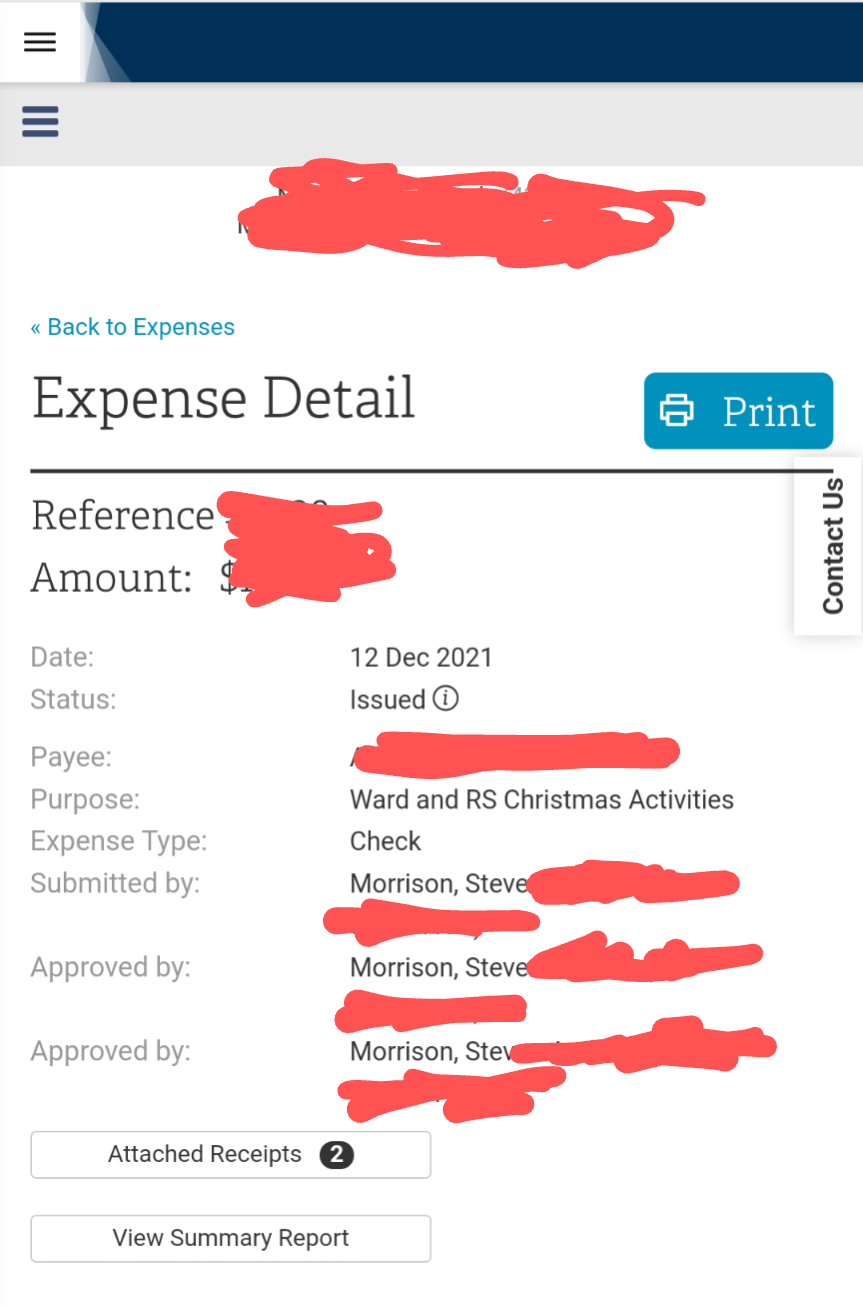
LCR allowing two approvals by the same person on one expense.

7 postsstarted by stevenamorrison 2,348 viewsoriginal topic

New Member
#1
I am the ward clerk and entered a new expense with a reimbursement type of electronic reimbursement. The member then contacted me and asked for a check. I was unable to see how to cancel the request or change the reimbursement type and I ended up going to the expense approval screen, clicked on a receipt as if I was going to review it and then rejected it. At this point, I was able to go back and edit the expense, changing the reimbursement type to a check. However, when I saved the expense, it went directly to bishop's review and showed that I had approved it twice.
Member
#2
I believe all physical check expenses show the same approver twice
There are 11 types of people. Those who understand Gray Code and those that don't.
Senior Member
#3
Any check without attached documentation will go immediately to the Print Checks tab and the Bishop's Review tab and does not require online approvals. The check signers must review physical documentation before signing. In this case the expense detail will show the same person for both Created By and Approved By.

If the check has attached online documentation then it goes to the Approve Expenses tab first for document approval before going to the Print Checks tab. In this case it shows Created By as the person who created the expense and Approved By as the second approver.
Member
#4
Ok ,I went digging and found one that did have 2 different approvers. Almost all of our checks are processed without attached documents.
There are 11 types of people. Those who understand Gray Code and those that don't.
New Member
#5
This check has attached (electronic) receipts. It was entered remotely and did not go to the Approve Expenses tab. I just looked at the last few physical checks and this is the only one showing me as the submitter and the approver.

Edit: Added screenshot
Screenshot_20211213-190640~2.png
Senior Member
#6
stevenamorrison wrote: Mon Dec 13, 2021 6:04 pm This check has attached (electronic) receipts. It was entered remotely and did not go to the Approve Expenses tab. I just looked at the last few physical checks and this is the only one showing me as the submitter and the approver.
Interesting. I can get something that looks the same but only by first printing the check without any attached documents and then attaching them after the check is printed. You may have found a path through the process that doesn't enforce the same rules as when entering a check at first.

It's not really a violation of policy as long as the check signers reviewed the documentation and the bishop marks his review. But it does seem like it may be a minor bug.
New Member
#7
eblood66 wrote: Mon Dec 13, 2021 8:42 pm
stevenamorrison wrote: Mon Dec 13, 2021 6:04 pm This check has attached (electronic) receipts. It was entered remotely and did not go to the Approve Expenses tab. I just looked at the last few physical checks and this is the only one showing me as the submitter and the approver.
Interesting. I can get something that looks the same but only by first printing the check without any attached documents and then attaching them after the check is printed. You may have found a path through the process that doesn't enforce the same rules as when entering a check at first.

It's not really a violation of policy as long as the check signers reviewed the documentation and the bishop marks his review. But it does seem like it may be a minor bug.
We scan and attach all documentation, so I haven't seen the process for expenses without electronic documenting so this was just odd to me to have it skip that step. I did have the bishopric member review the documentation prior to him signing the check (and obviously he wanted to see it before signing).
Thanks!