Password Reset PC in Clerks Office

6 postsstarted by allibri425 6,978 viewsoriginal topic

New Member
#1
We're unable to login to the PC in the clerks office this morning. We get an incorrect password error. Nobody in the bishopric is aware of anything changing. I try the password reset option and it points to a thumb drive that doesn't have the backup password.

I can't seem to find a support number to call and help reset it. Who do I call?
Community Administrator
#2
If your computer requires you to enter the account name, try adding ".\" in front.

For example. if the account was "clerk", type in ".\clerk".
Have you searched the Help Center? Try doing a Google search and adding "site:churchofjesuschrist.org/help" to the search criteria.

So we can better help you, please edit your Profile to include your general location.
New Member
#3
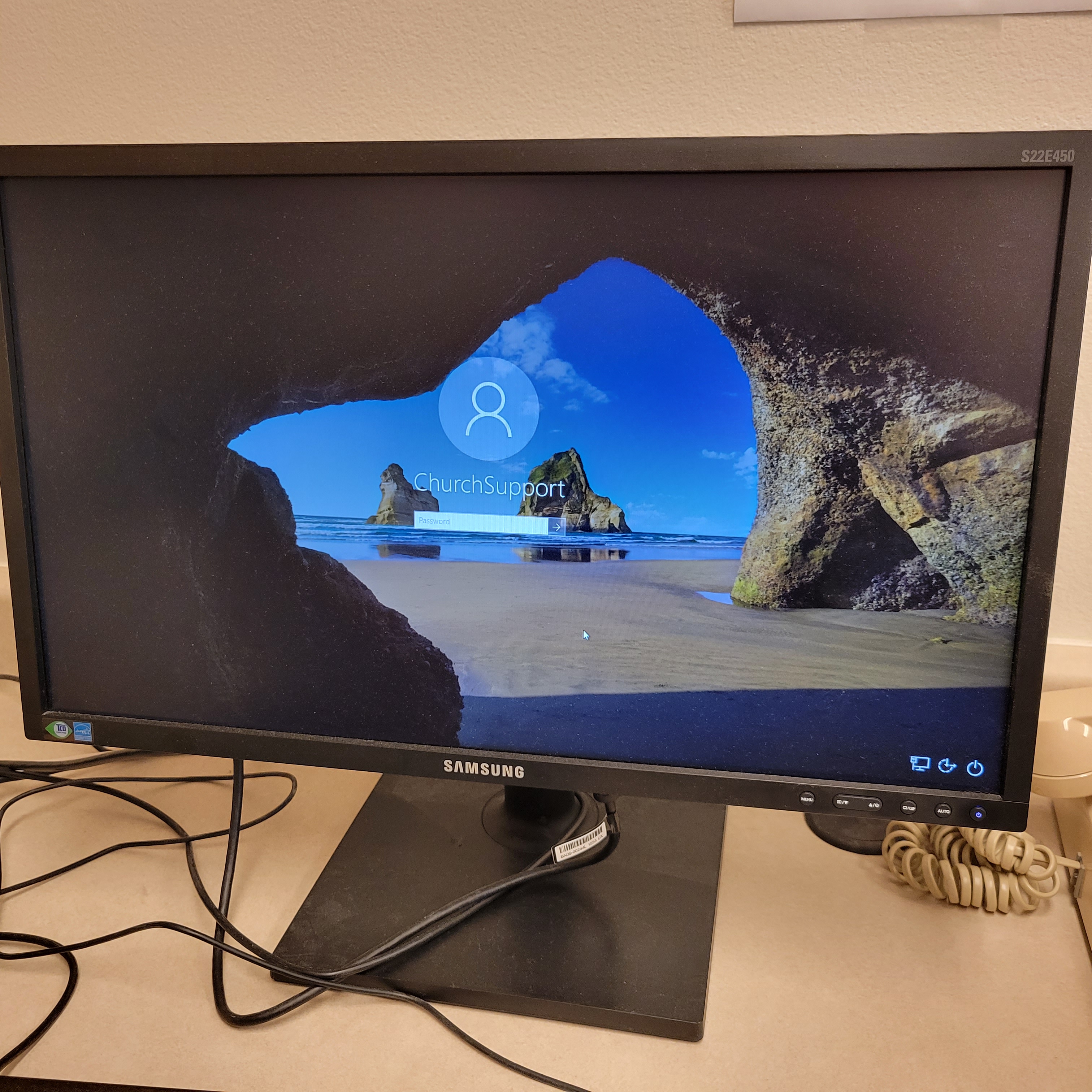
Thanks for the suggestion. It actually doesn't even allow me to select/change user accounts. It only lets me enter the password for user ChurchSupport. Tried resetting the PC and trying different internet connections.
Community Administrator
#4
allibri425 wrote: Sun Dec 05, 2021 12:49 pm It only lets me enter the password for user ChurchSupport. Tried resetting the PC and trying different internet connections.
In the lower left, should be a selection of accounts, or at least some form of "other".
Have you searched the Help Center? Try doing a Google search and adding "site:churchofjesuschrist.org/help" to the search criteria.

So we can better help you, please edit your Profile to include your general location.
New Member
#5
I don't see any icon for switching accounts (appears to be locked down). The only icons I see are network, power (Sleep, Shutdown, or Restart), and Ease of Access. I attached a screenshot.
16387340447812674283687811916823.jpg
16387340447812674283687811916823.jpg (2.43 MiB)
Community Administrator
#6
That's odd. It appears that all other accounts have been disabled. The only thing I can think of is if you've been using "Administrator". A policy may have been pushed down that disabled that. Normally, you'd be using "Clerk" or "Unit 12345".


You'll need to contact support. Try this link:
https://www.churchofjesuschrist.org/hel ... s?lang=eng
Have you searched the Help Center? Try doing a Google search and adding "site:churchofjesuschrist.org/help" to the search criteria.

So we can better help you, please edit your Profile to include your general location.