Any suggstions for a stable portable camera mount?

15 postsstarted by brad_p 5,977 viewsoriginal topic

Member
#1
That headline suggests "get a tripod", but hear me out. We're ready to implement a permanent solution for our stake, and we've got it all figured out except the camera mount. We're stuck on this. We've got old buildings, so the only permanent solution which works with cords is the chapel's back corner.

My needs:

* Mount a PTZ camera about 150 feet back.
* Put the camera ~7 feet high to see over heads.
* No wobble. At 20x zoom, wobbles easily show up.
* Small footprint, one old chapel has at most a 2x2 foot area on the floor for us to use, that building is cramped with pews.
* Easily bring it in and out of a closet for meetings. The PTZ and software will handle the pan/tilt/zooming.

The easy answer is a simple 8 inch L bracket wall mount. Two bolts in a wall, and I'm done. But FM is adamant that church HQ won't let us do that.

I've considered using a narrow shelf and put the camera mount on top of that. Pull the shelf out of a closet, rest it against a wall, and I'm good. But all such shelving I find online only goes up to ~5 foot height.

Tripods don't seem to work for my needs. They require wide legs to avoid wobble, stable ones cost at least $600, and the tripod will almost certainly get a hard accidental kick by someone in the congregation at some point (I've already lost two cheaper tripods that way.)

Any ideas out there?
Member
#2
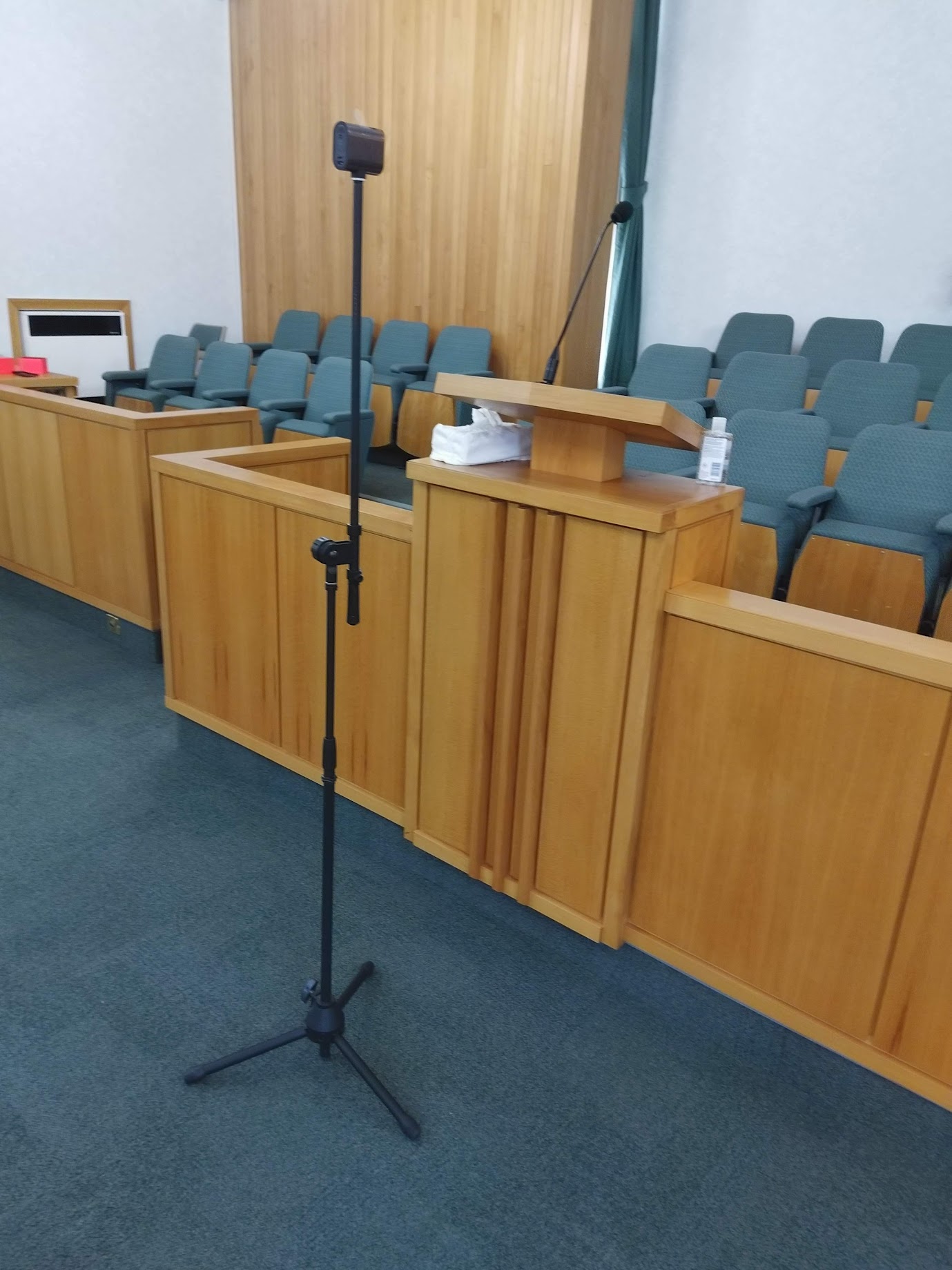
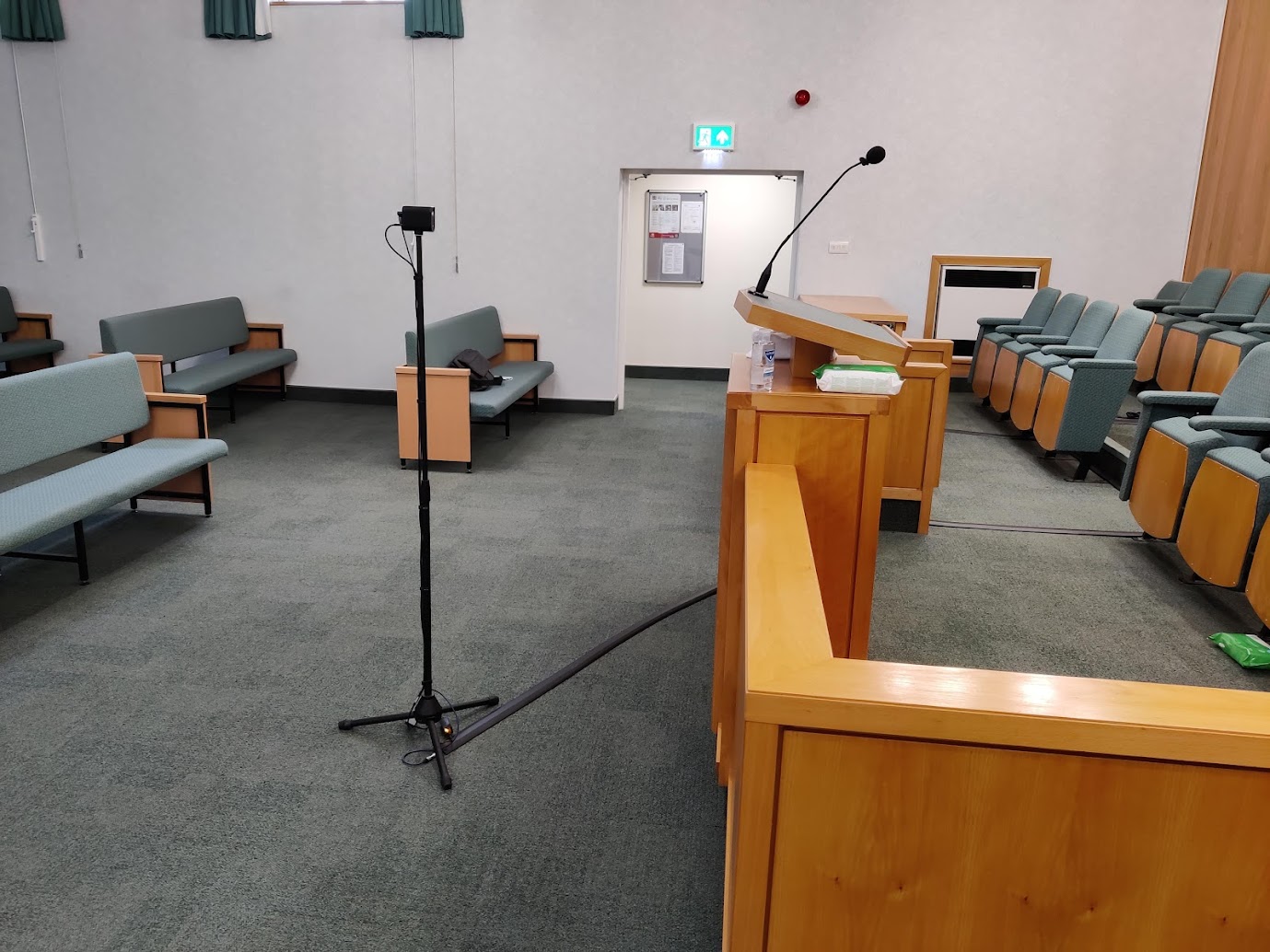
We use a microphone stand. It is very stable and has a very small footprint. You can get threaded adapters for whatever camera you are attempting to mount.

It extends to 7 or more feet but we find that high is a bit unnatural for viewers at home. At 5-6 feet high it till sees over the congregation and just is a more natural angle.

One picture of a mevo start mounted directly to mic stand without extendable boom attached and one pic with it attached.

We've since gone to a larger, heavier camera with a 10x zoom and the stand is now at the back left corner of the chapel instead of front and centre.

Not experienced any wobble that I know of but we are careful to keep it well away from any passing feet.
๐Ÿ“Ž IMG_20200908_134007.jpg (287.5 KiB)
๐Ÿ“Ž IMG_20210512_184440.jpg (272.15 KiB)
Member
#3
Huh, I hadn't considered microphone stands at all. That's a really good idea.
Member
#4
This mic stand seems like a great fit:

https://www.bhphotovideo.com/c/product/ ... stand.html

I think this adapter will also do the trick:

https://smile.amazon.com/dp/B013X10T1C/ ... BAZDJRPWMG
Member
#5
Yes, we have those adapters which were needed for the PTZ camera but not for the Mevo camera.

FM group in our area were happy to provide microphone stands but not the required adapters for the camera.

You may want to enquire and see what they can provide for you from their budget.

You may also have plenty of old microphone stands tucked away in a cupboard somewhere in the chapel?
Member
#6
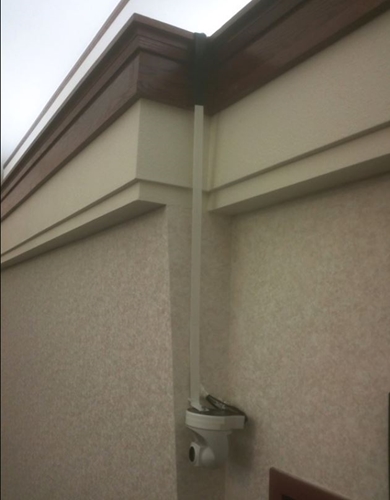
Construct a "J" shaped bracket using 1/2" pipe, wood, or steel strap that can just hang from the soffit.
Camera Hanging from Soffit 500px.JPG
Camera Hanging from Soffit 500px.JPG (93.8 KiB) Viewed 3757 times
Member
#7
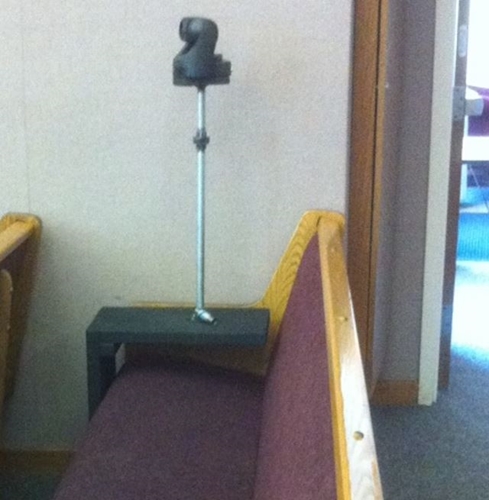
Construct a "U" shaped bracket using 2X12 lumber and 1/2" pipe. The bracket "floats" around the pew to avoid vibration.
Camera U Bracket in Pew.JPG
Camera U Bracket in Pew.JPG (142.38 KiB) Viewed 3754 times


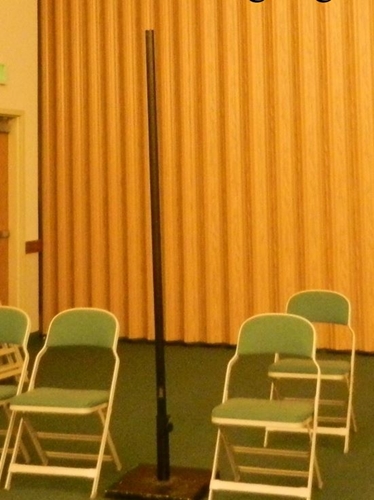
Buy a stone patio umbrella base (35lbs) and insert a 7ft chainlink fence pole. Attach camera shelf using pipe hangers.
Floor mounted Camera Pole.JPG
Floor mounted Camera Pole.JPG (126.58 KiB) Viewed 3754 times
New Member
#8
Have you considered using the device for the hard of hearing as an audio input? That's what we use. It includes the organ and all microphone inputs in the chapel. You may need the crab box to patch it to the camera or the PC depending on equipment configuration.

--
Larry Autry
New Member
#9
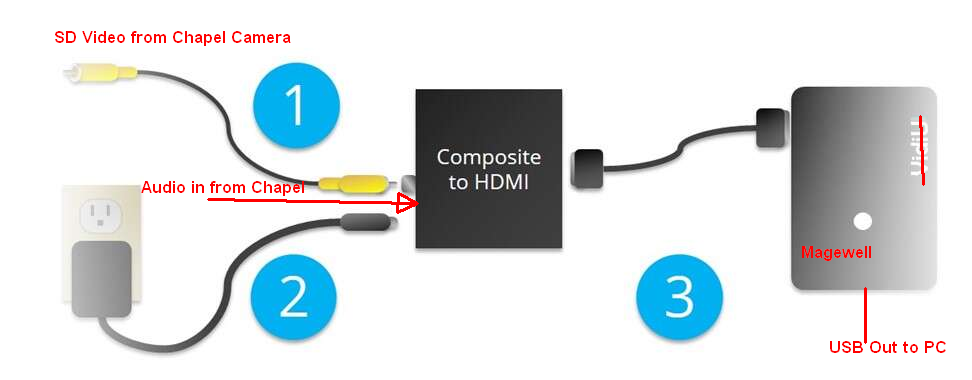
Our Sony SD camera is permanently mounted at the back corner of the chapel on top of the ledge where fluorescent lights are mounted. The FM group also had the IR control wired back to the satellite closet so I can position the camera most anywhere on the stand - chorister, piano, organ, choir, etc. The audio is also permanently wired to include all audio including the organ. We currently use the VidiU to encode for our webcasts. When we switch to zoom, I believe all we need to do is change the configuration as noted in the image below. The Magewell is a video capture device but I think it's a bit expensive. If you know of a good and less expensive one, please share a link.
SD Video Zoom Webcast.png
--
Larry Autry
Community Administrator
#10
autryld wrote: Wed Nov 03, 2021 1:53 pm Have you considered using the device for the hard of hearing as an audio input? That's what we use. It includes the organ and all microphone inputs in the chapel. You may need the crab box to patch it to the camera or the PC depending on equipment configuration.
Depending on the receiver, it may need a load to turn on.

I wouldn't expect the mix for it to be any different than the audio output.

Some have reported it as too noisy.

It certainly an option if a better one isn't available.
Have you searched the Help Center? Try doing a Google search and adding "site:churchofjesuschrist.org/help" to the search criteria.

So we can better help you, please edit your Profile to include your general location.
Member
#11
autryld wrote: Wed Nov 03, 2021 1:53 pm Have you considered using the device for the hard of hearing as an audio input? That's what we use. It includes the organ and all microphone inputs in the chapel. You may need the crab box to patch it to the camera or the PC depending on equipment configuration.

--
Larry Autry
Yes, it was awful for all three of our buildings. The signal is analog, and so each building had both a static in the background and some high pitched squeal. We had more success just sticking a condenser USB mic nearby and using that. The best is a direct line into the directional mic on the pulpit.
New Member
#12
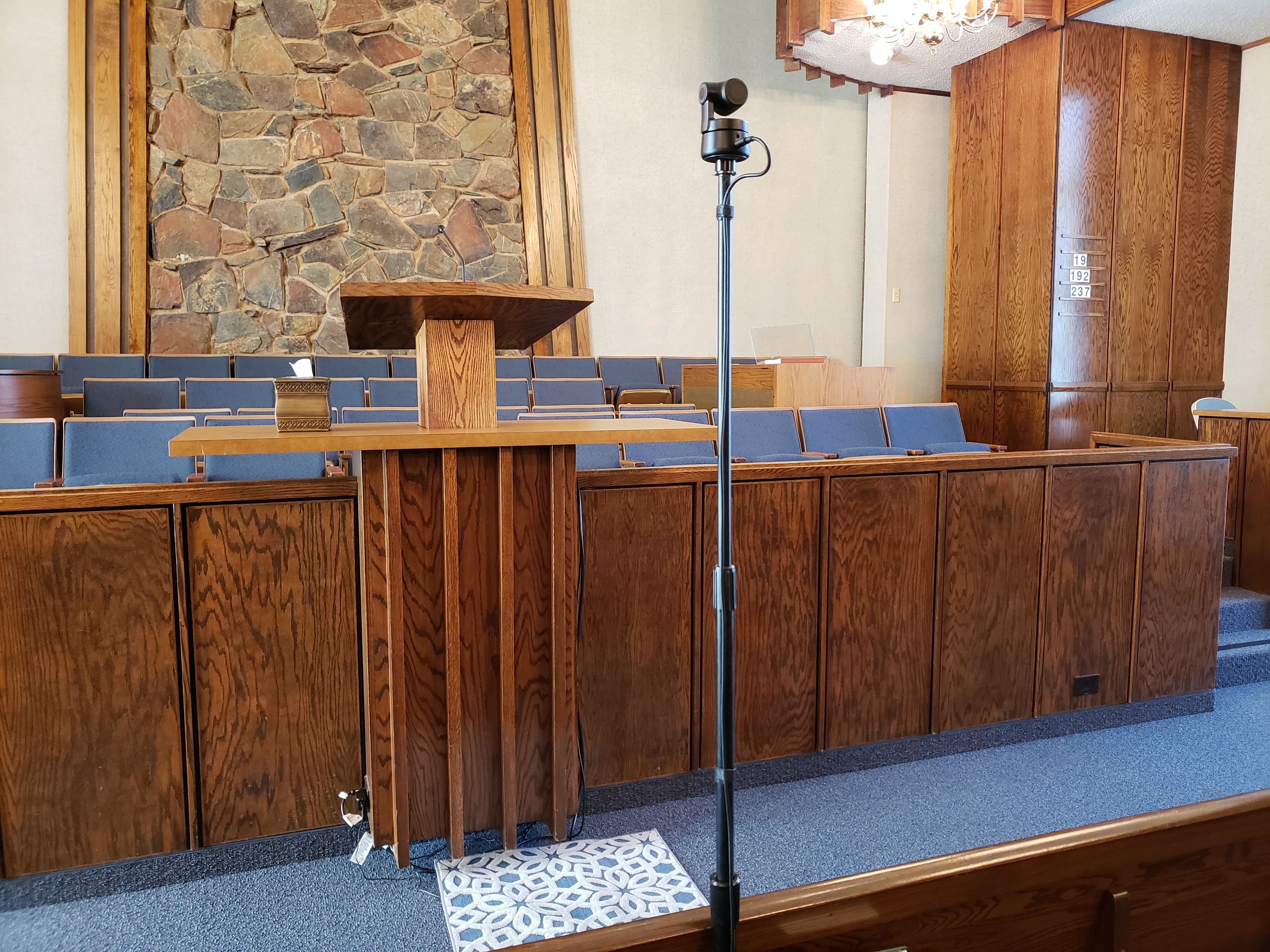
20210904_092313.jpg
Here is my camera on a mic stand setup we have been using. The mic stand has a heavy round base and is from 2 different stands so it has 3 tubes and can be extended up to 7'
New Member
#13
bradpeterson@gmail.com wrote: Sun Nov 07, 2021 1:17 pm [Yes, it was awful for all three of our buildings. The signal is analog, and so each building had both a static in the background and some high pitched squeal. We had more success just sticking a condenser USB mic nearby and using that. The best is a direct line into the directional mic on the pulpit.
It's been a while since your reply so I'm not sure if your ward is still doing webcasts. You may be getting RF interference. If you're getting static even without doing a webcast, that's a possibility. It's worked great in our building with clear audio and no static. The only problem we've had is when a member of the bishopric doesn't connect it correctly to the the crab box and I'm viewing from home , unable to assist. Another thing you can try before reporting static to the FM group is to flip the "Hum" switch on the crab box.
New Member
#14
Some great solutions in the camera mounts shown here in this thread. Another option is a "Lightstand" Much like a tripod, but is lightweight aluminum only has a single pole going up so not as nearly as obtrusive as a traditional tripod, and you can put it in the pews. It is plenty sturdy enough to support a small camera that will not be manned during operation. You can also pick up a few pound ankle weight and drape it around where the pole comes out of the base if you want to secure it a little better
https://www.amazon.com/dp/B074VMTP68?re ... VD4SQGS332 $40 on Amazon. On the bigger issue.. remember, Facilities is NOT the ultimate authority on buildings. The agent bishop/stake president has ultimate authority over what happens in the building, and if something is in the best interest of the tithepayers who meet in the building they have every right to implement it. Facilities' know this, and if you listen to their language they acknowledge it "I dont recommend that.. " "That is not authorized..." but they never come out and say you cant do it. That being said, It is a very good policy to not allow things to be installed on the walls willy nilly, but in the end when it is an important utility like this that will be used EVERY week to support worship, just install it. Make it nice, and fit in with the building, but just make your case the Stake President and do it.

We have had a run-in with Facilities and we held our ground and common sense won out-- we had a strip of cream/flesh colored wall on the front of the chapel which showed up behind the person speaking at the podium in our video shot. It played havoc with the cameras auto exposure. We asked it be repainted to the color of the wood above and below it. They said they could not as the building was "historical" and they could not make any changes whatsoever. We pointed out that they had changed the color of the pews and carpet just a couple of years earlier to match what they had in supply/vendors, so they relented and painted the strip. The video of the speaker is now much better.
Member
#15
jjohansson wrote: Thu Jun 02, 2022 7:16 am Much like a tripod, but is lightweight aluminum only has a single pole going up so not as nearly as obtrusive as a traditional tripod, and you can put it in the pews. It is plenty sturdy enough to support a small camera that will not be manned during operation. You can also pick up a few pound ankle weight and drape it around where the pole comes out of the base if you want to secure it a little better
We ended up using this, and I love it: https://www.amazon.com/gp/product/B01N7 ... UTF8&psc=1

It has the height, a 10 pound base, it's tough metal, a smaller footprint to fit within pews, it's collapsible, and goes up 8 feet to see over heads. You just have to find the right adapters to hook it into your camera, which is cheap.

The biggest downside is that it doesn't have any way to tilt like a tripod does. I've noticed in one chapel that the floors near a wall tend to have a small tilt to them, which is a bit noticeable on the broadcast.