AnnouncementEnd of Webcasting in July 2022: Please transition to Zoom

70 postsstarted by bretbassett 159,109 viewsoriginal topic

Church Employee
#1
For questions and answers regarding the announcement that went out on Oct 6th regarding the decommissioning of the church's webcast service please see the attached PDF document.
Community Administrator
#2
Personal commentary:

Each unit is eligible for ONE Church Zoom account.

Each account can either host one webinar or two simultaneous meetings. Each meeting can have breakout sessions allowing for more meeting rooms.

As pandemic restrictions relax, any streaming will under the guidelines set out in the General Handbook. This will undoubtedly reduce the size of the audience - in some cases to zero as "Streams and virtual meetings are not meant for the convenience of those who could reasonably attend in person." See Section 29.7 for details.
Have you searched the Help Center? Try doing a Google search and adding "site:churchofjesuschrist.org/help" to the search criteria.

So we can better help you, please edit your Profile to include your general location.
Community Moderators
#3
A point of clarification concerning the attached End of Webcasting pdf.

Under the question "What features can my church Zoom account provide?" please note that if one ward is holding a sacrament meeting and is using the Zoom Webinar function, the other wards in the building can hold other meetings only if they are using a different Zoom account.

A Church Zoom account will run up to two regular Zoom meetings simultaneously, with additional meetings available using breakout rooms, or it will run only one Zoom Webinar.

Since each ward has its own Zoom account, the only limitation should be your meetinghouse Internet bandwidth.

Also please note that if you choose to stream multiple wards throughout the day using the same stream and Zoom Webinar, the same limitation applies. The account streaming the sacrament meetings cannot be used for other meetings on the same account and at the same time that a sacrament meeting Webinar is taking place.
Member
#4
Curious about the push towards Zoom and seemingly avoiding YouTube?

I'd imagine for most of us, the easiest transition without changing hardware is to move from webcast to youtube.
Very simple to reconfigure a Teradek or Mevo for this.

I'm sure there must be reasons for this that i'm not aware of.

Attendance data capture seems the only benefit of zoom over youtube.

The advantages of youtube over zoom are many.

Anyway, a few months to go yet. I hope the discontinuation of webcast ultimately encourages us to a more standardised approach across the church. The lack of coordination and disjointed support from ward to ward, stake to stake and FM group to FM group have been challenging as we all try and figure this out.
Community Moderators
#5
Wattsuk wrote: Fri Oct 08, 2021 2:07 am Curious about the push towards Zoom and seemingly avoiding YouTube?
I agree. They have published some guidelines for those wishing to use YouTube Live here:
https://www.churchofjesuschrist.org/help/support/meetinghouse-technology/virtual-meetings/youtube-live-overview
So we can better help you, please edit your Profile to include your general location.
Church Employee
#6
Wattsuk wrote: Fri Oct 08, 2021 2:07 am Curious about the push towards Zoom and seemingly avoiding YouTube?
The church virtual meeting team is not trying to move people away from Youtube. You can use whatever solution works best for your unit. You have free access to Zoom webinar, but if Youtube is preferred by any given unit, you can certainly use it. As point out above, there is more info in Tech Forum and in MHTech on how to use Youtube for Webinars.

The church is shifting it's investment from webcasting to Zoom's webinar features because Zoom provides both a webinar feature and a much needed interactive meeting functionality which neither Youtube nor webcasting provides.
Community Moderators
#7
bretbassett wrote: Fri Oct 08, 2021 11:17 amThe church virtual meeting team is not trying to move people away from Youtube. You can use whatever solution works best for your unit. You have free access to Zoom webinar, but if Youtube is preferred by any given unit, you can certainly use it.
Thanks Bret, we really appreciate the clarification.
So we can better help you, please edit your Profile to include your general location.
New Member
#8
Who has taken the time to read the End Users License Agreement (EULA) or the Terms of Service (ToS), say for YouTube or Facebook? I will not agree to YouTubes conditions for posting content that I create - as I would be agreeing to let any other YouTube user use my content any way they desire, and I give up any rights to assert my copyright - just read through it. Facebook is not much better, if at all - you agree to let them use your likeness, name, and so on, any way they want, without compensation, so they could use your company name in adverting, and suggest you support something that you don't, all without consulting you. And lets not forget that the church has a licensing agreement with Zoom now, so each unit can have two meetings (with breakout rooms if desired) running concurrently, or one webinar.

I understand that not all content creators/streamers needs to have at least a thousand subscribers to stream live, yet I am not sure what the requirements are. Also, if we are forced to stop in-person meetings then being able to conduct the second hour by Zoom, and not telling someone that that have to switch from YouTube to Zoom, means one less thing to confuse the end user. A good number of people in a prior ward, and in my current branch, did not grow up with computers or the internet, nor see a reason to start now - they might be willing to do the phone dial in thingamajig, yet that is about it, if you write out step-by-step instructions (don't email it to them, either they don't have email or it goes unread).

I will give YouTube and Facebook props for implementing streaming standards, so current hardware can work with it a bit easier, yet you can still get things into Zoom, just means one extra step and piece of hardware.
Member
#9
bretbassett wrote: Fri Oct 08, 2021 11:17 am
Wattsuk wrote: Fri Oct 08, 2021 2:07 am Curious about the push towards Zoom and seemingly avoiding YouTube?
The church virtual meeting team is not trying to move people away from Youtube. You can use whatever solution works best for your unit. You have free access to Zoom webinar, but if Youtube is preferred by any given unit, you can certainly use it. As point out above, there is more info in Tech Forum and in MHTech on how to use Youtube for Webinars.

The church is shifting it's investment from webcasting to Zoom's webinar features because Zoom provides both a webinar feature and a much needed interactive meeting functionality which neither Youtube nor webcasting provides.
Thank you Bret. Much appreciated. The second point of consolidation is a great one!
Community Moderators
#10
awev wrote: Sat Oct 09, 2021 11:11 am Who has taken the time to read the End Users License Agreement (EULA) or the Terms of Service (ToS), say for YouTube or Facebook? I will not agree to YouTubes conditions for posting content that I create - as I would be agreeing to let any other YouTube user use my content any way they desire, and I give up any rights to assert my copyright - just read through it.
I've read through them. Since nearly all of our stake's YouTube videos change to "Unlisted" 60 seconds after they end, and are deleted after I've had a chance to check them for any quality problems, other YouTubers don't have access to them.

Occasionally, I will leave a webcast up longer, such as a funeral service, so people who couldn't view it live have a chance to see it. But after a week or so, I take them down also.
So we can better help you, please edit your Profile to include your general location.
New Member
#11
@MikeRowaved - Congratulations, you are one of the few to read those documents, doing even better than congress. Years ago, a lobby firm working for a consumer advocacy group mailed a report to members of congress wrapped in shrink wrap, with something to the effect that when you remove this film you are agreeing to the terms and conditions as laid out inside. Most people opened the report without reading the print on the wrapper, nor the printed terms and conditions inside. The other few? Well, they never found the time to get to it - lol.
New Member
#12
bretbassett wrote: Fri Oct 08, 2021 11:17 am The church is shifting it's investment from webcasting to Zoom's webinar features because Zoom provides both a webinar feature and a much needed interactive meeting functionality which neither Youtube nor webcasting provides.
With this shift what recommended updates need to be made so that we can easily grab the feed from the cameras and use them within zoom? My understanding is that the existing hardware doesn't support that and that somehow the camera in the Chapel needs to become a webcam to the computer hosting the webinar.

Also is the guideline to shift to youtube/facebook for extended seating? We will need more than 500 attendees to cover our stake with our upcoming stake conference.
Community Administrator
#13
jacobstimpson wrote: Tue Oct 12, 2021 9:00 pm With this shift what recommended updates need to be made so that we can easily grab the feed from the cameras and use them within zoom? My understanding is that the existing hardware doesn't support that and that somehow the camera in the Chapel needs to become a webcam to the computer hosting the webinar.

Also is the guideline to shift to youtube/facebook for extended seating? We will need more than 500 attendees to cover our stake with our upcoming stake conference.
I believe you can find the answer to those questions in the attachment to the first post in this thread.
Have you searched the Help Center? Try doing a Google search and adding "site:churchofjesuschrist.org/help" to the search criteria.

So we can better help you, please edit your Profile to include your general location.
New Member
#14
The WIFI in my Ward building will not allow two simultaneous Zoom meetings. It will max out the Bandwidth and video will cut out every time.
Senior Member
#15
Newboldm8 wrote: Thu Oct 14, 2021 1:50 pm The WIFI in my Ward building will not allow two simultaneous Zoom meetings. It will max out the Bandwidth and video will cut out every time.
Are you disabling the Liahona SSID and using the Lehi SSID only? If you aren’t familiar with this mode of operation, contact your Stake’s Technology Specialist for advice.
Community Moderators
#16
Newboldm8 wrote: Thu Oct 14, 2021 1:50 pm The WIFI in my Ward building will not allow two simultaneous Zoom meetings
If your meetinghouse WiFi is truly that slow, I would work with the Stake Technology Specialist and the Physical Facilities Representative (PFR: a high councilor) to get better Internet service.
New Member
#17
Question: Will the church broadcast system continue to be available for Stake Conferences (similar to how it was used before the COVID-19 Pandemic?) Or do stakes also need to plan to transition away from the webcast system as well?

One of the reasons I ask is we are having a conference this morning where we are simultaneously broadcasting on zoom and the webcast system. We have 400 connections on the webcast system and about 100 connections on zoom - which would put us up against the 500 attendee limit on zoom. I know that when the pandemic is over, most people will be attending stake meetings in person - but understanding this aspect to the plan would be helpful.
-Aaron Hixson
Payson Utah Mountain View Stake
aaron@hixsonfamily.net
Community Administrator
#18
hicksticks2001 wrote: Sun Oct 17, 2021 10:07 am Or do stakes also need to plan to transition away from the webcast system as well
Yes. According to the PDF attached to the first post, the suggestion is to use YouTube as a Zoom overflow.
Have you searched the Help Center? Try doing a Google search and adding "site:churchofjesuschrist.org/help" to the search criteria.

So we can better help you, please edit your Profile to include your general location.
Community Moderators
#19
hicksticks2001 wrote: Will the church broadcast system continue to be available for Stake Conferences?
No. It is going away completely. As others have mentioned, the replacement suggestion is YouTube Live, but there are other options also available that are acceptable.
New Member
#20
Hi,

Are there any camera recommendations with the move to Zoom? I would prefer the same kind of setup now where the camera is mounted and out of sight. The only problem is it requires a good amount of zoom since it is is so far away from the pulpit. Any direction would be nice.

Thanks!
Community Administrator
#21
jstn.green24 wrote: Mon Oct 18, 2021 10:18 am Are there any camera recommendations with the move to Zoom? I would prefer the same kind of setup now where the camera is mounted and out of sight. The only problem is it requires a good amount of zoom since it is is so far away from the pulpit. Any direction would be nice.
The PDF attached to the first post in this thread outlines how you can use an inexpensive adapter to convert HDMI to USB that is visible to Zoom as a webcam.
Have you searched the Help Center? Try doing a Google search and adding "site:churchofjesuschrist.org/help" to the search criteria.

So we can better help you, please edit your Profile to include your general location.
Senior Member
#22
jstn.green24 wrote: Mon Oct 18, 2021 10:18 am The only problem is it requires a good amount of zoom since it is is so far away from the pulpit.
We were using a PTZ camera with only 10x optical zoom, which was fine when the camera was on a tripod a couple of rows from the pulpit. But when mounted at the back of the chapel, wasn't adequate for us. We now have this 20x camera and couldn't be more pleased. It is a clone of the PTZOptics 20x-SDI. (it even takes the same firmware)
Community Moderators
#23
danpass wrote: Wed Oct 20, 2021 12:38 pmWe now have this 20x camera and couldn't be more pleased.
Wow, nice camera! Gotta keep that one bookmarked.
So we can better help you, please edit your Profile to include your general location.
New Member
#24
"If more than 500 participants are expected for a webinar, Zoom can be configured to redirect overflow participants to a live streaming service. YouTube Live is the suggested platform for larger events like stake or regional conferences. Using Zoom as the front-end platform enables a moderator to hold speakers that are not present in the meetinghouse in a waiting area so that they can be brought into the meeting when it is their turn to speak or pray."

I have attempted to configure our Stake Zoom account with a YouTube RTMP stream multiple times, but Zoom does not ever send data to YouTube. It is turned on in the Zoom settings.
Member
#25
vlc22 wrote: Mon Oct 25, 2021 8:46 pm "If more than 500 participants are expected for a webinar, Zoom can be configured to redirect overflow participants to a live streaming service. YouTube Live is the suggested platform for larger events like stake or regional conferences. Using Zoom as the front-end platform enables a moderator to hold speakers that are not present in the meetinghouse in a waiting area so that they can be brought into the meeting when it is their turn to speak or pray."

I have attempted to configure our Stake Zoom account with a YouTube RTMP stream multiple times, but Zoom does not ever send data to YouTube. It is turned on in the Zoom settings.
I also couldn't get youtube working with RTMP settings at our stake conference back in April.

I think I read that it's something to do with the autostart settings in the youtube account. AT least in my case. You seem pretty sure that youtube is not receiving any data whatsoever?
Youtube by default recognises a stream coming in on the RTMP details but is waiting for you to manually go back into youtube and then authorise the stream to start.

Using the Zoom in built "Live on YouTube" function did work perfectly though.
This also improves the end-user experience as well. Zoom can throw people over to youtube very easily when you use their own live to youtube tool. If you use RTMP then zoom seems a bit glitchy with that handover mechanism.
New Member
#26
Does the Zoom built-in "Live on YouTube" work with channels that do not have 1000 subscribers? I know that the mobile app from YouTube require 1000 subscribers. I have been able to get around that by using RTMP with the Larix app.
Member
#27
vlc22 wrote: Tue Oct 26, 2021 11:42 am Does the Zoom built-in "Live on YouTube" work with channels that do not have 1000 subscribers? I know that the mobile app from YouTube require 1000 subscribers. I have been able to get around that by using RTMP with the Larix app.
Yes, it works on both my account with 380 subscribers and the ward account with 10 or so subscribers.
New Member
#28
I just realized why I couldn't find the "Live on YouTube" option. It does not show up in the Firefox browser on Linux. I was able to find it with the IOS Zoom app, and it works. Of course, I had to remove the Zoom app and reinstall it in order to remove the Google account credentials. I will eventually look at the Windows laptop at the Stake center to see if "Live on YouTube" shows up there.
New Member
#29
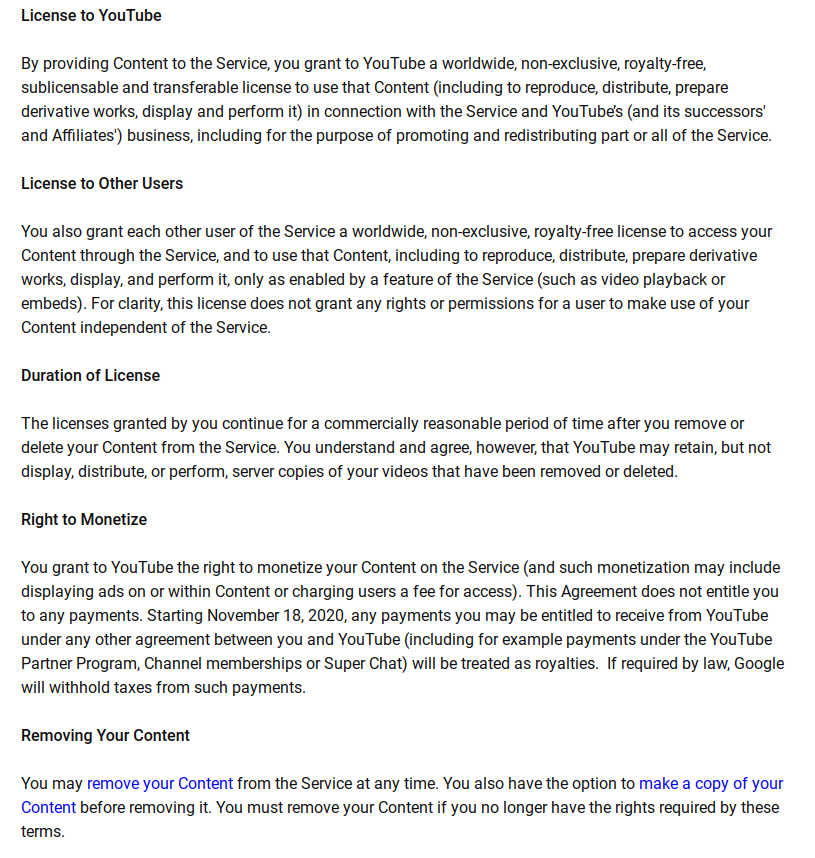
awev wrote: Sat Oct 09, 2021 11:11 am Who has taken the time to read the End Users License Agreement (EULA) or the Terms of Service (ToS), say for YouTube or Facebook? I will not agree to YouTubes conditions for posting content that I create - as I would be agreeing to let any other YouTube user use my content any way they desire, and I give up any rights to assert my copyright - just read through it.

This is not entirely true even though there is some truth to it.

I have inserted the direct quotation from the YouTube "Terms of Service."
https://www.youtube.com/static?template=terms

"You also grant each other user of the Service a worldwide, non-exclusive, royalty-free license to access your Content through the Service, and to use that Content, including to reproduce, distribute, prepare derivative works, display, and perform it, only as enabled by a feature of the Service (such as video playback or embeds). For clarity, this license does not grant any rights or permissions for a user to make use of your Content independent of the Service."
📎 YouTubeLicenseAgreement.png (141.03 KiB)
New Member
#30
We tried our first broadcast using the Zoom webinar platform instead of the church's webcast system and it went pretty well. We disconnected our Teradek and routed the HDMI video and audio cables into a laptop using a video capture device (Mavis Link Video Capture Card) and a 1/8" to USB adapter (Sabrent USB External Stereo Sound Adapter). The only problem we noticed was the picture transmitted showed a slight distortion - everyone looked a little slimmer and taller then normal. (Is that a bad thing?) I'm wondering if that is a result of the quality of the video capture device we are using?

Anyone else noticed this? If so, have you found a fix?

Thanks for your time.
New Member
#31
SmithonVI wrote: Mon Nov 29, 2021 2:59 pm We tried our first broadcast using the Zoom webinar platform instead of the church's webcast system and it went pretty well. We disconnected our Teradek and routed the HDMI video and audio cables into a laptop using a video capture device (Mavis Link Video Capture Card) and a 1/8" to USB adapter (Sabrent USB External Stereo Sound Adapter). The only problem we noticed was the picture transmitted showed a slight distortion - everyone looked a little slimmer and taller then normal. (Is that a bad thing?) I'm wondering if that is a result of the quality of the video capture device we are using?

Anyone else noticed this? If so, have you found a fix?

Thanks for your time.
I have been using a Zoom webinar at the Stake center for a daytime religion class with a similar setup. I have noticed that there is a use original ratio setting.

https://support.zoom.us/hc/en-us/articl ... mobile-app
New Member
#32
Hi Vic22,

Yes, I found that setting this week as I was researching our problem. It didn't help but the check box next to it (HD) did reset the video to eliminate the distortion. Perhaps that just told Zoom to recognize our existing HD cameras. Always something to learn.

Anyway, thanks for your time in responding to my post. Stay safe and well.
New Member
#33
With the YouTube API, I can setup YouTube Live to work almost like the webcasting with the Larix app. I wish the embedding in a webpage worked for YouTube live events though. Has anyone else been able to get embedding to work with new YouTube channels?
New Member
#34
Mikerowaved wrote: Sat Oct 09, 2021 7:33 pm Since nearly all of our stake's YouTube videos change to "Unlisted" 60 seconds after they end, and are deleted after I've had a chance to check them for any quality problems, other YouTubers don't have access to them.
In my ward, we just make them unlisted from the start and use a URL redirection service so members can use the same URL every Sunday. During the week, I point the redirect to the main church website. When the video goes live (usually a few minutes before the meeting starts), I replace it with whatever the YouTube URL is for that day.
New Member
#35
So today (01,23,2022) I paid a visit to my neighboring ward (Copper Hill) as I've been suffering from the worst Audio issues such as (hissing and muffling) of our Audio via the use of ZOOM meetings.

The purpose was to find out if maybe the issue was my wiring and or settings within OBS and Zoom as I was amazed on how well their quality both in Video & Audio but specially in their AUDIO was coming through Youtube.

Turns out that it was neither any software settings nor cabling of the equipment, zoom meetings just sound really "really!" bad when streaming. Just a heads up to those making the switch over to Zoom in the next coming months.

If anyone has any additional input please do let everyone know as this is quite annoying.

And yes I'm running the latest software versions of zoom and OBS.
- Utilizing a new Mac M1 laptop along with their new Apple VT H264 Software Encoder under my Output settings in OBS.
(don't use the Hardware options for your output encoder, as this is only recommended when your dealing with bitrates above 10,000 Kbps , I currently have mine set to 4500 Kbps given we have a 15Meg Upload speed on our internet connection.

(side note: find out what your upload speeds are via speedtest.com and then utilize around 30% of that figure and then do the conversion to bitrates, example: 10meg upload = 3,000 bitrate. <---- you want to input that figure into your output settings / under the Advanced tab)

-Rodecaster Pro with no audio effect, just straight into my laptop.

thanks
Member
#36
What purpose does OBS serve in your configuration?

Do you have the 'enable original audio' box ticked?

Have you monitored the audio at source by utilising headphones directly at your laptop before transmission via zoom?
New Member
#37
Just I thought I would share what we have done to transition from Broadcasting to Zoom using our pre-wired equipment at the Stake Center. I will share a video link below. I will also share a link for using a GoPro for Zoom in a building that does not have a pre-wired camera.

Video Links:
Buildings with Pre-wired Camera systems: https://youtu.be/iZEGO_5wlpY
Buildings with-out: https://youtu.be/JNP3sNsEVOs

Sincerely
Josh L
Community Administrator
#38
Surfing4u wrote: Thu Feb 10, 2022 9:24 pm Just I thought I would share what we have done to transition from Broadcasting to Zoom using our pre-wired equipment at the Stake Center. I will share a video link below. I will also share a link for using a GoPro for Zoom in a building that does not have a pre-wired camera.
I take it that neither chapel had an audio out from the sound system? That should eliminate the need for the mixer.
Have you searched the Help Center? Try doing a Google search and adding "site:churchofjesuschrist.org/help" to the search criteria.

So we can better help you, please edit your Profile to include your general location.
Member
#39
russellhltn wrote: Thu Feb 10, 2022 9:44 pm
Surfing4u wrote: Thu Feb 10, 2022 9:24 pm Just I thought I would share what we have done to transition from Broadcasting to Zoom using our pre-wired equipment at the Stake Center. I will share a video link below. I will also share a link for using a GoPro for Zoom in a building that does not have a pre-wired camera.
I take it that neither chapel had an audio out from the sound system? That should eliminate the need for the mixer.
I was thinking the same. First time i've seen someone interrupt the signal between the mic and the sound system. Usually done further down the chain.

GoPro is a great camera for it's intended purpose for sure. Unless someone in the ward already has one to use reliably every week, there are much more cost effective cameras that don't have such a wide angle lens and need to be so close.

Anyway, thanks for sharing. Always good to see what others are doing.
New Member
#40
russellhltn wrote: Thu Feb 10, 2022 9:44 pm
Surfing4u wrote: Thu Feb 10, 2022 9:24 pm Just I thought I would share what we have done to transition from Broadcasting to Zoom using our pre-wired equipment at the Stake Center. I will share a video link below. I will also share a link for using a GoPro for Zoom in a building that does not have a pre-wired camera.
I take it that neither chapel had an audio out from the sound system? That should eliminate the need for the mixer.

The Go Pro set up did have issues, and so we went with the mixer for a seamless experience. The Setup for the Stake: Using the mixer allows for everything to be in one place for ease of use with mutable mics for Leadership & audience participation. We usually run three wireless mics. one Lapel and 2 handhelds. The mixer makes it easy, and clean... instead of plugging in around area.

Josh
New Member
#41
We've been using a Teradek VidiU and were looking for solutions to move our meeting broadcasts to Zoom with minimal added cost/complexity. To do that, we're testing a cloud-based relay option that enables broadcasting from our existing Teradek (or any RTMP stream) to Zoom, without the need for any additional computer or A/V hardware.

Essentially it's a custom script that spins up and configures a secure cloud instance on AWS on demand (when our meeting is scheduled each week), starts the Zoom webinar, and relays the incoming Teradek stream to the Zoom webinar in real-time. It also shows a fallback image for any periods when the device isn't broadcasting, such as before the meeting has started. To make the switch, we just had to set up the Zoom webinar, then change the "Remote XML" URL on the Teradek.

Software components include nginx-rtmp-module, v4l2loopback, snd-aloop, the Zoom client for Linux, and a nodejs service to tie it together. Estimated AWS costs (including bandwidth) are less than $1 per ward per month, as it can run on very modest specs.

If anyone here is interested in something similar, let me know. If there is interest, I may be able to publish the scripts or make it available as a turn-key solution at cost.
New Member
#42
Can you not just use YouTube for that? You can put in the RMTP and Stream Key straight into the Teradek like you used to with the church webcast system can't you? I apologise if you need Zoom for any additinal functionality, I didn't see that in your post.
New Member
#43
ayoward wrote: Wed Mar 09, 2022 8:28 am Can you not just use YouTube for that? You can put in the RMTP and Stream Key straight into the Teradek like you used to with the church webcast system can't you? I apologise if you need Zoom for any additinal functionality, I didn't see that in your post.
Yes, YouTube can work too. Our stake has chosen to follow the guidance in the Church’s statement “Please transition to Zoom”. The statement does suggest YouTube for events requiring over 500 connections, but most of our meeting do not, and it sounds like the Church prefers we use Zoom for those meetings. Zoom also provides interactive features when we need them for smaller meetings/classes (with a standard laptop setup), so sticking to one platform for everything other than Stake Conference is also a plus.

If the Church’s recommendation has changed since the statement attached in the first post of this thread, let me know.
New Member
#44
Well, I'm not sure about the recommendation changing, but what I do know is that when Elder Ballard, Elder Holland and Elder Cook visited the British Isles recently, they held a special meeting broadcast to the members over here from the Hyde Park Chapel in London. This was broadcast only on YouTube, so I thought if it's good enough for them, it will be good enough for our stake. :D
New Member
#45
Don't get me wrong, we still use Zoom for our normal Sunday services in the wards.
Member
#46
ayoward wrote: Wed Mar 09, 2022 9:50 am Well, I'm not sure about the recommendation changing, but what I do know is that when Elder Ballard, Elder Holland and Elder Cook visited the British Isles recently, they held a special meeting broadcast to the members over here from the Hyde Park Chapel in London. This was broadcast only on YouTube, so I thought if it's good enough for them, it will be good enough for our stake. :D
That was specifically because of capacity reasons, but I take your sentiment.

YouTube is still encouraged as an overflow/backup option. It's not forbidden or anything.

YouTube offers better audio and video quality but Zoom offers the benefit of consolidation and also tighter controls on the viewing experience. For example, being shown random adverts on YouTube.

We're still weighing our options and haven't yet committed to either.
Progression from Webcast + Mevo means YouTube is the logical step as it requires no difference in hardware, just settings to update.
New Member
#47
benturley wrote: Sat Mar 05, 2022 11:50 am We've been using a Teradek VidiU and were looking for solutions to move our meeting broadcasts to Zoom with minimal added cost/complexity. To do that, we're testing a cloud-based relay option that enables broadcasting from our existing Teradek (or any RTMP stream) to Zoom, without the need for any additional computer or A/V hardware.

Essentially it's a custom script that spins up and configures a secure cloud instance on AWS on demand (when our meeting is scheduled each week), starts the Zoom webinar, and relays the incoming Teradek stream to the Zoom webinar in real-time. It also shows a fallback image for any periods when the device isn't broadcasting, such as before the meeting has started. To make the switch, we just had to set up the Zoom webinar, then change the "Remote XML" URL on the Teradek.

Software components include nginx-rtmp-module, v4l2loopback, snd-aloop, the Zoom client for Linux, and a nodejs service to tie it together. Estimated AWS costs (including bandwidth) are less than $1 per ward per month, as it can run on very modest specs.

If anyone here is interested in something similar, let me know. If there is interest, I may be able to publish the scripts or make it available as a turn-key solution at cost.
I would love to see this. We have yet to move off the webcast platform, so if your setup will be seemless and use Zoom, I would love to follow-suite.
Community Moderators
#48
Our stake transitioned from the Church webcast system to YouTube Live. The decision was very simple. We used the back-up option.

The notice at the Meetinghouse Webcast Event Manager site says
Please make the transition to the Church-sponsored Zoom accounts (Preferred) or YouTube Live (Back-up option) ASAP!.
Our stake has a Teradek VidiU encoder in a very expensive audiovisual rack that we were feeding directly to the soon to be decommissioned Church webcast system. The preferred option, to transition to Zoom, would require the purchase and maintaining of expensive additional equipment including something akin to a laptop and other connection devices that would become obsolete and require replacement regularly.

The back-up option, YouTube Live, required less than 10 minutes* to enter new streaming codes into the encoder. I did not need to use my credit card, other than to scrape some ice off of my windshield the day I made the switch.

* In the interest of full disclosure, I tried off and on for three months to get my encoder to speak with YouTube. My faith was not sufficient to risk losing the Church connection by messing up those settings. But in the end, those settings were the cause of my troubles. On my last and successful attempt, I wiped the encoder memory, reset it from scratch with the YouTube codes, rebooted the encoder, and webcast on the first try. I should have done that at the very beginning.
New Member
#49
matthewdavis wrote: Sun Mar 13, 2022 5:48 am I would love to see this. We have yet to move off the webcast platform, so if your setup will be seemless and use Zoom, I would love to follow-suite.
Glad to know we're not the only ones interested in this. We did a full test today, broadcasting our sacrament meeting using the new cloud-based solution (Teradek to Zoom) and it worked perfectly.

If I can find some time in the next week or two, I'll see if I can put together a basic self-serve option for other wards wanting to use this, so you can essentially just upload a CSV/spreadsheet of meeting dates/times (and Zoom info), and it will set up everything and provide a unique XML configuration URL for your Teradek, similar to the soon-to-be-retired Church webcast solution. Will keep you posted.
Member
#50
benturley wrote: Sun Mar 13, 2022 5:33 pm
Glad to know we're not the only ones interested in this. We did a full test today, broadcasting our sacrament meeting using the new cloud-based solution (Teradek to Zoom) and it worked perfectly.

If I can find some time in the next week or two, I'll see if I can put together a basic self-serve option for other wards wanting to use this, so you can essentially just upload a CSV/spreadsheet of meeting dates/times (and Zoom info), and it will set up everything and provide a unique XML configuration URL for your Teradek, similar to the soon-to-be-retired Church webcast solution. Will keep you posted.
I'd be very interested in this. It's way beyond my technical capabilities to develop that on my own and am really looking to keep it as simple as the current webcast format is.
New Member
#51
benturley wrote: Sat Mar 05, 2022 11:50 am We've been using a Teradek VidiU and were looking for solutions to move our meeting broadcasts to Zoom with minimal added cost/complexity. To do that, we're testing a cloud-based relay option that enables broadcasting from our existing Teradek (or any RTMP stream) to Zoom, without the need for any additional computer or A/V hardware.

Essentially it's a custom script that spins up and configures a secure cloud instance on AWS on demand (when our meeting is scheduled each week), starts the Zoom webinar, and relays the incoming Teradek stream to the Zoom webinar in real-time. It also shows a fallback image for any periods when the device isn't broadcasting, such as before the meeting has started. To make the switch, we just had to set up the Zoom webinar, then change the "Remote XML" URL on the Teradek.

Software components include nginx-rtmp-module, v4l2loopback, snd-aloop, the Zoom client for Linux, and a nodejs service to tie it together. Estimated AWS costs (including bandwidth) are less than $1 per ward per month, as it can run on very modest specs.

If anyone here is interested in something similar, let me know. If there is interest, I may be able to publish the scripts or make it available as a turn-key solution at cost.
Sorry to ping you again.. but with the recent announcement that the webcast system will be offline for an indefinite amount of time, do you have an alpha set of scripts you can share?
Senior Member
#52
matthewdavis wrote: Tue Mar 29, 2022 8:18 am Sorry to ping you again.. but with the recent announcement that the webcast system will be offline for an indefinite amount of time, do you have an alpha set of scripts you can share?
Not offline, but permanently withdrawn from service!
Community Administrator
#53
Biggles wrote: Tue Mar 29, 2022 8:50 am Not offline, but permanently withdrawn from service!
According to the subject line, that wasn't supposed to happen until July.
Have you searched the Help Center? Try doing a Google search and adding "site:churchofjesuschrist.org/help" to the search criteria.

So we can better help you, please edit your Profile to include your general location.
Senior Member
#54
russellhltn wrote: Tue Mar 29, 2022 11:42 am
Biggles wrote: Tue Mar 29, 2022 8:50 am Not offline, but permanently withdrawn from service!
According to the subject line, that wasn't supposed to happen until July.
I made the assumption that the poster was referring to a a temporary outage, but hadn’t realised that the service was being permanently withdrawn in July!
New Member
#55
matthewdavis wrote: Tue Mar 29, 2022 8:18 am Sorry to ping you again.. but with the recent announcement that the webcast system will be offline for an indefinite amount of time, do you have an alpha set of scripts you can share?
I'm hoping to have something online this week or soon after General Conference to allow other wards/stakes to use the solution. Haven't had as much time to work on it as I'd like (busy with other work), but with the recent announcement and seeing as there's a need for it not just in my stake, I'm making it a higher priority.
New Member
#56
Biggles wrote: Tue Mar 29, 2022 8:50 am Not offline, but permanently withdrawn from service!
It's not permanent based on the email I received.
To support our General Conference, we will need to take down our Webcast system for a few days. This means that our Webcast system will be unavailable beginning today, March 28th. We will be working with Church leadership to determine when Webcast can be made available again sometime after General Conference. We do not have a specific date at this time when Webcast will become available. If you need to broadcast local unit meetings, please use Zoom. You can request a Church-provided Zoom license at meet.churchofjesuschrist.org if you don’t already have one.
I read that as it'll be back, just the date is unknown.
Community Moderators
#57
matthewdavis wrote: Wed Mar 30, 2022 8:49 pm I read that as it'll be back, just the date is unknown.
I tend to agree agree. I also read (and this is only my personal opinion) that with the ups and downs of church services of late, it's probably all hands on deck to ensure all conference sessions go flawlessly. After conference, everyone can get back to what they were working on, including stabilizing services, such as webcasting.
So we can better help you, please edit your Profile to include your general location.
New Member
#58
it's offline as of April 1 ... it's been 5 days without connections.
I'm guessing there will be many wards and stakes who don't notice until Sunday morning.

we are moving broadcasts this week.
New Member
#59
For those wishing to try the Teradek to Zoom relay service my ward is using, please send me an email here: rtmprelay_beta@luminationlabs.com

I'm in the process of deploying a beta version and can send you some instructions for getting set up. The current relay servers are in the US only right now, so probably not going to work well for anyone outside North America.
New Member
#60
Pretty frustrated with the way this was handled. Our wards are scrambling to switch to Zoom this weekend due to the removal of the webcast system three months early.

Nothing actionable, just wanted to state that this is not how this should have happened. Erodes trust for church-provided resources.
New Member
#61
100% agree. This was handled very poorly. We are scrambling as well. We were working backwards into the date they provided.
Senior Member
#62
We may never officially know, but given the scope and nature of the multitude of issues with Church systems over the past few weeks, I imagine that this is something that appeared unlooked-for, and the Church is trying to react the best they can. We know communication with the users (aka all of us) is always an issue, but although I'm quite disconnected from any awareness of the specifics, what I've seen in the Forum and elsewhere leads me to believe that it's more than simply "poor management". For example, MLS was unceremoniously discontinued this week without any prior notice, much earlier than anticipated. Obviously MLS isn't key functionality anymore like webcasting still is, but I believe it's a symptom of the underlying nature of what's occurred.

That said, I sympathize with your pain. We have a visiting general authority for our Stake Conference next weekend, and these issues are causing a lot of (unexpected) grief and stress for those involved. Which thankfully doesn't include me...
New Member
#63
About a month ago I was not able to log into the financial section of LCR, and the clerk computer wanted to restart because of a windoze update, so it was bad all around. Now with MLS not being an option to enter in-person donations, I can foresee problems, and with two people needing to be present to do in-person donations, that does require some manpower to ensure it is up and running on a Sunday. Looking at LCR I see we can not submit our quarterly reports right now. That requires some resources as well. General Conference is over, so webcasting takes a lower propriety at this time. At this point I expect that we will receive one more official letter about this, and that will be how to de-commission the equipment and ensure that it does not pose any security threats (they can update the firewall rules, so that is something we do not have to worry about).
New Member
#64
I’ve made some improvements to the RTMP to Zoom relay, publishing it now as a public web service. For anyone wanting to stream from a Teradek to Zoom (without needing a computer with Zoom), you’re welcome to try this solution out. It should also work with other sources that can publish to RTMP(S) like OBS. It’s still considered “beta”, but I’ve been testing with a few people and have received good feedback while ironing out the issues.

To try it out, visit https://stream2meeting.com

Pricing right now essentially reflects the AWS cost to run it, though the price for non-church usage will likely increase in the future. Feedback is welcome at support@stream2meeting.com. Thanks!
Community Moderators
#65
A Notice at the Official Communication Library dated today reminds that the Webcast system, including the Webcast Portal, will go away in July as previously announced. July 1st, to be exact.

I was tickled that the Notice also included a link to the Meetinghouse Virtual Meeting Wiki page that will provide "self-support content on transitioning from Webcast to Zoom" for those who may not have made the switch as of yet.

"Self-support" reminds me of something that happened in 2004 as we were switching from MIS/FIS to MLS. Of course, MLS is gone now, as well, at least in the U.S. according to word of mouth. I think.

I guess I will always have trouble with the 1 Corinthians 14:8 part of all of this. Refreshingly, the Notice today does not fall into that category. I am almost able to sense the excitement of the person who wrote it.
New Member
#66
I was a fairly new member of the church when they where using MIS/FIS, so I never got to see that. MLS was established, yet improvements and features where still being added when I was first called as an assistant clerk for membership. Now days as a branch clerk I am discouraged from using MLS, everything is expected to be done on-line. I am no longer able to use MLS to enter donations on Sundays, I am required to go online to do so, even if the servers are down :( . So the word of mouth is correct, and I find it easier to transfer member records online, that way I don't have to connect, download updates, read important communications that are not, enter the information without real-time checking/feedback, and then transmit the information, and finish up by backing up everything to a thumb drive.
As to the official July 1st disconnect I think people have felt that it has happened un-officially before the April General Conference. I do not know if a band-aid was put on it and made to work for the rest of this month or not. My stake pretty much said near the start of this year that we are doing live, in-person, only, and if there is an exception, it would be an area 70 doing a regional broadcast, and even then everyone would be expected at the stake center to watch the televised 70 speak.

COVID-19 and webcasting has been a learning experience. It is at a point that my branch president and I are able to stream a sacrament service without much difficulty, as long as hearing a speaker clearly is not a requirement. I am able to get RS and EQ meeting going on Zoom with little problems nowadays. Still have the problem in our rural community of poor DLS service, so you can not have the kids to join Primary in one room, expect YM/YW to Zoom in a second room, while mom attends RS in a third room, and day is part of the EQ in the tool shed. People in our branch just do not have the bandwidth for that. If nothing else COVID-19 has been a great teacher in time and resource management, along with team building (figuring out schedules, helping each other understand how to use the technology, etc).
New Member
#67
Just became aware of this transistion/letter today I believe, I guess I should visit the tech forum more often.

It mentions that the webcast system is being shut down. Is it a requirement that we move from other systems we may using which aren't webcast?

I've been using OBS and YouTube for some time for our Sacrament meeting broadcasts.

Thanks
Member
#68
Yep, you can carry on with OBS to YouTube.
New Member
#69
With the end of the webcast system and the webcast.churchofjesuschrist.org site no longer available, is there a way to access the reports from the last quarter (April, May, & June)?

Thanks, Doug

Doug Reynolds
Technology Specialist
Clinton West Stake
Community Moderators
#70
I doubt it. Last I checked the website had completely gone away and could not be accessed late in the evening of June 30th.