Cannot login to lds tools

18 postsstarted by anztenney 15,572 viewsoriginal topic

New Member
#1
I’m trying to help my wife’s primary secretary sign in to the tools app. We have verified she can signin online to
https://account.churchofjesuschrist.org
And
https://churchofjesuschrist.org

When we look at her Membership information (https://account.churchofjesuschrist.org/membership) it shows her correct record number and current calling.

When she tries to login to the app with the same username and password, she gets an error. We asked the clerk, and he said to reach out to tech support.

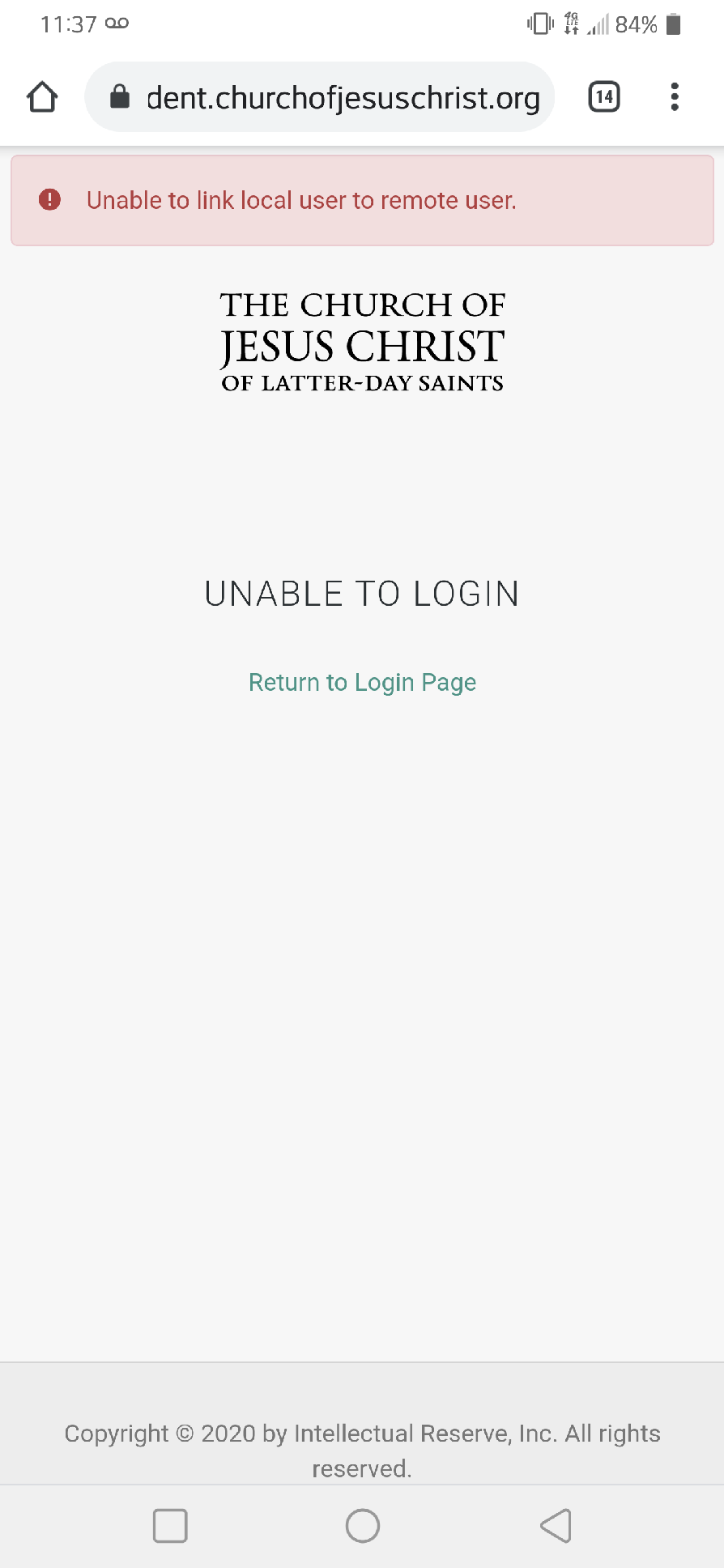
One last strange thing is when she tries to view the ward directory online, she gets this error.
Unable to link local user to remote user
Screenshot_20210502-113734.png
(76.36 KiB) Not downloaded yet
Community Administrator
#2
By chance, does she have any punctuation or something other than letters and number in her name or password? It's possible the apps are not encoding them correctly.

I'd also ask the clerk to verify that MRN is in the ward. It's not unheard of for someone to have a duplicate record.
Have you searched the Help Center? Try doing a Google search and adding "site:churchofjesuschrist.org/help" to the search criteria.

So we can better help you, please edit your Profile to include your general location.
New Member
#3
anztenney wrote:I’m trying to help my wife’s primary secretary sign in to the tools app. We have verified she can signin online to
https://account.churchofjesuschrist.org
And
https://churchofjesuschrist.org

When we look at her Membership information (https://account.churchofjesuschrist.org/membership) it shows her correct record number and current calling.

When she tries to login to the app with the same username and password, she gets an error. We asked the clerk, and he said to reach out to tech support.

One last strange thing is when she tries to view the ward directory online, she gets this error.
Unable to link local user to remote user
Screenshot_20210502-113734.png
Hello anztenney.

In our ward we also have a member who is a councillor in the primary with the same problem (HUAWEI P30, Android 10):
She can login on the website but it doesn't work in the Member Tools App (named LDS Tools before).

We checked the Membership Number (is that what MRN means?), it is correct and also in our ward list. We reinstalled the application (Version 4.3.1), we reseted the data of the App, nothing helped.

Do you have an other idea?

Greetings :geek:
New Member
#4
Can I get my Membership number online?
Senior Member
#5
Alirod2527 wrote: Tue Aug 24, 2021 2:49 pm Can I get my Membership number online?
No, but your ward or branch clerk can give it to you.
New Member
#6
Following. Can use churchofjesuschrist.org with new password, but same password does not work in tools. Old password does not work either.
Community Administrator
#7
Landline wrote: Wed Sep 15, 2021 10:34 am but same password does not work in tools.
How long ago did you change your password? I've seen in the past it might take a few minutes for a new password to sync.

Does your password have any punctuation that might be mishandled?
Have you searched the Help Center? Try doing a Google search and adding "site:churchofjesuschrist.org/help" to the search criteria.

So we can better help you, please edit your Profile to include your general location.
New Member
#8
I am having the same issue any resolution yet
New Member
#9
All of a sudden, I can't get in to LDS Tools stopped working. It doesn't like any of my passwords.
How can I get some help to get back into Tools?
Community Administrator
#10
farnsy wrote: Thu Dec 08, 2022 4:38 pm All of a sudden, I can't get in to LDS Tools stopped working. It doesn't like any of my passwords.
How can I get some help to get back into Tools?
Did you turn on two factor authentication (2FA)? Church mobile apps only support some forms of 2FA.
Have you searched the Help Center? Try doing a Google search and adding "site:churchofjesuschrist.org/help" to the search criteria.

So we can better help you, please edit your Profile to include your general location.
New Member
#11
I also all of a sudden cannot login to LDS Tools, or Member Tools. It says my password is wrong, but it is. I changed it, and waited awhile and tried again, and still the same. I don't have any special characters or anything in the password.
Community Administrator
#12
knger1 wrote: Thu Dec 22, 2022 2:28 pm I also all of a sudden cannot login to LDS Tools, or Member Tools. It says my password is wrong, but it is. I changed it, and waited awhile and tried again, and still the same. I don't have any special characters or anything in the password.
Did you turn on Two Factor Authentication?
Have you searched the Help Center? Try doing a Google search and adding "site:churchofjesuschrist.org/help" to the search criteria.

So we can better help you, please edit your Profile to include your general location.
New Member
#13
I'm having the same problem with the tools app.
I can sign in online, but not with the tools app.
Recently I was called to serve a service mission and two step authentication was turned on.
Now I can't use the tools app.
New Member
#14
About 30 minutes after posting this message, the app let me login.
New Member
#15
My Church account and my Tools account are linked, and I cannot access LDS Tools on my SamsungA452 phone. I thought it was because I had mistakenly given Tools the same username as my Church account (different passwords). I went into to my Church account and changed my user name. When I tried signing into Tools, it did the same thing as before...it took me directly to my Church account. I read through the suggestions, but didn't see anything that spoke directly to my problem. Can you help? I have deleted and reinstalled the app, but that did nothing.
Community Administrator
#16
IFollowHim wrote: Wed Mar 15, 2023 8:51 am My Church account and my Tools account are linked, and I cannot access LDS Tools on my SamsungA452 phone. I thought it was because I had mistakenly given Tools the same username as my Church account (different passwords). I went into to my Church account and changed my user name. When I tried signing into Tools, it did the same thing as before...it took me directly to my Church account.
There is no separate tools account. You can have multiple church accounts, but only one can have your Membership Record Number connected with it. The one with the MRN is the only one that will work with Member Tools. It's the MRN that's the key to determining what ward you're in and what you should see.
Have you searched the Help Center? Try doing a Google search and adding "site:churchofjesuschrist.org/help" to the search criteria.

So we can better help you, please edit your Profile to include your general location.
New Member
#17
Id is correct, password is correct.
App: try another way to sign in two step verification

and a back button
I only have one way.
[contact information removed]

[Moderator edit: Removed contact information since this is a publicly-visible user-to-user discussion forum.
New Member
#18
I had the same problem…password I use on LDS websites stopped working for LDS Tools app and scriptures app. After going on the church website, go to account settings, and turn off two factor Authentication. Everything works now.