More Permanent Setup for Sacrament Meeting Broadcasts

43 postsstarted by richielloydbrown 13,729 viewsoriginal topic

Church Employee
#1
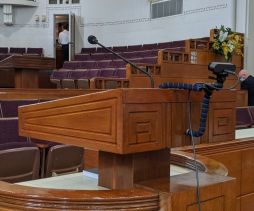
My Stake Presidency has asked us to look for a more permanent solution for broadcasting weekly sacrament meetings, even though many members are now attending in person. Based on handbook changes, the stake would like to always have a broadcast option that bishops can provide to members (for those who are chronically ill, longer-term home bound, etc.). They however do not want to continue with the setup we have been using that is a bit obtrusive (laptop on a table below pultip with webcam on a music stand and audio running from pulpit output (or USB microphone in some buildings). Broadcast would continue to be over Zoom.

My first thought is a mounted PTZ camera in the back (left or right side) and a feed from the chapel audio system. Then we just plug both into a video capture device + laptops (existing)
We could do some kind of handy-cam on a tripod in the back...
Haven't heard back from the FM yet...

Experience with this type of setup? Cautions? Or any other ideas?
Richard Brown
Product Manager | Missionary Department
New Member
#2
In our stake, I've received the same mandate and have been done quite a bit of research on options. I'm actually at a point where I've put together a preliminary report on options. When it's done, I'll send it to you via PM. Readers Digest version -- PTZOptics NDI camera into ?? software using ?? O/S. You need to understand what uses H/W encoding and what doesn't.

One thing to know up front, and this was confirmed by the regional FM manager, - the Church will NOT pay for cameras, webcast components etc. for non-stake center buildings. They want to reserve the tithing funds for temples and buildings / programs in "more challenged" countries both economically and pandemic affected. If you want to do anything in your individual building(s), you'll have to pay for it yourself. The FM group will assist in installing the network lines (camera to switch plus switch to where ever you'll manage the webcast) as well as mount the camera.

Carlton
Community Moderators
#3
richielloydbrown wrote:My Stake Presidency has asked us to look for a more permanent solution for broadcasting weekly sacrament meetings, even though many members are now attending in person.
My stake presidency has received instructions that all 2nd hour webcasts are to end immediately and that sacrament meeting webcasts are to end by June 1st.
Community Administrator
#4
lajackson wrote:My stake presidency has received instructions that all 2nd hour webcasts are to end immediately and that sacrament meeting webcasts are to end by June 1st.
Rather curious considering General Handbook 29.7.
Have you searched the Help Center? Try doing a Google search and adding "site:churchofjesuschrist.org/help" to the search criteria.

So we can better help you, please edit your Profile to include your general location.
Member
#5
richielloydbrown wrote:My Stake Presidency has asked us to look for a more permanent solution for broadcasting weekly sacrament meetings, even though many members are now attending in person. Based on handbook changes, the stake would like to always have a broadcast option that bishops can provide to members (for those who are chronically ill, longer-term home bound, etc.). They however do not want to continue with the setup we have been using that is a bit obtrusive (laptop on a table below pultip with webcam on a music stand and audio running from pulpit output (or USB microphone in some buildings). Broadcast would continue to be over Zoom.

My first thought is a mounted PTZ camera in the back (left or right side) and a feed from the chapel audio system. Then we just plug both into a video capture device + laptops (existing)
We could do some kind of handy-cam on a tripod in the back...
Haven't heard back from the FM yet...

Experience with this type of setup? Cautions? Or any other ideas?
Have you looked into the mevo start option?
Member
#6
Edited 1 time, last by Wattsuk on
dbaresrc wrote:In our stake, I've received the same mandate and have been done quite a bit of research on options. I'm actually at a point where I've put together a preliminary report on options. When it's done, I'll send it to you via PM. Readers Digest version -- PTZOptics NDI camera into ?? software using ?? O/S. You need to understand what uses H/W encoding and what doesn't.

One thing to know up front, and this was confirmed by the regional FM manager, - the Church will NOT pay for cameras, webcast components etc. for non-stake center buildings. They want to reserve the tithing funds for temples and buildings / programs in "more challenged" countries both economically and pandemic affected. If you want to do anything in your individual building(s), you'll have to pay for it yourself. The FM group will assist in installing the network lines (camera to switch plus switch to where ever you'll manage the webcast) as well as mount the camera.

Carlton
That's a FM group policy rather than a church wide policy.

One FM group has provided 2 x mevo start cameras to each stake within its area. It has advised the stake to distribute them as they see fit, but recommended that the stake centre continue with it's teradek.

Many wards and stakes have not utilised their budget in the same way during the pandemic and could quite comfortably set aside some funds for some technology provided a reasonable case of sustainability can be presented.
Member
#7
russellhltn wrote:
lajackson wrote:My stake presidency has received instructions that all 2nd hour webcasts are to end immediately and that sacrament meeting webcasts are to end by June 1st.
Rather curious considering General Handbook 29.7.
Yes, and that section of the handbook suggests that the local Bishops make these decisions. I'm sure the stake presidency will have some counsel for the Bishops within their stake just as the CCM / Area presidency have some counsel for the Stake Presidents.
Community Moderators
#8
lajackson wrote:My stake presidency has received instructions that all 2nd hour webcasts are to end immediately and that sacrament meeting webcasts are to end by June 1st.
russellhltn wrote:Rather curious considering General Handbook 29.7.
Wattsuk wrote:Yes, and that section of the handbook suggests that the local Bishops make these decisions. I'm sure the stake presidency will have some counsel for the Bishops within their stake just as the CCM / Area presidency have some counsel for the Stake Presidents.
General Handbook 29.7 and the instructions the stake president received are both new and do conflict. The stake president has pointed this out. It will be interesting to see what happens as these instructions are clarified.

One thing I noticed in 29.7 is the instruction that these are to be inconspicuous one-device operations.
Community Administrator
#9
Getting back to the thread's title, this is what my ward came up with. A web cam on the podium. At a distance it's there but easily ignorable. The picture is great. With a USB extension cable, the laptop can be anywhere in a 15' radius. Usually a folding chair acting like a table just off to the side of the podium or in front of the first row. Sometimes even on the front row pew.

Note that the bulk of the visual intrusiveness is the mount itself which is just hanging on and isn't at all permanent. With FM's help or permission to create a permanent mount, I'm sure something even more inconspicuous could be done.

Edit: wanted to add, what isn't visible in the photo is that podium has a raised lip that runs around the outside. The mount is using the lip to hang on. I know not all podiums have that raised lip. My point is that a webcam mounted on the podium can be unobtrusive, yet simple. (And cheap.)
WebcamS.jpg
WebcamS.jpg (14.56 KiB)
Have you searched the Help Center? Try doing a Google search and adding "site:churchofjesuschrist.org/help" to the search criteria.

So we can better help you, please edit your Profile to include your general location.
Senior Member
#10
My stake wanted the FM to mount PTZ cameras in all three meetinghouses, but the FM said it was only authorized in stake centers.

I put our webcam on a five-foot tripod so I can easily swivel it during both Sacrament Meeting and the second hour class meeting in the chapel. The class passes around an XLR mic on a 50-foot cord so those online can hear class comments.
Dana Repouille, Plattsmouth, Nebraska
#11
Here's what we did for our buildings. We fabricated a webcam mount that clamps to the base of the microphone boom. There is a rubber liner to prevent scuffing the boom, and a setscrew to lock the camera boom. Cable is mounted into the pulpit under the mic mount and out the bottom through a small hole. Keeps the camera at eye level and minimally intrusive. By attaching to the mic boom, the speaker stays in frame as the mic is raised or lowered for taller/shorter folks.
20210409_102929.jpg
(648.53 KiB) Not downloaded yet
20210409_102934.jpg
(265.86 KiB) Not downloaded yet
20210409_125819.jpg
(1.13 MiB) Not downloaded yet
Member
#12
swigginton wrote:Here's what we did for our buildings. We fabricated a webcam mount that clamps to the base of the microphone boom. There is a rubber liner to prevent scuffing the boom, and a setscrew to lock the camera boom. Cable is mounted into the pulpit under the mic mount and out the bottom through a small hole. Keeps the camera at eye level and minimally intrusive. By attaching to the mic boom, the speaker stays in frame as the mic is raised or lowered for taller/shorter folks.
20210409_102929.jpg20210409_102934.jpg20210409_125819.jpg
That's a neat solution. A more compact webcam could be a small improvement.
Something like a Microsoft lifecam studio which has a different form factor to the webcam you currently have.
Or use something like a Huddly go for an ultra wide angle lens. That way the camera position is more forgiving and could be more flexible?

Anyway, good to trade solutions and ideas.
New Member
#13
dbaresrc wrote:In our stake, I've received the same mandate and have been done quite a bit of research on options. I'm actually at a point where I've put together a preliminary report on options. When it's done, I'll send it to you via PM. Readers Digest version -- PTZOptics NDI camera into ?? software using ?? O/S. You need to understand what uses H/W encoding and what doesn't.
Carlton
I'd love a copy of that report, if you have it completed.

Thanks!
Member
#14
Our stake is transitioning to a permanent setup. Our stake president is fully on board with supporting the handbook change to let those who can't come view online. We've had a handful of reactivations because of our existing setup, and he wants to reach out to as many stake members as he can.

Our permanent setup is in the approval/implementation stage, and this is where it's headed:

* Moving the camera to the back corner of the chapel to keep the camera out of sight. We also prefer an ethernet jack in the back corner.
* Using our pre-existing cameras which have excellent zoom. Also using higher quality HDMI to USB converters with no latency.
* Using a small form factor computer (such as a raspberry pi) with a touch screen, 4 USB ports, ethernet jack, wifi, and an SD card. (I've got an OBS/raspberry pi 4 setup that's hitting 1280x720@30 fps.)
* Using Linux, OBS, and ffmpeg for ease of options, licensing, and copying/resetting disk images.
* Using wireless audio transmitters that guitarists use at concerts. These can be found for about $50 each, have excellent sound quality, and run long distances. (The hearing aid wireless ones have scratches and buzzes.)

The goal is enabling any ward member to hook up the camera to small computer, follow a short set of instructions, and start broadcasting. A camera assistant could choose to pan/tilt/zoom the camera and switch mics if desired. The computer itself is dedicated to broadcasting only and doesn't lend itself for general ward computer usage. We can hit our permanent solution for about $350 per ward in extra parts.
Community Administrator
#15
bradpeterson@gmail.com wrote:and an SD card.
It should be noted that using a SD card for a general use hard drive a bit of an abuse. SD was never designed for that. I think you'll find better long term reliability if you move to a SSD. It does take some work to get the Pi to boot off of a SSD, but it's do-able.
bradpeterson@gmail.com wrote:The hearing aid wireless ones have scratches and buzzes.
What brand receiver? If you can lay your hands on a Listen Technologies unit, that may disappear. Doing that would eliminate having to plug in the transmitter.
Have you searched the Help Center? Try doing a Google search and adding "site:churchofjesuschrist.org/help" to the search criteria.

So we can better help you, please edit your Profile to include your general location.
Member
#16
Edited 1 time, last by brad_p on
russellhltn wrote:It should be noted that using a SD card for a general use hard drive a bit of an abuse. SD was never designed for that. I think you'll find better long term reliability if you move to a SSD. It does take some work to get the Pi to boot off of a SSD, but it's do-able.
Yes, SSDs are a step up, but our plan is using it only a few hours every Sunday, and that's it. The units have enough RAM, and aren't using disk swap space, so disk I/O is relatively small. I've got a couple of Raspberry Pis in my house that get far more use and haven't had SD card problems. Worst case is that one SD card goes bad and I just flash another from a pre-existing image.
What brand receiver? If you can lay your hands on a Listen Technologies unit, that may disappear. Doing that would eliminate having to plug in the transmitter.
We have Listen Technologies units. We originally tried using them in 2020 and gave up. I went back and tried them again at our FM's request, from various locations in all 3 buildings' chapels. They all scratch and buzz. They're good enough for one person who just sticks a speaker next to their ear. But they're definitely a poor choice for broadcast audio. Our FM said we should put in a work order to try and get these improved, but I'm skeptical. I'd rather control our own audio with something that definitely works and has fewer moving parts.
Community Administrator
#17
bradpeterson@gmail.com wrote:We have Listen Technologies units. We originally tried using them in 2020 and gave up. I went back and tried them again at our FM's request, from various locations in the chapel. They all scratch and buzz. They're good enough for one person who just sticks a speaker next to their ear. But they're definitely a poor choice for broadcast audio. Our FM said we should put in a work order to try and get these improved, but I'm skeptical.
Probably wouldn't be a bad idea to put in the work order at requested - if nothing else, for the benefit of those who use the system. It might be the transmitter, or some interference.
Have you searched the Help Center? Try doing a Google search and adding "site:churchofjesuschrist.org/help" to the search criteria.

So we can better help you, please edit your Profile to include your general location.
Member
#18
Our long-term approach for broadcasting Sacrament Meetings is to implement a system that is fully automatic – well almost!

By using a $15 digital AC Timer the wall-mounted camera’s (PTZOptics20X) AC or POE power will be turned on and the camera will start broadcasting immediately (rtmp stream to youtube or church webcast server) 5 minutes before the meeting starts and then turn off 70 minutes later (5 minutes after scheduled end time). This timing cycle will repeat for every ward that meets in the bldg.

The camera’s power-on ptz position (preset 0) will NOT be the pulpit, it will be a small sign that says “Broadcast will begin /resume shortly”. By adding a magnetic reed switch https://www.amazon.com/dp/B07YW47395 to the side of the camera, using double stick tape, and placing the switch contacts in series with the audio connection of the camera, we can “connect” or “disconnect” the audio based on the “pan” position of the camera! Audio will be ‘disconnected” whenever the camera is at the “Preset 0” (the small sign) position - audio will be “connected” when the camera is pointed anywhere else(Preset 1 – pulpit).

If the Bishop wants to broadcast the meeting he can use the camera’s handheld IR remote control and press the “Preset 1” button which will move the camera ptz postion to the pulpit and also “un-mute” the audio. When it is time for the Sacrament ordinance, he simply presses the “Preset 0” button and the camera will rotate to the small sign and disconnect the audio. When the Sacrament is over, he presses “Preset 1” and camera moves to pulpit and audio is connected. Additional Presets are provided for a wider view of the pulpit and for musical numbers near the piano.

This automation is possible because the PTZOptics camera has a line level audio input and built in RTMP streaming.
📎 Automated Camera Setup.pdf (411.42 KiB)
Member
#19
This automation is possible because the PTZOptics camera
Oh how I wish I could find an IP driven PTZ camera that isn't $1800...
Member
#20
bradpeterson@gmail.com wrote:
This automation is possible because the PTZOptics camera
Oh how I wish I could find an IP driven PTZ camera that isn't $1800...
You can always buy used from ebay or one of the PTZOptics clones for a lot less !

PTZOptics Clone
https://www.amazon.com/gp/product/B097CF8482

Used PTZOptics
https://www.ebay.com/itm/284341679420
Member
#21
Oh how I wish I could find an IP driven PTZ camera that isn't $1800...
Here's a few more inexpensive streaming cameras with audio input.

https://www.ebay.com/itm/203074432762

https://www.google.com/shopping/product ... 2596047469

https://www.ebay.com/itm/203074432761

If you watch ebay you can pickup used PTZOptics 12X and 20X cameras as low as $600 ! Just check the completed sales on ebay. It seems that with covid winding down (fingers crossed) there are more organizations selling off their cameras.
#22
bradpeterson@gmail.com wrote:Oh how I wish I could find an IP driven PTZ camera that isn't $1800...
We're using 2 of these in our stake center. They support NDI so can be fully operated over a single Cat6 cable (PoE, streaming and IP VISCA control). They seem to be compatible with the PTZOptics tools. We're using the 30x zoom model. Their 20x model is $100 less.
https://www.amazon.com/gp/product/B08MZBFZ1Y/
We're controlling with this IP controller:
https://www.amazon.com/gp/product/B07ZS1F162
Member
#23
These are fascinating. Are there any ways to easily attach these to PC or even program it so you can do all the PTZ controller functions and selecting presets? My dream is that someone like a bishopric or a ward member could sit next to a touch screen, and we let them jump to camera presets or to PTZ positions. Then I could hook that feed into a second program (like OBS), which gives us the ability to switch mics and use OBS scenes.

The Ogden Tabernacle has a touch screen interface for PTZ/preset control. But it's only for camera. But if I had access to the camera feed, which these PTZ camers seem to do, then I could easily go one step futher, mix in audio and text, and send it out to another RTMP feed of my choice.
New Member
#24
our stake center is relatively new (dedicated Jan 2020).
The design for the stake center is much smaller than previous stake centers - it's ~11 feet longer than our other building designs. We cannot fit even half of our stake into the stake center. FM told us that is the direction for buildings in the future - no more large stake centers. So we are an all broadcast stake for stake conferences. We can mostly fit all the adults in for adult session of conference, but the broadcast makes it comfortable rather than a tight fit (and parents with young children love the broadcast).

> the new building came with a built-in PTZ camera installed during construction. The camera included a remote control in the tech closet and a remote extension such that the camera can be moved via remote control from the tech closet. It also has some presets that can be configured (1=podium, 2=choir, 3=zoom out, etc).
> There is a TV screen in the tech closet that shows the video output.
> the stake purchased a SlingStudio device (https://www.myslingstudio.com). This works very well and allows us to add additional wireless cameras using cell phones with an app installed. (during stake conference we place a camera at the organist, piano, musical numbers, congregation, etc. We can even carry a phone around or use another video camera and pipe in that video if needed for the meetings where the authority has lots of audience interaction). Some tech clerks use this during sacrament meetings also to make a better broadcast. others keep it simple and just use the one PTZ camera.
> the stake purchased a MacBook Air to run the SlingStudio software - this allows for replacing the video with the church symbol during the sacrament ordinance. (and during stake conference we can add overlays of the names of the speakers, pictures, etc similar to how General Conference is done)
> the stake purchased a small Yamaha mixer for audio (audio mixing includes, chapel mic, piano, organ for Sacrament meetings. For stake conf we add in choir and musical number mics). We have a bigger mixer for stake conferences so that we have enough inputs for wireless mics, lava mics, etc.
> We use the church system (https://mywebcast.churchofjesuschrist.org) and have the SlingStudio configured for 3 different ward streams each Sunday. Each ward chooses a destination for their ward and it takes just a few minutes to start/stop the stream between wards.
> the stake purchased misc adapters and mic stands to make everything work. We keep a mic on the piano so that we can add piano music to the audio and we can mix organ audio also. We don't have built-in condenser mics for choir or congregation - that would be a nice addition to make the at-home broadcast sound better (it's all organ music because mics don't pick up the sound of any others singing)

With a little bit of training many people are able to operate the system (although troubleshooting still requires higher skill levels of our tech clerks).


My thoughts/recommendations:
> establish a stake tech budget - start out with all the necessary equipment and have money to expand each year. you'll need to spend about $4000 to get initial equipment for a good system and there will be ongoing improvements you'll want to make - mic stands, tripods, additional cameras, condenser mics, mixers, etc etc.
> work with your FM group as needed
> don't go cheap on equipment - get what works and can be operated by people who aren't pro audio/visual types. Sacrament meetings and Stake Conferences are important and it's worth spending money to make high quality streaming meetings
> we have duplicated some of this setup in another stake building. We will likely do the same for all other buildings so that each system has the same learning curve and any trained user can operate the system in any building.
> PTZ cameras make it look so much more professional - professional broadcasts help bring the spirit to the homes ... don't go cheap, go quality (think about how much was spent for general conference - they do that right)
> get good video and audio quality - remember that some people at home will have hearing challenges - you need good audio with no hum/buzz so that they can feel the spirit also
> multiple cameras (and training to use them) make for a great stake conference experience - especially given the capability of the SlingStudio to use many camera inputs wirelessly
> include the tech clerk early in stake conference planning - it takes time to generate the speaker overlays and photographs and other items that help add to the speaker experience. when you have sample agendas communicate so that they can improve the broadcast quality by putting in music overlay, speaker names, etc. There's no reason you can't make stake conf or ward conf more professional and add to the spirit through the use of good technology
> when you get the system set up and tested, pay to have professionals instal cables in your building. Make it easy to set up and operate. If your cables were installed by someone who is a hobbyist, get a professional to re-do the work. FM likely has contracts with people who manage all the building audio
> some of the audio mixers will need to be re-programmed - the FM group/Audio contractors can help with this
> get a PTZ controller like the one mentioned in the post above
> don't be afraid to spend $2000+ on a good primary camera (and if you have an established budget you might be able to get another one in the future)
New Member
#25
We're using the AViPAS-1081 ($620 https://smile.amazon.com/dp/B079THZ1V3). We have it set up so a member of the bishopric can control the camera presets and video overlays from their cell phone.

We have a computer running OBS that stays in an unoccupied clerk's office, but could just as easily sit in the library, or next to the audio box in the chapel. OBS has a browser source (pointing to our website) that we use to overlay speaker chyrons and hymn lyrics. A member of the bishopric then controls the overlays through the browser on their cell phone. We also have buttons on that webpage that move the camera to presets*, specifically:
  • Speaker
    Rostrum
    Chorister
    Short Speaker
    Tall Speaker
    Congregation
    Gym
    Piano
    Piano & Instruments
    Piano & Vocal
Then during the sacrament ordinance the bishopric member pushes the sacrament button on their cell phone which causes OBS to mute the microphone, play the sacrament hymn music, and display pictures of the Savior with a message saying the service will resume in approximately 10 minutes (counts down).
screenshot.jpg
Image of overlay controller
(37.3 KiB) Not downloaded yet
Happy to let anybody piggyback off of what we've made, just send me a PM with your email (I can't respond to PMs yet)

*The PZT stuff currently only works with the AViPAS camera, but it probably wouldn't be too much effort to get it working with another camera if you have a programmer / tech guy who's comfortable with Postman.
Member
#26
mgthatch,

I'm liking the direction you are going. I've racked my head all month trying to find a good solution, and yours is very close to what I want. Something that can be managed by a simple touch interface, and doesn't require setting up or tearing down cords.

Two questions for you:

1) Does the AViPAS-1081 give you options so you can write your own interface to target presets? Or must you use their software?
2) How did you feed a signal from a phone app to select a source on OBS?
New Member
#27
Hey Brad,
I've attached a PDF showing the software and hardware connections of our permanent setup.
Sacrament Stream Diagram.pdf
(136 KiB) Downloaded 815 times
You'll notice we communicate with the camera using normal http requests. AViPAS doesn't have a published API, so we've just written code that replicates the requests that the camera's onboard webserver makes.

Our overlay display webpage communicates with OBS using the obs-websocket plugin. This makes it so the person controlling it doesn't need to have any special software, they just open a webpage in their preferred browser.

I'm happy to help however I can and/or let you or anybody piggyback off of the webserver we already have set up for this. Just let me know.

-Mike

p.s. I'm still too new to reply to private messages.
Member
#28
AViPAS doesn't have a published API, so we've just written code that replicates the requests that the camera's onboard webserver makes
Interesting. So you pulled up AViPAS's interface web page, then watched the URL address bar or used some kind of transmission sniffer, then duplicated that? So for example, if you use AViPAS software to tell the camera to go to say, preset camera position #3, you would see something like a request to http://192.168.10.107/AVIPas/interface. ... position=3, and then you just duplicated that in your own implementation?

If that's roughly the case, then that answers a big need for me. Are you comfortable sharing any relevant bits of code you used in this implementation?

As I said, I'd love to get it down to a single touch screen interface. I've found that OBS scenes + ffmpeg + Linux + other apps give me most of what I need for the encoding and audio side. I definitely don't want to abandon that for a Teredek or a Teredek-like solution. My biggest remaining problem now is manual control over the camera. What I need is some way to make the equivalent of an OBS scene change audio, video, and camera presets. Your solution does exactly that.
New Member
#29
Our webpage (which again, anybody is welcome to use) makes it so you only need to set up a single OBS scene, which remains unchanged after the initial setup. Then instead of adding different scenes for your different overlays or hymns, you just use the https://wardtools.org/stream/adhoc page to configure and select the speaker overlays (styled the same as general conference), the hymns (currently has all of the English hymns), the sustainings, the sacrament interlude, etc...

We have different camera preset buttons (like you can see in the screenshot from my post above), but we've also set it up so it can be single touch like you mentioned. When you click on a speaker overlay the camera automatically moves to the podium then shows their name and calling. When you click on a hymn, it automatically moves to the chorister preset and lets you queue the lyrics, then zooms out to the rostrum preset when the hymn finishes. When you click on a sustaining it automatically moves to the sustaining preset (with the podium on the right side of the screen so there's room for the member pictures, names, and callings), then moves back to the normal speaker preset when it finishes.

Image

That being said, even though you don't need more than one OBS scene, it's also set up to change your OBS scenes from the webpage if you need to do that too.

------------------------

What you said about figuring out how to control the camera is basically right. In the easiest scenario you open the dev tools in chrome (push F12) and go to the network tab. Check the "Preserve log" option toward the top of the dev tool. Then you navigate to the camera's webpage, log in, then tell it to go to all your presets. Each of the web requests likely shows as a new line in the dev tools. If you're lucky you can get all the info you need from there. If that's not the case then hopefully the camera has a couple js files you can get from that network tab that will have the relevant requests in there somewhere.

If anybody has a camera that can be controlled from a built-in webpage I'd be more than happy to look at the network traffic and see if there's a way to control it. It'd be really easy to add your camera to our webpage so you can control it without having to worry about any of the coding.

In the case of the AViPAS 1081 camera at IP address 192.168.109.250 the login requires a GET request to

Code:

http://192.168.109.250/login/login?username=admin?password=admin
Then you change presets by making a POST request to

Code:

http://192.168.109.250/ajaxcom
with a post body of

Code:

szCmd:"{\"SysCtrl\":{\"PtzCtrl\":{\"nChanel\":0,\"szPtzCmd\":\"preset_call\",\"byValue\":999}}}"
substituting 999 for the preset you want to move to.
Member
#30
mgthatch, thanks for that info. I've since learned many PTZ manufacturers use that same HTTP API interface, I just don't know what the standard is named...

We're almost ready to purchase and implement our permanent solution. Here are things I've learned in case it helps others:
  • The church recommended non-PTZ camcorder is starting to have problems because of the HDMI slot. We've plugged things in and out and let cords "hang" from it so often that cords are starting to naturally slip out. One building gets periodic black screens, and another gets long disconnections of up to 15 minute downtimes due to it. Camera assistants don't know what to look for as the cable doesn't fully fall out. These camcorders are not good for permanent use anyway due to so many cords required on setup.
  • For wall mounted PTZ cameras, the church uses A51S Lumens cameras in supported stake centers only. They're a bit of a mess because they have no IP interface at all, and only supply HDMI video out only where the media rack is located. Our FM rep put in a request for that camera in our stake center, and we were denied that camera for at least the next 4 years.
  • I went to another stake center than has a Lumens A51S camera. At about 45 feet back, they broadcast and like a preset 8x zoom. The camera goes up to 20x zoom, and that would literally show only part of a person's face. So 10x zoom should be sufficient for most back of chapels.
  • My stake president is on board to buy 3 AV-1081 AViPass PTZ cameras for our three buildings.
  • Our FM manager said the stake can reimburse for these camera purchases, but we aren't allowed to mount any of them on walls, including the stake center. So our permanent solution will require someone setting up a camera with a tripod each week. Bleh.
  • Our FM manager is fully supportive of approving requests for 2 ethernet jacks in the back of all our chapels, one for a PTZ camera, and another for a laptop to manage broadcasts.
  • I've tested a $60 5.8 GHz wireless audio transmitter/receiver, they work amazing. Even when the transmitter is under countertop and fully out of line of sight, the receiver in the back of the chapel picks it up and I can't tell from the audio that it's wireless. That's my last step to all remove all cords or cameras near the pulpit.
  • We don't have any kind of Vidiu Teredeks. FMs won't buy any. So we need a long term decoder/encoder/streamer solution. I've looked at numerous options, including a fully optimized Raspberry Pi 4, Intel NUC gen 11s, Ryzen mini CPUs, and laptops. At the moment, laptops appear to win. Early chatter seems to suggest that all our buildings need dedicated laptops anyway (they're all very old and are breaking down), so we could use the laptops for multi-use. Dual boot the laptop, one into a broadcasting setup that makes starting/stopping/scenes/camera presets super easy, and another boot into general ward usage. Broadcasting would also require using a USB to 3 USB/ethernet dongle (I've had 3 of these die in the last year during broadcasted meetings...)
  • OBS apparently has a plugin that lets you run commands on scene selection. I could program OBS to also change a camera preset with a scene selection, if I choose to go down that route.
New Member
#31
Brad,
If you aren't going to use overlays or anything, the AV-1081 will let you livestream directly from the camera. https://www.avipas.com/how-to-materials links to a "How to live stream via RTMP" pdf that walks you through how to set that up. Then you could just use the included remote to switch between presets.
Member
#32
Ya, I saw that. AViPAS makes nice cameras.

My problem is we need overlays for sacrament. We used to do sacrament 15 minutes in, and I suspect we go back to that practice next year. OBS lets me have a simple scene to overlay an image with a note about an ongoing sacrament service, then easily switch back, without interrupting the RTMP broadcast. The other problem is audio mixing. We've found we need two mics, one for speakers, one for music, sometimes both. I need an easy way to mix audio. The camera doesn't let me do that easily either.
New Member
#33
So one thing I've been looking for in cameras is getting ones that have NDI support. This one has NDI support https://www.amazon.com/gp/product/B08MZ ... 48KZ&psc=1 and the nice thing is you can get the NDI plugin for OBS. It will allow you to find the video/audio stream from that camera in OBS and use it with your existing OBS overlays.

I'm hoping as my stake starts to order equipment that we get these types of cameras as the nice thing is, you can purchase NDI decoders, or use a computer with software to pick up these NDI feeds that you could ultimately display the feed in rooms around the building. That being said, you can also set OBS to be an NDI "feed" so then you can select this feed from rooms to get the overlays as well.

As things progress in my Stake, I'll make sure to document and post how we are doing it.
New Member
#34
Anyone have any updates on permanent PTZ setups for their regular buildings? It's been a few months since the last post. Just wondering how things are working etc...
Community Administrator
#35
awchan13 wrote: Mon Feb 21, 2022 6:28 pm Anyone have any updates on permanent PTZ setups for their regular buildings?
I haven't heard of any change from "FM will only pay for the stake center". So, wards and stakes will have to fund their own solution for the regular buildings.
Have you searched the Help Center? Try doing a Google search and adding "site:churchofjesuschrist.org/help" to the search criteria.

So we can better help you, please edit your Profile to include your general location.
Member
#36
If you're looking to kit out a building that's not a stake centre, you might want to have a look at the Cisco / Tandberg ttc8-02.

You can pick them up for very little on ebay. They output a clean HDMI signal. Good 10x optical zoom.

Just need a HDMI capture device to get the video feed into a computer.

It would be great if we could get NDI PTZ cameras in every chapel. That would provide flexibility and future proofing, but in reality they are still very expensive, even for the entry level non branded Chinese ones.
#37
swigginton wrote: Tue May 11, 2021 9:01 am Here's what we did for our buildings. We fabricated a webcam mount that clamps to the base of the microphone boom. There is a rubber liner to prevent scuffing the boom, and a setscrew to lock the camera boom. Cable is mounted into the pulpit under the mic mount and out the bottom through a small hole. Keeps the camera at eye level and minimally intrusive. By attaching to the mic boom, the speaker stays in frame as the mic is raised or lowered for taller/shorter folks.
20210409_102929.jpg20210409_102934.jpg20210409_125819.jpg
Do you have the STL or vector file of that clamp?
#38
Lds_drummer_chef wrote: Sun Apr 17, 2022 9:24 am Do you have the STL or vector file of that clamp?
Unfortunately, I don't. It was done by hand. We just took measurements of the mic boom and built from there. Replicated for our 3 buildings and did 4 more for a neighboring stake. Here are the parts we used:
  • 1/2" x 2" aluminum 6061 flat bar for the mount (2 pieces sandwiched and drilled to create the clamp). Made the mic boom hole slightly larger than needed and lined with rubber to prevent scuffing. Drilled, recessed and tapped the screw holes.
  • Socket head cap screws, hex drive, 10-32 x 3/4" black oxide coated.
  • 1/4" steel rod for the camera mount, bent to shape and threaded at 1/4-20 on the end for the tripod mount with a wingnut for adjusting.
  • Flat black paint to match the mic base/boom color.
Hopefully, that helps. We're still using them and they are working well. The FM group really likes them because they are non-permanent and non-intrusive, while still looking like they belong.
New Member
#39
russellhltn wrote: Mon Feb 21, 2022 7:36 pm
awchan13 wrote: Mon Feb 21, 2022 6:28 pm Anyone have any updates on permanent PTZ setups for their regular buildings?
I haven't heard of any change from "FM will only pay for the stake center". So, wards and stakes will have to fund their own solution for the regular buildings.
Thanks. Our stake has decided to pay the FM's installer to install church spec systems in our two meetinghouses. The stake presidency really wants to improve the zoom/youtube experience for regular services as well as funerals etc...
Community Moderators
#40
awchan13 wrote: Mon Apr 18, 2022 9:40 am Thanks. Our stake has decided to pay the FM's installer to install church spec systems in our two meetinghouses. The stake presidency really wants to improve the zoom/youtube experience for regular services as well as funerals etc...
I haven't heard of any ward buildings getting approved for permanent camera installs. In fact, the last I heard (from my FM manager) is the presiding bishopric has made it clear that NO ward meetinghouses are to be modified for camera installs. I would proceed cautiously and only with the blessing of your FM manager.
So we can better help you, please edit your Profile to include your general location.
Community Administrator
#41
Mikerowaved wrote: Mon Apr 18, 2022 11:27 pm In fact, the last I heard (from my FM manager) is the presiding bishopric has made it clear that NO ward meetinghouses are to be modified for camera installs.
Which seems a tad odd considering that webcasting for the shut-ins is allowed. It's no longer just a pandemic thing. I can only guess that they believe it's a situational issue for most wards, so it won't really per permanent for most buildings.
Have you searched the Help Center? Try doing a Google search and adding "site:churchofjesuschrist.org/help" to the search criteria.

So we can better help you, please edit your Profile to include your general location.
Member
#42
We just had an Ethernet socket and an audio output socket installed in a more usable location than on the stand.

FM were really cooperative and quick to complete the install from time of request.

Ok, we don't have any permanent camera mounted, but we do have 2 new wall boxes that are specifically for plugging camera gear into.
Community Moderators
#43
Wattsuk wrote: Wed Apr 20, 2022 10:44 am ...but we do have 2 new wall boxes that are specifically for plugging camera gear into.
Love it! Yes, our FM has also been responsive for putting LAN jacks where we need them in ward buildings. That's now giving the creative side of my brain a good workout. 8-)
So we can better help you, please edit your Profile to include your general location.