Organ Audio Out

23 postsstarted by EarloftheWest 15,224 viewsoriginal topic

#1
I noticed that our organ has a host of audio out jacks.
We've been broadcasting Sacrament Meeting via Zoom and just using the podium microphone.
I'd like to plug the Organ into one of our audio inputs on our Laptop for better sound quality.
Can anyone point me in the right direction for instructions on the best way to hook the organ up to a mic input?
Thanks!
Community Administrator
#2
That's going to depend on the organ. Our new organ has no ins or outs. Our prior organ had a headphone out, but it would shut off the speakers if used.

You're either going to have to plug the organ into the house system so all the sound is in the record out, or you're going to have to set up a mixer. The laptop probably doesn't have what it needs to be a mixer.
Have you searched the Help Center? Try doing a Google search and adding "site:churchofjesuschrist.org/help" to the search criteria.

So we can better help you, please edit your Profile to include your general location.
New Member
#3
Hi All!

I have a similar question. I did purchase a mixer for our Zoom and YouTube broadcasts. We have the speaker's mic, and then other directional mics for various instruments, when they play. But the organ is still an issue with the sound. It just sounds like a big elephant over broadcast.

I threw a mic up to one of the speakers this morning and discovered that only the SWELL comes out of that speaker and ended up playing only on the SWELL keyboard (which sounded really off), plus the mic picked up a lot more ambient sound (we had a lot of babies crying and it really picked that up!). When I played on the GREAT keyboard, it overwhelmed everything, so I think I need to put a mic up to the right speakers, as well. If there is an audio out from the organ that I can connect to the mixer, that would solve me having to climb up on a ladder every Sunday to position the mics and connect all the mic cords. It would also make the organ output sound so much better, without picking up the ambient noises.

I don't have our organ's model number, but I looked all around the organ and opened up the inside (which is a jumble of electronics) and did not see any audio out jacks, except for the ones that come out and go into the floor somewhere.

So to summarize:
1) Do the recent organs have audio out jacks that we can connect to a mixer for broadcast?
2) If not, how do we plug the organ into the house system?
3) If one and two are non-existent or too difficult, does anyone have a good experience mic-ing the organ?

Thank you so much!
Community Administrator
#4
alicequan wrote:1) Do the recent organs have audio out jacks that we can connect to a mixer for broadcast?
2) If not, how do we plug the organ into the house system?
Too much variability to advise on that. Even if it was there, I don't advise messing with the sound system. If anything goes wrong, FM will be coming after you. I'd suggest contacting FM about what you need and see what they can or are willing to do. However, it may take some time.

alicequan wrote:3) If one and two are non-existent or too difficult, does anyone have a good experience mic-ing the organ?
I know one ward in my stake center just uses a cell phone at the pulpit. But we have a decidedly non-standard layout.

The microphone used will be everything. I've seen people enamored with "omnidirectional" microphones, but you need some kind directionality to pick up the sounds you want and to reject the sounds you don't.
Have you searched the Help Center? Try doing a Google search and adding "site:churchofjesuschrist.org/help" to the search criteria.

So we can better help you, please edit your Profile to include your general location.
New Member
#5
@russellhltn: Thank you for replying! I’ll try throwing another mic up next week to see how it sounds. But maybe I should just give up on the organ and switch to just piano, instead.
Community Administrator
#6
Something you might check is under the keyboard and above the pedals to see what connections are hidden there. You might have a headphone out, but it will likely cut off the speakers.
Have you searched the Help Center? Try doing a Google search and adding "site:churchofjesuschrist.org/help" to the search criteria.

So we can better help you, please edit your Profile to include your general location.
New Member
#7
I will definitely check under the keyboard for an output. Thank you!
New Member
#8
I opened up the back of our organ and found RCA out plugs. It took a bit of looking but they were there. I plugged in a cable, attached it to our mixer And it works fantastically for YouTube.
New Member
#9
clarktellart wrote:I opened up the back of our organ and found RCA out plugs. It took a bit of looking but they were there. I plugged in a cable, attached it to our mixer And it works fantastically for YouTube.
Can you describe where those audio jacks are? Or take a photo please? We’ve been throwing two mics up towards the speakers, and the sound has improved a whole lot, but it would sound better if we could directly plug in the organ to the mic. Thanks!
New Member
#10
alicequan wrote:
clarktellart wrote:I opened up the back of our organ and found RCA out plugs. It took a bit of looking but they were there. I plugged in a cable, attached it to our mixer And it works fantastically for YouTube.
Can you describe where those audio jacks are? Or take a photo please? We’ve been throwing two mics up towards the speakers, and the sound has improved a whole lot, but it would sound better if we could directly plug in the organ to the mic. Thanks!
What model of organ do you have? Thanks!
New Member
#11
It's an Allen Protege.
Member
#12
Many newer organs have an XLR output connection. Our organ was installed last year (Allen LD-34b) and the connection is behind the back panel. To access it you have to lift the top (which requires releasing a catch by sliding something thin on the left side to release), then turn the latches to open the back panel. The connector is near the bottom in center. Some newer sound systems also are wired with a connection to the sound system, but the mixers only feed organ sound to the overflow and cultural hall. Our sound system has an Organ Out feed on the sound rack that can be run to an external mixer. I know of at least one older (5 years older?) Allen model that also had the XLR output.
New Member
#13
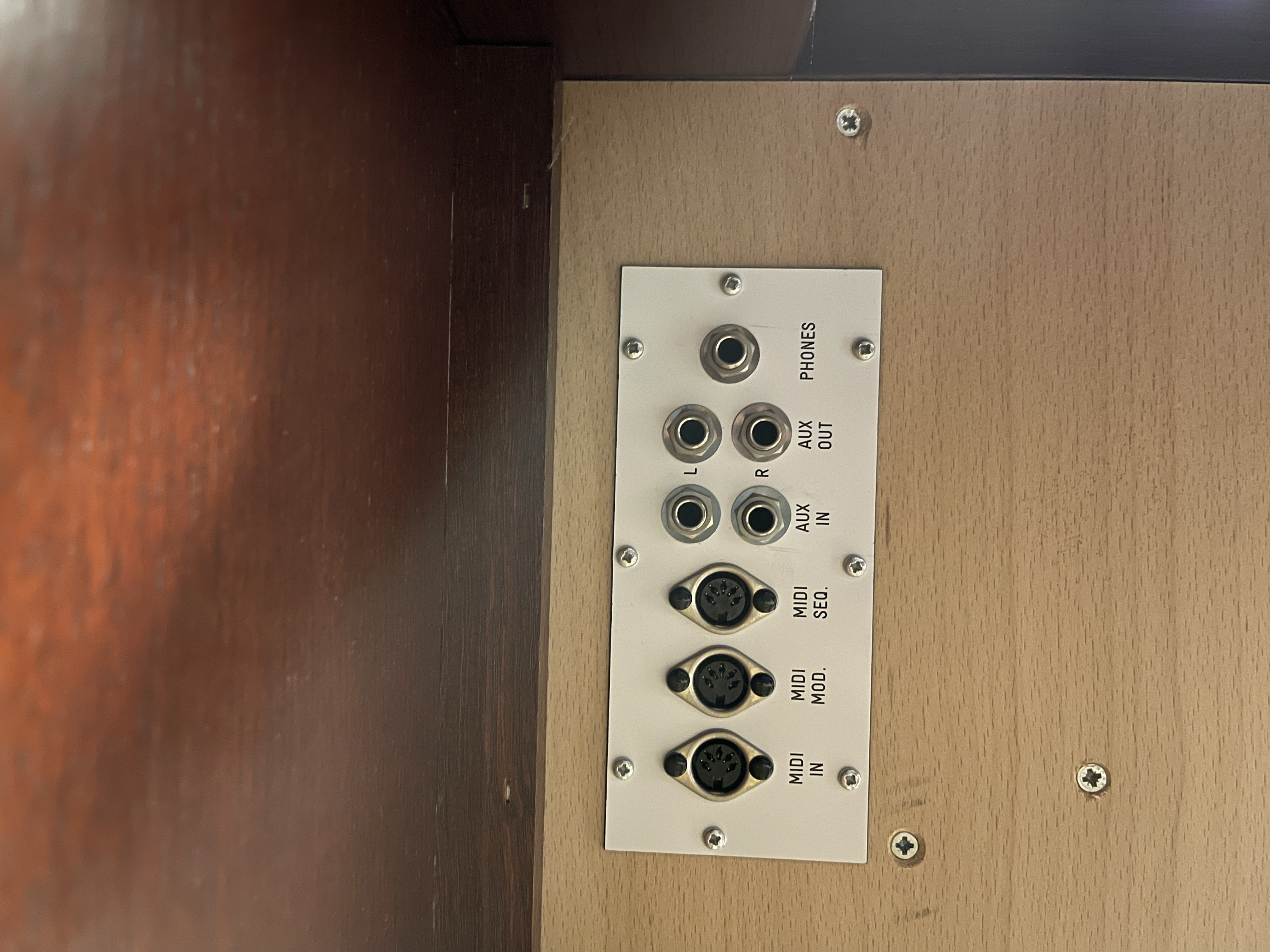
Found these output jacks on Our Stake Center, organ.
(Pictures attached) it is under they keyboard above the pedals.

I’m not an audio expert, but I’m going to try a cable that goes from R/L 1/4” to a single 1/4”

If anyone has any suggestions on cables or which connection to use that would be great!
Community Administrator
#14
mstadler wrote: Sun Aug 29, 2021 8:05 am I’m not an audio expert, but I’m going to try a cable that goes from R/L 1/4” to a single 1/4”

If anyone has any suggestions on cables or which connection to use that would be great!
You can try that, but it may mono out the sound coming from the organ speakers. If it does, then you'll need to find a way to mix it down.

Odds are, if you use "Phones", you'll get no sound at all from the speakers.
Have you searched the Help Center? Try doing a Google search and adding "site:churchofjesuschrist.org/help" to the search criteria.

So we can better help you, please edit your Profile to include your general location.
Community Moderators
#15
So we can better help you, please edit your Profile to include your general location.
Community Administrator
#16
Mikerowaved wrote: Mon Aug 30, 2021 12:11 am Page 35 of the manual tells all... ;)

https://www.churchofjesuschrist.org/bc/ ... Manual.pdf
A good resource, but it doesn't explain what might happen if you were to put a "Y" cable on the aux out. They don't always have a buffer amp to prevent the connection from doing things to the organ.

It also doesn't say if this is "consumer level" (-10dBv) or "professional" level (+4/+8dBv) output. (Picky, aren't I?)

I did notice in the specs there's an XLR output. If not being used, that might be preferable (but more likely to be pro level). But you'd probably have to open the back to find it.
Have you searched the Help Center? Try doing a Google search and adding "site:churchofjesuschrist.org/help" to the search criteria.

So we can better help you, please edit your Profile to include your general location.
Senior Member
#17
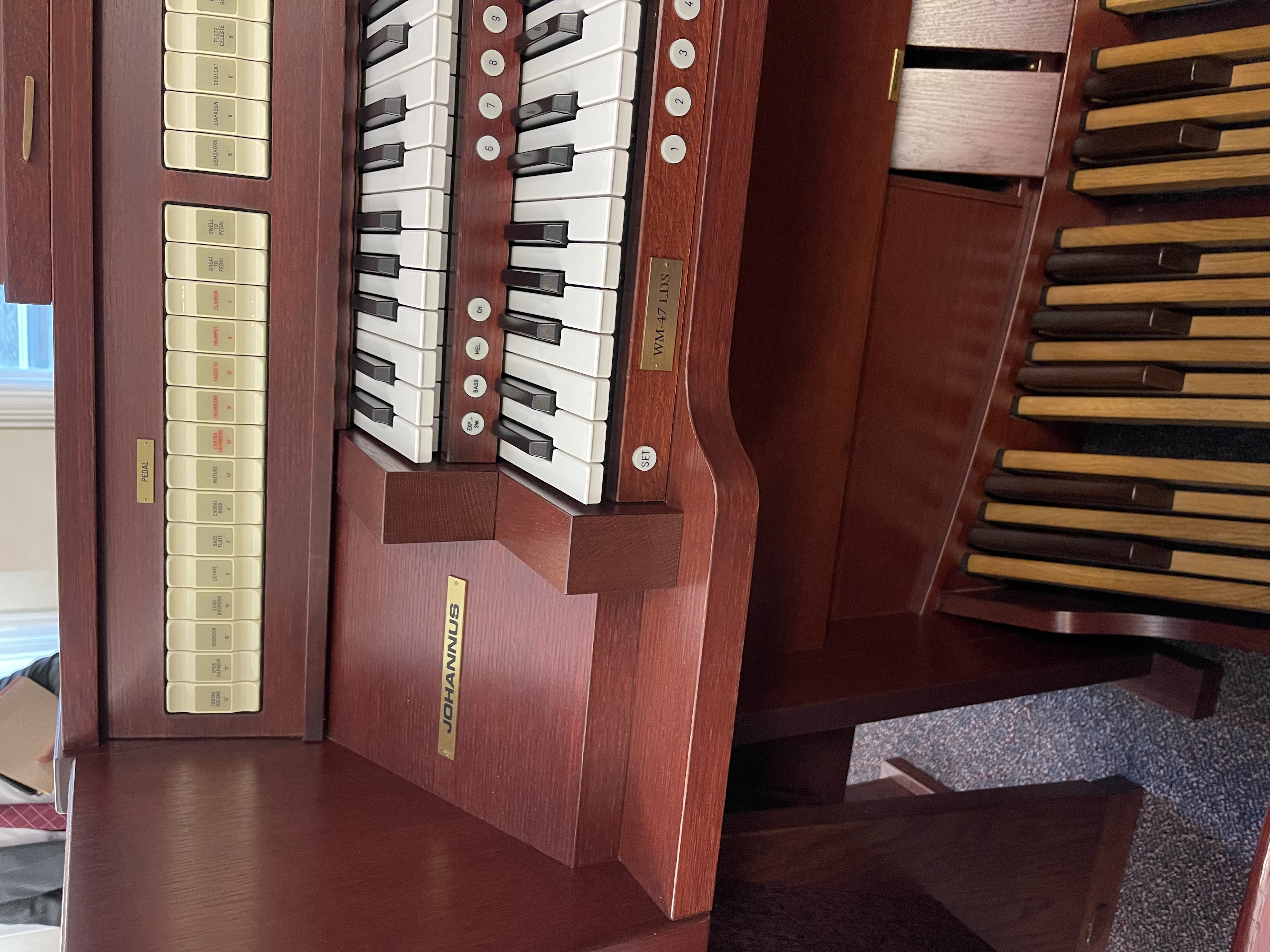
We have the same model of organ as depicted in the photos above. It indeed has an XLR output and it is only accessible after taking the back off. Which before it was officially commissioned I experimented with.
New Member
#18
As an update....

I purchased
https://www.amazon.com/Inch-Mono-Female ... B00RYAB8WS
which takes both output jacks and combines them to a single 1/4" plug.

I then connected this to the crabbox EJ-8, which connected to the chapel sound system.
The reason for this setup is that previous stake conferences it has been complained the the remote chapels and homes we are broadcasting to get the organ audio choppy. This I assume is due to the sound processer noise cancelling so that the organ does not amplify the organ that is already going into the chapel...

After connecting the organ to the chapel sound system, it did come across louder on zoom, but also made it louder in the chapel, which I believe will be a bad thing. I didn't have an experienced organ player with me, nor a full chapel to see if that would really cause issues, but I think it would.

My new plan is to have this adapter connected to an ipad, and use as a secondary camera, and switch the Zoom webinar to it when the organist plays.... the viewers will just see that iPad video and the audio from the organ (which is directly connected to the ipad) I haven't tested it yet, but think it will work.
Community Moderators
#19
mstadler wrote: Sun Sep 05, 2021 9:53 am...previous stake conferences it has been complained the the remote chapels and homes we are broadcasting to get the organ audio choppy.

This is a very common complaint when using Zoom Meeting or Zoom Webinar. The feedback I got was it sounded like music-on-hold over a poor cellphone connection. The only solution I found was to move away from Zoom. For stake conference, I would highly recommend using the church's Meetinghouse Webcast system. IMO, it's far superior to Zoom, especially when it comes to audio quality. For weekly meetings, our stake moved to YouTube Live, which completely solved the poor music quality issue we were having with Zoom.
So we can better help you, please edit your Profile to include your general location.
Community Administrator
#20
Mikerowaved wrote: Sun Sep 05, 2021 11:43 pm This is a very common complaint when using Zoom Meeting or Zoom Webinar.
There's some settings that might make a difference. I haven't played with those at all.
Have you searched the Help Center? Try doing a Google search and adding "site:churchofjesuschrist.org/help" to the search criteria.

So we can better help you, please edit your Profile to include your general location.
New Member
#21
Mikerowaved wrote: Sun Sep 05, 2021 11:43 pm
mstadler wrote: Sun Sep 05, 2021 9:53 am...previous stake conferences it has been complained the the remote chapels and homes we are broadcasting to get the organ audio choppy.

This is a very common complaint when using Zoom Meeting or Zoom Webinar. The feedback I got was it sounded like music-on-hold over a poor cellphone connection. The only solution I found was to move away from Zoom. For stake conference, I would highly recommend using the church's Meetinghouse Webcast system. IMO, it's far superior to Zoom, especially when it comes to audio quality. For weekly meetings, our stake moved to YouTube Live, which completely solved the poor music quality issue we were having with Zoom.
I've used youtube for multiple stake conferences and the organ does not sound good, the "webcast" output from the chapel audio system just does not pick it up, in my experience.
New Member
#22
To Close the loop on this.
Yes you can get perfect audio from the organ through the Aux jacks.

I used this product:
https://smile.amazon.com/gp/product/B08 ... UTF8&psc=1
and this product:
https://smile.amazon.com/gp/product/B07 ... UTF8&psc=1
Which was connected to an ipad, which connected the Audio to Zoom, and utilized "original audio"
New Member
#23
As an alternate solution with no cost, take a look at your sound settings inside the actual Zoom client. By default it is set to automatically adjust the volume. While you cannot completely turn this off, you can set it to as minimal as possible. This will make all the difference.

To illustrate the difference that this makes, I will use the example of what used to happen in my ward each Sunday:
When the organ is playing, it dials the volume back. Once it stops and someone starts speaking, then you could not hear them until it readjusted. (Now it does not adjust at all to my knowledge.)

The only other thing that I did for sound quality was to locate the auxiliary output for the PA system in our building. In this case it was located underneath the Sacrament table and which fed through a tape recorder and back into the system. I used that to pull the audio straight from the PA system to the laptop we use. It is a mono output so I use a 3mm mono-to-3mm stereo adapter and a 3mm stereo cable to bring it into the laptop. This gives a balanced audio signal for both channels in Zoom. (The reverse does not work passively.) Then I just select line in for the microphone in Zoom. Do note that using this approach requires going back into the Zoom client sound settings and adjusting the volume levels up to where you would like it. (Prior to this we had been using a lapel mic attached to the pulpit mic and the organ was too much for it.

I have found that the PA pulpit microphones do a fairly good job of handling the organ. There are better solutions but they can get expensive very quickly.

I hope this of help.