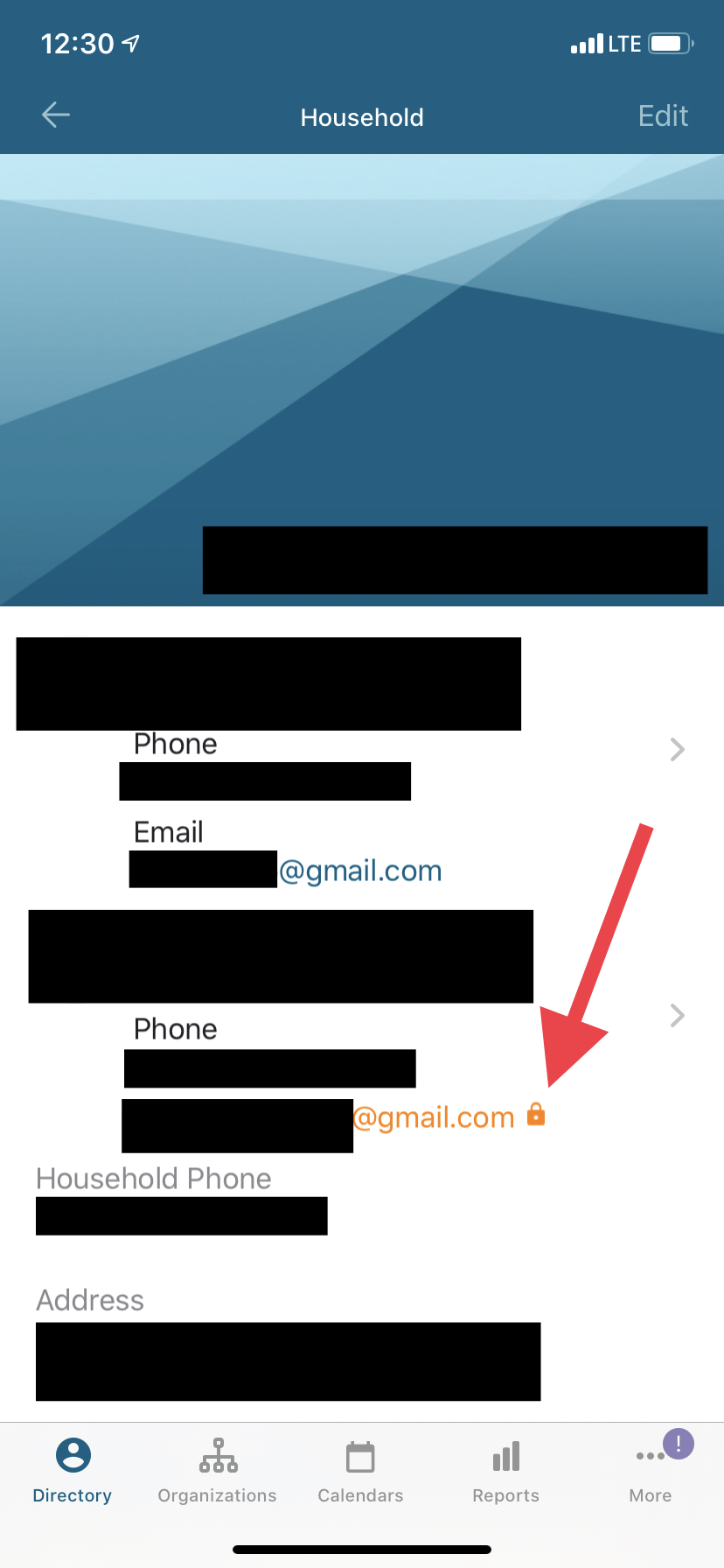
"Locked" Emails

13 postsstarted by jncarpenter 8,829 viewsoriginal topic

New Member
#1
I haven't been able to find anything on this yet, so I'm not sure how widespread the issue is. In Member Tools there are a number of our members whose emails are seemingly randomly showing up in orange with a lock icon next to their names (see attached). As far as I can tell it hasn't limited me from emailing them, however one of our members reported that his wife was not able to join our live-streamed sacrament meeting today and they suspect that the "lock" on her email is responsible.

Thanks in advance for any enlightenment on this.
📎 IMG_4105.jpg (342.94 KiB)
Community Administrator
#2
jncarpenter wrote:however one of our members reported that his wife was not able to join our live-streamed sacrament meeting today and they suspect that the "lock" on her email is responsible.
It would be a factor only if you were using the church webcast system and set it to "private". Then a Church Account has to be used to access it. However, I'm not sure as an issue with email would do it since I'm told even non-member accounts can assess it.

I'm not sure about Member Tools, but in the on-line directory. the lock just means it's been set to private.
Have you searched the Help Center? Try doing a Google search and adding "site:churchofjesuschrist.org/help" to the search criteria.

So we can better help you, please edit your Profile to include your general location.
Community Moderators
#3
The lock icon means that the email address is set to Private visibility. You're able to see that email address because you have a leadership calling in the ward, but other regular ward members won't be able to see it (so the lock serves as a reminder to be careful in how it's shared).
Samuel Bradshaw • If you desire to serve God, you are called to the work.
New Member
#4
I am our Ward Clerk. I have a member whos email shows up as restricted like that, but she has set it to stake visibility - So it should be available to everyone. I deleted the email address, allowed time for everything to sync up and verified it was absent. I re added the address, let everything sync up, but when it showed up the address was still synced. Has anyone else had this issue? Thx
Community Administrator
#5
gordonsmith4 wrote:I am our Ward Clerk. I have a member whos email shows up as restricted like that, but she has set it to stake visibility - So it should be available to everyone.
Are you sure you're looking at the same email? There's two: household and personal.

Also check the household privacy limit. Unless it's set for stake, everything in the household will be limited regardless of setting.

Lastly, privacy setting is separate from the email itself, so no surprise that delete/add didn't change anything.
Have you searched the Help Center? Try doing a Google search and adding "site:churchofjesuschrist.org/help" to the search criteria.

So we can better help you, please edit your Profile to include your general location.
New Member
#6
My father is having the same problem. Email has an orange lock symbol and can’t access streamed church meetings. I reset everything and all the privacy settings and still nothing. Let us know if this gets figured out!
Church Employee
#7
maryholje wrote:My father is having the same problem. Email has an orange lock symbol and can’t access streamed church meetings. I reset everything and all the privacy settings and still nothing. Let us know if this gets figured out!
Your father's email privacy is set to leader only.
Community Administrator
#8
scgallafent wrote:
maryholje wrote:My father is having the same problem. Email has an orange lock symbol and can’t access streamed church meetings. I reset everything and all the privacy settings and still nothing. Let us know if this gets figured out!
Your father's email privacy is set to leader only.
But that shouldn't affect access to the video streams.
Have you searched the Help Center? Try doing a Google search and adding "site:churchofjesuschrist.org/help" to the search criteria.

So we can better help you, please edit your Profile to include your general location.
New Member
#9
Try the following: in the LDS Tools app navigate to your contact information > click on the “Edit “ link in the upper right hand corner > scroll down to the bottom of the page > click on “Personal Multiple Values” change the “Email” to “Stake Visibility”. See if that works.
New Member
#10
I’m having the same problem. My orange locked email is incorrect and though it appears correctly as the household email my group emails for Relief Society cannot be delivered. (Because they’re going to this incorrect locked address) Privacy is set to Stake. Please help.
Church Employee
#11
christensenc wrote: Wed Sep 08, 2021 6:52 pm I’m having the same problem. My orange locked email is incorrect and though it appears correctly as the household email my group emails for Relief Society cannot be delivered. (Because they’re going to this incorrect locked address) Privacy is set to Stake. Please help.
The locked email doesn't mean that the address can't be changed. The lock is a visual indicator for a leader who has access to the data that you have changed the privacy settings on that informatoin and they shouldn't share it without permission.

You can change the email address directly in Member Tools. Look for the pencil icon on the screen with your contact information.
New Member
#12
How do you change the orange lock to no longer be there? It appears on all my items name birth photo phone email address location
Community Moderators
#13
k.clayton wrote: Fri Mar 08, 2024 2:21 pm How do you change the orange lock to no longer be there?
The lock will be displayed whenever the visibility setting for the item is set to a more restricted level other than "Visible to stake members".

Unit leaders with membership edit permissions and adults over 18 years of age in the household can edit the visibility for all members of the household. Those under 18 cannot change their own visibility settings and must have an adult in the household edit those settings.
To edit visibility settings:
  1. Select, tap, your household name from the Directory listing.
  2. Scroll over to, or tap, the Household tab.
  3. Select, tap, the name of the member in the household to edit. Selecting the name of even single member households is necessary to get the individual information to be displayed.
  4. Tap the "Edit Information" button. All the editable member information will have an edit icon (pencil icon) on the right side of the page.
  5. Tap the edit icon to edit the information. The visibility setting can now be edited.
JD Lessley
Have you tried finding your answer on the ChurchofJesusChrist.org Help Center or Tech Wiki?