Help! Trying to connect to the chapel sound system

17 postsstarted by carolingrable 5,164 viewsoriginal topic

New Member
#1
I've got everything figured out and working beautifully to stream our services... except the sound, which is the most important!

I want to connect my laptop to the chapel sound system.

While I am technically inclined, I know nothing about audio equipment.

After spending hours last week reading the forum, I bought what I thought was needed but it didn't work at all and I'm not sure what I'm supposed to buy to get it to work. This is what I bought and why...

The splitter I thought would convert the 3.5mm line out trrs to trs, which would allow me to use a trs cable:
https://www.amazon.com/gp/aw/d/B01M0T6P ... JXXC&psc=1

The USB to 3.5mm I thought would act as an attenuator, which after reading the description again, I don't think it will:
https://www.amazon.com/dp/B00IRVQ0F8/re ... CFbSASF060

And a long cable to connect it all:
https://www.amazon.com/gp/aw/d/B076S1DM ... OVH4&psc=1

I tried connecting the splitter to cable to USB adapter as well as splitter to headphones directly.

Zero sound either way.

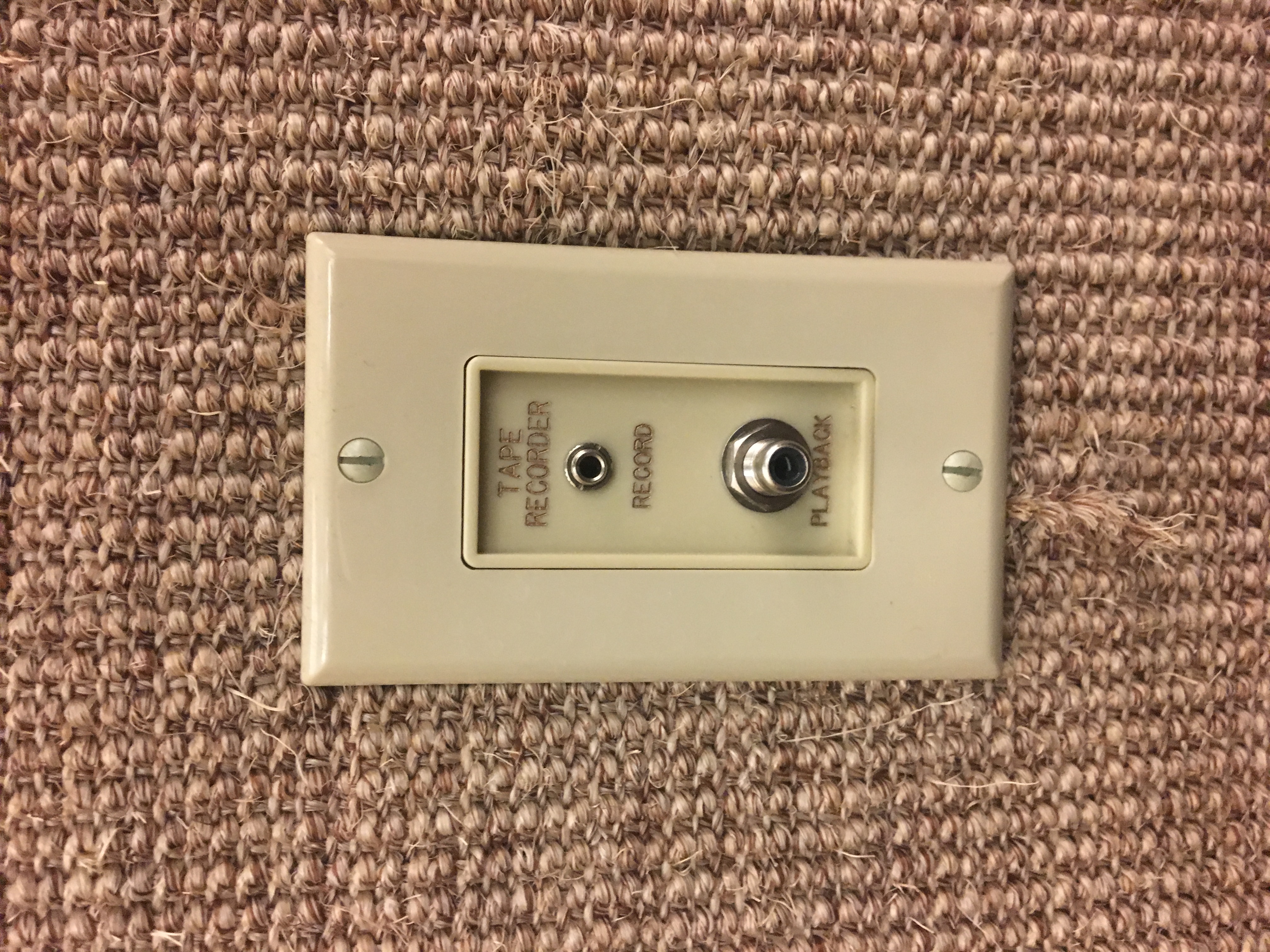
I don't even know if I'm using the right connection at the church. Attached is a photo of the outlet.

I was using the "Tape recorder" Jack top 3.5mm connection. It's located on the wall 15 feet from the sacrament table near the choir seating of our very old building in FL.

So my ultimate questions...

1- Is the jack in the attached photo the right jack to connect to the chapel sounds system?

2- What do I need to return from the 3 things listed above?

3- What do I need to do or buy to get the sound to connect to my laptop?
Community Administrator
#2
carolinswetland wrote:The splitter I thought would convert the 3.5mm line out trrs to trs, which would allow me to use a trs cable:
https://www.amazon.com/gp/aw/d/B01M0T6P ... JXXC&psc=1
That will help if your laptop has a "headset" TRRS jack. If it has a "mic" jack, then you're already there.

carolinswetland wrote:The USB to 3.5mm I thought would act as an attenuator, which after reading the description again, I don't think it will:
https://www.amazon.com/dp/B00IRVQ0F8/re ... CFbSASF060
Doesn't look like it.

I'd suggest looking at the Getting Audio right with Virtual Sacrament Meeetings thread.
Have you searched the Help Center? Try doing a Google search and adding "site:churchofjesuschrist.org/help" to the search criteria.

So we can better help you, please edit your Profile to include your general location.
Community Moderators
#3
carolinswetland wrote:1- Is the jack in the attached photo the right jack to connect to the chapel sounds system?
Yep. Looks very similar to mine, only mine was dead. Apparently disconnected when the audio system was overhauled some years ago.
So we can better help you, please edit your Profile to include your general location.
Community Administrator
#4
Mikerowaved wrote:
carolinswetland wrote:Looks very similar to mine, only mine was dead. Apparently disconnected when the audio system was overhauled some years ago.
I've got one building where it's dead. I'm suspecting something chewed though the cable, but someone is going to have to go in the crawl space under the stand to find out. I have no plans on doing that.
Have you searched the Help Center? Try doing a Google search and adding "site:churchofjesuschrist.org/help" to the search criteria.

So we can better help you, please edit your Profile to include your general location.
Senior Member
#5
You have the correct jack for the sound system. Not sure what you mean by "I tried connecting the splitter to cable to USB adapter as well as splitter to headphones directly." Either of those adapters should work, but you wouldn't want to use both together. One catch is that there are two types of TRRS cables.
Craig
Saint George, UT
New Member
#6
Thanks for the comments!

So after reading the article linked below that was super helpful, I definitely have the right connection jack but the wrong cables.

download/file.php?id=4319

I think I'll return the adapters, keep the cable and buy the headset buddy adapter as suggested in the article.

If anyone thinks there's a better approach, I'm all ears.

Is there a way to test if the connection in the building is dead before I go through the trouble of returning and buying stuff?
Senior Member
#7
carolinswetland wrote:So after reading the article linked below that was super helpful, I definitely have the right connection jack but the wrong cables.

download/file.php?id=4319

I think I'll return the adapters, keep the cable and buy the headset buddy adapter as suggested in the article.

If anyone thinks there's a better approach, I'm all ears.

Is there a way to test if the connection in the building is dead before I go through the trouble of returning and buying stuff?
Although a headphone output is different, you should be able to plug in some headphones/earphones to the output jack and hear something.

The only difference with that adapter is it has an attenuator, which you may or may not need. Another user here said his computer let him choose between mic in and line in. I would try those adapters again after verifying them jack via headphones.
Craig
Saint George, UT
Community Administrator
#8
craiggsmith wrote:Another user here said his computer let him choose between mic in and line in.
It did, but it appears to have been a false hope.
Have you searched the Help Center? Try doing a Google search and adding "site:churchofjesuschrist.org/help" to the search criteria.

So we can better help you, please edit your Profile to include your general location.
New Member
#9
I did a little bit of testing the other day...

Using headphones directly to the wall, I got no sound.
Using headphones connected to the splitter which was directly connected to the wall, I got no sound.

So should I go back to the building and test to see if I can get any sound from the tape record jack? What would I do to test?

Or does it seem like my jack is dead?
Community Administrator
#10
carolinswetland wrote:Using headphones directly to the wall, I got no sound.
...
So should I go back to the building and test to see if I can get any sound from the tape record jack? What would I do to test?
When you say "the wall" what are you referring to if not the tape record jack?
Have you searched the Help Center? Try doing a Google search and adding "site:churchofjesuschrist.org/help" to the search criteria.

So we can better help you, please edit your Profile to include your general location.
New Member
#11
russellhltn wrote: When you say "the wall" what are you referring to if not the tape record jack?
That was written a bit confusing. I was referring to the tape record jack when I was talking about the wall outlet.
Community Administrator
#12
carolinswetland wrote:Using headphones directly to the wall, I got no sound.
Using headphones connected to the splitter which was directly connected to the wall, I got no sound.
While I like the theory of checking the sound with a set of headphones, I'm not too sure how well it works - especially when you're trying to hear a sound in the earphone when the same sound is coming though the speakers. You may have to plug/unplug to detect the difference.

Note that the sound will be in only one ear (probably "left"), so you'd have to check both sides.
Have you searched the Help Center? Try doing a Google search and adding "site:churchofjesuschrist.org/help" to the search criteria.

So we can better help you, please edit your Profile to include your general location.
Senior Member
#13
russellhltn wrote:
carolinswetland wrote:Using headphones directly to the wall, I got no sound.
Using headphones connected to the splitter which was directly connected to the wall, I got no sound.
While I like the theory of checking the sound with a set of headphones, I'm not too sure how well it works - especially when you're trying to hear a sound in the earphone when the same sound is coming though the speakers. You may have to plug/unplug to detect the difference.

Note that the sound will be in only one ear (probably "left"), so you'd have to check both sides.
I monitored the sound with headphones during our whole stake conference. If you don't have good headphones with cups that help isolate the outside noise, it can be difficult. I don't have that type of headphones and often times put my hands over the headphones to try blocking the chapel sound. With the help of my hands I was able to monitor things okay.

As far as the record out jack, it's possible it doesn't work. We found it was broken at one of our buildings, but the sound system happens to be getting redone this week, so that should fix the problem.
New Member
#14
We also have one building with a broken "record out" jack. Going to ask the FM group to get it fixed, as tracing the cable with a telecom tone generator hasn't yielded any results. In the mean time, a long mic cable from the rack to the stream encoder does the trick.
Member
#15
jeremywillden wrote:We also have one building with a broken "record out" jack. Going to ask the FM group to get it fixed, as tracing the cable with a telecom tone generator hasn't yielded any results. In the mean time, a long mic cable from the rack to the stream encoder does the trick.
TRS jacks and plugs are known to build up a layer of oxidation on the contact surfaces over the years. A simple fix is to insert a plug into the jack 5-10-20 times to break down the oxidation. After this procedure, plugin a set of headphones, have someone talk into pulpit mic, and listen as you wiggle the connection. You should hear audio in one ear. If you still don't hear anything then you DO need to replace the jack.
Community Administrator
#16
CalS201 wrote:If you still don't hear anything then you DO need to replace the jack.
If only it was that simple. I have one chapel where the line coming into it is open. Not sure if it was disconnected in a upgrade or if a rodent chewed though the wire. When I inquired, FM didn't seem motivated. I'd have to wait until it became an issue. Fortunately, it's just one chapel in the stake.
Have you searched the Help Center? Try doing a Google search and adding "site:churchofjesuschrist.org/help" to the search criteria.

So we can better help you, please edit your Profile to include your general location.
New Member
#17
We have found multiple methods for converting the audio.

We used this adapter to adapt from line level to mic level as most laptops don't take line level.
https://www.amazon.com/dp/B00OAW85ZG/?c ... _lig_dp_it

Then if the laptop will not take the line directly we found 2 options
Option 1 - easier solution.
https://www.amazon.com/gp/product/B085Z ... UTF8&psc=1

Option 2 - This was our original solution but Option 1 is easier.
https://www.amazon.com/dp/B08H2GJ7B5
TRRS to USB audio adapter
and this together.
https://www.amazon.com/dp/B07RV6VBNR

[Moderator note: Fixed broken links]