Simple Fully Automated worship webcast with Meetinghouse Webcast

139 postsstarted by bretep 35,127 viewsoriginal topic

Member
#1
Edited 1 time, last by russellhltn on . Reason: Correct link
Hi everyone. I thought I would share the cost effective and low stress setup we are using in our stake. I've made this an easy setup for anyone and it uses the Meetinghouse Webcast system to boot.

This setup is quite simple. Just turn on or off the encoder is all that is needed by anyone on the stand. All else is automated.
I webcast 12 of 13 wards on Sunday with no technical issues on the webcasting side of things. I do admit that I had specialists
configure each encoder before each session, however, they will no longer be required to configure with this firmware.

Benefits of this setup:
  • Low cost - No expensive web camera or computers
    Stationary - Podium can move up and down
    No fuss - Power on/off to start and stop the webcast
    Simple configuration using the Church provided Meetinghouse Webcast system
    Easy to train and delegate
    Open source, so we can improve this system together!

Cost: $205.00 MSRP per building
I'm listing MSRP, but I was able to find them far cheaper on Amazon

J-Tech Digital H.264 IP Encoder: MSRP: $179.99 https://jtechdigital.com/product/jtech-ench4-0220/
RCA to HDMI Converter: $12.00 https://www.amazon.com/GANA-Composite-C ... B01L8GG6PW
Camera with Microphone: $14.00 https://www.amazon.com/dp/B073P1K48T/re ... AFbXG48WGZ


Firmware Release:
https://github.com/bretep/webcast-auto- ... tag/v1.0.0

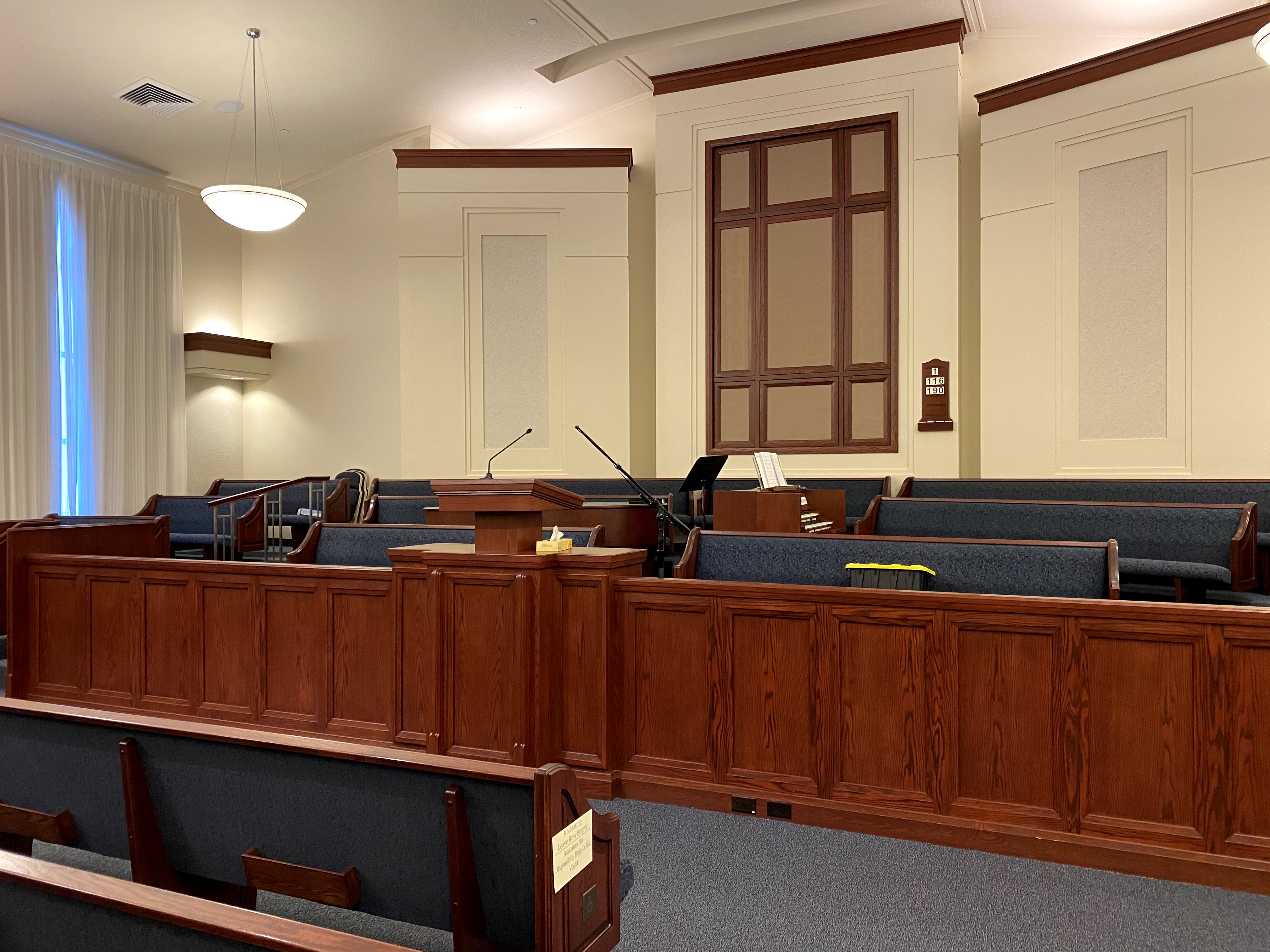
Meetinghouse Setup
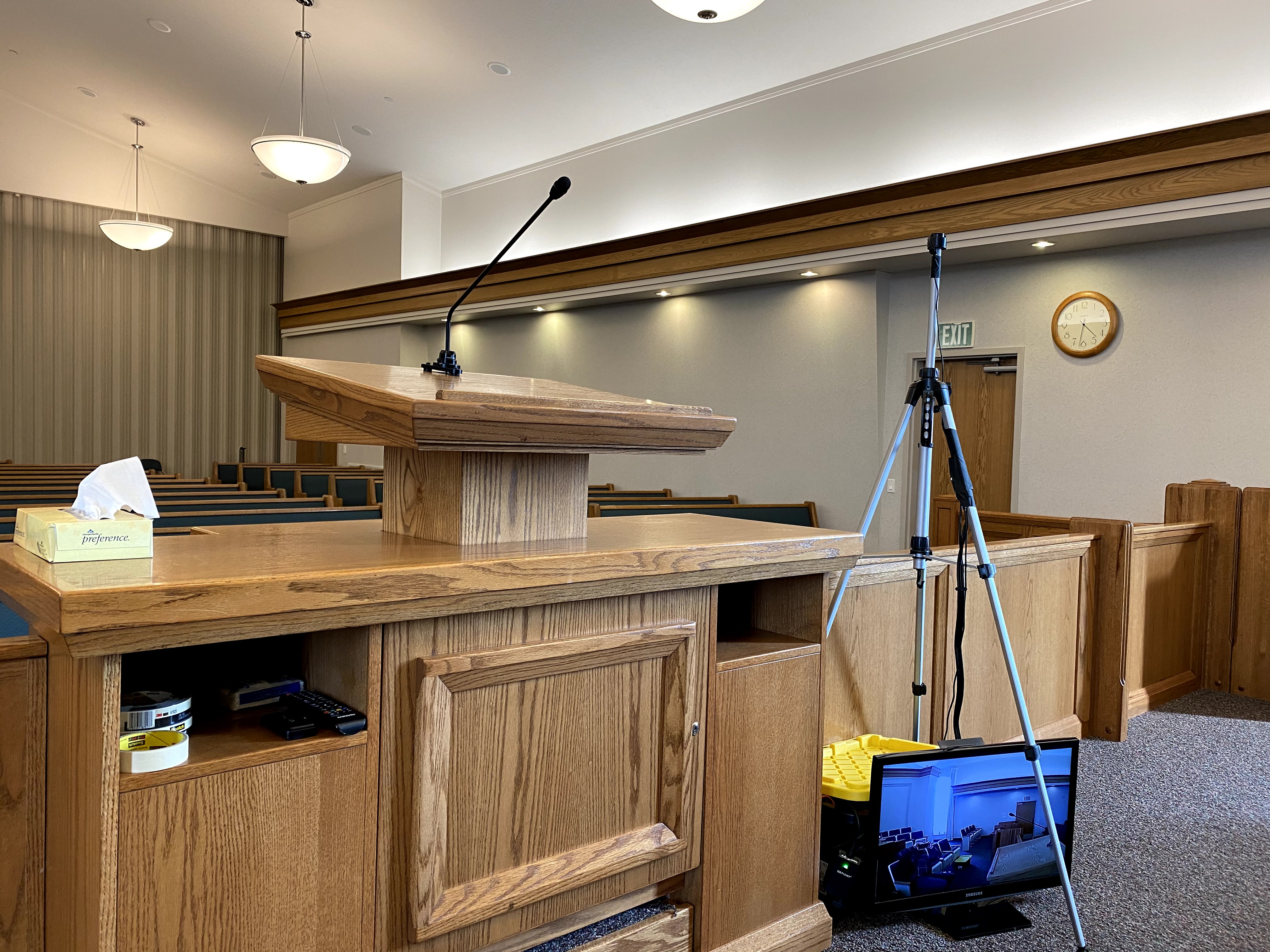
IMG_8690.jpg
Meetinghouse setup
(1.68 MiB) Not downloaded yet
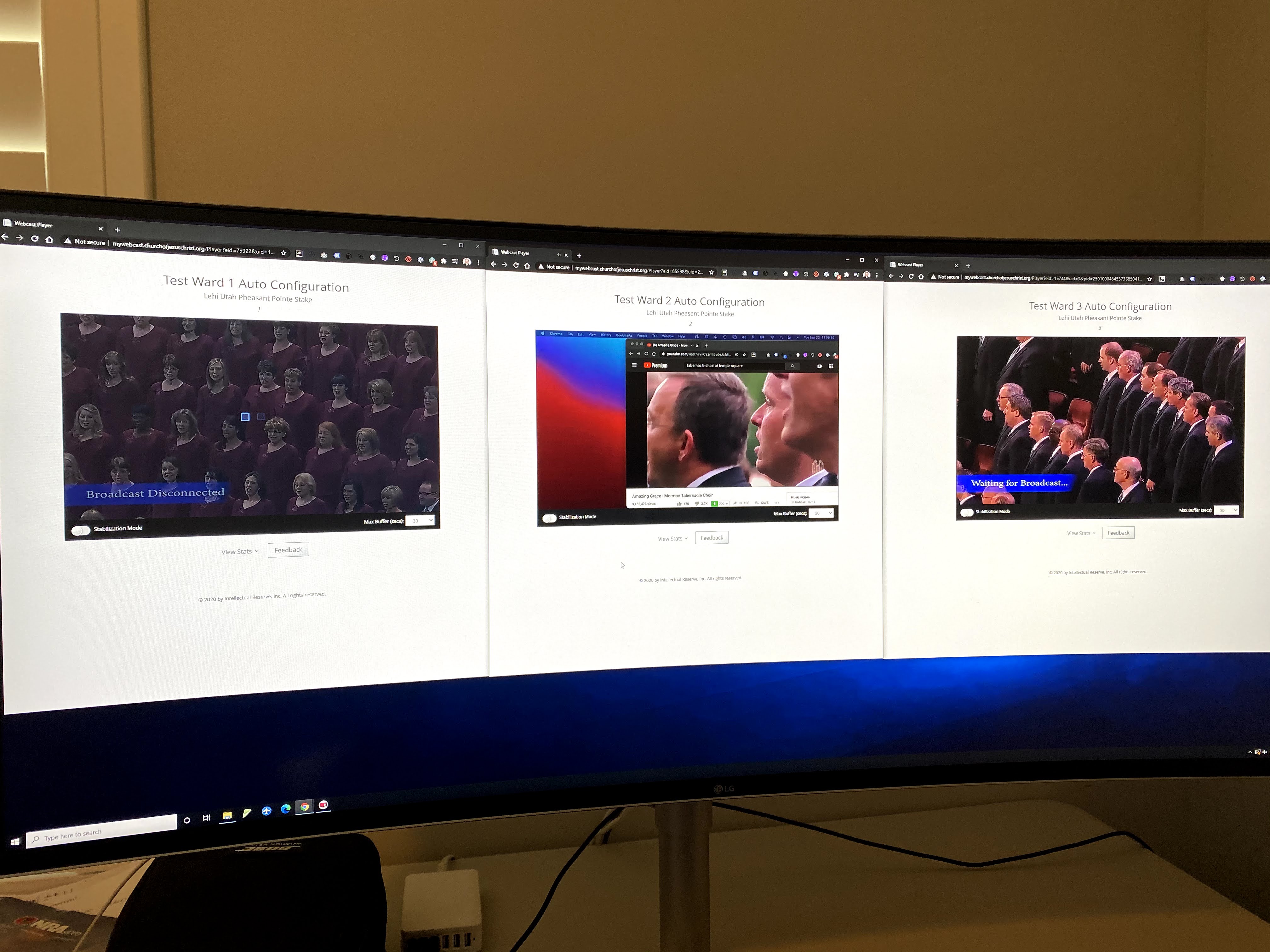
Full test of full automation - Zero touch to webcast encoder, simulated scheduling and playing all 3 worship meetings only using the Meetinghouse Webcast system.
IMG_8733.jpg
Successful fully automated meeting test
(905.39 KiB) Not downloaded yet
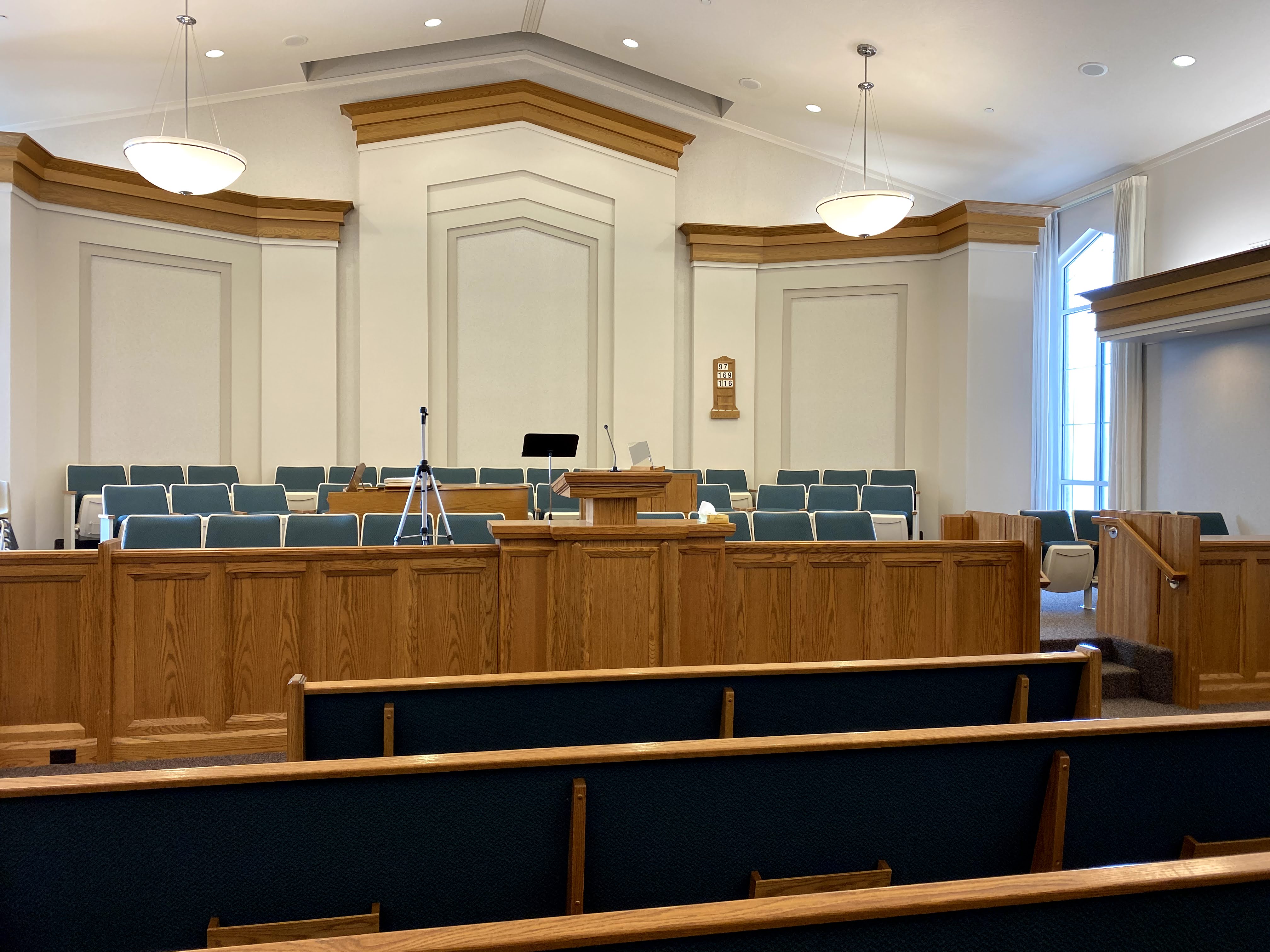
Congregation view
IMG_8693.jpg
Congregation view
(1.01 MiB) Not downloaded yet
Community Administrator
#2
So, this encoder works like the VidiU as far as the auto configuration? It loads it automatically from the church Webcast System?
Have you searched the Help Center? Try doing a Google search and adding "site:churchofjesuschrist.org/help" to the search criteria.

So we can better help you, please edit your Profile to include your general location.
Member
#3
Correct, but you have to use my firmware and configuration steps. I made this since the Teradek VidiU has been discontinued and the church no longer sells it according to store.churchofjesuschrist.org and my FM group and their direct manager.

It’s also much cheaper than the VidiU and I prefer it given the simplicity. I have a call with J-Tech tomorrow to see if I can get access to the GPIO pins and to have a look at my auto config so they can include it by default in their firmware.

The great thing about this encoder is it uses the same chipset as the VidiU, you get root access to the device (if you send in a support ticket to get the root user and password) which makes it ideal to develop custom software for it.

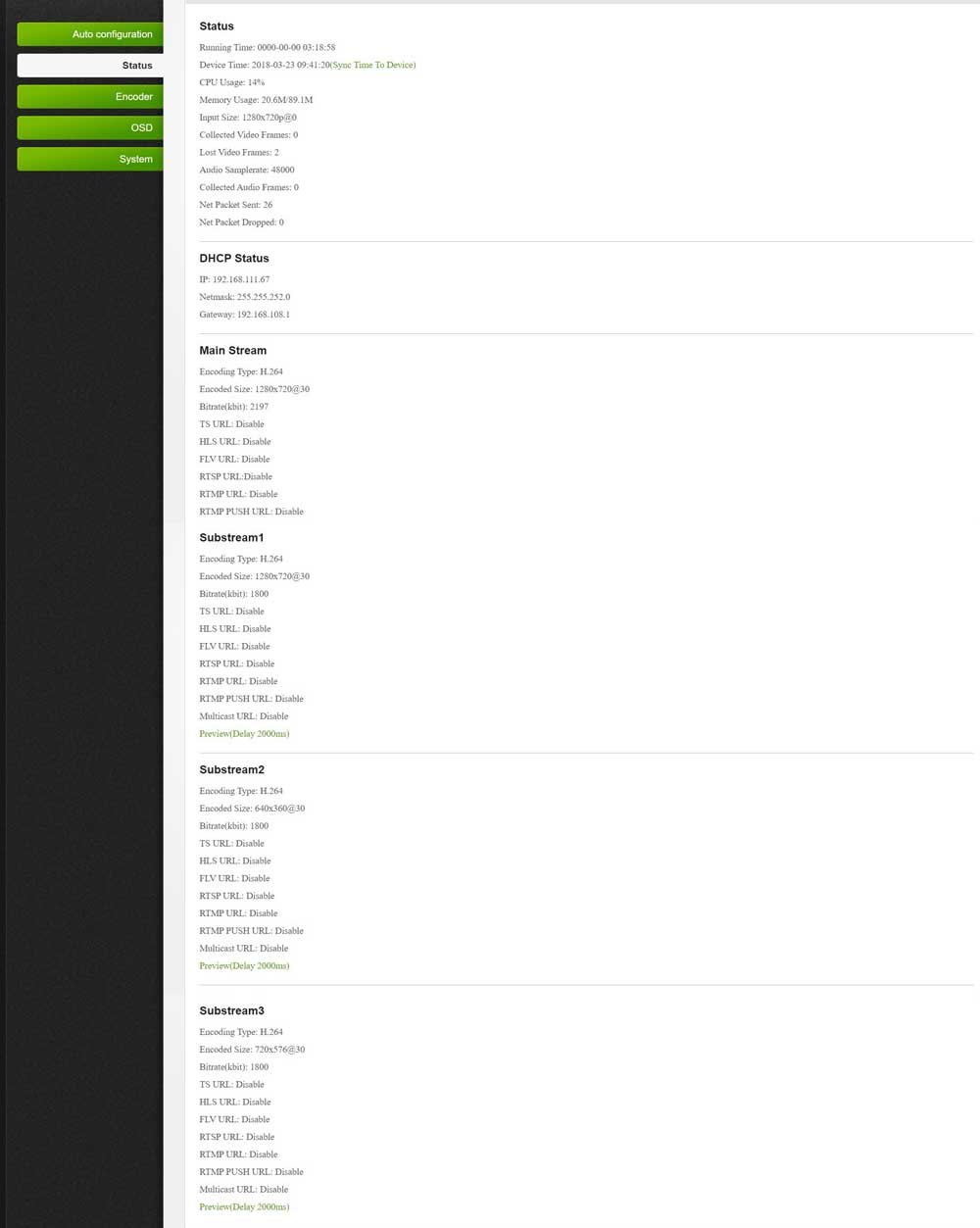
It has 2GB flash memory, Cortex A7 arm processor, only 32 MB of disk, but I can deal with that. Runs Linux.
New Member
#4
bretep wrote:I made this since the Teradek VidiU has been discontinued and the church no longer sells it according to store.churchofjesuschrist.org and my FM group and their direct manager.
The old Teradek Vidiu model has been discontinued that is listed on the Purchasing Webcast Products page https://www.churchofjesuschrist.org/hel ... s?lang=eng , but there is a newer model the "Teredek Vidiu Pro" and the church online store's website says it is in stock. The Item number for the Teredek Vidiu Pro is 16740000

I believe one of our FM's were able to purchase one of Teredek Vidiu Pro's recently.

In regards to the encoder you've found, it sounds like a great alternative and now makes me wonder if I can get one of my other encoders to get the auto config settings too.
Member
#5
Awesome! We would have purchased 3 of these last week had we been able to find it. However, I’m glad we didn’t. $732.25 USD vs. $179 USD,
Member
#6
Teradek vs. the J-Tech encoder trade-offs

Had my FM group helped me find the Teredek Vidiu Pro (16740000) we would have gladly purchased 3 of them. The time I spent learning the J-Tech platform and building and testing a firmware and even bricking one of the devices, was much more expensive than to purchase the 3 additional Teredeks.

The reason I point this out is because we all try to be good stewards of money spent in the Church. My FM group is strongly discouraging the purchase of Teredek's and I spent Monday and Tuesday last week trying to purchase the three of them with approved money from our Stake. It would have saved me about 60 hours of work. To put numbers to this cost: 3 teradeks / 60 hours = $36.62/hr which if far less than I make an hour meaning it was more expensive for me to get the J-Techs working.

Now that I have working firmware which performs better than the Teredek auto config, the J-Tech is now a viable option and we won't be purchasing the Teradeks.

The features we don't get with the J-Tech that the Teredek has:
- Wifi config and monitoring (I wouldn't broadcast using the wifi, but you can)
- Built in display for easy setup
- iOS and Android app
- Slow boot time
- Slow auto configure
- A red joystick/numb for starting/stopping the webcast

The features we get with J-Tech that Teredek does not have:
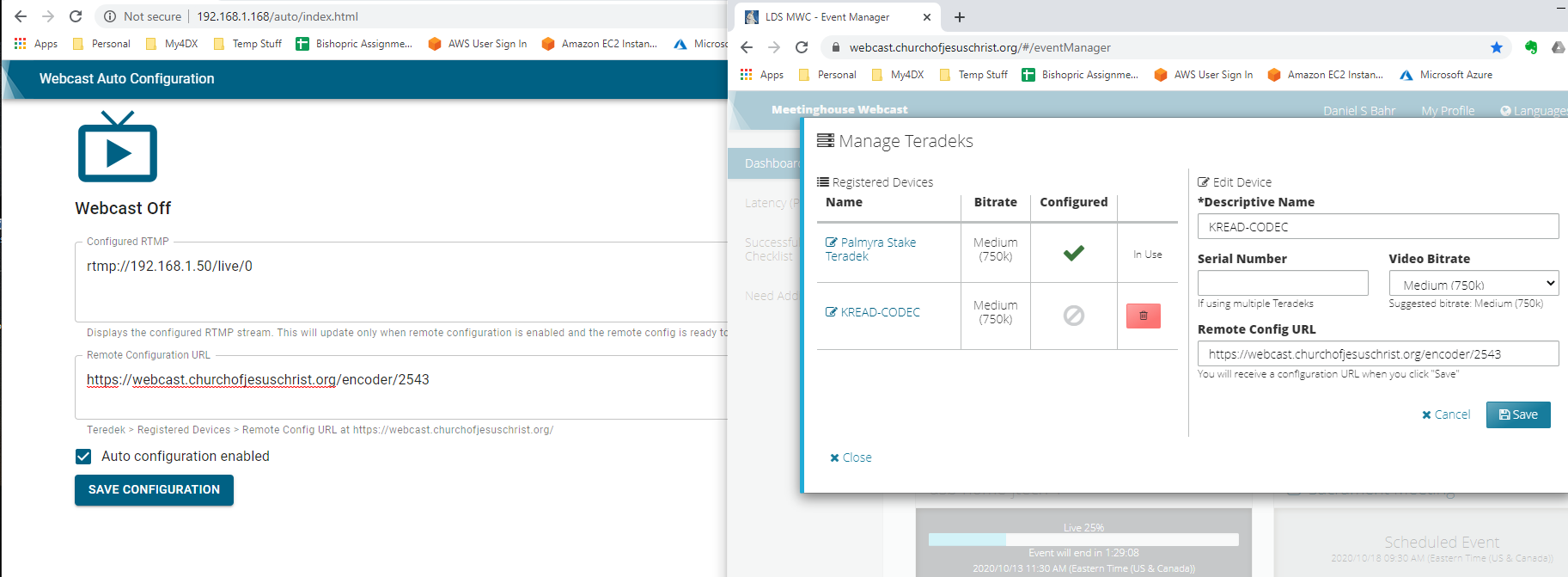
- Fast power on, 5 seconds and webcast is running
- Fast and reliable auto configuration
- One way to configure, via web interface
- Less moving parts, meaning less things to configure, break, etc...

The only technical issues we had on Sunday were with the Teredek in the Stake Center. The red joystick was not used properly and the broadcast was not stopped, I had to end the session using the Meetinghouse Webcast. The J-Tech's did not
experience any problems because it's power on/off for webcast. Dead simple.

Everyone now has an alternative, viable option to use with the Meetinghouse Webcast system, and you don't need to spend the 60+ hours configuring the thing. It's literally a firmware upload that takes about 2 minutes, and configuration which takes about 3 minutes, then you're up and running on the J-Tech. All other setup (HDMI, Camera, etc...) is the same as the Teredek.
Member
#7
I just got off the phone with J-Tech, they have taken a look at my firmware and are building the remote config functionality into their firmware. They said they'll try to have it to me by end of week!
#8
Hey BRETEP. Solution looks really great and simple and thanks for all of your work on this. Can you correct the link in your original post for the RCA to HDMI adapter?

Thanks,

Dane
Member
#9
I’m not able to edit the original post however here is the correct link. Sorry about the error.

https://www.amazon.com/GANA-Composite-C ... B01L8GG6PW
Community Administrator
#10
bretep wrote:I’m not able to edit the original post
Fixed.
Have you searched the Help Center? Try doing a Google search and adding "site:churchofjesuschrist.org/help" to the search criteria.

So we can better help you, please edit your Profile to include your general location.
New Member
#11
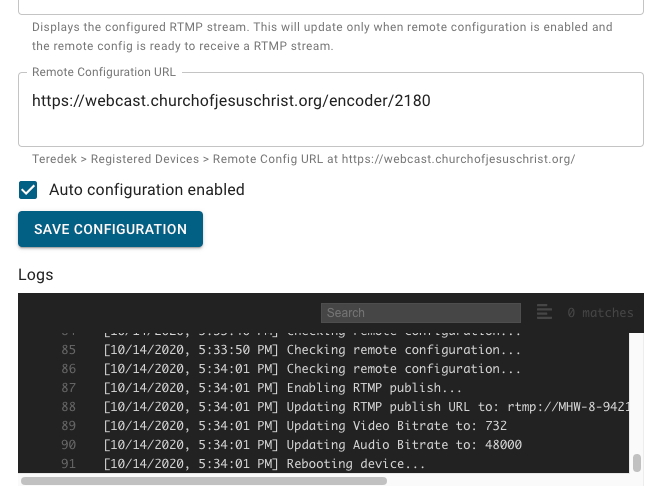
My Teradek died so I am looking into an alternative as I cannot find the Pro version (which has also been discontinued). The J-Tech does not appear to have an audio input which was very helpful when using the Teradek as I could control the level in easily. Probably could use a RCA to HDMI converter with the J-Tech (older camera). Any other solutions coming from the Webcast group? I did acquire a URayCoder (Chinese company Shenzhen URay Technology Co.) and will experiment. There is a Teradek Cube out there but it is twice the price of the Teradek Vidiu Pro.
Member
#12
I noticed you're here in Lehi, you can swing by one of my chapels to check out the J-Tech. We haven't had any issues with the volume.
New Member
#13
poswald wrote:My Teradek died so I am looking into an alternative as I cannot find the Pro version (which has also been discontinued). The J-Tech does not appear to have an audio input which was very helpful when using the Teradek as I could control the level in easily. Probably could use a RCA to HDMI converter with the J-Tech (older camera). Any other solutions coming from the Webcast group? I did acquire a URayCoder (Chinese company Shenzhen URay Technology Co.) and will experiment. There is a Teradek Cube out there but it is twice the price of the Teradek Vidiu Pro.
I second the request for an audio input on the jtech. Our cameras are HD, so they have HDMI out. We regularly use the audio input on the Teradek to take the chapel
Sound out and put it onto the webcast.
New Member
#14
Awesome news that jtech is interested in including your auto configure url addition. Please Keep us posted as you work with them if they end up including it in their firmware release.

Did your github firmware start from source code they gave you (does it include all the stock features)?
New Member
#15
What is the upload speed in your buildings? We hover between 1 and 2. Will this solution work with lower upload speeds?
Member
#16
We delivered our meetings today at 714 kbps which is less than 1Mbit. We received great feedback from members. +90% of the feedback was 10s across the board.

All the J-Tech devices were automated and worked flawlessly. The Teredek is the only unit that gave us troubles, it wasn't picking up the configuration automatically without a manual reboot. So I'll be swapping out the Teredek this week for the J-Tech, then we'll be 100% J-Tech encoder.

For the J-Tech, the only thing that had to be done was clicking a wireless On/Off button. Bishops controlled the whole thing.

This is the on/off button I got for each building: https://www.homedepot.com/p/Defiant-Wir ... /301844750

Updated album of our setup with screenshots of all the meetings today: https://photos.app.goo.gl/ChDssT77Ph6gDoeY8
Community Administrator
#17
bphilli7 wrote:I second the request for an audio input on the jtech. Our cameras are HD, so they have HDMI out. We regularly use the audio input on the Teradek to take the chapel
Sound out and put it onto the webcast.
For about $50, you can get something like this to insert/replace the audio in the HDMI stream. Put that in front of the J-Tech and you have the functionality of the Teradek.
Have you searched the Help Center? Try doing a Google search and adding "site:churchofjesuschrist.org/help" to the search criteria.

So we can better help you, please edit your Profile to include your general location.
New Member
#18
So some basic questions on this setup. Can you use a USB webcam with microphone or is there somehow to pipe the sound from the chapel sound system directly onto the broadcast? I was reading through all the posts and was wondering how that could work? Any help would be appreciated. Thanks.
Member
#19
No USB webcam, and that is on purpose because of cost, availability, variance in types of cameras, and equipment (computer) / drivers that are required.

Sticking to RCA which requires nothing special, cost, availability, and the quality is 1080p means a reliable, stable, stress free setup. You can leave it setup during the week, stress free. The $14 camera was so cheap, I got two for every building, just in case one broke. If someone steals it, or pushes the camera over (looking at the primary aged kids), no one stresses over breaking anything.

I personally think that spending any money on a webcam, handycam, or anything fancy is a recipe for a lot of stress and complication in setup.

For this purpose, less is more! :)
New Member
#20
Ok, but didn't you say that the sound picked up by this camera microphone was not good and I saw some comments from others about trying to do things to improve it? If so, what are your suggestions to improve the sound as that is really the primary focus that needs to be very good for those tuning in. Let me know of any thoughts there or is your experience that the sound with the RCA camera is fine?
Member
#21
You are correct, the sound isn't great on this camera, which is why we use the audio directly from the church sound system. You can get that sound by plugging in one of there locations depending on the building: under the sacremanet table, at the podium, or under the clerks desk (if your building has one). Someone posted an excellent document about that in another thread.
New Member
#22
bretep wrote:I just got off the phone with J-Tech, they have taken a look at my firmware and are building the remote config functionality into their firmware. They said they'll try to have it to me by end of week!
Any update on the firmware getting updated? I just ordered one of these via
https://www.amazon.com/gp/product/B0761 ... UTF8&psc=1
It should be here Saturday.

BTW - for what it is worth - the Auto Config for the Teradek VidiU GO (they cost about 2x as much as the VidiU Pros and about 9x as much as these J-Tech devices) does not work because the church includes 48000 as the custom audio bitrate in the auto config XML file, and the minimum audio bitrate that the Teradek VidiU Gos support is 96000.

I have a ticket open with the church webcast engineering team about it - but would gladly return the VidiU Go and purchase a bunch of these J-Tech Digital H.264 IP Encoder if they are easy for our Broadcast assistance to use and the quality is decent.
-Aaron Hixson
Payson Utah Mountain View Stake
aaron@hixsonfamily.net
Member
#23
You can use the firmware that I posted. The only thing added to the binary is the poller and read/writing the configuration file.

J-Tech is focused on building this a new device and writing the firmware for that, which will contain a new user interface as well.
New Member
#24
From what I can see your audio comes through the mini camera and not from the chapel sound system. Is that correct? If you wanted to use a different camera and pull audio from the chapel sound system does the j-tech support this or would you have to use a device to combine the video and audio onto the common hdmi input to jtech box? Any one know of other encoder devices that might work, maybe uRayCoder?
Member
#25
No, we are not using the audio from the camera.
They camera has 2 outputs - audio and video. The audio is not being used.

The video plugs into the video input to RCA to HDMI converter. The chapel audio then goes into the input of the RCA to HDMI converter.

Does that make better sense.
New Member
#26
Yes that makes sense. Thank you.
New Member
#27
A few more questions. It looks like I have about a week to get ready in our Stake.

On the encoder you use auto config. Correct? If you needed to do manual config where would I find the settings and what they show be set to?

Are you aware of any other brand encoders that would work with church webcast system if I can't get a jtech?

Since you have everything automated how do you block out the broadcast during the administration of the sacrament? It has been my observation that the administration of the sacrament length in time varies a lot from ward to ward, especially with covid restrictions.

On the church webcast page are you setting up sacrament meeting events a private or public?

Thanks,
Mike Vail
Member
#28
Brother Vail,

On the J-Tech encoder, I have it using myfirmware following the instructions posted on the github repository from the first post in this thread. That firmware supports the auto config.

If you cannot get the J-Tech encoder, any encoder that has the RTMP setting can be used with the church, facebook, and youtube broadcasting solution. There are many, infact they almost all use the exact same hardware and firmware J-Tech is using. The firmware is just styled differently.

For blocking out the sacrament, I provide a on/off remote control that powers the encoder on/off, see link below. The presiding authority then clicks on or off to start or stop the broadcast. The encoder’s default firmware will keep the settings and automatically start broadcasting when powered on.

I’d suggest installing my firmware for auto config, but if you want to to it manually, you will need network access to the device and goto the webpage to configure the unit before each meeting.

I am setting the meeting up as public. Meetings are public and public is welcome just like attending another ward in person. We need to be sure that we are inviting everyone. The church webcast system is scaled to support 2,000+ viewers per broadcast.

With love,
Brother Bret Palsson

$10 on/off remote control: https://www.homedepot.com/p/Defiant-Wir ... /301844750
New Member
#29
I got my j-tech yesterday, uploaded the custom firmware, and did a successful auto configuration test from my home last night. I plan on doing another full test today or tomorrow at one of our buildings.
-Aaron Hixson
Payson Utah Mountain View Stake
aaron@hixsonfamily.net
Member
#30
Awesome to hear!
Member
#31
Just a reminder, if you are using the firmware, please consider staring and following the repo for updates. I plan on adding some more features to make it easier to use.

The stars help me understand how many people would benefit from updates. If it's just me, I may decide not to add them.

https://github.com/bretep/webcast-auto-conf
Community Administrator
#32
I'd like to see a better way of handling the sacrament ordinance than killing the stream. Doing so can have some repercussions - one of them is getting an urgent email saying the encoder has gone down. I'm also not sure as the viewers get the very last before cut-off or the very beginning when it resumes.
Have you searched the Help Center? Try doing a Google search and adding "site:churchofjesuschrist.org/help" to the search criteria.

So we can better help you, please edit your Profile to include your general location.
New Member
#33
Full test went well.

Details:
I tested with two different cameras
1) camera worked great
2) camera had trouble, I do t think it adapted to the correct resolution that the j-tech can handle and I need to play with it more

As a side note, I ran I to a problem taking the line level out from this chapel, which is mono of course, but when I plugged my 3.5 mm stereo cable into the line out, I was only getting left channel on the broadcast. When I converted the cable to RCA and ait the RVA and then recombined into a steep cable (where both channels are the identical mono channel) I wasn’t getting any audio. The only way I was able to get the audio working on both channels was to send the audio through a mixer to get it to give me clean two channel audio.
-Aaron Hixson
Payson Utah Mountain View Stake
aaron@hixsonfamily.net
Member
#34
For the audio being on one channel, I used this splitter, no mixer needed.

https://www.amazon.com/gp/product/B008N ... UTF8&psc=1
Member
#35
russellhltn wrote:I'd like to see a better way of handling the sacrament ordinance than killing the stream. Doing so can have some repercussions - one of them is getting an urgent email saying the encoder has gone down. I'm also not sure as the viewers get the very last before cut-off or the very beginning when it resumes.
I agree. There are other ways like cutting the power to the RCA to HDMI device and then uploading a different nosig.yuv file. This is one of the improvements I've been thinking about making and releasing. You can do it now, but the nosig.yuv looks kinda hoaky.
Member
#36
russellhltn wrote:I'd like to see a better way of handling the sacrament ordinance than killing the stream. Doing so can have some repercussions - one of them is getting an urgent email saying the encoder has gone down. I'm also not sure as the viewers get the very last before cut-off or the very beginning when it resumes.
I've created a new release that displays the church's logo when there is no signal. Here is a link to the new firmware release.

https://github.com/bretep/webcast-auto- ... tag/v1.0.1

Please consider staring and following the repository, by so doing helps me understand how many people are using the firmware.
New Member
#37
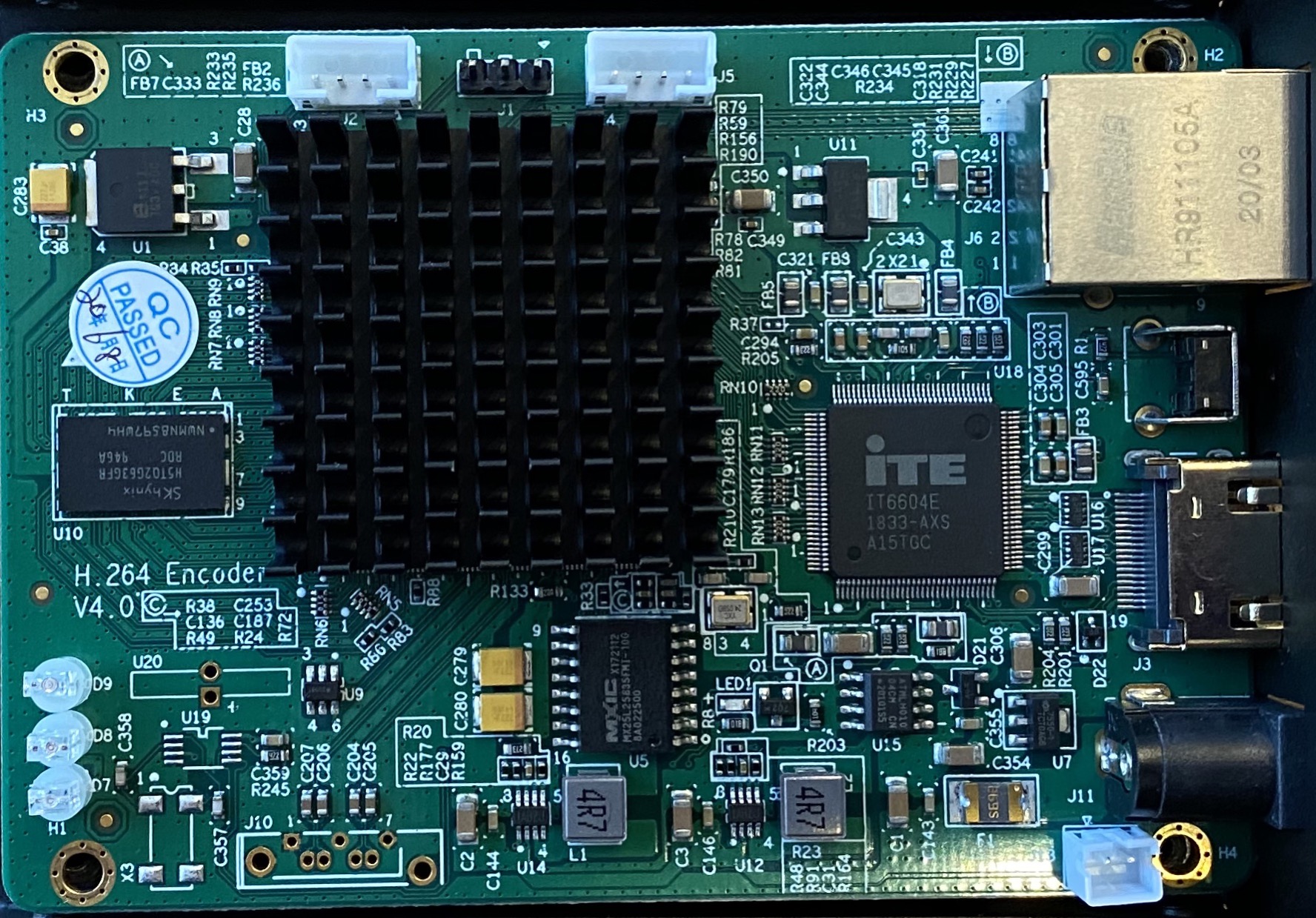
I took a picture of the inside of my jtech encoder.

I wonder what J1, J2, J5, J10, and J13 (bottom right, by J11) do...
89AED70D-F4D8-48C6-8613-39D42010C94A.jpeg
(675.22 KiB) Not downloaded yet
New Member
#38
russellhltn wrote:I'd like to see a better way of handling the sacrament ordinance than killing the stream. Doing so can have some repercussions - one of them is getting an urgent email saying the encoder has gone down. I'm also not sure as the viewers get the very last before cut-off or the very beginning when it resumes.
I agree. The webcast system is built for broadcasting stake conferences, where there are no intentional interruptions of the feed. It alarms when the feed is cut and requires a physical action to stop the broadcast.

COVID-19 has local church leadership requiring that we broadcast these meetings while allowing the bishop to cut the feed as soon as the local congregation is ready for the sacrament ordinance. But the bishop (or anyone in ward leadership, for that matter) does not have the ability to cut the feed through the webcast system.

Our local leadership requires the sacrament ordinance at the end of the meeting. So killing the feed means that the remote viewers get to see everything up to the moment the feed is cut, but there is nothing to watch after because the feed will never resume (the meeting has concluded). I do like that the viewers get to see the tabernacle choir singing when the feed is cut though.

I ignore the urgent emails about the feed going down. They're unnecessary. I know the feed will and should go down at some point during the broadcast. I also ask all the assistant stake technology specialists to cut the feed before the sacrament ordinance using the power supply of the JTECH or power switch of the Teradek (it has a battery!), rather than using the web portal, because I want to be sure it's not broadcasting the sacrament.
Senior Member
#39
Before last Sunday, we now have sacrament at the end of the meeting when the webcast has been terminated, we focused the camera on the wall clock and pulled the audio feed into the Teredek. Quite easy as we are using an RCA plug that takes the audio from the meetinghouse sound system.

Not elegant, but practical!
Community Administrator
#40
hicksticks2001 wrote:As a side note, I ran I to a problem taking the line level out from this chapel, which is mono of course, but when I plugged my 3.5 mm stereo cable into the line out, I was only getting left channel on the broadcast.
Understandable
hicksticks2001 wrote:When I converted the cable to RCA and ait the RVA and then recombined into a steep cable (where both channels are the identical mono channel) I wasn’t getting any audio.
You lost me. One way to do it is to run the cable into a RCA pair, take just the left channel and "Y" it into two RCA jacks which can then be converted to feed your system. If that didn't work, I'd check to make sure things split the right way. I'd expect the audio to be on the white jack, but there's no promise it wasn't mis-wired and the colors are reversed.
Have you searched the Help Center? Try doing a Google search and adding "site:churchofjesuschrist.org/help" to the search criteria.

So we can better help you, please edit your Profile to include your general location.
Member
#41
bphilli7 wrote:I took a picture of the inside of my jtech encoder.

I wonder what J1, J2, J5, J10, and J13 (bottom right, by J11) do...

89AED70D-F4D8-48C6-8613-39D42010C94A.jpeg
Two are USB ports, the other is a JTAG port for serial access... I may have needed that port to unbrick one of my devices when building the firmware. ;)

There is also 12v power and some contacts without header pins that I have not yet tried to figure out.

Also, for the reset button, if anyone has a use, I can detect when it's pressed and do things based on the button being pressed. I can't think of a practical use for that right now. Let me know if you have a request.
New Member
#42
bretep wrote:For the audio being on one channel, I used this splitter, no mixer needed.

https://www.amazon.com/gp/product/B008N ... UTF8&psc=1
I used the same splitter. My mixer accepted it just fine, but for some reason my camera “line in” 3.5mm didn’t like the audio when i used and RCA splitter and converted it back to 3.5mm.

I’m thinking about adding a $50 mixer to the setup to help make sure the audio is clean (no hum) and so I have discrete control over the audio volume on the broadcast.
-Aaron Hixson
Payson Utah Mountain View Stake
aaron@hixsonfamily.net
New Member
#43
bretep wrote: I've created a new release that displays the church's logo when there is no signal. Here is a link to the new firmware release.

https://github.com/bretep/webcast-auto- ... tag/v1.0.1
Does updating the firmware preserve existing settings? Or do we need to reapply the configuration in your steps to get the remote configuration setup?

Also, wanted to give you a heads up that I heard from the Church Product Manager for the webcast product and they are planning on removing all parameters from the remote configuration file except the Stream URL and Stream Name so that they can have the greatest comparability with the most devices (since Teradek Pros are no longer available.

They didn’t have an ETA for when this would happen, but I thought you may want a heads up in case you need to update your custom firmware instructions or even release a new version of your firmware if/when this happens.
-Aaron Hixson
Payson Utah Mountain View Stake
aaron@hixsonfamily.net
New Member
#44
bretep wrote:
Two are USB ports, the other is a JTAG port for serial access... I may have needed that port to unbrick one of my devices when building the firmware. ;)
Funny.
bretep wrote: There is also 12v power and some contacts without header pins that I have not yet tried to figure out.

Also, for the reset button, if anyone has a use, I can detect when it's pressed and do things based on the button being pressed. I can't think of a practical use for that right now. Let me know if you have a request.
I think J10 might be analog audio inputs, or maybe analog audio out. Two pairs of wires, maybe R/L. They go straight to the processor.

Do you know the part number of the processor? I don't want to remove my heat sink.

U20 looks like a coin cell battery contact.
Member
#45
Yes, the upgrade preserves all parameters set. Also to note, my firmware will only modify the settings documented in the README file on GitHub and only if you have set the remote configuration URL. Otherwise, my firmware does nothing.

For clarity, the parameters my firmware will control are:
The main stream’s:
- RTMP URL
- RTMP Enable/Disable
- Video bitrate
- Audio bitrate

They will only be controlled if:
- OSD > Substream3 > Zone 1 is enabled and the txt field is set with a valid URL.

Everything else is up to the end user. I personally disable all other outputs, but I’m not going to try and force anyone else to. :) Everybody have different needs.
Member
#46
bphilli7 wrote:
bretep wrote:
Two are USB ports, the other is a JTAG port for serial access... I may have needed that port to unbrick one of my devices when building the firmware. ;)
Funny.
bretep wrote: There is also 12v power and some contacts without header pins that I have not yet tried to figure out.

Also, for the reset button, if anyone has a use, I can detect when it's pressed and do things based on the button being pressed. I can't think of a practical use for that right now. Let me know if you have a request.


I think J10 might be analog audio inputs, or maybe analog audio out. Two pairs of wires, maybe R/L. They go straight to the processor.

Do you know the part number of the processor? I don't want to remove my heat sink.

U20 looks like a coin cell battery contact.
I have documentation for the chipset. This is good information. PM me and let’s get hooked up on more real-time communication platform. Happy to share what I know and documento on I have.
Member
#47
hicksticks2001 wrote:
bretep wrote: I've created a new release that displays the church's logo when there is no signal. Here is a link to the new firmware release.

https://github.com/bretep/webcast-auto- ... tag/v1.0.1
Does updating the firmware preserve existing settings? Or do we need to reapply the configuration in your steps to get the remote configuration setup?

Also, wanted to give you a heads up that I heard from the Church Product Manager for the webcast product and they are planning on removing all parameters from the remote configuration file except the Stream URL and Stream Name so that they can have the greatest comparability with the most devices (since Teradek Pros are no longer available.

They didn’t have an ETA for when this would happen, but I thought you may want a heads up in case you need to update your custom firmware instructions or even release a new version of your firmware if/when this happens.
This information is correct.
New Member
#48
I acquired a jtech so would be interested in fw updates.
Member
#49
Awesome! I’m about done with a new UI which I’ll finish in the next couple of days. This will make the J-Tech extremely simple to setup and superior to the teredek experience. I don’t worry. I’ll have a link to the original interface for everything I’m not adding to the UI.
Community Moderators
#50
bphilli7 wrote:COVID-19 has local church leadership requiring that we broadcast these meetings while allowing the bishop to cut the feed as soon as the local congregation is ready for the sacrament ordinance. But the bishop (or anyone in ward leadership, for that matter) does not have the ability to cut the feed through the webcast system.
We are allowing wards at the stake center to use the actual system, which gathers the camera and audio signals at the main AV rack where the VIdiU is also located. Each ward is designating someone to be trained on how to change the video switch from camera to black, and the audio panel from Webcast to Off while the ordinance of the sacrament is taking place. They will then be able to select the camera again on the video switch and the webcast audio on the audio switch.

It is not difficult, once you figure out which two buttons you need to push in a 7-ft electronic rack located behind the choir seats.
New Member
#51
I'm proposing this to my Stake Presidency. You are awesome! Thank you! I'm attaching a couple of documents, I liked the table layout someone did before this solution came out, with Pros and Cons. So I'm attaching a PowerPoint with a layout of how the cabling would work. I haven't installed it yet, so sanity check me! And I'm attaching a spreadsheet that has costs and links.

If I had one request, it would be minor. Maybe the no-signal screen could say something like "Sacrament currently being administered" so if someone joined then, they'd know what's going on?

These are on their way for approval! Thank you so much! I was struggling with all the options, and how best to balance spending the Lord's money, with performance and usability. Mainly it was the Vidiu and Sony Camera. You found an option I can present and feel comfortable with! :D

https://drive.google.com/drive/folders/ ... t9JwyE6LkH
Member
#52
Looks good, and great idea about the image.

One quick item to note. I’m going to swap my tripods out with a boom microphone stand that already exists in each meetinghouse. This way I can position the camera more front facing to the podium while having it stationary. I also think this will be less distracting than the tripod.
New Member
#53
bretep wrote:I noticed you're here in Lehi, you can swing by one of my chapels to check out the J-Tech. We haven't had any issues with the volume.
I tested with the J-Tech today and it worked like a charm. I will most likely try the new firmware once I get a few Sacrament meeting broadcast under my belt. I have the URayCoder as well and like the ability to feed sound directly into the encoder like I did with the Teradek. I will have to try and report. For now my Stake Center with the installed camera and J-Tech will be my solution for Sacrament meeting broadcasts as well as a Stake Conference coming in November. I opted for a single device solution in my other buildings. I am using Mevo Start cameras with an Ethernet connection and injected power. It has a built in encoder and the digital zoom is great. The camera has a hotspot so killing the wifi means I can still manage things via smart devices. It can handle an external 3.5mm input for sound and testing has gone great. Some wards are using the Church Azure Cloud and some are using a YouTube stream. I am concerned about the ability of the Church webcast system to handle the load of all these broadcasts. YouTube is one of my back up options. The Mevo camera can handle a variety of streaming solutions. Thanks for your feedback and efforts.
Community Administrator
#54
poswald wrote:I am concerned about the ability of the Church webcast system to handle the load of all these broadcasts.
As I understand it, it's not a fixed system, but rather a VM on demand. How likely is Microsoft data center to run out of VMs?
Have you searched the Help Center? Try doing a Google search and adding "site:churchofjesuschrist.org/help" to the search criteria.

So we can better help you, please edit your Profile to include your general location.
Community Moderators
#55
russellhltn wrote:How likely is Microsoft data center to run out of VMs?
Not very, but it's my understanding the church has a finite number of licenses available that could present some problems. I'm sure they've bumped that number up while sacrament meetings are being webcasted, however, from their standpoint it's just a guessing game as to how many wards will use Meetinghouse Webcast and how many will choose a different method.
So we can better help you, please edit your Profile to include your general location.
Community Administrator
#56
Mikerowaved wrote:Not very, but it's my understanding the church has a finite number of licenses available that could present some problems.
Perhaps. I think they've learned their lesson from the past and are keeping an eye on what's scheduled.
Have you searched the Help Center? Try doing a Google search and adding "site:churchofjesuschrist.org/help" to the search criteria.

So we can better help you, please edit your Profile to include your general location.
Member
#57
TLDR; No need to be concerned about using the church’s webcast system. I wouldn’t use it if I didn’t trust it. Licenses aren’t involved, and if they are, Bart needs to talk with me to fix that. ;) No licensing should be required to encode these streams.

Some information on the church webcast system. The virtual machines scheduled are WAY over provisioned per broadcast.

They do run in azure and of course azure has limits, but the church will not hit them. How do I know, I worked for Microsoft and know azure (as well as other cloud providers) quite well.

Each instance (or meeting for our case) combined with the muxing and HLS protocol for transporting the webcast can easily scale to over 2,000+ unique streams. Given our wards haven’t passed 100 concurrent sessions, and we have wards between 300 and 800 members, I’m confident you will be just fine.

There are more optimizations the church can do with the VMs and I know they are working on them.

BTW if you want to understand HLS (which Apple, YouTube, and Facebook also use for webcasts) here is the information on it. https://developer.apple.com/streaming/
Senior Member
#58
lajackson wrote:It is not difficult, once you figure out which two buttons you need to push in a 7-ft electronic rack located behind the choir seats.
If you have an HDMI distribution system with an Extron switcher, you can get a remote. We have one in the stake center chapel. It's mounted in a single-gang box. You might ask your FM group about it.
Community Moderators
#59
russellhltn wrote:I'd like to see a better way of handling the sacrament ordinance than killing the stream. Doing so can have some repercussions - one of them is getting an urgent email saying the encoder has gone down. I'm also not sure as the viewers get the very last before cut-off or the very beginning when it resumes.
The recommendation from the Church is to not interrupt the broadcast, but instead to do the sacrament part of the meeting before or after the broadcast part. Another downside with doing the sacrament in the middle is that some members may feel like they need to do sacrament at home during that time, if they're authorized to do sacrament at home, which can lead to it being rushed/worrying about how much time they have.
bretep wrote:Also, for the reset button, if anyone has a use, I can detect when it's pressed and do things based on the button being pressed. I can't think of a practical use for that right now. Let me know if you have a request.
Can you detect a long-press differently from a regular press? If so, could a long press be used to "pause" the broadcast with a specific message on the screen during the sacrament? (Though given the choice, I would still recommend doing the sacrament before or after.)
Samuel Bradshaw • If you desire to serve God, you are called to the work.
Community Moderators
#60
mevans wrote:If you have an HDMI distribution system with an Extron switcher, you can get a remote. We have one in the stake center chapel. It's mounted in a single-gang box. You might ask your FM group about it.
I have a remote. But since you have to be standing right in front of the switcher to gain line of sight, you might as well just push the button. I do not have an HDMI distribution system, so you also have to press the sound distribution panel buttons.
New Member
#61
jstanworth wrote:If I had one request, it would be minor. Maybe the no-signal screen could say something like "Sacrament currently being administered" so if someone joined then, they'd know what's going on?
I recommend leaving the "no HDMI signal message" as being generic (I love the simplicity of showing the Church Logo with no message) because there are many use cases as to why these devices could be used and why they may not get a signal from the HDMI input.
-Aaron Hixson
Payson Utah Mountain View Stake
aaron@hixsonfamily.net
Community Administrator
#62
I'm a bit concerned about use of the church logo.

General Handbook 38.8.11:
The Church’s official logotype ... is to be used only for items approved by the Correlation Department at Church headquarters.
Have you searched the Help Center? Try doing a Google search and adding "site:churchofjesuschrist.org/help" to the search criteria.

So we can better help you, please edit your Profile to include your general location.
New Member
#63
I ran a quick test with the HDMI unplugged from the jtech encoder. The Church Logo comes up for a few seconds and then goes away and the stream returns to the church default stream. It looks like the logo is not a stream so it drops out.
Senior Member
#64
lajackson wrote:
mevans wrote:If you have an HDMI distribution system with an Extron switcher, you can get a remote. We have one in the stake center chapel. It's mounted in a single-gang box. You might ask your FM group about it.
I have a remote. But since you have to be standing right in front of the switcher to gain line of sight, you might as well just push the button. I do not have an HDMI distribution system, so you also have to press the sound distribution panel buttons.
Ours is a wired remote to the switcher. The rack is not near the chapel.
New Member
#65
Sorry I continue to ask questions. But do you setup different viewing url's for each ward in the church webcast page or do you use the same url with different event id's? Also can you set up reoccurring (every week) event or do you have to add event every week?
Member
#66
sbradshaw wrote: Can you detect a long-press differently from a regular press? If so, could a long press be used to "pause" the broadcast with a specific message on the screen during the sacrament? (Though given the choice, I would still recommend doing the sacrament before or after.)
Yes
Member
#67
vailmd wrote:Sorry I continue to ask questions. But do you setup different viewing url's for each ward in the church webcast page or do you use the same url with different event id's? Also can you set up reoccurring (every week) event or do you have to add event every week?
You only get one URL using the church webcast manager. You then schedule each meeting and they all show up on that URL if they are marked public (which is the default)
Member
#68
russellhltn wrote:I'm a bit concerned about use of the church logo.

General Handbook 38.8.11:
The Church’s official logotype ... is to be used only for items approved by the Correlation Department at Church headquarters.
I obtained it from the media press kit. If they have an issue with me using the logo, they have my information and will reach out to me. I'm confident in the way the logo is being used would be acceptable, given when there is no stream you see the choir singing and other official church information.
Member
#69
New Firmware Release with a User Interface!

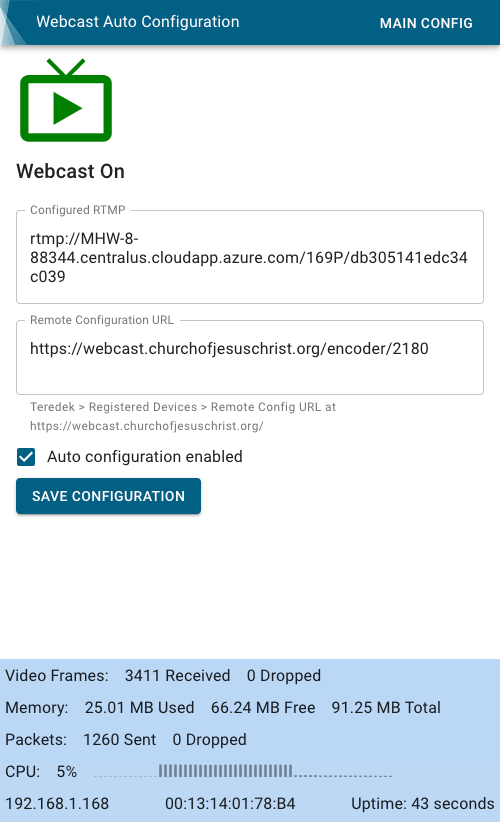
The new firmware adds a menu item called "Auto Configuration" which takes you to a new user interface where all you have to do is enter in the URL you get from http://webcast.churchofjesuschrist.org/ under the Teredek > Registered Devices > Remote Config URL button. You then check the Auto configuration enabled box and Save Configuration button.

That is all you need to do and you can begin scheduling your meetings using http://webcast.churchofjesuschrist.org/.

Another firmware update is in the works, but it will be next week sometime. This will add better monitoring and allow you to see how all your devices are performing in real-time on one dashboard. This will be an opt-in only feature since you will be sending metrics to a server. I will be providing the monitoring service free of charge.

The new firmware can be downloaded here: https://github.com/bretep/webcast-auto- ... tag/v1.0.2

Please consider staring the github repository and following the project or releases. This benefits you and me. You get to receive notifications on new releases and I get to see how helpful my firmware is to others.
screenshot-webcast-on.png
Screenshot of the User Interface
(79.95 KiB) Not downloaded yet
New Member
#70
bretep - I'm dying and am in need of some help with the configuration of the J-Tech JTD-220

Following your directions seemed very easy; to me, they were very clear and methodical. However, after several Resets, reloads of your up.rar, and re-configurations I still receive the Begin Encoding message in Meetinghouse Webcasting.

Did I miss something? After changing the IP, I set everything in ENCODER > MAINSTREAM to DISABLE, and in OSD > SUBSTREAM3 > ZONE 1 I set ZONE to ENABLE, TYPE to TXT, and pasted the REMOTE CONFIG URL from Meetinghouse Webcast into the TEXT field. I repeated these steps several times, on one iteration APPLYing and REBOOTing after each individual change. I have not yet been able to broadcast with the JTD-220. I did test my output from the AV2HDMI, and have audio and video going into the JTD-220.

Would you have time for phone consultation?
Member
#71
Hi. Try the new firmware I released yesterday. I made a user interface so you don’t have to go and edit the OSD etc... plus it shows if it’s broadcasting, where to, and other information.

I’m happy to take a phone call and help out. You can PM me to get connected.

https://github.com/bretep/webcast-auto-conf/releases
Member
#72
vailmd wrote:I ran a quick test with the HDMI unplugged from the jtech encoder. The Church Logo comes up for a few seconds and then goes away and the stream returns to the church default stream. It looks like the logo is not a stream so it drops out.
As of yesterday I’m working with J-Tech on this issue. Their program streams the image on a loop and then checks for input then restarts the loop. Hopefully we get this resolved this week. If we do, I’ll release a new version of my firmware.

Good news is, this behavior does not happen with a normal input from a camera.
New Member
#73
bretep wrote:Hi. Try the new firmware I released yesterday. I made a user interface so you don’t have to go and edit the OSD etc... plus it shows if it’s broadcasting, where to, and other information.

I’m happy to take a phone call and help out. You can PM me to get connected.

https://github.com/bretep/webcast-auto-conf/releases
bretep;

Thank you for the firmware update, but I'm still not broadcasting. Additionally, I am unable to use PM, as of yet.

Auto configuration is wonderful. If you're available & willing, I could really use that phone consultation.

Ken Anderson
TwoZeroEightTwoEightFourThreeThreeSevenOne
New Member
#74
bretep wrote:The new firmware can be downloaded here: https://github.com/bretep/webcast-auto- ... tag/v1.0.2

Please consider staring the github repository and following the project or releases. This benefits you and me. You get to receive notifications on new releases and I get to see how helpful my firmware is to others.

screenshot-webcast-on.png
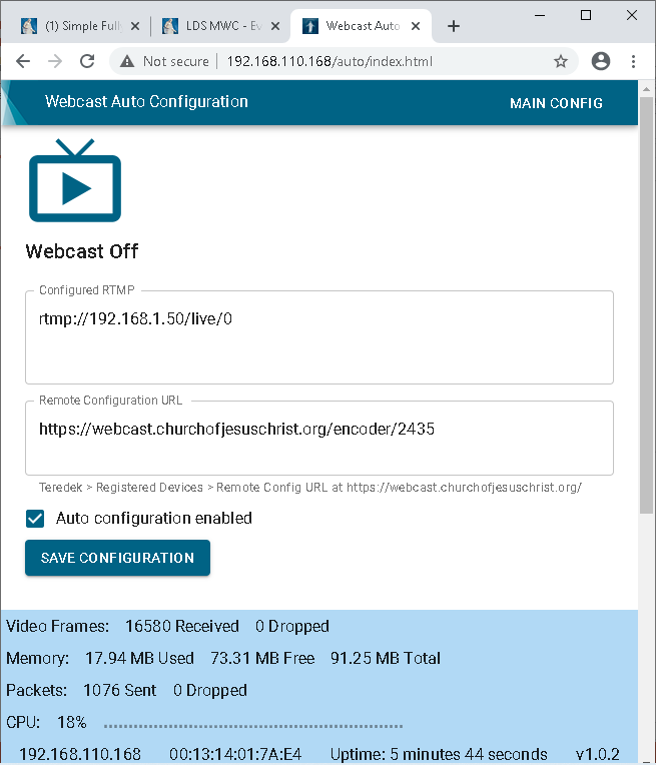
It appears that I have incorrectly set a setting. I say this because your 06 OCT 15:46 auto-config screen shot shows your CONFIGURED RTMP as the Meetinghouse Webcast COMBINED RTMP URL AND STREAM NAME. However, as can be seen by my auto-config screen shot, I am not getting the Combined RTMP URL & Stream Name.
20201007_JTD-220_Auto-config.png
(112.57 KiB) Not downloaded yet
Member
#75
That is the manufacture default. If you’re scheduled a meeting with that device, it will change to whatever the church tells it to when the server is ready to accept the RTMP stream.

I do not clear any values, rather I only enable disable the stream. You notice on my screenshot there is a configured RTMP url when the webcast is off. It won’t change until told to by the church. The reasoning behind this is so you can see the last value set, even after the webcast.

Maybe I’ll add helper text to that box explaining that is the case.

Thank you for the heads up.
Member
#76
New Release: Version 1.0.3 is now avaliable

I've fixed some minor issues with the UI in this release and added helper text to the Configured RTMP box to help technology specialists understand that it will only be updated when the remote configuration is ready to receive the RTMP stream.

My UI will now display the correct IP Address

https://github.com/bretep/webcast-auto- ... tag/v1.0.3

You can receive update notifications if you "Watch" the github repository.
New Member
#77
bretep - I'm new to github - so forgive me for the newbie question. For your Firmware project, is there a place on github to put Enhancement Requests? Or do we just open "issues" ?

Are you wanting us to submit ideas on how to possibly improve the project?
-Aaron Hixson
Payson Utah Mountain View Stake
aaron@hixsonfamily.net
Member
#78
Hi,

Yes, just create an issue, then I can work on it. :)
Member
#79
MKenAnderson wrote:
bretep wrote:The new firmware can be downloaded here: https://github.com/bretep/webcast-auto- ... tag/v1.0.2

Please consider staring the github repository and following the project or releases. This benefits you and me. You get to receive notifications on new releases and I get to see how helpful my firmware is to others.

screenshot-webcast-on.png
It appears that I have incorrectly set a setting. I say this because your 06 OCT 15:46 auto-config screen shot shows your CONFIGURED RTMP as the Meetinghouse Webcast COMBINED RTMP URL AND STREAM NAME. However, as can be seen by my auto-config screen shot, I am not getting the Combined RTMP URL & Stream Name. 20201007_JTD-220_Auto-config.png
Thanks for letting me help you today. Here are the results of our debugging:

- The encoder will only receive an RTMP configuration when the church webcast auto config URL is ready for streaming.

- After the church sends the config and is ready for streaming, it may take 5 minutes or so for the church webcast to accept the stream.

- If you have one webcast ending and another webcast scheduled 30 minutes after using the same encoder, the encoder will not receive an updated configuration until the church’s 15-minute post buffer has ended. The encoder will begin webcasting the new stream about 15 minutes before the new meeting begins.

Each of these issues is not related to my firmware or the encoder. They are issues with how the church designed their auto configuration, and the Teradeks experience the same problem. However, with the Teradeks, you frequently have to manually reboot to pick up the auto config, where the J-Tech encoder, with my firmware, you do not have to reboot manually.
New Member
#80
Just wanted to say thanks for putting this together, making it easy, and for the logo upload feature! I was going to try to replace the image file in the up.rar, but this is MUCH easier!
Member
#81
Thank you. Also, I’m working with j-tech to solve two issues:
1. When there is no signal, my firmware will display the church logo for several seconds and then stop broadcasting for a few seconds then start broadcasting again. J-Tech has confirmed this issue with their binary, which I cannot fix since I don’t have the source. They are working on making the no signal page continue to loop; this way, we don't see the no signal page for a few seconds, then the choir sing for a few seconds repeatedly.

2. They are working on a new feature for us where we can add text overlay to the no signal page; this way, you can add any message you would like to the no signal page.

Hopefully, they have these things solved this week.

They may also be giving me access to their source code, which would allow me to fix it. We’re working out the details there.

Thanks, everyone! I am thrilled this firmware is blessing more than my life.
New Member
#82
First Sunday with both buildings in my stake broadcasting and I thought I’d report.

I have one Teradek box and one jtech box connected to hdmi camcorders the stake already owned. Each building gets their own setup (encoder box plus a camcorder).

It’s noticeable how low maintenance the jtech is with the custom firmware bretep has written. The fast reboot time and checking for an updated stream configuration every ten minutes (versus the every hour the Teradek does) is a marked difference. Loving the jtech setup a lot more than the Teradek now.

Thank you bretep!

When you get a second, I sent you a couple private messages with questions.
Member
#83
Great! Thank you for the feedback.

Just a clarification, my firmware checks every 10 seconds, but remote config takes 10-15 minutes to update because of the post buffer. I

Today, all 13 wards meet, and was the first Sunday I had zero interactions with anyone. The past Sundays the only people that had problems were the ones using the Teredek. I replaced it this last week with the J-Tech.

This was a great Sunday!
New Member
#84
@bretep - next Sunday please post a picture of your setup monitoring all 13 broadcasts :-)
Question: When J-Tech comes out with a new firmware - how are you going to take their updates and apply it to your custom firmware? Is that a headache?
-Aaron Hixson
Payson Utah Mountain View Stake
aaron@hixsonfamily.net
Member
#85
For me to apply their updates to my firmware, it's a very simple process, takes a couple minutes is all.

If you goto their website and download the latest firmware, then you will have just their stuff. ;)
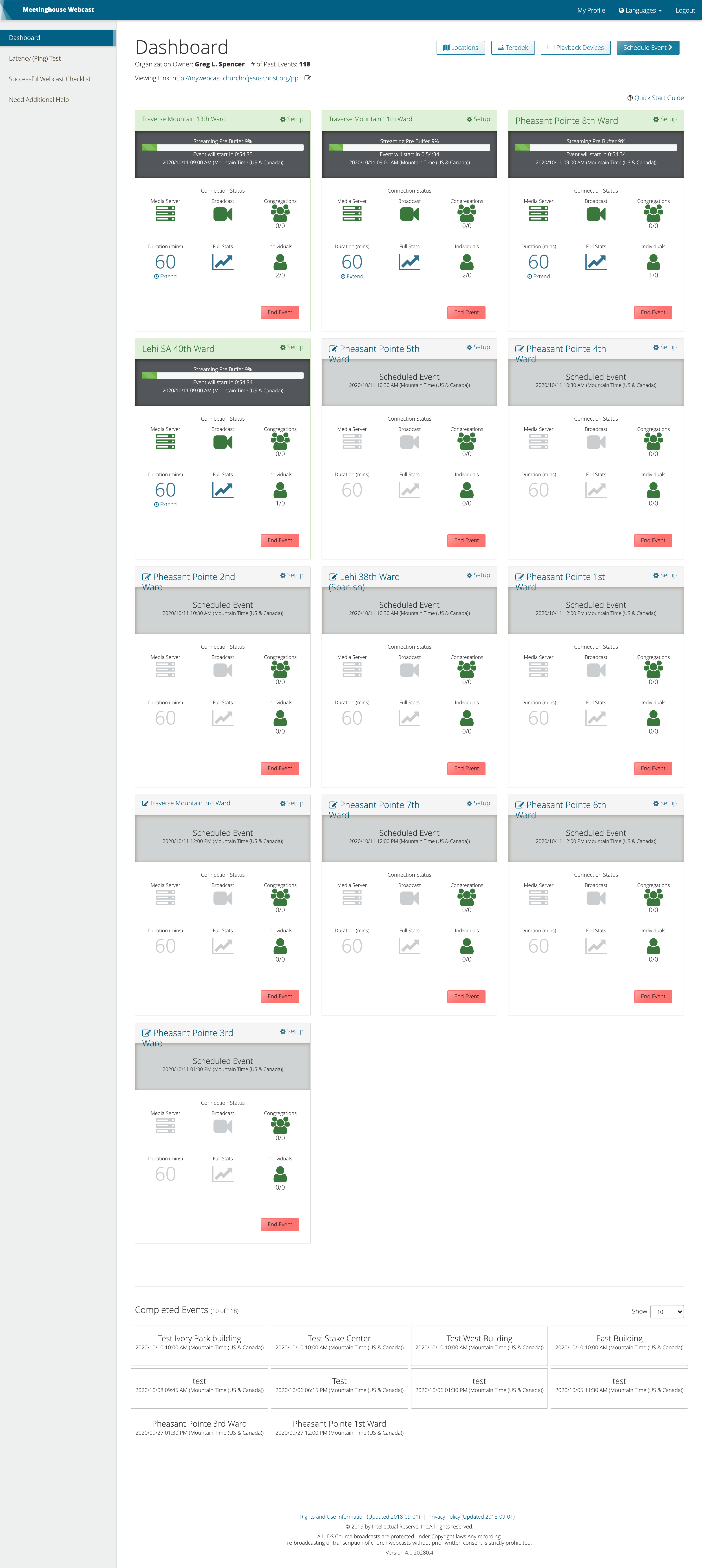
screencapture-webcast-churchofjesuschrist-org-2020-10-11-08_06_15.png
13 Broadcasts using webcast dashboard
(1.37 MiB) Not downloaded yet
Member
#86
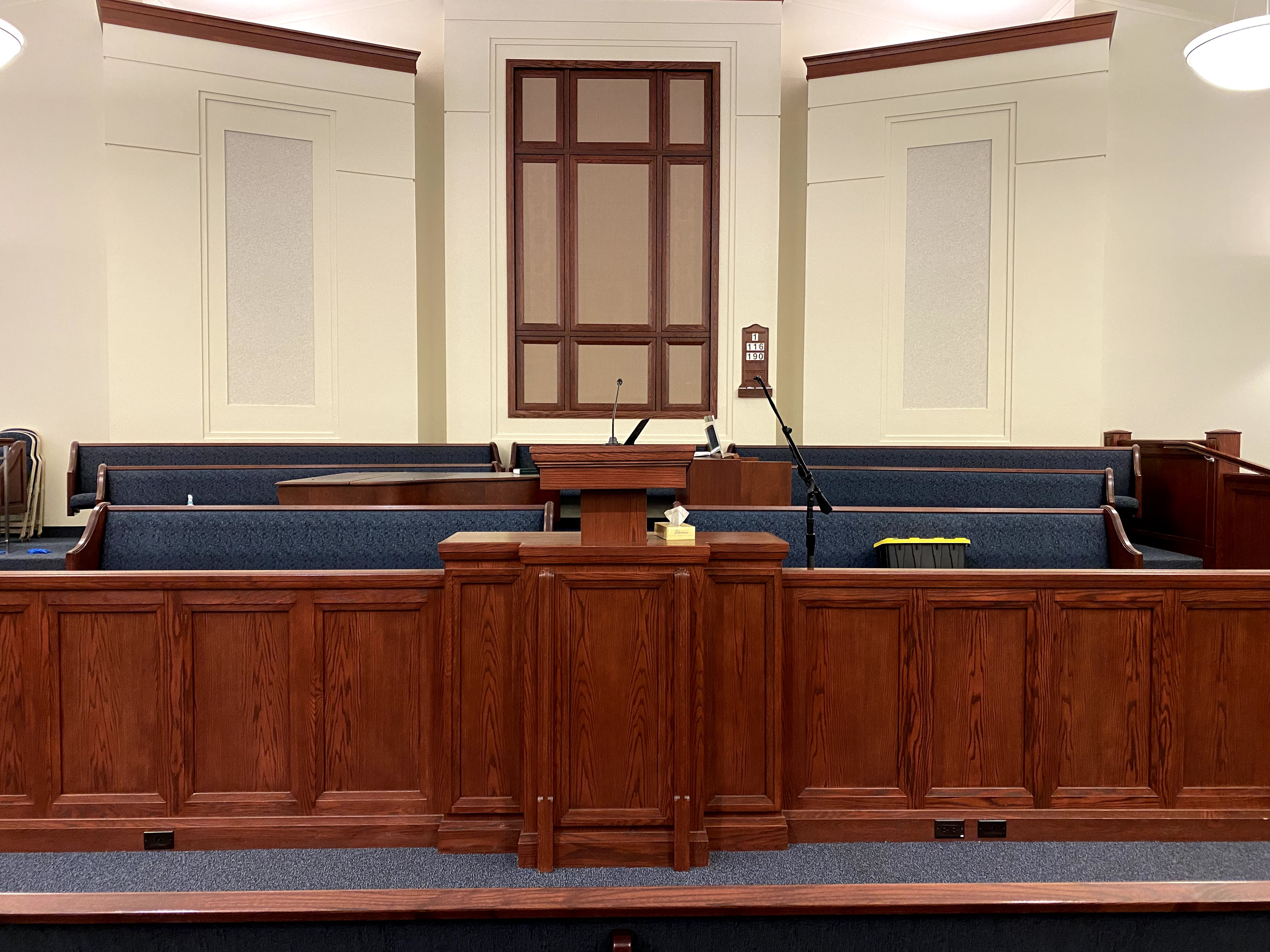
I swapped out my tripods with a microphone boom so that the camera faces the front of the speaker vs. the side. Also, it's less distracting.

Here is what the setup now looks like in the congregation:
IMG_8891.jpg
Congregation front view
(1.23 MiB) Not downloaded yet
IMG_8890.jpg
Congregation side view
(1.17 MiB) Not downloaded yet
New Member
#87
bretep wrote:That is all you need to do and you can begin scheduling your meetings using http://webcast.churchofjesuschrist.org/.
I assume that the STS has to schedule a link for you each week in the stake portal with this option? And each stake member would see each wards scheduled broadcasts as well when they logged in?
Community Administrator
#88
johnv wrote:I assume that the STS has to schedule a link for you each week in the stake portal with this option?
Or an Assistant Technology Specialist. But correct about it being a weekly process.

johnv wrote:And each stake member would see each wards scheduled broadcasts as well when they logged in?
If you're talking about the stake page, and the broadcasts are set to public, that is correct. Otherwise, they'll need the meeting number which will change each week. It has been suggested to use a URL shortener where you can change the destination of a static URL each week.
Have you searched the Help Center? Try doing a Google search and adding "site:churchofjesuschrist.org/help" to the search criteria.

So we can better help you, please edit your Profile to include your general location.
New Member
#89
For our stake we make the meetings public and we bought the domain paysonworship.com to make it easy for members to find/remember where they need to go in order to watch our Sabbath Day worship services. The domain cost $5 for the first year, which is fine since we don't know how long Sunday Ward Broadcasts will continue.
-Aaron Hixson
Payson Utah Mountain View Stake
aaron@hixsonfamily.net
Member
#90
johnv wrote:
bretep wrote:That is all you need to do and you can begin scheduling your meetings using http://webcast.churchofjesuschrist.org/.
I assume that the STS has to schedule a link for you each week in the stake portal with this option? And each stake member would see each wards scheduled broadcasts as well when they logged in?
The STS does need to schedule each week. I put in a request with the project manager to add reoccurring meetings so I don't have to spend 30 minutes each Saturday scheduling meetings. They had already had this feature on their to-do list.

Just like in-person worship is public, so are our broadcasts. We welcome everyone. The church broadcast system will support 2,000+ individual streams.
New Member
#91
This looks exciting - I'm looking forward to trying it out. For anyone looking for an even lower-cost solution (I spent about $50 per building by using older model iMac computers (reformatted and running Ubuntu) purchased from the school district surplus a few years back), refer to this thread for automating OBS Studio on an older computer to pull configuration from the Webcast XML file: viewtopic.php?f=27&t=37666 Rather than just pulling the plug on HDMI or the power to the encoder, scene controls in OBS Studio allow source selection. I haven't used them, but I believe there are mobile apps for remote controlling OBS if you don't want to sit near the machine.
Member
#92
Thank you Jeremy, I look forward to any feedback you might have.


Because we are now on page 10 of this thread, I want to highlight that the J-Tech solution I have come up with focuses on the following:
- Reliability: Reduce as many points of failure as possible
- Repeatability: Can reliably be deployed across chapels with ease
- Low cost: No expensive web camera, computers, or software
- Stationary: The podium can move up and down
- No-fuss: Power on/off to start and stop the webcast
- Simple configuration using the Church provided Meetinghouse Webcast system
- Easy to train and delegate

The more equipment and moving pieces you add to your setup will incur a cost in time, frustration, stress, and have more points of failure. I want to stress, that while the solution I have here is low cost and 1/8th the cost of most solutions, that is not the primary focus. There is a lot of value in having a reliable, low touch, stress-free setup.

Some additional information about the decisions made:

I've been asked more than a dozen times about USB cameras. Here is my stance on USB cameras. While I use a USB camera for work and with my personal computer, it's not the ideal solution for this purpose. USB cameras each require their own drivers and are built to run on specific operating systems. While the J-Tech is running a tiny version of Linux, it only has a grand total of 24MB of disk space. USB Camera drivers are often times 1MB or more. Besides the driver compatibility problems, the USB cameras are expensive.

Analog cameras are extremely low cost ($14) and the converters to HDMI are also affordable ($17). No drivers or software involved. They are such low cost that I purchased an extra camera per building and one additional RCA to HDMI converter, just in case one fails.

As a Stake Technology Specialist, I was able to hold one training meeting with a representative from each of the 13 wards in my stake. They were able to learn and are at the chapel to help, if needed. I'm happy to report, only one of the representivives had to do any work, and that was because they had a Teredek.

The Teredek has the following issues:
1. Battery: You must manually flip the on/off switch, you cannot add a remote on/off switch to control the power to the device.
2. Red button/joy-stick: The helper thought he had turned off the broadcast by pushing the button, but instead it just activated the menu
3. Remote configuration is not predictable: 5 minutes before the meeting was to start, the broadcast had not yet begun, but the webcast dashboard showed it was waiting for the stream to come in. This required a manual fiip of the on/off switch.

Teredeks require too much involvement and babysitting, thus being less reliable.
New Member
#93
As the STS, and having worked with the Teradeks for a while, I will say I am very excited by this solution.

However, for some reason I am not able to make the magic happen. It seems like such a simple solution to configure I believe I am either missing something obvious, or that I perhaps have a quirky unit...???

The auto configuration is not working. When I get to the Auto Configuration page I enter the "REMOTE CONFIGURATION URL" from the Manage Teradeks screen and then press 'Save Configuration' (with the Auto Config Enabled button selected). However the top window that displays the "Configured RTMP" URL doesn't change - it stays at the same "rtmp://192.168.1.50/live/0" I have always seen there.

Needless to say, it wont automagically start the webcast either.
jtech-1.PNG
(114.93 KiB) Not downloaded yet
Has anyone else had an issue like this?
Member
#94
dsbahr wrote:As the STS, and having worked with the Teradeks for a while, I will say I am very excited by this solution.

However, for some reason I am not able to make the magic happen. It seems like such a simple solution to configure I believe I am either missing something obvious, or that I perhaps have a quirky unit...???

The auto configuration is not working. When I get to the Auto Configuration page I enter the "REMOTE CONFIGURATION URL" from the Manage Teradeks screen and then press 'Save Configuration' (with the Auto Config Enabled button selected). However the top window that displays the "Configured RTMP" URL doesn't change - it stays at the same "rtmp://192.168.1.50/live/0" I have always seen there.

Needless to say, it wont automagically start the webcast either.

jtech-1.PNG

Has anyone else had an issue like this?
Your device is not connected to the internet, so it cannot get the remote configuration.

I've added logging to a new version of the firmware, I'm about to post about it now.
Member
#95
New firmware release v1.0.4 -- Added logs to the user interface!

Hi everyone! I've been supporting dozens of people around the world! It's wonderful that so many people are using this solution. I've concluded that I needed to add logs to the user interface to see what is happening on the device. This will empower the user to debug their own issues very quickly!

Some of you were notified when this release happened; for the other who have not subscribed to the updates on Github, you can find the release here:
https://github.com/bretep/webcast-auto-conf/releases
screencapture-192-168-7-188-auto-index-html-2020-10-14-17_34_10.png
Screenshot of the logging added to the firmware
(71.37 KiB) Not downloaded yet
New Member
#96
Do you happen to have pictures of the setup and connections?
New Member
#97
Hi @bretep,
I'm able to get our solution up and running. We used it as part of a recent stake conference, and will be using it for a trial sacrament next sunday. I have been able to compile a fresh copy (not just the release) and push it to my encoder. But I'm running into a confidence issue before I start working on code for it. Is there any tips you can provide on how to go about coding for this in a safe way?

I haven't yet been able to access the serial console. So I'm guessing that's a good first step.

I unfortunately cannot direct message you (it won't let me, as this is my first post).

Thanks,
William Lightning
Community Moderators
#98
kassah wrote:I unfortunately cannot direct message you (it won't let me, as this is my first post).
You have the capability to send a PM now.
So we can better help you, please edit your Profile to include your general location.
New Member
#99
Mikerowaved wrote:You have the capability to send a PM now.
Thank you!
New Member
#100
As the STS for our stake, thank you so much for this project, and the time spent on it. With teredeks effectively gone, I needed another good solution for our stake.

This provides an easy to use, effective solution in its place. I have purchased two, and tested one. The J-Tech is about 1/5 the cost of a teredek. So, that is awesome too.

We are going to be doing stake conference with both local and remote users here soon. But, this also includes two languages (English and Spanish). Thus the need for two units.

The auto configuration is great! It makes it real easy. Interesting that the unit has to reboot between configuration changes. But, it does boot fast.

I do like having the OSD in the lower right corner setup for the local clock, so I can know where we are in the broadcast remotely. Because I am going to be having two going at the same time, I added a second OCD in the lower left with the Stake name, and # (Phx Stake #2 - for example). This way I can know which unit I am on as well.

I also like the ability to get a multicast connection to it so I can see the content locally before it goes out to the webcast system. If you have multiple units, make sure to change the associated port#. I find it is about 3-5 seconds behind live viewing.

With the multiple releases, is there any way to see in the web screens what revision I am currently running? I just downloaded1.0.4. It still says it is using 2.89 on the upgrade screen. Never mind, I see it in the lower right corner of the auto-configuration screen.

I did take a few minutes, once I figured the MAC address on these guys, to label this on the bottom of the units. This makes finding it in the DHCP system (or a ping sweep) much easier.

The logging in 1.0.4 is a nice addition.

In testing with no input to the church webcast system, I am finding that I am getting the church generated content (Mormon Tab for example - with "broadcast disconnected" on screen.) interspersed with LDS logo screen, back and forth, back and forth. It is a bit annoying. Anything that can be done about that?

Some suggestions for an improved interface:
1) Can you change the logging so there are levels, so the auto-configuration queries do not overwhelm the logs? It is still checking auto-configs during a webcast, so I cannot see any new updates on that in a concise manner. Maybe just a check box to turn that query on/off in the logs. This could also be put in the bottom update window - last time an auto-configuration query was run? And a countdown timer for the next one.

2) Leading off from that, anyway to modify the configuration to change the query interval from the current 10 seconds to 30, or whatever I would like (10-120 seconds, say)?

3) In the auto-configuration screen - in the stats on the bottom, could you add a current date/time entry as well? This is auto-updating anyways, so having the time there would be nice.

Again - thank you so much. This is good work.
New Member
#101
Just received the setup, once the firmware was applied...and I was able to get the camera powered on, The broadcast came up. Any tips on how to best focus these little guys? Recommendation on how far from the speaker\pulpit?
Thank you so much for sharing this and putting this together! My Stake Presidency is so excited.
Member
#102
Here are pictures of my setup. The last pictures show my new setup. I changed the tripod to a boom mic stand to get more of a front view and less of a distraction to the congregation:
https://photos.app.goo.gl/ChDssT77Ph6gDoeY8
Member
#103
sjstringham wrote: In testing with no input to the church webcast system, I am finding that I am getting the church generated content (Mormon Tab for example - with "broadcast disconnected" on screen.) interspersed with LDS logo screen, back and forth, back and forth. It is a bit annoying. Anything that can be done about that?
This is a bug in a binary I do not have access to. J-Tech is working on fixing the issue.
sjstringham wrote: Some suggestions for an improved interface:
1) Can you change the logging so there are levels, so the auto-configuration queries do not overwhelm the logs? It is still checking auto-configs during a webcast, so I cannot see any new updates on that in a concise manner. Maybe just a check box to turn that query on/off in the logs. This could also be put in the bottom update window - last time an auto-configuration query was run? And a countdown timer for the next one.

2) Leading off from that, anyway to modify the configuration to change the query interval from the current 10 seconds to 30, or whatever I would like (10-120 seconds, say)?

3) In the auto-configuration screen - in the stats on the bottom, could you add a current date/time entry as well? This is auto-updating anyways, so having the time there would be nice.
Thank you! Can you open these issues on github so more than just me can work on fixing them? We have a couple of people interested in helping with the project now.

https://github.com/bretep/webcast-auto-conf/issues
New Member
#104
Per request - submitted to GitHub.
New Member
#105
Question - The micro camera on the first entry - how did you power that guy up? It does not look like the camera comes with a power supply.
Community Administrator
#106
sjstringham wrote:Question - The micro camera on the first entry - how did you power that guy up? It does not look like the camera comes with a power supply.
Looking at the photos on Amazon, the red connector isn't the right channel of a stereo pair, but a 12V connector.
Have you searched the Help Center? Try doing a Google search and adding "site:churchofjesuschrist.org/help" to the search criteria.

So we can better help you, please edit your Profile to include your general location.
New Member
#107
I bought the JTech encoder and have been trying to setup a test meeting without success in getting connection. I am attaching the details in a PDF file of my setup and configuration settings as per the auto config firmware. I would appreciate any help or input on something that we are missing in the configuration or setup. The encoder never connects to the stream that was setup within the webcast portal.

Thanks.
New Member
#108
Looking at your document for 30 seconds, I think you need to configure the network for DHCP before you haul it to a church house. It also would be good for it to be DHCP on your local network for test broadcasts, but that’s just my preference.
Member
#109
bphilli7 wrote:Looking at your document for 30 seconds, I think you need to configure the network for DHCP before you haul it to a church house. It also would be good for it to be DHCP on your local network for test broadcasts, but that’s just my preference.
I agree, that looks like it's the issue. The logging I added should be saying that it cannot reach the server.
  • 1. System-> LAN -> DHCP: Enable
    2. Apply
    3. Reboot
Member
#110
russellhltn wrote:
sjstringham wrote:Question - The micro camera on the first entry - how did you power that guy up? It does not look like the camera comes with a power supply.
Looking at the photos on Amazon, the red connector isn't the right channel of a stereo pair, but a 12V connector.
Yes, you will need to buy a 12v connector for that micro camera. You can buy one on Amazon:
TMEZON 12 Volt 2A Power Adapter Supply AC to DC 2.1mm X 5.5mm Plug 12v 2 Amp Power Supply Wall Plug Extra Long 8 Foot Cord
https://www.amazon.com/TMEZON-Power-Ada ... ics&sr=1-3
New Member
#111
bretep wrote:
bphilli7 wrote:Looking at your document for 30 seconds, I think you need to configure the network for DHCP before you haul it to a church house. It also would be good for it to be DHCP on your local network for test broadcasts, but that’s just my preference.
I agree, that looks like it's the issue. The logging I added should be saying that it cannot reach the server.
  • 1. System-> LAN -> DHCP: Enable
    2. Apply
    3. Reboot
Thanks for the look and input. I will give it a try. Much appreciated.
New Member
#112
I purchased the equipment as suggested in the first post. It arrived yesterday and I was amazed at how easy it was to connect and to install the latest version of the firmware that you have created.

Later in the evening I scheduled a test event. I left the encoder connected and powered on. It was my impression that the encoder would activate and start the stream at the scheduled start time of the broadcast. However, that isn’t what I experienced. The encoder started to broadcast When the pre-buffer part of the event happened.


After my experience last night, that has led me to several questions I’m hoping you can answer.

1. Is what I experienced with the encoder starting to broadcast at the beginning of the pre-buffer phase the anticipated behavior?

2. If so, how can I keep it from starting to encode and broadcast until the actual start time of the event? My bishop doesn’t want it to start broadcasting early.

3. As you mentioned in the read me file, the microphone in the $14 RCA camera isn’t very good. How can I add the audio from the church system without an audio in like the Teradeck encoders have?

4. I am anticipating that my bishop will want a different camera used. Is there a suggested camera that could be placed in the back of the chapel and zoomed in on the speaker?


Thanks again for this post. I’m currently spending 45 minutes cabling and checking USB camera, setting up the information in OBS and preparing for each ward that I help broadcast. I’m excited for how easy this sounds And for how effortlessly it sounds like it will work.
Community Moderators
#113
khansen188 wrote:1. Is what I experienced with the encoder starting to broadcast at the beginning of the pre-buffer phase the anticipated behavior?
2. If so, how can I keep it from starting to encode and broadcast until the actual start time of the event? My bishop doesn’t want it to start broadcasting early.
Yes. This allows sending and receiving locations to test the webcast before the meeting begins, particularly for stake conferences, and allows time to troubleshoot any problems that arise.

The only way I know to avoid webcasting during the Pre Buffer is to turn on encoding when the meeting begins. I do not know if that can be automated, or if the encoder you are using can be controlled remotely.

It may be tempting to schedule a live event to start an hour later, which would cause the Pre Buffer to start at the beginning of the actual meeting. This would be risky, because the Pre Buffer for a live event does not always start exactly one hour before the actual event is scheduled to start.

An alternate method would be to leave the sound (and possibly the video) off until the meeting begins. The bishop may be okay with that but, once again, it requires manual intervention to accomplish.
Community Administrator
#114
khansen188 wrote:My bishop doesn’t want it to start broadcasting early.
Anyone showing up in person early will experience the same thing. It also won't give you any time to resolve problems if it doesn't work when it's supposed to.

What you can do is power the system on just before the start time. Note that the system won't end at the end time either. You'll have to turn it off. Note that when you do that, you'll likely lose the last few seconds of the broadcast.

lajackson wrote:It may be tempting to schedule a live event to start an hour later, which would cause the Pre Buffer to start at the beginning of the actual meeting. This would be risky, because the Pre Buffer for a live event does not always start exactly one hour before the actual event is scheduled to start.
Not only that, but the broadcast will be labeled with the wrong start time. And as mentioned above, it doesn't solve your ending issue.
Have you searched the Help Center? Try doing a Google search and adding "site:churchofjesuschrist.org/help" to the search criteria.

So we can better help you, please edit your Profile to include your general location.
New Member
#115
I setup this system as described in the first post at home the other day. After setting it up, I ran a successful test even from my office at home. Now I have taken the equipment to the church and can't get the encoder to start encoding the broadcast or can't get the broadcast pushed from the encoder to the church webcast system. I don't have a whole lot of knowledge of how to do this and am at a loss on what to do at this point.

What kind of troubleshooting information, screenshots, etc. can I provide to get help with this and have a successful broadcast tomorrow?
New Member
#116
Did you make sure to set the jtech to collect a DHCP address? It defaults to a static IP address.

Do you have network connection (blinking green and orange lights on the network connection)?
New Member
#117
I had a faulty connector on my network cable. Once I swapped out the cable it worked great.

I have my stream working now, however, the audio is very quiet. It is connected to the sound in the building through the line out port. How can I increase the volume being provided to the webcast system?
New Member
#118
I found the setting in the encoder to boost the audio. Fingers crossed that things go well today.
New Member
#119
@bretep I'm not far from where you are. Would there be a possibility to come see your setup in person? I don't think I can DM anyone yet, so maybe you'd be willing to DM me? This has some sweet potential for our stake where we deal with multiple languages. Thanks in advance.
New Member
#120
The last couple weeks, I have ran across an interesting issue using this setup. By the end of our broadcast today the audio and video were out of sync by almost 5 seconds. Any ideas on how we can adjust things to make the audio and video stay in sync?
New Member
#121
khansen188 wrote:The last couple weeks, I have ran across an interesting issue using this setup. By the end of our broadcast today the audio and video were out of sync by almost 5 seconds. Any ideas on how we can adjust things to make the audio and video stay in sync?
When I have seen this it is typically a refresh on the device you are watching that clears it up.
New Member
#122
khansen188 wrote:I found the setting in the encoder to boost the audio. Fingers crossed that things go well today.
Are you using the digital enhancement? When I tried that I got a really loud squeal and it sounded way to roboticy. I have since purchased a cheap booster and it seems to work great.
Community Administrator
#123
trentj2009 wrote:
khansen188 wrote:The last couple weeks, I have ran across an interesting issue using this setup. By the end of our broadcast today the audio and video were out of sync by almost 5 seconds. Any ideas on how we can adjust things to make the audio and video stay in sync?
When I have seen this it is typically a refresh on the device you are watching that clears it up.
Which suggests the issue is somewhere between the church servers and the viewing device. Not much you can do on the chapel end of things to fix that. Not unless some encode rates are more prone to that then others.
Have you searched the Help Center? Try doing a Google search and adding "site:churchofjesuschrist.org/help" to the search criteria.

So we can better help you, please edit your Profile to include your general location.
New Member
#124
We have a 100MB up and 100MB down fiber connection coming into our building. I've never done much streaming of anything and am still learning. What would be the best target encode rate?
New Member
#125
trentj2009 wrote:
Are you using the digital enhancement? When I tried that I got a really loud squeal and it sounded way to roboticy. I have since purchased a cheap booster and it seems to work great.


What audio booster did you purchase?
Community Moderators
#126
khansen188 wrote:We have a 100MB up and 100MB down fiber connection coming into our building. I've never done much streaming of anything and am still learning. What would be the best target encode rate?
I would recommend 720p at 30 fps with a bitrate somewhere between 2 and 4.5 Mbps. The difference in quality is really only noticeable on larger screens. How are you planning on doing the encoding?
So we can better help you, please edit your Profile to include your general location.
New Member
#127
I purchased one of the Jtech Encoders, mentioned in the first post of this thread.
New Member
#128
For what it's worth, as has been brought up before, the audio out "jacks" in the buildings are mono only. bretep posted that he installed a mono splitter, which does work, but there is another option I've implemented that doesn't require a splitter...

In the J-Tech encoders, under the "Encoder">"Audio" section, you can change "Audio Channel" from "L+R" to "L" or "R" depending on where you're inserting the audio. The J-Tech will take the audio in from where you specify and send stereo out. So, if you give it mono on one channel, it will duplicate that on the other channel going out to create perceived stereo...or dual-mono. The one "gotcha" is that the J-Tech encoders appear to have the L and R backwards.

I'm using an RCA to HDMI converter as my audio inserter as well. The camera video is connected to the RCA to HDMI adapter on the yellow jack and the audio on the red jack. R is generally Red and L is White...but they are backwards in the J-Tech box. So, where I'm inserting audio on "Red" in the converter, the J-Tech is setup to take audio from "L"...which does the mono to dual-mono conversion now in the J-Tech encoder.
New Member
#129
bretep wrote:Hi everyone. I thought I would share the cost effective and low stress setup we are using in our stake. I've made this an easy setup for anyone and it uses the Meetinghouse Webcast system to boot.

This setup is quite simple. Just turn on or off the encoder is all that is needed by anyone on the stand. All else is automated.
I webcast 12 of 13 wards on Sunday with no technical issues on the webcasting side of things. I do admit that I had specialists
configure each encoder before each session, however, they will no longer be required to configure with this firmware.

Benefits of this setup:
  • Low cost - No expensive web camera or computers
    Stationary - Podium can move up and down
    No fuss - Power on/off to start and stop the webcast
    Simple configuration using the Church provided Meetinghouse Webcast system
    Easy to train and delegate
    Open source, so we can improve this system together!

Cost: $205.00 MSRP per building
I'm listing MSRP, but I was able to find them far cheaper on Amazon

J-Tech Digital H.264 IP Encoder: MSRP: $179.99 https://jtechdigital.com/product/jtech-ench4-0220/
RCA to HDMI Converter: $12.00 https://www.amazon.com/GANA-Composite-C ... B01L8GG6PW
Camera with Microphone: $14.00 https://www.amazon.com/dp/B073P1K48T/re ... AFbXG48WGZ


Firmware Release:
https://github.com/bretep/webcast-auto- ... tag/v1.0.0

Meetinghouse Setup
IMG_8690.jpg

Full test of full automation - Zero touch to webcast encoder, simulated scheduling and playing all 3 worship meetings only using the Meetinghouse Webcast system.
IMG_8733.jpg

Congregation view
IMG_8693.jpg
I have followed this set up pretty closely as I am no expert when it comes to this topic. Most of what I have learned has come from reading these forums. I have the video and audio from the church system connected to a J-Tech 18GAE (HDMI Audio Embedder). This is then connected to the J-Tech ENCH4 (HDMI H.264 Encoder). We are then using the Church Webcast system to stream the sacrament meetings. I have followed all of the instructions as described on github. I am not sure what changed two weeks ago but I am having two issues:

1) At different times during the broadcast the signal is lost to the encoder and the viewers see the church logo or the choir singing. This usually requires me to disconnect the HDMI cable and reconnect. This tends to reconnect the stream.

2) As of two weeks ago the video and audio are no longer in sync. Previously they were fine. I can't figure out for the life of me what changed and how to correct this. After speaking with Salt Lake we tried different servers and this as not corrected the issues. If the view refreshes the browser the video and audio will be in sync again for about a minute and then the progressively get worse.

Any help and advise would be greatly appreciated.
Community Moderators
#130
mads2041 wrote:...

1) At different times during the broadcast the signal is lost to the encoder and the viewers see the church logo or the choir singing. This usually requires me to disconnect the HDMI cable and reconnect. This tends to reconnect the stream.

...
Have you tried substituting other HDMI cables in place of the ones you are using? It is possible for HDMI cables to go bad after a period of time. At home yesterday, I missed a lot of my ward's sacrament meeting because of an HDMI cable that had worked well during testing but then failed. With a different cable, everything worked again.
New Member
#131
I swapped out the HDMI cables this Sunday and still had the same issue. Some members complained that the lag was several sentences behind. I have posted a screenshot of the settings.
📎 Screenshot.jpg (45.69 KiB)
Community Administrator
#132
mads2041 wrote:I swapped out the HDMI cables this Sunday and still had the same issue. Some members complained that the lag was several sentences behind. I have posted a screenshot of the settings.
The DHCP IP setting has me scratching my head. That seems unusual for a church network.

Are you doing four streams? That might be an issue. That's going to put a significant load on the encoder as well as your upload speed.
Have you searched the Help Center? Try doing a Google search and adding "site:churchofjesuschrist.org/help" to the search criteria.

So we can better help you, please edit your Profile to include your general location.
New Member
#133
We only have one stream at a time. I think I set it up according to the instructions with the exception of the DCHP. When I had an ip address selected the network did not recognize the encoder. My main issue right now is the audio and video being out of sync and I can not figure out what is causing it to be out of sync.
New Member
#134
The sync issue is with the church player embedded in the webpage. Using developer tools you can get the address to the m3u8 file that describes the stream. Putting that into VLC will result in a stream that stays in sync the whole time, each time. The sync issue is sadly out of our hands...and reconnecting the HDMI will only kill the stream for everyone and is not a fix as the stream is in sync coming from the encoder. However, the church has posted (on the webcast site where events are scheduled) that there will be maintenance on the player this coming week. We can only hope that includes a fix to the sync issues!

I also use DHCP in my J-Tech encoders, but I've specified a static address for the encoders in TM. That way they always get the same address and I can also find the reservation easily if the encoder is off.
New Member
#135
Edited 1 time, last by mrnitro on
Ok...after a ton of testing, I've solved the sync issues found when using the J-Tech Encoders! The sync issues mostly affected Chromium-based browsers, but it has been observed from time to time on Safari as well. Additionally, with the new static encode URL from the Church, we can all remove a bit of load from the Church's systems by reverting back to the stock firmware (No offense bretep! Your firmware rocked while we needed it!) as we no longer need the auto configuration. Without the auto configuration in bretep's modified firmware, the encoder will still boot quickly, and try about every minute to connect to the "Enabled" URL (as defined below). Once it connects, it streams beautifully! I used this configuration for two 1-hour tests and five Sacrament Meetings yesterday...and it never went out of sync! Here's the steps I recommend taking asap:
  1. Download the latest firmware from J-Tech: https://jtechdigital.com/product/jtech-ench4-0220/ (Scroll down and click on "Firmware Upgrade")
    • Extract the zip file and you'll have an up.rar file.
    • If you'd like a custom splash screen when the encoder first begins to stream or when the HDMI is disconnected, follow their link for "Tech Digital JTECH-ENCH4 (JTD-220) H.264 Encoder - How to change the "No Signal" image": https://jtechdigital.com/?p=126976
    • Alternatively, if you'd like their V2.89 firmware with the blue church logo, you can download the up.rar file attached to this post. (I followed their instructions above.)
  2. Login to the J-Tech Encoder and upload the firmware:
    1. On the left side, click on "System", then "Upgrade".
    2. Click "Choose file" and find the up.rar file you downloaded to your computer.
    3. Click "Upload", and wait until the status bar shows it has completed the upload.
  3. Reboot the encoder:
    • On the left side, under the "System" section, click "Reboot" and then click the "Reboot" button.
  4. Configure for the new static URL:
    1. On the left side, click "Encoder", then "Main stream"
    2. Set the following settings:
      • Encoding type: H.264
      • FPS: 30
      • GOP: 15 <-- this will make the encoder create 2 keyframes per second which helps with the audio/video sync
      • Bitrate(kbit): your desired bitrate -- 1536 (1.5Mbps) or 2048 (2Mbps) is sufficient for 1280x720 video
      • Encoded Size: 1280x720 -- if you're using the tiny RCA spycam suggested by bretep in earlier posts
      • H.264 Level: high profile
      • Bitrate control: vbr
      • Disable all URLs and "Multicast IP" except for "RTMP/RTMPS/RTSP PUSH URL".
      • Login to webcast.churchofjesuschrist.org and get the "Encoder URL" for your specific encoder. Paste it in the box for "RTMP/RTMPS/RTSP PUSH URL" and set it to "Enable"
    3. Click "Apply"
  5. Configure Audio Settings:
    1. On the left side, click "Encoder", then click "Audio"
    2. Set the following settings:
      • Audio Input: HDMI
      • Sampling rate: 48000 <-- this will also be paramount to keep the video and audio in sync. The default from J-Tech is 44100.
      • Encoder: AAC
      • Audio Channel: If you are only supplying mono to the encoder, set this to match where you're inserting it into the HDMI (L or R) and the encoder will make it stereo. If you are using a mono splitter to feed both L & R into the HDMI, then select "L+R".
      • Bitrate: 96000 - 128000 should be sufficient
      • Digital Volume: 0 is probably sufficient for most cases, but if viewers are having to turn up the volume a lot to hear the webcast, then this number can be increased to help boost the volume in the stream. For example, in a non-Stake Center with a QSC amplifier, I use 30. In the Stake Center with an old Ivie, I use 10. (Good idea to set a value and test with a test event.)
      • G711A Over PTE: Enabled
    3. Click "Apply"
  6. Reboot the encoder:
    • On the left side, click "System", then click "Reboot", then click the "Reboot" button.
📎 up.rar (7.6 MiB)
Community Moderators
#136
garnsb wrote:...
[*]Configure Audio Settings:
  1. On the left side, click "Encoder", then click "Audio"
  2. Set the following settings:
    • Audio Input: HDMI
    • Sampling rate: 4800 <-- this will also be paramount to keep the video and audio in sync
      ...
Just to make sure there isn't a typo, should that be 4800 or 48000? on the sampling rate?
Community Administrator
#137
garnsb wrote:Additionally, with the new static encode URL from the Church, we can all remove a bit of load from the Church's systems by reverting back to the stock firmware
Is the static URL per encoder, or only per meeting (and only when doing reoccurring meetings)?
Have you searched the Help Center? Try doing a Google search and adding "site:churchofjesuschrist.org/help" to the search criteria.

So we can better help you, please edit your Profile to include your general location.
New Member
#138
rmrichesjr wrote:
garnsb wrote:...
[*]Configure Audio Settings:
  1. On the left side, click "Encoder", then click "Audio"
  2. Set the following settings:
    • Audio Input: HDMI
    • Sampling rate: 4800 <-- this will also be paramount to keep the video and audio in sync
      ...
Just to make sure there isn't a typo, should that be 4800 or 48000? on the sampling rate?
Yes, I corrected it in my post above. Sorry.
New Member
#139
russellhltn wrote:
garnsb wrote:Additionally, with the new static encode URL from the Church, we can all remove a bit of load from the Church's systems by reverting back to the stock firmware
Is the static URL per encoder, or only per meeting (and only when doing reoccurring meetings)?
The static URL is per encoder. On the "webcast.churchofjesuschrist.org" page, there is an "Encoder URLs" button in the top right. This let's you create a URL for each encoder you have in your Stake. That URL should then be set in the respective encoder. Then, when you schedule an event, you select the Encoder URL you wish the event to be tied to...whether a one-time or a reoccurring meeting. When that respective encoder turns on near the window of time when your event was scheduled, it will begin to encode to the URL, which should coincide with the event you scheduled.

The Church does point out, in the huge green notification box that is currently being displayed on the webcast page right after login, that events cannot overlap for the same Encoder URL. That would not work very well. ;)