Please share your experience with broadcasting interactive Sacrament Meetings

23 postsstarted by bretbassett 18,617 viewsoriginal topic

Church Employee
#1
For the next several months many wards will begin to broadcast Sacrament Meetings for the first time. Some will try to use Interactive tools such as Zoom or Google Meet. Those who are trying to create an experience without disruptions caused by interactivity will try to use non-interactive tools such as the Church Webcast System or YouTube Live. We would like to find out from you which tool you used (not how you used it or what troubleshooting you are seeking to make it better) and whether you would recommend it for others to try. The church isn't going to make a global recommendation for a variety of reasons. But we would love to hear what is working for you, and what is not working.

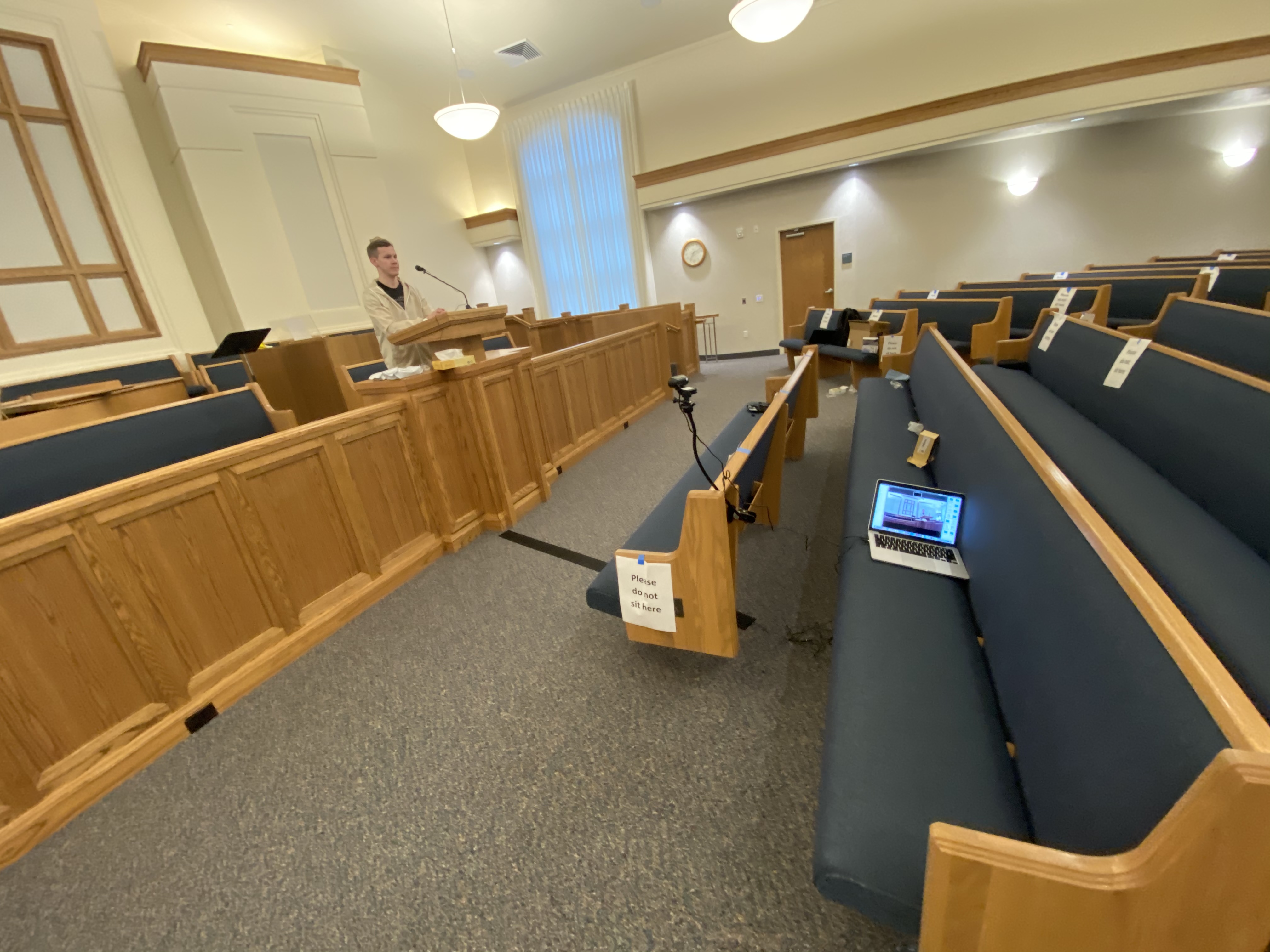
For example my ward is going to use a webcam connected to a laptop (inside the podium), portable mic connected to the Laptop (and connected to the podium stand), and streamed through YouTube Live. Tests looked excellent. Setup was simple. And the home experience was excellent. That was the test. The technologists in the ward will run it live this Sunday to see how it goes. Please respond with whatever detail you feel is needed to help us understand what tools you used and what kind of experience you had. Thanks.
Senior Member
#2

Re: Please share your experience with broadcasting Sacrament Meetings

On July 2nd, I bought a Logitech C922 webcam and a gooseneck stand to use with my personal laptop to broadcast Sacrament meeting, starting July 12th. I requested a church G Suite account, and created a recurring Google Meet event that has the same URL and phone number every week. We also use Google Meet for ward council and other leadership meetings.

Since Google Meet requires me to admit about half of the people who connect to the meeting, and I must mute the mic during the Sacrament ordinance, I sit at a small table in front of the podium to control the broadcast.

I run the Logitech Capture app on my laptop, so I can control the digital zoom and pan operations. I set Google Meet to use the app as a video source. I like to use Google Meet because I can chat with everyone during the meeting to get feedback on the audio and video quality. Although I can mute audio from individuals, I have to ask them to turn off their cameras. I think it really works well.

While the audio from the webcam is OK, it captures more ambient noise than I would like. I have tried to connect a Comtek receiver to my laptop, but I can't get the volume setting right. This week I plan to tape a Lavalier mic to the podium mic boom, and attach the base station to my laptop to see if that audio quality is better than either the webcam mic or the Comtek. What I really need is an audio output jack with a volume control on the side of the podium. I don't want to run a 30-foot cable from the Sacrament table.

Since we are not allowed to sing during our meetings, the bishop asked me to play hymns with vocals over the sound system. I installed the church app on an old Android phone, and connected the phone to the crab box using the splitter that came with our WD Live media player. I enjoy hearing hymns with clear vocals, but other members say they would rather just listen to the organ or the piano.
Dana Repouille, Plattsmouth, Nebraska
Senior Member
#3

Re: Sharing out experience with Virtual Sacrament Meeting Broadcasts

We just moved from one ward to another within the same Stake. In our old ward the had a full sacrament meeting using a paid zoom account. We had Choir music for prelude and postlude. For congregational singing we just played music from the app and families sang at home (interesting to watch), we even created a 5 min countdown video which was played for sacrament (picture of Christ introducing sacrament with countdown clock in the corner). We unmuted for assigned members to give prayers and talks, even the occasional individual or family musical number. Members loved it and we averaged 150 attendance.

My brothers ward has regular youth firesides with Q&A. He is a best selling author with some serious contacts so they are able to get some fairly big names to speak.

Our new ward has a 20 min devotional once a month, it’s quite an adjustment. Using the “Visitors Welcome” idea, I really wish I had a list of wards that had zoom meetings and links to participate.
New Member
#4

Re: Sharing out experience with Virtual Sacrament Meeting Broadcasts

would like paper on how you set it up
thanks
Senior Member
#5

Re: Sharing out experience with Virtual Sacrament Meeting Broadcasts

I was Executive Secretary and was involved in all of the discussions but from what I could tell they just used the tools in the zoom account. You get more control when you get a paid account.
New Member
#6
What is the process for requesting a G Suite account from the church?
Community Moderators
#7
dmon wrote:What is the process for requesting a G Suite account from the church?
See the GSuite Non-Profit Account? thread .
JD Lessley
Have you tried finding your answer on the ChurchofJesusChrist.org Help Center or Tech Wiki?
Senior Member
#8
The account was purchased directly from ward budget funds following approval from the Stake
New Member
#9
wrigjef wrote:The account was purchased directly from ward budget funds following approval from the Stake
For a ward zoom acct?
Senior Member
#10
Yes
New Member
#11
Our stake purchased Zoom accounts for the individual units. Zoom has proved to be a reliable and consistent platform for our Sunday meetings. It has also been used for Ward Council and presidency meetings with good success. During our state's shutdown period, our Sunday "devotionals" were entirely on Zoom. More recently, Sacrament meetings have been broadcast via Zoom under the church's guidelines, along with very limited in-person attendance at the ward building. The arrangement works well and I hope that it continues. There has been some talk of moving to Facebook live or another platform, but Zoom's reliability and easy but secure access via computer, smartphone, and telephone dial-in makes it far and above the best option.
New Member
#12
This is our set up and it practically the same as the church announced in the recent announcement.

We set up a tripod on top of a seminary table in the middle of two rows and use an iPad. To have cleared sound, we bought wireless microphones, the ones that are portable put the transmitter on the iPad and clip on the pulpit.

We use Facebook live, without any problems.

Spend maybe $150 in technology and the iPad was already owned by a member.

It works well and no problems.

Hope this helps someone.
New Member
#13
We use a borrowed laptop, a USB 1080P webcam with a flexible clamp mount and a wired lapel mic with an 18’ cable, (1/8” TRS connection) all using the Zoom platform. Sounded great, looked good and was easy for the ward techs and end users.
9F840836-46C4-4CF0-94B4-D77C3DF79353.jpeg
(1.75 MiB) Not downloaded yet
New Member
#14
So I have read some of the posts and thought maybe I could help. I bought a $130.00 4k video camera that can charge the battery while in use (not all of them do that), a cheap $25.00 tripod, a memory card (camera won't run without it), and a 100 ft. Cat 8 cable so I can Hard wire connection. As far as sound goes I am using the hard of hearing box hooked into the laptop mic port. I watched one of the tech videos done a couple of years ago and it mentioned that these have a 30db gain and they are already hooked into the sound system. Audio issue solved. The laptop I'm using is the one our building was issued several years ago that is an I3 that I doubled the memory on. (4gigs to 8gigs) This laptop is upgrade to Windows 10 1909.
I went with the Video Camera so we can record holiday events like Trunk or Treat and Christmas party to name some. The bonus is it was cheaper than mounted internet cameras costing $300 +.
As for some things that can be done with a Zoom meeting. We can now have those @ home, by invitation, give there testimonies, be our speakers, etc. We have a projector in our building but the screen is behind the podium and we would have to turn down the lights for those in Chapel to see. I don't recommend this. So I recommend you use a TV. I also bought an updated Android TV box from Amazon for 50. (U will need a wireless keyboard w/ mouse pad). I added zoom app to this box to hooked to the TV and point it to the Chapel. I have a HDMI 2 way spitter and a long HDMI cable so I can add another TV for the Bishopbric to be able to see the zoom feed.
As far as editing software I'll be learning Obs. I'm in the testing phase right now as our Ward will start Broadcasting 2nd Sunday in October 2020. I will update with any troubleshooting that comes up. Otherwise if you have questions you can email me @ littlezeek@hotmail.com. I live in Eastern NC.
New Member
#15
How were you able to hook the hard off hearing boxes to the laptop? I'm assuming we need a cable or adapter to change it to a single pole connector to a three pole connector which most laptops would use to have an headphones with microphone connector? Or did you get a USB device that just has an audio in port?

littlezeek wrote: Mon Sep 28, 2020 11:31 pm So I have read some of the posts and thought maybe I could help. I bought a $130.00 4k video camera that can charge the battery while in use (not all of them do that), a cheap $25.00 tripod, a memory card (camera won't run without it), and a 100 ft. Cat 8 cable so I can Hard wire connection. As far as sound goes I am using the hard of hearing box hooked into the laptop mic port. I watched one of the tech videos done a couple of years ago and it mentioned that these have a 30db gain and they are already hooked into the sound system. Audio issue solved. The laptop I'm using is the one our building was issued several years ago that is an I3 that I doubled the memory on. (4gigs to 8gigs) This laptop is upgrade to Windows 10 1909.
I went with the Video Camera so we can record holiday events like Trunk or Treat and Christmas party to name some. The bonus is it was cheaper than mounted internet cameras costing $300 +.
As for some things that can be done with a Zoom meeting. We can now have those @ home, by invitation, give there testimonies, be our speakers, etc. We have a projector in our building but the screen is behind the podium and we would have to turn down the lights for those in Chapel to see. I don't recommend this. So I recommend you use a TV. I also bought an updated Android TV box from Amazon for 50. (U will need a wireless keyboard w/ mouse pad). I added zoom app to this box to hooked to the TV and point it to the Chapel. I have a HDMI 2 way spitter and a long HDMI cable so I can add another TV for the Bishopbric to be able to see the zoom feed.
As far as editing software I'll be learning Obs. I'm in the testing phase right now as our Ward will start Broadcasting 2nd Sunday in October 2020. I will update with any troubleshooting that comes up. Otherwise if you have questions you can email me @ littlezeek@hotmail.com. I live in Eastern NC.
New Member
#16
@blakegrover
It's been a couple of weeks since your post so I'm hoping this will still be of some help.

Our ward has been using the device for the hard of hearing for the audio for our Zoom meetings. You'll need to use the crab box. Connect the mono audio connector from the earplug port to a crab box then the 3.5mm stereo as input to this device below. The stereo connector should be plugged into the microphone in (red) on the USB device. This should work on either a Windows or Mac laptop.
https://www.amazon.com/gp/product/B00IRVQ0F8/

We are transitioning from using a webcam and the device for that hard of hearing using Zoom on the Bishop's laptop. We will soon be using Zoom and the chapel camera and audio via OBS and the USB Razer Ripsaw Capture Card. However, I haven't gotten that setup to broadcast audio yet. I could use some assistance in getting the audio to work. I'm using a MacBook Pro but we are looking at getting a used Windows laptop. That shouldn't make any difference.
New Member
#17
Good evening - not sure if there is interest in two way meeting still, its been a while since the last post.

We have run two way meeting often enough, Zoom with the right connections a TV laptop and MevoStart Cameras allow for a quick set up.
Audio is the most difficult concern
Stake New Setup Gym.pdf
(112.85 KiB) Downloaded 276 times
There are a few details needed but - it can be done.
Stake New Setup Gym.pdf
(112.85 KiB) Downloaded 276 times
Member
#18
Who do ward members contact to find out if their ward is doing this kind of thing, and how to participate?

I have not experienced interactive sacrament meetings online, so I can't comment on that.
Community Administrator
#19
munaish wrote: Sun Mar 03, 2024 12:24 am Who do ward members contact to find out if their ward is doing this kind of thing, and how to participate?
Contact your bishop. Wards do this depending on need. If there's no shut-ins, there's no need.
Have you searched the Help Center? Try doing a Google search and adding "site:churchofjesuschrist.org/help" to the search criteria.

So we can better help you, please edit your Profile to include your general location.
#20
Zoom worked really great at our Stephenville Ward in Texas until we got new equipment ever since I cannot hear very well and the music is completely gone. It used to work so great. I brought the experience of being at church home. I am the only one that actually uses Zoom in our ward sure wish somebody would come and fix it or I can hear the music and the people talking again really clearly
New Member
#21
The loss of the music may also be a software thing. I’ve noticed in other Zoom meetings that when someone plays music it is almost completely filtered out, but in other cases it come through clearly. There are noise filters in the Zoom audio settings that may have changed with a software update.
Community Administrator
#22
charlesbarrymack wrote: Sun Jul 27, 2025 10:47 am sure wish somebody would come and fix it or I can hear the music and the people talking again really clearly
You're going to have to take it up with your ward. No one outside of the ward is going to help without being asked by the ward or the person doing it.
Have you searched the Help Center? Try doing a Google search and adding "site:churchofjesuschrist.org/help" to the search criteria.

So we can better help you, please edit your Profile to include your general location.
New Member
#23
russellhltn wrote: Sun Jul 27, 2025 9:05 pm
charlesbarrymack wrote: Sun Jul 27, 2025 10:47 am sure wish somebody would come and fix it or I can hear the music and the people talking again really clearly
You're going to have to take it up with your ward. No one outside of the ward is going to help without being asked by the ward or the person doing it.
Zoom has an "Original Sound" setting that needs to be turned on. It should be at the top of the Zoom window for the person originating the meeting. Turning On original sound turns off filtering. Turning it off works fine for our building. If it's not turned on, only the pulpit microphone audio will be heard well.
If the setting is hard to find, I'm sure it is documented.