Sacrament Meeting

71 postsstarted by drepouille 60,631 viewsoriginal topic

Senior Member
#1
Last week, my bishop asked me if we could stream or otherwise record Sacrament Meeting for those who will not be able to attend when we resume meetings. I replied that we do not have a camera, and we have been told never to record or broadcast Sacrament Meeting. Last night, my bishop told me that the stake had given us permission, directed us to do so, and the STS would be willing to help set it up.

Now what? We don't have a camera or any other equipment to broadcast from our meetinghouse. We do have a live RJ-45 outlet on the podium, and we may have an audio output under the Sacrament table.
Dana Repouille, Plattsmouth, Nebraska
Community Moderators
#2
Before you follow one of the next two suggestions, please read all the way to the end of this post.

I would let the STS set it up for you. He will know right away that to do video you will need a camera and an encoder or software on a laptop. I would ask if the stake is willing to furnish those items for you, along with the necessary cabling for combining video, sound, and connecting to the Internet.

Or you might offer to do an audio recording from the audio output near the sacrament table, an audio output from the A/V rack, or even a plain old microphone on a good cell phone. Then email the MP3 file to the affected members.

As for video of sacrament meeting, I believe your stake president has exceeded his authority.* But I would not go there at the moment, I am aware that other wards and stakes who say they are planning to do it because to our present circumstances.

Our Area Seventy has made it clear that video streaming of Church meetings from the chapel (sacrament, Sunday School, priesthood, Relief Society), other than stake conference, is not to be done. He said this instruction came from the area presidency or higher.

The First Presidency has granted a temporary exception for baptism services.

Keep it simple. I would not challenge the stake president. Let the area take care of him or let the bishop discuss the Handbook* with him. Let the stake do the heavy lifting if they are directing the effort. Support them as best you are able.

*General Handbook 35.4.15
Community Administrator
#3
I would suggest you seek clarification on one detail: What do do about the sacrament ordinance itself. Nothing that I've read or that others have posted have indicated that's acceptable. Some broadcast the meeting, but blank out the sacrament portion. People at home can do their own during that time (circumstances permitting). Normally, broadcasting from the chapel for anything but stake conference wouldn't be allowed, but of course this is anything but normal.

As for the equipment, I think the stake should have an encoder and camera, but only one. So, there'll likely be some kind of sharing arrangement.

If no one supplies a camera and encoder, this becomes a moot issue.
Have you searched the Help Center? Try doing a Google search and adding "site:churchofjesuschrist.org/help" to the search criteria.

So we can better help you, please edit your Profile to include your general location.
Senior Member
#4
From Meetinghouse Technology Policy:
8.3.3 Local Unit Provided Equipment: Under the direction of the stake president, local units may purchase additional webcasting equipment with local unit funds. The costs for maintaining, upgrading, and replacing this equipment are the responsibility of the local unit.
Dana Repouille, Plattsmouth, Nebraska
Senior Member
#5
Stake president informs me that this is directly from the Q12, the Seventy, and the Area Presidency as an exception to stated policy.
Dana Repouille, Plattsmouth, Nebraska
Community Moderators
#6
drepouille wrote:Stake president informs me that this is directly from the Q12, the Seventy, and the Area Presidency as an exception to stated policy.
Having presented my knowledge base to him, I will never argue with a stake president. Enjoy it while it lasts.

Unless I have missed something, we do not enjoy the benefits of such an exception in our area. Perhaps official word is still forthcoming to us.
Community Administrator
#7
The church did supply a encoder to the stakes awhile back. A camera magically showed up in our library at some point. So, we only had to pay for cables and other "glue" items. Thankfully the camera had a HDMI output, so we could go direct from the camera to the encoder.

As always, YMMV.
Have you searched the Help Center? Try doing a Google search and adding "site:churchofjesuschrist.org/help" to the search criteria.

So we can better help you, please edit your Profile to include your general location.
Senior Member
#8
More clarification from the stake president:
We are planning on a Zoom call, muted for all participants, with it focused on the podium. The ordinance of the sacrament will be muted.
I wonder how we are supposed to send out Zoom invitations to only those households that request them?

Note on audio from the stake clerk:
the mic on the laptop to pick up the speaker. It should be sufficient to pick up the organ as well.
It seems to me that a laptop microphone would pick up every part of the ambient noise in the vicinity.
Dana Repouille, Plattsmouth, Nebraska
Community Administrator
#9
drepouille wrote:It seems to me that a laptop microphone would pick up every part of the ambient noise in the vicinity.
True. The question is where are you going to put the laptop? I'd suggest creating a stand about podium height in front of the podium.

Since it's zoom, you can give it a trial run and see what the results are like.

Some of our local newscasters have been anchoring from home, apparently using the laptop's microphone. The sound quality is about what you'd expect. (Really? They couldn't get a lavaliere and plug it in??) But it seems to be what passes for "acceptable" these days.

While it irks me, I'd go along with it unless I was willing to provide better.

You could try running a cable from the audio out (it might need an attenuator). For the organ, plug in a mic on a stand to the PA auxiliary mic input. I believe most chapels have automatic mixers that would switch between the auxiliary and podium mic.
Have you searched the Help Center? Try doing a Google search and adding "site:churchofjesuschrist.org/help" to the search criteria.

So we can better help you, please edit your Profile to include your general location.
Senior Member
#10
I think it would be easier and less obvious if I set up my camera and laptop on the pew behind the deacons' bench.

I need to connect the 3.5 mm stereo "Record Out" signal (located under the Sacrament table) to a laptop. My Dell Inspiron 5770 has a "headset" jack, but I don't know how many connectors the jack has. I don't know if it can be used for both input and output of audio signals. I suppose I can test it using my cell phone ear buds, which have a four-connector plug to provide both input and output audio.

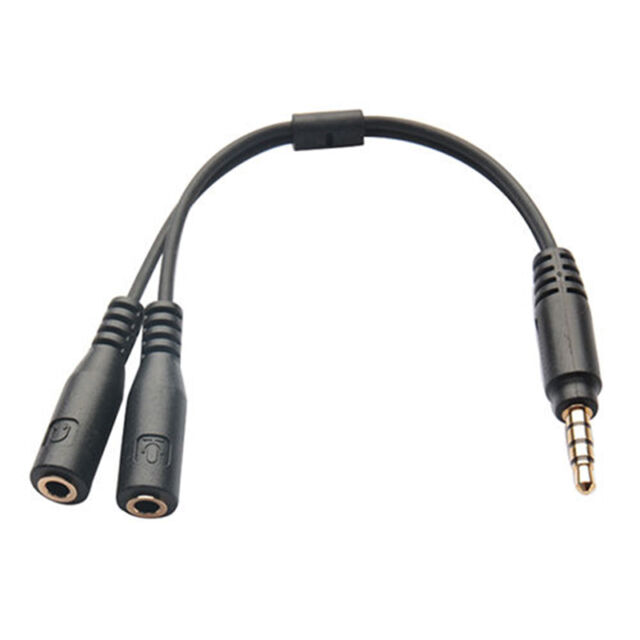
So how do I connect the 3.5 mm stereo "Record Out" jack (three-connector) to a "headset" jack (four-connector)? Is there an adapter I can buy that converts the three-connector stereo plug into a USB connector for audio input to the laptop?
Dana Repouille, Plattsmouth, Nebraska
Senior Member
#11
OK, I have tested using my cell phone ear buds, and have proven that my laptop can use a four-connector headset plug for audio input and output.

Now I have to find an adapter to connect the three-connector "Record Out" plug to the four-connector jack on my laptop.
Dana Repouille, Plattsmouth, Nebraska
Community Administrator
#12
drepouille wrote:I think it would be easier and less obvious if I set up my camera and laptop on the pew behind the deacons' bench.
OK, I thought this was a "broadcast only" not a mixed live/webcast situation.

Since this is a zoom meeting, We're either talking about the built-in camera for a laptop or a webcam. Not the usual church webcast setup. Most webcams don't have any zoom, so you're probably going to want it fairly close to the speaker. The other issue is the angle. Funny thing about tv, what's fine "in person" looks weird on a screen. If it's too low, it's going to look odd.
drepouille wrote:I need to connect the 3.5 mm stereo "Record Out" signal (located under the Sacrament table) to a laptop. My Dell Inspiron 5770 has a "headset" jack, but I don't know how many connectors the jack has. I don't know if it can be used for both input and output of audio signals. I suppose I can test it using my cell phone ear buds, which have a four-connector plug to provide both input and output audio.
You'll have to find/build an adapter. The mic-in tends to be the two connections farthest from the tip, with ground being toward the tip.

The problem is I don't know if the audio out is line or mic level. If it's line level, you'll need an attenuator as well.

However, at this point, I think the built-in mic will do fine - at least for a first round. I'd focus more on understanding zoom to set up the meeting correctly. That is, making sure no one else can talk. Just because you can put them on mute doesn't mean they can't unmute themselves.
Have you searched the Help Center? Try doing a Google search and adding "site:churchofjesuschrist.org/help" to the search criteria.

So we can better help you, please edit your Profile to include your general location.
Community Administrator
#13
russellhltn wrote:The mic-in tends to be the two connections farthest from the tip, with ground being toward the tip.
See if you can find a 3.5mm to stereo & video cable (white, red, yellow RCA connectors). It looks like the "video" connection is same as "mic". That will give you a starting point without having to break out a soldering iron.

Sometimes thrift stores can be a source of cheap cables.
Have you searched the Help Center? Try doing a Google search and adding "site:churchofjesuschrist.org/help" to the search criteria.

So we can better help you, please edit your Profile to include your general location.
Senior Member
#14
This will work nicely. A TRRS Y Splitter Cable Adapter.
s-l640.jpg
(20.07 KiB) Not downloaded yet
Dana Repouille, Plattsmouth, Nebraska
Community Administrator
#15
When is your first meeting? You've got maybe one business day before this Sunday.
Have you searched the Help Center? Try doing a Google search and adding "site:churchofjesuschrist.org/help" to the search criteria.

So we can better help you, please edit your Profile to include your general location.
Senior Member
#16
russellhltn wrote:Most webcams don't have any zoom, so you're probably going to want it fairly close to the speaker.
Browsing Staples and Amazon, I see what you mean. All the webcams have auto-focus, but very few have any zoom function. Optical zoom is more expensive than digital zoom. So I believe you are correct that if I don't want to buy a $600 camera, I will need to sit close to front and center. Luckily, the front center pew is more narrow than the second pew, so there is a natural place to set up on the end of the front pew.
Dana Repouille, Plattsmouth, Nebraska
Senior Member
#17
Since most major outlets are out of stock, and all new webcams ship from China, I decided to buy on eBay.
Logitech C922 PRO HD Webcam with tripod.

The tripod gives me the option of placing the webcam directly on the podium. That may help with the audio and video capture.

Although I would prefer to capture sound directly from the sound system, I will try using the webcam's built-in stereo microphones. If the ambient noise severely impacts the sound, I will run a sound cable at a later date.
Dana Repouille, Plattsmouth, Nebraska
Community Administrator
#18
Sounds like a plan. How long is the USB cable? I'm thinking 3'. You might want a USB extension. But the laptop is still going to be real close by.
Have you searched the Help Center? Try doing a Google search and adding "site:churchofjesuschrist.org/help" to the search criteria.

So we can better help you, please edit your Profile to include your general location.
Senior Member
#19
russellhltn wrote:Sounds like a plan. How long is the USB cable? I'm thinking 3'. You might want a USB extension. But the laptop is still going to be real close by.
I have some USB extension cables, but I wonder if the video signals would be degraded by using extensions.
Dana Repouille, Plattsmouth, Nebraska
Community Administrator
#20
drepouille wrote:I have some USB extension cables, but I wonder if the video signals would be degraded by using extensions.
At that point, it's digital, not video. As long as the extensions are rated for the same speed/verson as the USB connection, I'd think it would work fine. USB 1 - good luck. USB 2 - check what the camera needs. USB 3 - good to go.

Something to considering is leaving the computer close to the podium and remoting into it from another machine. That way you can leave all the equipment at the podium but control it from a discrete distance. However, depending on what technology is used to display the video, that part may not remote.
Have you searched the Help Center? Try doing a Google search and adding "site:churchofjesuschrist.org/help" to the search criteria.

So we can better help you, please edit your Profile to include your general location.
Senior Member
#21
My USB extensions are very old, so probably USB 1.

Luckily, the stake president authorized us to upgrade from DSL service to 100MB cable modem service last year. Otherwise, it would be impossible and unthinkable to try to host a Zoom teleconference during Sacrament meeting.
Dana Repouille, Plattsmouth, Nebraska
Senior Member
#22
russellhltn wrote:How long is the USB cable? I'm thinking 3'.
Cable length: 5 ft (1.5 m)
Dana Repouille, Plattsmouth, Nebraska
Senior Member
#23
russellhltn wrote:When is your first meeting? You've got maybe one business day before this Sunday.
We should have our first meeting on July 12th. Since Staples and Amazon are practically sold out of webcams, I ordered a webcam and tripod from an eBay seller in Idaho, who uses USPS Priority Mail. He may have been able to drop the shipment today, since my mail carrier was out delivering mail today (which surprised me). Guaranteed delivery date is Thursday, July 9th.
Dana Repouille, Plattsmouth, Nebraska
New Member
#24
Your laptop should the a “headset input” 3.5 mm quad contact jack. One of those is the microphone. Use a splitter (something like this https://www.amazon.com/Kingtop-Adapter- ... r_1_2_sspa) to get the audio to work.
Community Moderators
#25
Sorry I'm a bit late to the party.
drepouille wrote:...if I don't want to buy a $600 camera, I will need to sit close to front and center.
The Canon VIXIA HF R20 is out of production, but a nice 1080i Camera that we've been using quite a bit for webcasting stake conferences. Available used in the $100 price range. The newer 1080p version (I think it's the R80) is about $200. The optical zoom is plenty to properly frame a speaker at the pulpit, or a chorister off to one side, all from the back of the chapel. Run the HDMI into your stake's Teradek VidiU encoder (tiny little box), and with the help of your STS, set it up to livestream over the church's webcast system, or some other webcast provider.

Any camcorder used needs a couple of features that not all of them come with. 1) You must be able to disable the auto-shutoff and 2) You must be able to remove all the menus & information found on the viewfinder from the HDMI output signal.

Finally, I would NEVER use Zoom for something intended for a one-way only webcast. Too many variables when nearly every viewer has a live webcam in front of them and options to see and chat with other participants. Save Zoom for ward council meetings. For complete control over the tone of the webcast and the spirit therein, you need to use a one-way only solution. The church's system is just that and works great. So does YouTube Live and a number of other providers offering one-to-many webcasting services.

It won't all come together in a day, sometimes not even a week, or month. Set it up and TEST it. Then test it a dozen more times. Yes, it's more involved than plugging a webcam into a laptop, but the results will be far more pleasing to those that can't attend in person.
So we can better help you, please edit your Profile to include your general location.
Senior Member
#26
Edited 1 time, last by drepouille on
This is a ward Sacrament meeting at a ward meetinghouse. The stake is willing to let us borrow a laptop and the stake's Zoom account. No camcorder, encoder, or webcasting software. The stake clerk recommended that I place the laptop on the podium, pointing the built-in webcam at the speaker, and ask the conducting person to mute and unmute the laptop's microphone so the Sacrament prayers are not broadcast.

I decided to use my own laptop, and purchase a Logitech C922 Pro Stream webcam with tripod. I will set up the laptop and webcam in front of the rostrum, to the side of the podium, so the speaker isn't staring directly into the webcam. I tested the C922 yesterday, and was impressed with its digital zoom abilities. I will probably use the RJ-45 jack on the podium, just to ensure the Wi-Fi encryption/decryption doesn't hamper the stream. I can't disable the Wi-Fi, since I am a ward clerk, and not the STS.

Rather than use the stake's Zoom account, I registered for a ChurchofJesusChrist Google Meet account, which should allow up to 250 participants. I had hoped it would provide the ability for a view-only stream. However, the church has apparently not enabled that view-only stream ability for their G Suite account.

I am going to run a test on Wednesday night, while the bishopric and the young men do another walk-through to prepare themselves. I invited the ward council to join as a test of the broadcast.
Dana Repouille, Plattsmouth, Nebraska
Senior Member
#27
drepouille wrote:
russellhltn wrote:How long is the USB cable? I'm thinking 3'.
Cable length: 5 ft (1.5 m)
After unpacking the Logitech C922, I seriously doubt that the USB cable is 5 feet long. Maybe 4 feet at the most.
Dana Repouille, Plattsmouth, Nebraska
Community Administrator
#28
drepouille wrote:I am going to run a test on Wednesday night, while the bishopric and the young men do another walk-through to prepare themselves. I invited the ward council to join as a test of the broadcast.
Once it's clear that it's working, you might want to ask them to see if it's possible for a viewer to be disruptive.

Keep in mind, even if you can mute people, at least in some situations, they can unmute themselves. Usually by using the space bar as a push to talk.

You might want to see if the stake zoom account has extra goodies. A separate product by zoom called "webinar" seems like a better fit for what you're doing. I don't know as it's available at the free level.
Have you searched the Help Center? Try doing a Google search and adding "site:churchofjesuschrist.org/help" to the search criteria.

So we can better help you, please edit your Profile to include your general location.
Community Moderators
#29
drepouille wrote:I will probably use the RJ-45 jack on the podium, just to ensure the Wi-Fi encryption/decryption doesn't hamper the stream. I can't disable the Wi-Fi, since I am a ward clerk, and not the STS.
I would still use the pulpit network connection, but your stake STS may be willing to turn off the WiFi and then turn it back on on a schedule you request, i.e., please turn if off Sunday at 8:30 am and turn it back on at 11:00 am. You would especially want to do this if your meetinghouse Internet connection is slow.

I have done this several times for meetinghouses in our stake on request.

I do not remember if a ward technology specialist (if you have one) can turn the WiFi off and on.
Community Administrator
#30
Disabling WiFi though TM would be the nice way. Unplugging them works too. <grin>
Have you searched the Help Center? Try doing a Google search and adding "site:churchofjesuschrist.org/help" to the search criteria.

So we can better help you, please edit your Profile to include your general location.
Community Moderators
#31
If this is something you'll be doing for a while, you might ask if it would be possible to be called as an Assistant Technology Specialist. This relatively new position would give you access to most of the same tools the stake technology specialist uses. Things like, Technology Manager (TM), where you can see the status of every building's network, turn on and off wireless access points, and much more. The Meetinghouse Technology (MHTech) help and training website has a ton of useful information, like how to get the audio out of your building's sound system. I just feel the tools and training available would be beneficial to what you've been asked to do.
So we can better help you, please edit your Profile to include your general location.
Senior Member
#32
Below is a list, obtained from the Help Centre, of those who can disable the WiFi.

Stake/District Presidencies
Bishoprics
Branch Presidencies
Stake/District Clerks
Stake/District Technology Specialists (STS)
Facilities Managers
Senior Member
#33
Perhaps we need to leave the Wi-Fi enabled. We have been directed to remove all hymnals from the chapel, and ask the members to use their mobile devices (or personal hymnals) if they wish to ponder hymn lyrics. No singing allowed, of course, despite the one photo shown on the church web site, which shows a chorister with a mask on, directing the congregation in a hymn.
Dana Repouille, Plattsmouth, Nebraska
Community Administrator
#34
Biggles wrote:Below is a list, obtained from the Help Centre, of those who can disable the WiFi.
I saw a list of who can access TM, but didn't see if they could enable/disable wifi.
Have you searched the Help Center? Try doing a Google search and adding "site:churchofjesuschrist.org/help" to the search criteria.

So we can better help you, please edit your Profile to include your general location.
Senior Member
#35
russellhltn wrote:
Biggles wrote:Below is a list, obtained from the Help Centre, of those who can disable the WiFi.
I saw a list of who can access TM, but didn't see if they could enable/disable wifi.
The list was taken from the instructions on how to disable WiFi access.

https://www.churchofjesuschrist.org/hel ... s?lang=eng
Community Administrator
#36
Biggles wrote:The list was taken from the instructions on how to disable WiFi access.

https://www.churchofjesuschrist.org/hel ... s?lang=eng
So, being a ATS wouldn't help.

Odd that they give rights to bishoprics but not the ward clerk.
Have you searched the Help Center? Try doing a Google search and adding "site:churchofjesuschrist.org/help" to the search criteria.

So we can better help you, please edit your Profile to include your general location.
Community Administrator
#37
drepouille wrote:Perhaps we need to leave the Wi-Fi enabled. We have been directed to remove all hymnals from the chapel, and ask the members to use their mobile devices (or personal hymnals) if they wish to ponder hymn lyrics.
That still leaves open the idea of upping the level of filtering. I'm not sure how restrictive you can make it and still allow that function.

There's also turning off APs in other parts of the building.
Have you searched the Help Center? Try doing a Google search and adding "site:churchofjesuschrist.org/help" to the search criteria.

So we can better help you, please edit your Profile to include your general location.
Senior Member
#38
russellhltn wrote:
Biggles wrote:The list was taken from the instructions on how to disable WiFi access.

https://www.churchofjesuschrist.org/hel ... s?lang=eng
So, being a ASTS wouldn't help.
Item #6 in the ASTS FAQ’s seems to answer that question.

https://www.churchofjesuschrist.org/hel ... s?lang=eng
Community Administrator
#39
From Technology Manager Overview:

People with the following callings should have access to this tool:
  • Stake or district technology specialist
  • Assistant technology specialist
  • Area technology specialist
  • Stake or district presidency
  • High councilor
  • Stake or district clerk
  • Bishopric/branch presidency
  • Ward/branch clerk
  • Facilities managers (FM)
  • FM admins
  • FM mechanics

From Disabling Wireless Access:
Certain positions in Technology Manager have additional permissions to disable or enable wireless access. Members without these permissions, including assistant technology specialists, should coordinate with these members to manage wireless access in meetinghouses.
  • Stake/District Presidencies
  • Bishoprics
  • Branch Presidencies
  • Stake/District Clerks
  • Stake/District Technology Specialists (STS)
  • Facilities Managers
From Filtering Policy Feedback Instructions:
Under the direction of the Stake President, Stake Technology Specialists and Bishops can change the firewall filtering policy


It appears to me that giving a Ward Clerk an ATS calling wouldn't change anything. He still couldn't disable the WiFi via TM, or change the filtering policy. But he probably has access to the wiring to disconnect things at Layer 1. <grin>
Have you searched the Help Center? Try doing a Google search and adding "site:churchofjesuschrist.org/help" to the search criteria.

So we can better help you, please edit your Profile to include your general location.
Senior Member
#40
I have just completed a test broadcast from the chapel using the Google Meet (or G Suite) account provided by the church (see their April 16th message).
Lessons learned:
- The camera view on my laptop was reversed left to right. However, all the participants saw the video in the correct orientation. This is apparently a feature, and not a bug, so all is well.
- The meeting host can "pin" the webcam video, so none of the participants can assert control over the video feed.
- While the host can mute all participants, they can un-mute themselves. So the host needs to keep an eye on them. If a participant starts a mute/un-mute battle with the host, then the host can kick that participant out of the meeting.
- The Logitech c922 does a very good job capturing the video and the audio. If I get complaints about too much ambient noise this Sunday, I will run a stereo cable from the Record Out jack directly into the laptop at a later meeting.
Dana Repouille, Plattsmouth, Nebraska
Senior Member
#41
drepouille wrote:This will work nicely. A TRRS Y Splitter Cable Adapter.
s-l640.jpg
Oddly enough, I bought a new home TV yesterday, and inside the box was a 3.5 mm (TRRS) to Triple RCA Audio/Video AV Female Composite Stereo Splitter Cable Adapter. Could prove useful.
Dana Repouille, Plattsmouth, Nebraska
Senior Member
#42
So in our Area, we have received authorization from the Area Presidency to broadcast our in-person sacrament meetings if we desire. Since there is a 25-person max-per-meeting and many people are remaining home at this time, I believe all the units in our Stake are broadcasting. As all units in our Stake were previously having "virtual worship services" at least a couple of Sundays each month, I believe that most are re-using whatever tech they're already familiar with. For us it's Zoom. Our Stake hasn't tried to implement any standard solution, and also really didn't try to direct us towards any solution (unsure if this was by design, or just how it happened to work out).

We have a simple solution. We have a selfie-stick (kinda a tripod actually), and use a cell phone with the tripod placed on the podium, with the camera focused on the microphone area. This cell phone is the Zoom host, and when the Zoom meeting starts we mute everyone, and select to not allow participants to un-mute themselves (we have a paid account, the free account may not allow for this). With only 25 people in the chapel, the ambient noise is not very noticeable, and members are aware we are broadcasting so I think they're a bit quieter than usual. We can have the organ sound level loud enough that the cell phone picks it up, but it doesn't overwhelm those in the chapel (we play hymns, but no congregational singing, just congregational listening). During the ordinance of the sacrament, the person conducting disables sound and audio so those viewing do not see or hear. Although we could leave things blank for viewers during the sacrament ordinance, we actually have tried out having another Zoom administrator located elsewhere, displaying something uplifting for those viewing at home.

Again, simple but sufficient. Plugging into the sound system might be a next step, but our at-home members have been really happy with what's provided, and the low-tech-solution so far hasn't impacted their ability to be uplifted. Although I must say, this was not anything I ever expected to be doing for sacrament meetings!
Senior Member
#43
Our stake offered to let us use the stake's paid Zoom account, but I saw too many problems with that. First, we would have had to deconflict with other units. The stake said they could not have multiple units running simultaneous Zoom meetings. Second, we have heard that Zoom would no longer allow call-in participants. These things are not problems with the G Suite account.

I run Google Meet from my laptop, and I have to constantly monitor the meeting, as half of the participants must be admitted manually, probably because they don't have a Google account. I also manually mute participants, and mute my broadcast during the Sacrament ordinance. I present a Notepad window reminding everyone why I muted myself. Last Sunday, the bishop asked me to bear my testimony. While I was speaking from the pulpit, another member tried to join, and my assistant clerk jumped in to manually admit him.

In my G Suite account, I am building a list of Contacts, each tagged for Sacrament meeting, Ward Council meeting, etc. Although I use recurring events for these meetings, a tagged Contact list allows me to create ad hoc events for each group.

I told the bishop that we really need opening and closing hymns. I think I will connect either my cell phone or a small laptop to the "crab" box, so I can play hymns with voices as needed. I think that will enhance our Sacrament meetings.
Dana Repouille, Plattsmouth, Nebraska
Community Administrator
#44
Something you might want to consider is Larix Broadcaster. It's an app that runs on a cell phone (iOS or Android), and can feed the church's webcast system directly. No need to admit anyone, not any risk of disruption. The stake would have to set up the broadcast. Others have reported that the system will allow one stake to have simultaneous broadcasts.

As for the sacrament prayer, there's a mute button right on the home screen.
Have you searched the Help Center? Try doing a Google search and adding "site:churchofjesuschrist.org/help" to the search criteria.

So we can better help you, please edit your Profile to include your general location.
Community Moderators
#45
drepouille wrote:Our stake offered to let us use the stake's paid Zoom account...

I run Google Meet from my laptop...
Both are fine programs for 2-way conferencing, meaning the viewers can also be contributors if they're not muted properly. Many hosts resort to manually admitting viewers so they don't get unwanted malicious disruptors. This is great for ward council meetings, bishopric meetings, etc., but (as you discovered) not the best solution for sacrament meetings.

You should seriously consider a 1-way only webcast solution for sacrament meeting. The advantages far outweigh the slightly more involved setup. The church's Meetinghouse Webcast (MWC) is a 1-way only program, as are YouTube Live, Facebook Live, and a host of other free and pay live-streaming services. Generally, any number of viewers can join, as they cannot disrupt the video or audio of the webcast, just view and/or listen; however, some apps allow you to restrict webcasts that are not intended for a general audience.

For live-streaming to MWC, you will need someone, such as the stake technology specialist, to setup a webcast for you and give you the RTMP URL, Stream Name (or key), and the Event Code for the event. This is a simple procedure that takes only a few seconds of their time. In fact, they can setup events for future dates, so you could request a month's worth of events at the same time. Each will have their own RTMP URL and Stream Name, so you'll need to keep them safe until it's time to use them. The viewers use the Event Code to watch either live, or delayed up to 24 hours following the event.

The only thing left is to find an app that can accept the RTMP URL and Stream Name to direct its A/V stream to that server. russellhltn suggested the free Larix Broadcaster app, which I've also used and highly recommend.
So we can better help you, please edit your Profile to include your general location.
Community Administrator
#46
Another advantage of using the Church's MWC is that if it's set to "private", then a login with a Church Account is required. That might help the members feeling apprehensive about having their talk "broadcast" to who knows who.
Have you searched the Help Center? Try doing a Google search and adding "site:churchofjesuschrist.org/help" to the search criteria.

So we can better help you, please edit your Profile to include your general location.
Senior Member
#47
Our weekly Sacrament broadcasts using a G Suite account and Google Meet have been going well. I sometimes have to mute participants who forget to mute themselves, and yesterday, I had to ask two people to turn off their camera feeds. Last week, I had selected the wrong microphone, and switched to the webcam microphone about 15 minutes into the meeting. No problem.

Since our stake president does not want anyone to sing, with or without masks, I started yesterday playing the opening and closing hymns with vocals from my old Android phone through the crab box into the podium. It was loud and clear, and I think people enjoyed it. We are still using the organ or piano for the Sacrament hymn, because that has more flexible timing.

I have also used Google Meet and our webcam for ward council and youth council meetings. I connect my laptop HDMI to a TV, so everyone in the room can see the online participants, and the webcam allows the reverse view. It works out very well.

We split Sacrament meetings into A-L one week, and M-Z on alternating weeks. However, since our attendance is less than 50 per week, we are considering inviting everyone to attend every week, since we assume at least 50 will stay home for the broadcast regardless of what we do.
Dana Repouille, Plattsmouth, Nebraska
Member
#48
Sounds like lots of good ideas here, I'll go ahead and post a link to what our stake is doing viewtopic.php?f=146&t=37353 for another idea. We're using YouTube, we did look at Zoom, and other options including the Church's broadcast system. I'd love to be able to use the church system, but in my experiences with it over the years, and including recently testing it again, it's a lot more finicky about the bit-rate and format of the video you're uploading (I can take the exact same stream and send it to both the Church system and YouTube, and the YouTube video always looks better on the receiving end). The other issues with the Church system, I have all 9 wards in our stake setup to run the broadcasts automatically, so the presiding member of the bishopric only needs to turn the sound system in the chapel on, and everything else happens automatically. With the church system somebody still has to setup each and every broadcast (unless there's an even more recent change that I've missed). I'm sure the Church system is setup the way it is to preserve and limit the amount of server resources they have active at any given time, but I really like the ability to YouTube to start a broadcast at anytime by simply starting a stream targeted at my YouTube Live key.
New Member
#49
drepouille wrote: I run Google Meet from my laptop, and I have to constantly monitor the meeting, as half of the participants must be admitted manually, probably because they don't have a Google account..
I created a GSuite church account and created a test meeting. But I'm not able to join from another computer without a google account. Can you confirm if you have this behavior or if non-google account users are in fact able to join for you?

Thanks in advance.
New Member
#50
Is it possible for someone to view Sunday Worsip Services via Meetinghouse Webcastt using a TV with just a streaming device such as Apple TV, Fire TV, Hulu, Chromecast, etc? That is, to access it without a smart phone, tablet, or compueter at broadcast time, even if one is used to set it up. If so, how to set it up for access?
Community Moderators
#51
Any device that can contact a specific URL on the Internet can access a Church webcast. For example you would have to be able to tell it to go to something like
"http://mywebcast.churchofjesuschrist.org/view/00000" (<< This link will not work. It is just an example.)
or similar. Some devices can do that. Others need to have a "channel" programmed in to find webcasts, such as the Latter-day Saints Channel or one of a hundred others.
New Member
#52
Thanks. I guess that my more general question is: Does anyone know WHICH of the TV Streaming devices, such as those I mentioned can access a specific URL, and how to do that? One reason for asking is that some individuals/families in our ward (especially older members) do have an internet connection of some sort, but not the capability to connect on a smart phone or computer. It would be nice to set something affordable up so that they could see the broadcasts on their TV, without someone bringing a separate device in each time.
Community Administrator
#53
It depends on how that ward is streaming the service. Some are using YouTube, so I'd think in that case it would be possible.

If the ward is using the Church Webcast system, there is a Android TV app "Meetinghouse Webcast". They'll need the meeting code. But this will have to be an authentic Android TV, not just Android.

Otherwise, unless the TV has a web browser, I don't think it can be done.
Have you searched the Help Center? Try doing a Google search and adding "site:churchofjesuschrist.org/help" to the search criteria.

So we can better help you, please edit your Profile to include your general location.
Community Moderators
#54
lajackson wrote:Any device that can contact a specific URL on the Internet can access a Church webcast. For example you would have to be able to tell it to go to something like
"http://mywebcast.churchofjesuschrist.org/view/00000" (<< This link will not work. It is just an example.)
or similar. Some devices can do that. Others need to have a "channel" programmed in to find webcasts, such as the Latter-day Saints Channel or one of a hundred others.
This article has a few options:
https://www.lifewire.com/how-to-downloa ... er-4684267
Samuel Bradshaw • If you desire to serve God, you are called to the work.
New Member
#55
Thank you for the article link. I've installed the Silk browser for Firestick and it seems to work.
#56

Re: Satke Conference

Hi,

We are using Meetinghouse Webcast for Stake Conference and everything is OK with OBS and cameras etc...however I can only schedule up to 120 min maximum. But conference sessions last 120min and sometimes go over that by a few minutes.But with buffering I should really book from 9:45 for those 2hrs, taking me to 11:45 -but the session ends at 12:00, so I need to repeat that stream or book from 10:00am and hope conference will end at 12:00 exactly, not a 12:04.

So because of this problem I'm wondering if it is possible to increase the maximum time for Conference bookings? to, say, 150 mins max? This would help out a bit with these longer conference sessions.

Regards,..
Community Administrator
#57
Set the start/end time for the actual event. Some leeway is added in automatically. If you set it to start at 10, the servers will be up and ready starting at 9. If the conference is going long, you can extend it during the conference. But I think there's some leeway on the backend as well.
Have you searched the Help Center? Try doing a Google search and adding "site:churchofjesuschrist.org/help" to the search criteria.

So we can better help you, please edit your Profile to include your general location.
#58
russellhltn wrote:Set the start/end time for the actual event. Some leeway is added in automatically. If you set it to start at 10, the servers will be up and ready starting at 9. If the conference is going long, you can extend it during the conference. But I think there's some leeway on the backend as well.
Ok, I'll try that. I know the server is up before 10 am but not sure if people can log in before 10am.

As long as it can go on for 5min or 10 min extra we should be fine.


Also, do you know why does my name come up at the top of all viewing streams? ie member logs in to , say, Stake Seminary Graduation and they see that title and my name underneath it.
Is it possible to no have my name come up there? does anyone know how to get rid of it? if it's possible.

Cheers,
:D
Community Moderators
#59
ccordoba24 wrote:I know the server is up before 10 am but not sure if people can log in before 10am.
People can begin viewing at any time. If you're not webcasting yet, they will get a canned video from the church. As russellhltn pointed out, any time after 9am, you can begin webcasting. When you do, any viewers already online will be automatically switched over to your video feed within a minute or two.
So we can better help you, please edit your Profile to include your general location.
New Member
#60

Re: Sacrament Meeting - Zoom Platform

There is a deficiency with the Zoom Platform for attending virtual sacrament meetings and Sunday School. The problem is, unlike any other streaming service, to have the family gathered around the TV using an HDMI cable from a laptop, the sound does NOT transfer from the laptop speakers to the TV speakers. It is NOT a TV problem as the service has been duplicated with multiple television sets. Further, Windows 10 recognizes the TV speakers as being active when the HDMI cable is connected, but Zoom insists on using the laptop speakers instead of the TV speakers.

This problem makes it very difficult to hear the speakers during the sacrament meeting or during Sunday School.

If the Church has any technological fixes for this problem, it would be very helpful to families. BTW, Zoom has been notified of the problem (actual more than a month ago), but Zoom has provided no answer or resolution to the problem.

Please help.
Community Moderators
#61

Re: Sacrament Meeting - Zoom Platform

jensenmi wrote:There is a deficiency with the Zoom Platform for attending virtual sacrament meetings and Sunday School. The problem is, unlike any other streaming service, to have the family gathered around the TV using an HDMI cable from a laptop, the sound does NOT transfer from the laptop speakers to the TV speakers. ...

Please help.
If this problem is seen/heard when using the Zoom app, there's a (perhaps small) chance the web app might be a useful workaround.
Community Administrator
#62
If you're running the Zoom app, you can select the "speakers" in the audio section.

I'm not sure if that is available if you're running Zoom from a web page without the app installed.

Following this article, you could answer "No" to "Do you hear a ringtone" until the sound comes from the TV.
Have you searched the Help Center? Try doing a Google search and adding "site:churchofjesuschrist.org/help" to the search criteria.

So we can better help you, please edit your Profile to include your general location.
Member
#63
I have had the same thing happen on a few occasions - video but no sound. It happens when I startup the computer before turning on the TV and having the TV on the correct HDMI input. Everything works properly if I turn on the TV and have it on the correct HDMI input before turning on the computer. Disconnecting and reconnecting the HDMI cable "should" also make it work.
#64
Mikerowaved wrote:
ccordoba24 wrote:I know the server is up before 10 am but not sure if people can log in before 10am.
People can begin viewing at any time. If you're not webcasting yet, they will get a canned video from the church. As russellhltn pointed out, any time after 9am, you can begin webcasting. When you do, any viewers already online will be automatically switched over to your video feed within a minute or two.
Yes, got it..Thanks for the advice.
Cheers,
New Member
#65
Just wanted to post this out there. We use a zoom webinar running from a laptop to broadcast sacrament meeting. With that, we can mute all participants and not allow people to unmute themselves. I also turn off the "Raise Hand" and "Chat" functionality. The webinar seems to be a good option since we are not looking to have an interactive meeting, just a broadcast. Once the zoom webinar is setup, the URL link is established and doesn't change. We can also generate an attendance report to aid in our overall sacrament meeting attendance count.


Audio setup:
We connect directly to the church sound system. Here is how we do it:
I bought two audio cables listed below to connect to the Record Out (Line level) port on the side of the podium. The cables are listed here:
https://www.amazon.com/gp/product/B00DI ... UTF8&psc=1
https://www.headsetbuddy.com/mic-line-p ... artphones/

Connect the first 10ft cable from the Record Out (Line level) port on the side of the podium to the blue input connection on the headset buddy cable. Then connect the headset buddy cable to your laptop's microphone port.
See attached PDF for more details.


Video setup:
I use my cell phone as a remote camera. You can do this by downloading and installing an app called "DroidCamX". It can be found here: https://www.dev47apps.com/
This app is free (although there is a paid version of it). There are two parts to this app: The first part is the app itself that you install on your cell phone. The second part is a client program that you install on your laptop. The beauty of this is the app allows your cell phone to be setup as a remote webcam and connects to your laptop over the wifi. I can then mount my cell phone on a tripod in the middle of the chapel facing the speaker. The tripod is setup in the center of a middle pew. Then I can use my camera's zoom to zoom in on the speaker (admittedly, the zoom is not great but it's adequate). This is all for an android cell phone and a Windows laptop. I know there is an iPhone equivalent out there, too.

On your laptop, Zoom will recognize the DroidCamX program as a video source so you can broadcast it.

Seems to work pretty well for a minimal cost.
📎 Audio Input.pdf (465.86 KiB)
Community Moderators
#66
To save a few dollars on the longer audio cable, you might check my favorite cable store: https://www.pchcables.com/12fo3stplplb.html I have no affiliation with that store other than as a very satisfied customer. I used to work a couple of blocks from the store, so I would drop in and buy cables, gaffer tape, velcro, etc. on the way home from work. As far as I can tell, their shipping charges are the actual USPS or UPS charge, with no mark-up. Their prices are insanely low, but I have rarely if ever been dissatisfied with the quality of their product.
Community Administrator
#67
Rather than use Headset Buddy which is a bit pricy, you can use the Sabrent USB External Stereo Sound Adapter for Windows and Mac.. While it says "mic in" it works fine with the chapel "line out" without distortion. The only drawback is it takes up a USB port and it's a bit wide.

But it does avoid the whole discussion of what kind of mic input the laptop has. There's a couple of different ways it could be, and they're incompatible with each other.
Have you searched the Help Center? Try doing a Google search and adding "site:churchofjesuschrist.org/help" to the search criteria.

So we can better help you, please edit your Profile to include your general location.
Member
#68
russellhltn wrote:Rather than use Headset Buddy which is a bit pricy, you can use the Sabrent USB External Stereo Sound Adapter for Windows and Mac.. While it says "mic in" it works fine with the chapel "line out" without distortion. The only drawback is it takes up a USB port and it's a bit wide.

But it does avoid the whole discussion of what kind of mic input the laptop has. There's a couple of different ways it could be, and they're incompatible with each other.
The Sabrent was upgraded sometime between November 2020, when I bought our first one, and February, when I broke it and replaced it. The device is now encased in sturdier aluminum, and it ships with a 4" or so USB extension cable, so the width of the device isn't a factor anymore. Also, the adapter has the aux ports labeled for those of us who can never remember whether green is supposed to be for a microphone or a speaker. It works wonderfully, but isn't ideal for another ward in my building who uses an iPad with no USB ports.
New Member
#69
We just switched from youtube live to Zoom using the headset buddy adaptor (line version) connected to the chapel sound system. I'm using my iphone 12 as the host (camera). Having the report data that is collected by zoom gives the bishop the data he needs for attendance. I have one complaint from one member - The aspect ratio is 4:3. With YouTube Live using my lapstop it was 16:9. I want to change it be 16:9 but I see no way to change it when using my iphone. Zoom support will not talk to me because our church account does not have phone support. Does anyone know how/or if the aspect ratio can be changed when using the iphone? With a camera that supports 4K you would think that should be possible.
New Member
#70
Hello Brothern,
This is an old topic that has not been replied to in three years, yet it is still on the first page of this sub-forum. Just some current feedback.

The General Handbook has seen a number of revisions, and the two that most concern us is sections 29.7 and 38.2.3. Sunday service and general conference, along with some ordiances (baby blessings for example) can be broadcast for those with special reasons as to why they can not attend in person. If a Sunday sacrament service is to be broadcast the administration of the sacrament itself must be blocked from the broadcast.

During the COVID-19 broadcast of everything era my branch president and I figured out that if I started a Zoom webinair that I could invite him as a speaker, and I could manage things from the back of the chapel (over flow area). He would set up his iPad on the poduim, leaning it agains the mic stalk/stand, and it would be good enough for a live audio/video feed for the person speaking. A sister in the audiance would play hymns from a church app via bluetooth to a reciever that was plugged into the second RCA jack that our organ uses - that was not included in the broadcast :( I had downloaded a painting of the last supper from the church's media library and added text to it stating that we would be right back after the administration of the sacrament, and I could switch to that while pausing the live feed from the pulput. I reconized phone numbers and device names so I could figure out the persons/households viewing, and guess the number attending remotely. During this time the church made two licesense availbe to each unit for Zoom, and so we used that. The wifi in our chapel is limited by an usable (if slow) DLS connection from the local phone company, I found it better just to broadcast using my cell phone's internet. A link was included in the weekly program/bulletin that was emailed to all members that had an email account on file.

After the hieght of COVID-19 we where instructed to stop broadcasting our Sunday services by our then current stake presidency, as the handbook was revised with information on streaming, supporting our stake presidency in this, and stake conferences where never broadcast so this was not effected. This was for the sacrament services, other meetings, such as High Council, was still able to be done via Zoom, as some HC members would have to drive 90 minutes to attend the meeting, then another 70 minutes to their assigned unit. As of now we have a new stake presidency along with a new Stake Technology Specialist (STS). Also a couple members of our branch are not medicaly able to travel 75 minutes or more to attend stake conference, with no internet connections at home (a very rual area), who are on a fixed income. We have just received special permission from our new stake presidency to be able to view remotely, at our local chapel, the stake conference, and I'll be working with the STS to set that up. Our STS is new in his calling, and is more comfortable with Zoom than the other options, such as the meeting house streaming option from the church (which we may switch to in the future). It is easy to have the general wifi network in a building switched off, and have the hidden IoT network still on, so you can stream a broadcast to/from your unit.

The help and training information avaialbe to Technology Specialist (and executive secretaries/clerks if no TS is called) is helpful. Just note that some things that the Faculties Management Group (FMG) is being told is different from what we have seen in the training and advisories. This includes that the FMG is to ensure that all units are able to recieve broadcasts, yet the FMG is not issuing streaming devices such as Roku or Amazon Fire devices (think fire stick, fire cube, fire TV). The FMG is to ensure that stake centers can transmit and receive broadcasts, yet that might not be the case, or they are slow to replace end of life equipment (such as the satilite system when the FCC reallocated the frequency spectum from North American satilite systems to the cell phone companies for 5G service).

Please take the time to review the latest information avaiable, and if you are a Stake Technology Specialist, be ready to support your requests with the proper documentation as it is easier to work with the FMG that way. And if you are a ward/branch TS please do your research as well, and reach out to your stake TS with questions and to find out how the stake can help support you.
Senior Member
#71
It's true that this thread is still on the first page of this sub-forum. But I believe that's because there's been a lot of activity on this same topic, but elsewhere in the Forum (in other words, this "Receiving Internet Broadcasts" sub-forum has gone quiet, with activity occurring elsewhere).. For example, in the sub-forum Broadcasts and Conferences, which has a lot of threads in the different sub-sub-forums.

It's likely a lot to work through, but if you are looking for recent discussion regarding the various aspects you mention, it would be worth it to work through the different posts listed there.