Cannot Show Content Because “English” is Not Installed

30 postsstarted by kelosh 11,467 viewsoriginal topic

New Member
#1
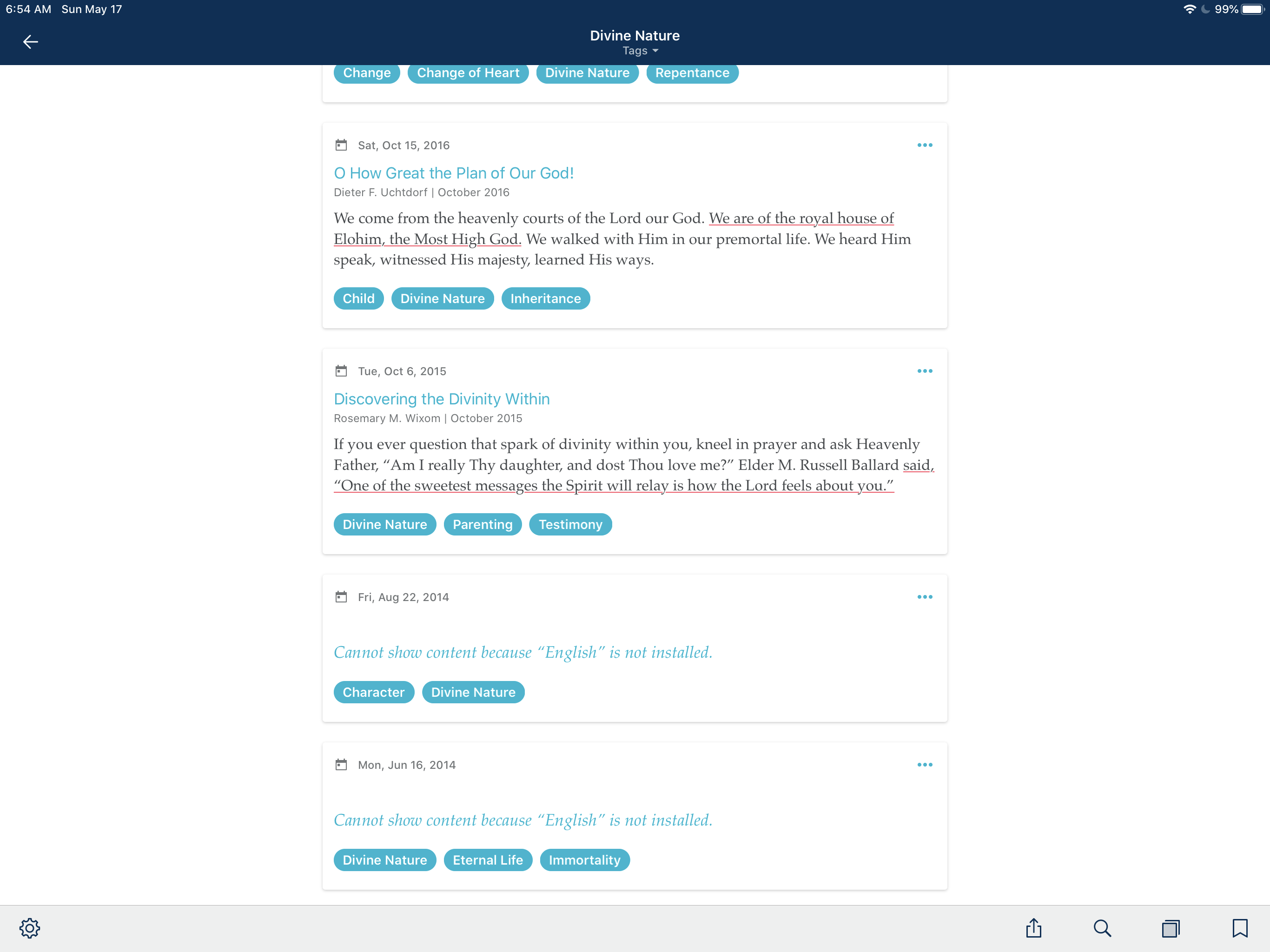
I’m suddenly seeing “Cannot show content because ‘English’ is not installed” all over the place in my tags. There are a good number of my tags that no longer show me the content attached to them. I click on the hyperlink and the app switches to a screen like it’s downloading something and then goes back to the prior page with no resulting change. I have uninstalled the app and reinstalled. Any ideas on what’s going on or am I just going to have to accept that some percentage of the work I’ve done over the past 10+ years is gone?
DC2C4513-E55E-43B8-8453-3A5677330B9B.png
(676.35 KiB) Not downloaded yet
New Member
#2
I am experiencing the same dilemma (also my brother). I am copying what I am highlighting/highlighted (and the source of the article) and pasting into the ‘create a note’ portion so I can see what I highlighted in my notes. Thank goodness, if you can remember which articles you have read, you can go back into them and the highlighting is still there (so you can do the copy and paste method, if you would like). With longer ago items, I realize that will be more difficult to determine, but hopefully the glitch will be figured out soon. I have sought assistance from whoever responds to the ‘Feedback’ in the settings in the Gospel Library App. This App has been awesome, so hopefully this frustration will be short term. Thank goodness most of the highlighted scriptures still are showing up (However, Pearl of Great Price highlights aren’t showing, but at least the reference—book and chapter—is). Looks like it is the magazines that are being the most troublesome. A General Conference talk In which I highlighted Some content on 5/15/20 did show as it should, with reference and highlight.
Community Moderators
#3
When this has happened in the past, sometimes switching to another language and then back to English has resolved the problem.
New Member
#4
Identify the English language and close the apps. Clear the device history. Now go to the apps setting and clear the cache and cookies.
Now login again. I wish your problem will be solved.
New Member
#5
Thank you for the recommendation. Did try that, but It did not work for me. Looks like that highlighting an Ensign before July 2019 will result in receiving that frustrating auto-message rather than the highlighted material in our notes. In regard to the New Era and the Friend, highlighting and seeing what you highlighted in notes is working 11/2019 to the present. As for the Liahona, only this year’s magazines will comply with showing what you have highlighted in your notes. I hope this gets remedied soon, but at least we can highlight and it will stay highlighted and we can copy and paste into the ‘create a note’ part, being sure to include the title and month and year information for future reference.
Community Moderators
#6
This is a temporary issue caused by a content update, affecting bookmarks, annotation links, and snippets in Notes, in Gospel Library on multiple platforms. Developers are investigating the issue, and hopefully a new content update with a fix will go out soon. The actual annotation data is not affected, so your annotations should be safe.

Thanks for the details about which specific content was affected – that helped QA reproduce the issue!
Samuel Bradshaw • If you desire to serve God, you are called to the work.
New Member
#7
Yay, the highlighted content is showing again in notes!! Thank you for resolving the issue!! :D
Glad I was able to give helpful scoop : )
New Member
#8
sbradshaw wrote:This is a temporary issue caused by a content update, affecting bookmarks, annotation links, and snippets in Notes, in Gospel Library on multiple platforms. Developers are investigating the issue, and hopefully a new content update with a fix will go out soon. The actual annotation data is not affected, so your annotations should be safe.

Thanks for the details about which specific content was affected – that helped QA reproduce the issue!
I started having this issue in May and now on June 8th am still having this issue. Was an update pushed out? My app is up to date... thanks.
New Member
#9
I’m having the same experience as dthomaswright. Unlike r053mar13 mine has not been resolved. I’m still having the same problem even after deleting the app and reinstalling.
Community Moderators
#10
kelosh wrote:I’m having the same experience as dthomaswright. Unlike r053mar13 mine has not been resolved. I’m still having the same problem even after deleting the app and reinstalling.
What content version are you on, if you go to Settings > App Details? (The latest English catalog as of yesterday is 915.)
Samuel Bradshaw • If you desire to serve God, you are called to the work.
#11
The latest content update should have fixed the issue. Worked for me. The Church developers also released v5.8 yesterday.
Jeremy 🎶
New Member
#12
It’s working for me now. Thank you!
New Member
#13
Not sure what changed, my version was the most updated one, but now it is working fine.
New Member
#14
I still have the issue with English not installed as of January 2023.
Community Moderators
#15
jolayneeastman wrote: Thu Jan 12, 2023 8:15 pm I still have the issue with English not installed as of January 2023.
When this happens to me I go to the Language setting and select English. The error goes away. One time several years ago I had to select a different language, and then English again to get rid of the error.
New Member
#16
I started having the issue with English not installed as of January 14, 2023. Up until then I had no problems. I have closed the app, I have signed out and back in, and I have uninstalled and reinstalled to no avail.
I have version 6.3.1 (631020.29) on an Android phone.
There is NOTHING showing up in the library. Any help would be greatly appreciated.
Community Moderators
#17
bethl wrote: Sun Jan 15, 2023 5:41 pm Any help would be greatly appreciated.
There is a suggestion that usually works in the post immediately before your post.
New Member
#18
lajackson wrote: Sun Jan 15, 2023 9:01 pm
bethl wrote: Sun Jan 15, 2023 5:41 pm Any help would be greatly appreciated.
There is a suggestion that usually works in the post immediately before your post.
Thank you for the reply.
The problem was that the library had not downloaded at all, so there was no way to get to the language settings. I uninstalled the app again and reinstalled it and this time the library downloaded and it seems to be working okay.
Member
#19
For the past few days, I have had intermittent problems with the Gospel Library app 6.3.1 on Android. It was not letting me get to some content and other content appeared to be out of place, such as old Ensign articles under Books and Lessons. I ended up uninstalling the app and reinstalling. Then it started saying that it couldn't show content because English was not installed. When I tapped on English, it appeared to try to install, but still said it wasn't installed. Then I tried to do a search for a random word (e.g. "testing") and then tapped on the first result that showed up. It took a while trying to bring up that content, then the screen flashed and I was out of the app, although it was still there in the background. One of those times when I tried to search and tap, it said the app was having a problem and it asked if I wanted to clear the cache, which I did. But it didn't seem to resolve it, except now it doesn't even ask if I want to clear the cache anymore.

Ugh. Running out of things to try.
Member
#20
Now after searching for "good" and tapping on the first thing in the list, it kicks me out of the app, and I get the following Android popup window:

"Some went wrong with Gospel Library. Gospel Library closed because this app has a bug. Try updating this app after its developer provides a fix for this error".

I've tried uninstalling and reinstalling several times, so until they provide a fix, sounds like it is broken. Unless there is some way to workaround whatever is causing the bug.

Did they not test GL version 6.3.1 on Android?
Member
#21
lajackson wrote: Fri Jan 13, 2023 4:16 pm When this happens to me I go to the Language setting and select English. The error goes away. One time several years ago I had to select a different language, and then English again to get rid of the error.
How do you "go to the Language setting and select English"? I can't find the Language settings on the app. Maybe it didn't install enough to get to the point to be able to even have Language setting option that I can get to?

Any help would be appreciated.
Community Moderators
#22
genman wrote: Tue Jan 17, 2023 8:50 pm I can't find the Language settings on the app.
On my Android device, the three-dot menu at the top right of the Library page has several links that are not included on the Home page. One of them is Language.

Select Library, then the three-dot menu at the top right. One of the options will be Language. Sometime selecting English again solves the problem for me. Other times, I select another language, then select English again.
Member
#23
lajackson wrote: Wed Jan 18, 2023 9:21 am
genman wrote: Tue Jan 17, 2023 8:50 pm I can't find the Language settings on the app.
On my Android device, the three-dot menu at the top right of the Library page has several links that are not included on the Home page. One of them is Language. ...
Are you talking about within the Gospel Library App? Or are you referring to the Gospel Library page on the website? Assuming you are talking about the Gospel Library App, when I press the Library icon at the bottom of the Home screen, nothing happens. So I can't even get to the Library to try tapping the three-dot menu.
Community Moderators
#24
genman wrote: Wed Jan 18, 2023 1:53 pm . . . when I press the Library icon at the bottom of the Home screen, nothing happens. So I can't even get to the Library to try tapping the three-dot menu.
Yes, in the app. If you cannot select the Library icon, I would guess that you do not have any content at all.

Solving that often included uninstalling and installing again, making sure you have a good Internet connection. Other posts have suggestions to help solve that problem.
Member
#25
lajackson wrote: Wed Jan 18, 2023 8:03 pm
genman wrote: Wed Jan 18, 2023 1:53 pm . . . when I press the Library icon at the bottom of the Home screen, nothing happens. So I can't even get to the Library to try tapping the three-dot menu.
...uninstalling and installing again, making sure you have a good Internet connection...
I have uninstalled and installed many times, and does the same. I can get to other sites and even download the app using the good internet connection. It is something systemic, not on my end, since others have recently been having similar problems with GL version 6.3.1 on Android regarding failed load of English over and over again. My only hope in the near term is that there is a workaround to the bug, other than just permanently uninstalling Gospel Library.
Senior Member
#26
I am also on android, GL version 6.3.1 and have no problems that I can see. If you haven't yet, I recommend you submit in-app feedback (from the Home screen: 3-dots menu - Help - Send Feedback). You shouldn't have to "go into the library" to get to the feedback link. I believe that feedback will provide developers the OS information from your device so they can try to figure out what is going on.
Community Moderators
#27
I wonder if you're able to access content in other languages in the app – is the problem just with English content?
For example, this link should open to 1 Nephi 1 in Spanish, downloading the Spanish catalog if it's not installed:
https://www.churchofjesuschrist.org/study/scriptures/bofm/1-ne/1?lang=spa

I think it would also be worth trying on another network, if you haven't already. Even if you have a good internet connection, there might be something in your network or in your internet service provider's configuration that's blocking the Church content servers, but allowing traffic through to the main Church website, the Google Play Store, etc.

Are you able to get to this URL in a browser?
https://ips-cdn-edge.churchofjesuschrist.org/content/production/v4/languages/eng/index.json
Samuel Bradshaw • If you desire to serve God, you are called to the work.
Member
#28
When I try again today, Android Gospel Library is working. When I look under GL > Help > What's New, it shows the version as 6.3.0 now. So apparently the software folks heard about the problems with 6.3.1 and rolled it back. It's working now.

Those of you who had 6.3.1 Android and who it was working for, I bet would have seen a problem if you completely uninstalled and reinstalled. Who knows. At least they rolled back the buggy release.

Thank you to those who replied.
Community Moderators
#29
genman wrote: Sat Jan 21, 2023 12:04 pm When I try again today, Android Gospel Library is working. When I look under GL > Help > What's New, it shows the version as 6.3.0 now. So apparently the software folks heard about the problems with 6.3.1 and rolled it back. It's working now.
What's New has information about major new features that are added to the app – it doesn't have content for every app update. You can see the app version you have installed under Settings > App Details. Gospel Library 6.3.1 for Android was released on November 1st, and it's still the current latest version on the Google Play Store.

It's possible there was a temporary problem on the content servers, but I'm not sure why it would only have affected some users.

I'm glad it's working for you now!
Samuel Bradshaw • If you desire to serve God, you are called to the work.
Member
#30
sbradshaw wrote: Sat Jan 21, 2023 3:00 pm You can see the app version you have installed under Settings > App Details. Gospel Library 6.3.1 for Android was released on November 1st, and it's still the current latest version on the Google Play Store.
It's possible there was a temporary problem on the content servers, but I'm not sure why it would only have affected some users.
I'm glad it's working for you now!
I see. Yes I do have version 6.3.1 installed then. I'm not sure why it started working. The last thing I tried before it started working was going to the the following Spanish language link from a browser, similar to what you suggested:

https://www.churchofjesuschrist.org/study/lib?lang=spa

When I did that, instead of bringing up the Gospel Library app like I thought it was supposed, it brought it up in the browser. So I figured it didn't do anything. Maybe that workaround worked after all. Or maybe it starting to work then was a coincidence.