Best practice to connect to TV from phone or tablet?

17 postsstarted by stevecline 24,415 viewsoriginal topic

New Member
#1
Is there a consensus or best practices or guidelines on how to play somthing on a device and have it show up on a TV or projector, preferably wireless? Something like a Chromecast or Roku stick needed? Does it require certain apps on the broadcasting device?

For example, we just had a group come in from SVU and they asked if we had Apple TVs ( we don't) - is that a recommended solution ? Do they have a subscription component?
Community Administrator
#2
At this point I don't think there are any officially recommended solutions. The closest to that is that the church is preparing to roll out Mi Box S for receiving webcasts. However, that may not be a great solution as it would require changing its configuration.

I do know a number of units seem to use Chromecast.
Have you searched the Help Center? Try doing a Google search and adding "site:churchofjesuschrist.org/help" to the search criteria.

So we can better help you, please edit your Profile to include your general location.
New Member
#3
Thanks - I am going to try out a Chromecast tomorrow during our youth kickoff - any tips for smooth operations?
Senior Member
#4
Our stake bought Chromecast devices for each meetinghouse. I tried it once with nobody else in the building, and it barely worked with our 1 mbps DSL modem. With others in the building, it didn't work at all.
Dana Repouille, Plattsmouth, Nebraska
New Member
#5
What i ran into this morning is trying to make the Choromecast work with the Liahona network - will need to find the instructions on adding a device with no browser
Senior Member
#6
We do not use Chromecast. The 3 wards in our building went together and purchased an assortment of cables/adapters to allow almost any device to be plugged in to each TV. We secured them to each TV cart with a cable so they must stay with the cart/TV. This takes the WiFi and the device brand out of the equation.
New Member
#7
I have considered that also, for just to avoid dealing with the wifi. Do you need any special software on the phone or tablet, or can most mirror on to a second screen using built in software? I am not an Apple guy, so I don't know much about the ecosystem
Senior Member
#8
I'm not an Apple fan either but our set up works with both Android and Apple phones, tablets, and laptop PCs. It does not use WiFi or Bluetooth. Most devices detect the screen automatically when plugged in (for PCs you sometimes have to use a key-combo to switch the screen), though I have seen a few instructors frustrated when things don't work as they want. I'm a bit old school myself - when I want to show a video for a class, I put it on a thumb drive and plug it into one of the USB ports on the back of the TV. Works every time...
#9
stevecline wrote: Sun Mar 08, 2020 8:01 am What i ran into this morning is trying to make the Choromecast work with the Liahona network - will need to find the instructions on adding a device with no browser
Where can we find these instructions? I ran into the same problem of being unable to get chromecast to work on Liahona
Community Administrator
#10
josephmaxhirschi wrote: Tue Oct 26, 2021 6:27 am Where can we find these instructions? I ran into the same problem of being unable to get chromecast to work on Liahona
It's something your stake technology specialist will have to do. I don't know as anyone at the ward level has access.
Have you searched the Help Center? Try doing a Google search and adding "site:churchofjesuschrist.org/help" to the search criteria.

So we can better help you, please edit your Profile to include your general location.
New Member
#11
davesudweeks wrote: Sun Mar 08, 2020 11:43 am We do not use Chromecast. The 3 wards in our building went together and purchased an assortment of cables/adapters to allow almost any device to be plugged in to each TV. We secured them to each TV cart with a cable so they must stay with the cart/TV. This takes the WiFi and the device brand out of the equation.
This sounds like the solution we need for our building. Can you supply me with more details, photos, whatever, of what you did and would recommend now?

Right now, my stake is in a bad place. I'm just a ward technology specialist. We have only two Stake Technology Specialists (1 at least is inactive.) After Zoom meetings ended I shifted my efforts to determining why no one seems able to use the televisions and media we have in lessons or presentations. Nearly everyone has gone back to chalk boards because they can't get anything to work.

I went into the resource center in our stake center one Saturday and tried to evaluate everything I could. It would seem that our technology is old. I was able to play some pre-recorded audio and images from a flash drive by plugging the flash drive into the USB drive on at least one television. It wouldn't work on the other two. I couldn't play anything from my phone (Moto G7 Android). It didn't recognize the device.

The Sunday School President was able to purchase an adapter so one brother was able to present a slide show from his iPhone one Sunday. I'm not certain where that adapter went and if the Church purchased it.

One other teacher, who has since been released, used her own adapters with her laptop and was able to play some videos she needed in real time. (I know, not ideal).

These technology problems are plaguing the stake and no one seems to know what to do about it, including me.

Purchasing adapters and attaching them to the carts seems the most reasonable solution. However, I'm not quite certain how to go about that or who in my ward or the stake to even pitch it to. Who has direct authority over these issues? I ask and no one seems to know.

I would appreciate whatever guidance and counsel any one of you can give me. I'm floundering.
Senior Member
#12
I will post pics of our setup when I get an opportunity. I don't know who in our ward set these up, but I have sent a request to the most likely person to see if he knows or has a parts list. In our case, the 3 wards who share our building split the cost of the hardware using budget funds. Our setup consists of a small box with multiple cables that can plug in to it with various connection options (USB-C, Lightning, DVI, HDMI, etc.). It allows tablets, cell phones, laptops, etc. to be cabled to any TV in our building.

Note: some android phones (like mine which is a mid-range Motorola phone) won't output video through the charge port so our setup doesn't work in every situation for everyone. There may be other models/brands, but I don't know which. In my case, I asked a counselor to use his iPhone to show the video clip for our EQ meeting.
Community Administrator
#13
davesudweeks wrote: Wed Mar 16, 2022 7:54 am Note: some android phones (like mine which is a mid-range Motorola phone) won't output video through the charge port so our setup doesn't work in every situation for everyone.
You're also on a short leash, tied to the TV set. I know at least one seminary teacher who didn't like that and went to Chromecast.

Another strategy to consider is using a laptop with a handheld keyboard/trackpad allowing portable remote control
Have you searched the Help Center? Try doing a Google search and adding "site:churchofjesuschrist.org/help" to the search criteria.

So we can better help you, please edit your Profile to include your general location.
Senior Member
#14
russellhltn wrote: Wed Mar 16, 2022 11:27 am You're also on a short leash, tied to the TV set. I know at least one seminary teacher who didn't like that and went to Chromecast.
True, but no solution will be perfect for everyone, even if there were unlimited funds to draw upon. For every workable solution, someone will find a way to complain that it won't fit their own special circumstances. In my experience, the problem is not the solution as much as the individual who refuses to try to make the best of what they can get to work. Personally, If I cannot put a video on a thumb drive to play direct from the TV, I don't bother and go without. My experience with trying to use my cell phone was a test that didn't work out for me (fortunately I checked during the week so had a backup plan in place). Rich multimedia is not a requirement for a good gospel lesson...
Community Administrator
#15
davesudweeks wrote: Wed Mar 16, 2022 11:54 am Rich multimedia is not a requirement for a good gospel lesson...
True, but I suspect those who work with the youth may disagree. ;)
Have you searched the Help Center? Try doing a Google search and adding "site:churchofjesuschrist.org/help" to the search criteria.

So we can better help you, please edit your Profile to include your general location.
Senior Member
#16
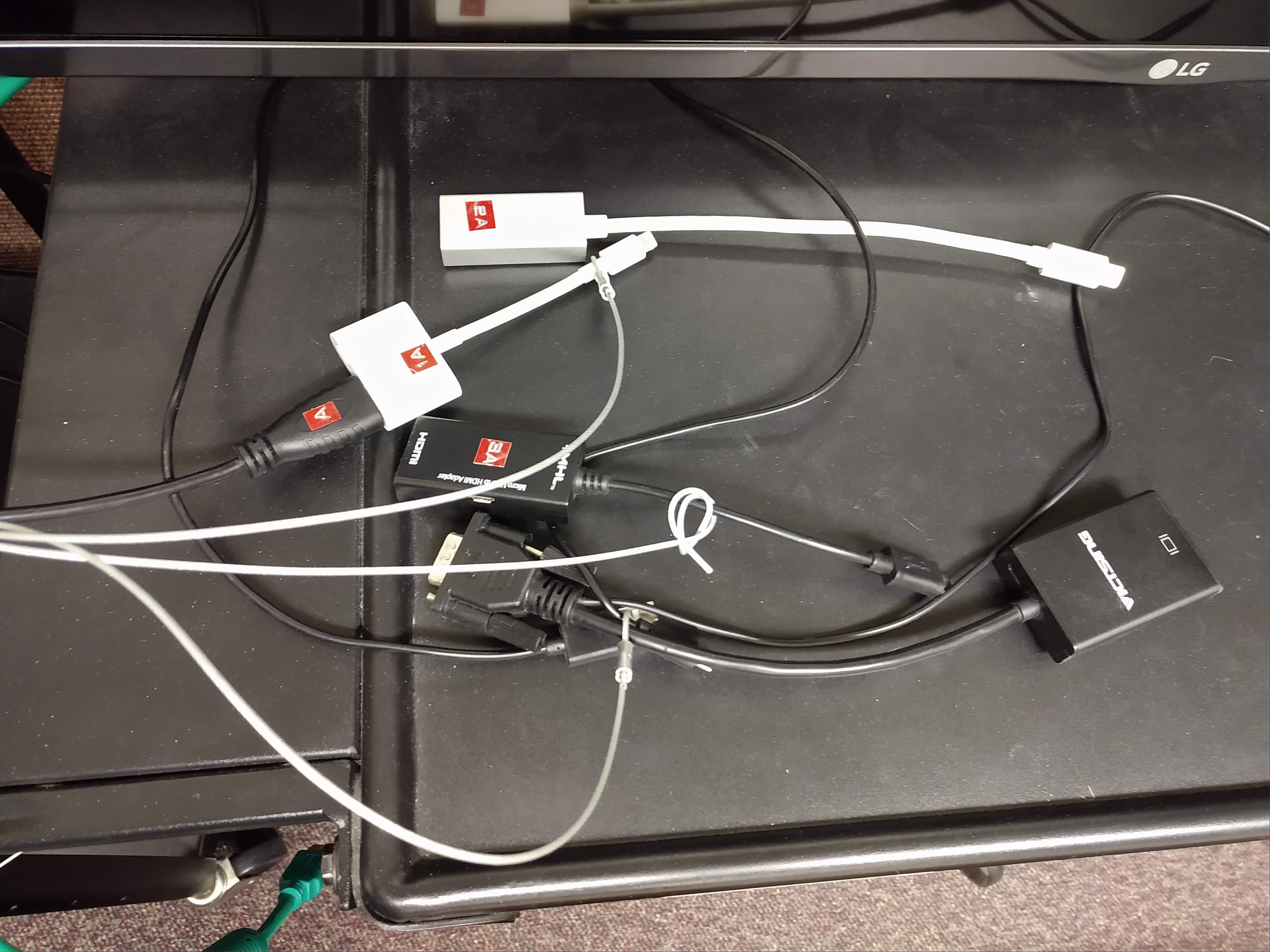
I have attached a parts list and a pic of what we set up for our ward. We did this back in 2017 - I did not set it up but the person who did is still in our ward. All 3 wards in the building shared the cost for the 4 tvs from their budget funds.

On the plus side, you can display videos from your phone or other device without having to use wifi.
On the down side, you have to keep the device at the TV to show the video.

All our TVs also have a USB port in them so a thumbdrive is an option as well for videos that can be downloaded. This seems to work well for us, but "your mileage may vary..."
๐Ÿ“Ž TV setup.pdf (251.59 KiB)
TV setup.jpg
TV setup.jpg (638.82 KiB)
New Member
#17
I want to thank all of you who responded to my original request. I especially appreciate the picture and the parts list. These are invaluable!

I certainly did not mean to languish this long before replying but I believe I have a good excuse: I got married in March, moved to my new husband's place, fell out of the moving truck, and broke both my right leg and my right arm. I've been pretty immobilized for a while.

I'm partially mobile now and back pursuing solutions. Since none of our three televisions can play video via USB flash drives (only audio and images), I'm assuming our technology is pretty old. I'm going to try and determine if any of it needs to be replaced first, then I'm going to pursue the cable tethers and adapters.

Recent guidance on Meetinghouse Technology at the Help Center suggests the line of authority I need to follow to get things approved and purchased. I'll start there.

If any of you have thought of any other pointers/tips or have any other advice, I would very much welcome it. I'm still out of my depth and still floundering, but you gentlemen have helped a lot! Thank you!

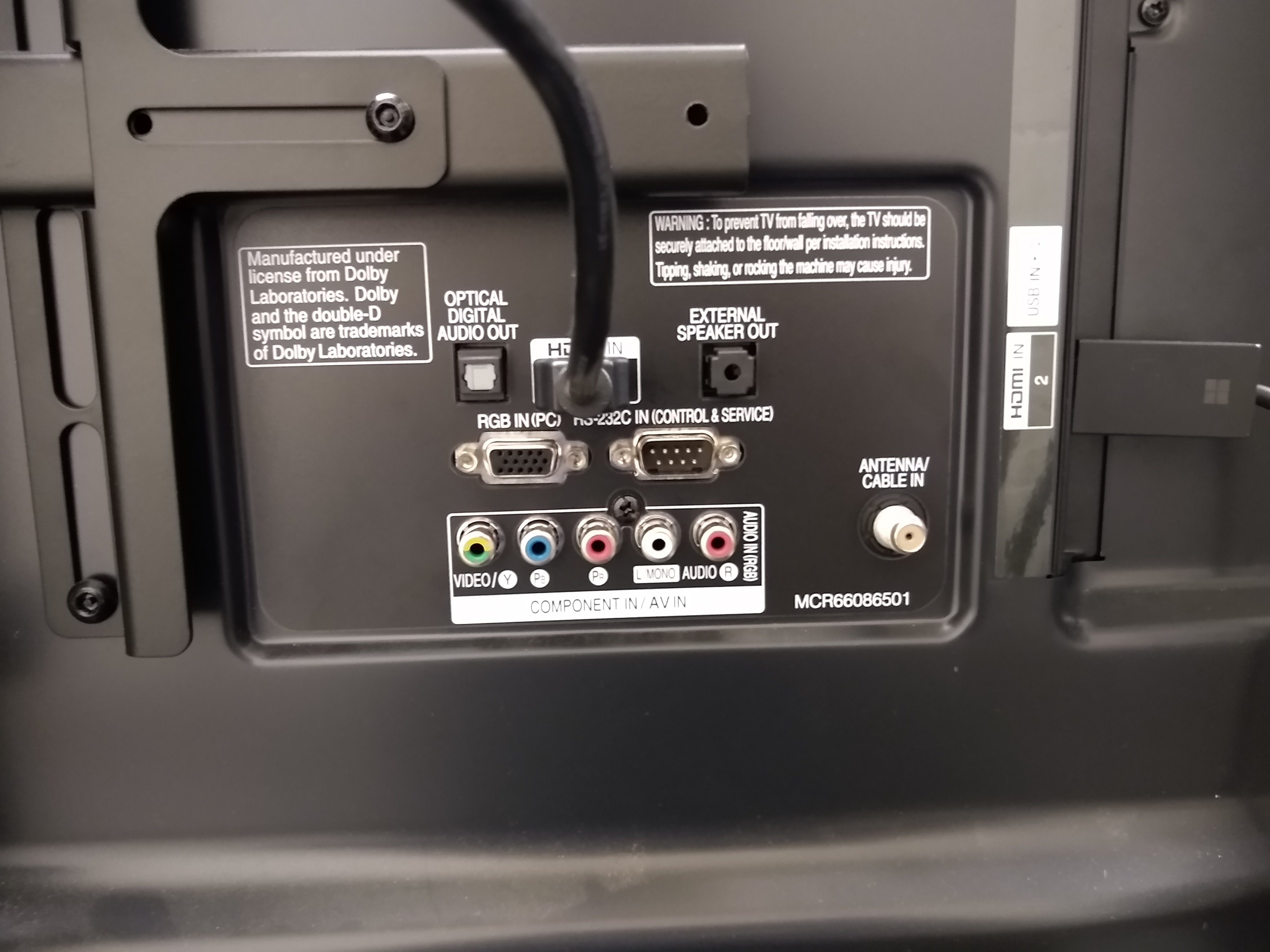
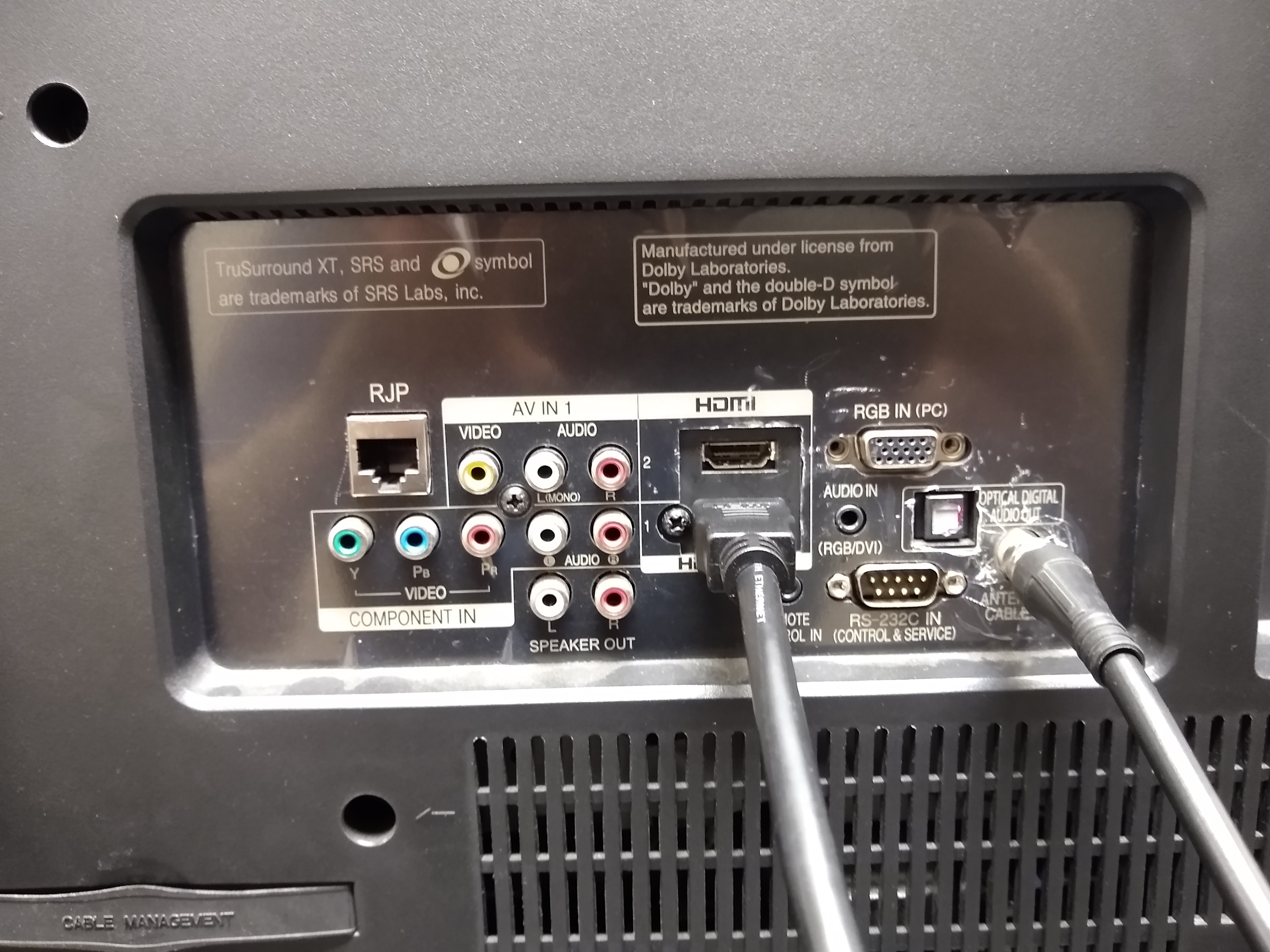
I've included images from the back of the three TV's we have. If that prompts any advice or comments, I'd like to hear them.
Big TV.jpg
Medium TV.jpg