Online Expense Reimbursement Request Form

33 postsstarted by t0008sa 52,275 viewsoriginal topic

Member
#1
I used JotForm to create an Online Expense Reimbursement Request Form.

It's working fantastic! (Especially on smartphones.)

Now, virtually everything can be done while away from the Clerk's computer (except for printing checks).

It's a simple matter to create a JotForm account, then go to the Templates section, search for "Troy" and you'll be taken to the form I created.

You just need to use that template and edit the form for your unit. (I've attached a PDF of what the input form looks like.)
Senior Member
#2
We don't use a form any longer except for paper receipts. We ask members to email their digital receipts to the organization president with the reason for the expense and how they want the reimbursement. We ask the organization president to forward the email to the assistant clerk-finance or the clerk as their approval for the expense and the purpose. When I do it, I save the email as a pdf document and save the receipts separately (pdf or jpg). Then I load each one as backup documentation for the reimbursement.

Haven't tried it on a smart phone - I like doing this on a nice big screen where I can easily tell what's going on.
Member
#3
I should have also mentioned --

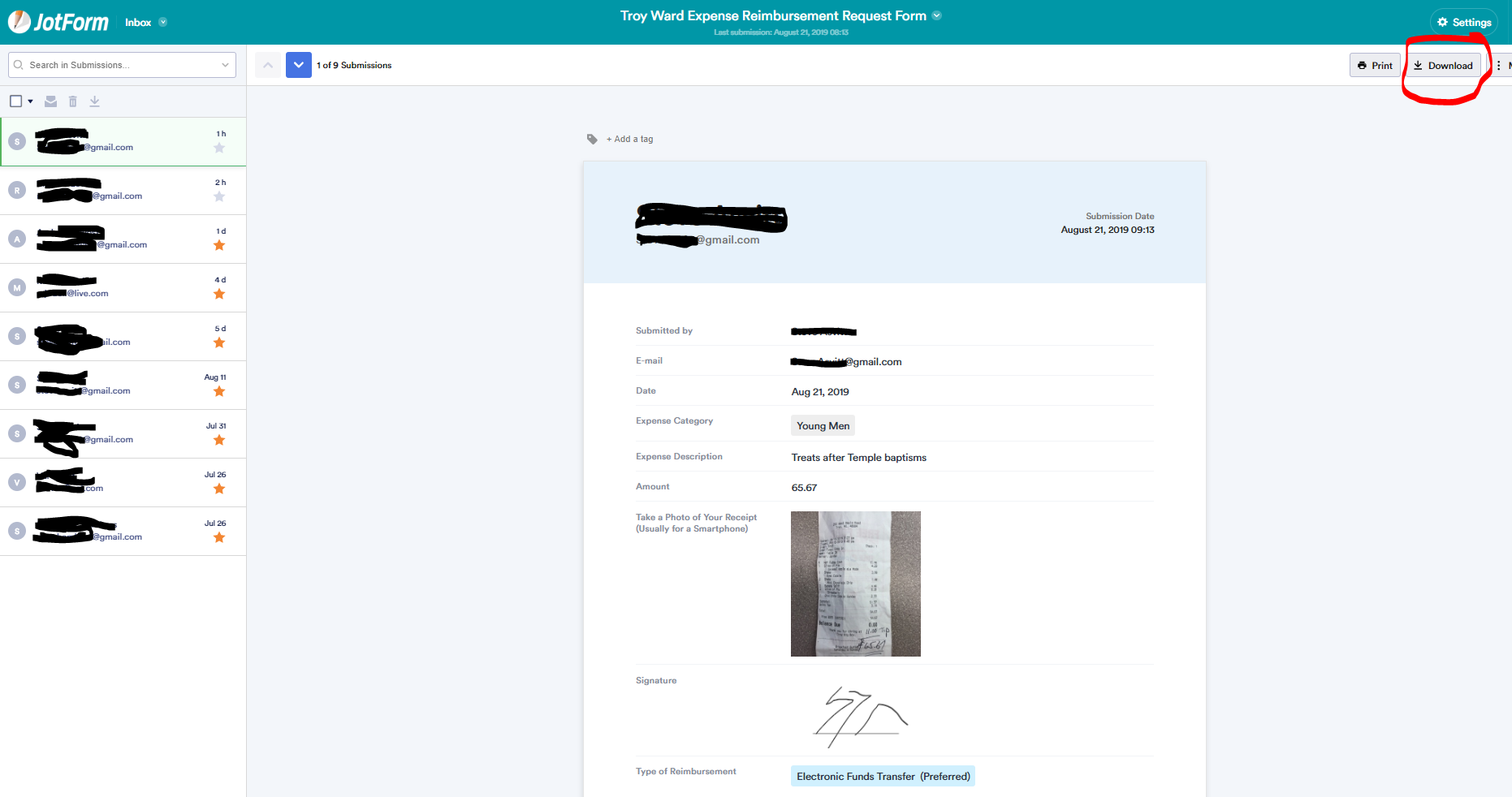
The attached shows what appears in the JotForm Inbox. From there, you can download individual inputs as a PDF and then upload that into LCR.

If you want to give it a LIVE try, navigate on your phone browser to bit.ly/TroyExpense and create a "fake" request. Just put TEST in the Description field. I can delete any input from our Inbox.
📎 JotForm Inbox.PNG (173.72 KiB)
#4
Here's our workflow. This could plug in pretty easily, but the email-only approach seems to be working for us.

https://docs.google.com/presentation/d/ ... sp=sharing
New Member
#5
This is great! Will be so much easier and more convenient. Thank you so much for sharing!
#6
With the new ability of members to directly enter their requests into LCR (or at least org presidencies can), I'm guessing the original poster isn't using the jot forms anymore.

My workflow above is slightly out of date because of this change and I'm working on a new version. You can make a copy of my google doc workflow and edit it for your process.
New Member
#7
chriswoodut wrote:With the new ability of members to directly enter their requests into LCR (or at least org presidencies can), I'm guessing the original poster isn't using the jot forms anymore.

My workflow above is slightly out of date because of this change and I'm working on a new version. You can make a copy of my google doc workflow and edit it for your process.

Where is the reimbursement request in LCR?
#8
reydnad wrote:
chriswoodut wrote:With the new ability of members to directly enter their requests into LCR (or at least org presidencies can), I'm guessing the original poster isn't using the jot forms anymore.

My workflow above is slightly out of date because of this change and I'm working on a new version. You can make a copy of my google doc workflow and edit it for your process.

Where is the reimbursement request in LCR?
I believe if a person clicks Finance in LCR, they will see the option. As a clerk, I get the clerk menu so I'm going from memory.
Senior Member
#9
I am a counselor in the EQ presidency so assume this goes for all ward/branch organizations who have access to request reimbursements electronically:
1. Log in to LCR
2. Click "Finance" in the banner just below the church logo.
3. Click the "Payment Request" tab
4. Enter the requested information (payee, purpose, category and amount).
5. Upload pics or scans of the receipts
6. Click on the Save button.
New Member
#10
Who has access to submit direct requests in LCR? Is it just members of presidencies of organizations?
Community Moderators
#11
davide wrote:Who has access to submit direct requests in LCR? Is it just members of presidencies of organizations?
If you are referring to the Payment Request feature then the organization presidencies, including the organization secretary, can submit payment requests for their organization budget categories as well as any other category for which they have been given permission (see this post in another thread).
JD Lessley
Have you tried finding your answer on the ChurchofJesusChrist.org Help Center or Tech Wiki?
New Member
#12
davesudweeks wrote:We don't use a form any longer except for paper receipts. We ask members to email their digital receipts to the organization president with the reason for the expense and how they want the reimbursement. We ask the organization president to forward the email to the assistant clerk-finance or the clerk as their approval for the expense and the purpose. When I do it, I save the email as a pdf document and save the receipts separately (pdf or jpg). Then I load each one as backup documentation for the reimbursement.

Haven't tried it on a smart phone - I like doing this on a nice big screen where I can easily tell what's going on.
So were the auditors satisfied with that process? I am questioning the need for the request cover page if it all happens in LCR from beginning to end. Having the receipt as one document and the cover as another makes my bishop uncomfortable, so I spend a lot of time trying to combine the cover page with the receipts into a single file and I think we are doing a lot of unnecessary work. But I wanted to see if others shared that opinion.
Senior Member
#13
siredge wrote:So were the auditors satisfied with that process? I am questioning the need for the request cover page if it all happens in LCR from beginning to end. Having the receipt as one document and the cover as another makes my bishop uncomfortable, so I spend a lot of time trying to combine the cover page with the receipts into a single file and I think we are doing a lot of unnecessary work. But I wanted to see if others shared that opinion.
I see no point in trying to combine any documents into one document and I've never done that. Whether images are combined or separate doesn't really tell you anything about whether they are valid or not. As long as there is documentation showing the purpose of the expense, who it should be paid to and receipts showing the amounts the auditor should be fine.

As for whether you need the reimbursement request or something similar (like a PDF of an emailed request), I would recommend having it at least for expenses where you are paying someone other than then person or company on the receipt. Having that document helps you ensure that you've entered the correct payee and purpose and it allows the 2nd approver to verify that as well. As an auditor I didn't look that closely at that information. I looked more at the receipts. But as a finance clerk, I like having it as that second check that everything is entered correctly and to provide a way to check back on it if there are any questions later.
Senior Member
#14
siredge wrote:So were the auditors satisfied with that process? I am questioning the need for the request cover page if it all happens in LCR from beginning to end. Having the receipt as one document and the cover as another makes my bishop uncomfortable, so I spend a lot of time trying to combine the cover page with the receipts into a single file and I think we are doing a lot of unnecessary work. But I wanted to see if others shared that opinion.
We never had any audit exceptions from our process. They were all attached to the same expense so in effect, they were in a single "folder" in the system. I had some reimbursements that were between 5 and 10 separate receipts and they were all individually uploaded. We never had any audit problems from multiple receipts as long as all the information was correct and the amounts all added up.

For the paper system, did your bishop make you photo-copy all the individual receipts onto a single page of paper for filing or were you allowed to attach them all individually to the reimbursement request? We would staple the individual receipts (along with the check stub) to the reimbursement request. Electronically, I consider this the same thing.
New Member
#15
davesudweeks wrote:
siredge wrote:So were the auditors satisfied with that process? I am questioning the need for the request cover page if it all happens in LCR from beginning to end. Having the receipt as one document and the cover as another makes my bishop uncomfortable, so I spend a lot of time trying to combine the cover page with the receipts into a single file and I think we are doing a lot of unnecessary work. But I wanted to see if others shared that opinion.
We never had any audit exceptions from our process. They were all attached to the same expense so in effect, they were in a single "folder" in the system. I had some reimbursements that were between 5 and 10 separate receipts and they were all individually uploaded. We never had any audit problems from multiple receipts as long as all the information was correct and the amounts all added up.

For the paper system, did your bishop make you photo-copy all the individual receipts onto a single page of paper for filing or were you allowed to attach them all individually to the reimbursement request? We would staple the individual receipts (along with the check stub) to the reimbursement request. Electronically, I consider this the same thing.
His point was that if the sheet was separated from the receipts, then modification of an electronic file would be easier to accomplish and more difficult to detect than on a physical receipt. I see his point, but like I said, I spend hours trying to get these things working and I'm not sure it is giving us much risk mitigation. I may have found a solution to speed things up using LibreOffice, which seems to be able to combine PDFs without an expensive utility. But again, if the action is unnecessary altogether, then finding an easier way to do it is still unnecessary.
Senior Member
#16
I believe digitally combining them all into one .pdf is unnecessary - there are already checks and balances in the system to minimize the risk of inappropriate actions with respect to the financial records. If the church thought it was important to combine them all into a single document, there would be instructions to that effect and the system would not be built to allow multiple documents be uploaded. But your bishop holds the keys for his ward. I have served with bishops who were stubborn and as the clerk I just had to make it work because they wouldn't listen to common sense (even though what they required caused confusion and headaches in the financial records for several years).

Once the receipts are uploaded, they are more secure (in my opinion) than paper records. Many receipts are thermally printed and can fade over time. I would be very surprised if the church did not have change tracking built into the system even though it isn't visible to the ward.
Senior Member
#17
siredge wrote:His point was that if the sheet was separated from the receipts, then modification of an electronic file would be easier to accomplish and more difficult to detect than on a physical receipt.
Putting the images together into a single document does not provide any additional protection. A PDF can be easily cut apart and put back together using online tools that can be found using a simple search. Even in the physical case there really isn't much way to ensure that physical documents stay together. It's also quite easy to remove a staple, rearrange documents and restaple. That does leave staple holes but there are lots of reasons why documents may be unstapled and restapled by either the member before submission or by the clerk (such as to scan the receipts) so it really doesn't mean much.

The more effective protections are that the reimbursement request should show the total amount requested (which should match the receipts) and the purpose (which should be consistent with what is shown on the receipts).
New Member
#18
I second that question. I'm an executive secretary and have made purchases for the ward. I'd love to be able to submit direct requests. It appears I'm not one who is allowed to submit reimbursement requests electronically?
Community Moderators
#19
jefferso wrote:It appears I'm not one who is allowed to submit reimbursement requests electronically?
The online payment request feature provides only organization presidencies the ability to submit online payment requests. Outside that direct entry into LCR > Finances > Expenses is limited to those with finance permissions. Those not in either of those two groups do not currently have an online payment request ability and must use the procedures established for your unit. The closest online payment request capability is to submit a payment request by email, with supporting documentation as attachments, to the appropriate organization president or to the ward clerk, assistant ward clerk, or assistant ward clerk - finance (Bishopric members also have finance permissions).
JD Lessley
Have you tried finding your answer on the ChurchofJesusChrist.org Help Center or Tech Wiki?
New Member
#20
Is it still the case today, that only the organization presidencies can submit an online payment request?
Member
#21
Yep, presidencies including secretaries only.
#22
nicksorenson wrote:Is it still the case today, that only the organization presidencies can submit an online payment request?
It looks like it (in glancing at the access table).
New Member
#23
After a payment request has been submitted online, there should be a way that I (as RS President) am able to see all requests previously submitted for Relief Society. This to avoid submitting requests twice by accident or by two different people. How do I view those?
Thanks!
Community Moderators
#24
deemorris wrote:After a payment request has been submitted online, there should be a way that I (as RS President) am able to see all requests previously submitted for Relief Society. This to avoid submitting requests twice by accident or by two different people. How do I view those?
Thanks!
At this time that capability does not exist. Only the bishopric and clerks with finance permissions can view details for a category. Organization presidencies can only see the category summary.

You can submit feedback on this to those who make decisions about future enhancements by using the feedback link found at the bottom of the page in the footer. Any church website link will work if there is not one on the page you are looking at.
JD Lessley
Have you tried finding your answer on the ChurchofJesusChrist.org Help Center or Tech Wiki?
New Member
#25
I would love the feature that deemorris asked for. As the RS Secretary, I'd like to see a richer report of payment requests so that I can review the details with the presidency.

If the Budget Details page included the name of the payment recipient and the text string provided in the Purpose field, that would meet my need.
#26
My challenge is I am a young men advisor but there is no young men presidency, the bishop is the president with no counselors. As young men advisor I don't have access Leader and Clerk Resources (it says access denied). Is there a way for young men's advisors to submit their expenses electronically?
Community Moderators
#27
james.mathias18@gmail.com wrote: Sun Sep 05, 2021 12:27 pm Is there a way for young men's advisors to submit their expenses electronically?

Not as of today. Our Aaronic Priesthood quorum advisors submit their payment requests to the ward clerk by email.
JD Lessley
Have you tried finding your answer on the ChurchofJesusChrist.org Help Center or Tech Wiki?
Community Moderators
#28
james.mathias18@gmail.com wrote: Sun Sep 05, 2021 12:27 pm… there is no young men presidency, the bishop is the president with no counselors.
In case it's helpful, the bishopric (including the counselors) are the presidency of the Aaronic Priesthood – see General Handbook, 7.1.2 and Doctrine and Covenants 107:15. The bishop is the president of the priests quorum without his counselors, but the entire bishopric is the presidency of the Aaronic Priesthood organization.
Samuel Bradshaw • If you desire to serve God, you are called to the work.
New Member
#29
I did a reimbursement on the app one time, but now I don't see it anywhere. has it moved, been eliminated, or otherwise unavailable?
Community Moderators
#30
victortango wrote: Sun Sep 29, 2024 8:10 pm I did a reimbursement on the app one time, but now I don't see it anywhere. has it moved, been eliminated, or otherwise unavailable?
The LCR > Finance > Budget > Payment Request feature is only available to organization presidencies and secretaries. It is not available to the general membership or those with custom callings. If your calling has changed and you are no longer a member of an organization presidency or a secretary then that feature is no longer available.
JD Lessley
Have you tried finding your answer on the ChurchofJesusChrist.org Help Center or Tech Wiki?
New Member
#31
We have had people recently, YW and YM advisors or YW camp directors, that have been able to submit online and as soon as they are taken out of the calling that ability was removed for them. is there a list of callings that should have this ability. or would this be a bug that you would like reported?
Community Moderators
#32
bradstrong wrote: Thu Oct 03, 2024 3:32 pm We have had people recently, YW and YM advisors or YW camp directors, that have been able to submit online and as soon as they are taken out of the calling that ability was removed for them.
It would be unusual for a YW advisor, a YM advisor, and a YW camp director to have access to LCR > Budget > Payment Request. I just checked the LCR > Help > Feature Access by Calling table and only the YW advisor and YM advisor are even listed in that table. Those callings show they do not have access to Budget > Payment Request but they do have access to view their organization budgets. The Payment Request tool is a tab on the Budget page and extending that feature to those two callings could have been done for a trial period. There is a possibility your unit may have been in a trial group that was given access to an extended list of standard callings to the Payment Request tool for a period of time. But I have not heard of such a thing. That in of itself does not mean much other than I have not heard of it. The YW camp director calling is not even on the table.
JD Lessley
Have you tried finding your answer on the ChurchofJesusChrist.org Help Center or Tech Wiki?
Senior Member
#33
bradstrong wrote: Thu Oct 03, 2024 3:32 pm We have had people recently, YW and YM advisors or YW camp directors, that have been able to submit online and as soon as they are taken out of the calling that ability was removed for them. is there a list of callings that should have this ability. or would this be a bug that you would like reported?
I wouldn't be surprised if the YW Camp Director also had an additional calling that gave her access to the Reimbursement tool (for example, many YW Camp Directors are also members of a ward YW/Primary/RS presidency). At least something to check and see.

Also for reference, the Tech Forum is not connected to the Church support team. The Forum is primarily for user-to-user interactions and self-help. So regarding whether or not to report this as a bug, I think it might be good to see whether any responses to your question, help provide answers to what you've seen. And then if it still seems like there's a bug, you can definitely report this using the Feedback functionality available at the bottom of most Church webpages (and you can also provide a link to these Forum discussions when you submit that Feedback).