Electronic reimbursements

155 postsstarted by cchang 53,659 viewsoriginal topic

Member
#1
It was brought to my attention that by the end of March 2019 expense reimbursements can now be electronically reimbursed instead of writing out a check. We noticed this informational message when logging into LDS.org. Is anyone aware that we can do electronic reimbursements for expenses?
Community Moderators
#2
The 15 March 2019: Ward and Stake Electronic Reimbursements notice is found in the Official Communications Library. The instructions are found in the Help Center page Record Expenses and Reimbursements

Many U.S. units were active for that capability on Friday, March 15. We are getting feedback from some units that the capability has not yet been activated for them yet.
JD Lessley
Have you tried finding your answer on the ChurchofJesusChrist.org Help Center or Tech Wiki?
New Member
#3
jdlessley wrote:The 15 March 2019: Ward and Stake Electronic Reimbursements notice is found in the Official Communications Library.
As a Ward Clerk in California, I don’t see the new functionality in LCR yet. I also can’t view that letter in the communications library! (It shows a Page Not Found error). I can access the Help Center article, so at least that’s something.
Senior Member
#4
pcox1217 wrote:I also can’t view that letter in the communications library! (It shows a Page Not Found error).
I can't see it either. We've been on the beta. I guess that letter is only showing up for those units where the new version has been recently enabled.
Senior Member
#5
From the Help Centre. Is this what you're looking for? https://www.lds.org/help/support/record ... s?lang=eng
Community Administrator
#6
eblood66 wrote:
pcox1217 wrote:I also can’t view that letter in the communications library! (It shows a Page Not Found error).
I can't see it either. We've been on the beta. I guess that letter is only showing up for those units where the new version has been recently enabled.
I can't see that letter if I follow the link, nor can I find it in Letters, even if I set the selection to "All". Yet, I see the reimbursement account setting on my donation page.
Have you searched the Help Center? Try doing a Google search and adding "site:churchofjesuschrist.org/help" to the search criteria.

So we can better help you, please edit your Profile to include your general location.
Senior Member
#7
eblood66 wrote:
pcox1217 wrote:I also can’t view that letter in the communications library! (It shows a Page Not Found error).
I can't see it either. We've been on the beta. I guess that letter is only showing up for those units where the new version has been recently enabled.
As an assistant stake clerk, I received an e-mail on 3/15, telling me that an official letter or notice is available and I was able to download the notice. The notice is directed to leaders of "activated units". So I believe you are correct.
New Member
#8
I received the letter today and I now have access through LCR! Looking forward to adopting the new reimbursement process.
New Member
#9
I have the information and looked over the process and looked at it on line. But do have a question. How do we get an electronic receipt into our system?
Senior Member
#10
larryparkdunn wrote:I have the information and looked over the process and looked at it on line. But do have a question. How do we get an electronic receipt into our system?
It has to be provided electronic to be uploaded, or scanned and uploaded. There are phone apps that others in the forum reported they have used to convert a paper receipt to a digital version that can be uploaded.

We are going to start with leaving the paper receipts in the paper process and do electronic receipts when they are provided (I don't have a cell phone that works well with any of the apps others have used). The system works fine using either process, as long as the paper trail is still there as it has been for paper receipts.
Senior Member
#11
larryparkdunn wrote:I have the information and looked over the process and looked at it on line. But do have a question. How do we get an electronic receipt into our system?
First off, you don't have to use electronic receipts. You can still use paper receipts for both checks and electronic reimbursements. However, for electronic reimbursements you have to have another approver available to review the documentation and authorize each reimbursement as you enter them.

The system doesn't provide any help in getting the receipts into electronic form. It just allows you to upload them once you have them on a computer. But there are several possible ways of getting them in electronic form. First, you can just ask members to submit them by email in the first place. This may not work for some but many may have a multi-function printer they can use to scan or they may just take a picture with their cell phones. And nowadays sometimes the original will be electronic anyway (for online orders). If you have a similar personal MFP or device you could also scan or photograph the receipt at home and either use a personal computer to upload the receipts or email them to an account you can access on the church computer.

I don't think it's usually setup but it's possible that the library copier may be able to function as a scanner if connected to the church network.

If none of those options is available then you'd probably have to just stick with paper receipts.
Community Administrator
#12
eblood66 wrote:I don't think it's usually setup but it's possible that the library copier may be able to function as a scanner if connected to the church network.
I'd have to check, but some MFPs will scan to a USB Thumb drive. I think that's preferable to trying to set up a network scanner that would open up the clerk computer to anyone on the network. :o Some MFPs will scan to email, but then you'd need a email account for it to work with.
Have you searched the Help Center? Try doing a Google search and adding "site:churchofjesuschrist.org/help" to the search criteria.

So we can better help you, please edit your Profile to include your general location.
New Member
#13
Has anyone developed an electronic version of a reimbursement form for the members to fill out that can be attached electronically, along with the electronic receipts? or, should we attach the email from the member asking for the reimbursement?
New Member
#14
We have been using this for about 2 weeks, and the approval process is mostly intuitive. However, it's not clear whether both approvers need to be physically present at the computer to review an expense before approving it. The instructions under the "Approve Expenses" tab says that " two approvers must be present at the computer or device." Cautiously, we have interpreted this as requiring both approvers to be present simultaneously. However, this seems to remove the value added by moving the process to LCR. Anyone know if, for example, I can approve in one location and, granted all material is available for a second approver, another party can approve from a second location?
Senior Member
#15
We will be instructing organization presidents to provide the required information in an e-mail forwarding to receipt to the clerk. There is no requirement for a "form" but only a requirement that it is approved. Our bishop likes the organization presidents to approve expenses in their organization before he approves them so the email will only need to include the information the clerk needs to set up the reimbursement: name of the person being reimbursed, the amount, the purpose of the expense, and the budget line it comes from (of there is more than one for an organization). Obviously, the receipt will need to be attached. The e-mail from the organization president will signify their approval.

For paper receipts, we plan to stay with our paper process for the time being which has a paper reimbursement request that collects the above information. Either process can be used for a paper check or electronic reimbursement if the member has set their account up to accept that.
New Member
#16
How are you doing this? This sounds like you are entering donations and processing expenses through LCR. I can only do this through MLS, and I don't see any option in MLS to do electronic reimbursements or receipts. Am I missing something with LCR? I can only view financial reports and batches in LCR. For me it is read only, I can't do anything with it. Do I need special access to process in LCR or am I just reading this wrong?
Community Moderators
#17
dwfaber wrote:How are you doing this?
The process of using LCR for expenses is being rolled out in phases. You should see a letter at the Official Communication Library, perhaps receive an email, and then see the option at LCR. Your MLS should also redirect you to LCR at that time.

If you have not yet seen those things, enjoy the topic here while folks work out all the kinks, and you will be ready to go when the process is turned on in your area.
Community Moderators
#18
lajackson wrote: Your MLS should also redirect you to LCR at that time.
The redirect is not mandatory. The popup gives the option of completing the expense reimbursement by way of redirect online at Leader and Clerk Resources (LCR) or through (in) MLS.

When not at the clerk computer using MLS you can see if you have the online expense entry capability by going online to LCR and select Finance. If you see the Dashboard in the (default) Overview tab then you have the LCR expense entry capability.
JD Lessley
Have you tried finding your answer on the ChurchofJesusChrist.org Help Center or Tech Wiki?
Member
#19

Our Meeting House Xerox will scan to USB

For what It's worth, Our Meeting House library, FM group provided, Xerox machine will scan to / or print from a USB drive. I've used that function in the past.

I would not recommend using it on the building LAN however. Some other clerk could inadvertently print confidential information to it. The "general public" in the meeting house library could then see the printouts.

Hopefully a program on the ward computer will let me crop the full page scan before upload and attachment.
Senior Member
#20

Re: Our Meeting House Xerox will scan to USB

murdock20m wrote:Hopefully a program on the ward computer will let me crop the full page scan before upload and attachment.
Standard windows installations come with a basic snipping tool. It works pretty well. However, there is nothing wrong with a full-size page scan that you upload to the website, in my view.

I will probably experiment with my wifi tablet to take a pic, email it to my gmail account, and then access the file from the clerk computer that way to upload the image.
Community Administrator
#21

Re: Our Meeting House Xerox will scan to USB

davesudweeks wrote:However, there is nothing wrong with a full-size page scan that you upload to the website, in my view.
As long as everything is readable, I agree. The added effort to crop does little considering that once it's filed, it's not going to get very many views. One needs to balance the work needed to make it "neat" versus how little it will be looked at.
davesudweeks wrote:I will probably experiment with my wifi tablet to take a pic, email it to my gmail account, and then access the file from the clerk computer that way to upload the image.
What I like about the Microsoft Lens app (and presumably other apps like it) is it does the cropping and some clean up automatically. So, for about the same amount of effort, you get cleaner results. That is worth the effort, but as long as it's readable, I wouldn't reject something done in the regular camera app.
Have you searched the Help Center? Try doing a Google search and adding "site:churchofjesuschrist.org/help" to the search criteria.

So we can better help you, please edit your Profile to include your general location.
Senior Member
#22

Re: Our Meeting House Xerox will scan to USB

russellhltn wrote:What I like about the Microsoft Lens app (and presumably other apps like it) is it does the cropping and some clean up automatically. So, for about the same amount of effort, you get cleaner results. That is worth the effort, but as long as it's readable, I wouldn't reject something done in the regular camera app.
I cannot install the Microsoft Lens app on my Android 4.4 device. I have tried one other app that I can install and the legibility was not good enough. Most of the apps on the Google store will not work for my device or I have to pay for them or there are other issues with them that make them undesirable. I'm ready to upgrade the device, but have not gotten approval from the CFO (Chief Female Officer) yet :)

I did verify today that we can scan to a thumb-drive on the Library copier so I may resort to that though it is a bit inconvenient. We will probably leave most paper receipts in the paper process for the time being and use the digital process when the receipts are already provided that way. We are just starting this and have not done any yet on LCR with digital receipts.
Community Moderators
#23

Re: Our Meeting House Xerox will scan to USB

davesudweeks wrote:I cannot install the Microsoft Lens app on my Android 4.4 device.
I was using Tiny Scanner and it worked quite well for me.
Church Employee
#24
burgundy21 wrote:We have been using this for about 2 weeks, and the approval process is mostly intuitive. However, it's not clear whether both approvers need to be physically present at the computer to review an expense before approving it. The instructions under the "Approve Expenses" tab says that " two approvers must be present at the computer or device." Cautiously, we have interpreted this as requiring both approvers to be present simultaneously. However, this seems to remove the value added by moving the process to LCR. Anyone know if, for example, I can approve in one location and, granted all material is available for a second approver, another party can approve from a second location?
If images of the receipts have been attached to the expense, the approvers can do that independently since each has the ability to review the online document. If paper receipts are being used (no attached images), the approval needs to happen simultaneously.
Senior Member
#25

Re: Our Meeting House Xerox will scan to USB

lajackson wrote:
davesudweeks wrote:I cannot install the Microsoft Lens app on my Android 4.4 device.
I was using Tiny Scanner and it worked quite well for me.
Thanks for the tip! I will try it out.
Community Moderators
#26
For scanning from my phone I use the Office Lens app on my android phone, which I assume is the same as the Microsoft Lens app.
JD Lessley
Have you tried finding your answer on the ChurchofJesusChrist.org Help Center or Tech Wiki?
Member
#27

Ward council handout sheet? re: New Financial Procedures.

I have "Tiny Scanner" on my Android tablet. However it looks like I have to fiddle with contrast settings as well as roughly crop on a touch screen. Ugh!

Also, a receipt may not lay flat when tabletop scanned. (However, ward leaders will likely email me receipts scanned that way.)

I'm thinking a Xerox scan (cover over glass holds receipts flat) will be most readable. However I am not afraid of using all options avilable. And, likely will prepare a brief page, to hand out in ward council, suggesting ways to get started submitting receipt scans to me, the ward Financial clerk.
Member
#28

Bishop need to "Authorize" checks day of cutting?

Question;
Will a paper check from MLS be rejected by bank if Bishop was not given a heads up by Fin clerk that he (Bishop) needs to authorize the check on his Dashboard?

Do Bishops/Presidents receive an occasional email saying there are x expenses he needs to authorize on his Dashboard?

Long version;
Yesterday we cut a paper check using MLS. We had just finished transmitting our batch.

I then closed MLS and having also had LCR open went to logoff and noticed the Bishops Authorization tab was now red with the 0 replaced by the number of the 1.

The Bishops 1st counselor emailed the Bishop a cell-phone screen shot . The Bishop then logged on and authorized the paper check.

My concern was because this check needed to be hand delivered to a provider ASAP. And if Zions bank did not honor it,... things would go quickly from bad to worse!

PS: If Bishops don't currently receive a text or email, could that opt-in be added. (I like that my credit cards message me when something I want to know right away, has occured.)

OR, before leaving the church on Sunday could the Bishop Preauthorize an expense he knows a check will be cut for that day?
Member
#29

Android, Office Lens vs Tiny Scanner

Having just installed MS Office lens I'm here reporting that it appears to automatically crop and then zoom in on the cropped section. Based on just seeing this much I will likely uninstall "Tiny Scanner" and use Office Lense.

Tiny Scanner seemed to require manual cropping and contrast adjustment.

Your mileage/opinions may vary. ;-)
Senior Member
#30

Re: Bishop need to "Authorize" checks day of cutting?

murdock20m wrote:Question;
Will a paper check from MLS be rejected by bank if Bishop was not given a heads up by Fin clerk that he (Bishop) needs to authorize the check on his Dashboard?
I'm pretty sure that it's not required. We were enabled on the beta test for at least a couple weeks before I found out. So when I started using the new system I had multiple checks already sitting and waiting for the bishops approval. I'm pretty positive that at least some of these checks were cashed before he eventually approved them 2-3 weeks later. If I remember right he had about 20 expenses to approve that first time. Also I've not seen any warnings that the bishops approval is needed before a check can be cashed.
murdock20m wrote:Do Bishops/Presidents receive an occasional email saying there are x expenses he needs to authorize on his Dashboard?
Yes, the bishop does receive an email if there are pending approvals but I'm not sure how quickly it's sent off. For electronic reimbursements it sends a notification email to all possible approvers within a couple hours. It also sends an another email if there are outstanding approvals. Based on how the notification is worded I think that it probably just checks periodically (maybe weekly) and sends an email if anything is outstanding.
Community Moderators
#31

Re: Android, Office Lens vs Tiny Scanner

murdock20m wrote:Tiny Scanner seemed to require manual cropping and contrast adjustment.
It does. I am sure there are better scanners out there. It has been quite some time since I needed to scan with my phone and that program worked well on my old phone at the time.

There have been many suggestions here at the forum. I would use the one that works best for you, and if I need to load a scanner onto my phone, I will probably use something newer, as well. My new phone is more state-of-the-art than my old phone.
Member
#32
pcox1217 wrote:I received the letter today and I now have access through LCR! Looking forward to adopting the new reimbursement process.
Have you been able to use the new online reimbursement process yet and how was your experience? Could you provide a step by step process with examples of your experience? I'm looking for how the process and approval works. For example, someone (EQ Secretary) brings you a paper receipt, how do you handle that now in the new online reimbursement process and what about paper forms?
Senior Member
#33
cchang wrote:
pcox1217 wrote:I received the letter today and I now have access through LCR! Looking forward to adopting the new reimbursement process.
Have you been able to use the new online reimbursement process yet and how was your experience? Could you provide a step by step process with examples of your experience? I'm looking for how the process and approval works. For example, someone (EQ Secretary) brings you a paper receipt, how do you handle that now in the new online reimbursement process and what about paper forms?
We are keeping paper receipts in the paper system for now. This will allow the clerk to process the check and have it ready for signature whenever the appropriate approvers are available. The LCR process is unwieldy with paper receipts, requiring 2 approvers to be present in order to print the check. For those who desire an ACH reimbursement that must go through LCR, the clerk will scan the receipt to do the 100% digital process which allows approvers to approve at different times.

But this is just our plan - we have only issued 4 checks since we went live on the new system and all were welfare checks to businesses so we just kept them in MLS for processing as that is very familiar.
Member
#34
davesudweeks wrote:
cchang wrote:
pcox1217 wrote:I received the letter today and I now have access through LCR! Looking forward to adopting the new reimbursement process.
Have you been able to use the new online reimbursement process yet and how was your experience? Could you provide a step by step process with examples of your experience? I'm looking for how the process and approval works. For example, someone (EQ Secretary) brings you a paper receipt, how do you handle that now in the new online reimbursement process and what about paper forms?
We are keeping paper receipts in the paper system for now. This will allow the clerk to process the check and have it ready for signature whenever the appropriate approvers are available. The LCR process is unwieldy with paper receipts, requiring 2 approvers to be present in order to print the check. For those who desire an ACH reimbursement that must go through LCR, the clerk will scan the receipt to do the 100% digital process which allows approvers to approve at different times.

But this is just our plan - we have only issued 4 checks since we went live on the new system and all were welfare checks to businesses so we just kept them in MLS for processing as that is very familiar.
When you say "requiring 2 approvers to be present in order to print the check", does the system not allow you to proceed to printing the check on LCR without the second approver logging into their LCR and approving it? So if I enter an expense, a second approver needs to be present AND signed into their LCR before printing the check? I thought as long as I'm one of the approvers during entry, it should allow me to proceed with printing the check...correct?
Senior Member
#35
cchang wrote:I thought as long as I'm one of the approvers during entry, it should allow me to proceed with printing the check...correct?
No. If you use electronic receipts then you must have two approvals before it will let you print the check. That's why, like davesudweeks, I use paper documentation for checks.
Member
#36
eblood66 wrote:
cchang wrote:I thought as long as I'm one of the approvers during entry, it should allow me to proceed with printing the check...correct?
No. If you use electronic receipts then you must have two approvals before it will let you print the check. That's why, like davesudweeks, I use paper documentation for checks.
So if I receive a paper receipt, scan it to upload it eletronically, it still requires two approvals prior to printing the check? Just makes me wonder why it would require this two approval prior to printing the check if I am already one of the approvers and the Branch President will approve it later in the process. So eventually if we want to go paperless in the future, it will always require two approvers to log into LCR prior to printing the check?
Senior Member
#37
cchang wrote:So if I receive a paper receipt, scan it to upload it eletronically, it still requires two approvals prior to printing the check? Just makes me wonder why it would require this two approval prior to printing the check if I am already one of the approvers and the Branch President will approve it later in the process. So eventually if we want to go paperless in the future, it will always require two approvers to log into LCR prior to printing the check?
You must always have two people look at the documentation before a check is signed. If you have paper receipts then the signers can (and must) review the documentation when they sign the check. However, if the receipts are electronic then two people have to view (and approve) the receipts before the check can be signed. I expect they decided to ensure this happens they would require two people view and approve the documentation before the check is even printed. Then the check can be signed without reviewing the documentation (which isn't readily available at that point since it's online).
Member
#38

Paper check on MLS only Bishop able to approve?

We are "Activated" for the new financial system.

Last Sunday I printed a paper check alone from MLS just like the "good old days" (However we had just finished transmitting our batch so MLS may have cached the Bishops counselors login credentials?)
Moments after printing the paper check from MLS, the Bishops counselor sitting next to me the entire time, logged into his LCR Dashboard and we could see no way for him to approve the check.
LCR seemed to want only the Bishop to approve the expense.

Is this the way it is now? Or did we overlook a way the Counselor could have approved it. We do have the paper documentation signed by the Bishop.

I later reviewed the LCR process, yet don't recall seeing a box for the Counselor to select to approve the freshly cut in MLS paper check.

PS: The Bishop reviewed the expense the next day and the expense summary lists him as the 2nd approver and reviewer.

PS2: This was just a secondary question. Eblood66 previously answered my main concern Re: "Bishop need to "Authorize" checks day of cutting?" (an expense had to be paid immediately.)
Senior Member
#39

Re: Paper check on MLS only Bishop able to approve?

murdock20m wrote:Last Sunday I printed a paper check alone from MLS just like the "good old days" (However we had just finished transmitting our batch so MLS may have cached the Bishops counselors login credentials?)
Moments after printing the paper check from MLS, the Bishops counselor sitting next to me the entire time, logged into his LCR Dashboard and we could see no way for him to approve the check.
If you print a check and don't upload digital receipts then there is no separate approval process. The approvals are the check signatures just like it was before. If you upload digital receipts for a check then someone else has to review and approve the documents before you can print the check.
#40
This is 75% of what I would love to see. Thank you! However, I would love to see a workflow where the payee submits the request electronically with a digitized version of the receipts (like via LDS tools app using the phone camera). Then it would go to a clerk for review then the bishop and then payment. However, I'm doing a happy dance about the ACH. I'll take what I can get and figure out a way to digitize the receipts. Our clerks office only has a b&w lazer printer with no scanner so Office Lens sounds like a useful tool if I can transfer from my phone to the PC in an easy way.
#41
I'm also trying to mentally process how this changes the stake audits of our ward. Anyone know? It seems like I will have less papers for them to look at.
Senior Member
#42
chriswoodut wrote:I'll take what I can get and figure out a way to digitize the receipts. Our clerks office only has a b&w lazer printer with no scanner so Office Lens sounds like a useful tool if I can transfer from my phone to the PC in an easy way.
After a youth activity last Wednesday, I showed the YM President how to set up his account for ACH reimbursement. He then took a pic of his receipt for the treats and texted it to the bishop. The bishop forwarded it to me in an email and "approved" the expense. Later that evening, I saved the receipt and the bishop's email (probably not technically required) and uploaded both documents to LDS.org when I set up his reimbursement from home. One was a .jpg file and the other was a .pdf document. A little later, the 1st counselor in the bishopric approved the reimbursement from home and the bishop approved it online the next day from work. The entire process happened without anyone having to go up to the church.

For now (as we get more comfortable with the new process), we are planning to stay with paper if the receipts are provided in paper. We will do all electronic if the receipts are provided electronic - it will be up to the member to provide them electronic if they want it that way unless they are set up for ACH reimbursement and then we will scan the receipt (the library copier has scan capability to a thumb drive so we can sneaker-net it to the clerk computer).

Also, keep in mind that you still must use paper checks for reimbursements to anyone not in your ward/branch (welfare, etc). I could be wrong, but that seems easier in MLS since it lets the clerk prepare everything by himself and then a counselor can be the 2nd review/signature when convenient instead of having to sit at the computer as the clerk enters each expense.
#43
davesudweeks wrote:
chriswoodut wrote:I'll take what I can get and figure out a way to digitize the receipts. Our clerks office only has a b&w lazer printer with no scanner so Office Lens sounds like a useful tool if I can transfer from my phone to the PC in an easy way.
After a youth activity last Wednesday, I showed the YM President how to set up his account for ACH reimbursement. He then took a pic of his receipt for the treats and texted it to the bishop. The bishop forwarded it to me in an email and "approved" the expense. Later that evening, I saved the receipt and the bishop's email (probably not technically required) and uploaded both documents to LDS.org when I set up his reimbursement from home. One was a .jpg file and the other was a .pdf document. A little later, the 1st counselor in the bishopric approved the reimbursement from home and the bishop approved it online the next day from work. The entire process happened without anyone having to go up to the church.

For now (as we get more comfortable with the new process), we are planning to stay with paper if the receipts are provided in paper. We will do all electronic if the receipts are provided electronic - it will be up to the member to provide them electronic if they want it that way unless they are set up for ACH reimbursement and then we will scan the receipt (the library copier has scan capability to a thumb drive so we can sneaker-net it to the clerk computer).

Also, keep in mind that you still must use paper checks for reimbursements to anyone not in your ward/branch (welfare, etc). I could be wrong, but that seems easier in MLS since it lets the clerk prepare everything by himself and then a counselor can be the 2nd review/signature when convenient instead of having to sit at the computer as the clerk enters each expense.
Why not go entirely electronic even if they provide things in paper form? You can scan it and enter it as the expense and then have no paper to track, even if you print a check (there's an assumption here that no paperwork gets printed out other than the check itself). I'm guessing that really speeds up the audit as they can do those audit steps without even being in the building.

This is new to me. I'm considering using a Google Form that people can upload the image to and provide details about the reimbursement itself. I realize our current paper method is doing a few extra things that aren't actually required by the docs. (Google forms does everything needed but has a requirement that people use a google login to do it. That makes it a no-go.)
Senior Member
#44
davesudweeks wrote:Also, keep in mind that you still must use paper checks for reimbursements to anyone not in your ward/branch (welfare, etc). I could be wrong, but that seems easier in MLS since it lets the clerk prepare everything by himself and then a counselor can be the 2nd review/signature when convenient instead of having to sit at the computer as the clerk enters each expense.
If you use paper receipts you can print from LCR pretty much the same way as from MLS (i.e., enter expenses, print checks, have 2 people sign the checks, bishop does his approval online later). You only have to have the 2nd approver available before you print if you use electronic documentation (in that case it's enter expenses and upload documentation, 2nd approver must approve checks, print checks, have 2 people sign checks, bishop does his approval later).
#45
eblood66 wrote:
davesudweeks wrote:Also, keep in mind that you still must use paper checks for reimbursements to anyone not in your ward/branch (welfare, etc). I could be wrong, but that seems easier in MLS since it lets the clerk prepare everything by himself and then a counselor can be the 2nd review/signature when convenient instead of having to sit at the computer as the clerk enters each expense.
If you use paper receipts you can print from LCR pretty much the same way as from MLS (i.e., enter expenses, print checks, have 2 people sign the checks, bishop does his approval online later). You only have to have the 2nd approver available before you print if you use electronic documentation (in that case it's enter expenses and upload documentation, 2nd approver must approve checks, print checks, have 2 people sign checks, bishop does his approval later).
I thought the policy is that the Bishop must approve all expenses before the checks are written. Is this new process changing the order of the steps such that the bishop approval online can happen after a clerk/counselor have already processed it?
Senior Member
#46
chriswoodut wrote:Why not go entirely electronic even if they provide things in paper form? You can scan it and enter it as the expense and then have no paper to track, even if you print a check (there's an assumption here that no paperwork gets printed out other than the check itself).
The biggest problem is that in that case you have to have the 2nd approver approve the expenses online before you can print the checks. So the clerk can't just prepare and print the checks by himself in one session. He either needs another bishopric member available right after entering the checks or has to come back later to print checks after the approval as been made. Policy says that checks must be printed on the clerk computer. If you use paper receipts then you can just enter the checks and print them immediately.
chriswoodut wrote:I'm guessing that really speeds up the audit as they can do those audit steps without even being in the building.
Maybe that's possible but it certainly didn't happen for my last audit. The auditor didn't look at the documentation until we were together. There were also some technical issues with the audit tool where images were reduced in size with no way we could find to zoom. We had one receipt he couldn't read so I pulled out the paper. I could have probably logged into LCR myself instead to view it full size but the paper was faster. Hopefully those kinks will be worked out in future audit tool updates.

Overall my audit wasn't really any faster than it has been in the past.
Senior Member
#47
chriswoodut wrote:I thought the policy is that the Bishop must approve all expenses before the checks are written. Is this new process changing the order of the steps such that the bishop approval online can happen after a clerk/counselor have already processed it?
The policy is and has been that the Bishop must approve all checks before the expense is incurred. However, it's always been OK for that approval to be verbal with a signature added later. The online approval can't happen until the clerk has entered the expense. At that point bishop can click his approval but he doesn't have to do it before the check is printed. But it's still the clerks and check signers responsibility to ensure that the bishop has given verbal approval and the auditor will still ask if that was always the case.
Senior Member
#48
chriswoodut wrote:Why not go entirely electronic even if they provide things in paper form? You can scan it and enter it as the expense and then have no paper to track, even if you print a check (there's an assumption here that no paperwork gets printed out other than the check itself). I'm guessing that really speeds up the audit as they can do those audit steps without even being in the building.

This is new to me. I'm considering using a Google Form that people can upload the image to and provide details about the reimbursement itself. I realize our current paper method is doing a few extra things that aren't actually required by the docs. (Google forms does everything needed but has a requirement that people use a google login to do it. That makes it a no-go.)
I don't own a smart phone and my experimentation with a .pdf scanner on my wifi tablet has been underwhelming (the resulting image is too poor quality to be legible). A reimbursement form is not required - only the bishop's approval and enough information to know who the reimbursement goes to, what the expense was for, and the budget line it comes from. We will be abandoning forms altogether for reimbursement requests that are sent digital.

The biggest problem I have with going digital on the front end and then printing a paper check is it adds workload and delay to the process. With MLS, the clerk can prepare everything (working alone in the clerk's office) and have it all ready for the second signature that can occur quickly when a counselor is available for a few minutes to review the expenses and sign the checks. To print a paper check via LCR, two individuals must sit together in the clerks office while the expenses are entered. If another member of the bishopric is not standing by while the expenses are entered, the clerk will not be able to complete the task of printing a paper check.

In reading other forum posts, there have been problems with the online portion of the financial audit that required the paper copies so I'm not ready to shred all the paper just yet. We don't have paper problems during the audit, at least not nearly as much as digital problems and server workload that prevent the auditor from completing their tasks.

Perhaps I'm being overly cautious. We have had no stake training on this process and are trying to figure it all out on our own. Yes, there are minimal instructions in the help center, but they don't come anywhere close to answering my questions on how this is supposed to work.
#49
eblood66 wrote:
chriswoodut wrote:I thought the policy is that the Bishop must approve all expenses before the checks are written. Is this new process changing the order of the steps such that the bishop approval online can happen after a clerk/counselor have already processed it?
The policy is and has been that the Bishop must approve all checks before the expense is incurred. However, it's always been OK for that approval to be verbal with a signature added later. The online approval can't happen until the clerk has entered the expense. At that point bishop can click his approval but he doesn't have to do it before the check is printed. But it's still the clerks and check signers responsibility to ensure that the bishop has given verbal approval and the auditor will still ask if that was always the case.
For me, trying to chase down if a verbal approval happened so I can write a check is harder than just having the bishop approve all expenses before I write a check. I just sit down with him for 5 minutes and he approves them all at one time.

I know of bishops approving a budget and allowing their organizations to manage their budgets and not every single expense is verbally approved in advance. But, they are all approved before a check is written.
#50
I think I lost one of my responses, here's a rehash.

We already have 2 clerks check every reimbursement request for math. Then the bishop approves it. Then a check is written. We're used to gaps in the process. Taking paper submitted requests and digitizing them and pushing them through the same process that the ACH requests will be going through doesn't seem like much of a change for us. Also, we have like 85% of our ward doing online donations so ACH is going to be used by the majority of people. I anticipate so few checks that even a two step gap is very little of my time. I'd rather have no paper receipts to store and take a little more time on paper checks.
Community Administrator
#51
davesudweeks wrote:The biggest problem I have with going digital on the front end and then printing a paper check is it adds workload
Exactly. Your're likely to find that it's more work to scan all the paperwork then it is to process it as paper.
Have you searched the Help Center? Try doing a Google search and adding "site:churchofjesuschrist.org/help" to the search criteria.

So we can better help you, please edit your Profile to include your general location.
New Member
#52
Using for the first time today and so far so good. The member requesting the reimbursement must log on to their LDS.org account, go to donations and then select settings (the three horizontal bars near the top left of the screen). Scroll down (if on a cell phone) until they see a section called 'Expense Reimbursement Account'. Select the only option which is 'Add Reimbursement Account'. They then will agree to allow funds transfers to the account they have on file for pay tithing. If they do not have a bank account already on file they will need to add one. Once they save the option to allow funds transfers it becomes available when processing their reimbursement.

A couple of things to note that I did not see in the initial letter.
1. The option to do a reimbursement using EFT is available both through LCR (online) and MLS but the member's checking account number initially only showed up in MLS. This could just be because I need to do a send and receive changes to be able to process through MLS.
2. Uploading receipts is optional. Which is a good thing as many of our members would struggle with how to get them to me electronically. If the paper version is selected, two authorized members have to be present and verify the paper receipts by signing with their LDS account name and password.
#53
Today after doing 2 ACH reimbursements with paper receipts and then 2 other ACH reimbursements as scanned receipts, I think we're going to scan all docs and push everything through the scanned receipts process as much as possible. This allows us to not be tied to the PC in the clerk's office. Approvals can happen no matter where people are and no two people have to be in the same place at the same time (for the most part).

Microsoft Office Lens app scanned/pictured/imaged well. I just took the image with my phone and then "shared" it via gmail app but never actually sent the email. This creates a draft with only attachments that is automatically synchronized to gmail on the web. Then on my laptop where I'm logged in to gmail in a browser, I can go to my drafts folder and grab the attachments and upload them into LCR.

With these changes, I'm not sure what to do with the papers afterwards. In the past it was all put in an envelope for that batch of reimbursements so we had it for an audit. There is no longer the idea of a "batch". There's just individual digitized reimbursements. Our previous method of putting them all in the same envelope that were processed on the same day no longer makes sense (because they may not be processed on the same day once it's gone through all the approvals). Also, there isn't any paperwork needing signatures or initials anymore afterwards (yeah!).

Does anyone know at what point the ACH is released? Does it wait for the bishop's final approval or does it go when the two reviews have been completed?
Senior Member
#54
I had an old Canon LiDE 200 scanner that I was going to donate to Goodwill. I brought it into the clerk's office last week, and just used the default Windows Fax & Scan app. The question remains as to whether we need to use a reimbursement request form to satisfy the auditors.
Dana Repouille, Plattsmouth, Nebraska
New Member
#55
chriswoodut wrote:This is 75% of what I would love to see. Thank you! However, I would love to see a workflow where the payee submits the request electronically with a digitized version of the receipts (like via LDS tools app using the phone camera). Then it would go to a clerk for review then the bishop and then payment. However, I'm doing a happy dance about the ACH. I'll take what I can get and figure out a way to digitize the receipts. Our clerks office only has a b&w lazer printer with no scanner so Office Lens sounds like a useful tool if I can transfer from my phone to the PC in an easy way.
Ah! I had assumed that our auxillary leaders could already do this. No wonder they were having so much trouble. It makes too much sense for them to fill out their own online expense form and attach their own digital reciepts. I will have to let them know this is not available yet.
Senior Member
#56
chriswoodut wrote:Does anyone know at what point the ACH is released? Does it wait for the bishop's final approval or does it go when the two reviews have been completed?
It starts the process as soon as the documentation has been review and approved by the 2nd reviewer. But it still takes a few days before the ACH completes.
Community Moderators
#57
Arkansas wrote: The option to do a reimbursement using EFT is available both through LCR (online) and MLS but the member's checking account number initially only showed up in MLS. This could just be because I need to do a send and receive changes to be able to process through MLS.
I think Arkansas meant to type LCR when he wrote "the member's checking account number initially only showed up in MLS."

The notice stated "This notice is to inform you that the Leader and Clerk Resources (LCR) application now has the option to reimburse a member with an electronic funds transfer (EFT). Checks may also be used if preferred." The notice didn't say that EFT expense reimbursements are available when processed through MLS. As I expected after receiving the 15 March notice I have found that EFT reimbursements are not possible through MLS. Reimbursements by EFT are only available through LCR.
JD Lessley
Have you tried finding your answer on the ChurchofJesusChrist.org Help Center or Tech Wiki?
Church Employee
#58
chriswoodut wrote:This is 75% of what I would love to see. Thank you! However, I would love to see a workflow where the payee submits the request electronically with a digitized version of the receipts (like via LDS tools app using the phone camera). Then it would go to a clerk for review then the bishop and then payment. However, I'm doing a happy dance about the ACH. I'll take what I can get and figure out a way to digitize the receipts. Our clerks office only has a b&w lazer printer with no scanner so Office Lens sounds like a useful tool if I can transfer from my phone to the PC in an easy way.
We have been using a workflow like that for several months. The payee creates an electronic request (an email message) and attaches a digitized version of the receipts (using the phone's camera). That electronic request gets submitted to the auxiliary president (by sending the email). The auxiliary president reviews it and approves it (by forwarding the email to the finance clerk with any additional information needed). The finance clerk reviews it and then creates an expense record in LCR Finance to initiate the disbursement, attaching the digitized receipts from the original request.

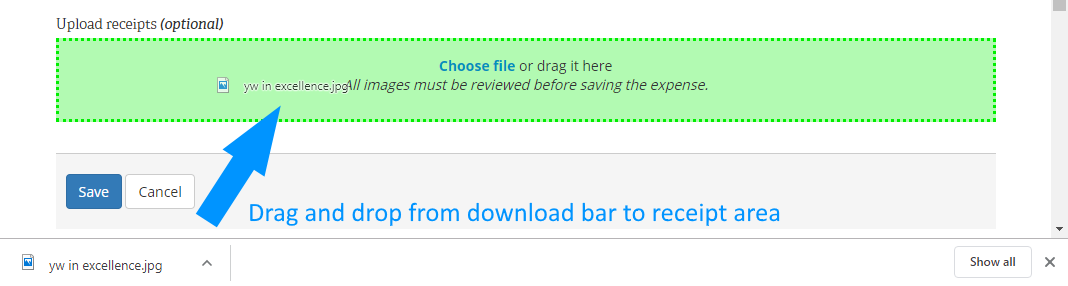
Pro tip: Download the images from the email message using the browser and don't view them. Once the expense record is created, drag the downloaded images from the download history and drop them in the receipt area. That will attach the receipt to the expense record. Once you have attached all receipts and completed the expense record, clear the list of downloaded files and move to the next expense. This works in both Chrome and Firefox.
attach-receipts-chrome.png
(26.18 KiB) Not downloaded yet
attach-receipts-firefox.png
(33.17 KiB) Not downloaded yet
#59
scgallafent wrote:
chriswoodut wrote:This is 75% of what I would love to see. Thank you! However, I would love to see a workflow where the payee submits the request electronically with a digitized version of the receipts (like via LDS tools app using the phone camera). Then it would go to a clerk for review then the bishop and then payment. However, I'm doing a happy dance about the ACH. I'll take what I can get and figure out a way to digitize the receipts. Our clerks office only has a b&w lazer printer with no scanner so Office Lens sounds like a useful tool if I can transfer from my phone to the PC in an easy way.
We have been using a workflow like that for several months. The payee creates an electronic request (an email message) and attaches a digitized version of the receipts (using the phone's camera). That electronic request gets submitted to the auxiliary president (by sending the email). The auxiliary president reviews it and approves it (by forwarding the email to the finance clerk with any additional information needed). The finance clerk reviews it and then creates an expense record in LCR Finance to initiate the disbursement, attaching the digitized receipts from the original request.
I'm contemplating do this as well. However, there's no form to indicate to the person requesting the reimbursement that there are a couple bits of info I do need.

I want to get away from our paper reimbursement request form but I see it does clarify a couple things:
1. Which budget category they think this should come out of (sometimes I override)
2. How much they think should be reimbursed. This is helpful if their receipt included items purchased for personal use and ward use. (sometimes we tweak it)
3. A description of the expense
4. We also have the organization head sign it before it comes to a clerk

How often to you get requests that are missing info and you have to go back for clarification?
#60
jdlessley wrote:
Arkansas wrote: The option to do a reimbursement using EFT is available both through LCR (online) and MLS but the member's checking account number initially only showed up in MLS. This could just be because I need to do a send and receive changes to be able to process through MLS.
I think Arkansas meant to type LCR when he wrote "the member's checking account number initially only showed up in MLS."

The notice stated "This notice is to inform you that the Leader and Clerk Resources (LCR) application now has the option to reimburse a member with an electronic funds transfer (EFT). Checks may also be used if preferred." The notice didn't say that EFT expense reimbursements are available when processed through MLS. As I expected after receiving the 15 March notice I have found that EFT reimbursements are not possible through MLS. Reimbursements by EFT are only available through LCR.
I'm pretty sure the other day I saw the EFT info pop up on MLS when entering an expense in MLS (I was messing around). I can't double check that without being at the clerk pc but I'm pretty sure I saw it. I'm 70% sure..... maybe 65%. :)
Church Employee
#61
chriswoodut wrote:1. Which budget category they think this should come out of (sometimes I override)
In the few cases where we have subcategories, the organization president who forwards the email will be the one who adds this. The person requesting the expense usually doesn't know about subcategories. We only have three organizations with subcategories (Primary, Young Men, Young Women) and one or two subcategories in each. That means we only have six people (president and secretary of each organization) who know about them. That's an easy group to work with to get things right.
chriswoodut wrote:2. How much they think should be reimbursed. This is helpful if their receipt included items purchased for personal use and ward use. (sometimes we tweak it)
Sometimes they will tell us how much they think should be reimbursed. If the receipt has a mix of personal and ward items, odds are pretty good they're going to have a calculation error related to taxes, so we're still going to recalculate it to make sure they calculated the taxes correctly.
chriswoodut wrote:3. A description of the expense
This hasn't been a problem.
chriswoodut wrote:4. We also have the organization head sign it before it comes to a clerk
The email comes from the organization head, so that covers this for us.
chriswoodut wrote:How often to you get requests that are missing info and you have to go back for clarification?
It's pretty rare. Most of the time, we can resolve the question with a quick email or phone call to the auxiliary president.
#62
scgallafent wrote:
chriswoodut wrote:This is 75% of what I would love to see. Thank you! However, I would love to see a workflow where the payee submits the request electronically with a digitized version of the receipts (like via LDS tools app using the phone camera). Then it would go to a clerk for review then the bishop and then payment. However, I'm doing a happy dance about the ACH. I'll take what I can get and figure out a way to digitize the receipts. Our clerks office only has a b&w lazer printer with no scanner so Office Lens sounds like a useful tool if I can transfer from my phone to the PC in an easy way.
We have been using a workflow like that for several months. The payee creates an electronic request (an email message) and attaches a digitized version of the receipts (using the phone's camera). That electronic request gets submitted to the auxiliary president (by sending the email). The auxiliary president reviews it and approves it (by forwarding the email to the finance clerk with any additional information needed). The finance clerk reviews it and then creates an expense record in LCR Finance to initiate the disbursement, attaching the digitized receipts from the original request.
In such a situation, has the bishop already approved the purchase before he sees the reimbursement request in LCR? From what another person said, the ACH goes out after the counselor reviews it and before the Bishop.
Senior Member
#63
chriswoodut wrote:In such a situation, has the bishop already approved the purchase before he sees the reimbursement request in LCR? From what another person said, the ACH goes out after the counselor reviews it and before the Bishop.
If the bishop is following Handbook 1 (14.7.1, 2nd paragraph), he has already approved the expense before the reimbursement is requested. I consider marking the approved box simply a formality to document his prior approval (which can be verbal).
#64
davesudweeks wrote:
chriswoodut wrote:In such a situation, has the bishop already approved the purchase before he sees the reimbursement request in LCR? From what another person said, the ACH goes out after the counselor reviews it and before the Bishop.
If the bishop is following Handbook 1 (14.7.1, 2nd paragraph), he has already approved the expense before the reimbursement is requested. I consider marking the approved box simply a formality to document his prior approval (which can be verbal).
So, most clerks guess that the approval happened? As I stated in this thread previously, I can't image clerks are going to extra steps to verify pre-approval.
Senior Member
#65
chriswoodut wrote:So, most clerks guess that the approval happened? As I stated in this thread previously, I can't image clerks are going to extra steps to verify pre-approval.
For requests via email, we ask the organization president to cc it to the bishop as well as the clerk. The bishop does a quick reply to verify that he's ok with it before I enter the expense. If it's urgent I'll call or text him.
Senior Member
#66
chriswoodut wrote:So, most clerks guess that the approval happened? As I stated in this thread previously, I can't image clerks are going to extra steps to verify pre-approval.
I don't second-guess the bishop because I don't have stewardship over him. My role as clerk is primarily ward leader training on the tools/handbook and records accuracy. I train the bishop on his role in the process and then leave the rest up to him. The handbook says expenses must be pre-approved. Do I believe sometimes they are incurred without pre-approval? absolutely. Do I worry about it? absolutely not. Do I refuse to process a reimbursement that the bishop has approved until I determine if it was pre-approved? absolutely not.

We still route reimbursement requests through the organization president and the bishop (manually or digitally) before generating the reimbursement. Whether or not they "pre-approved" the expense is not my concern.
Senior Member
#67
Our ward Primary president has not registered a bank account for direct deposits, but her husband has. If she sends me receipts for reimbursement, can I send the ACH transaction to her husband's account? Does she have to also register their account under her name?
Dana Repouille, Plattsmouth, Nebraska
Community Administrator
#68
You might want to verify with her that the account is shared. Some couples keep separate accounts.

I'm also thinking there may be some record-keeping confusion if you start sending reimbursements to someone other than the requester. (It would look even stranger if the couple have different last names.) If there are two couples in the ward with the same last name, I'd think the odds of an eventual mistake increases.

Long term, I think it would be simpler/safer to ask her to set up the reimbursement account.
Have you searched the Help Center? Try doing a Google search and adding "site:churchofjesuschrist.org/help" to the search criteria.

So we can better help you, please edit your Profile to include your general location.
Member
#69
My free opinion, for what it's worth. I would reimburse in the name of the requester only. (Cleaner audit wise?) Also, as a financial clerk it has come to my attention that some married couples maintain separate bank accounts. (And get upset if their donations are recorded under their partners name.)

Your question raises a question for me. If a husband and wife use the same bank account number for donations. When the husband "opts-in" to ACH does that also automatically "opt-in" the wife also?

Back to you, Could you ask her to "opt-in" just as her husband has? Or include a note with her current paper check highlighting the advantage(s) to her by "opting-in" to ACH?

Moments later edit: Oops. I see russellhltn has already answered above. At least now you have a 2nd opinion.
Member
#70
Fin Clerk here,

Having tried 3 ACH reimbursements (scanned receipts & remote 2nd approver) I think I will suggest to the Bishopric our primary workflow. It should be that immediately before or after counting, with two authorized persons present and able to log into LCR that we get as much done as possible for ACH or paper check payments. (Hopefully LCR will allow two local users to approve an ACH payment.)

My reason is that I hate to see that email go out during the week requesting expense approval when I know the Bishop and his first counselor are in front of a computer all week, very busy making a living. Some employers monitor employees computer use as well.

Of course, eventually, the Bishop will still have to do his "final" review. However, I'm hoping that can be done once a month or every few months? During his few free moments here and there?

PS: However, I've read that at the Bishops review he can delete the expense. How can that happen after the 2nd approver allows the funds to be released (paper check or ACH)?
Senior Member
#71
drepouille wrote:Our ward Primary president has not registered a bank account for direct deposits, but her husband has. If she sends me receipts for reimbursement, can I send the ACH transaction to her husband's account?
I wouldn't do it without checking with them. But I have some couples where I already know that I should just use the one setup if the other requests a reimbursement. I've also added a line on our reimbursement form so they can tell me if they want it deposited using another person's account.
drepouille wrote:Does she have to also register their account under her name?
Yes, to link the expense to her record she would have to register it under her LDS account as well.
Senior Member
#72
murdock20m wrote:Your question raises a question for me. If a husband and wife use the same bank account number for donations. When the husband "opts-in" to ACH does that also automatically "opt-in" the wife also?
No, they have to each do it on their own LDS account.
Senior Member
#73
OK, I entered four Fast Offering expenses, and will ask my assistant to print those checks on Sunday. I also entered two ACH expenses for Primary, and those have already been approved by the bishop for payment.

All from the comfort of my recliner at home!
This is going to change financial audits forever.
Dana Repouille, Plattsmouth, Nebraska
New Member
#74
As a ward we have been able to begin positing and approving expenses except for one expense that was written to the bishop. As counselors and ward clerks we have not been able to approve the expense for him.

How can we approve expenses/reimbursements that are written to the bishop?
Community Moderators
#75
I assume the stake president will be the approval authority for that expense.
JD Lessley
Have you tried finding your answer on the ChurchofJesusChrist.org Help Center or Tech Wiki?
Community Administrator
#76
jdlessley wrote:I assume the stake president will be the approval authority for that expense.
If it was a Fast Offering expense, yes. But I don't think that applies to regular expenses.

The Help Center says "It is not recommended that a leader be an approver for his own reimbursement or expense, but it is allowed for unusual situations."
Have you searched the Help Center? Try doing a Google search and adding "site:churchofjesuschrist.org/help" to the search criteria.

So we can better help you, please edit your Profile to include your general location.
#77
davesudweeks wrote:
chriswoodut wrote:So, most clerks guess that the approval happened? As I stated in this thread previously, I can't image clerks are going to extra steps to verify pre-approval.
I don't second-guess the bishop because I don't have stewardship over him. My role as clerk is primarily ward leader training on the tools/handbook and records accuracy. I train the bishop on his role in the process and then leave the rest up to him. The handbook says expenses must be pre-approved. Do I believe sometimes they are incurred without pre-approval? absolutely. Do I worry about it? absolutely not. Do I refuse to process a reimbursement that the bishop has approved until I determine if it was pre-approved? absolutely not.

We still route reimbursement requests through the organization president and the bishop (manually or digitally) before generating the reimbursement. Whether or not they "pre-approved" the expense is not my concern.
It sounds like you do have a step in there to have the bishop approve it even if it is not pre-approved. That was my point. It wouldn't make sense to do it the other way because chasing pre-approvals is harder than just having the bishop approve everything before entering expenses.
Senior Member
#78
chriswoodut wrote:It sounds like you do have a step in there to have the bishop approve it even if it is not pre-approved. That was my point. It wouldn't make sense to do it the other way because chasing pre-approvals is harder than just having the bishop approve everything before entering expenses.
Yes, we have had this step in all my clerk experience (many years through multiple bishops and I had a VERY good clerk as an example when I served as branch president before that). We have not seen a need to change something that is easy to do and passes the audits. We are being cautious in the rollout for our ward, rather than risk a bunch of audit exceptions (real or invented) due to a brand new process that, in my opinion, is not documented well enough to be crystal clear to everyone involved (including the stake auditors).
#79
murdock20m wrote:Fin Clerk here,

Having tried 3 ACH reimbursements (scanned receipts & remote 2nd approver) I think I will suggest to the Bishopric our primary workflow. It should be that immediately before or after counting, with two authorized persons present and able to log into LCR that we get as much done as possible for ACH or paper check payments. (Hopefully LCR will allow two local users to approve an ACH payment.)

My reason is that I hate to see that email go out during the week requesting expense approval when I know the Bishop and his first counselor are in front of a computer all week, very busy making a living. Some employers monitor employees computer use as well.

Of course, eventually, the Bishop will still have to do his "final" review. However, I'm hoping that can be done once a month or every few months? During his few free moments here and there?

PS: However, I've read that at the Bishops review he can delete the expense. How can that happen after the 2nd approver allows the funds to be released (paper check or ACH)?
I see the Bishop's final review as an electronic version of the paper report/document he used to sign after the checks were written and the transmission happened. Waiting months for the bishop to review seems long to me. The system is going to send emails to him saying he needs to review it so he will get nagged if he ignores it. I agree it would be a mess for the bishop to delete a request at the verification step because the ACH/paper check is already completed as you pointed out. Hopefully that isn't the case.

I wouldn't worry about them seeing requests for reviews during the week. That's their choice when to look at it.

I did call HQ about whether the ACH really does go out before the bishop's review. Initially the person said no but then checked with his supervisor and said yes, it does go out before the Bishop's review. The bishop's review is not an authorization.
#80
davesudweeks wrote:
chriswoodut wrote:It sounds like you do have a step in there to have the bishop approve it even if it is not pre-approved. That was my point. It wouldn't make sense to do it the other way because chasing pre-approvals is harder than just having the bishop approve everything before entering expenses.
Yes, we have had this step in all my clerk experience (many years through multiple bishops and I had a VERY good clerk as an example when I served as branch president before that). We have not seen a need to change something that is easy to do and passes the audits. We are being cautious in the rollout for our ward, rather than risk a bunch of audit exceptions (real or invented) due to a brand new process that, in my opinion, is not documented well enough to be crystal clear to everyone involved (including the stake auditors).
I've been concerned as well about the audit. We've had perfect scores the last two times -- can't risk ruining our track record. We're going to follow our existing procedures as well but I am going to try dropping the paper form. There's a chance that may get added back (scanned version) if the Bishop requests it as part of the expense entry. I'm kind of surprised at the lack of direction from our stake.
Senior Member
#81
In my limited experience with the new system, it appears an email comes out weekly to all the bishopric members if reimbursements are still awaiting the bishop's final review. If I recall, no email arrives if there are no reimbursements awaiting the bishop's final review.
Member
#82

Re: ACH "Issued" vs "Cleared"

davesudweeks wrote: ... it appears an email comes out weekly to all the bishopric members if reimbursements are still awaiting the bishop's final review.
Yes, I can confirm this. I (fin clerk) entered another ACH payment w/scanned receipts last Saturday. The first counselor did the 2nd approval on-line. Friday we received the LCR email. It pointed out that there is one expense still waiting for the Bishops review.

I think this particular expense, waiting for review, shows in LCR as "Issued" and "Received by Bank"

Prior ACH payments the Bishop has done the 2nd approval (and simultaneously reviewed) on-line. They show in LCR as "Cleared" and "Received by Bank"


PS: One hard copy thermal printed receipt I was given had some faded spots (finger print oil?). It took quite a bit of fiddling with scanner settings so that the faded digits could be seen in the scan. I eventually had to scan it as a photograph with far from normal brightness and contrast settings.
Senior Member
#83

Re: ACH "Issued" vs "Cleared"

murdock20m wrote:PS: One hard copy thermal printed receipt I was given had some faded spots (finger print oil?). It took quite a bit of fiddling with scanner settings so that the faded digits could be seen in the scan. I eventually had to scan it as a photograph with far from normal brightness and contrast settings.
We are asking members to retain their receipt temporarily if they scan and send it via email in case the copy received is not legible and we need to request it again, for what it's worth.
#84

Re: ACH "Issued" vs "Cleared"

davesudweeks wrote:
murdock20m wrote:PS: One hard copy thermal printed receipt I was given had some faded spots (finger print oil?). It took quite a bit of fiddling with scanner settings so that the faded digits could be seen in the scan. I eventually had to scan it as a photograph with far from normal brightness and contrast settings.
We are asking members to retain their receipt temporarily if they scan and send it via email in case the copy received is not legible and we need to request it again, for what it's worth.
Good suggestion. How long are you holding onto paper submission of receipts if you digitize it and pay via ACH?
Senior Member
#85
We only have had 1 submitted thus far and it was emailed from the YM President to the Bishop who forwarded it to me with "Approved" in the email subject line. I never received the paper copy of the receipt on that one - but it was clear and legible. We have not scanned any paper copies yet to make them digital - perhaps tomorrow...

I have received "bills" forwarded from the bishop for welfare needs that were such bad quality pics that they would drive an audit exception so I told the bishop we had to have a better/complete copy before we could process the reimbursement. This experience is what got me thinking about requesting members hold on to the receipt until the reimbursement is deposited so if there is any question, we can verify.
Member
#86
I'm not the one you asked, however because I was given paper, I staple the previously scanned original paper receipts to a page printed from LCR showing the completed ACH report. I expect to keep doing this until our next audit.

I expect to keep those receipts for the standard (USA) 3 Years plus current.

TIP; Only print page one of the ACH status page. If "all" pages are printed there will be several subsequent pages printed with (as I recall) random lines and text scattered all over them.
#87
murdock20m wrote:I'm not the one you asked, however because I was given paper, I staple the previously scanned original paper receipts to a page printed from LCR showing the completed ACH report. I expect to keep doing this until our next audit.

I expect to keep those receipts for the standard (USA) 3 Years plus current.

TIP; Only print page one of the ACH status page. If "all" pages are printed there will be several subsequent pages printed with (as I recall) random lines and text scattered all over them.
It's interesting to see how others interpret the limited information we have and apply it to the their existing workflows. I anticipate setting a timeline that I shred them -- I don't want to create a paper system to track them if I've already digitized them as if the person submitted them electronically. I want less in my filing cabinet and more tracked on LCR. The auditor won't be asking for them because he'll rely on the digitized version. Maybe I'll keep them in one big folder until the next audit and then shred them (since the digital version is the official version, these wouldn't be subject to the 3 yr + current rule, IMO).

I anticipate very few paper receipts -- probably more fast offering related than reimbursement related. If there are few enough, maybe I do keep them around.... Mm... I'll have to decide when I start to get a feel for the workflow.
Member
#88
chriswoodut wrote:
murdock20m wrote:...maybe I do keep them around.... Mm... I'll have to decide when I start to get a feel for the workflow.
My records retention is not set in stone. To a more reasonable mind, it does seem that once receipts I have scanned are uploaded the hard copy can be shredded.

Some time ago I read here that the audit procedures had not yet caught up with the new system (a beta user posted). I hope that's no longer an issue because the system is no longer in beta.
Community Administrator
#89
chriswoodut wrote:I anticipate setting a timeline that I shred them -- I don't want to create a paper system to track them if I've already digitized them as if the person submitted them electronically. I want less in my filing cabinet and more tracked on LCR.
From what I understand, the current system allows a mix of electronic and paper. There's no requirement to go all one way or another.

One issue with shredding the paper copies - you'd have to be sure that it had been made electronic and wasn't processed as paper. One mistake here, and it seems like an easy one to make, and you've destroyed your only copy.
Have you searched the Help Center? Try doing a Google search and adding "site:churchofjesuschrist.org/help" to the search criteria.

So we can better help you, please edit your Profile to include your general location.
Senior Member
#90
We plan to keep a mix of paper and electronic. If we receive the paper receipts and issue a paper check, there will be a paper copy of everything for the auditor to review. If we receive all electronic, and issue an ACH reimbursement, there will be no paper copy of anything. If we scan paper receipts to make them electronic so we can issue an ACH reimbursement, we plan to keep the paper at least until the next audit provides guidance.

My experience with church auditing is there is huge variation in personal opinion of the "requirements" by certain auditors and very little training by the stake to ensure they are all doing it the same (I have had audits stretch over multiple days and totaling over 8 hours due to auditors thinking their role is to personally inspect every reimbursement issued in the past 6 months and adding requirements that don't exist in any handbook and training document). This is why we are stepping cautiously down this path as we have had no clear direction from the stake and the direction in the instructions is vague. I understand we should not be commanded in all things, but when a rogue auditor is allowed to make life miserable for the wards for years and the stake doesn't respond, it is very frustrating.
#91
I noticed one person mention that they allow the payee to indicate the person to pay. I can foresee that one spouse may do donations and have the bank account setup on their LDS account. Then the second spouse has a reimbursement request and does not have a bank account setup. I'm wondering if I should suggest they put the name on the request for the person that has the bank account setup. So, a brother may get reimbursed for a YW activity expense. The system wouldn't care. I've actually seen this done with paper check reimbursements where one spouse handles the finances and requests the reimbursements even though it was the other spouse incurring the expenses.

Is there a downside to this that I'm not seeing?
Community Administrator
#92
chriswoodut wrote:Is there a downside to this that I'm not seeing?
I see a few issues:

First, if this is electronic, how is the person going to show who they want reimbursed if there's no form? And is that person going to be "named" or will it be a generic "my wife/my husband" ?

What are the risks if you have multiple couples with the same last names? For example 3 "Smith" families? How will you make sure you route it to the right "Smith" spouse, especially without a specific name from the form

How would this look when being reviewed by another person, such as an auditor? More so if the couple don't share the same last name. Then you'd have to explain that Mrs Smith is married to Mr Jones and that's the "my husband" who's to get the funds. Making sure the request spells out the full name of the person to be reimbursed would really help - if you could be assured of getting that.

None of this is a show-stopper, but I do believe it's something that you want to think about before going down that road.
Have you searched the Help Center? Try doing a Google search and adding "site:churchofjesuschrist.org/help" to the search criteria.

So we can better help you, please edit your Profile to include your general location.
Senior Member
#93
I think it is wise to consider the situations and be aware of them. There may be some like my household: we have a joint bank account and my wife is "stay-at-home." Hence whether I incur the expense or she does, it comes out of the same account and whether I receive the reimbursement check or she does, it goes back to the same account. Up until now, I would have the reimbursement check go to her as it is easier for her to deposit the check into our account than it is for me. There is nothing preventing one spouse from listing the other spouse as the payee on the paper reimbursement request, so I don't see anything different going electronic, as long as it is clear.

I can envision circumstances where this is absolutely the wrong way to handle it for some individuals so caution and consideration is advised.
Senior Member
#94
I have seen clerks write reimbursement checks to their wives to circumvent rules governing writing checks to themselves.
Dana Repouille, Plattsmouth, Nebraska
Senior Member
#95
russellhltn wrote:First, if this is electronic, how is the person going to show who they want reimbursed if there's no form? And is that person going to be "named" or will it be a generic "my wife/my husband" ?
I'd expect that to be spelled out clearly in the email requesting reimbursement. If it's not clear, then I'd request clarification and I'd attach both emails to the expense.
russellhltn wrote:What are the risks if you have multiple couples with the same last names? For example 3 "Smith" families? How will you make sure you route it to the right "Smith" spouse, especially without a specific name from the form
My printed request form has two boxes: the name of the submitter and the name of who to pay (if different). We sometimes use this when someone (usually a bishopic member) makes an order and we're going to pay the vendor directly. But I also have a note saying that if they want the payment made to someone else's EFT account then to put their name in the 'pay to' box.
#96
russellhltn wrote:
chriswoodut wrote:Is there a downside to this that I'm not seeing?
I see a few issues:

First, if this is electronic, how is the person going to show who they want reimbursed if there's no form? And is that person going to be "named" or will it be a generic "my wife/my husband" ?

What are the risks if you have multiple couples with the same last names? For example 3 "Smith" families? How will you make sure you route it to the right "Smith" spouse, especially without a specific name from the form

How would this look when being reviewed by another person, such as an auditor? More so if the couple don't share the same last name. Then you'd have to explain that Mrs Smith is married to Mr Jones and that's the "my husband" who's to get the funds. Making sure the request spells out the full name of the person to be reimbursed would really help - if you could be assured of getting that.

None of this is a show-stopper, but I do believe it's something that you want to think about before going down that road.
I think you misunderstood my question slightly. This is a situation where I clearly know who is requesting it and who they are suggesting I pay and the email or form clearly has that spelled out. For example, a wife submits a reimbursement request that says "please reimburse through my husband's LDS account and associated bank account". The husband would be the person the expense was issued to.
#97
drepouille wrote:I have seen clerks write reimbursement checks to their wives to circumvent rules governing writing checks to themselves.
I believe the audit question now covers this -- asking about the entire household. The last audit we had specifically listed all the reimbursements to the bishop's name just because they had his name on them. He didn't sign any of them. The auditor suggested reimbursing his wife so that the system wouldn't flag all of these reimbursements for review. In that case, the same rule applies that the bishop shouldn't sign anything reimbursing his wife. I wonder if the new ACH method won't allow a counselor to approve his own reimbursement -- I bet it won't.
Senior Member
#98
chriswoodut wrote:I wonder if the new ACH method won't allow a counselor to approve his own reimbursement -- I bet it won't.
You'd think so and it does allow a clerk to submit (and thus approve) an expense payable to themselves. It gives a message saying that the payee shouldn't approve their own expense but it lets you submit it anyway. I got bit by this thinking that if I submitted it for myself it would either not allow it or it would then require two other approvers. But, no, it gave a warning (which at the time I didn't quite understand because of my assumptions) but accepted the expense anyway and then processed it as soon as the bishop did the approval.
Senior Member
#99
eblood66 wrote:
chriswoodut wrote:I wonder if the new ACH method won't allow a counselor to approve his own reimbursement -- I bet it won't.
You'd think so and it does allow a clerk to submit (and thus approve) an expense payable to themselves. It gives a message saying that the payee shouldn't approve their own expense but it lets you submit it anyway. I got bit by this thinking that if I submitted it for myself it would either not allow it or it would then require two other approvers. But, no, it gave a warning (which at the time I didn't quite understand because of my assumptions) but accepted the expense anyway and then processed it as soon as the bishop did the approval.
Interesting outcome. Here in the UK we started doing expenses solely in LCR last October. We haven’t been using cheques for several years.
When I prepare an reimbursement expense for myself, I get a similar message about the payee shouldn’t enter their own expense, but it does allow it. However if I try to approve it, the system won’t allow it. The reimbursement still requires two others to approve it.
New Member
#100
chriswoodut wrote:
davesudweeks wrote:
chriswoodut wrote:It sounds like you do have a step in there to have the bishop approve it even if it is not pre-approved. That was my point. It wouldn't make sense to do it the other way because chasing pre-approvals is harder than just having the bishop approve everything before entering expenses.
Yes, we have had this step in all my clerk experience (many years through multiple bishops and I had a VERY good clerk as an example when I served as branch president before that). We have not seen a need to change something that is easy to do and passes the audits. We are being cautious in the rollout for our ward, rather than risk a bunch of audit exceptions (real or invented) due to a brand new process that, in my opinion, is not documented well enough to be crystal clear to everyone involved (including the stake auditors).
I've been concerned as well about the audit. We've had perfect scores the last two times -- can't risk ruining our track record. We're going to follow our existing procedures as well but I am going to try dropping the paper form. There's a chance that may get added back (scanned version) if the Bishop requests it as part of the expense entry. I'm kind of surprised at the lack of direction from our stake.
The lack of direction from your stake is because the stake was given NO direction either. I am a stake fin clerk and am upset with the way this system was rolled out with NO DIRECTION or TRAINING! And I just found out yesterday with a clerk asking questions.
New Member
#101
davesudweeks wrote:We plan to keep a mix of paper and electronic. If we receive the paper receipts and issue a paper check, there will be a paper copy of everything for the auditor to review. If we receive all electronic, and issue an ACH reimbursement, there will be no paper copy of anything. If we scan paper receipts to make them electronic so we can issue an ACH reimbursement, we plan to keep the paper at least until the next audit provides guidance.

My experience with church auditing is there is huge variation in personal opinion of the "requirements" by certain auditors and very little training by the stake to ensure they are all doing it the same (I have had audits stretch over multiple days and totaling over 8 hours due to auditors thinking their role is to personally inspect every reimbursement issued in the past 6 months and adding requirements that don't exist in any handbook and training document). This is why we are stepping cautiously down this path as we have had no clear direction from the stake and the direction in the instructions is vague. I understand we should not be commanded in all things, but when a rogue auditor is allowed to make life miserable for the wards for years and the stake doesn't respond, it is very frustrating.
Dave, I feel your pain. As a stake fin clerk we are left in the dark also. I am just finding out about this ACH business yesterday and trying to wrap my head around what is required. With no direction or process flow from SLC the stake can not help if they were not trained or given the information. And with the auditors going rouge, that is because there is no training for them either. Seems to be all in interpretation instead of real training and guidelines. I work the financial system in our stake around the audit questions and what is going to be asked and required. When the questions change and there are no advanced notice we all get hurt with audit findings.
#102
I've created a flowchart of what process we are going to try using. Maybe this is helpful to others. It is based on feedback I received on this thread and our preferences for our ward based on our previous process. If you want to make a copy of this for your own editing enjoyment, I think you can do that under the File Menu after you open it ("make a copy" option).

Google Presentation Flowchart:
https://docs.google.com/presentation/d/ ... sp=sharing
Member
#103
chriswoodut wrote:I've created a flowchart of what process we are going to try using. Maybe this is helpful to others. It is based on feedback I received on this thread and our preferences for our ward based on our previous process.
Awsome, Thanks so much. As a financial clerk everyone else has been asking me about the new system. (from the Ward clerk to the Bishop).
I especially like your chart because it gets the Bishops permission before the expense is entered into the system.
New Member
#104
chriswoodut wrote:I've created a flowchart of what process we are going to try using. Maybe this is helpful to others. It is based on feedback I received on this thread and our preferences for our ward based on our previous process. If you want to make a copy of this for your own editing enjoyment, I think you can do that under the File Menu after you open it ("make a copy" option).
As I was reading this forum I thought to myself that I needed to make a process for my ward to follow. There are a lot of good things to take from these pages in the absence of more direct training. This is what I had in mind. Thanks.
New Member
#105
It looks to me that with the new electronic reimbursement option that receipts for expenses can be uploaded. We currently have a form that the payee will fill out and the bishop signs to approve the expense and we would then enter that data into MLS. For auditing purposes, does this mean our specific form may not be required? If approvals can all be done online, it seems that way.
#106
robertmax wrote:It looks to me that with the new electronic reimbursement option that receipts for expenses can be uploaded. We currently have a form that the payee will fill out and the bishop signs to approve the expense and we would then enter that data into MLS. For auditing purposes, does this mean our specific form may not be required? If approvals can all be done online, it seems that way.
The new system assumes that an approval happens before you enter it into LCR. It does not dictate that process. Your process sounds similar to ours. For electronic email requests, I'm saving the email thread to a PDF and uploading it into LCR with the receipts as proof of the approval. If someone gives me a paper form, I'm scanning it and the receipts and emailing it to the bishop for approval and then following the same steps (export email thread approval to PDF, upload PDF and receipts into LCR).

My flowchart: https://docs.google.com/presentation/d/ ... JO2qpxRLQc
Senior Member
#107
chriswoodut wrote:The new system assumes that an approval happens before you enter it into LCR. It does not dictate that process. Your process sounds similar to ours. For electronic email requests, I'm saving the email thread to a PDF and uploading it into LCR with the receipts as proof of the approval. If someone gives me a paper form, I'm scanning it and the receipts and emailing it to the bishop for approval and then following the same steps (export email thread approval to PDF, upload PDF and receipts into LCR).
That is exactly what I have been doing this past week. Printing the email thread to a PDF really helps to preserve the history of each expense for the auditor. I even have the bishop trained to check for needed approvals a couple times a week.
Dana Repouille, Plattsmouth, Nebraska
New Member
#108
Okay but where do I go to actually fill out and get a reimbursement? I set up my bank account to do it, but... then what?
Community Administrator
#109
jennyg89 wrote:Okay but where do I go to actually fill out and get a reimbursement? I set up my bank account to do it, but... then what?
The system is not open to the general membership, or even ward leaders (other than the bishopric and clerks).

I'd suggest sending a email to the organizational head and/or the ward clerk with an attached receipt.
Have you searched the Help Center? Try doing a Google search and adding "site:churchofjesuschrist.org/help" to the search criteria.

So we can better help you, please edit your Profile to include your general location.
Senior Member
#110
Arrgh! Receipts came to me via email. I saved the email thread, including the Primary president's approval, as a PDF. When I created the expense, I uploaded that email PDF, and planned to simply drag the three receipt attachments from Gmail to the expense. However, I clicked Save after I had reviewed the approval PDF, so the expense went immediately to the Approve Expenses bucket. Luckily, the bishop was able to quickly approve the expense. Then I was able to attach the three receipts to the expense after he had approved it.

It would be lovely if I could back the new expense out of the Approve Expenses bucket when I make a stupid mistake like that. I really did not want to reject the entire expense when I just wanted to attach more receipts for it.
Dana Repouille, Plattsmouth, Nebraska
Senior Member
#111
There isn’t a way to go back and edit a mistake in an expense that is waiting in the Approve Expense tab. You effectively have to reject the expense and start again.

I agree it would be nice to edit the expense at the Approve Expenses stage, but at the moment we have to go with what we are given.
Senior Member
#112
Playing Devil's Advocate here: If you absolutely had to pay an expense today, but you know you would not receive a receipt until later, you could upload and attach any file, perhaps just a note that the actual receipt is not yet available. If a member of the bishopric approves it, the expense is immediately paid, and the clerk can attach the actual receipt when it becomes available. In this manner, you could pay an Advance using EFT/ACH, and then upload the actual receipts when they come in. When creating the expense record for the Advance, you could upload a form that indicates the purpose of the Advance.

Please correct me if I am wrong.
Dana Repouille, Plattsmouth, Nebraska
Senior Member
#113
drepouille wrote:Playing Devil's Advocate here: If you absolutely had to pay an expense today, but you know you would not receive a receipt until later, you could upload and attach any file, perhaps just a note that the actual receipt is not yet available. If a member of the bishopric approves it, the expense is immediately paid, and the clerk can attach the actual receipt when it becomes available. In this manner, you could pay an Advance using EFT/ACH, and then upload the actual receipts when they come in. When creating the expense record for the Advance, you could upload a form that indicates the purpose of the Advance.

Please correct me if I am wrong.
I find myself wondering what issue would be in this situation. We cannot pay vendors via EFT/ACH so this would not be a welfare situation where someone was being threatened with eviction (for example). It is against policy to give the welfare reimbursement to the member to provide to the vendor so we cannot address the previous scenario that way. I would think an advance would be done by paper check, but even then the advance should not be issued without the bishop's approval so there would be that document and the actual receipt be uploaded later if the advance was done by EFT/ACH. Or perhaps I'm missing the point completely and if so, I apologize.
#114
davesudweeks wrote: I find myself wondering what issue would be in this situation. We cannot pay vendors via EFT/ACH so this would not be a welfare situation where someone was being threatened with eviction (for example). It is against policy to give the welfare reimbursement to the member to provide to the vendor so we cannot address the previous scenario that way. I would think an advance would be done by paper check, but even then the advance should not be issued without the bishop's approval so there would be that document and the actual receipt be uploaded later if the advance was done by EFT/ACH. Or perhaps I'm missing the point completely and if so, I apologize.
I know the check is supposed to be written to the vendor for fast offerings, but you've indicated the recipient of the FO can't take that check (payable to the vendor) and deliver it. I just checked the following link but don't see that restriction. Do you have a link to that policy?

https://www.lds.org/help/support/paying ... s?lang=eng
Senior Member
#115
davesudweeks wrote:
drepouille wrote:In this manner, you could pay an Advance using EFT/ACH, and then upload the actual receipts when they come in. When creating the expense record for the Advance, you could upload a form that indicates the purpose of the Advance.
I would think an advance would be done by paper check, but even then the advance should not be issued without the bishop's approval so there would be that document and the actual receipt be uploaded later if the advance was done by EFT/ACH. Or perhaps I'm missing the point completely and if so, I apologize.
I have printed advance checks for food purchases for YW Camp and for ward activities. If the person requesting the advance wanted to receive it via EFT, then the only thing we could attach to the expense would be a pre-approval form. The actual receipts would be attached later. If the advance was insufficient to cover expenses, we would create a second expense. If the advance was too much, the funds would need to be redeposited (and not as a donation credited to the member).
Dana Repouille, Plattsmouth, Nebraska
Senior Member
#116
chriswoodut wrote:I know the check is supposed to be written to the vendor for fast offerings, but you've indicated the recipient of the FO can't take that check (payable to the vendor) and deliver it. I just checked the following link but don't see that restriction. Do you have a link to that policy?

https://www.lds.org/help/support/paying ... s?lang=eng
Perhaps I'm a purist, but in over 10 years as ward clerk, we have always delivered/mailed the payment to the vendor. I suppose it depends on how one interprets the statement that we should "make payments to" and whether that means we hand the check to the member to take care of it or we deliver/mail it from the ward to make sure the payment is accomplished.
New Member
#117
How do you request a reimbursement? Last time I logged into my account I had a link to request it, but the link is no longer there.
#118
taniss87 wrote:How do you request a reimbursement? Last time I logged into my account I had a link to request it, but the link is no longer there.
There is no request functionality. Clerks and the bishopric can enter already approved expenses for payment. your ward clerk can provide you the process for your ward.
Community Moderators
#119
taniss87 wrote:How do you request a reimbursement? Last time I logged into my account I had a link to request it, but the link is no longer there.
The link you saw might have been a link to the donation tool settings where you can set up a bank account to receive direct deposits. You'll need to set up a bank account there (similar to setting up a bank account for donations) first, then ask your clerk how he wants to receive electronic reimbursement requests. Some clerks may still be learning about the system and not ready to receive electronic requests yet. For those that are receiving electronic reimbursements, it's common to send a photo of the receipt by email to the clerk, along with a description of the expense, confirmation that the expense was approved, name of the payee, etc. The "request" part isn't handled by the Church's systems directly – what's new is the workflow to record and disburse expenses after the request is received.
Samuel Bradshaw • If you desire to serve God, you are called to the work.
Community Administrator
#120
sbradshaw wrote:For those that are receiving electronic reimbursements, it's common to send a photo of the receipt by email to the clerk,
Depending on your position, it might be best to send to the email to the head of the organization for them to forward to the clerk as a way of approving it. It's not strictly necessary, but it is a nicety to make sure the appropriate leadership is aware and approved. This is why it's best to ask how your ward wants to handle it.
Have you searched the Help Center? Try doing a Google search and adding "site:churchofjesuschrist.org/help" to the search criteria.

So we can better help you, please edit your Profile to include your general location.
Member
#121
is there an online process for members to submit their receipts and requests for reimbursements?
Or, is the new reimbursement process focused solely on the output of the reimbursement. Should the workflow remain members submit paper receipts and requests to ward leadership, then enable their online accounts for electronic reimbursement? No online intake available yet (or planned?) for members to submit this all online enabling ward leaders to review / approve online? A complete online system? Thanks, grateful for the progress thus far.
Community Moderators
#122
colbyj wrote:is there an online process for members to submit their receipts and requests for reimbursements?
Or, is the new reimbursement process focused solely on the output of the reimbursement.
There is not an online process for submitting receipts. The new process enables the clerk to reimburse electronically a member who has set up a bank account to receive those reimbursements.

A member does not have to wait to set up an account. That can be done anytime through the Donations site settings.

A ward determines the best process for receiving requests for reimbursements. Some still use paper. Others accept an email with an attached electronic copy of the receipt, such as a PDF file. There are other combinations, as well. There have been many discussions about process here at the forum, but all ideas, other than the electronic reimbursement payment, are local to the unit involved.
Member
#123
thank you for clarifying and offering ideas for submission.
New Member
#124
If an expense is entered into LCR with images of receipts attached, does the Bishop still have to physically sign an Expense Request form to be uploaded with the expense? To me it would make sense that the Bishop's electronic approval in LCR would be adequate and that the signed form would be redundant, but after reading the policy in the Help Center, I'm not quite sure.

https://www.churchofjesuschrist.org/hel ... s?lang=eng
#125
carter.holm wrote:If an expense is entered into LCR with images of receipts attached, does the Bishop still have to physically sign an Expense Request form to be uploaded with the expense? To me it would make sense that the Bishop's electronic approval in LCR would be adequate and that the signed form would be redundant, but after reading the policy in the Help Center, I'm not quite sure.

https://www.churchofjesuschrist.org/hel ... s?lang=eng
Technically the handbook requires all expenses to be pre-approved by the Bishop before funds are spent. The system is built around that rule so it assumes the approval has already happened and does not require you to show it.

Our ward prefers to show an approval since we had that in our paper process -- we use an email approval thread. I save that email thread to a PDF and upload it with the images.

Here is our work flow:
https://docs.google.com/presentation/d/ ... JO2qpxRLQc

One thing to note, the bishop acknowledgement in the new system is NOT an approval because the funds can and will go out after the counselor's approval and before the Bishop sees it. The Bishop's approval is an acknowledgement that the reimbursement happened.
New Member
#126
Thank you sir- I appreciate the added layer of Bishop email approval for the avoidance of doubt in the case of an audit.

Do you mind if I use your workflow presentation to roll out a similar to our ward? It is very clear and well done.
#127
carter.holm wrote:Thank you sir- I appreciate the added layer of Bishop email approval for the avoidance of doubt in the case of an audit.

Do you mind if I use your workflow presentation to roll out a similar to our ward? It is very clear and well done.
Please do. If you want to edit it for your own ward, you can select save a copy under the file menu and it will create your own version of it that you can edit.
New Member
#128
A member requested electronic reimbursement which was done. A week later he requested reimbursement for a different expense and that was done also. A couple of weeks later he told me that he didn't find the money had reached his bank account for either expense. I asked that he contact the bank to be sure it wasn't delayed or maybe wouldn't show up until his statement close date? He waited until he got his paper statement and the two reimbursements didn't show. I sent him a paper check to cover both.

I called headquarters to find out what they could do. They told me that they couldn't see any problem, but they can't see the account number where the money actually ended up. Isn't there a way to reverse the electronic fund transfer so that we don't end up paying twice?
#129
bayless wrote:A member requested electronic reimbursement which was done. A week later he requested reimbursement for a different expense and that was done also. A couple of weeks later he told me that he didn't find the money had reached his bank account for either expense. I asked that he contact the bank to be sure it wasn't delayed or maybe wouldn't show up until his statement close date? He waited until he got his paper statement and the two reimbursements didn't show. I sent him a paper check to cover both.

I called headquarters to find out what they could do. They told me that they couldn't see any problem, but they can't see the account number where the money actually ended up. Isn't there a way to reverse the electronic fund transfer so that we don't end up paying twice?
I would have the member log into their lds account and see if they entered the bank information correctly. If you can figure out a potential account it went to, you could ask the bank to fix it.
Member
#130
Acceptable file formats for scanned receipts in LCR?

A well experienced with electronic reimbursements Fin clerk here;

Moments ago, when entering an electronic reimbursement, I tried attaching .PDF files of receipts and email exchanges. When I reviewed them they displayed as blank. I then tried uploading the same files converted to .JPGs and they also came up as blank when I tried to review, (however this time a uploaded .pdf file was displayed correctly). So far nothing is saved yet. Whats up ? JPGs and PDFs have worked OK in the past...

What are the allowed formats for scanned documentation that is uploaded to LCR? I could not find a answer using the 'help' function. Of course, I did log off and back into LCR several times also.

What formats will always be readable? (A complex PDF may not be view-able by someone else who has a older smart phone, etc.)

thanks

PS: All PDF and JPG files are view-able on the computer alone. However, they are displayed as blank after being uploaded to LCR.
Community Moderators
#131
There have been system/server issues on and off today. I have run into portions of LCR Finance not rendering and getting a server timeout error notice. I have also seen the image for PDF, JPG, JPEG, TIFF, PNG files coming up blank. When that has happened I just waited a while and tried again.
JD Lessley
Have you tried finding your answer on the ChurchofJesusChrist.org Help Center or Tech Wiki?
#132
When trying to upload a signature card as a PDF, I had trouble with the spinning wheel of death. When I converted it to a JPEG it worked just fine. So not all versions of graphic files are the same, so it seems. Having said that, I did upload a reimbursement request yesterday with a PDF and a JPEG and it worked.
New Member
#133
The system doesn't work. How are we supposed to request reimbursements now? The church website won't display the instructions. Are the instructions found elsewhere?
#134
JScottDalton wrote:The system doesn't work. How are we supposed to request reimbursements now? The church website won't display the instructions. Are the instructions found elsewhere?
You'll have to provide more info to know what you're trying to do (by steps) and what isn't working. I just pulled up our expense entry page and it looked ok to me.
New Member
#135
Hi there -

Does anyone know if it is possible to set up EFT for welfare-related payments, specifically for non-members payees (e.g. a ward member’s landlord)?
Community Moderators
#136
markeliason wrote:Does anyone know if it is possible to set up EFT for welfare-related payments, specifically for non-members payees (e.g. a ward member’s landlord)?
Not currently. During the early rollout of the EFT capability there was a brief time that there was a page that indicated they were planning on implementing something like that. That page was removed before it went active.
JD Lessley
Have you tried finding your answer on the ChurchofJesusChrist.org Help Center or Tech Wiki?
New Member
#137
We have been using it in our ward and I think it is fantastic.
- No checks to cut as long as the member sets up an ETF.
- No chasing down members to give them checks at church
- Nothing to file in the filing cabinet.
We have only had two people submit expenses and get paid this way - we wanted to see how it worked. I was going to start pushing it in Ward Council and then the COV-19 hit.

One thing I haven't figured out is how to submit my own expenses electronically this way. It seems that my interface thinks that i am submitting expense for others and once it notices that the payee and the submitter are the same person it balks. So I and the fincial clerk maybe the few in the ward that can't take advantage of the new system.
Senior Member
#138
Although you will get a notification that you can’t enter your own expense, you can in fact enter the expense. What you can’t do is approve it.
Senior Member
#139
Biggles wrote:Although you will get a notification that you can’t enter your own expense, you can in fact enter the expense. What you can’t do is approve it.
Unless something has changed, when you enter the expense it considers you the first approver. it will requires a second approver but it's supposed to have two approvers other than yourself and that doesn't happen (or at least didn't) when you enter an expense for yourself. As far as i could ever tell you need to have someone else enter the expense and then a 3rd person approve it to conform to policy.
Senior Member
#140
eblood66 wrote:
Biggles wrote:Although you will get a notification that you can’t enter your own expense, you can in fact enter the expense. What you can’t do is approve it.
Unless something has changed, when you enter the expense it considers you the first approver. it will requires a second approver but it's supposed to have two approvers other than yourself and that doesn't happen (or at least didn't) when you enter an expense for yourself. As far as i could ever tell you need to have someone else enter the expense and then a 3rd person approve it to conform to policy.
Here in the UK, I can enter an expense for myself, but the system displays a notification to the effect l can’t. However it allows me to proceed with the process. If, as an experiment, I try to approve the expense, it quite rightly doesn’t allow that. Two alternative approvers are then required to complete the process.
Also see my post #99 in this thread.
#141
Biggles wrote:
eblood66 wrote:
Biggles wrote:Although you will get a notification that you can’t enter your own expense, you can in fact enter the expense. What you can’t do is approve it.
Unless something has changed, when you enter the expense it considers you the first approver. it will requires a second approver but it's supposed to have two approvers other than yourself and that doesn't happen (or at least didn't) when you enter an expense for yourself. As far as i could ever tell you need to have someone else enter the expense and then a 3rd person approve it to conform to policy.
Here in the UK, I can enter an expense for myself, but the system displays a notification to the effect l can’t. However it allows me to proceed with the process. If, as an experiment, I try to approve the expense, it quite rightly doesn’t allow that. Two alternative approvers are then required to complete the process.
Also see my post #99 in this thread.
This would be great if it does allow 2 approvals after I enter a reimbursement to myself. It isn't clear that it is doing that. I've been concerned that the message warning me is indicating I'm approving my own request.
Senior Member
#142
As I mentioned try it and you will find it won’t let you approve your own expense! If you can something has gone wrong with the system.
Senior Member
#143
Biggles wrote:As I mentioned try it and you will find it won’t let you approve your own expense! If you can something has gone wrong with the system.
But the normal process I always used did not require that I approve the expenses I entered. I would enter them, the bishop (usually) would approve and they would be paid. There was never a separate step for me to approve the expense I entered and there was never a 3rd person involved. It also showed me as the first approver immediately after I entered the expense.

But it's possible there is a difference in how it works in the UK and in the US.
Senior Member
#144
That would appear to be the case, as I have to go to the Approvals tab (regardless of who the expense is for) and review the expense(s) before I can actually approve them.
#145
If a reimbursement is going to me, I've been having the two counselors enter and approve it. I haven't entered it myself because of the warning. I'll have to try it to see if it requires 2 approvals after I enter. If I'm entering a request for another person, my entry gets counted as the first approval.
New Member
#146
During the last audit cycle (July-December 2019 several ward clerks entered expenses for reimbursement to themselves. The audit system flagged these expenses for audit since the payee was one of the approvers. I recommended to the ward clerks to have one of the counselors enter the expense to avoid the very appearance of impropriety.

William Woodford
William Woodford
Senior Member
#147
Edited 1 time, last by Biggles on
wwoodford wrote:During the last audit cycle (July-December 2019 several ward clerks entered expenses for reimbursement to themselves. The audit system flagged these expenses for audit since the payee was one of the approvers. I recommended to the ward clerks to have one of the counselors enter the expense to avoid the very appearance of impropriety.

William Woodford
It would appear that maybe the US system doesn’t appear have the same safeguard system we have in the UK!
#148
Biggles wrote:
wwoodford wrote:During the last audit cycle (July-December 2019 several ward clerks entered expenses for reimbursement to themselves. The audit system flagged these expenses for audit since the payee was one of the approvers. I recommended to the ward clerks to have one of the counselors enter the expense to avoid the very appearance of impropriety.

William Woodford
It would appear that the US system doesn’t appear have the same safeguard system we have in the UK!
I wonder if the change was put in place when the programmers introduced the new system for organization leaders to enter their own requests.
New Member
#149
Could a clerk begin a reimbursement EFT from his home, sign off on it, and then have a bishop or counselor sign off on the same expense from his home and complete the procedure?
#150
Centralo wrote:Could a clerk begin a reimbursement EFT from his home, sign off on it, and then have a bishop or counselor sign off on the same expense from his home and complete the procedure?
Yes, that's how we do it.
New Member
#151
Do you have a copy of the audit questions?
Senior Member
#152
If you have access to LUFAS, you can download a PDF of the audit. If not, then ask an auditor to send the PDF to you.
Dana Repouille, Plattsmouth, Nebraska
New Member
#153
I have had great success with the phone app “Genius Scan”, but there are many such apps which allow you to scan a document to PDF (or JPEG), and I have found these free scan apps to be as good as it better than my flatbed scanner for quality.
New Member
#154
Where can I find a link for instructions for members or presidents to upload receipts for reimbursement?
Senior Member
#155
I don't know of any official instructions. However, steps were posted by a fellow forum member here: viewtopic.php?f=46&t=34915&p=216815&hil ... st#p216693

Only organization presidency members (including secretaries) can submit reimbursement requests online but they can submit them on the behalf of other members (i.e. they can specify someone else as the payee).