Removing Highlighting in Scriptures

31 postsstarted by eveaorr 33,317 viewsoriginal topic

New Member
#1
I can't seem to find a way to remove highlighting or underlining once I've put it in my scriptures. When I tried, the highlighting got darker instead. It looks terrible and is a great distraction. How can this be done?
Community Moderators
#2
To remove a highlight, do a quick tap on the highlight, then tap the "Remove" button on the menu that pops up. If you have multiple highlights on top of the first, you'll need to repeat a few times (for each highlight deleted, you should see the color getting lighter).

It sounds like you've created several highlights on top of the first by accident, by long-pressing to select text, instead of doing a quick tap to select the highlight. The trick is to do a quick tap instead of long-pressing.
Samuel Bradshaw • If you desire to serve God, you are called to the work.
New Member
#3
I clicked on the highlighted verse, no menu item popped up. And I can't see anything on any of the standard icon menu items that might delete the colors on the verse
Community Moderators
#4
shurst4901 wrote:I clicked on the highlighted verse, no menu item popped up.
Was that a left mouse click or a right click? sbradshaw's description is for a touch screen and the equivalent for a mouse/touch pad is a left click.
JD Lessley
Have you tried finding your answer on the ChurchofJesusChrist.org Help Center or Tech Wiki?
Senior Member
#5
Some other things to consider:
- Sometimes the highlighting mechanisms are broken.
- Sometimes you may be presented with a different user experience, as the church periodically experiments with changes.

If you have more than one web browser or computer, you might try different browsers and computers to see if the experience is different.

If you're really stuck, see if you can find your highlight in the Notes tool. You might be able to delete it there when you aren't able to delete it from within the highlighted text itself. However, if you didn't tag it or make a note, I think it may not appear in the Notes tool.
New Member
#6
I have high light in scriptures on the churchofjesuschrist.org use the delete, but I can't use the remove tab so how can I get to show up so I can use it.
Community Moderators
#7
amandaedgar7 wrote:I have high light in scriptures on the churchofjesuschrist.org use the delete, but I can't use the remove tab so how can I get to show up so I can use it.
If you click on an existing highlight, you should see an annotation menu appear, which has an option to remove the highlight.
Samuel Bradshaw • If you desire to serve God, you are called to the work.
Senior Member
#8
sbradshaw wrote:
amandaedgar7 wrote:I have high light in scriptures on the churchofjesuschrist.org use the delete, but I can't use the remove tab so how can I get to show up so I can use it.
If you click on an existing highlight, you should see an annotation menu appear, which has an option to remove the highlight.
Sometimes the option to delete an existing highlight in the scriptures doesn't work. In that case, the only way I've found to remove a highlight is find it in the Notes app and delete it from there.
#9
I was reading my scriptures online, at the church's website. I was not able to delete my unwanted highlights. :shock:

I clicked (single-short) on the highlighted verse, which brought up the side panel showing my highlighted text, I had highlighted more than once. The instruction bar over the side panel says "Select one." Once I selected one of the highlighted texts (it doesn't make clear if you are selecting it to use or delete), the side panel goes away and leaves you back at the main page, with no changes. The verse(s) remains highlighted with the option menu open next to it, but the delete icon within it is greyed out. Very frustrating after a while. :cry:

Here was my fix. I grabbed my phone, went into the Gospel Library App and repeated the process. After clicking the highlighted verse(s) that I wanted to change, and selecting one of the highlighted verse(s) in the side panel that comes up, it sent me back to the main page. This time the delete icon in the options window by my highlighted verse(s) was available. I could delete here (trash icon), and repeat the process until I only had the highlighting that I wanted.

I hope this helps anyone who is reading their scriptures through the church website, and has a problem with that platform. My solution was making the changes through my phone's App. :D
Senior Member
#10
lindamariagarcia wrote:I was reading my scriptures online, at the church's website. I was not able to delete my unwanted highlights. :shock:

I clicked (single-short) on the highlighted verse, which brought up the side panel showing my highlighted text, I had highlighted more than once. The instruction bar over the side panel says "Select one." Once I selected one of the highlighted texts (it doesn't make clear if you are selecting it to use or delete), the side panel goes away and leaves you back at the main page, with no changes. The verse(s) remains highlighted with the option menu open next to it, but the delete icon within it is greyed out. Very frustrating after a while. :cry:

Here was my fix. I grabbed my phone, went into the Gospel Library App and repeated the process. After clicking the highlighted verse(s) that I wanted to change, and selecting one of the highlighted verse(s) in the side panel that comes up, it sent me back to the main page. This time the delete icon in the options window by my highlighted verse(s) was available. I could delete here (trash icon), and repeat the process until I only had the highlighting that I wanted.

I hope this helps anyone who is reading their scriptures through the church website, and has a problem with that platform. My solution was making the changes through my phone's App. :D
I've sometimes seen this problem with the online gospel library. Sometimes you need to try a couple of times or try another day. It can be frustrating. Another option to try is using the Notes app on the website. If you can find both of your entries there (it helps if you use tags), then you may be able to delete it there.

I'm curious...are you using a Mac and Safari web browser? They fixed some highlighting problems there in the past but they came back. It's very easy to get multiple highlights on the same passage when using Safari. I've given up trying to use Safari for Gospel Library study.
#11
Hi So I Figured out how to remove highlighted sections in Library 5.11.0 11809 if anyone is interested in finding out how this is what you do if you have only 1 verse highlighted tap the highlighted verse and then you will see a table then click on remove and do the same if you have a verse that is underlined but if you have a verse that is underlined and highlighted click the verse that is underlined and highlighted once and it will bring up a tab that says choose highlight tap on the verse that is just highlighted and then the table will come up again and then tap remove and then you will see just it underlined and then tap the verse again and click on remove
and your done!
Hope this helps!
New Member
#12
I use chrome and would like to delete old highlights and am unable. It's very frustrating and I would like to see this feature fixed. Once in a great while a window pops up and it will ask which highlight I would like to delete. I don't know why it shows up and I don't know how to get to reappear. Please fix.
Community Moderators
#13
kwerby wrote: Tue Jan 04, 2022 7:04 am I use chrome and would like to delete old highlights and am unable. It's very frustrating and I would like to see this feature fixed. Once in a great while a window pops up and it will ask which highlight I would like to delete. I don't know why it shows up and I don't know how to get to reappear. Please fix.
To remove a highlight, you should be able to click on the highlight, then the menu will appear with an option to delete. You do not want to select text – that will initiate creation of a new highlight. Instead, simply click the existing highlight to select it and see options. If you're on a mobile device, you may have better luck with the iOS or Android Gospel Library app.
Samuel Bradshaw • If you desire to serve God, you are called to the work.
Member
#14
The problem for me isn't that I can't delete them, but that it takes too much time, since there are so many I want to delete. What I do instead is just not log in. Then I have a clean slate to work with until I uninstall/reinstall the Gospel Library Android app.
New Member
#15
My problem is that when I highlight a specific word, the app insists on highlighting the next two words also. After much wrestling with it, I cannot get it to highlight just the one word. Now, I've inadvertently gotten more than one color on that passage, it looks ugly, and I can't remove the highlights. The option to "Remove highlight" doesn't appear for me; it is grayed out and not selectable. Can someone please help me learn how to remove these unsightly highlights?
#16
I am soooo frustrated with the highlight option if you highlight something you do not want its is near to impossible to un highlight it! and it take too much time. this need to be fixed and added as a main button in the menu when you have marking options.
New Member
#17
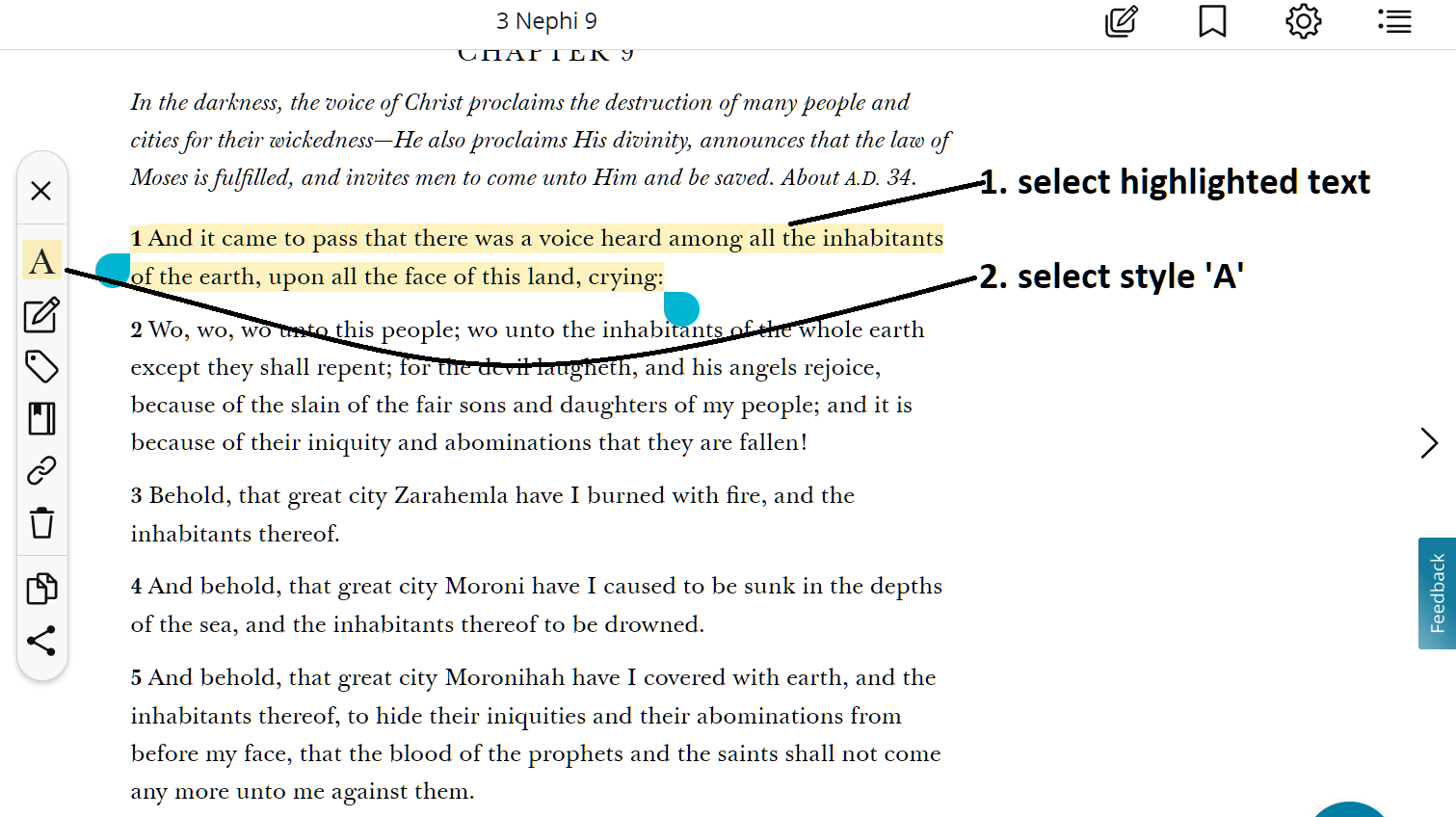
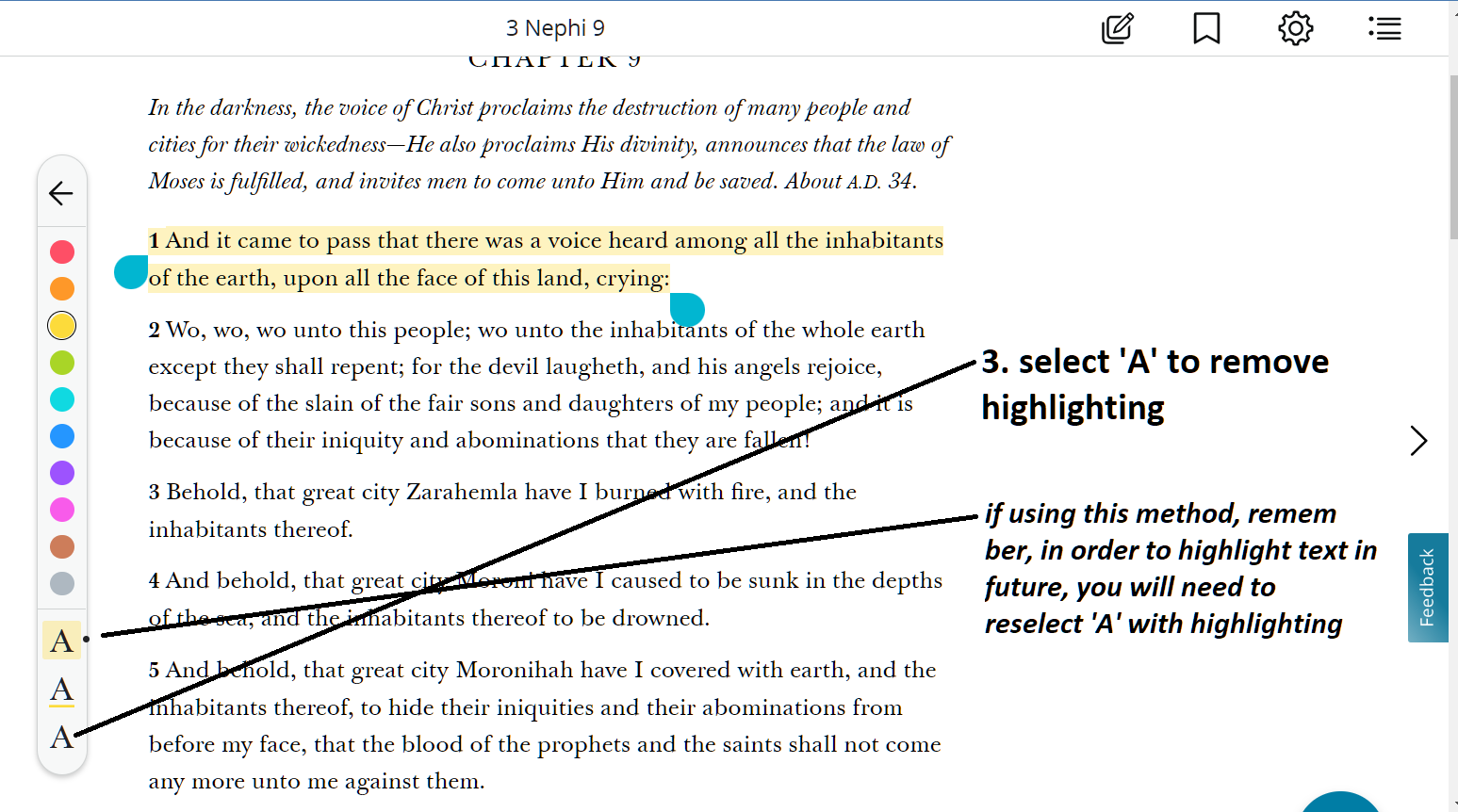
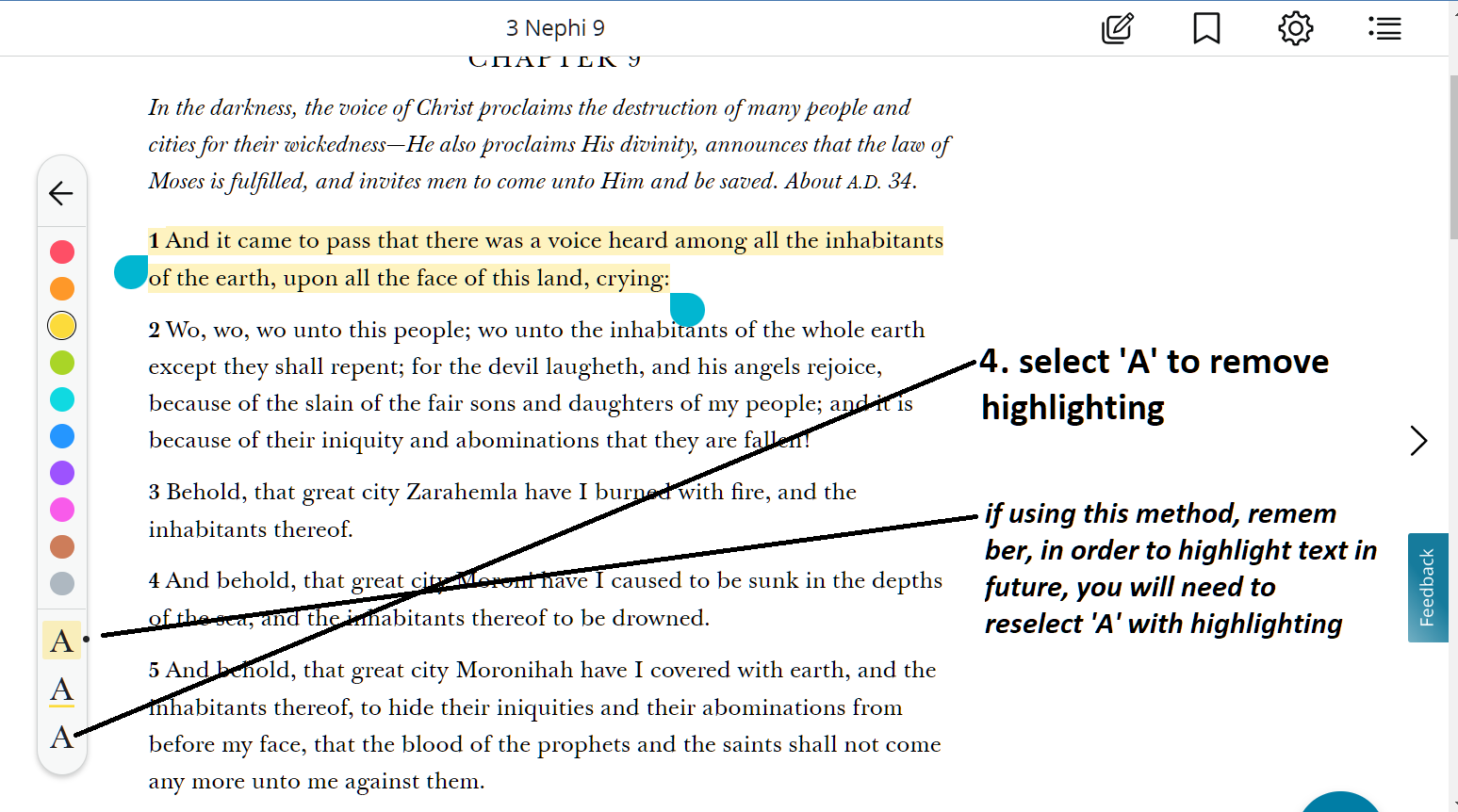
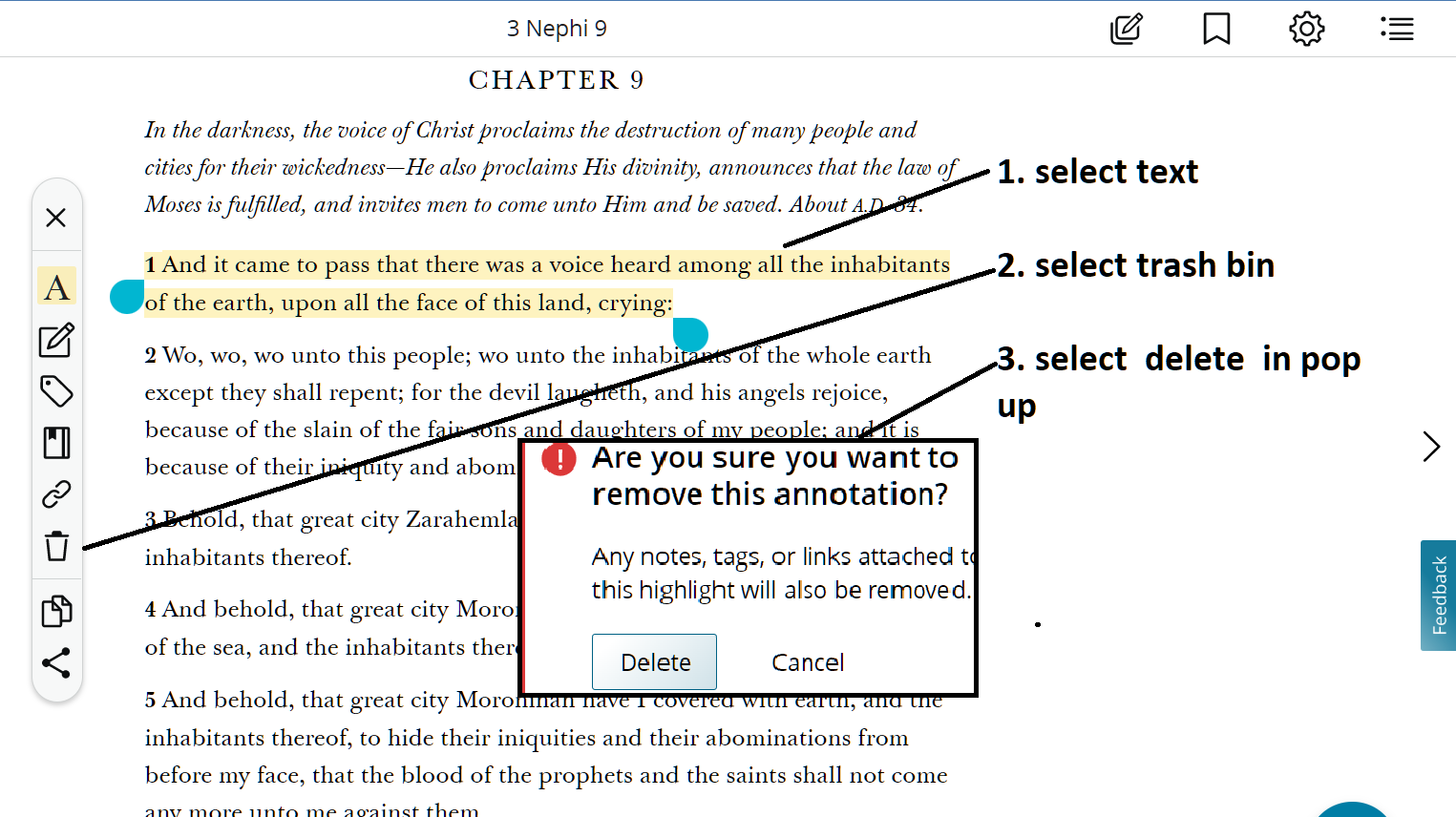
To remove highlighting, see solutions below

method 1
Screenshot (824).png

method 2

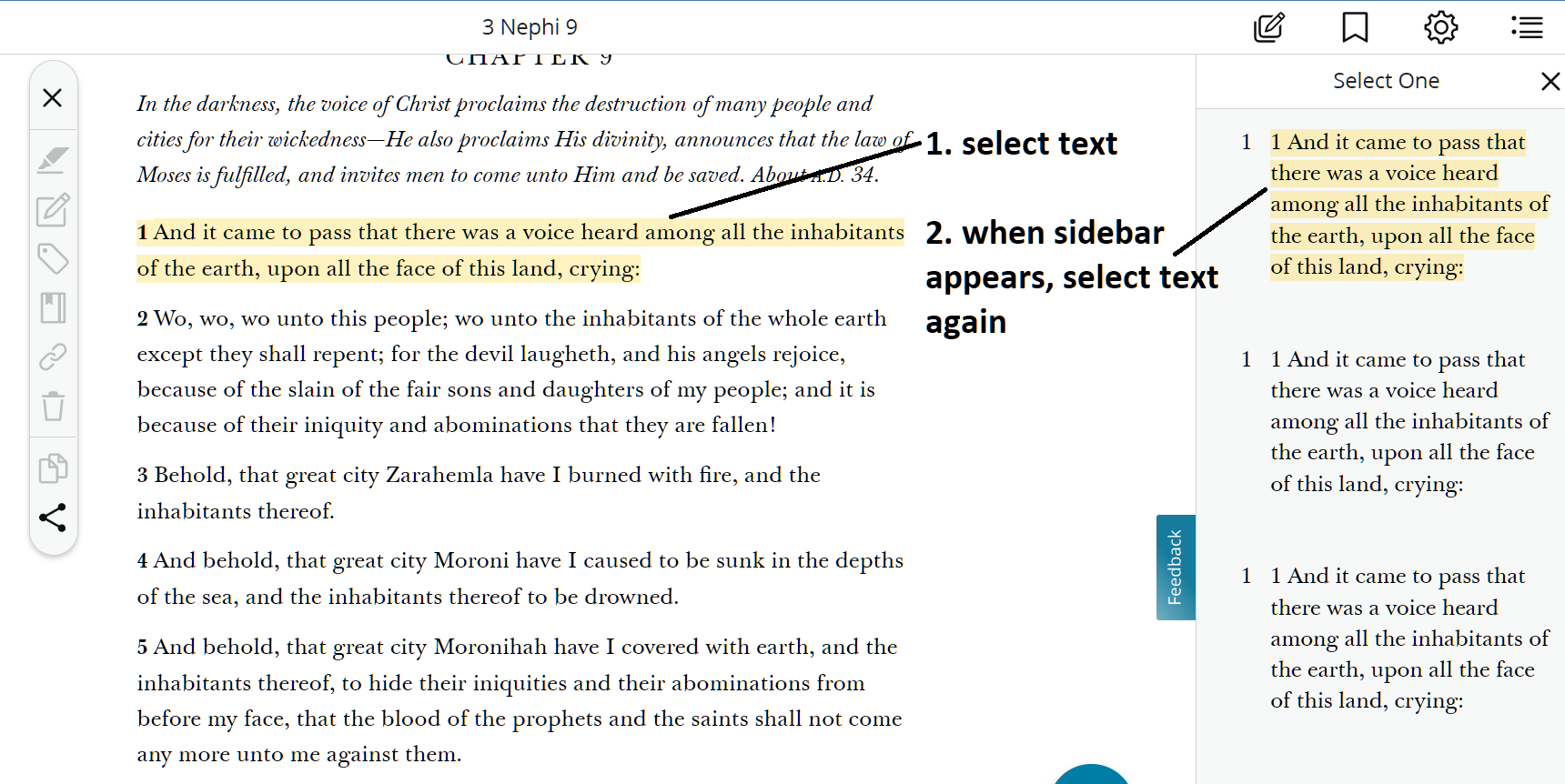
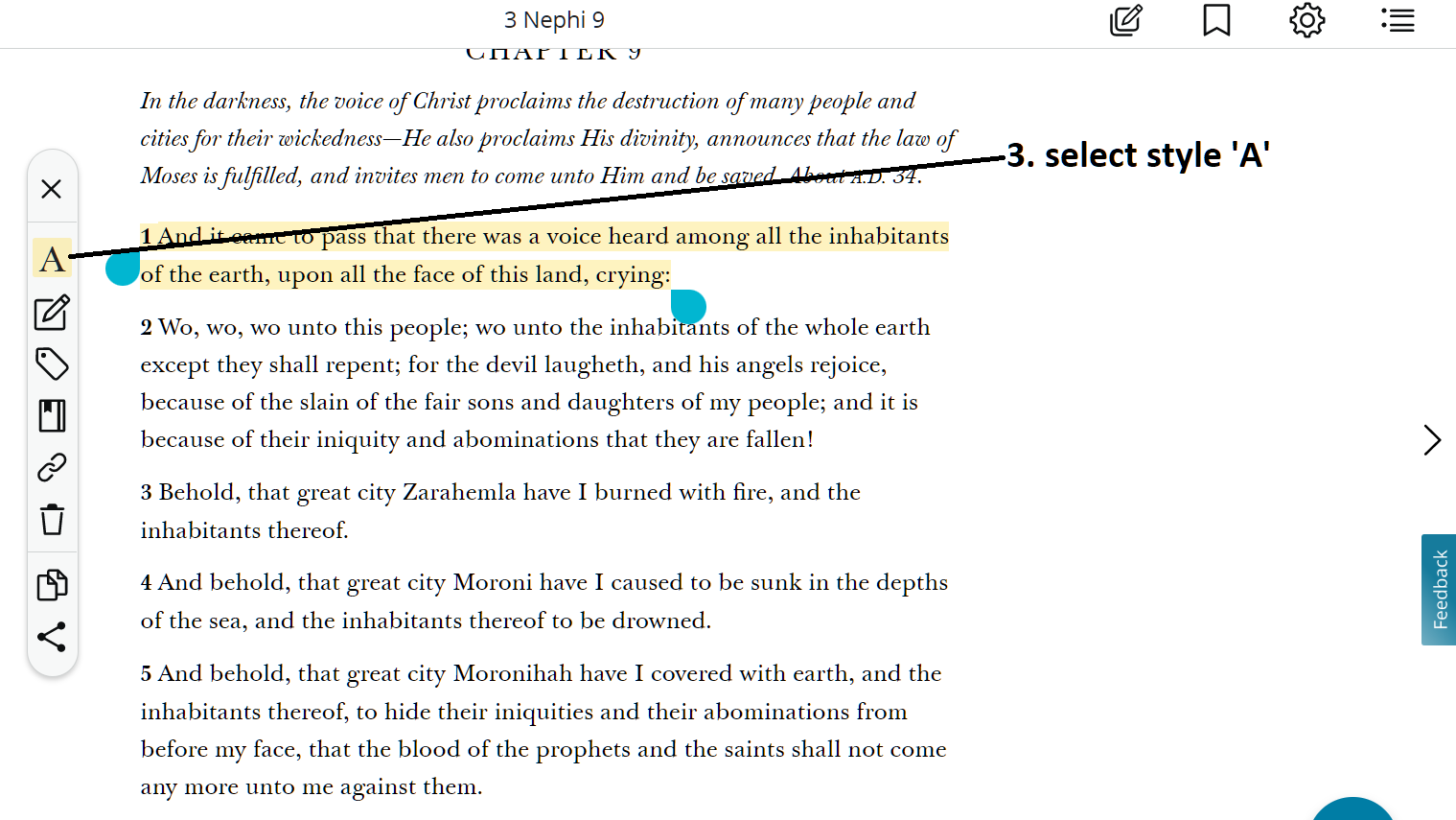
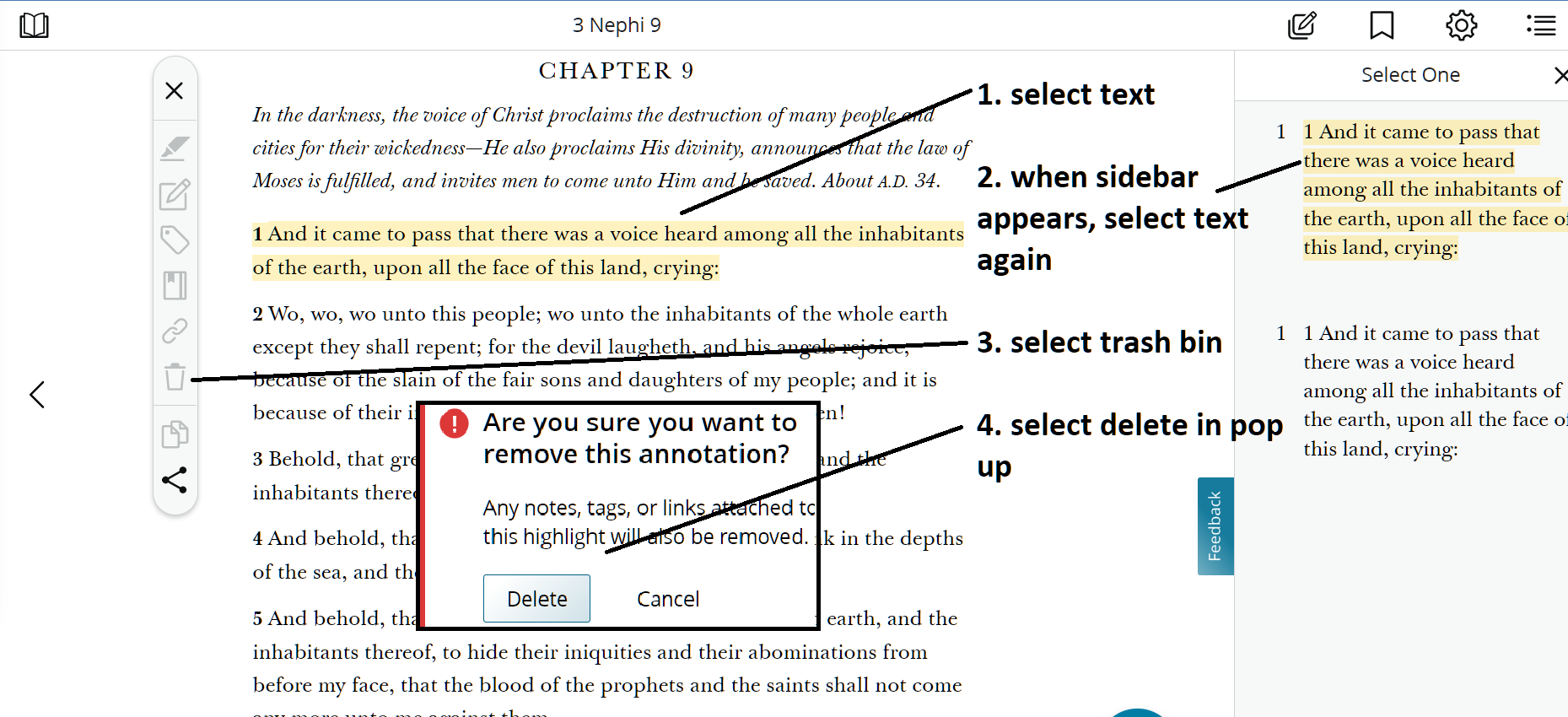
often times when selecting highlighted text the sidebar appears. follow solution 2 (below). the sidebar often appears when the same text has been highlighted twice. To remove double highlighted text you will need to go thru method 2 twice.
Screenshot (820).png

method 3
Screenshot (838).png
Screenshot (839).png
method 4
often times when selecting highlighted text the sidebar appears. follow solution 4 (below). the sidebar often appears when the same text has been highlighted twice. To remove double highlighted text you will need to go thru method 4 twice.
Screenshot (840).png
Screenshot (841).png
Screenshot (839).png
New Member
#18
Working from a PC desktop, and trying multiple browsers, none of these solutions have worked for me. The "Remove" icon remains grayed out no matter what I do.
New Member
#19
After wrestling a lot with this problem and trying to follow all the advice I could find in the tech formum (and not being successful) here is what I learned -- hoping it will be helpful to some.

*Note: I did my best to upload relevant photos to this post, but not sure it worked. Here's hoping... Thinking that you should at least be able to see URLs for the images.
*Another Note: entry was made on 4/26/2023. As the coders make periodic changes - these instructions may have a limited lifespan. Also done on a PC.

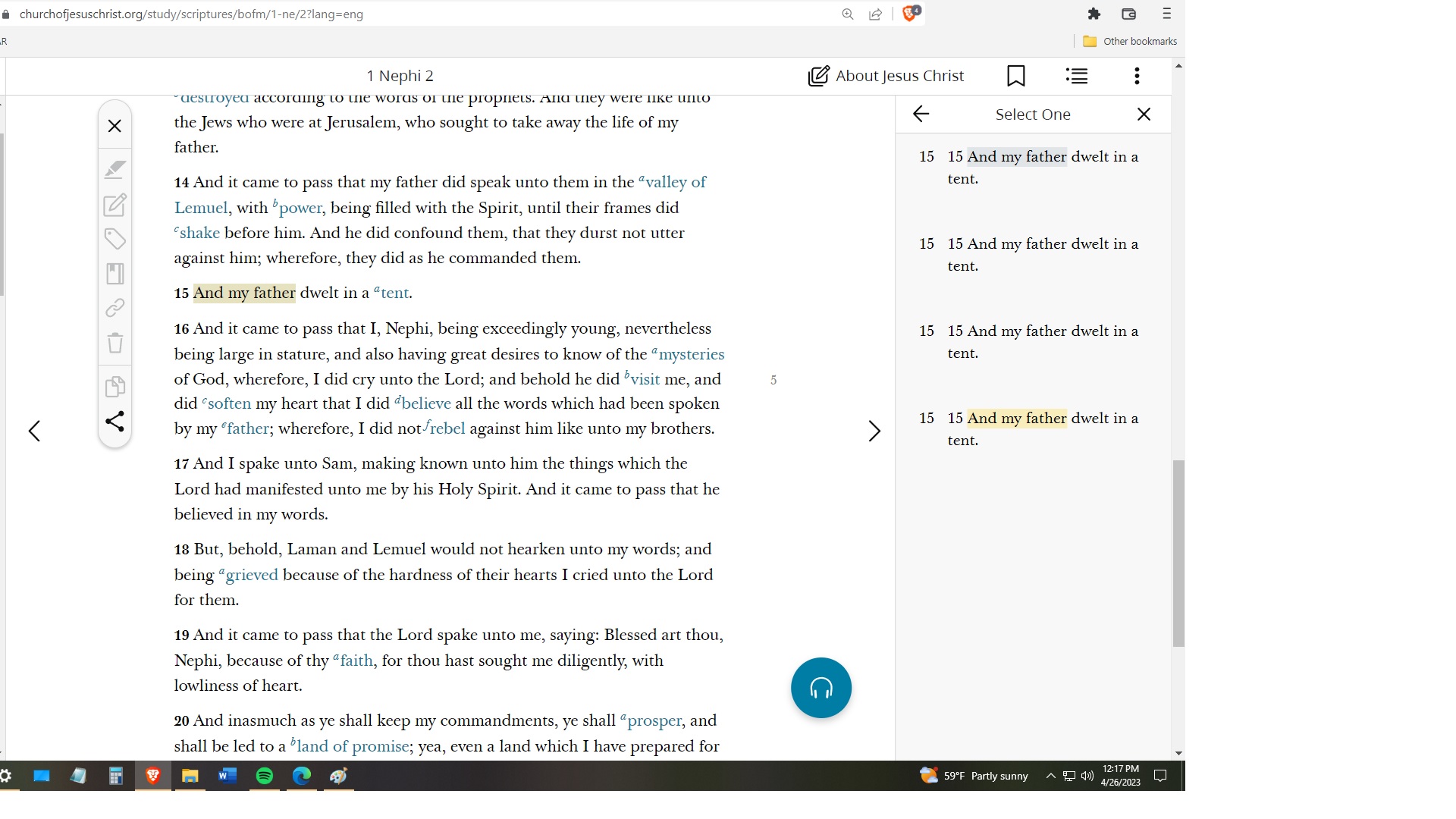
The first thing I learned is that each time I tried to remove a highlight, what it actually did was record a new highlight. If you change the color of a highlight, the system doesn't overwrite the old highlight by replacing it, but adds it to a list or history of highlights. If you were to successfully remove a highlight, and there is still another one in the history, it will still show a highlight. With this in mind, the right panel you see people talking about shows that list. Here is an image of my "history" of messing with a single highlight in my scriptures.
Image
In the image you can see the panel on the right showing my history. If you look at all my attempts to remove the highlighting, you will see some of them are entries with NO highlighting.

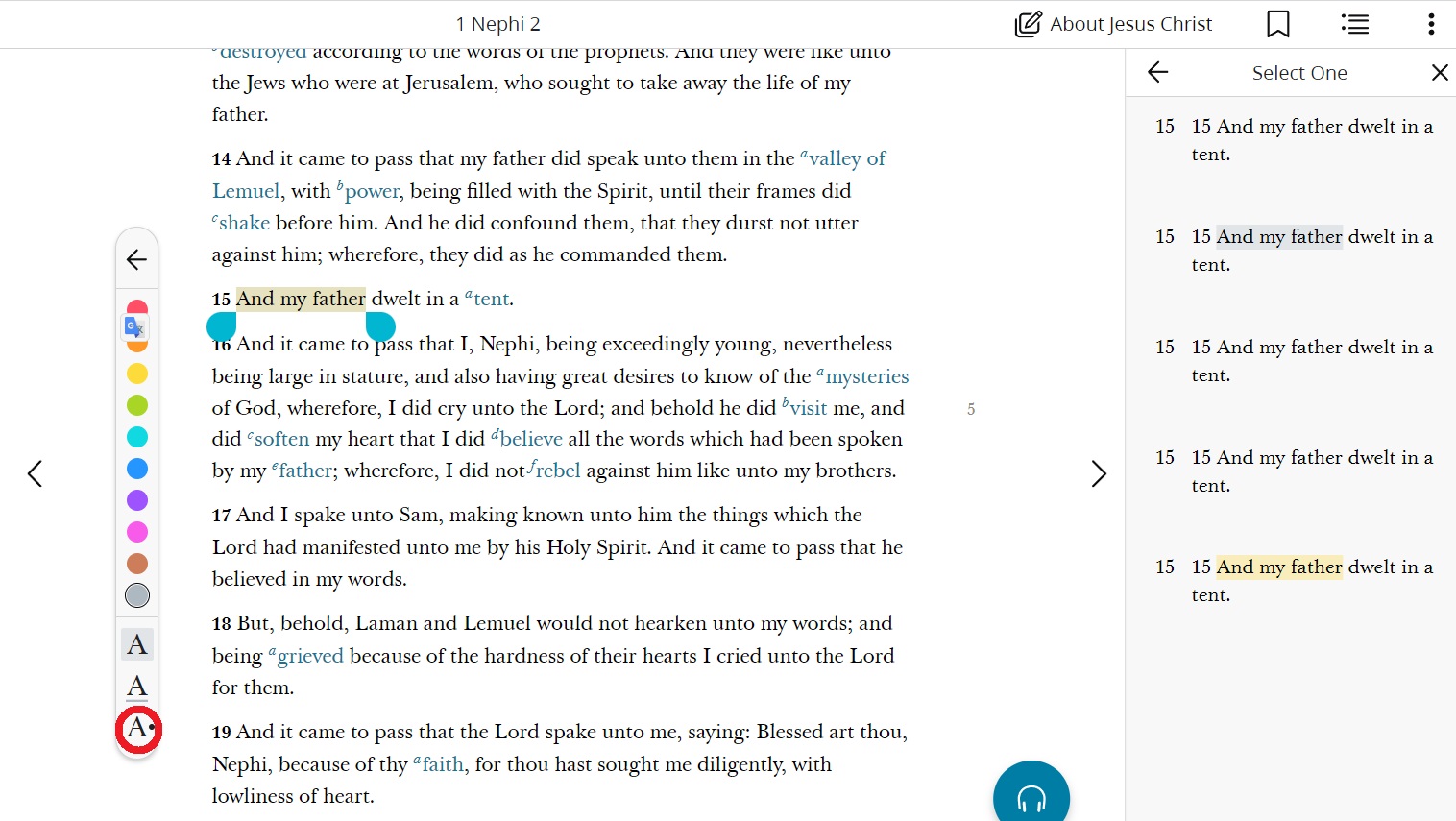
That happened when, as shown below, I highlighted the text and chose the non-highlighted character.
Image

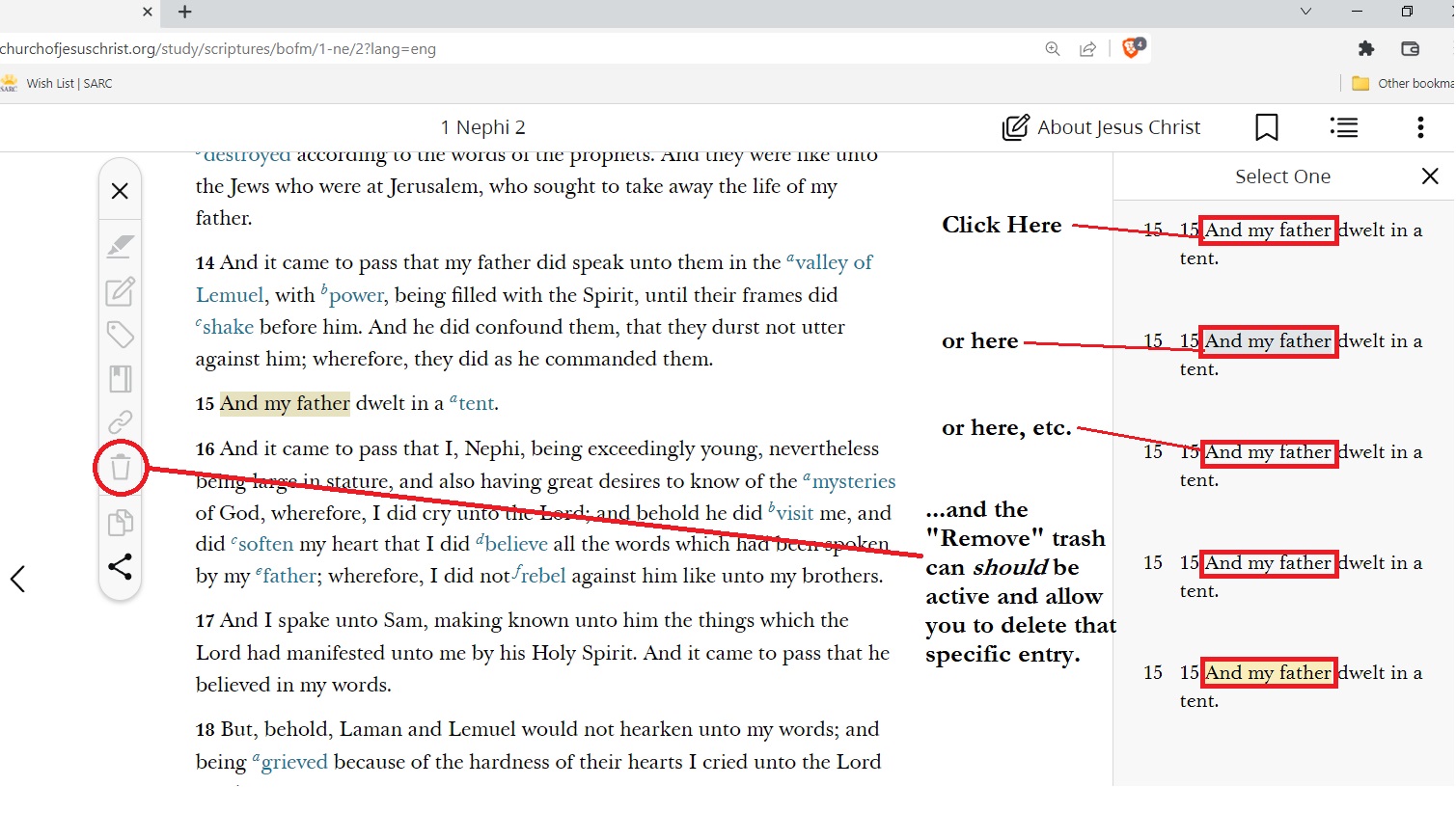
So here is how I removed the highlighting after many attempts. First you need to get that right panel open. To do this you click on the highlighted text (NOT re-highlighting the text by dragging the mouse over it). Simply single-click on the highlighted text and that right pane should open and show all your attempts.

Now single-click on the one of the entries in the right panel that DOES have highlighting. The funny thing is that you can't just click anywhere on the listed entry, you MUST click on the words in the entry that are highlighted. This is true even if you want to remove an entry that has no highlighting. Once you do this the grayed out "Remove" icon (trash can) should be accessible.
Image

In order to remove the highlighting, however, you must go through the entire history and do this with every entry that shows highlighting.
New Member
#20
*UPDATE

The very next day after I posted the above, I went in to do some highlighting and found that it now works exactly the way you would think it should.
#21
Yes, Very, Very, Very Fustrating!! :
New Member
#22
comment 9 solved my problem
THANKS MUCHO
New Member
#23
I found the solution to removing highlights.
DON'T use them at all, period.
Do not use online scriptures except to read unless you want to mark them for all eternity.
Buy an inexpensive new set of scriptures and marking pencils and start from scratch.
Do not use online scriptures except to read unless you want to mark them for all eternity.
I wish it were not so.
New Member
#24
Comment No. 19 worked for me. Thank you.
New Member
#25
It really shouldn’t be this complicated. Someone needs to get fired. Fix this!
Community Moderators
#26
lhamner wrote: Sat Sep 14, 2024 3:40 pm It really shouldn’t be this complicated. Someone needs to get fired. Fix this!
Because this is only a user-to-user discussion forum, it's unlikely anyone with any power to fix the problem will ever see this thread. Please use the 'Feedback' button or link to get your observations and/or opinion into the official channel.
New Member
#27
billbeesley wrote: Mon Nov 06, 2023 10:44 pm Comment No. 19 worked for me. Thank you.
Thanks for refferring to #19 #19 did figure it out. Finally!
New Member
#28
craigdblom wrote: Wed Apr 26, 2023 11:23 am After wrestling a lot with this problem and trying to follow all the advice I could find in the tech formum (and not being successful) here is what I learned -- hoping it will be helpful to some.

*Note: I did my best to upload relevant photos to this post, but not sure it worked. Here's hoping... Thinking that you should at least be able to see URLs for the images.
*Another Note: entry was made on 4/26/2023. As the coders make periodic changes - these instructions may have a limited lifespan. Also done on a PC.

The first thing I learned is that each time I tried to remove a highlight, what it actually did was record a new highlight. If you change the color of a highlight, the system doesn't overwrite the old highlight by replacing it, but adds it to a list or history of highlights. If you were to successfully remove a highlight, and there is still another one in the history, it will still show a highlight. With this in mind, the right panel you see people talking about shows that list. Here is an image of my "history" of messing with a single highlight in my scriptures.
Image
In the image you can see the panel on the right showing my history. If you look at all my attempts to remove the highlighting, you will see some of them are entries with NO highlighting.

That happened when, as shown below, I highlighted the text and chose the non-highlighted character.
Image

So here is how I removed the highlighting after many attempts. First you need to get that right panel open. To do this you click on the highlighted text (NOT re-highlighting the text by dragging the mouse over it). Simply single-click on the highlighted text and that right pane should open and show all your attempts.

Now single-click on the one of the entries in the right panel that DOES have highlighting. The funny thing is that you can't just click anywhere on the listed entry, you MUST click on the words in the entry that are highlighted. This is true even if you want to remove an entry that has no highlighting. Once you do this the grayed out "Remove" icon (trash can) should be accessible.
Image

In order to remove the highlighting, however, you must go through the entire history and do this with every entry that shows highlighting.
thank you finally! I tried the first steps like this but did not think of those other things to try. smart.
New Member
#29
Thank you #9!! The solution to remove highlights from gospel texts is to do it on the phone first!!
New Member
#30
None of the solutions worked for me: on my desktop, laptop, or my phone, as suggested. I am very frustrated by the inability to delete the highlighting that I make by mistake, e.g., highlighting an entire chapter from my selected verse to the end of the chapter (seems to be the default of the highlighting process). I am an elderly, non-tech-savvy individual for whom using the digital scriptures frustrates me. Please, Church Technology folks, help make these scriptures user friendly.
Community Moderators
#31
butlerro wrote: Thu Oct 09, 2025 10:25 am None of the solutions worked for me: on my desktop, laptop, or my phone, as suggested. I am very frustrated by the inability to delete the highlighting that I make by mistake, e.g., highlighting an entire chapter from my selected verse to the end of the chapter (seems to be the default of the highlighting process). I am an elderly, non-tech-savvy individual for whom using the digital scriptures frustrates me. Please, Church Technology folks, help make these scriptures user friendly.
Nobody who can help solve the problem is likely to ever see your post. This is a user-to-user discussion forum. Please voice your concern/suggestion via the Feedback button or link.