Signing is is okay...access to online store won't happen

45 postsstarted by bradball 19,766 viewsoriginal topic

New Member
#1
I can sign into my account but if I go into the store I can't shop or put anything into the cart. Or look at garments. If I go to sign in within the online store side of the site it says there is an error with my login. Yet I can login everywhere else on the website.

It has been like this for a few days.....Anything going on to fix??
New Member
#2
I'm having that same problem tonight. My credentials work fine elsewhere, but not on the store site.
New Member
#3
I have the same problem, sign in on main site but not at store, no error message just does not log in.
Senior Member
#4
Working right now for me. I'm using a "not current" version of Firefox browser during my lunch break here at work...
I can see to order garments and unit supplies (I am the ward clerk).

You do have to log in again when you go to the store, even if you are already logged in to LDS.org when you click the link to the store.
New Member
#5
2023 and this is still a problem. Sad.
Community Moderators
#6
rawls wrote: Thu Oct 05, 2023 9:31 am 2023 and this is still a problem. Sad.
I just went to the store and signed in with no problem. Yes, it still requires you to sign in to their site even if you were signed onto another church site. In my communication with the GSD support people they told me that was intentional and not a bug or programming error.
JD Lessley
Have you tried finding your answer on the ChurchofJesusChrist.org Help Center or Tech Wiki?
New Member
#7
I’m having this problem too— I realize you have to sign in twice. It won’t let me log into the store even though I’m using the same credentials I’m already logged into lds.org with, and I’m assuming its the same for the other posters with this problem.
Community Administrator
#8
I'd suggest trying incognito mode. Cookie buildup on church websites is a real problem and can cause all kinds of strange things.
Have you searched the Help Center? Try doing a Google search and adding "site:churchofjesuschrist.org/help" to the search criteria.

So we can better help you, please edit your Profile to include your general location.
New Member
#9
October 2024, and I'm having the same problem. I can sign in to the church website just fine, using two-step verification, but when I click to sign in to the online store I either get a 500 error or the garment sign-in page simply reloads, over and over.

Please help!!!
New Member
#10
October 2024 I can't get in either. I try to log in and I just get an error
Community Moderators
#11
sharpal wrote: Mon Oct 28, 2024 4:41 pm October 2024 I can't get in either. I try to log in and I just get an error
What does the error message say? There is a possibility the Church Account you used to sign in did not have your membership record number (MRN) recorded in the profile. Being able to sign into churchofjesuschrist.org with a nonmember Church Account (no MRN recorded in profile) works just fine. Try checking whether you have access to either the Calendar or the Ward Directory and Map in the Resources menu. Those require a member Church Account (MRN recorded).

There are also cookie issues that may be creating issues. Try using incognito mode / private window to see if that works.
JD Lessley
Have you tried finding your answer on the ChurchofJesusChrist.org Help Center or Tech Wiki?
New Member
#12
I'm also having issues here. I just get a loading screen with a redirect scms commerce microsoft auth URL and it goes back to whatever the previous page in the store was, still as a guest rather than logged in. I've tried multiple browsers, incognito, clearing cookies and caches, and different devices.
New Member
#13
Same here. Tried on several browsers. All require to sign in, which I've done, and then sends me back to a page that says I need to sign in. Which I do, but instead of taking me to the log in page it loops back to the "If you are not seeing the expected results, please sign in to view Men's Garments products." I hope this gets fixed.
Senior Member
#14
It worked just fine earlier today for me. When I navigated to the online store from my signed-in account on the church website, I had to sign-in again but this is normal behavior for the online store.
New Member
#15
Also getting the same error and reloading the homepage but not actually letting me in. Anyone ever find a fix for this?
Community Moderators
#16
lmitten wrote: Fri Nov 08, 2024 10:49 pm Also getting the same error and reloading the homepage but not actually letting me in. Anyone ever find a fix for this?
Can you further describe what is happening? What do you mean by not letting you in?

Even without signing in I have access to all areas that are not restricted to membership. But for areas accessible only to members, such as the clothing sections then I get an error message. For example when I try to access the men's garments section I get the "If you are not seeing the expected results, please sign in to view Men's Garments products" message. In the other areas I am not required to sign in until attempting to add items to the order cart.

After signing in I have no problems in any online store areas. But note that even if I signed into the Church website and use a link from there to the online store I still must sign in again at the online store to add items to the order cart or to enter member access only areas.

If you provide a description of when, or at what point, you encounter problems and any error messages you may get, then we may be able to help with some troubleshooting. If you are not in the U.S. or Canada areas, then please let us know what area you are in. Some areas may experience issues when others do not.
JD Lessley
Have you tried finding your answer on the ChurchofJesusChrist.org Help Center or Tech Wiki?
New Member
#17
same problem. I'm a newly called ward clerk. no problem signing into LDS.org and accessing LCR, but when I click on reports / purchase materials I'm redirected to the church store where I'm unable to login. after clicking 'sign in' my browser is momentarily redirected (presumably to a login screen - but that screen is never displayed) before returning me to the previous screen - all in less than a second or two. I'm using chrome on my personal windows 11 computer. but the problem was exactly the same using Microsoft edge or the clerk's office computer (also windows 11 with chrome). I tried chrome incognito mode but it was the same problem. pls help - gotta get these YW emblems ordered!
Senior Member
#18
kim24416 wrote: Sat Nov 09, 2024 9:19 am same problem. I'm a newly called ward clerk. no problem signing into LDS.org and accessing LCR, but when I click on reports / purchase materials I'm redirected to the church store where I'm unable to login. after clicking 'sign in' my browser is momentarily redirected (presumably to a login screen - but that screen is never displayed) before returning me to the previous screen - all in less than a second or two. I'm using chrome on my personal windows 11 computer. but the problem was exactly the same using Microsoft edge or the clerk's office computer (also windows 11 with chrome). I tried chrome incognito mode but it was the same problem. pls help - gotta get these YW emblems ordered!
Can your Bishop access that page? It seems like there's a few Forum members experiencing this, but there's lots of others who are successfully ordering materials like that.

Whenever something like this comes up, I'm always interested in knowing if "it's just me". For example, if the Bishop can successfully access the church store on a computer, can you try the same thing with your login on that same computer? Just trying to get more data points to help diagnose if it's truly your church account, or something else less obvious.
New Member
#19
I'm having the same issue.

I log in to the church website where I can access Leader and Clerk Resources, Donations ...
https://store.churchofjesuschrist.org/aus/en
When I go to Online Store,

it shows that I'm not logged in. When I login it tries to access the following website:
https://scmscommerceecomd365.b2clogin.c ... 2/authresp
and gives the message 'Bad Request', and still I'm not logged in

Also tried incognito mode but no luck.

My location is Australia.

Is there a solution to this?
New Member
#20
Same problem here trying to order garments. Login process is an endless loop. Enter credentials and it reverts back to an error saying:

Results for Men's Garments
If you are not seeing the expected results, please sign in to view Men's Garments products.

I try signing in again and it goes back to this page. It has been doing this since Nov 6.
Community Moderators
#21
bcoray wrote: Sun Nov 10, 2024 10:00 am Same problem here trying to order garments. Login process is an endless loop. Enter credentials and it reverts back to an error saying:

...
Please try your browser's private/incognito mode. If that works, it indicates the problem is cookie build-up. To solve that problem for a while, clear the browser's cache and delete Church-related cookies.

If that doesn't solve it, please report the problem via the Feedback link/button or call the store's online support number.
New Member
#22
Update: Incognito mode did not solve the problem.

And a bishopric member logging in with his credentials had the same problem on clerk's computer.

However, it worked just fine for the same bishopric member with the same credentials on his android mobile device (meaning he was able to login and order supplies). So I cannot offer a solution but try an android device if you have one.
Community Administrator
#23
kim24416 wrote: Sun Nov 10, 2024 12:01 pm And a bishopric member logging in with his credentials had the same problem on clerk's computer.

However, it worked just fine for the same bishopric member with the same credentials on his android mobile device (meaning he was able to login and order supplies). So I cannot offer a solution but try an android device if you have one.
So it's not the account, but something with the computer or browser? What browser was used in each case? I'd expect chromium-based browsers would have the best chance. Firefox and Safari are some of the few with their own rendering engine.
Have you searched the Help Center? Try doing a Google search and adding "site:churchofjesuschrist.org/help" to the search criteria.

So we can better help you, please edit your Profile to include your general location.
New Member
#24
I'm in Australia and have been having the same issue for weeks. I'm using chrome and I've tried clearing cache and cookies, I've tried microsoft edge, I even installed firefox just in case. I've also tried logging in to the online store on my android phone. None of these have enabled me to sign in to the online store. I have no issues with my church account on the church website, it is only the online store.
Community Moderators
#25
shewolf06 wrote: Tue Nov 12, 2024 3:16 pm I'm in Australia and have been having the same issue for weeks. I'm using chrome and I've tried clearing cache and cookies, I've tried microsoft edge, I even installed firefox just in case. I've also tried logging in to the online store on my android phone. None of these have enabled me to sign in to the online store. I have no issues with my church account on the church website, it is only the online store.
Are you signing in to the store's sign-in page itself? Apparently by deliberate design, the online store does not recognize Church Account SSO.
Senior Member
#26
FWIW - Not having an issue here, in the UK, with accessing and logging in to the Store.
Senior Member
#27
I don't believe we've had anyone report that they've contacted GSC for help with this issue. Since there's a few users who affirm they've tried private browsing etc., but still have the issue, that's about all any of us can suggest to try and help out. So I'd be interested to see if GSC can identify anything specific to their Church account. I'd think it's unlikely to be something at the GSC-level, but it would be an interesting data point if somebody experiencing this access issue can connect with the official Church support.
New Member
#28
rmrichesjr wrote:

"Are you signing in to the store's sign-in page itself? Apparently by deliberate design, the online store does not recognize Church Account SSO."

Yes :) I have tried to sign into the store directly without being redirected from the church website, and I have tried after being redirected. Neither way has worked for me.
New Member
#29
I'm having the same issue. I called and the person told me to try another browser or order over the phone because it's just like that sometimes :/
New Member
#30
mtolney wrote:
> I'm having the same issue.
>
> I log in to the church website where I can access Leader and Clerk
> Resources, Donations ...
> https://store.churchofjesuschrist.org/aus/en
> When I go to Online Store,
>
> it shows that I'm not logged in. When I login it tries to access the
> following website:
>
> https://scmscommerceecomd365.b2clogin.c ... 2/authresp
> and gives the message 'Bad Request', and still I'm not logged in
>
> Also tried incognito mode but no luck.
>
> My location is Australia.
>
> Is there a solution to this?

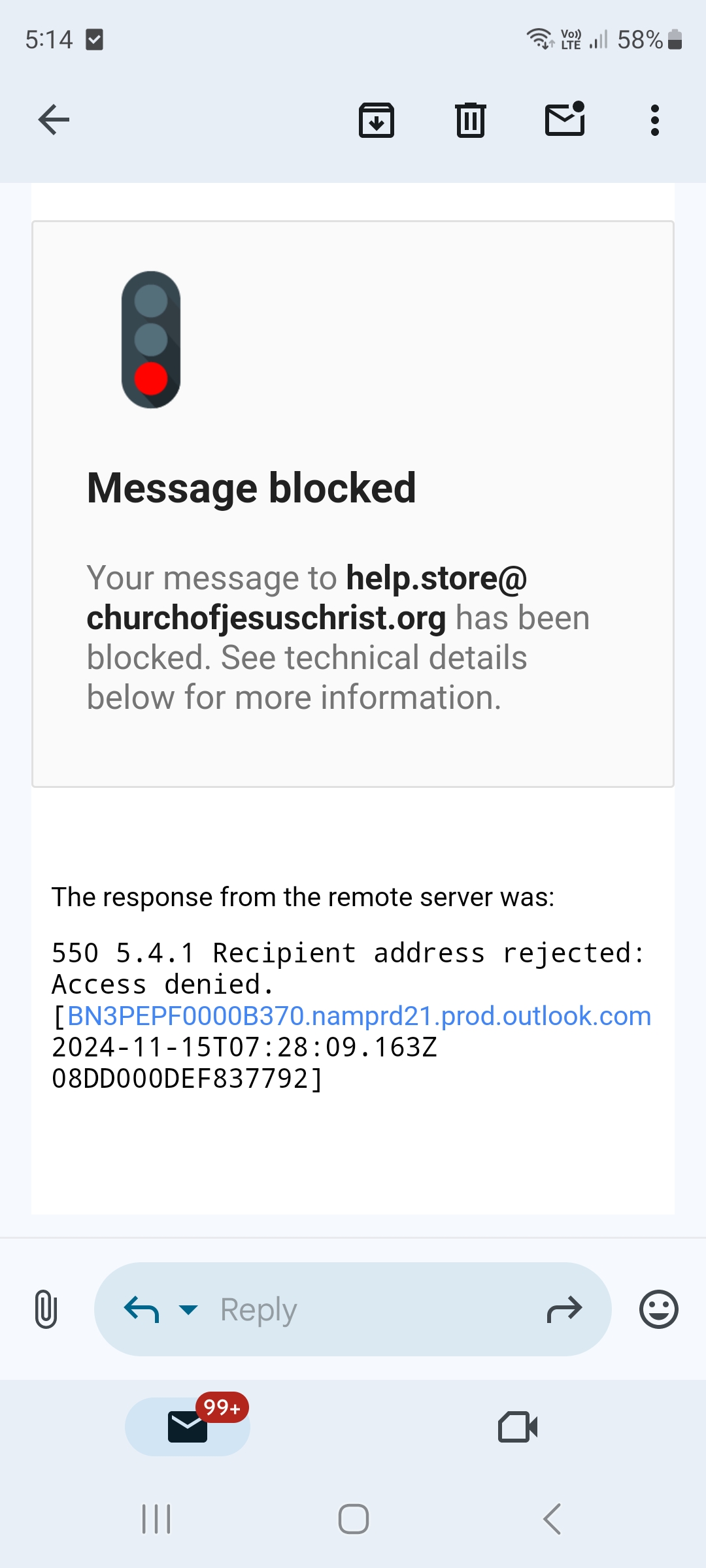
I was emailed by help.store@churchofjesuschrist.org to delete cookies and cache. Still didn't work. Furthermore, I couldn't reply to their email.
Screenshot_20241115_171405_Gmail.jpg
Screenshot_20241115_171405_Gmail.jpg (310.16 KiB)
Community Moderators
#31
mtolney wrote: Fri Nov 15, 2024 5:01 am I was emailed by help.store@churchofjesuschrist.org to delete cookies and cache. Still didn't work. Furthermore, I couldn't reply to their email.
The email address you posted is a no-reply address. The online store email address for help is help@store.ChurchofJesusChrist.org.
JD Lessley
Have you tried finding your answer on the ChurchofJesusChrist.org Help Center or Tech Wiki?
New Member
#32
I am also experiencing this issue repeatedly on multiple devices and browsers over the past 2 weeks. I've tried resetting my password, clearing cache and cookies, and logging into the store directly. Please advise if there's a fix for this.
New Member
#33
Im also having the same issue and have tried everything that has been mentioned in all the comments since 2018. Ive put in multiple tickets and still nothing. So hopefully this gets fixed soon. Thought I was crazy until I found this thread.

Is there anyone in here that can give us an update from the actual church that this issue is being worked?
Senior Member
#34
benjaminjmuncy wrote: Mon Nov 18, 2024 12:24 am Is there anyone in here that can give us an update from the actual church that this issue is being worked?
Likely not. We are all pretty much regular members like yourself. I know it is discouraging that you are not able to log in, but I don't think it is a churchwide problem.

I just logged into the store and was able to put items into my cart (I'm in the USA). Official feedback is at the bottom of the page when you are at the store site. There is also a Contact Us link there that will give you a phone number to call.
New Member
#35
Having the same issue here, can't sign in to the online store
New Member
#36
I sent an email to help.store@churchofjesuschrist.org and they responded saying:

"We’d like to inform you that this is a known issue, and our IT team is currently working to resolve it. This has affected some customers."

So they are aware of the issue and working on it.
Senior Member
#37
fishyfire wrote: Tue Nov 19, 2024 9:04 am I sent an email to help.store@churchofjesuschrist.org and they responded saying:

"We’d like to inform you that this is a known issue, and our IT team is currently working to resolve it. This has affected some customers."

So they are aware of the issue and working on it.
Thank you for providing this for others to refer to.
New Member
#38
It's good to hear it's being worked on.
New Member
#39
oday, the same problem that was mentioned earlier persists. I tried signing in to Google and Microsoft Edge, both online and on my phone, but I am still unable to sign in.
Senior Member
#40
One of our members also has a problem login into the store. This last Sunday I could login ok, but using the same computer multiple times his login failed. We hope the issue is resolved soon!
New Member
#41

Re: Signing in is okay...access to online store won't happen

It's May now, and I have been experiencing this problem since November. Can someone share how they resolved this issue? Or is it still unresolved and being worked on, 5 months later?
Community Moderators
#42

Re: Signing in is okay...access to online store won't happen

taylorje wrote: Sun May 18, 2025 11:08 am It's May now, and I have been experiencing this problem since November. Can someone share how they resolved this issue? Or is it still unresolved and being worked on, 5 months later?
Are you sure your MRN is attached to your Church Account?

Have you tried clearing the browser cache and deleting cookies in case it might be the cookie build-up problem?

Have you checked earlier in this thread for suggestions? There might be information about the best solution being to call the store and do the transaction over the phone.
New Member
#43

Re: Signing in is okay...access to online store won't happen

I can't make temple appointments or see the garments to then buy them at all. It won't even come up as an option after I click the category. Help!!
Community Administrator
#44

Re: Signing in is okay...access to online store won't happen

yayamtz wrote: Thu May 29, 2025 2:38 pm I can't make temple appointments or see the garments to then buy them at all. It won't even come up as an option after I click the category. Help!!
Is your membership number (MRN) associated with the account? If not, then the web pages will treat you like a non-member.
Have you searched the Help Center? Try doing a Google search and adding "site:churchofjesuschrist.org/help" to the search criteria.

So we can better help you, please edit your Profile to include your general location.
Church Employee
#45
Also get with your ward clerk and make sure your membership records are in your ward