Caller ID - Not Working

19 postsstarted by bench.john 9,515 viewsoriginal topic

New Member
#1
The caller ID isn't working for my phone. Google Pixel XL with latest update. My ward has fairly high turnover and it is beginning to be a Hassel haveing to export contacts manually. Can someone tell me how to get the caller ID to work or enable some sort of ward export as a group into my Google contacts. Maybe the group gets updated during the sync?
New Member
#2
I have the same issue with the LG V20 phone. Any ideas?
Community Moderators
#3
I'm having no issues on my Samsung. I can only suggest to uninstall and reinstall LDS Tools granting all the permissions it asks for during the install and see if that helps.
So we can better help you, please edit your Profile to include your general location.
Senior Member
#4
Not sure what you're looking for but CallerID basically let's you know in a notification after you've taken a call the name of the person. It will not put the name over the phone number on the phone app as it comes in. It's really not caller-ID it's I know it's not really helpful now after your call but here's who called
..
โ€œA long habit of not thinking a thing wrong, gives it a superficial appearance of being right, and raises at first a formidable outcry in defense of custom.โ€
โ€• Thomas Paine, Common Sense
Community Moderators
#5
johnshaw wrote:CallerID basically let's you know in a notification after you've taken a call the name of the person. It will not put the name over the phone number on the phone app as it comes in.
Actually, when it is working well and the stars are aligned, it will pop up the name of the household calling as the call is coming in. At least it does on my Android. I use it all the time to determine if a call is from someone I truly do not know, or from a member of our stake that I should answer.
Community Moderators
#6
lajackson wrote:Actually, when it is working well and the stars are aligned, it will pop up the name of the household calling as the call is coming in.
This is the way mine works also.
So we can better help you, please edit your Profile to include your general location.
New Member
#7
Although it worked in the past, when someone from the Stake called my cell phone it would access Tools for information and display who was calling. Now all I see is the phone number. Wondering if this is related an iPhone 6 of some setting that needs to be set?
Community Moderators
#8
bhayashi wrote:Although it worked in the past, when someone from the Stake called my cell phone it would access Tools for information and display who was calling. Now all I see is the phone number. Wondering if this is related an iPhone 6 of some setting that needs to be set?
It hasn't worked for my Android for some time as well, so either I'm doing something wrong or they dropped that feature.
So we can better help you, please edit your Profile to include your general location.
New Member
#9
The caller ID has not been working for me for quite sometime. Has this feature been dropped for android? Thanks!
Community Moderators
#10
nykvail wrote:The caller ID has not been working for me for quite sometime. Has this feature been dropped for android? Thanks!
It appears that way [sniff].
So we can better help you, please edit your Profile to include your general location.
Community Moderators
#11
nykvail wrote:Has this feature been dropped for android?
The option is still there to turn it on or off, but it does not seem to be working.
New Member
#12

But why does it work or not work?๐Ÿค”

So I've noticed this feature is not working for me on Android (version 4.5.1) and with my new callings it sure would be nice.

I know I've seen it work in the past on my Android phones.

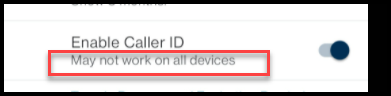
Does anyone know the technical reasons why this is not working. Under the setting Enable Caller ID there is subtext "May not work on all devices"

Is this because of a carrier setting, Android skin setting(s) of the manufacturer, Android security? Is this subtext just a message to sound nice but that really means, it's not a priority to research why this still works on some phones and not others but will let it still work for some users and just kind of leave other users in the dark but give a heads up message about it possibly not working

I'm curious how much the dev team understands the nature of the issue and what causes it to work or not . Do they have a list of Android versions and manufacture skins they know it works with and or a carrier settings that is works with or doesn't? Perhaps the dev team knows exactly why this does or does not work and I'd like to understand when or why not it's not been prioritized to be fixed.

This info might help users to troubleshoot or even influence a phone purchase.

I'll send this inquiry to -membertools@churchofjesuschrist.org. per the suggestion in this thread - viewtopic.php?t=7631
caller id setting.png
caller id setting.png (13.26 KiB)
Senior Member
#13
It has never worked for me on my Motorola Moto Z3 phone running Android 9. My wife is on a Samsung phone running Android 10 (I think) and she said it works for her. She has other problems with her Samsung phone (about a year newer than mine) that I don't have so I'm OK to have my problem and not hers, LOL*. I just manually add the phone numbers to my contact list for anyone in the stake who calls me.

*For anyone wondering, I have recommended on several occasions to her to just replace her phone, but she doesn't want to right now so I'm honoring her wishes.
Senior Member
#14
Does anyone know which department at the church is currently in the queue for enhancements for Tools, maybe we can send them some chocolate or something to see if they'll ask for this feature to be consistent and usable for everyone. I'm not sure though, that ability to get in touch with your mission president through tools was an item discussed on this board for years and years and finally made it to the top of the queue. There must be other really super important additions to the tools app that this request would make this a very minimal priority.
โ€œA long habit of not thinking a thing wrong, gives it a superficial appearance of being right, and raises at first a formidable outcry in defense of custom.โ€
โ€• Thomas Paine, Common Sense
Community Moderators
#15
No go on my Google Pixel 5 running Android 12.
So we can better help you, please edit your Profile to include your general location.
Community Administrator
#16
Mikerowaved wrote: Mon Jan 10, 2022 1:09 pm No go on my Google Pixel 5 running Android 12.
Something to check:

Settings > Apps > (See all apps) > Member Tools

Look at "Permissions". See if it has permissions for "Phone".
Have you searched the Help Center? Try doing a Google search and adding "site:churchofjesuschrist.org/help" to the search criteria.

So we can better help you, please edit your Profile to include your general location.
Community Moderators
#17
russellhltn wrote: Mon Jan 10, 2022 1:49 pm
Something to check:

Settings > Apps > (See all apps) > Member Tools

Look at "Permissions". See if it has permissions for "Phone".
Yes, it has permissions set for using both "Phone" and "Location".
So we can better help you, please edit your Profile to include your general location.
Community Administrator
#18
Mikerowaved wrote: Mon Jan 10, 2022 2:55 pm Yes, it has permissions set for using both "Phone" and "Location".
Rats. It was worth a shot.
Have you searched the Help Center? Try doing a Google search and adding "site:churchofjesuschrist.org/help" to the search criteria.

So we can better help you, please edit your Profile to include your general location.
Senior Member
#19
russellhltn wrote: Mon Jan 10, 2022 1:49 pm
Mikerowaved wrote: Mon Jan 10, 2022 1:09 pm No go on my Google Pixel 5 running Android 12.
Something to check:

Settings > Apps > (See all apps) > Member Tools

Look at "Permissions". See if it has permissions for "Phone".
I already tried that on my phone as well. Everything was set to have proper permissions, but still no go on the caller ID. But not a huge deal for me.