StickyMeetinghouse Internet Problems

80 postsstarted by bartj 170,915 viewsoriginal topic

Church Employee
#1
We are still experiencing connection issues with the Meetinghouse firewall system. The Church and our vendors are continuing to work on the firewall issue but unfortunately do not yet know the root cause.

If your building is having internet issues (cannot connect to internet or if your building is shown as offline in Technology Manager) we've had success getting firewalls back online by completing the following:
1. Follow the directions below exactly and do not power cycle the router or the access points.
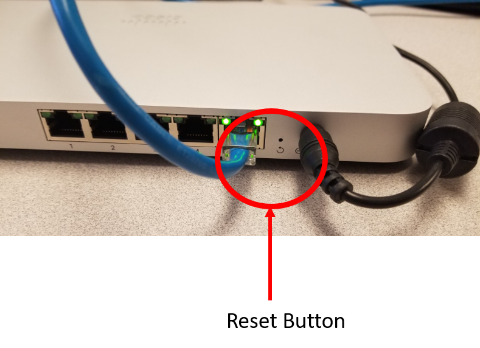
2. This reset is on the router, as shown below, and not any other device. This device has a model and serial number on the bottom. The model number will start with MX. Please record the serial number found on the bottom right of the label.
3. Use a paperclip to press the button labeled 'Reset' on the back panel of the router and release after 6 seconds.
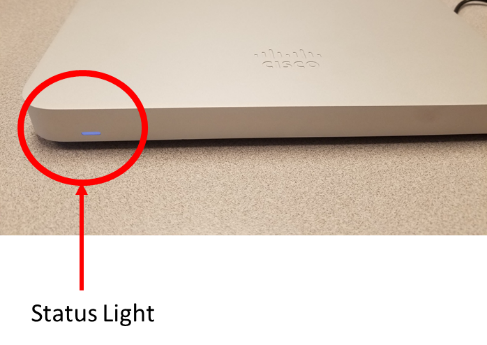
4. When the router restarts the status light on the bottom left of the front panel may flash green and will then turn to orange.
5. Wait for the device to recover its configuration. While recovering its configuration the light will show rainbow colors and will eventually turn solid white. This may repeat two times and will take about 10 minutes.
6. Once the light turns solid white and remains solid white the device should be ready for use.
7. Verify internet connectivity is working by browsing to www.churchofjesuschrist.org.
8. After this has been completed, please send an email to: mht@ldschurch.org giving us the serial number of the MX64 you reset and if the procedure worked or not.

These instructions, with graphics, are available on TM.
Church Employee
#2
The missing images (displayed in TM)
meraki-reset-btn.png
meraki-reset-btn.png (224.8 KiB) Viewed 31450 times
meraki-status-light.png
meraki-status-light.png (177.17 KiB) Viewed 31450 times
Church Employee
#3
If the process above does not resolve the problem try pulling the network cables out of ports 1, 2, 3, and 4 of the firewall and repeat the steps above. Do not remove the Internet cable. It may also be beneficial at this point to reboot the firewall at this point. It is critical the cables go back in the exact ports you removed them from after the firewall has come back online - solid white indicator light on the front of the firewall.
Church Employee
#4
Revised additional steps if the initial reset does not work:

If the process above does not resolve the problem try first rebooting the modem by powering it off for 30 seconds. Then pull the network cables out of ports 1, 2, 3, and 4 of the firewall, reboot the firewall (unplug and plug back in), and repeat the steps above. Make sure that you press the reset button when the status light is showing rainbow colors. Do not remove the Internet cable. After the firewall reboots, re-insert the network cables you removed. It is critical all cables go back in the exact ports they were removed from.
Senior Member
#5
Could you remind me which ports to use?

My meetinghouse does not have a FHC. We have:
- Clerk's computer
- HVAC equipment
- Three 1041 WAPs

I just want to verify the cables are connected to the correct ports.
Dana Repouille, Plattsmouth, Nebraska
Senior Member
#6
With the right login credentials you should see the installation instructions with this link https://www.lds.org/help/support/bc/cle ... f?lang=eng
Community Moderators
#7
drepouille wrote:Could you remind me which ports to use?
I sent you a private message.
Church Employee
#8
For anyone with the same question:

Warning: This only applies to the Cisco Meraki Firewalls (Model: MX64)

If TM says the firewall DOESN'T have a SP zone:
Port 1: User/public zone (clerk computers, APs, printers, etc.)
Port 2: User/public zone (clerk computers, APs, printers, etc.)
Port 3: User/public zone (clerk computers, APs, printers, etc.)
Port 4: FAC zone (HVAC, door systems, etc)

If TM says the firewall HAS a SP zone:
Port 1: User/public zone (clerk computers, APs, printers, etc.)
Port 2: User/public zone (clerk computers, APs, printers, etc.)
Port 3: SP zone (generally used by Family History Center computers, printers, etc.)
Port 4: FAC zone (HVAC, door systems, etc)
Community Administrator
#9
I was successful in getting the two firewalls that were off-line in my stake working again. The first one was pretty smooth. The second one took some effort. I notice that the firewall doesn't seem to have a reaction for quite some time after the paperclip operation. I also saw it go white, and then start the rainbow cycle again. But all's well that ends well.
Have you searched the Help Center? Try doing a Google search and adding "site:churchofjesuschrist.org/help" to the search criteria.

So we can better help you, please edit your Profile to include your general location.
Church Employee
#10
Edited 1 time, last by russellhltn on . Reason: Correct url for TM.
We have updated the instructions based on more field experience. This update has been posted on tm.lds.org.
Church Employee
#11
bartj wrote:This update has been posted on tm.ldschurch.org.
That is tm.lds.org :)
Community Administrator
#12
yarrgh wrote:
bartj wrote:This update has been posted on tm.ldschurch.org.
That is tm.lds.org :)
Fixed. :)
Have you searched the Help Center? Try doing a Google search and adding "site:churchofjesuschrist.org/help" to the search criteria.

So we can better help you, please edit your Profile to include your general location.
Church Employee
#13
There is also a lot of traffic hitting TM at the moment and we're getting a lot of rate limit errors from the vendor service. At this moment there isn't much we can do since this is a fixed constraint. We are working on a solution to control the requests to our vendor but it will require development and testing time before it can be implemented. We don't have a time frame on when it could be implemented.

If you are running into errors in TM and are not able to see your firewall details/status, try again in a little while. The more you refresh the page, the worse it makes it for everyone involved.
New Member
#14
Here are the updated instructions for the outage:

https://www.lds.org/help/support/intern ... s?lang=eng

Thanks
Senior Member
#15
Church Network team. I believe the instructions could be made more clear.

1. Reset the firewall (8-10 seconds) watch the light blink green a couple of times go solid amber and then start blinking the rainbow of colors
2. Once the rainbow of colors starts, reset the firewall again (4 seconds) and watch the rainbow of colors, then the solid white, then rainbow of colors, then solid white.
3. Power cycle the AP's just for good measure.

I'd have anyone that this doesn't work for call the GSC. I didn't read ahead and called the GSC which instructed me to follow the instructions like 2 below the Call the GSC one. Anyway, might reduce some calls to the GSC...
“A long habit of not thinking a thing wrong, gives it a superficial appearance of being right, and raises at first a formidable outcry in defense of custom.”
― Thomas Paine, Common Sense
Senior Member
#16
Grrr. I checked TM from home to verify the firewall was still offline. Then I drove to the meetinghouse, walked into the office, and saw the firewall displaying a solid white light. I checked TM from the clerk's computer and found everything was perfectly normal. Oh well.
Dana Repouille, Plattsmouth, Nebraska
Community Administrator
#17
One of the Meraki that hadn't been affected on Wednesday went into "Warning" status and all the APs lost connection to the server. I power cycled the firewall and the status went green and all the APs checked in.

Now, it appears that all the 1041 APs in my stake are connected. I think this is the first time since the replacement of the firewalls this has happened - so things are looking up!
Have you searched the Help Center? Try doing a Google search and adding "site:churchofjesuschrist.org/help" to the search criteria.

So we can better help you, please edit your Profile to include your general location.
Community Moderators
#18
drepouille wrote:Grrr.
I have one that was okay on Wednesday, went offline Thursday afternoon, and this morning is okay again. I am hesitant to make the 60-mile trip.
Senior Member
#19
Luckily, I am no longer the STS. As a humble ward clerk, I now live a mere two miles from the meetinghouse.
Dana Repouille, Plattsmouth, Nebraska
Senior Member
#20
So I reset all mine yesterday, and go into TM this morning and it was kicking all sorts of errors and didn't show a correct status. But as I started to click through the firewalls to see if the AP's showed up, after 5-10 minutes they all came back ok. So is this just a tool problem for many at this point? Are these all false positives? Maybe instructions should also read, double-check at the meetinghouse if the Internet is really affected before performing the procedures.

Mine were all hosed, and we knew because of testing for an upcoming webcast.
“A long habit of not thinking a thing wrong, gives it a superficial appearance of being right, and raises at first a formidable outcry in defense of custom.”
― Thomas Paine, Common Sense
Senior Member
#21
Right. I have decided to ignore all those red pop-up messages that say the status of the firewall could not be determined. If I can drill down into the firewall, and see the WAPs and connected devices, then I know all is well.
I just wish the usage statistics would work as they once did.
Dana Repouille, Plattsmouth, Nebraska
Church Employee
#22
johnshaw wrote:TM this morning and it was kicking all sorts of errors and didn't show a correct status.
This is because of a constraint with the vendor API. With the amount of people checking their firewall statuses, we are exceeding the rate limit. We've been working on a solution to better handle this so that we don't exceed it so much, but it isn't quite ready. And now because of the outage, it is really affecting everyone. TM is almost unusable at times because of the amount of traffic and everyone constantly refreshing trying to get a successful status return for their firewalls.

If we get an error (rate limit, etc.) we come back with a unknown status. This doesn't necessarily mean that there is an issue with your firewalls. Just that TM doesn't know the status. If you absolutely can't get the online status of your firewalls and you absolutely need to know before you head on site (travel times, etc.), you can PM me with your serial numbers and I can check them manually.
Community Administrator
#23
Well, it's back. Two of the new firewalls in my stake are showing "warning". One had never been reset and all the APs are showing off-line. The other had been "paper clipped" before, and the APs are showing on-line. I'll need to call to find out what's going on there. That one has had "warnings" in the past due to a IP address collision, but I thought it was fixed.
Have you searched the Help Center? Try doing a Google search and adding "site:churchofjesuschrist.org/help" to the search criteria.

So we can better help you, please edit your Profile to include your general location.
Community Administrator
#24
Apparently a problem in TM where you'll get a false status. So, there's still a small kink in the system.
Have you searched the Help Center? Try doing a Google search and adding "site:churchofjesuschrist.org/help" to the search criteria.

So we can better help you, please edit your Profile to include your general location.
Senior Member
#25
russellhltn wrote:Apparently a problem in TM where you'll get a false status. So, there's still a small kink in the system.
Yup. See the post right before yours.
Community Administrator
#26
mfmohlma wrote:
russellhltn wrote:Apparently a problem in TM where you'll get a false status. So, there's still a small kink in the system.
Yup. See the post right before yours.
I think that's different. When TM is overloaded, you'll get an actual pop-up error message. This is a bit more subtle. No pop-up error message, but a "warning" status. Since everything was fine Sunday, I thought it was all resolved.
Have you searched the Help Center? Try doing a Google search and adding "site:churchofjesuschrist.org/help" to the search criteria.

So we can better help you, please edit your Profile to include your general location.
Community Moderators
#27
russellhltn wrote:Since everything was fine Sunday, I thought it was all resolved.
Wasn't there a post a while back that said there were limitations on how TM is getting its information? I think they are still trying to resolve that.
Community Administrator
#28
lajackson wrote:Wasn't there a post a while back that said there were limitations on how TM is getting its information? I think they are still trying to resolve that.
Right. But what's I've seen when that happens is a pop-up message on my screen. IIRC, at first it's just a thing on the right side, but then there's an actual popup I have to click though. It's not subtle at all.

I suppose it's possible they've removed that "feature" and let it fail more quietly as it is rather annoying to get one for every firewall in the stake every time you go to the dashboard.
Have you searched the Help Center? Try doing a Google search and adding "site:churchofjesuschrist.org/help" to the search criteria.

So we can better help you, please edit your Profile to include your general location.
Community Moderators
#29
russellhltn wrote:it is rather annoying to get one for every firewall in the stake every time you go to the dashboard.
I wonder if it has anything to do with the number of firewalls you have in your stake. Perhaps a lot (6-10 or more) are triggering the error, but five or less or not. Or maybe there is some other magic number in between where TM can fetch the information without raising too much of a ruckus.
Community Administrator
#30
As I understand it, the overload problem is the total number of users hitting TM at the same time, not individual TM users. The new firewalls are controlled by "the cloud" and all those requests hit upon a single cloud provider. When the number of requests gets too high, it gets throttled and hurts the TM users.

Because of the notice sent out, a lot of people were hitting TM at the same time to check on the status of their systems.
Have you searched the Help Center? Try doing a Google search and adding "site:churchofjesuschrist.org/help" to the search criteria.

So we can better help you, please edit your Profile to include your general location.
Church Employee
#31
Just to clarify, a "warning" status doesn't mean your firewall is offline. It actually means that it is online (otherwise you'd see an offline status). What it means is that there may be additional issues. In this specific case, the VPN may be down. VPN issues can affect your ability to manage your APs in TM.

When we check the status of the firewall and see that it is online, we ping the FAC zone to see if it is responding. If it doesn't respond, the VPN connection may be down and we show a warning status. Otherwise you see the online status.

Offline obviously means that it is offline.

Unknown shows up when there isn't yet a status or there was an error getting the status.
Community Administrator
#32
yarrgh wrote:When we check the status of the firewall and see that it is online, we ping the FAC zone to see if it is responding. If it doesn't respond, the VPN connection may be down and we show a warning status.
What happens if I don't have any devices in the FAC zone? Someone on GSD tried to tell me that because of that, the firewall would show up in "warning". However, ALL of my buildings don't have devices in the FAC zone, but not all of them show in in warning.
Have you searched the Help Center? Try doing a Google search and adding "site:churchofjesuschrist.org/help" to the search criteria.

So we can better help you, please edit your Profile to include your general location.
Church Employee
#33
The FAC zone, from my experience, should ping whether it has devices on it or not. My test equipment always pings and I never have any devices connected to the FAC. This should be the case everywhere else as well.
New Member
#34
What if I have a 'Warning' status (perhaps the VPN is down...) But my FAC ping fails?

This particular site was working earlier tonight (according to the TM tool). But before I sent the stake presidency an "all is well" message, I decided to check all my sites, one more time. Found that two of them were down (red check mark). About 20-30 minutes later - one of them was back up (green check mark). Now - I'm only dealing with this one site. Don't really want to drive 70 miles, only to find that it was a false positive.

I really need to know how to read all the info given - and accurately assess the situation.

Tried calling GSC. After working hours. Only option was to talk to an operator if I considered this an emergency. I don't. So I haven't woken anyone up (I figure the IT guys have been hammered by this outage and need time off).
New Member
#35
Update - It's back up. All green, as of now.
Community Moderators
#36
We found a Meraki firewall today with a solid orange light doing nothing. It was fine Saturday night. What is the proper procedure at that point? Remove power, wait 30 seconds, reboot?

I need the answer to that question, and then I need to know if anything extra is needed if they put the paper clip in it and it came back solid orange and stayed there. (I have provided explicit directions not to do that again without calling me first.) Will it reconfigure itself?

Does it ever recover on its own from solid orange?
Community Administrator
#37
I have seen "solid orange" when things have problems. I'd try a power cycle first.
Have you searched the Help Center? Try doing a Google search and adding "site:churchofjesuschrist.org/help" to the search criteria.

So we can better help you, please edit your Profile to include your general location.
Senior Member
#38
Our internet died during the third hour of our meeting block today. After the block ended, I cycled power on the Meraki firewall. After showing rainbow colors for a few minutes, it settled down to solid orange. Still no internet connection.
Dana Repouille, Plattsmouth, Nebraska
Community Moderators
#39
drepouille wrote:I cycled power on the Meraki firewall. After showing rainbow colors for a few minutes, it settled down to solid orange.
That is exactly where this unit is.
Community Administrator
#40
LED Status Meaning
Solid orange Power is applied but the appliance is not connected to the Meraki Dashboard


It may be the ISP that's down. I'd power cycle the modem and then power cycle the firewall (unless the LDS starts doing something).
Have you searched the Help Center? Try doing a Google search and adding "site:churchofjesuschrist.org/help" to the search criteria.

So we can better help you, please edit your Profile to include your general location.
Community Moderators
#41
russellhltn wrote:It may be the ISP that's down. I'd power cycle the modem and then power cycle the firewall (unless the LDS starts doing something).
I found out (by mistake) it will stay orange indefinitely if the WAN (Internet) cable is removed or damaged. Check that first, THEN power cycle modem. Or just cable a notebook computer directly into the modem and see if you have access to the Internet.
So we can better help you, please edit your Profile to include your general location.
Community Moderators
#42
Mikerowaved wrote:
russellhltn wrote:It may be the ISP that's down.
I found out (by mistake) it will stay orange indefinitely if the WAN (Internet) cable is removed or damaged.
If the Internet goes down then comes back up, does the Meraki recover, or does it stay orange until you reboot it? In other words, can it tell the difference between a missing/damaged cable and simply no data on the cable?
Community Administrator
#43
I'd hope it would eventually recover, but it may take longer then you are willing to wait. ;). I discovered that when rebooting a modem. The firewall didn't seem to sense the modem had come up.

But at that same building, I have the modem on a timer to reboot every night. I haven't had problems. So, yes, it does recover. But I don't know how quickly.
Have you searched the Help Center? Try doing a Google search and adding "site:churchofjesuschrist.org/help" to the search criteria.

So we can better help you, please edit your Profile to include your general location.
New Member
#44
lajackson wrote:
drepouille wrote:I cycled power on the Meraki firewall. After showing rainbow colors for a few minutes, it settled down to solid orange.
That is exactly where this unit is.
With the solid orange light, I had success simply unplugging the ethernet cable to the modem then plugging it back in (rather than rebooting the modem; it can still take a couple minutes to come back).
Church Employee
#45
lajackson wrote:If the Internet goes down then comes back up, does the Meraki recover, or does it stay orange until you reboot it? In other words, can it tell the difference between a missing/damaged cable and simply no data on the cable?
The Meraki device detects changes to it's internet link. If the cable is disconnected and then reconnected or if the modem goes down and back up (ex: power cycle) it'll start trying to connect again. Normally if it can't get connected (orange light) it'll periodically try to connect. You can tell it is trying to connect once it starts doing the rainbow colors. From there it'll either succeed and go solid white (sometimes flashing white depending on the scenario) or it'll fail and go back to orange. The cycle keeps repeating until it can connect.
Community Administrator
#46
yarrgh wrote:Normally if it can't get connected (orange light) it'll periodically try to connect.
Any idea how often it checks?
Have you searched the Help Center? Try doing a Google search and adding "site:churchofjesuschrist.org/help" to the search criteria.

So we can better help you, please edit your Profile to include your general location.
Community Moderators
#47
russellhltn wrote:Any idea how often it checks?
The answer to this would be helpful, please.

I have a meetinghouse (at a distant location, as always) with some of the worst Internet service available. The provider drops service regularly. After the weeping and wailing and phone calls are over and the ISP modem has been rebooted and returns all green lights, how long will it be until the Meraki firewall with the orange light realizes Internet service is back?

Do I need to include power cycling the firewall on the checklist after the modem goes green?

This poor branch has not been able to transmit their financial information on Sunday for three weeks in a row now. And not only is it in a remote city, the boxes of interest are up a pull-down ceiling ladder in a remote location in the attic.

I am tempted just to let the FM Group figure it out each week, but that's another story, and it is part of one of my callings to help.

In the meantime, I hate to power cycle the firewall every week if it is going to recover itself, but I need better than same-day service because we keep telling the presidency and clerks to spend more time with their families.
Community Administrator
#48
lajackson wrote:And not only is it in a remote city, the boxes of interest are up a pull-down ceiling ladder in a remote location in the attic.
In one building, I found what breaker the equipment was on. So, now the whole thing can be power cycled without having to climb a ladder and open a locked equipment box. :D
Have you searched the Help Center? Try doing a Google search and adding "site:churchofjesuschrist.org/help" to the search criteria.

So we can better help you, please edit your Profile to include your general location.
New Member
#49
I am probably the newest member to this forum. I've been the stake clerk for less than a month. I feel lost, but confident that I'll merge into my calling and duties with time naturally. I feel that I am growing with confidence, and am encouraged and empowered by reading all the topics that are being discussed on these forums. Please continue to ask questions as they are vital to my learning and growth in my new calling, as well as I am sure that others like myself have found refuge. Thank you....Palei Fonua
New Member
#50
Our FHC computer

One of the computer is doesn't work because after the booting then the User Account Control pop up asking to give an Administrator password so what I am asking for whether we are allowed to access or knows the Administrator password or not.
Community Administrator
#51
petiolavaipulu wrote:One of the computer is doesn't work because after the booting then the User Account Control pop up asking to give an Administrator password so what I am asking for whether we are allowed to access or knows the Administrator password or not.
You need to talk to the stake technology specialist. He needs to investigate why you're getting that popup.
Have you searched the Help Center? Try doing a Google search and adding "site:churchofjesuschrist.org/help" to the search criteria.

So we can better help you, please edit your Profile to include your general location.
Member
#52
These forums appear dead but in case anyone sees this is the Internet access at all of your buildings abymal now? The last year or so it's been so slow I just wish they would cancel it. I measure at most 2-3 mbps at each building when no-one is there and constantly field questions about why its so slow and times out continuously. I tell the members it's just the church cutting it down to the bare min. but honestly at this point I'd rather the church just cancel it entirely and save the hassle as it's nearly useless as is. I guess the answer for this is it's the church way of saving money but why not just go all the way and save 100% of the money since it's 99% of the way there now? Curious if any other stakes see this same issue as all three buildings (2 with Comcast, 1 with ATT dsl ) have this nearly useless internet connection.
Community Administrator
#53
ldsrussp wrote:is the Internet access at all of your buildings abymal now?
I have a couple of problem building due to what's available, but otherwise it's fine. In preparation for a webcast, I did a speedtest in a empty stake center and got 60Mbit down.

I suggest you pass the complaints to the stake president so he can take it up with FM and what level of service they order.
Have you searched the Help Center? Try doing a Google search and adding "site:churchofjesuschrist.org/help" to the search criteria.

So we can better help you, please edit your Profile to include your general location.
Community Moderators
#54
ldsrussp wrote:These forums appear dead...
Not yet. The forums are more active then they've ever been.
ldsrussp wrote:...all three buildings (2 with Comcast, 1 with ATT dsl ) have this nearly useless internet connection.
DSL I can understand, it's a hit or miss kind of thing, but you should be getting MUCH better from your Comcast buildings. When was the last time the cable modems were rebooted?
So we can better help you, please edit your Profile to include your general location.
Community Administrator
#55
ldsrussp wrote:These forums appear dead
Be sure you're looking at the post date, not the "join" date. There's over 80 threads that have had at least one post added to them since the 15th.

One of the issues is that FM might be looking at guidance such as Internet Bandwidth Guide and ordering what they think is appropriate. The problem is, that guide is bandwidth per user, not all users. And there's no guidance on what to expect when you have WiFi open to the membership.
Have you searched the Help Center? Try doing a Google search and adding "site:churchofjesuschrist.org/help" to the search criteria.

So we can better help you, please edit your Profile to include your general location.
Senior Member
#56
I can tell you that is not the case in our stake, we did a Webcast this past weekend and all 4 buildings were above 25Mbps download speeds
“A long habit of not thinking a thing wrong, gives it a superficial appearance of being right, and raises at first a formidable outcry in defense of custom.”
― Thomas Paine, Common Sense
Member
#57
It's not a matter of rebooting anything. The service was all downgraded some time ago by the FM support group and now we routinely get as low as 1-2 mbps on the dsl/uverse (used to be 40,50 mbits) and < 10 on Comcast even after fresh power cycling of everything. I have little visibility anymore as to what is happening with the equipment given it's all FM group controlled and they are now so spread out (too many buildings to cover) it's hard to get responses. Anyways, performance is horrible. Like non-usuable even most of the time. I personally keep hoping we'll just cancel it or at least turn off all the wifi.
Community Administrator
#58
ldsrussp wrote: or at least turn off all the wifi.
That's under the direction of the stake president. The STS had access to the controls in TM.
Have you searched the Help Center? Try doing a Google search and adding "site:churchofjesuschrist.org/help" to the search criteria.

So we can better help you, please edit your Profile to include your general location.
Senior Member
#59
russellhltn wrote:
ldsrussp wrote: or at least turn off all the wifi.
That's under the direction of the stake president. The STS had access to the controls in TM.
I think you meant the STS has, rather than the STS had.

Although the STS is generally the person who would use the feature, see Disabling Wireless Access in the Help Center, for a list of other positions who have access.
Community Administrator
#60
danpass wrote:I think you meant the STS has, rather than the STS had.
Correct.

And while a number of people do have access, I believe you'd find documentation that says it should be done under the SP's direction. So, I'd at least loop him in on the decision.
Have you searched the Help Center? Try doing a Google search and adding "site:churchofjesuschrist.org/help" to the search criteria.

So we can better help you, please edit your Profile to include your general location.
Member
#61
Oh, I have the ability to disable the wifi but to do so permanently I'd of course need the Stake President to approve. I might ask for it honestly. At this point though I just wonder why the Church even bothers to pay for any of this given how unusable it's become in most cases (at least for our buildings). Guess I'm just venting that I get complaints about how awful it is or saying that "it's not working" when it really is just that BW is so pitiful that it's get overwhelmed and will just appear like it's not working at all. I routinely just tell people to not rely on it but instead use their own hotspot or someone elses as you can't in any way depend on the church connection.
Community Administrator
#62
The situation is unique for each meetinghouse. I have one that hosts one ward that is similar to your experience. I also have a stake center that hosts 5 wards on a overlapping schedule that's doing fine.
Have you searched the Help Center? Try doing a Google search and adding "site:churchofjesuschrist.org/help" to the search criteria.

So we can better help you, please edit your Profile to include your general location.
Senior Member
#63
Last year's work b Meetinghouse Tech regarding site filtering made the diference for me, even with having very good bandwidth and top level CAT 5 cabling. With the work they did last May, things run smoother.

Now, nonessential apps cannot make calls for updates, or transient content requests for related data. Only the Church apps do that and it is very minimal and they start up fast er and my tablet loads the startup sequence faster because things are not downloading.

A tip: Just before you get to the meetinghouse, power down your device, once inside the door power up again, you will see fewer resident apps, mainly the Church ones and sometimes Gmail. Nothing else will load if you are solely using the Church wifi. That is the case with many tablets especially those that do not take data plans.

This may help in low-bandwidth areas. Some realize this, but most may not.
Member
#64
My solution is simple. Don't use church wifi. I'd personally shut it down if it was up to me as in our area most people have phones and the cellular networks have good coverage at our buildings. The building with the worst problems is with ATT Uverse. It's under repair now so maybe it will improve but usually get around 1-6 mbps download even after fresh reboots. :(
Senior Member
#65
ldsrussp wrote:My solution is simple. Don't use church wifi. I'd personally shut it down if it was up to me as in our area most people have phones and the cellular networks have good coverage at our buildings. The building with the worst problems is with ATT Uverse. It's under repair now so maybe it will improve but usually get around 1-6 mbps download even after fresh reboots. :(
Seriously, and I mean this with all honesty, this is something you can work to get the answers to. If the problem is technology, start troubleshooting it building by building until it's resolved - If it's not technology then work with the High Councilman, the Stake Clerk, the Stake Presidency member or whoever has the ear of the FM group to improve things. The Church has negotiated with most major internet providers for speeds that are well above what you've been posting on this board. Ask the FM what speeds you are supposed to be getting (contracted for) and if you're not getting them then get on the phone and figure out why or why not with those providers. If you're contracted for 25, you should get 25. If you're not getting 25, it doesn't seem to follow standard church contracts with major providers. If you're the STS then get it done, if you're not, then I don't see why coming on this board is anything be silliness and a vain waste of time for others responding. The only thing over time I've seen in several stakes I've served as the STS for is improved and increased speeds, not decreases. Your experiences don't jive with the community as I've seen on this board for the last 10 years, it's an anomaly.

Assuming you're the STS, figure it out, get it done, it's your calling.
“A long habit of not thinking a thing wrong, gives it a superficial appearance of being right, and raises at first a formidable outcry in defense of custom.”
― Thomas Paine, Common Sense
Senior Member
#66
While we have very good bandwidth, until the cabling was replaced even we had major problems. Once the CAT 5 cabling was replaced with stuff that gave us 66 mbps throughput, not expensive but swapping that for what anyone has is going to make a lot of difference.

Check where the WAPs are too, one errantly misplaced one can leave a dead spot in just the wrong place. While that is not likely those placements need to be double checked to ensure best coverage
Senior Member
#67
When I was the STS about five to ten years ago, I was also the stake clerk. The stake was supposed to pay the telephone bills, and the FM was supposed to pay the Internet bills. But several of our meetinghouses used DSL, which combined both services. So the DSL providers mailed the bills to the stake, while the bills for meetinghouses that had cablemodems went to the FM, and other telephone service was billed through IROPs.

The DSL bills that came to the stake often contained upgrade offers. So I negotiated an upgrade from 2 mpbs to 6 mbps. No problem. Then I tried to upgrade a second DSL line to a higher speed. When I informed the FM office, they immediately called the provider and cancelled the upgrade. They informed me that the church minimum standard speed was 2 mbps, and we could not justify anything that would cost more than that.

We all know that speeds are increasing, and costs are decreasing. The free market makes shopping around the smart approach, especially since ISPs these days tend to give the sweetest (introductory) offers to new subscribers.

As for "bad" CAT5 cabling, the only time I saw that was when FM techs wired RJ45 connectors, junctions, and terminators, and took too many twists out of the wires, which caused performance to suffer. They treated the network cabling as if it were POTS wiring.
Dana Repouille, Plattsmouth, Nebraska
Senior Member
#68
But how old is 'too old'? Ten-year-old cabling is going to be substandard anywhere now, and the age could also mean electrical impedance issues with throughput, newer cabling, even three to five years after the last install, is going to make a world of difference, just be sure the cable purchased is rated correctly.
Community Administrator
#69
JamesAnderson wrote:Ten-year-old cabling is going to be substandard anywhere now,
Depends on what you're trying to do with it. If your equipment only support 100M, I'd think it would be Ok. But if your switch is 1GB, those new APs might be trying to do 1G over old wiring.
Have you searched the Help Center? Try doing a Google search and adding "site:churchofjesuschrist.org/help" to the search criteria.

So we can better help you, please edit your Profile to include your general location.
Member
#70
johnshaw wrote:
ldsrussp wrote:My solution is simple. Don't use church wifi. I'd personally shut it down if it was up to me as in our area most people have phones and the cellular networks have good coverage at our buildings. The building with the worst problems is with ATT Uverse. It's under repair now so maybe it will improve but usually get around 1-6 mbps download even after fresh reboots. :(
Seriously, and I mean this with all honesty, this is something you can work to get the answers to. If the problem is technology, start troubleshooting it building by building until it's resolved - If it's not technology then work with the High Councilman, the Stake Clerk, the Stake Presidency member or whoever has the ear of the FM group to improve things. The Church has negotiated with most major internet providers for speeds that are well above what you've been posting on this board. Ask the FM what speeds you are supposed to be getting (contracted for) and if you're not getting them then get on the phone and figure out why or why not with those providers. If you're contracted for 25, you should get 25. If you're not getting 25, it doesn't seem to follow standard church contracts with major providers. If you're the STS then get it done, if you're not, then I don't see why coming on this board is anything be silliness and a vain waste of time for others responding. The only thing over time I've seen in several stakes I've served as the STS for is improved and increased speeds, not decreases. Your experiences don't jive with the community as I've seen on this board for the last 10 years, it's an anomaly.

Assuming you're the STS, figure it out, get it done, it's your calling.
Whatever dude. It's junk, I've got zero control unlike when the stake paid for things. I can't be meeting them at the building as I actually have a job and church has gotten rid of most of the local FM group so hard to get them scheduled to meet ATT and wait for hours also. I left it with the FM group but really don't see why we bother at all given the quality. I'm the STS but frankly just don't care anymore. Responses here don't address the real issue of Church cutting back beyond the bone anyways so waste of my time coming here and you are quite offensive anyways.
New Member
#71
Can stake technologists get access to this documentation? We have very little documentation other than the instructional videos
New Member
#72

Re: Meetinghouse Internet Problems - Internet Status

SUGGESTION/QUESTION: Since TM has both the dashboard STATUS of each building's firewall, and it has the MOBILE contact number of people in the stake on the CONTACTS tab, can you provide a checkbox option on the CONTACTS tab of who to send a TEXT MESSAGE to whenever a firewall status goes to OFFLINE status?
I have been a technology specialist for about 4 years now and I have wards in 4 different building, and each building goes years without any internet issues – but when problems start, they usually come is rashes of events, and many members of the wards/stake power cycle the modem and firewall when there are incidents and they do not call me – even when I put a VERY BIG SIGN next to the equipment (with my name, position, reasoning, and two phone numbers). So I can’t keep track/document the issue quickly to get the ISP to come and replace the modem for months into the issue. This is why I would like to be notified by SMS (text) whenever any of my firewalls in TM go to OFFLINE. And yes, I will get notified too whenever the church’s contractor powers something down as part of maintenance – BUT THAT IS GOOD! I WANT to be notified when they touch the equipment, but they never do (because 75% of my issues in the past 4 years have been right after a contractor changed things and I had to find out about it weeks later, after the problem plagued me and the wards). And with the use of several Zoom meetings broadcast each week from the building, let alone baptisms too, it is even more important now than ever to have a feature like this.
Community Administrator
#73
I'd suggest you use the feedback link to make the request. The decision-makers do not visit this forum.
Have you searched the Help Center? Try doing a Google search and adding "site:churchofjesuschrist.org/help" to the search criteria.

So we can better help you, please edit your Profile to include your general location.
New Member
#74
I'm the STS and a building in our unit is having internet issues. The download speed is at 1.37 Mbps, upload was at 7.34Mbps. I am not sure what cable company this building uses, or the internet plan that the building has. I am told that the WIFI speeds are faster than the wired ethernet speeds (which doesn't make sense), but the guy who relayed this info, works in IT so I trust him. Who do I need to call to even start troubleshooting the problem?
Community Administrator
#75
I think the first step is to do a speed test in an empty building. Note that a speed test can only show you how much "headroom" you have over existing usage - not the total capacity.

The fact you have 7 Mbps up and only about 1 Mbps down makes me suspect the test was run when there was a significant load on the network. It's pretty unusual for the up to be faster than the down. Either that or someone got their numbers flipped.

Slow wired speeds sounds like a problem in cabling. (Or a bad speed test)

You'll need to work with FM to address some of the questions and issues.

Note that you may have a building that just too far in the boonies as far as internet connectivity goes. I had one like that. Residents around it were on fiber, but we couldn't get anything as we weren't considered "residential" and were too far away for DSL.
Have you searched the Help Center? Try doing a Google search and adding "site:churchofjesuschrist.org/help" to the search criteria.

So we can better help you, please edit your Profile to include your general location.
New Member
#76
we dont have a FHC

the internet becomes very slow that it takes five whole minutes for MLS to load even on the the site

to add even the required internet speed do not the match with the one the site
#77
What part of the country are you in? What speeds are you now seeing?
Ryan Gardner
New Member
#78
I had the same problem where the WIFI speed was faster than the ethernet speed in the Family Search Center. I checked the speed on the clerk computer and found it to be 100 meg. I checked the speed on the input to the switch in the Family Search Center and found it to be 100 meg so I replaced the switch. The ethernet in the Family Search Center is now 100 meg.
Senior Member
#79
qhurst wrote: Tue Feb 27, 2024 9:34 am I had the same problem where the WIFI speed was faster than the ethernet speed in the Family Search Center. I checked the speed on the clerk computer and found it to be 100 meg. I checked the speed on the input to the switch in the Family Search Center and found it to be 100 meg so I replaced the switch. The ethernet in the Family Search Center is now 100 meg.
I'm hoping you meant 1000
“A long habit of not thinking a thing wrong, gives it a superficial appearance of being right, and raises at first a formidable outcry in defense of custom.”
― Thomas Paine, Common Sense
New Member
#80
Church buildings are starting to get Starlink, which will help with rural meetinghouses.