Some video downloads not possible from LDS.org

19 postsstarted by cnj87 10,553 viewsoriginal topic

New Member
#1
Whenever I use Chrome, I am not able to download certain videos from LDS.org. I've noticed this mostly when I'm trying to access the videos linked from the YW lessons. I'll click on the link to the video, and it will bring up the video player. But when I click the Download link, nothing happens. When I try this in other browsers, I get a little popup asking whether I want the small/medium/large file - but in Chrome I get nothing. I have to think this is some sort of Javascript issue. I definitely have Javascript enabled in Chrome, and I've also tried disabling my ad blocker. Nothing seems to help. Any thoughts? It's annoying to switch browsers for something random like a video download...

By the way, I haven't had any trouble downloading content through the Media Library. It's only certain pages that are problematic.
Community Moderators
#2
Do you have an example of a page where the download link isn't working?
Samuel Bradshaw • If you desire to serve God, you are called to the work.
Community Administrator
#3
I've tried several of the videos linked from the YW March lessons. All of them get pop-ups asking me what size of download I want.

This is with the current version of Chrome.

You might want to try disabling any add-ins.
Have you searched the Help Center? Try doing a Google search and adding "site:churchofjesuschrist.org/help" to the search criteria.

So we can better help you, please edit your Profile to include your general location.
New Member
#4
Here is a YW lesson from January with a problematic video: https://www.lds.org/youth/learn/yw/godh ... lang=eng#d

By the way, updating the browser and disabling add-ins has never worked for me in resolving this issue.
Community Administrator
#5
cnj87 wrote:Here is a YW lesson from January with a problematic video: https://www.lds.org/youth/learn/yw/godh ... lang=eng#d
Working fine on Chrome under Windows 10 for me.
Have you searched the Help Center? Try doing a Google search and adding "site:churchofjesuschrist.org/help" to the search criteria.

So we can better help you, please edit your Profile to include your general location.
Community Moderators
#6
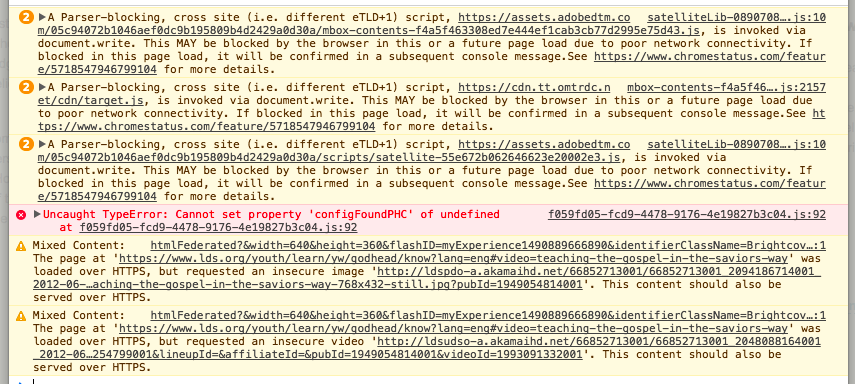
The video download links work for me, but I'm seeing some warnings in the web inspector (image attached).
I'll bet one of those warnings is turning into an error on your computer, because of browser settings, a slow internet connection, or some other reason.
screenshot_364.png
(229.61 KiB) Not downloaded yet
Samuel Bradshaw • If you desire to serve God, you are called to the work.
Community Administrator
#7
sbradshaw wrote:I'll bet one of those warnings is turning into an error on your computer, because of browser settings, a slow internet connection, or some other reason.
The bottom two catch my eye. I wonder if the user is running an extension that tries to make everything https.
Have you searched the Help Center? Try doing a Google search and adding "site:churchofjesuschrist.org/help" to the search criteria.

So we can better help you, please edit your Profile to include your general location.
New Member
#8
Just checked my console. I get the same first three warnings, and then it says nothing.

I wouldn't think it's the internet connection, as I've had this same issue in two different houses on a 200 Mbps connection. Plus, I've had this issue for over a year, so I can't imagine the speed would continuously be an issue over that length of time. Not sure which browser settings to check... Like I mentioned before, turning off extensions doesn't work.
New Member
#9
I am having the same problem. I am not having any issue with this on my older Windows 7 laptop. However, when I upgraded to Windows 10 and a new machine I cannot download any videos from YM or YW in Chrome I click on the download button and nothing happens. I can download in the Explorer but only if I do one at a time and get out of the Explorer program each time. Help!
Senior Member
#10
wmwmorgan wrote:I am having the same problem. I am not having any issue with this on my older Windows 7 laptop. However, when I upgraded to Windows 10 and a new machine I cannot download any videos from YM or YW in Chrome I click on the download button and nothing happens. I can download in the Explorer but only if I do one at a time and get out of the Explorer program each time. Help!
I have the same problem with my laptop, running Windows 7 Professional and the latest Chrome browser. I have to use IE to download videos on that laptop. I am not using any strange Chrome extensions, so it seems Chrome is trying to protect me from something.

I can't remember if the download fails at home as well as in the meetinghouse. Good thing to test.
Dana Repouille, Plattsmouth, Nebraska
New Member
#11
I have the same problem with my Macbook. Had it ever since the site went "beta."
New Member
#12
I still can't play ANY videos on the Young Woman lessons!!! Its very frustrating! This happened back in May as well and now again. I noticed that LDS.org has been updated so I am assuming that is what it is. I have tried, Chrome, Safari, and Internet Explorer! ALL browsers don't work! I am on lesson #2 for July about Covenants. None of the videos work! WHY?
Community Administrator
#13
nsingleton wrote:I still can't play ANY videos on the Young Woman lessons!!! Its very frustrating! This happened back in May as well and now again. I noticed that LDS.org has been updated so I am assuming that is what it is. I have tried, Chrome, Safari, and Internet Explorer! ALL browsers don't work! I am on lesson #2 for July about Covenants. None of the videos work! WHY?
I assume you're taking about this page.

The videos do play for me, but the "pop over" viewer is really touchy. Any click on the video will pause/unpause. Any click outside of the video frame will close it entirely. More frustrating, there's a pop-over to the video that advises downloading if used in a meetinghouse (a very good idea), but frequently trying to click the "close" button will cause the video to pause/unpause.
Have you searched the Help Center? Try doing a Google search and adding "site:churchofjesuschrist.org/help" to the search criteria.

So we can better help you, please edit your Profile to include your general location.
New Member
#14
'
I think this might have something to do with device-specific user agent settings.
I'm not sure if the issue is with the Chrome browser or the lds.org website (although, I get the exact same issue using firefox).

But, I've found that if your device is touch-capable you can get the link to work just fine by activating it with your finger via the screen touch.
I have no idea why this works, but I've tested it with 4 different touch-capable laptops and it worked on all of them.

While it's slightly annoying for those of us that usually use a mouse, it's still more convenient than having to switch browsers.


I just figured I would share this in case it helps anyone out.
New Member
#15
Seeing similar issues 20 Jan 2019

Some lds.org videos cannot be downloaded. The Download link button below the right bottom of video does not popup anything. Observed Sunday Jan 20 2019. Two different laptops - Windows 10 w Chrome, MacOS w Chrome, MacOS w Safari. Windows 10 w Edge works. Chrome developer tools console shows that the "#download-popup" reference is having problems (below). Most but not every video page has this issue. E.g.

https://www.lds.org/media-library/video ... 9?lang=eng
https://www.lds.org/media-library/video ... u?lang=eng

Rick

Deprecation] Using unescaped '#' characters in a data URI body is deprecated and will be removed in M71, around December 2018. Please use '%23' instead. See https://www.chromestatus.com/features/5656049583390720 for more details.
2011-10-053-jesus-declares-the-parable-of-the-wheat-and-the-tares?lang=eng&_r=1:166 Uncaught ReferenceError: _satellite is not defined
at 2011-10-053-jesus-declares-the-parable-of-the-wheat-and-the-tares?lang=eng&_r=1:166
VM1126:2 Object
VM1124:2 jQuery.Deferred exception: $(...).popups is not a function TypeError: $(...).popups is not a function
at loadVideo (https://www.ldscdn.org/cdn2/csp/ldsorg/ ... 0.js:30:25)
at HTMLDocument.<anonymous> (https://www.ldscdn.org/cdn2/csp/ldsorg/ ... 0.js:299:5)
at j (<anonymous>:2:29999)
at k (<anonymous>:2:30313) undefined
r.Deferred.exceptionHook @ VM1124:2
VM1124:2 Uncaught TypeError: $(...).popups is not a function
at loadVideo (video-collection.2.0.0.js:30)
at HTMLDocument.<anonymous> (video-collection.2.0.0.js:299)
at j (<anonymous>:2:29999)
at k (<anonymous>:2:30313)
media-lib.js:32 Uncaught TypeError: jQuery(...).live is not a function
at media-lib.js:32
2011-10-053-jesus-declares-the-parable-of-the-wheat-and-the-tares?lang=eng&_r=1:1 [Intervention] Slow network is detected. See https://www.chromestatus.com/feature/5636954674692096 for more details. Fallback font will be used while loading: https://edge.ldscdn.org/cdn2/csp/ldsorg ... sicon.woff
lds.js:134 Uncaught TypeError: $(...).not(...).fixSelect is not a function
at LDS.resizeCallbacks.fixSelect.LDS.resizeCallbacks.fixSelect (lds.js:134)
at Function.<anonymous> (lds.js:134)
at Function.each (<anonymous>:2:2765)
at lds.js:134
#16
I suddenly am having the same problem downloading videos on LDS.org. I am a seminary teacher who regularly downloads videos on my apple ipads. I click on the download button and nothing happens.
New Member
#17
Same here. Interesting thing is, I downloaded a different browser (Firefox) and the download pop-up worked in that for the video that didn't work in Chrome.
New Member
#18
While this thread is from several years ago, this is an update. I'm an early morning seminary teacher and I frequently run across a video that I cannot download and insert into a PowerPoint presentation. So I simply play the video from the source instead of downloading. One example of this is the video President Nelson - Hearken.
Senior Member
#19
cherilynbacon wrote: Sun Jun 26, 2022 5:56 pm While this thread is from several years ago, this is an update. I'm an early morning seminary teacher and I frequently run across a video that I cannot download and insert into a PowerPoint presentation. So I simply play the video from the source instead of downloading. One example of this is the video President Nelson - Hearken.
While this may work sometimes, make sure you have a backup plan in case you're unable to stream the video during your lesson. If you're on church internet, it might not be working. You might have to stream from a personal device at your expense (depends on your plan).

I've found that videos may sometimes be in multiple locations. The embedded videos for lessons (such as Come, Follow Me) often times aren't downloadable, or are downloadable with very poor quality). If I search, I can often times find a better, downloadable version of the video on the church website (or sometimes I find it on You Tube). However, some videos aren't available as a download. I think the church uses the Brightcove player. If you search for how to download videos from Brightcove, you'll see some suggestions. I don't know if they work or not. I have a tool that lets me download videos from a few different players, but Brightcove isn't one of them.