Bishopric and Sacrament Meeting Template

18 postsstarted by mcdarby 40,610 viewsoriginal topic

New Member
#1
Edited 1 time, last by Mikerowaved on . Reason: Corrected URL per OP
I am not sure if this is an appropriate venue for posting this, but here is a link to a google sheet that will enable a unit leader to make a customized Bishopric and Sacrament Meeting Template.

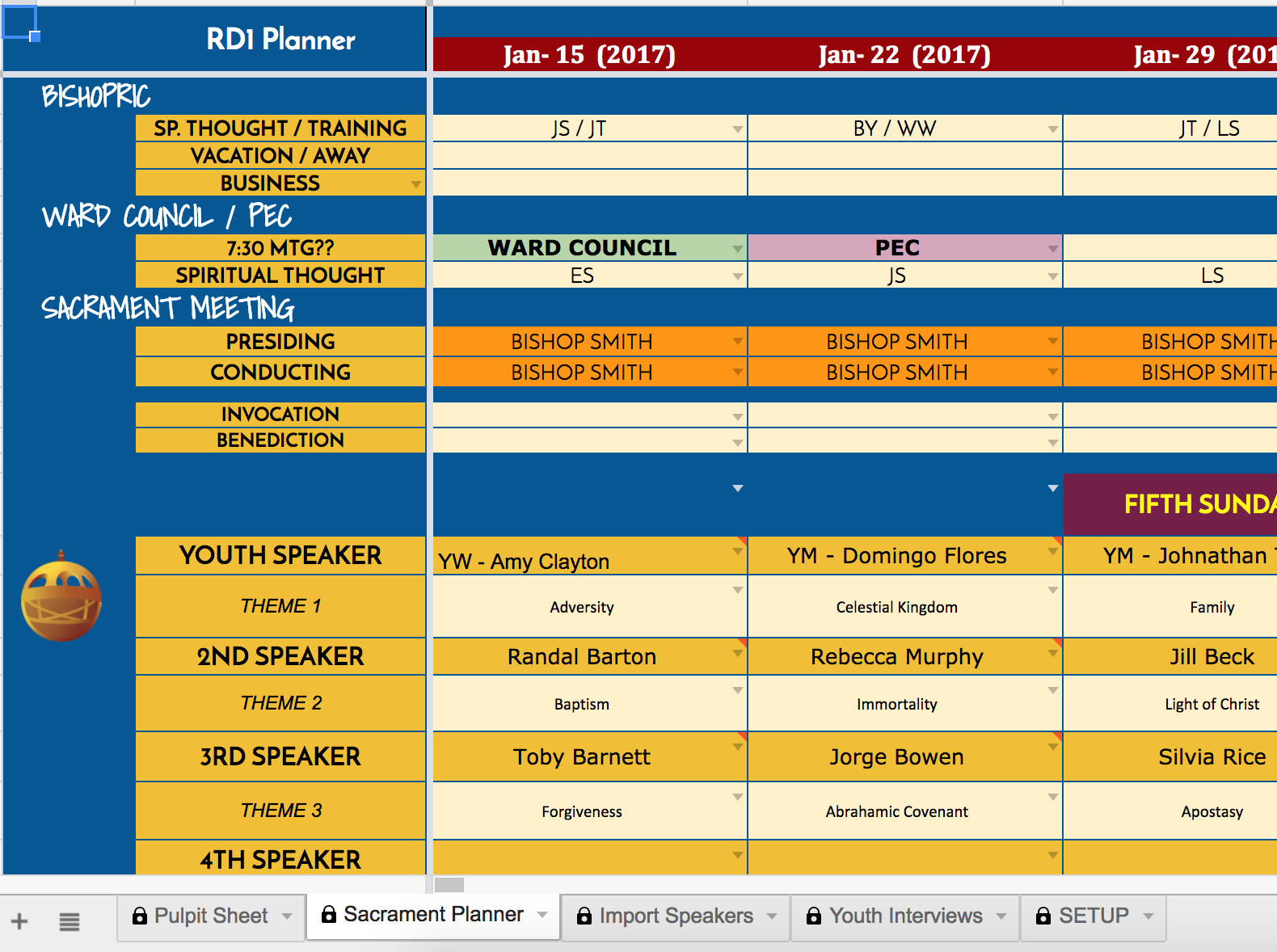
This is a sample of what it looks like with fake names.
A) Sacrament and Bishopric Planning Document - https://docs.google.com/spreadsheets/d/ ... dit#gid=52
B) Music Document - https://docs.google.com/spreadsheets/d/ ... =983564742

Feel free to mess around - (all the names are fake.)

And if want to make one for your unit - use this link and follow the instructions - https://docs.google.com/spreadsheets/d/ ... iew#gid=54

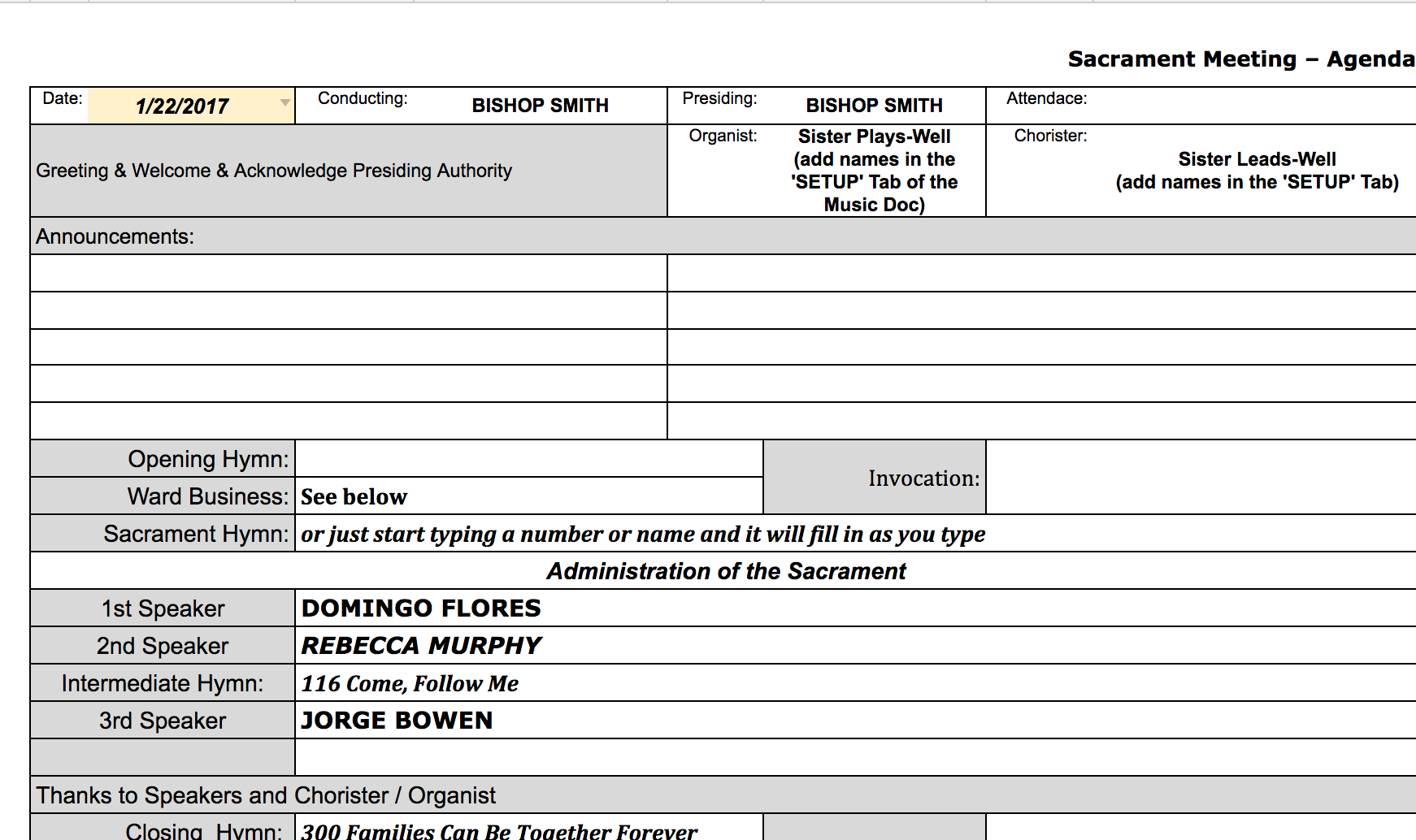
Basically this allows us as a Bishopric to plan our speakers and topics and it will automatically update a "pulpit" sheet that we print off (or use ipads) every Sunday.

The music leader has access to the music document. The music document receives the speakers and topics so she can plan music accordingly.

The Bulletin Leader has access to the music document so she can see who is speaking, what the music is, etc.

Since using this I have received and given ZERO calls to / from music leader or bulletin editor about what is happening on a given Sunday.

The Sacrament Planner also tracks when someone last spoke.

Oh and if you are stuck for a speaker and topic - click the Liahona for guidance . . . . .

Also - if you enable the options in the SETUP tab, it can send out automatic email reminders for Spiritual Thought and Handbook training assignments for Bishopric and automatic emails for Ward Council / PEC reminders and Spiritual Thought assignments. You choose what time the emails go out and what the message is and they will read the schedule on the planner and send out automatically.

IF this is not an appropriate venue for this - feel free to move it or delete! I'm just putting this out there as it has been an enormous time saver for our Bishopric. Its still a work in progress (still finding a few bugs) so just keep that it mind.
New Member
#2
Sorry - wrong link above . . . .

This is the link to the master template.

https://docs.google.com/spreadsheets/d/ ... iew#gid=54
Community Moderators
#3
mcdarby wrote:Sorry - wrong link above . . . .

This is the link to the master template.

https://docs.google.com/spreadsheets/d/ ... iew#gid=54
[Moderator note: The link has been corrected in your original post.]
So we can better help you, please edit your Profile to include your general location.
New Member
#4
Once more, again, an updated link for the template to make your own version -

https://docs.google.com/spreadsheets/d/ ... dit#gid=54
New Member
#5
I can't seem to get the paste to work. "Name" pastes but all of the other cell underneath are blank. After looking they are 1 cell to the right. i receive #n/a in the columns to the right. Can you assist?
New Member
#6
mcdarby wrote:Once more, again, an updated link for the template to make your own version -

https://docs.google.com/spreadsheets/d/ ... dit#gid=54
This is brilliant, thanks!

I'm not familiar with Google Apps Script and am not sure how to fix an issue with the speakers import. My ward has many individuals from Spanish-speaking countries who have multiple last names. The import script only keeps their last two names, resulting in incorrect names (e.g., someone whose name is Maria Elena Martinez Murillo [listed in MLS online as Martinez Murillo, Maria Elena] becomes Murillo, Martinez after running the script). Is there an easy way to change the script to keep all names before the comma as the last name and then just keep the first name after the comma as the first name?

Thank you!
New Member
#7
I have a work-around to my problem (question about Hispanic ward members with multiple last names) but still would prefer a way to include all names before the comma as the last name.

The work-around is to copy from online MLS into Excel. Then I run this Excel formula to remove spaces between names before the comma: =SUBSTITUTE(LEFT(B2,FIND(",",B2))," ","")&MID(B2,FIND(",",B2)+1,255)

Then I replace the names (Paste Special --> Values), copy all the information again, and then paste into the Import Speakers spreadsheet. It works but adds a couple more steps. A direct fix would be preferable.

I still think this semi-automated sacrament planning system is one of the most brilliant things I've seen recently.
New Member
#8
[Moderator note: A limitation in the Forum software does not allow the formulas to be displayed correctly. Please note the following:

In each formula, there is a double asterisk in quotes, followed by additional quotes and spaces like this: "**","")," ", . . .
There should be two spaces between the quotes surrounding the single space after the comma.

"**",""),"[there should be two spaces here instead of one]", . . . This needs to happen for all three cells.

You can paste the formulas into each cell and then edit the formula in your favorite spreadsheet program to add the space, or you might just copy the file again using the link at the end of the post.

Again, this is a Forum software limitation. All multiple spaces are turned into just one space, which is not at all helpful in this situation.]

In case anyone is interested, there is an update to the spreadsheet that will automatically remove extra spaces between names. While this really shouldn't be a big deal, the way the background formulas and scripts work 2 extra spaces between a first and last name would often cause the pulpit sheet to only display first names. Similarly, the bulletin / Music document would only display first names.

To make this change . . . .

In the IMPORT SPEAKERS tab:

REPLACE CELL BI6 with:
=filter(arrayformula(Substitute(Substitute(Substitute(Substitute(Substitute(Substitute(Substitute(Substitute(Substitute(Substitute(Substitute(Substitute(Substitute(Substitute(Substitute(Substitute(Substitute(Substitute(AX6:AX,"**","")," "," "),BM6,BO6),BM7,BO7),BM8,BO8),BM9,BO9),BM10,BO10),BM11,BO11),BM12,BO12),BM13,BO13),BM14,BO14),BM15,BO15),BM16,BO16),BM17,BO17),BM18,BO18),BM19,BO19),BM20,BO20),BM21,BO21)),AW6:AW<>"")

REPLACE CELL BJ6 with:
=filter(arrayformula(Substitute(Substitute(Substitute(Substitute(Substitute(Substitute(Substitute(Substitute(Substitute(Substitute(Substitute(Substitute(Substitute(Substitute(Substitute(Substitute(Substitute(Substitute(BB6:BB,"**","")," "," "),BM6,BO6),BM7,BO7),BM8,BO8),BM9,BO9),BM10,BO10),BM11,BO11),BM12,BO12),BM13,BO13),BM14,BO14),BM15,BO15),BM16,BO16),BM17,BO17),BM18,BO18),BM19,BO19),BM20,BO20),BM21,BO21)),BA6:BA<>"")

REPLACE CELL BK6 with:
=filter(arrayformula(Substitute(Substitute(Substitute(Substitute(Substitute(Substitute(Substitute(Substitute(Substitute(Substitute(Substitute(Substitute(Substitute(Substitute(Substitute(Substitute(Substitute(Substitute(BF6:BF,"**","")," "," "),BM6,BO6),BM7,BO7),BM8,BO8),BM9,BO9),BM10,BO10),BM11,BO11),BM12,BO12),BM13,BO13),BM14,BO14),BM15,BO15),BM16,BO16),BM17,BO17),BM18,BO18),BM19,BO19),BM20,BO20),BM21,BO21)),BE6:BE<>"")


The Template ( https://docs.google.com/spreadsheets/d/ ... dit#gid=54 ) is already updated with this change so anyone starting out won't need to worry about this.
New Member
#9
jkondel wrote:I can't seem to get the paste to work. "Name" pastes but all of the other cell underneath are blank. After looking they are 1 cell to the right. i receive #n/a in the columns to the right. Can you assist?
Sorry for the long, long, long delay. I have decided to start working on this again!

Copy / Pasting should intuitively work the same no matter what browser / operating system you are working on but unfortunately this is not the case.

In this instance, the copy / pasting should work if done with Chrome (mac or PC).

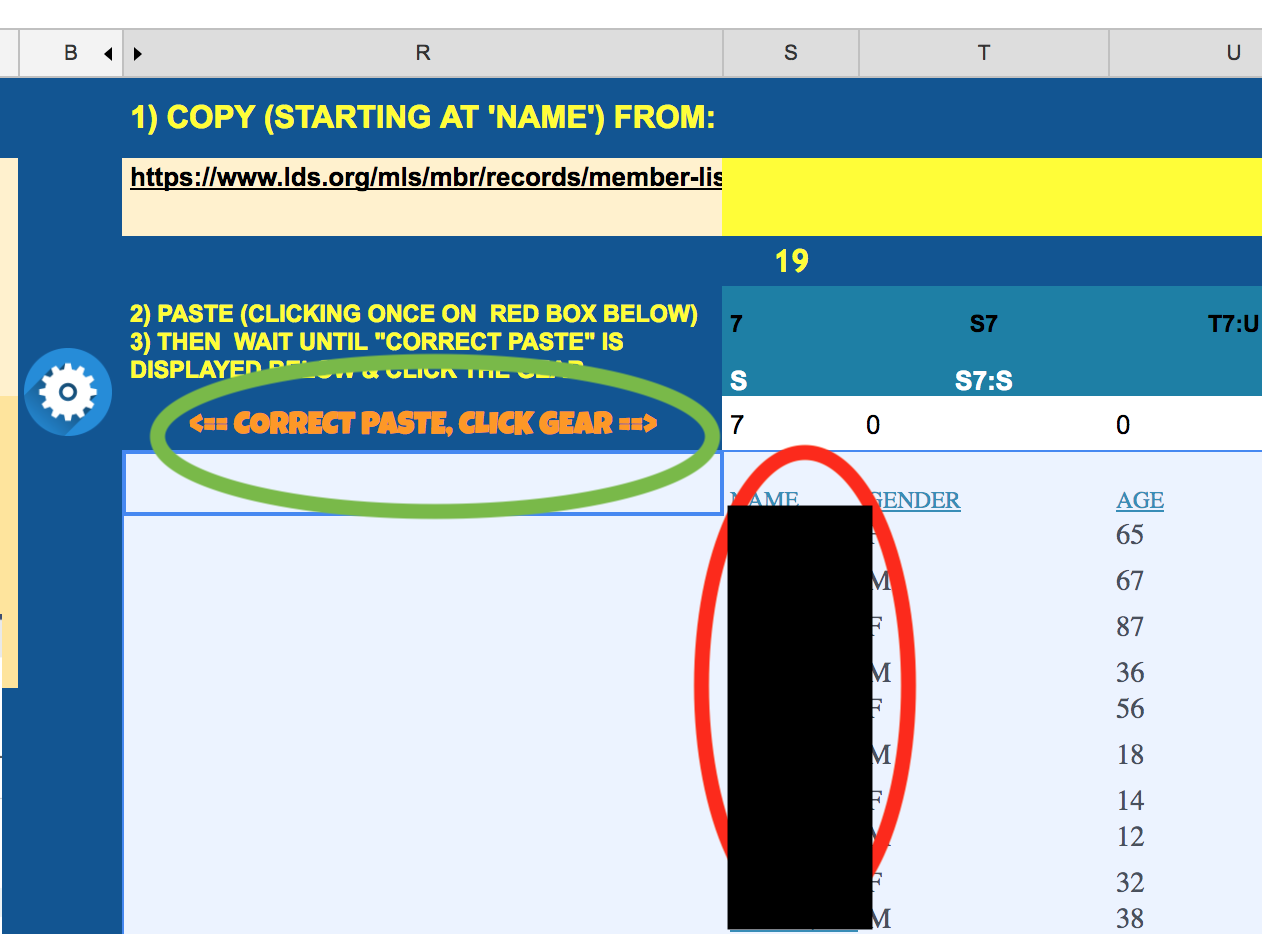
When you paste into the red Box, the names should show up not in column R, but in Column S (you may need to unhide the columns to see if this is the case)

If the paste worked correctly, Cell R6 should change to "<== CORRECT PASTE, CLICK GEAR ==>"

This is how it should look after pasting (assuming you unhide column S):
Step 3.png
(154.02 KiB) Not downloaded yet
New Member
#10
mcdarby wrote:In case anyone is interested, there is an update to the spreadsheet that will automatically remove extra spaces between names. While this really shouldn't be a big deal, the way the background formulas and scripts work 2 extra spaces between a first and last name would often cause the pulpit sheet to only display first names. Similarly, the bulletin / Music document would only display first names.
The Template ( https://docs.google.com/spreadsheets/d/ ... dit#gid=54 ) is already updated with this change so anyone starting out won't need to worry about this.
Thank you for this update and thank you again for making this brilliant form.
Community Moderators
#11
If you tried to update the mcdarby spreadsheet manually, please see the moderator note at the beginning of his post that contains the replacement cell information.

Edit: There is still a problem with the formulas relating to spaces. Check the Moderator Note for the latest update.
New Member
#12
Hello,

Do we have an online agenda or app that we can edit every week for sacrament meetings with the new changes announced in the last months?

Regards,

Jeff Silva
New Member
#13
New Version available - https://docs.google.com/spreadsheets/d/ ... 0GEi0/copy
(following the link above will ask you to log into your google account which will then allow you to start customizing your own version)

There was a bug that stopped some of the formulas from running ~6 years after the start date, this is fixed now.

DEMO versions to play with:

Sacrament Planner - https://docs.google.com/spreadsheets/d/ ... dit#gid=52
Music Planner - https://docs.google.com/spreadsheets/d/ ... =983564742

Oh and please don't actually use the DEMO versions for you own units real use . . . . these are open documents and just to DEMO, not actually use. (Yep - its happened!!)
New Member
#14
Hi there! I am having trouble updating the members on my ward's template. Is this because of the changes the church is making to their site? I have never had a problem before. How can I make it work?
New Member
#15
I love the planner! I'm also having the problem with the names not importing correctly. They paste fine, I get the "Correct Paste" message, click the gear, and nothing imports. I unhid the columns and I can see the names just fine. I'm using the latest version. Any ideas?
New Member
#16
Have there been any updates to this template by chance? When I go to make a copy of *Sacrament Planner CREATOR v0.86 * by clicking the blue Make a Copy Button next to the grey View Apps Scripts File it doesn't do anything. No matter how many times I click. I am logged in on Chrome. Any help, guidance, direction would be much appreciated. Thank you ever so kindly =)
Community Administrator
#17
jarcher wrote: Thu Dec 01, 2022 2:07 pm Have there been any updates to this template by chance? When I go to make a copy of *Sacrament Planner CREATOR v0.86 * by clicking the blue Make a Copy Button next to the grey View Apps Scripts File it doesn't do anything. No matter how many times I click. I am logged in on Chrome. Any help, guidance, direction would be much appreciated. Thank you ever so kindly =)
It launches in Google Sheets. You might want to make sure you have access to that. Being logged into Chrome may not always be the same as logged into an account that has Sheets.
Have you searched the Help Center? Try doing a Google search and adding "site:churchofjesuschrist.org/help" to the search criteria.

So we can better help you, please edit your Profile to include your general location.
New Member
#18
Timgoat wrote: Sat Nov 02, 2019 6:57 pm I love the planner! I'm also having the problem with the names not importing correctly. They paste fine, I get the "Correct Paste" message, click the gear, and nothing imports. I unhid the columns and I can see the names just fine. I'm using the latest version. Any ideas?
I am having this issue as well. Thank you mcdarby for creating this!